herdr_agents_tracker
Health Uyari
- License — License: MIT
- Description — Repository has a description
- Active repo — Last push 0 days ago
- Low visibility — Only 7 GitHub stars
Code Gecti
- Code scan — Scanned 12 files during light audit, no dangerous patterns found
Permissions Gecti
- Permissions — No dangerous permissions requested
Bu listing icin henuz AI raporu yok.
Herdr plugin that shows your AI subscription usage: account limits in the tab bar, a context meter per agent, low-limit alerts and a token dashboard for Claude Code, Codex, OpenCode Go and Grok.











Why · Features · Install · Use · Configure · Providers · Privacy · FAQ
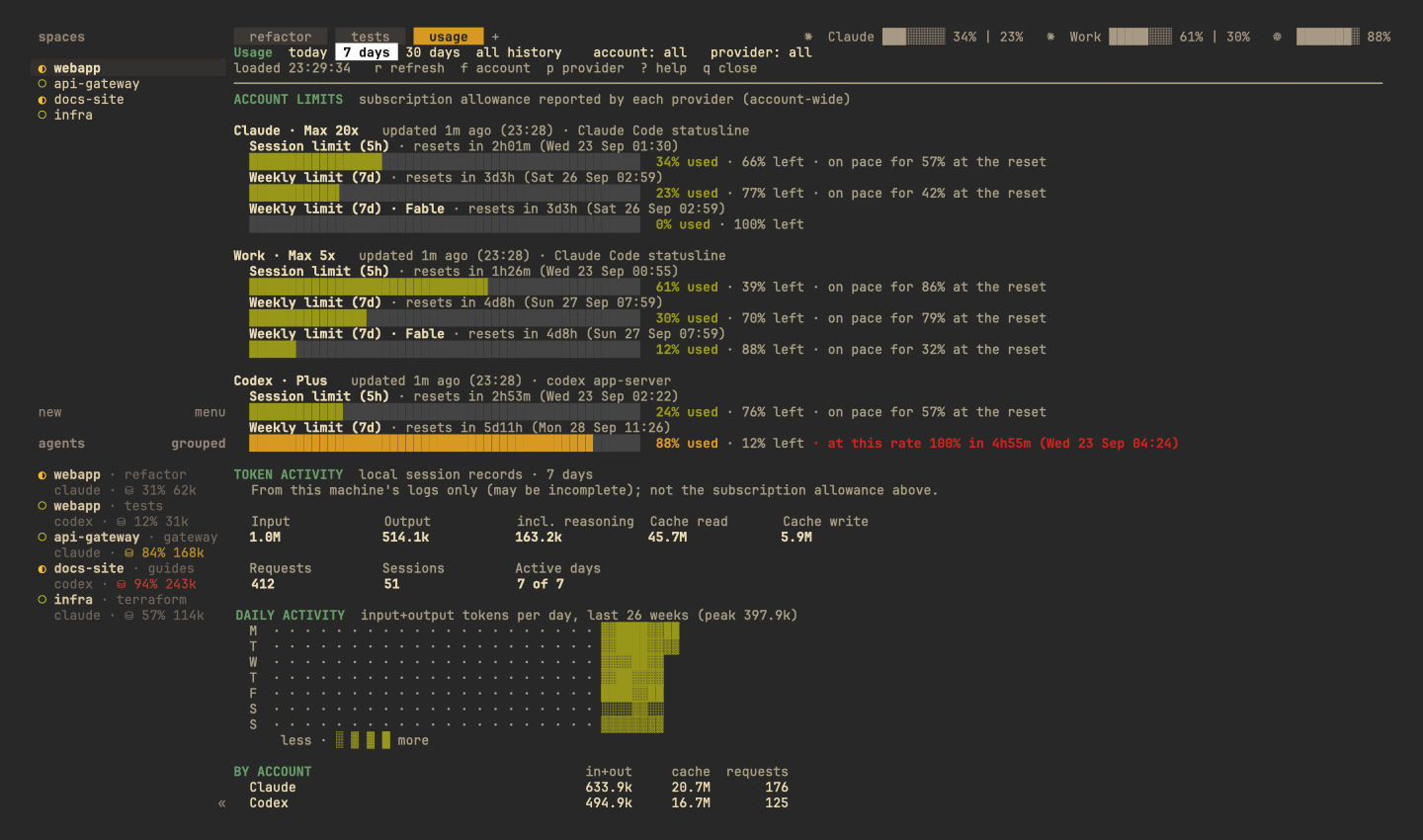
Screenshots use demo accounts and made-up numbers.
Why this one
A time, not just a percentageOther trackers tell you 52% used. This one also tells you when you'll hit 100% at your It goes by the last hour of work, not the average since the window opened, so a sudden burst |
Usage per agentRunning five agents at once? Each one's context meter shows its own part of the limit: No more guessing which pane used up your 5-hour window. |
Warned before, told afterA notification at 80% and 95%, and another when the limit resets. Agents that stopped |
Nothing to leakIt reads no credentials for Claude or Codex: it asks those tools themselves. It never reads |
Everything it answers
| You want to know… | Where to look | What you see |
|---|---|---|
| How much of each account have I used? | Tab bar, always visible | Claude ██░░ 13% 35m | 2% 6d11h | 0% Fable |
| Will I run out before it resets? | Tab bar and dashboard | (100% in 1h40m) · on pace for 64% at the reset |
| Which agent is using the limit? | Agents panel, per pane | ⛁ 28% 72k · ~12% of 5h |
| How full is this agent's context? | Agents panel (grey, then yellow from 70%, red from 90%) | ⛁ 84% 216k |
| When can a stopped agent go on? | Agents panel, then a notification | limit · resets 22:20 |
| How has usage grown this window? | Dashboard trend line | ▁▁▂▃▃▅▆▇ |
| Where did my tokens go? | Dashboard | by day · account · model · project · session, plus a heatmap |
| Can my scripts check it? | CLI | status --json · status --check 90 → exit 10 |
How it works
flowchart LR
    subgraph Sources["Read locally, no credentials"]
        C["Claude Code<br/>get_usage + statusLine"]
        X["Codex<br/>app-server"]
        O["OpenCode Go<br/>opencode.db"]
        S["Session files<br/>token counts only"]
    end
    R(["Collector<br/>every 5 min and<br/>after each turn"])
    D[("Cache and<br/>history")]
    subgraph Herdr
        T["Tab bar<br/>every 30 s"]
        A["Agents panel<br/>meters"]
        P["Dashboard<br/>prefix+u"]
        N["Notifications"]
    end
    J["CLI<br/>--json / --check"]
    C --> R
    X --> R
    O --> R
    S --> R
    R --> D
    D --> T
    D --> A
    D --> P
    D --> N
    D --> J
A closer look
Tab bar: all accounts at a glance
One entry per account: logo, bar, % used and time until reset, for every limit window. A model's
own limit shows its name (0% Fable). When the tab bar runs short of room, it drops model limits,
then reset times, then bars, but every account stays visible.

Agents panel: a meter under every agent
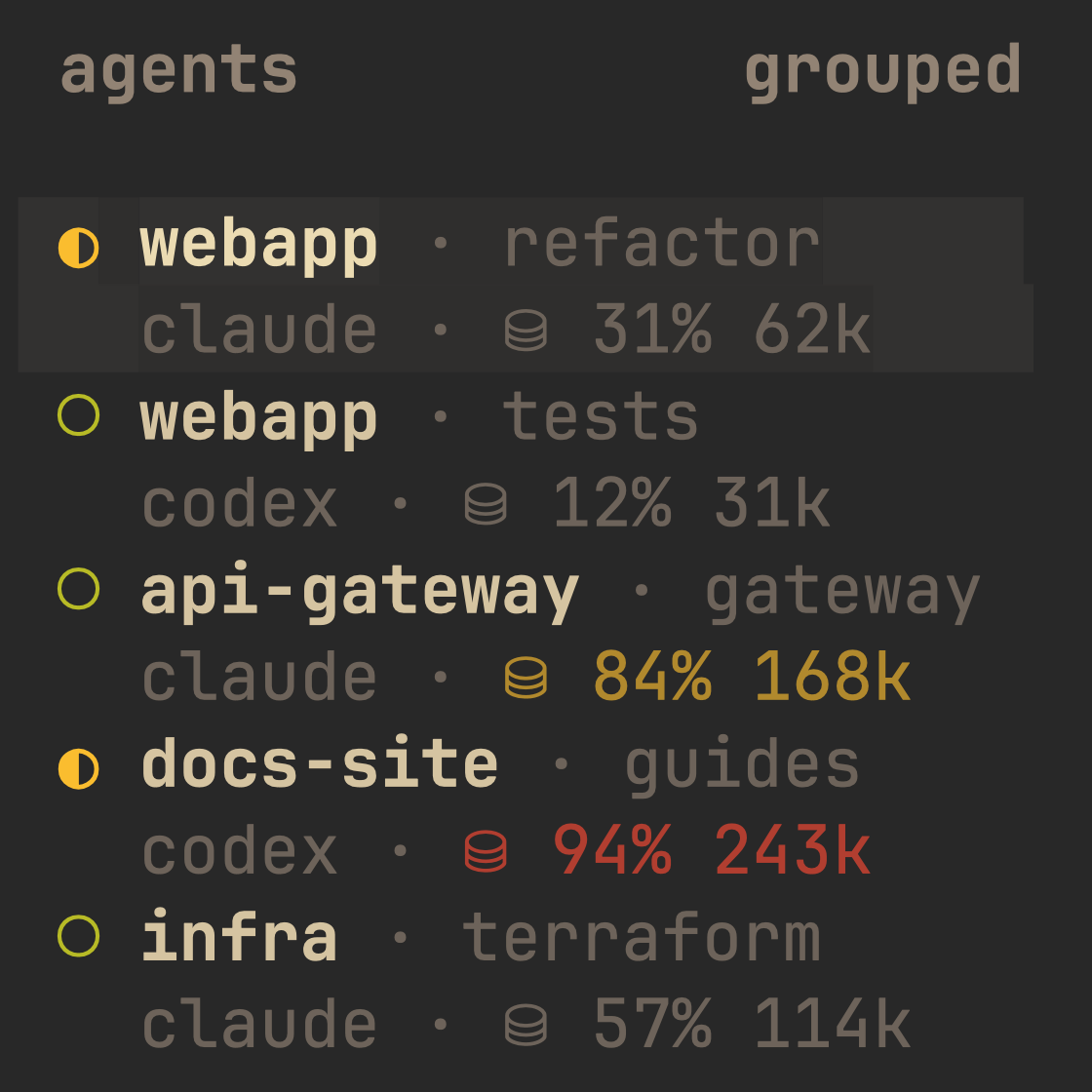
Under each Claude Code and Codex agent:
- Context meter: how full its context window is, coloured by level.
- Its part of the limit:
~12% of 5h, updated after every turn. - Stopped at a limit? The meter shows
limit · resets 22:20instead. A minute after the
reset, one notification names every agent that was waiting.
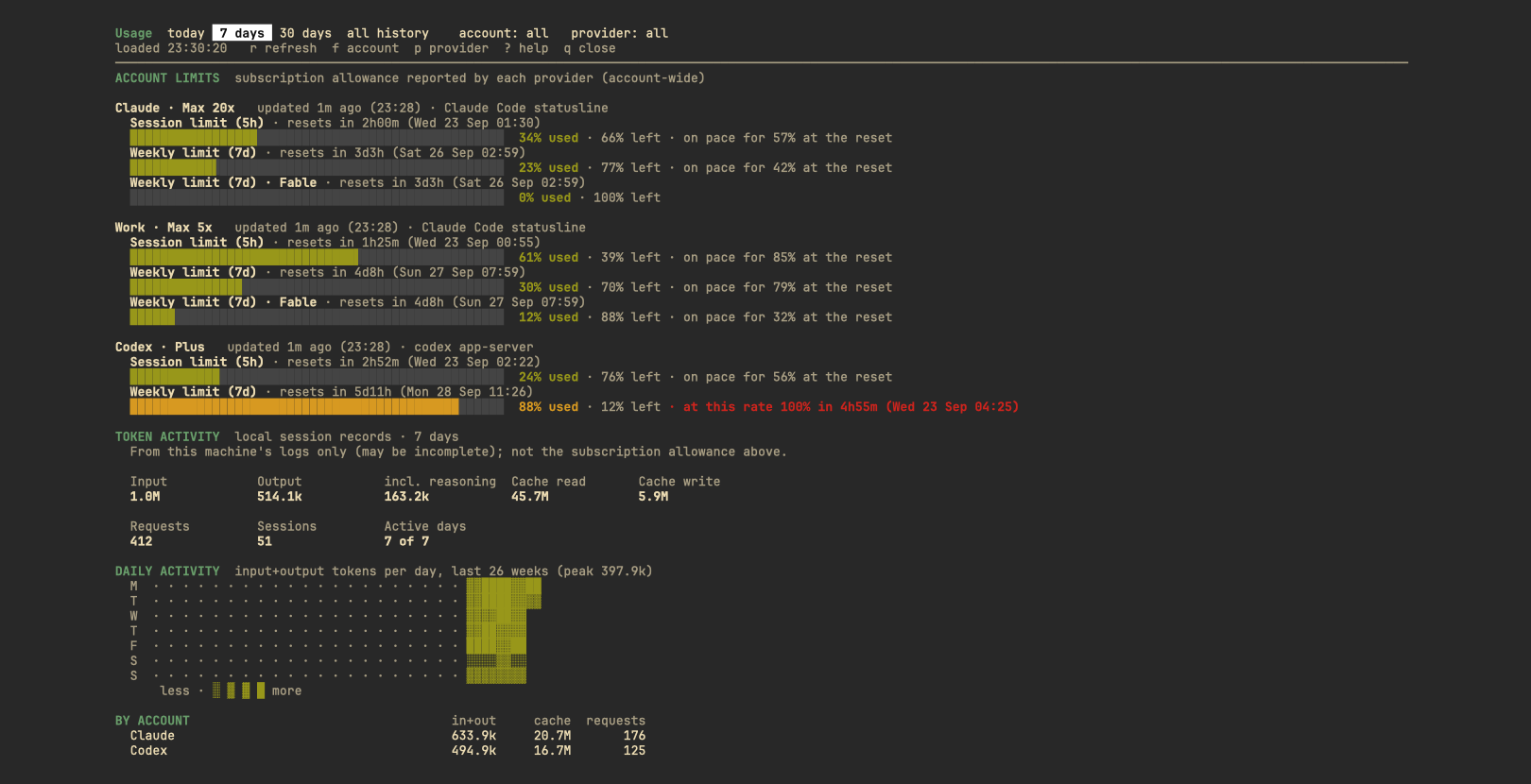
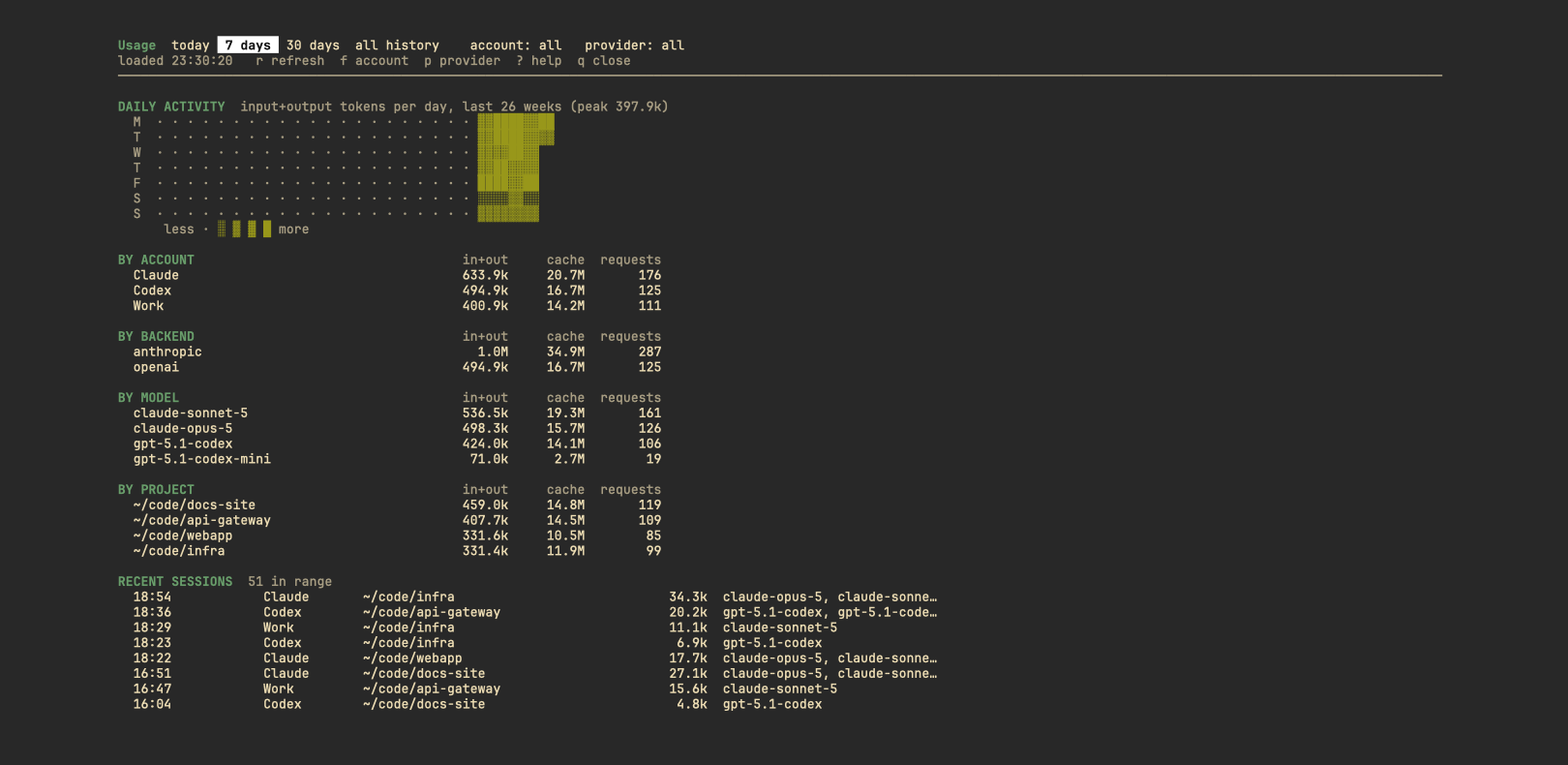
Dashboard: prefix+u
Every limit with its bar, pace and a trend line across the window, then your token history:
today, 7 days, 30 days or all time, with a daily heatmap and totals by account, model, project
and session.
Numbers you can trust
It never shows a misleading 0%. Every state has its own label:
| You see | It means |
|---|---|
… |
First refresh still running |
~21% |
An estimate (e.g. OpenCode Go, from local records) |
(3h00m old) |
Stale data, with its age |
-- (reset) |
The window reset and hasn't been read again yet |
sign-in needed · n/a · error |
The account needs attention (details in diagnostics) |
[!TIP]
Several accounts per provider are fine (personal and work, say): each keeps its own cache,
history and alerts, and they're never merged.
Install
[!IMPORTANT]
Requirements: Herdr 0.8.2+ · Python 3.11+ · macOS or Linux.
macOS ships Python 3.9, so runbrew install pythononce; the install stops with a message if
no 3.11+ is found.
# 1. Install the plugin (shows a preview; confirm it)
herdr plugin install VHemanth45/herdr_agents_tracker

# 2. Run the setup guide (shows its plan; applies when you answer "y")
herdr plugin action invoke setup --plugin herdr_agents_tracker
That's it. Setup:
- adds the tab-bar summary, a
prefix+udashboard key and aprefix+shift+urefresh key; - adds the context meter to the Agents panel;
- writes a starter config listing the accounts it found;
- wraps your Claude Code
statusLineso Claude's own limit numbers are saved (your command still
runs, unchanged); - reloads Herdr's config without restarting Herdr or touching running agents.
Install from a clone instead[!NOTE]
Every line setup writes ends with# usage-tracker, every file is backed up first, and running
it again changes nothing.
git clone https://github.com/VHemanth45/herdr_agents_tracker.git
cd herdr_agents_tracker
herdr plugin link "$PWD"
bin/usage-tracker setup --claude-statusline --apply
Use
| Keys | What it does |
|---|---|
prefix+u (ctrl+b u) |
Open the dashboard as a popup; q closes it and your layout is untouched |
prefix+shift+u |
Re-read every account now (the tab bar shows it within 30 s) |
| In the dashboard | r refresh · ↑↓/jk scroll · t w m a today / 7 d / 30 d / all · f account · p provider · ? help |
Herdr's action menu also has Usage: open dashboard · refresh now · show diagnostics · setup guide.
How fresh is it? The tab bar reads a local cache every 30 s. Limits are re-read every
5 minutes and right after an agent finishes a turn. Claude's statusLine reports its 5h and 7d
limits as you work.
For scripts
usage-tracker status --json                    # every account's limits and forecast, as JSON
usage-tracker status --check 90 --profile claude || echo "Claude is nearly out"
--check [PCT] exit code |
Meaning |
|---|---|
0 |
Every limit below PCT (default 80) |
10 |
A limit is at PCT% or more |
11 |
A limit is used up |
20 |
No account has fresh data |
Plain status (what the tab bar runs) always exits 0, so the tab bar is never hidden by it.
Configure
Your config: ~/.config/herdr/plugins/config/herdr_agents_tracker/config.toml
(herdr plugin config-dir herdr_agents_tracker). config.example.toml
lists every option with comments.
| Option | Default | What it does |
|---|---|---|
[[profiles]] |
auto-detected | One per account, each with its own dir (CLAUDE_CONFIG_DIR, CODEX_HOME, …). With none set, ~/.claude, ~/.codex, ~/.local/share/opencode, ~/.copilot and ~/.local/share/amp are used. Gemini, Cursor and Grok are opt-in. |
label, icon |
provider name | What the tab bar shows. With a Nerd Font, "" / "" are the Claude / OpenAI logos. |
status.format |
compact |
compact (one window), detailed (all windows) or split (5h and weekly in one bar). Also per profile. |
status.bar, status.bar_width |
blocks, 10 |
blocks, color (coloured squares) or none; width in columns. |
status.percentage |
used |
remaining shows what is left (91% left) and fills the bar with it. Alerts, --check and --json still use % used. |
status.order, status.window |
all, max |
Which accounts appear, and which window compact shows. |
status.max_width |
120 | Room for the whole summary; detail is dropped to fit. |
alerts.thresholds |
[80, 95] |
% used that triggers a notification; [] turns alerts off. |
alerts.on_reset |
true |
Also say when a limit you were alerted about resets. |
context.icon |
⛁ |
Symbol before each context meter. |
context.share |
true |
Show each agent's part of the limit (~12% of 5h). |
resume.enabled, resume.prompt |
false, "continue" |
Send that prompt to agents that stopped at a limit, once it resets, and only if they're still idle at the limit error. |
refresh.interval_seconds |
300 | How often limits are re-read. |
Notifications follow Herdr's [ui.toast] delivery, which must be "herdr" or "system".
Providers
| Provider | Limits it shows | Where they come from | Tested |
|---|---|---|---|
| Claude Code | 5h, 7d, per-model weekly (Fable, Sonnet), plan | Claude Code itself (claude -p answering get_usage) and your statusLine |
 |
| Codex | Every window Codex reports, plan | codex app-server → account/rateLimits/read, or the last snapshot in a session log |
|
| OpenCode Go | Estimated 5h / 7d / 30d spend against the published Go caps | Costs in the local opencode.db (the official meter isn't read) |
 |
| GitHub Copilot CLI | Monthly premium requests (chat and completions on Copilot Free), plan | gh api /copilot_internal/user: the account gh is signed in to |
|
| Amp | Amp Free (daily), subscription or tier usage, plan | amp usage |
|
| Gemini CLI | Daily quota per model (Pro, Flash, …), plan | Google's Code Assist quota with the Gemini CLI's sign-in. Google sign-in accounts on a Code Assist plan only (Google stopped serving personal accounts through Gemini CLI in 2026). Opt-in | |
| Cursor | Included usage of the billing cycle: total, Auto and API, plan | Cursor's dashboard service with Cursor's sign-in. No token history (Cursor keeps none on disk). Opt-in | |
| Grok | Weekly credit %, monthly usage | Grok's billing endpoint with the Grok CLI's sign-in. Opt-in | |
Limits are account-wide, so they include use outside Herdr. Windows are shown separately and never
summed. Token history comes from session records on this machine only. API-key accounts never get
invented subscription limits, and no prices or spend estimates are shown.
Privacy: what it reads
Everything is a local file or the provider's own CLI. The plugin makes no network request of its
own (except the opt-in Gemini, Cursor and Grok) and sends nothing anywhere.
Every source, and what is taken from it[!CAUTION]
Never read:~/.claude/.credentials.json, Codex'sauth.json, the GitHub CLI's or Amp's
sign-in, the macOS Keychain, browser cookies, or the content of any conversation. It never switches the account an agent uses, and
it types into an agent only if you turn on[resume], and then only the resume prompt, once per
reset.
| Source | What is taken from it |
|---|---|
Claude transcripts, <dir>/projects/**/*.jsonl |
Token counts, model, timestamp, session, project directory, and whether the last reply was the limit error. Never the text of prompts or replies. |
<dir>/sessions/<pid>.json |
The session id of a running claude, to find its transcript. The .key files beside it are never opened. |
<dir>/settings.json |
Only the statusLine entry, and only when setup or uninstall changes it. |
claude -p --safe-mode --no-session-persistence |
Answers get_usage: the limits and plan. Claude Code signs itself in; no prompt is sent and no session is saved. |
| Claude Code's statusLine input | Only rate_limits and context_window. |
Codex sessions, <dir>/sessions/**/rollout-*.jsonl |
Token counts, model, timestamps, session, project path, and whether a limit was reached. |
codex app-server |
One account/rateLimits/read request. Codex signs itself in; its auth.json is not read. |
OpenCode's opencode.db |
Token counts per session, and the costs its Go allowance is estimated from. Read-only. |
~/.grok/auth.json (opt-in) |
The Grok CLI's sign-in, held in memory for one billing request. Never written or logged. |
Copilot's session-store.db, session-state/*/events.jsonl |
Token counts, model, timestamp, session and project directory. Read-only. |
gh api /copilot_internal/user |
Copilot's quota and plan. The GitHub CLI signs itself in; no token is read. |
amp usage, Amp's threads/T-*.json |
The balance text Amp prints; token counts, model, timestamp and project from thread files. secrets.json is not read. |
Gemini CLI's tmp/*/chats/** session files |
Token counts, model, timestamp, session and project directory. |
~/.gemini/oauth_creds.json (opt-in) |
The access token only, held in memory for the two quota requests. Never refreshed, written or logged. |
Cursor's state.vscdb (opt-in) |
The access token and plan name, read-only; the token is held in memory for one request. Never refreshed, written or logged. |
Herdr's config.toml and CLI |
The marked setup lines, the agent list and each agent's state and title, a pane's processes, the meters, notifications. |
It writes its own state (~/.local/state/herdr/plugins/herdr_agents_tracker), the marked lines in
Herdr's config.toml, and the statusLine wrapper in Claude's settings.json.
FAQ
Does it modify Herdr?No. Herdr's code is untouched: this is a plugin. Setup only adds lines to Herdr's config.toml,
each ending with # usage-tracker, and uninstall --apply removes exactly those lines.
Yes. Each provider is independent: use it with Codex, Copilot, Amp, Gemini or any other alone, and accounts you
don't have are simply not shown.
The agent's share of the account's tokens since the 5-hour window opened (its subagents included,
cache reads left out because they count for little against the limit), times the window's % used.
It's an estimate from this machine's session records, hence the ~. Turn it off withcontext.share = false.
Only if you set [resume] enabled = true. Then, a minute after a limit resets, each agent that
stopped at it is sent continue, and only if it's still idle at that limit error. An agent that's
busy, or that you already continued yourself, is left alone.
The plugin uses only the standard library, including tomllib (added in 3.11), so there is
nothing to pip install. Run brew install python once; the install stops with a clear message
if no 3.11+ is found.
Limits are re-read every 5 minutes and after each turn, so they can lag briefly. OpenCode Go's
numbers are estimates from local costs.
Update, remove, troubleshoot
Update (your settings are kept; see CHANGELOG.md):
herdr plugin install VHemanth45/herdr_agents_tracker
Remove (backs up each file first and removes only lines marked # usage-tracker):
root=$(herdr plugin list --plugin herdr_agents_tracker --json | python3 -c 'import json,sys; print(json.load(sys.stdin)["result"]["plugins"][0]["plugin_root"])')
"$root/bin/usage-tracker" uninstall                  # dry run: shows what would go
"$root/bin/usage-tracker" uninstall --apply          # remove the config lines, restore statusLine, unregister
"$root/bin/usage-tracker" uninstall --apply --purge  # also delete the plugin's config and state
Something off?
- Run Usage: show diagnostics (or
bin/usage-tracker diagnostics): each account's source,
last attempt, errors, next refresh, history coverage and the state of the integration.
Credentials are never shown. - Collector log:
~/.local/state/herdr/plugins/herdr_agents_tracker/collector.log. - Nothing in the tab bar? Herdr hides the summary when it doesn't fit beside the tabs; try a
smallerstatus.max_widthorstatus.format = "compact".
Roadmap
Ideas, not promises. Open an issue to vote for one or to help:
- Turns left per agent:
~9 turns leftbefore the 5-hour limit, at its recent pace. - Runaway-agent alert: one agent using a large share of the limit in minutes.
- Usage by git branch or worktree: "feature/login used 23% of this week's limit".
- Daily budget for the weekly limit:
9%/day keeps you under until the reset. - Live testing for OpenCode Go, Copilot, Amp, Gemini, Cursor and Grok.
Adding a provider is one adapter module; CONTRIBUTING.md explains how.
Development
- Tests:
python3 -m unittest discover -s tests(synthetic fixtures and temporary directories;
they never touch real accounts or Herdr config). - docs/internals.md: how it works, the modules, adding a provider, and the
Herdr 0.8.2 behavior this builds on.
License
MIT. Data-source research drew on
senna-lang/herdr-agent-usage (MIT, © 2026 senna)
and on Orca's usage view as a behavioral reference; no code from either is included.
Yorumlar (0)
Yorum birakmak icin giris yap.
Yorum birakSonuc bulunamadi