zapzero
Health Uyari
- License — License: MIT
- Description — Repository has a description
- Active repo — Last push 0 days ago
- Low visibility — Only 5 GitHub stars
Code Basarisiz
- process.env — Environment variable access in scripts/selfcheck.ts
- spawnSync — Synchronous process spawning in scripts/setup.ts
- process.env — Environment variable access in scripts/setup.ts
- process.env — Environment variable access in server/ai.ts
- network request — Outbound network request in server/ai.ts
- process.env — Environment variable access in server/calendar.ts
- process.env — Environment variable access in server/env.ts
Permissions Gecti
- Permissions — No dangerous permissions requested
Bu listing icin henuz AI raporu yok.
Inbox zero for WhatsApp. AI triages every chat and drafts replies in your voice, from WhatsApp Desktop on your Mac. Read-only, no bot, nothing sent without you.
zapzero

Inbox zero for WhatsApp. No bot, no ban risk, your chats never leave your Mac.
zapzero reads the WhatsApp Desktop app's own database on your Mac, read-only. AI triages every chat (who is waiting on whom, how urgent, who this person is to you) and drafts a reply in your own tone of voice for everyone waiting on you. You clear it from the keyboard: Y opens the chat in WhatsApp with the reply typed in, you press Enter. Next.
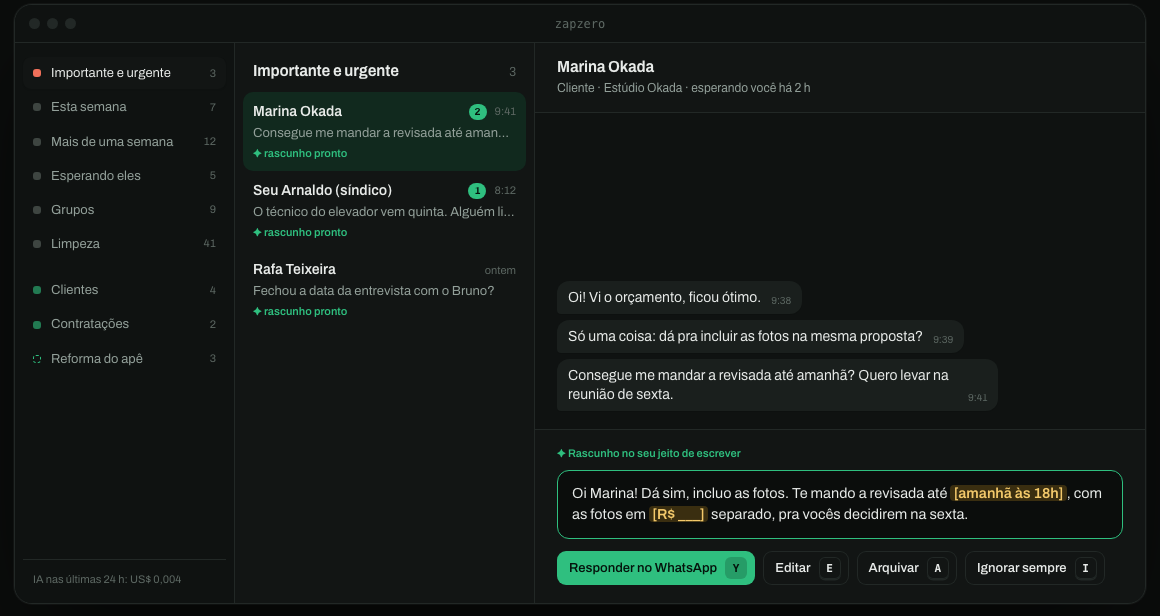
Names and messages are made up.
Why it is safe for your number
- Read-only. zapzero copies the database the official app already keeps on disk (
sqlite3 mode=ro+.backup) and works on the copy. It never writes to WhatsApp's files. - No bot, no linked device, no unofficial API. Nothing talks to WhatsApp's servers. To WhatsApp, it's just you using the app.
- Nothing is sent by zapzero. A reply is typed into WhatsApp Desktop; you press Enter. Commitments (dates, prices, yes/no) are left
[in brackets]for you to fill, and Y selects a bracket instead of sending. - No zapzero cloud. Snapshots and state live in
~/Library/Application Support/zap(chmod 700). Only the excerpt of each conversation goes to the model you choose, with your own key.
What you get
- Categories by when: Important & urgent · This week · Older than a week · You're waiting on them · Groups · Cleanup.
- Areas by who: Clients, Hiring, Team, Investors, Partners, Family, Friends, Home & services, Selling to you, Other. Once a day the AI suggests new areas from your pending chats ("Apartment renovation", "Events & talks"); accept one and it becomes a triage choice.
- Your voice ("Seu jeito"). After the first scan the AI reads ~150 of your own messages, your 40 busiest chats and the groups you write in most, and writes who you are, one editable field per topic (where you live, work, family, people who matter, current projects, routine, languages), plus a guide to how you write. Accept or edit each part; triage uses it to know who's who and every draft follows your tone.
- Performance ("Desempenho"). Week by week over the last 13: how often you answered within 24 h, how long you typically take, who never got an answer, split by saved contacts, strangers and groups. Computed from the snapshot, no AI. A "turn" is a message that arrives after you spoke and after an hour of silence, so a live back-and-forth counts once.
- Calendar, through your own Claude. When a reply names a time ("14h30 fica bom"), the panel offers "create the event in my calendar" (on by default,
Ctoggles). After you press Y, zapzero runs your Claude Code headless (claude -p) with exactly one tool allowed, your calendar connector's create-event, and the event lands in your calendar. If the other person wrote an e-mail in the chat, the panel offers to invite it (you see the address before Y; the server only accepts addresses that appear in that chat), with a Meet link. No e-mail yet? One click adds "Me passa seu e-mail que te mando o convite?" to the reply, and when they answer with it the chat shows "Adicionar no convite": your Claude adds them to the same event (only the update-event tool allowed). zapzero holds no calendar credentials. Settings:ZAP_CLAUDE,ZAP_CALENDAR_TOOL,ZAP_AGENT_MODEL. - Use it from Claude.
bun run setuplinks a Claude Code skill: ask Claude "who's waiting on me?", "how fast did I answer this month?" or "I live in Rio, fix my profile", and it calls zapzero locally throughbun run zap api …. No MCP server or token to configure. - Keyboard flow:
Yreply ·Eedit ·Rnew draft ·Dresolved ·Aarchive ·Sskip ·Iignore this person forever ·J/Kmove ·Zundo ·⌘↵reply from the editor. - Runs in the background, re-reading WhatsApp every 15 minutes and only re-doing AI work for chats that changed.
The panel is in Portuguese or English (setup asks).
Requirements
- macOS with WhatsApp Desktop linked to your phone. Linking syncs about the last 3 months of messages; older chats show in the list without text.
- Bun 1.3+.
- Claude Code, logged in. zapzero runs it headless (
claude -p, no tools, no MCP) and your Claude subscription pays for triage, drafts, rewrites, profile and suggestions. Nothing else to pay or configure. - Or a local model with Ollama: nothing leaves your Mac. Setup asks which AI to use, and the panel language (Portuguese or English).
- Optional: an OpenRouter key. It unlocks Jev (
typesafe/jev-1.14) for triage: faster than batching through Claude and about US$0.00005 per chat (US$0.09 to triage 1,600 chats). Without Claude Code, OpenRouter also runs the chat model (ZAP_LLM=openrouter).
Install
git clone https://github.com/vibegui/zapzero && cd zapzero
bun install
cp .env.example .env        # optional: your OpenRouter key, for Jev
bun run setup
setup checks everything, takes the first snapshot, builds the panel, installs a launchd agent (dev.zapzero.server) so the server starts at login, and prints the panel URL with your access token.
macOS blocks other apps' data until you allow it. If setup says it can't read WhatsApp's database: System Settings → Privacy & Security → Full Disk Access, add your terminal, then run it again. The background server is its own binary (~/Library/Application Support/zap/bin/zapzero), built once by setup: give Full Disk Access to that one, not to bun, so no other script gets it. Updates don't rebuild it, so the permission stays.
Use
Open http://127.0.0.1:8810/?t=<token> (the token is in $ZAP_DATA/token). Then:
- Check Seu jeito in the sidebar: accept or edit who you are and how you write.
- Start at Importante e urgente:
Y,Y,Y,E,Y. - Press
Ion people you never want to see again.
From your phone or another computer, put it on your private Tailscale network (never Funnel):
tailscale serve --bg --set-path=/zap http://127.0.0.1:8810
It also runs as an MCP App screen inside hosts like deco Studio: a tiny resource whose iframe points at your tailnet URL, granted with _meta.ui.csp.frameDomains. Chrome's Local Network Access blocks tailnet addresses inside other sites' iframes unless the host delegates local-network-access.
Commands
bun run zap refresh     # snapshot -> triage -> drafts, once
bun run zap inbox       # counts per category
bun run zap voice       # re-read how you write
bun run zap suggest     # suggest new areas now
bun run zap stats       # answer performance as JSON
bun run zap api inbox   # any API route, token handled (POST: bun run zap api <route> '<json>')
bun run start           # build + serve in the foreground (instead of launchd)
launchctl kickstart -k gui/$(id -u)/dev.zapzero.server   # restart the agent after updating
Settings live in .env (see .env.example): models, port, refresh interval, data dir.
Uninstall
launchctl bootout gui/$(id -u)/dev.zapzero.server
rm ~/Library/LaunchAgents/dev.zapzero.server.plist ~/.claude/skills/zapzero
rm -r ~/Library/Application\ Support/zap    # your snapshots, drafts and decisions
How it works
WhatsApp Desktop's SQLite ──read-only copy──▶ snapshot (every 15 min)
                                                   │
             Jev: wait / urgency / who / area ◀────┤  only chats whose last message changed
     chat model: draft in your voice, areas ◀──────┘
                                                   │
         panel (React) ◀── Hono API on 127.0.0.1, token-gated ──▶ `open whatsapp://send?…` (you press Enter)
server/wa.tsreads the snapshot.server/ai.tsholds every paid call, each capped per run in items and dollars, and stopped when the upstream fails.server/inbox.tsis the pure ranking (tested).server/store.tsis zapzero's own SQLite.web/is the panel: React, TanStack Router + Query, Tailwind.site/is the landing page at zapzero.dev (TanStack Start + deco blocks).skills/zapzero/SKILL.mdteaches an agent to call zapzero (zap api …) or read the database directly.server/stats.tsis the pure performance math (tested).
Development
bun run dev      # API on :8810 + Vite on :5188 with HMR
bun test && bun run check && bunx biome check --write .
The local database (WhatsApp Mac, 2026)
~/Library/Group Containers/group.net.whatsapp.WhatsApp.shared/
| File | Table | What |
|---|---|---|
| ChatStorage.sqlite | ZWACHATSESSION |
one row per chat: ZSESSIONTYPE, ZCONTACTJID, ZPARTNERNAME, ZUNREADCOUNT, ZARCHIVED, ZLASTMESSAGE, ZREMOVED, ZHIDDEN |
ZWAMESSAGE |
ZCHATSESSION, ZISFROMME, ZMESSAGEDATE, ZMESSAGETYPE, ZTEXT, ZPUSHNAME, ZGROUPMEMBER |
|
ZWAGROUPMEMBER |
ZCONTACTNAME, ZMEMBERJID |
|
| ContactsV2.sqlite | ZWAADDRESSBOOKCONTACT |
ZWHATSAPPID (phone jid), ZLID, ZFULLNAME |
Encoding details:
- Session type: 0 = DM, 1 = group, 2 = broadcast, 3 = status, 4 = community group, 5 = channel.
- Dates: Cocoa epoch, so add
978307200. - Pinned chats:
ZLASTMESSAGEDATEsits in the far future (> 4e9). Use the date ofZLASTMESSAGEinstead. - Message types with content:
0,1,2,3,4,5,7,8,15(text, image, video, audio, contact, location, link, document, sticker).ZGROUPEVENTTYPE=2is the default and does not mean an event. - History: linking the desktop app only syncs about the last 3 months of messages. The chat list (name, last date, unread count) is complete, but older chats have no text to read.
Yorumlar (0)
Yorum birakmak icin giris yap.
Yorum birakSonuc bulunamadi