vibeke
Health Warn
- License — License: Apache-2.0
- Description — Repository has a description
- Active repo — Last push 0 days ago
- Low visibility — Only 5 GitHub stars
Code Fail
- rm -rf — Recursive force deletion command in .github/workflows/ci.yml
- rm -rf — Recursive force deletion command in .github/workflows/coverage.yml
- rm -rf — Recursive force deletion command in .github/workflows/herdr-plugins.yml
- network request — Outbound network request in .github/workflows/herdr-plugins.yml
Permissions Pass
- Permissions — No dangerous permissions requested
No AI report is available for this listing yet.
Run agents in your terminal. Answer from your phone. A workspace for Claude Code, Codex, and other agent CLIs.
Vibeke

Run agents in your terminal. Answer from your phone.
Bring Claude Code, Codex, and your other agent CLIs into one workspace.
Run them on your laptop or an SSH host.
Pair your phone to answer supported requests.
Keep using your usual agent commands.
Install · Watch the full tour · Documentation · Website
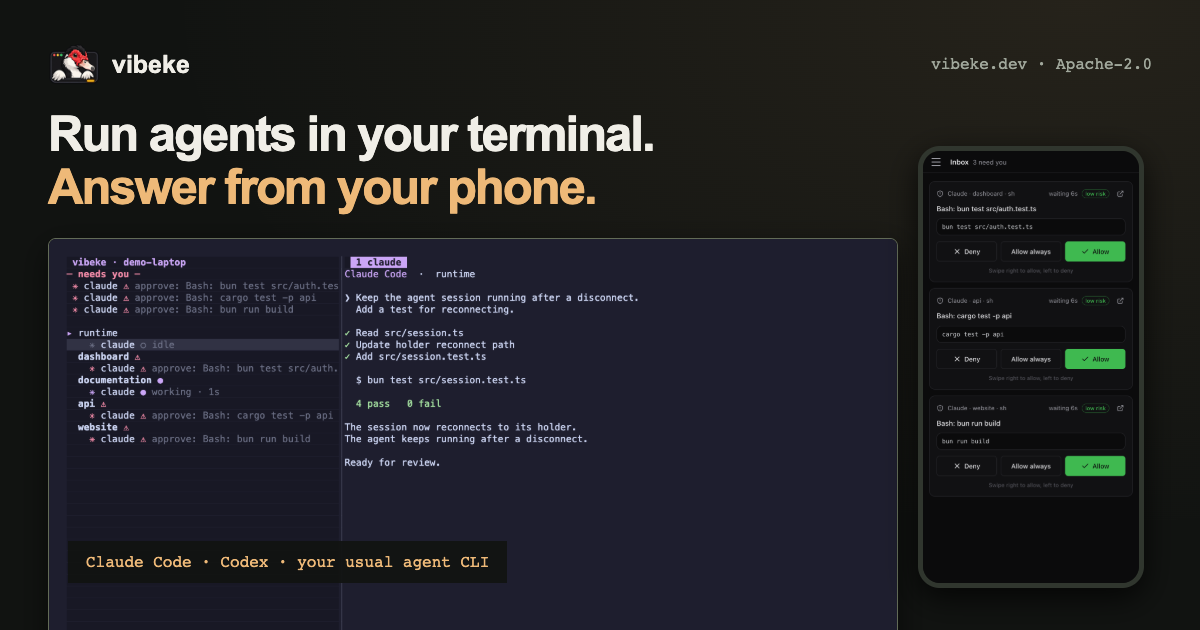
- Know which agent needs you. Keep questions and permission requests in one inbox. Answer through the supported agent integration.
- Reconnect to work in progress. Agents keep running after a client disconnect or server restart. A host restart stops the processes.
- Work across devices. Use your terminal, the desktop app, or a paired browser. Your host must stay awake and connected.
Install
The host CLI runs on macOS 13+ (Apple silicon or Intel) and Linux (x86_64 or ARM64).
Install minisign first: brew install minisign on macOS, or use your Linux package manager.
curl -fsSL https://vibeke.dev/install.sh | sh
The installer verifies the release signature and checksums.
See installation requirements.
Start in your project:
cd your-project
vibeke
Complete first-run setup.
Run claude, codex, or your usual agent command inside the pane.
Press Ctrl+B, then : to open the command palette.
Start with one task, such as adding a test to your project.
Open the inbox when your agent needs an answer.
See the quickstart.
Want to try Vibeke later? Star this repository to find it again.
Add another screen
Download the desktop app for macOS, Linux, or Windows.
The desktop app connects to a host. It does not bundle the CLI.
Local use requires the CLI on a supported Mac or Linux computer.
Windows connects to a supported remote host.
To pair your phone, open Devices on the host and choose Pair a phone.
You can also use vibeke gateway pair.
Confirm the pairing to connect the browser app.
See phone and browser access.
A few things to try
Preview an app on your devbox
Run your app on an SSH host.
Open its preview beside the agent in your local terminal.
Browser panes need Chromium and a terminal that supports graphics.
Watch the example · Previews guide
Ask another agent for a review
Name a pane @reviewer.
Send a request from another agent pane in the same workspace:
@reviewer please check the changes in src/auth.rs
Mentions work with the Claude Code and Codex integrations.
Messages wait until the receiving agent is idle.
Set up agent mentions
Point at what you want to change
Open your app in a browser pane.
Choose Annotate page in the command palette.
Pick an element and write a note.
Send the notes to your agent with the selected element and a screenshot.
Page annotations
More capabilities
- Separate tasks. Give each task its own worktree, branch, and port range. Review changes before accepting them. Tasks
- Optional isolation. Choose a supported OS sandbox, container, or VM. Worktrees alone do not restrict process access. Execution and isolation
- Sharing and handoffs. Give a teammate view or approval access. Transfer code changes and supported agent sessions between paired hosts. Sharing and handoffs
- Agent integrations. Use Claude Code, Codex, pi, omp, OpenCode, Hermes Agent, Gemini CLI, or an ACP agent. Structured features vary by integration. Agents
- Automation. Control Vibeke through its CLI, JSON-RPC API, or MCP server. Control API
- Plugins and migration. Load native plugins with declared capabilities. Import supported Herdr configuration and layouts. Migration guide
How it works
Vibeke runs inside your terminal.
It uses Ghostty's VT engine.
A separate holder process owns each pane, so a server restart does not stop its agent.
Remote device traffic passes through an end-to-end encrypted relay.

Process durability · Security model
Documentation and contributions
Quickstart · CLI reference · Configuration · All documentation
Tried Vibeke? Tell us which part of your workflow it helped with.
Open an issue about what got in the way.
Include your Vibeke version, operating system, and steps to reproduce a problem.
Remove secrets and private project data before sharing logs or screenshots.
For source builds, see the development guide.
Read AGENTS.md before contributing code.
License
Vibeke is licensed under the Apache License 2.0.
Inspiration and related work
Vibeke takes inspiration from Herdr, particularly its approach to organizing coding agents in terminal workspaces and its plugin ecosystem.
There is a rich body of related work here. cmux brings agent notifications and a programmable browser into terminal workspaces. Paseo makes coding agents accessible across machines and devices. Conductor, Emdash, and Superset explore parallel agents, isolated workspaces, and review workflows. Solo brings agent CLIs and development services together, while Warp explores integrated terminal and agent workflows. These projects deserve recognition alongside the foundations established by tmux and Zellij.
We created Vibeke to bring together the workflow we wanted: keep using our usual agent commands, run work on our own laptops and remote machines, and follow up from a terminal, browser, or phone. Its built-in, end-to-end encrypted relay makes hosts reachable without opening inbound ports or configuring a VPN.
We also wanted to make that work easier to share: invite teammates to view panes or help with approvals, and hand off code changes and supported agent sessions so someone else can pick up where we left off. Vibeke brings these capabilities together with structured agent integrations and processes that survive server restarts.
Special thanks to Ghostty, whose libghostty-vt provides Vibeke’s terminal engine, and to the maintainers and contributors behind these projects.
Reviews (0)
Sign in to leave a review.
Leave a reviewNo results found