vibemetric
Health Uyari
- License — License: MIT
- Description — Repository has a description
- Active repo — Last push 0 days ago
- Low visibility — Only 5 GitHub stars
Code Basarisiz
- rm -rf — Recursive force deletion command in scripts/build-app.sh
Permissions Gecti
- Permissions — No dangerous permissions requested
Bu listing icin henuz AI raporu yok.
Mac app that scores how well you work with AI, from your local Claude Code and Codex history
Vibemetric 🎯 — Supercharge your AI coding.
Faster builds, safer code, smaller token bills. Vibemetric shows you exactly what to change, from your menu bar.






Tiny native macOS app that reads the Claude Code and Codex sessions already on your Mac and tells you, in plain words, what's holding your AI coding back and how to fix it. You get a score out of 100 across 10 skills, the problems it found in your real sessions, and a fix you can paste. It lives in your menu bar and rescores every day, so you can see whether a change actually helped.
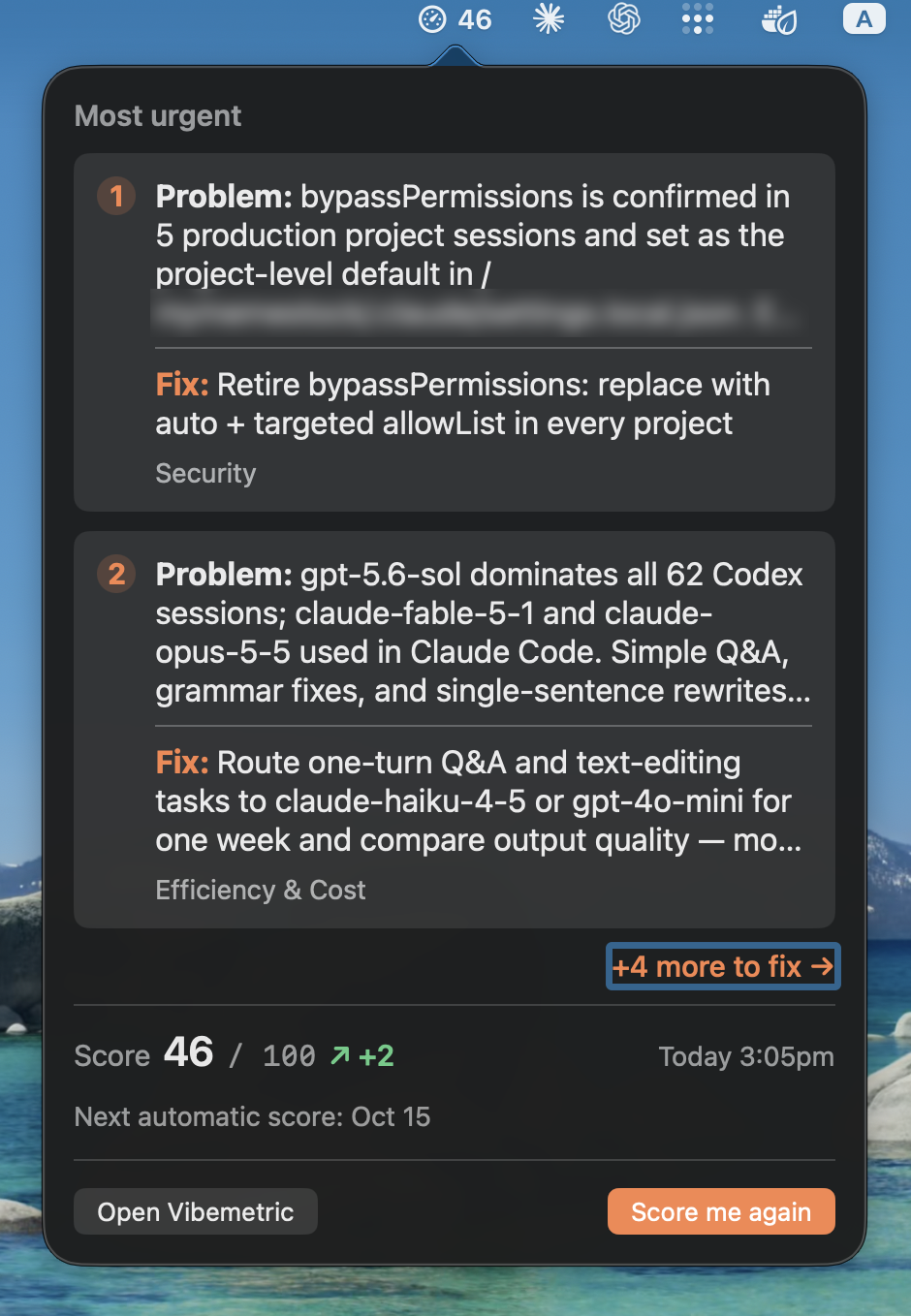
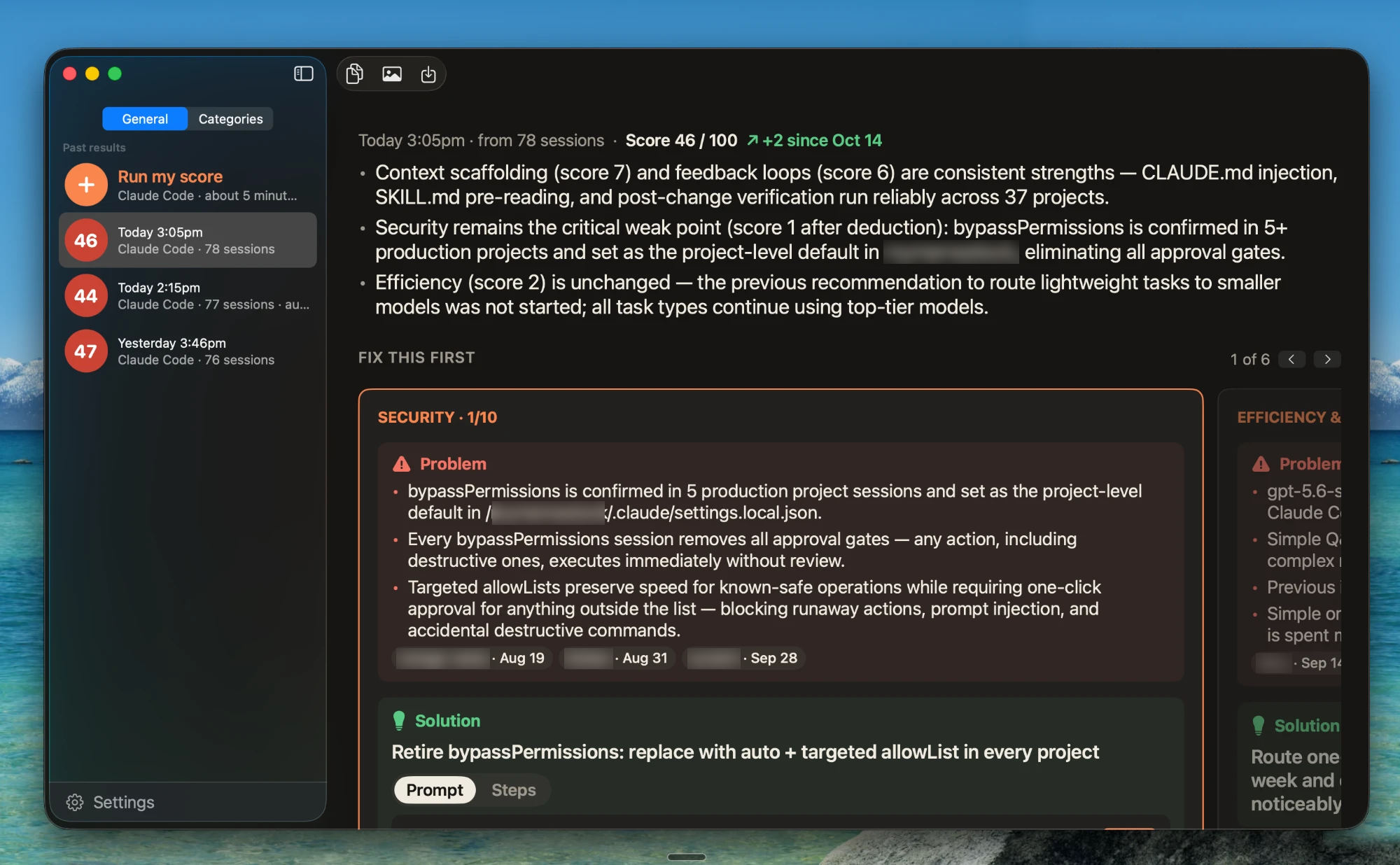
The main window shows a fictional demo score.
Why
- See what's actually going wrong. Problems come from your own sessions, with numbers: "The AI changed code 23 times last week. It never ran your tests once."
- Get the fix, not a lecture. Every problem comes with a solution and the exact prompt or rule to paste into
CLAUDE.md. - Watch it improve. A new score every day in the menu bar, compared with your last one, so you know whether a change helped.
- Private by default. Sessions are read on your Mac and scored by your own Claude Code or Codex, under your own account. Vibemetric's server never sees them.
Install
macOS app
Requires macOS 14+ (Sonoma) on Apple Silicon or Intel. Download the latest Vibemetric-<version>.dmg from GitHub Releases or vibemetric.app.
- Open the
.dmgand drag Vibemetric onto Applications. - Open it. The app is signed and notarized, so macOS asks once whether to open an app from the internet. Click Open.
- Later versions install themselves (Vibemetric → Check for Updates… checks right away).
You also need
- Claude Code or Codex CLI, installed and signed in. Pick the scoring engine on the first screen or in Settings → Scoring engine. Either engine scores both Claude Code and Codex history, using that engine's own account and plan.
- Claude Code: check
claude --version, then runclaudeto sign in. - Codex CLI: check
codex --version, then runcodex login. Use a version that supportsexec forkand--ignore-user-config --ignore-rules --strict-config --output-schema; Vibemetric checks these and picks the newest working installation, including the CLI bundled with the ChatGPT desktop app.
- Claude Code: check
- Some history in
~/.claude/projectsor~/.codex/sessions. The more sessions, the better the evidence.
First run
- Open Vibemetric. It scans your history in about a second and shows how many sessions it found.
- Choose Claude Code or Codex, then click Score me. Scoring takes a few minutes while the engine reads the evidence. The choice is saved and used for the daily score.
- Your score appears in the window and in the menu bar. Click it for the most urgent problems and their fixes.
Shortcuts: ⌘N starts a new assessment; ⌘+ / ⌘- / ⌘0 change the text size.
Features
- Problem and Solution. Each fix shows the problem as short bullets, with the sessions it comes from, and the solution with Prompt and Steps tabs.
- Fix this first. The most useful change leads, with the other weak spots one swipe away.
- Plain-language summary. Two or three bullets anyone can read: what's going well, what's holding you back, what to do first.
- Daily score in the menu bar. The two most urgent problems and their fixes, one click away. Automatic daily scoring, or Score me again any time.
- Compared with last time. Each run is compared with your previous compatible result, and the card says what changed and why.
- Share card. Export a PNG of your scores (scores and summary only, never session details).
- Pro deep dives (official app): for any category, a deeper report with real examples from your sessions, the root cause, tools and setup steps, and a step-by-step plan.
The 10 categories
| Category | The question it answers |
|---|---|
| Planning & Specs | Do you agree on the goal and the checks before work starts? |
| Context Engineering | Does each project tell the AI what it must know? |
| Memory & Knowledge | Does the AI remember what it learned, correctly? |
| Tool Integration | Does recurring work run through tools and skills? |
| Orchestration I: Task Mapping | Is the work broken into the right pieces and wired together? |
| Orchestration II: Feedback Loops | Do results decide the next step, and does the loop improve? |
| Testing & Evals | Is checking the AI's work a habit? |
| Human Steering | Do you examine the AI's work and redirect it with clear reasons? |
| Security | Is the agent limited to what each task needs? |
| Efficiency & Cost | Do models and effort match each task's difficulty? |
Each is scored 0–10 from what you actually did, not from how many prompts you sent. The full rubric is in rubric.md.
Privacy note
- Read-only. Vibemetric never writes to
~/.claudeor~/.codex. The Claude Code run it starts can onlyRead,GrepandGlob; Codex runs in a read-only sandbox. - Secrets are stripped first. The evidence digest removes API keys, tokens, webhook URLs and database connection strings it recognizes.
- Your engine, your account. The selected CLI sends the digest and any excerpts it reads to Anthropic or OpenAI under your own account, exactly as when you use it yourself.
- No Vibemetric server for your sessions. A build from this source makes no network calls of its own. The official app checks
vibemetric.app/appcast.xmlabout once a day for updates (sending only the app version). With a Pro key, it checks your plan with the Vibemetric API, sending the key but never your sessions. The key is stored in the macOS Keychain. - Anonymous usage counts (official app only). The official app sends PostHog, through
vibemetric.app/ingest, a random install ID with: install, app opened (once a day), which engines are installed, and for each assessment its engine, model, session count, duration, total score and whether it failed or was cancelled (the error's type, not its message). Never transcripts, prompts, notes, file paths or project names. Turn it off in Settings → Usage Data, which also forgets the ID. Builds from source have no analytics key and send nothing; the code is inAnalytics.swift. - Deep-dive web research (Pro, optional): may search public documentation; transcripts and private project details are never put into searches. Turn it off in Settings → Account.
- You decide what stays. Each result keeps its redacted evidence on your Mac until you delete the result. The CLI saves the scoring run in its own history; Vibemetric leaves those runs out of later scores.
Free and Pro
This repository is the complete free app, open source under the MIT license: scanning, scoring, the score card, the menu bar and daily scores.
Pro features (deep dives, Pro Reviews, recommendations) use Vibemetric's hosted service and are available only in the official app from vibemetric.app. They attach through the plug-in points in Extensions.swift; in a build from this source those are all empty.
Trademark: the code is open source; the Vibemetric name and logo are not. Forks must use a different name and icon.
Build from source
You need Xcode 15.3 or later (Swift 5.10+).
git clone https://github.com/vibemetric-app/vibemetric.git
cd vibemetric
./scripts/build-app.sh                    # build/Vibemetric.app (Apple Silicon + Intel) and build/Vibemetric.dmg
cp -R build/Vibemetric.app /Applications/
open /Applications/Vibemetric.app
An app you build yourself isn't quarantined, so macOS opens it without a warning. It has no Pro features and doesn't check for updates; update with git pull and a new build.
Getting started (dev)
swift run VibemetricApp              # run the app from source
VARIANT=dev ./scripts/build-app.sh   # "build/Vibemetric Dev.app", separate data and preferences
swift test                           # fixture CLIs; never spends model usage
Contributions are welcome. See CONTRIBUTING.md; report security issues as described in SECURITY.md.
How it works- Scan (local, about a second). Parses
~/.claude/projects/**/*.jsonl(subagent transcripts are folded into their parent session) and~/.codex/sessions/**/rollout-*.jsonlinto normalized session timelines, with heuristic signals such as spec language, memory writes and reads, verification after edits, fix→rerun loops, subagents, hooks, permission denials, and corrections. Each session's counts, signals and token use are kept in~/Library/Application Support/Vibemetric/scan-cache.json(no conversation text beyond a short title), so later scans parse only transcripts that are new or have changed; an app update starts the cache over. - Evidence pack (local). Writes a redacted digest to
~/Library/Application Support/Vibemetric/packs/<run>/:overview.md,sessions.tsv,leads.md,settings.md, and one timeline per session undersessions/(up to 450 sessions, parsed again from their transcripts; the rest of the pack covers every session). Successful runs keep their evidence until the result is deleted; failed runs remove their pack. - Assessment (your selected local CLI). Both engines use the same
rubric.md, evidence pack, score-card schema and local totals.- Claude Code:
claude -p,stream-json,--json-schema, tools restricted toRead,Grep,Glob,--permission-mode dontAsk, and--setting-sources project. - Codex:
codex exec --json --sandbox read-only --skip-git-repo-check,--output-schemaand--output-last-message. The prompt is sent through stdin. Personal config and execpolicy rules are skipped; hooks, plugins, apps, web search, multi-agent work and memory features are disabled for scoring. Saved CLI authentication is reused. - Claude offers Default (Sonnet), Opus, Sonnet, and Haiku. Codex offers Default (GPT 6.1 Sol), Astra, Sol, and Luna. Availability depends on your CLI sign-in. Model preferences are saved per engine and also apply to automatic scores.
- Results record the engine, requested model, CLI version, rubric version and saved CLI session ID. Pro deep dives fork that session using the original engine and a copy of its saved evidence.
- Claude Code:
Download or build the new version and replace /Applications/Vibemetric.app (quit it first: menu bar score → Quit). Your saved results are kept. From source:
git pull
./scripts/build-app.sh
rm -rf /Applications/Vibemetric.app && cp -R build/Vibemetric.app /Applications/
To uninstall, quit Vibemetric, then:
rm -rf /Applications/Vibemetric.app
rm -rf ~/Library/Application\ Support/Vibemetric   # saved results and their evidence packs
rm -rf ~/Library/Caches/Vibemetric                  # temporary files from versions before 0.1.1
defaults delete app.vibemetric.prod                 # preferences such as text size
Vibemetric doesn't modify your transcripts. The CLI's own records of scoring runs stay in its history, and its authentication caches and logs are its own.
Troubleshooting- The scoring engine is not ready. Install and sign in to the selected CLI, then click Check again. Vibemetric checks common install locations and your login shell's PATH. An outdated Codex CLI shows an update message.
- No sessions found. Use Claude Code or Codex for a while first. Vibemetric reads only
~/.claude/projectsand~/.codex/sessions. - Scoring stops with an error. Common causes are being signed out, an unavailable model, or reaching your account's usage limit. Check the selected CLI in Terminal. Vibemetric never switches providers on its own.
- The selected Codex model is unavailable. Update Codex and click Check again. Older CLIs can reject newer models even when the same account works in a newer CLI.
Release (VARIANT=prod, default) |
Dev (VARIANT=dev) |
|
|---|---|---|
| App | Vibemetric.app |
Vibemetric Dev.app |
| Bundle ID | app.vibemetric.prod |
app.vibemetric.dev |
| Data folders | ~/Library/Application Support/Vibemetric, ~/Library/Caches/Vibemetric |
… /Vibemetric Dev |
| Default API | production | develop |
The two builds keep separate preferences, Pro keys and privacy answers, so both can be installed together. Override the API with defaults write <bundle ID> apiBaseURL <url>.
Signing. build-app.sh signs with a Developer ID Application certificate when one is in the keychain (or set SIGN_IDENTITY), and falls back to an ad-hoc signature otherwise.
# once per Mac: store notarization credentials (prompts for an app-specific password)
xcrun notarytool store-credentials "vibemetric-notary" --apple-id [email protected] --team-id TEAMID
NOTARIZE=1 ./scripts/build-app.sh      # signs, notarizes and staples the app and build/Vibemetric.dmg
Automatic updates (Sparkle). Official release builds (with Pro/) check https://vibemetric.app/appcast.xml once a day and install only updates signed with the project's EdDSA key. Builds from source, dev builds and swift run never check. One-time setup on the release Mac:
.build/artifacts/sparkle/Sparkle/bin/generate_keys          # stores the private key in the login Keychain, prints the public key
.build/artifacts/sparkle/Sparkle/bin/generate_keys -x sparkle-private-key   # back up the private key, not in git
Releasing. VERSION=0.3.2 ./scripts/release.sh builds, notarizes, writes the website download and the signed appcast; then commit and deploy vibemetric-web and publish a GitHub release with the DMG. The build number is the commit count plus 100, so release from a committed state. release.sh stops unless Pro/ is present, clean, and at its origin/main.
Screenshots. docs/demo-card.json is a fictional score for README and website images:
VIBEMETRIC_SNAPSHOT=/tmp/shots VIBEMETRIC_CARD=docs/demo-card.json VIBEMETRIC_SNAPSHOT_SCALE=2 swift run VibemetricApp
CLI. A command-line tool is included for development:
swift run vibemetric scan
swift run vibemetric pack --out /tmp/pack
swift run vibemetric assess --engine claude [--model opus|sonnet|haiku] [--out DIR]
swift run vibemetric assess --engine codex [--model MODEL_ID] [--out DIR]
Live checks. swift test never spends model usage. These opt-in checks use your signed-in accounts with a single fictional session:
VIBEMETRIC_LIVE_CODEX=1 swift test --filter LiveCodexTests
VIBEMETRIC_LIVE_FORK=1 swift test --filter LiveSessionForkTests   # 1 = both engines, or codex / claude
Layout
| Path | Purpose |
|---|---|
Sources/VibemetricCore |
Parsers, signals, evidence pack, Claude Code/Codex runners, score-card model, Markdown renderer |
Sources/VibemetricAppKit |
SwiftUI app as a library: home/scan, live run view, score card, menu bar, PNG share card |
Sources/VibemetricAppKit/Extensions.swift |
Plug-in points for optional modules (a stable interface) |
Sources/VibemetricApp |
Launcher: main.swift starts VibemetricMain from VibemetricAppKit |
Sources/vibemetric |
Development command-line tool |
scripts/build-app.sh, scripts/release.sh |
App bundle and DMG; notarized releases |
docs/demo-card.json |
Fictional score for screenshots |
Not yet supported
- Cursor and Grok transcripts.
- Hosted share links.
License
MIT. The Vibemetric name and logo are trademarks and are not covered by the license. The Claude Code and Codex icons in Sources/VibemetricAppKit/Resources/Brand belong to their owners; see SOURCES.md there.
Yorumlar (0)
Yorum birakmak icin giris yap.
Yorum birakSonuc bulunamadi