agent-keyboard
Health Uyari
- License — License: MIT
- Description — Repository has a description
- Active repo — Last push 0 days ago
- Low visibility — Only 5 GitHub stars
Code Uyari
- process.env — Environment variable access in server/skills/image-gen/generate.mjs
- network request — Outbound network request in server/skills/image-gen/generate.mjs
- process.env — Environment variable access in server/skills/provision-user/invite.mjs
- network request — Outbound network request in server/skills/provision-user/invite.mjs
- process.env — Environment variable access in server/src/auth.ts
- network request — Outbound network request in server/src/auth.ts
- process.env — Environment variable access in server/src/checkouts.ts
- process.env — Environment variable access in server/src/claude.ts
Permissions Gecti
- Permissions — No dangerous permissions requested
Bu listing icin henuz AI raporu yok.
A prompt bar that edits the site it's on — ask for a change; a real Claude Code session edits the repo and pushes to main. Self-hosted, single-owner, MIT.
Agent Keyboard
A prompt bar that edits the app it's on.


One <script> tag puts a prompt bar inside the app you want to change. The owner taps the bar,
signs in, and describes a change — typed, dictated, or photographed. A real Claude Code session
edits that app's own git repo, commits as Agent Keyboard, and pushes to main; wherever you
deploy from redeploys. Every step streams live, and the job is fire-and-forget — close the tab and
it keeps running server-side; reopen and the bar re-attaches.
<!-- one line, before </body>, on any page you own -->
<script src="https://YOUR-APP.fly.dev/widget.js" data-site="mysite" defer></script>
data-site is the id of a repo in your allow-list (the SITES env var). The API defaults to wherever
the script is served from.
agentkeyboard.com runs this widget on itself (data-site="halo") —
the marketing site edits its own repo. When you see a commit here authored by Agent Keyboard, it was
made from the bar at the bottom of that page.
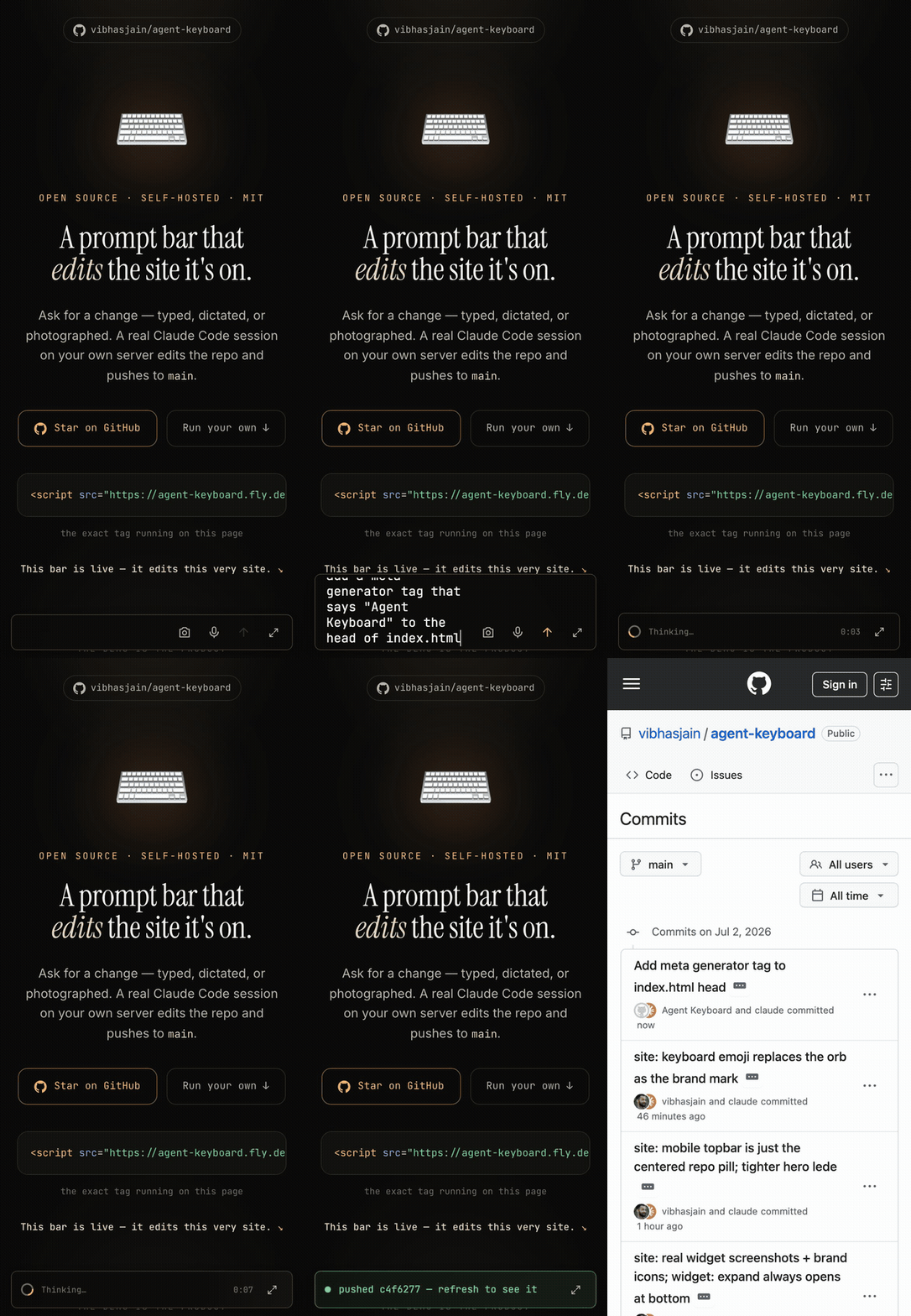
A real session, recorded live — the commit it lands (c4f6277) is in this repo's history.
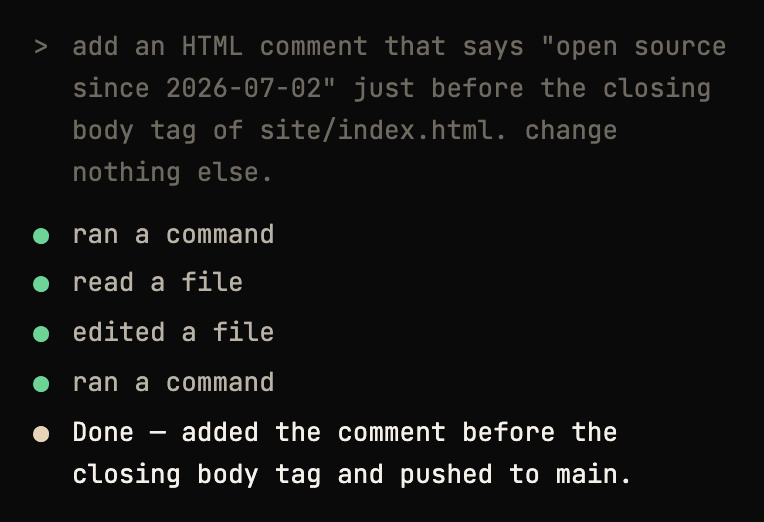
The expanded transcript of another real exchange.
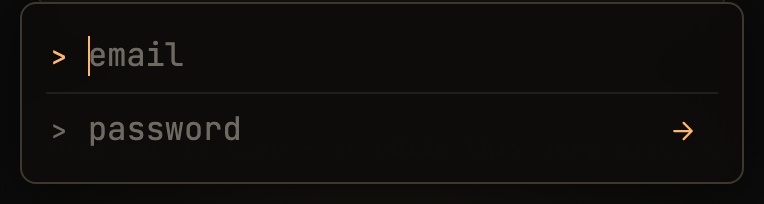
| Sign in — a prompt, not a form | A job running | At rest |
|---|---|---|
 |
 |
 |
What this is
A personal tool, open-sourced because there's no reason to keep it closed. It scratches one itch: I
own apps and codebases I keep looking at, I already pay for Claude Code, and I wanted to shape them
from the product itself without opening an editor. So it's narrow on purpose — an allow-list of
accounts (you, maybe a client or a partner), an allow-list of repos you control, no public signups,
no dashboard. If you have a Claude Code subscription and
apps you deploy from git, you can fork it and point it at your own repos in under an hour (see
SELF_HOSTING.md). If you don't, it probably isn't for you.
How it works
flowchart LR
  A["Browser widget<br/>bar → compose"] -->|"POST /sites/:id/messages"| B["Your server (Fly)"]
  B -->|"verify JWT — one email"| C["Supabase auth"]
  B -->|"per-site checkout<br/>on /data volume"| D["git checkout"]
  D -->|"claude -p (edit)"| E["Claude Code CLI"]
  E -->|"commit + push"| F["your GitHub repo"]
  F -->|"deploy hook"| G["your host redeploys<br/>(Netlify, etc.)"]
  B -.->|"SSE: status · reply"| A
The widget is a Shadow-DOM-isolated bundle baked into the server image and served at /widget.js. The
server is Express on Fly.io. Auth is a Supabase JWT that must belong to your one allowed email. Each
site is a durable git checkout on a Fly volume (HOME=/data), so the Claude Code session — its memory
and compaction — persists between runs. The CLI runs headless (claude -p) with permissions bypassed
inside the VM, edits the checkout, commits, and pushes with a repo-scoped token.
Self-host quickstart
Full walkthrough with time estimates in SELF_HOSTING.md.
You'll need accounts with:
- GitHub — holds your site repos and issues the push token. (You have this.)
- A Claude Pro or Max subscription —
claude setup-tokenmints the OAuth token the server's CLI edits with. This is the one cost that matters. - Supabase — auth (your one login) plus optional job history. Free tier is fine.
- Fly.io — runs the server. The guide prescribes Fly; a Dockerfile exists if you insist on hosting elsewhere.
- An app host you already use — Vercel, Netlify, Fly.io, Cloudflare Pages, etc. Anything that redeploys your repo on push. This project does not host your app.
What it costs. Your existing Claude subscription does the editing, plus one small always-on Fly VM
— usage-billed, on the order of a few dollars a month. It stays running on purpose so detached jobs
survive after you close the tab. Supabase's free tier covers auth and job history. If you'd rather pay
less, you can let the Fly machine sleep and wake on request, trading away the fire-and-forget
guarantee — see the cost note in SELF_HOSTING.md.
The short version:
- Supabase — create a free project, turn off new signups, add one user (your login), run
server/sql/jobs.sql. Copy the URL, anon key, and service_role key. - GitHub PAT — a fine-grained token scoped to only the repos you'll edit: Contents read/write +
Metadata, and deliberately no workflows permission. - Claude token —
claude setup-token(needs a Claude Pro or Max subscription). - Fly —
fly launchfrom the repo root with--config server/fly.toml, rename the app, create
theagent_datavolume, set your secrets, deploy. - CI (optional) — add
FLY_API_TOKENas a repo secret to autodeploy on push. - Embed — drop the
<script>tag on your site;data-sitemust match aSITESid and the page's
domain must equal that site'sdomain.
Configuration
Set on the server (Fly secrets for anything sensitive). The server exits at boot with a message
listing any missing required var.
Required
| Var | What it is |
|---|---|
SUPABASE_URL |
Supabase project base URL. Also injected into the served widget bundle. |
SUPABASE_ANON_KEY |
Publishable anon key. Public by design; injected into the widget. |
ALLOWED_EMAIL |
The email(s) allowed to drive the agent — one, or a comma-separated few (case-insensitive). |
SITES |
One-line JSON array allow-list of repos the agent may edit (see below). |
GH_TOKEN |
Fine-grained PAT: only the SITES repos, Contents read/write + Metadata, no workflows. |
Optional
| Var | What it is |
|---|---|
CLAUDE_CODE_OAUTH_TOKEN |
Read by the Claude Code CLI, never by server code; from claude setup-token. Boot warns if missing — the agent can't run without it. |
ALLOWED_USER_ID |
Extra pin to specific Supabase user UUID(s), comma-separated. |
SUPABASE_SERVICE_KEY |
Enables durable job history / re-attach. Works without it; boot warns. |
OPENAI_API_KEY |
Voice dictation (ephemeral realtime tokens minted server-side). Absent = the mic button errors with "voice not configured". |
GEMINI_API_KEY |
The baked-in image-generation skill. Read by the skill inside the CLI child, never by server code. Absent = the agent reports image generation as not configured. |
AK_PUBLIC_URL |
This server's public base URL; invite emails from user provisioning land on $AK_PUBLIC_URL/welcome. |
FLY_API_TOKEN |
App-scoped Fly deploy token (fly tokens create deploy -a <app>). Enables the self-ops skill — the agent can read its own logs/status and set secrets. |
SUPABASE_ACCESS_TOKEN |
Supabase personal access token. Lets the agent manage auth config (SMTP, email templates, redirect URLs) via the Management API. |
EXTRA_ORIGINS |
Comma-separated extra CORS origins (deploy previews, staging). |
CLAUDE_MODEL |
Default model for the CLI. Default opus. Per-site overrides via harness controls. |
CONTEXT_WINDOW_TOKENS |
Window size for the approximate context gauge. Default 200000. |
CLAUDE_RUN_TIMEOUT_MS |
Per-run timeout in ms. Default 0 (no timeout — runs are unbounded). Set a positive value to re-arm a ceiling. |
CLAUDE_COMPACT_TIMEOUT_MS |
Timeout for an on-demand compact turn. Default 300000. |
CLAUDE_BIN |
Path to the claude binary. Default claude. |
AGENT_DATA_DIR |
Checkout + session root. Default /data. |
WIDGET_JS_PATH |
Override path to the built widget.js. |
PORT |
Default 8080. |
GIT_AUTHOR_NAME / GIT_AUTHOR_EMAIL |
Commit identity. Default Agent Keyboard / [email protected]. |
GIT_COMMITTER_NAME / GIT_COMMITTER_EMAIL |
Same defaults. |
REALTIME_TRANSCRIBE_MODEL |
Voice transcription model. Default gpt-4o-transcribe (higher-accuracy speech-to-text for push-to-talk prompts). |
REALTIME_FALLBACK |
Set 1 to use the fallback realtime session shape. |
Copy server/.env.example to server/.env for local dev.
The SITES allow-list. A one-line JSON array; each entry maps a slug to a repo, a branch, and a
domain:
SITES=[{"id":"blog","repo":"https://github.com/you/blog.git","branch":"main","domain":"blog.example.com"}]
id— the slug you put in the embed tag'sdata-site.repo— https clone URL; theGH_TOKENis injected at clone/sync time.branch— the branch your host deploys from.domain— bare host (no scheme). Drives CORS (https://domainandhttps://www.domainare
auto-allowed) and the[Sent from …]context handed to the agent.pushBranch(optional) — publish the agent's commit to this branch instead of pushing straight tobranch. Use it when you'd rather review changes than deploy them live: nothing redeploys until you
merge the branch yourself. A{ts}placeholder becomes a UTC timestamp, so"agent-keyboard/{ts}"
gives each change its own branch. Must differ frombranch. See SELF_HOSTING.md.
A pretty-printed multi-site example lives in server/sites.example.json.
Talking to the harness
The bar has no settings screen — you configure the agent by asking it, the same way you'd ask for a
site change:
- "What model are you on? How much context are we using?" — it answers from live values the server
injects into every turn (the context number is approximate). - "Switch to sonnet." / "Set effort to max." — applied from the next message.
- "Switch to plan mode." — the agent explores and proposes without committing; "go back to
dangerously bypass permissions" to leave (works even from inside plan mode). - "Compact your memory." — compacts the conversation right after the current turn.
- "Clear the context." — destructive: starts a fresh session (wipes the agent's memory of this
conversation) and clears the chat history. The agent confirms once before doing it. - "Install a skill that does X." — the agent writes it to its own skills directory on the volume;
it loads from the next turn and survives deploys.
Under the hood each site has a small settings file on the volume
(/data/agent-keyboard/sites/<id>/settings.json, keys model · effort · permissionMode ·compactNow · clearNow) that the agent itself edits and the server validates and applies to the next CLI spawn.
Bad values fall back to defaults with a warning the agent sees and fixes. Delete the file to reset
everything.
Two more things ride along:
- A second message while one is running queues — server-side, in order, as its own follow-up
turn; the agent answers it knowing what the previous turn did. The bar shows queued sends dimmed
with a+Nbadge, and they survive a page reload. - Provision users by asking — "invite [email protected]". Supabase emails them a link to set a
password (landing on this server's/welcomepage), and their email joins the allow-list. NeedsSUPABASE_SERVICE_KEY; add$AK_PUBLIC_URL/welcometo Supabase Auth → URL Configuration →
Redirect URLs, and don't pinALLOWED_USER_IDif you use this.
Built-in skills
Shipped in server/skills/ (key-free), seeded into ~/.claude/skills on the
volume at boot — deploys update them, agent-installed ones persist:
| Skill | What it does | Needs |
|---|---|---|
image-gen |
Generates images with Gemini and places them in the site repo. | GEMINI_API_KEY |
verify-in-browser |
Serves the checkout locally, screenshots it with the preinstalled headless Chromium, and inspects the render. | nothing (baked into the image) |
provision-user |
Invites a new user by email + allow-lists them. | SUPABASE_SERVICE_KEY |
self-ops |
The agent operates its own deployment: logs, status, secrets, deploy flow, Supabase auth config. Knows a restart kills its own turn. | FLY_API_TOKEN (optionally SUPABASE_ACCESS_TOKEN) |
frontend-design |
Anthropic's official design skill — distinctive, intentional UI when the agent builds or reshapes a page. | nothing |
ponytail |
Lazy-senior-dev discipline: simplest thing that works, reuse before adding, shortest root-cause diff. Always on — a directive in the operating-scope prompt applies it every turn. | nothing |
Branded invite/recovery email templates live inserver/email-templates/ — see that README for the
free Resend + Supabase custom-SMTP setup.
Security model
Concentric rings, honestly stated:
- Allow-list gate. Every request must carry a Supabase JWT that resolves to an email on your
ALLOWED_EMAILlist ∪ the runtime allow-list at/data/agent-keyboard/allowed-emails.json
(optionally pinned further toALLOWED_USER_ID). Accounts exist only where you created them by
hand or provisioned them by asking the agent. - The
SITESallow-list. The agent can only ever touch repos you listed. A request for any other
site id is rejected; there is no "edit an arbitrary repo" path. - Bounded blast radius. The CLI runs with permissions bypassed, but inside a dedicated Fly VM.
The most it can reach is the/datavolume and whateverGH_TOKENcan — which is why the PAT is
repo-scoped, contents-only, and has no workflows permission (GitHub then rejects any push that
touches.github/workflows/, capping what the agent can change). The agent is additionally
sanctioned to write two spots on the volume it always physically could: its own harness settings
file and its skills directory — same blast radius as before, now stated. - No key reaches the browser. The anon key is public by design (RLS gates everything). Voice uses
short-lived OpenAI tokens minted server-side. The Claude, GitHub, and Supabase service keys live
only in Fly secrets.
One thing to know: your prompts become commit messages. If a target repo is public, what you typed
is visible in its history.
Full threat model: SECURITY.md — what an unauthenticated attacker can and can't
reach, where the trust boundaries sit, and the residual risks stated plainly.
Develop
- Widget —
cd widget && npm i && npm run build(→dist/widget.js).npm run mockruns a
zero-dep mock server plus a hostile host page underdev/for local testing. Seewidget/README.md. - Server —
cd server && npm i, copy.env.exampleto.env, thennpm run dev(watch mode). - Site — the marketing page; open
site/index.html.
Repo layout
| Dir | What it is |
|---|---|
site/ |
The marketing site (agentkeyboard.com) and the original vision film. |
server/ |
Express API + the Claude Code CLI runner; serves /widget.js, streams SSE. |
widget/ |
The embeddable bundle: TypeScript, zero runtime deps, ~21 KB gzip, Shadow-DOM isolated. |
License
MIT — see LICENSE.
Built by @vibhasjain — with the bar itself, wherever possible.
Yorumlar (0)
Yorum birakmak icin giris yap.
Yorum birakSonuc bulunamadi