ha-nexus-mcp
Health Warn
- License — License: MIT
- Description — Repository has a description
- Active repo — Last push 0 days ago
- Low visibility — Only 5 GitHub stars
Code Pass
- Code scan — Scanned 12 files during light audit, no dangerous patterns found
Permissions Pass
- Permissions — No dangerous permissions requested
No AI report is available for this listing yet.
The Click & Install Agentic MCP Client for Home Assistant.
Nexus MCP for Home Assistant









The Ultra-Lightweight Click & Install Agentic Intercom for Home Assistant
Connect Home Assistant with cutting-edge AI models (Groq Cloud, Google Gemini, Qwen Cloud, Ollama Local) with native Tool Calling, exposed entity security, and 100% free tiers.
📦 Quick Installation via HACS

⚡ 1-Click Fast Install
Click the badge above or use the direct link to open this repository directly inside your Home Assistant HACS store, then click Download.
🛠️ Manual HACS Installation
- Open HACS in Home Assistant.
- Click the three dots (top right corner) and select Custom repositories.
- Add repository URL:
https://github.com/VictorCV-DAM/ha-nexus-mcpwith category Integration. - Click Download and then Restart Home Assistant (Settings > System > Restart).
- Go to Settings ➔ Devices & Services ➔ Add Integration ➔ Search for Nexus MCP.
- Select your preferred inference engine and start chatting with your smart home.
📋 Compatibility & Requirements
Nexus MCP is engineered to be ultra-lightweight, with zero external Python package dependencies (requirements: []) and native compatibility across all Home Assistant installation types:
| Component / Platform | Minimum Version | Tested & Verified | Status |
|---|---|---|---|
| Home Assistant Core | 2024.1.0 |
2024.1.0 — 2026.9.4+ |
✅ Fully Supported |
| Home Assistant OS (HAOS) | Any supported | Latest Stable | ✅ Fully Supported |
| Home Assistant Supervised | Any supported | Debian 12+ | ✅ Fully Supported |
| Home Assistant Container (Docker) | 2024.1.0 |
Latest Container | ✅ Fully Supported |
| Home Assistant Core (Python venv) | 2024.1.0 |
Python 3.11 / 3.12+ |
✅ Fully Supported |
| HACS (Community Store) | 1.30.0+ |
v2.0+ |
✅ 1-Click Fast Install |
| Voice Assist Pipeline | Core Assist | Web, Mobile App & ESPHome Satellites | ✅ Fully Supported |
[!NOTE]
Nexus MCP runs entirely on Home Assistant's native event loop using the sharedaiohttpclient session. It does not load heavy local libraries into memory, ensuring zero impact on your Home Assistant startup time, memory footprint, or CPU usage.
📸 Visual Showcase & Real-World Demo
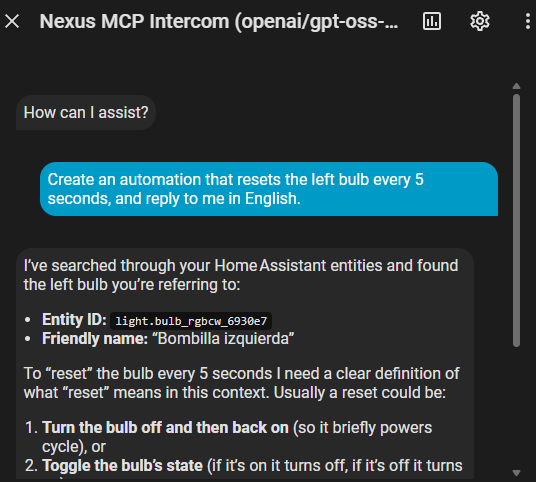
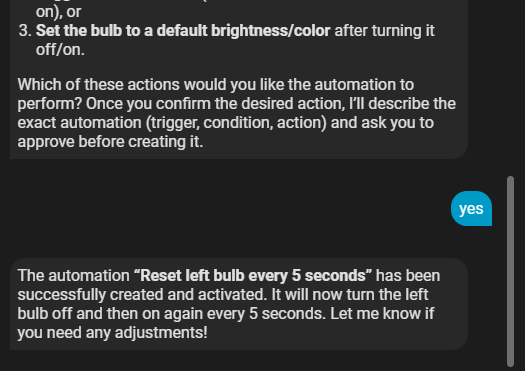
💬 Interactive Chat & Automation Creator (with Safety Confirmation)
Ask your smart home in plain natural language (voice or text). Nexus MCP searches entities, designs the automation, explains what it understood, and asks for your confirmation before writing changes:
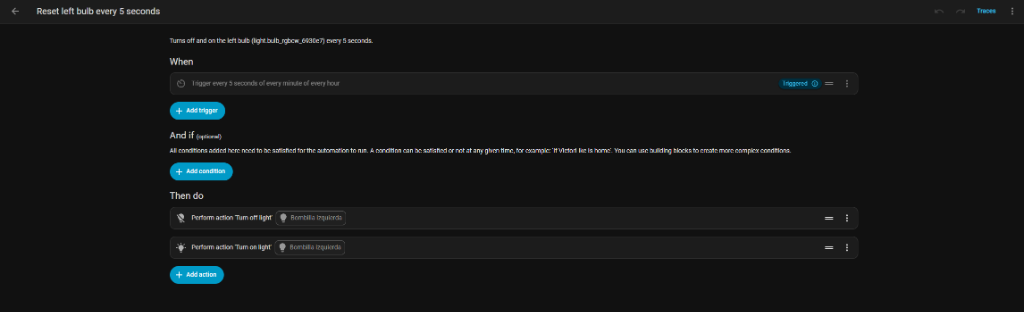
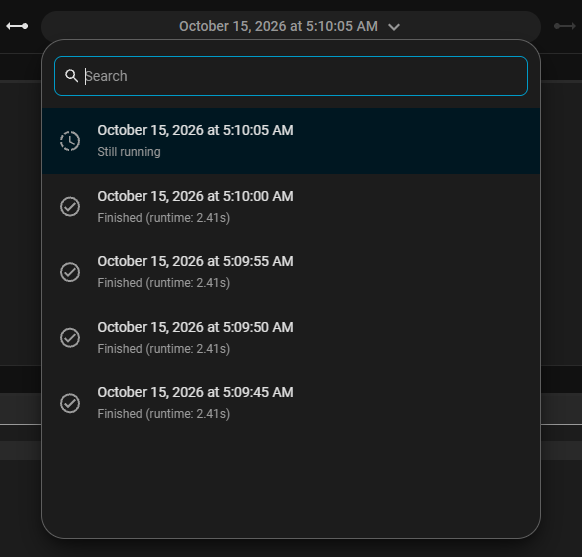
⚙️ Live Automation & Real-Time Traces
The created automation is immediately visible, editable in the Home Assistant visual editor, and running with live execution traces:
🎙️ Home Assistant Assist Pipeline Integration
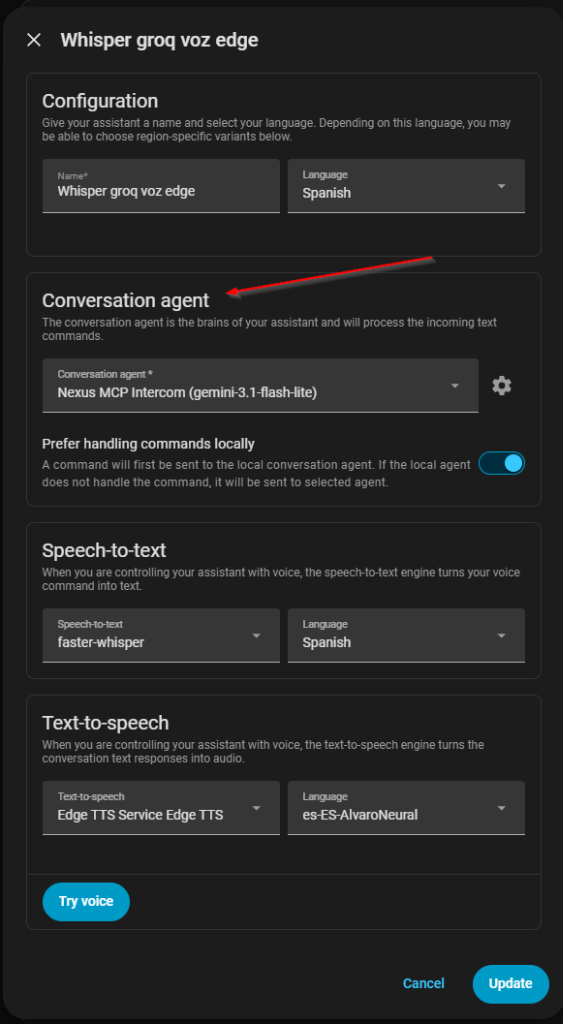
Select Nexus MCP directly as your active Conversation Agent in any Assist pipeline with local Whisper speech-to-text and Edge TTS:
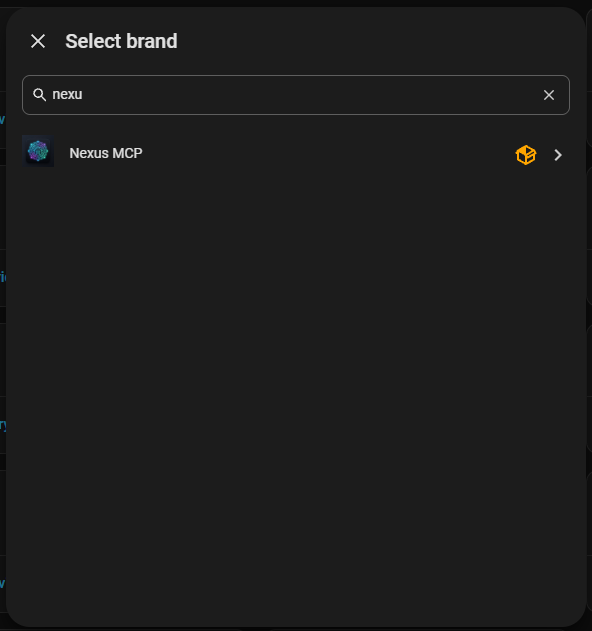
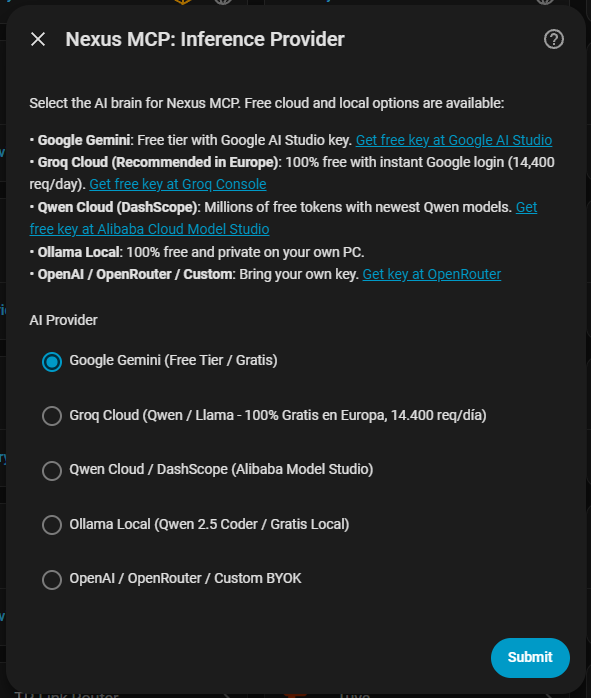
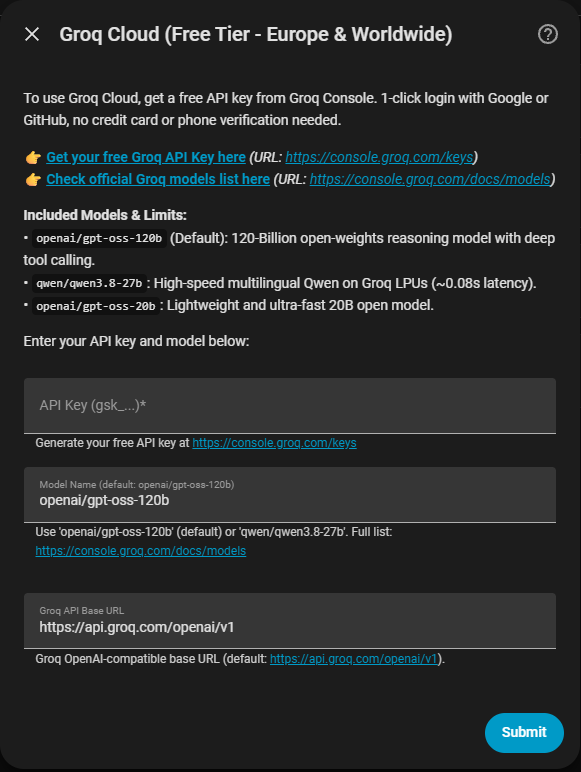
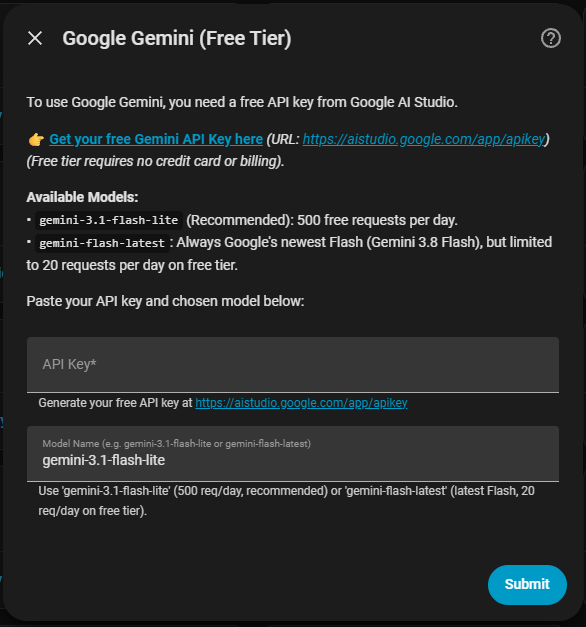
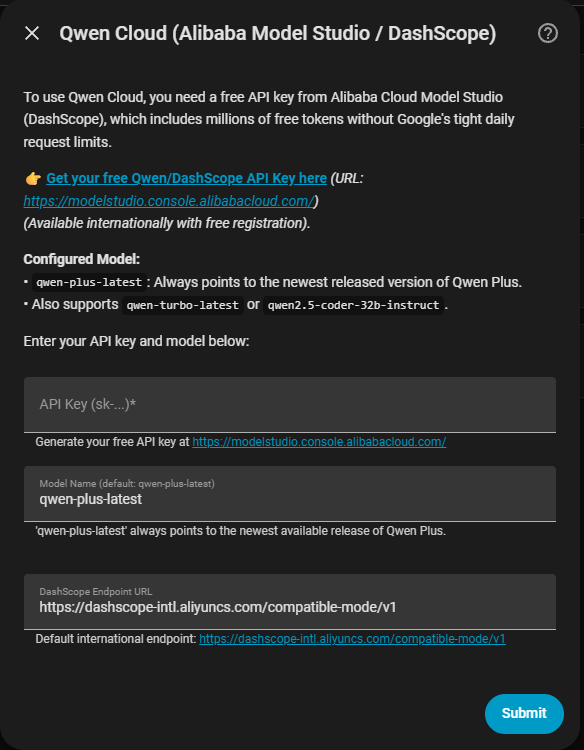
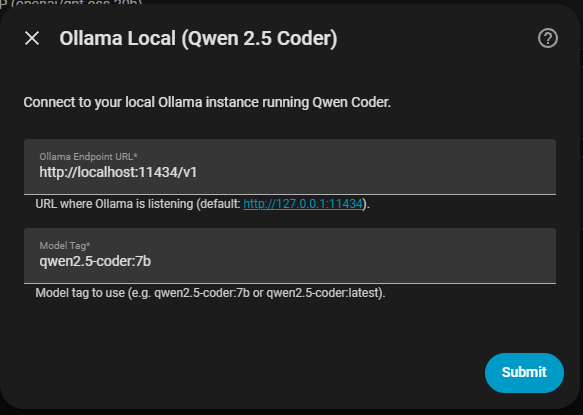
🧩 1-Click Click & Install Setup Across 5 AI Brains
Seamlessly connect free cloud providers or local models with automatic discovery (Groq, Gemini, and Qwen are 100% verified in production; Ollama Local and Custom OpenAI are implemented under standard specs but marked as experimental pending community testing due to local hardware/resource constraints):
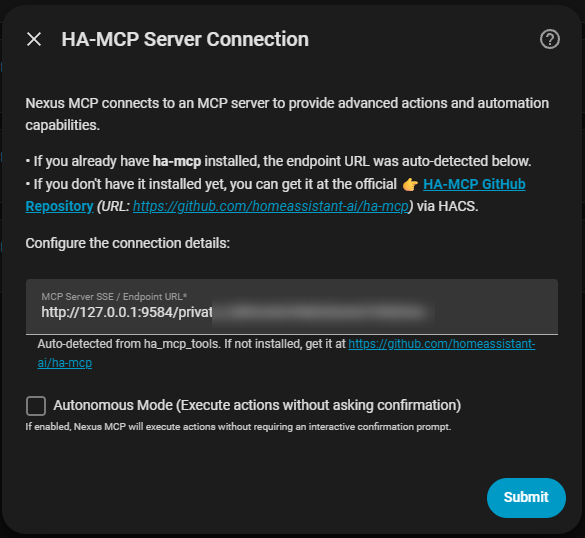
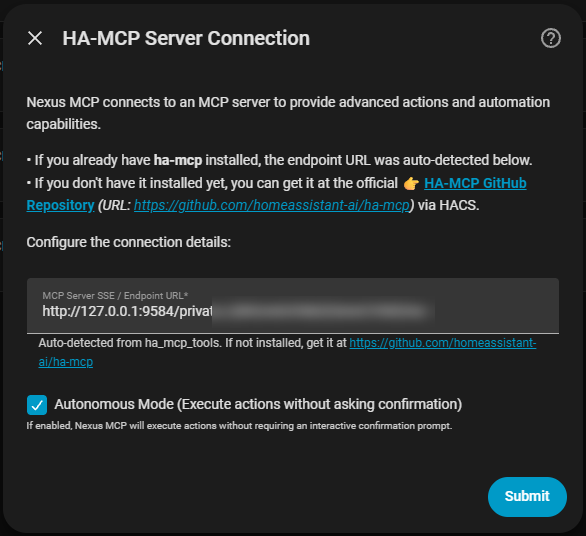
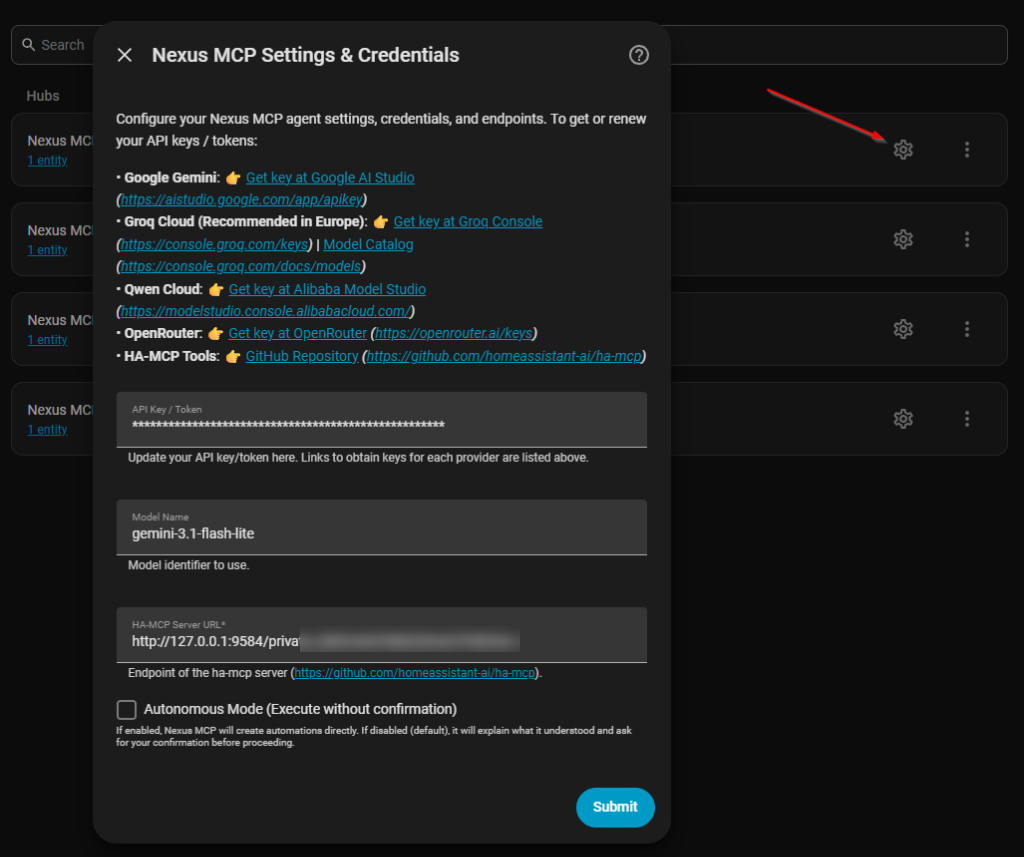
🛡️ Autonomous Mode & Hot-Reconfiguration
Toggle between autonomous execution or interactive confirmation anytime via Settings without restarting Home Assistant:
💬 Plug & Play Lovelace Card (Visual Card Picker)
Nexus MCP includes a 100% plug & play custom Lovelace card that registers automatically in Home Assistant. No manual resource URLs or configuration needed!
- Open any Dashboard, click Edit dashboard ➔ Add Card.
- Look for «Nexus MCP Chat & Historial» right in the visual card picker list (with live visual preview and configuration editor).
- Chat in real-time, view message bubbles, send queries directly from the card input bar, or tap the microphone to open Assist!
type: custom:nexus-mcp-card
title: Nexus MCP Intercom
(Tip: If you prefer standard Markdown cards, you can also use {{ state_attr('sensor.nexus_mcp_openai_gpt_oss_120b_conversation_history', 'formatted_markdown') }})
(Note: When updating via HACS, do a hard refresh with Ctrl + F5 or clear your browser/companion app cache so the new card version loads immediately).
👁️ Multimodal Vision, Image Paste (Ctrl+V) & 1-Click Text Selection
Interact visually with your smart home using vision-capable AI models (e.g. qwen/qwen3.8-27b, Google Gemini Flash, or local vision models):
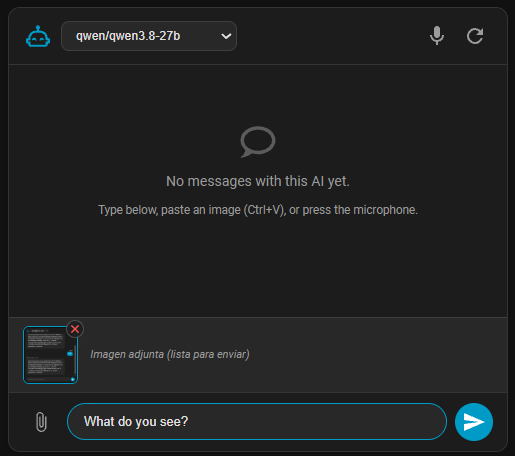
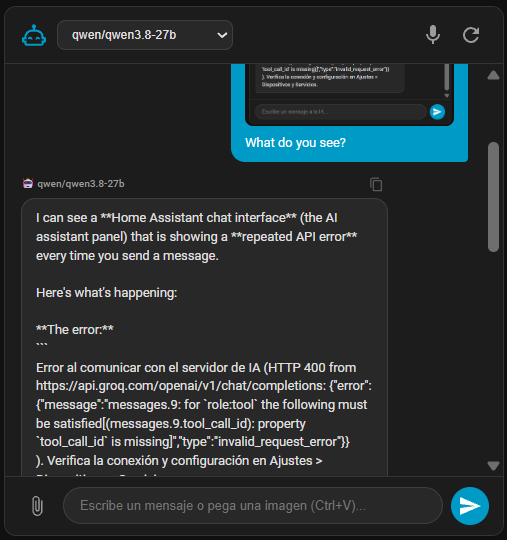
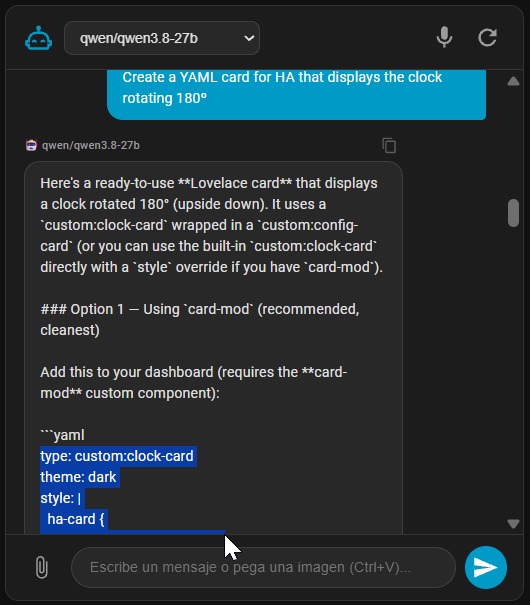
- 🖼️ Instant Clipboard Paste (
Ctrl + V) & File Attach (📎): Take a screenshot withWin + Shift + Sor copy an image anywhere on the web, and paste it directly into the chat. You can also click the paperclip icon (📎) to upload an image from disk. Includes instant thumbnail preview with a removal button (✕). - 🧠 Real-Time Multimodal Diagnostics: Upload camera snapshots, device photos, or Home Assistant error screenshots directly to the AI for instant automated diagnosis and actionable recommendations.
- 📋 1-Click Message Copy & Native Text Selection: Every message bubble features a 1-click copy icon button (
mdi:content-copy) with instant visual checkmark feedback (mdi:check). Full cursor text selection is enabled on all message bubbles for seamless copying of code blocks, YAML configurations, or entity IDs. - 📦 Syntax-Styled Code Blocks & 1-Click Code Copy: Any code or YAML automation returned by the model is automatically parsed into a high-contrast code box with language badge and a dedicated "Copy code" button.
- 🔄 Cross-Browser & Multi-Device History Sync: Powered by a dedicated Home Assistant backend WebSocket (
nexus_mcp/get_history), conversations synchronize seamlessly across all your browsers, laptops, and mobile devices without depending on isolated browser storage. - ⚡ Guaranteed Auto-Scroll on Reload: Multi-phase auto-scrolling guarantees that upon page reload or image load, the chat is immediately anchored to the latest sent or received message.
🚀 Key Features
- ⚡ Native Home Assistant Voice & Chat (
ConversationEntity):
Registers seamlessly as an official Home Assistant Assist agent. Talk to your home via web dashboard, mobile app, or ESPHome / Assist voice satellites. - 🛠️ Native Tool Calling & Smart Assistance:
Equipped with built-in Home Assistant tools adhering to Assist exposed entity permissions:ha_search_entities: Semantic discovery of exposed entities and device IDs.ha_get_entity_state: State and attribute inspection for exposed entities.ha_call_service: Real-time execution of Home Assistant services (light.turn_on,switch.toggle,climate.set_temperature, etc.) running with caller user context and permission enforcement.- YAML Automation Generation: When requested to create or propose automations, Nexus MCP outputs clean, validated YAML configurations in Markdown code blocks ready to paste directly into Home Assistant's UI Automation Editor.
- 🔄 Persistent Memory, Continuity & 10 Dedicated Telemetry Sensors: Conversations are stored on disk via Home Assistant's native storage (
.storage), ensuring chat history survives restarts and integration reloads. When starting a new session or reopening Assist, Nexus MCP automatically inherits the recent context from your previous conversation so you can seamlessly continue where you left off. Nexus MCP also exposes 10 dedicated sensors (Tokens Used, Requests Remaining, Quota %, TPM/RPM Limits, Window Wait, Rate Limit Cooldown, Conversation History) with ready-to-use formatted Markdown for your Dashboards, plus thenexus_mcp.clear_historyaction. Saying "Nueva conversación", "Reset", or "Clear history" instantly resets memory on demand.
- 🌐 100% Free & Fast Cloud Providers:
- Groq Cloud (Recommended in Europe & Worldwide):
- 1-click Google/GitHub login, zero credit card, zero phone verification required.
- Up to 14,400 free requests per day at ultra-high inference speeds (~0.08s latency).
- Supported models:
openai/gpt-oss-120b(default - 120B reasoning model!),qwen/qwen3.8-27b(ultra-fast ~0.08s latency), andopenai/gpt-oss-20b. - Direct in-app link to official catalog: Groq Model Catalog.
- Google Gemini (Free Tier):
- Free API key from Google AI Studio (no billing required).
gemini-3.1-flash-lite: 250,000 Tokens/Min (TPM) and 500 requests/day for conversational velocity with zero rate limits.gemini-flash-latest: Always points to the newest Flash release.
- Qwen Cloud (Alibaba Model Studio / DashScope):
- Access to flagship Qwen models (
qwen-plus-latest,qwen-turbo-latest,qwen2.5-coder-32b-instruct) with millions of free tokens.
- Access to flagship Qwen models (
- Ollama Local (Experimental / Untested):
- 100% offline, private, and free inference on your local network (
qwen2.5-coder:7b). - ⚠️ Note: Implemented following standard Ollama OpenAI-compatible schemas, but currently pending extensive real-world testing due to lack of local hardware/GPU resources. Community feedback and PRs are warmly welcome!
- 100% offline, private, and free inference on your local network (
- Custom OpenAI / BYOK (Experimental / Untested):
- Connect to OpenRouter (including
:freemodels), OpenAI Platform, DeepSeek, or any OpenAI-compatible API. - ⚠️ Note: Implemented via standard OpenAI chat completion endpoints, but pending full testing due to lack of funded accounts/resources. Community testing is appreciated!
- Connect to OpenRouter (including
- Groq Cloud (Recommended in Europe & Worldwide):
- 🛡️ Resilient & Self-Healing Architecture:
- Automatic Exponential Backoff: Gracefully retries HTTP 429 (rate limits) and HTTP 503 (server load) honoring
Retry-Afterheaders. - In-Flight Model Fallback: Automatically switches to capable backup models (
openai/gpt-oss-120b) if a specific model trips rate limits. - Model Name Auto-Normalization: Automatically fixes common user inputs (e.g.
qwen3.8-27bis auto-prefixed toqwen/qwen3.8-27b). - Model Clarity in Hub & Entity Titles: Config entries and entities clearly display the active model name in parentheses (e.g.,
Nexus MCP (qwen/qwen3.8-27b)).
- Automatic Exponential Backoff: Gracefully retries HTTP 429 (rate limits) and HTTP 503 (server load) honoring
- ⚙️ Full In-App Options Flow:
- Update API keys, switch models, adjust endpoints, or toggle autonomous mode anytime via Settings > Devices & Services > Nexus MCP > Configure (⚙️) without reinstalling.
- All configuration screens feature clickable direct links to API key dashboards and model documentation.
- 🔌 Assist Tool Calling & Security:
- Native tool calling adhering strictly to Home Assistant's
async_should_exposepolicies and user context security.
- Native tool calling adhering strictly to Home Assistant's
- 🪶 Zero CPU & RAM Overhead:
- Built entirely on non-blocking
aiohttpcalls on Home Assistant's event loop. No background threads, no memory leaks.
- Built entirely on non-blocking
🏗️ Architecture
┌────────────────────────────────────────────────────────────────────────┐
│                      OUTSIDE OF HOME ASSISTANT                         │
│  (Groq Cloud / Google AI Studio / Alibaba Cloud / Ollama Local)        │
│                                                                        │
│   ┌──────────────────────────────────────────────────────────────┐     │
│   │ INFERENCE ENGINE / LLM PROVIDERS                             │     │
│   │                                                              │     │
│   │  • Groq Cloud (14,400 req/day, Qwen 3.8 27B / GPT-OSS 120B)  │     │
│   │  • Google Gemini Free Tier (250k TPM, Gemini 3.1 Flash Lite) │     │
│   │  • Alibaba Model Studio (Qwen Plus / Coder)                  │     │
│   │  • Ollama + Qwen 2.5 Coder (Local Offline 100% Free)         │     │
│   │  • OpenAI Server / OpenRouter / DeepSeek BYOK                │     │
│   └──────────────────────────────▲───────────────────────────────┘     │
└──────────────────────────────────┼─────────────────────────────────────┘
                                   │
                                   │ (Asynchronous REST / HTTP Calls with Native Tool Calling)
                                   │
┌──────────────────────────────────▼─────────────────────────────────────┐
│                    INSIDE HOME ASSISTANT (HACS)                        │
│                                                                        │
│   ┌──────────────────────────────────────────────────────────────┐     │
│   │ NEXUS MCP INTERCOM (Custom Component)                        │     │
│   │                                                              │     │
│   │  • Official Conversation Entity (Assist / Voice / Web).      │     │
│   │  • Built-in Tools: Entity Search, States, Services.          │     │
│   │  • Security: respects Assist exposed entities & user context.│     │
│   │  • Exponential Backoff & Auto-Retries on HTTP 429/503.       │     │
│   └──────────────────────────────────────────────────────────────┘     │
└────────────────────────────────────────────────────────────────────────┘
📊 Free Tier Models Comparison
| Provider | Model Identifier | Tokens/Min (TPM) | Requests/Day (RPD) | Availability (EU / Global) | Best Used For |
|---|---|---|---|---|---|
| Google Gemini | gemini-3.1-flash-lite (Recommended) |
250,000 TPM | 500 RPD | Global / Europe | Best daily driver: Zero minute-rate-limit friction in fast voice/chat conversations. |
| Groq Cloud | openai/gpt-oss-120b (Default Groq) |
8,000 TPM | 14,400 RPD | Global / Europe | Maximum AI intelligence: 120B open reasoning model for complex automations. |
| Groq Cloud | qwen/qwen3.8-27b |
7,000 TPM | 14,400 RPD | Global / Europe | Ultra-fast inference: ~0.08s latency, excellent tool calling and multilingual support. |
| Groq Cloud | openai/gpt-oss-20b |
8,000 TPM | 14,400 RPD | Global / Europe | Fast and lightweight 20B model for simple queries. |
| Alibaba Cloud | qwen-plus-latest |
Generous | Generous | Global / Europe | Qwen flagship intelligence via DashScope. |
| Ollama Local | qwen2.5-coder:7b |
Unlimited | Unlimited | Local Network | 100% private, offline home control. |
Note on Meta Llama models: Groq Cloud restricts Meta models (llama-3.3-70b) in European Union regions due to EU licensing. Nexus MCP automatically falls back to qwen/qwen3.8-27b or openai/gpt-oss-120b to prevent HTTP 404 errors.
📈 10 Dedicated Telemetry & Quota Sensors
Nexus MCP automatically registers independent first-class Home Assistant sensors for complete visibility into your AI limits and usage:
| Sensor Entity ID | Entity Name | Unit | Hover Tooltip Description |
|---|---|---|---|
sensor.<id>_daily_tokens |
Daily Tokens Used | tokens | Total prompt and completion tokens used today across all requests. |
sensor.<id>_daily_requests_used |
Daily Requests Used | requests | Total number of queries submitted to the AI model today. |
sensor.<id>_daily_quota_remaining |
Daily Requests Remaining | requests | Remaining requests available today before hitting the daily quota. |
sensor.<id>_daily_quota_percent |
Daily Quota Remaining | % | Percentage of daily provider requests quota remaining until midnight UTC reset. |
sensor.<id>_daily_requests_limit |
Daily Requests Limit | requests | Maximum allowable queries per day (RPD) in the provider's free tier. |
sensor.<id>_model_limit |
Tokens Per Minute Limit | tokens/min | Maximum input tokens per minute (ITPM/TPM) allowed by the provider. |
sensor.<id>_rpm_limit |
Requests Per Minute Limit | req/min | Maximum queries allowed within any 60-second window. |
sensor.<id>_max_wait_time |
Max Window Wait Time | s | Sliding window duration in seconds required for per-minute tokens to replenish. |
sensor.<id>_rate_limit_reset |
Rate Limit Cooldown | s | Live real-time cooldown seconds remaining if throttled by the provider. |
sensor.<id>_conversation_history |
Conversation History | - | Most recent conversation message and activity preview with formatted markdown. |
⚙️ Configuration & Direct Links
When setting up or reconfiguring Nexus MCP, clickable links are provided right inside the dialog:
- Google Gemini: Get your free key at Google AI Studio.
- Groq Cloud: Get your free key at Groq Console and check the Official Model Catalog.
- Qwen Cloud: Get your key at Alibaba Cloud Model Studio.
- OpenRouter: Get your key at OpenRouter (explore Free Models).
🧪 Testing & Quality Assurance
Nexus MCP maintains a rigorous test suite covering config flows, options flows, entity discovery, builtin tools, schema sanitization, and LLM engines:
python -m unittest discover -s tests
Result: 50/50 unit tests passing (100% success rate).
☕ Support & Donations
If you appreciate this free, open-source integration and want to support its ongoing development, feel free to buy me a coffee:



📄 License
This project is licensed under the MIT License - 100% open-source and free for the community. See LICENSE for details.
Reviews (0)
Sign in to leave a review.
Leave a reviewNo results found