aws-architecture-diagram-skill
Health Gecti
- License — License: MIT
- Description — Repository has a description
- Active repo — Last push 0 days ago
- Community trust — 42 GitHub stars
Code Gecti
- Code scan — Scanned 3 files during light audit, no dangerous patterns found
Permissions Gecti
- Permissions — No dangerous permissions requested
Bu listing icin henuz AI raporu yok.
Reusable skill for generating AWS architecture diagrams in draw.io format. Works with Kiro CLI and Claude Code.
AWS Architecture Diagram Skill

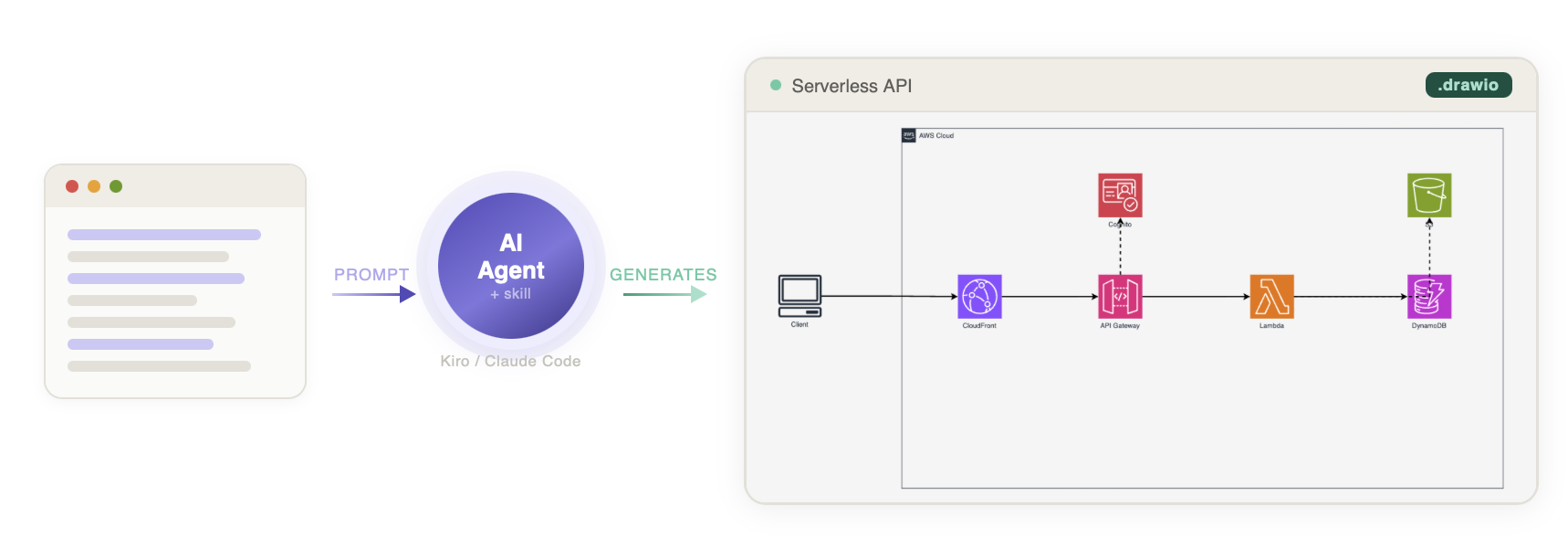
A reusable skill for generating AWS architecture diagrams in draw.io format. Works with both Kiro CLI and Claude Code.
Generates production-quality .drawio files using official AWS Architecture Icons with proper styling, layout, and color coding.
Features
- Left-to-right flow — UI/Frontend on left, data sources on right
- Official AWS icons — from draw.io's built-in
mxgraph.aws4stencil library (sourced from AWS Architecture Icons) - Verified icon catalog — only icons confirmed to render correctly
- Consistent styling — 78px icons, strokeWidth=2 edges, proper AWS color palette
- Export support — PNG/SVG/PDF via draw.io Desktop CLI with embedded XML
Installation
Claude Code (Plugin — recommended)
/plugin marketplace add vidanov/aws-architecture-diagram-skill
/plugin install aws-architecture-diagram@vidanov-skills
Then use it:
/aws-architecture-diagram:aws-architecture-diagram
Or just ask naturally — the skill activates automatically when you mention AWS architecture diagrams.
Claude Code (Manual)
mkdir -p ~/.claude/skills/aws-architecture-diagram
cp claude/SKILL.md ~/.claude/skills/aws-architecture-diagram/SKILL.md
cp -r references ~/.claude/skills/aws-architecture-diagram/references
Kiro CLI
# Global (all projects)
mkdir -p ~/.kiro/skills/aws-architecture-diagram
cp kiro/SKILL.md ~/.kiro/skills/aws-architecture-diagram/SKILL.md
cp -r references ~/.kiro/skills/aws-architecture-diagram/references

# Per-project
mkdir -p .kiro/skills/aws-architecture-diagram
cp kiro/SKILL.md .kiro/skills/aws-architecture-diagram/SKILL.md
cp -r references .kiro/skills/aws-architecture-diagram/references
Usage
Just ask to create an AWS architecture diagram:
Create an AWS architecture diagram for a serverless API with Lambda, DynamoDB, and API Gateway
Or with export:
Create an AWS architecture diagram as PNG for a real-time data pipeline with Kinesis, Lambda, and S3
Example Output
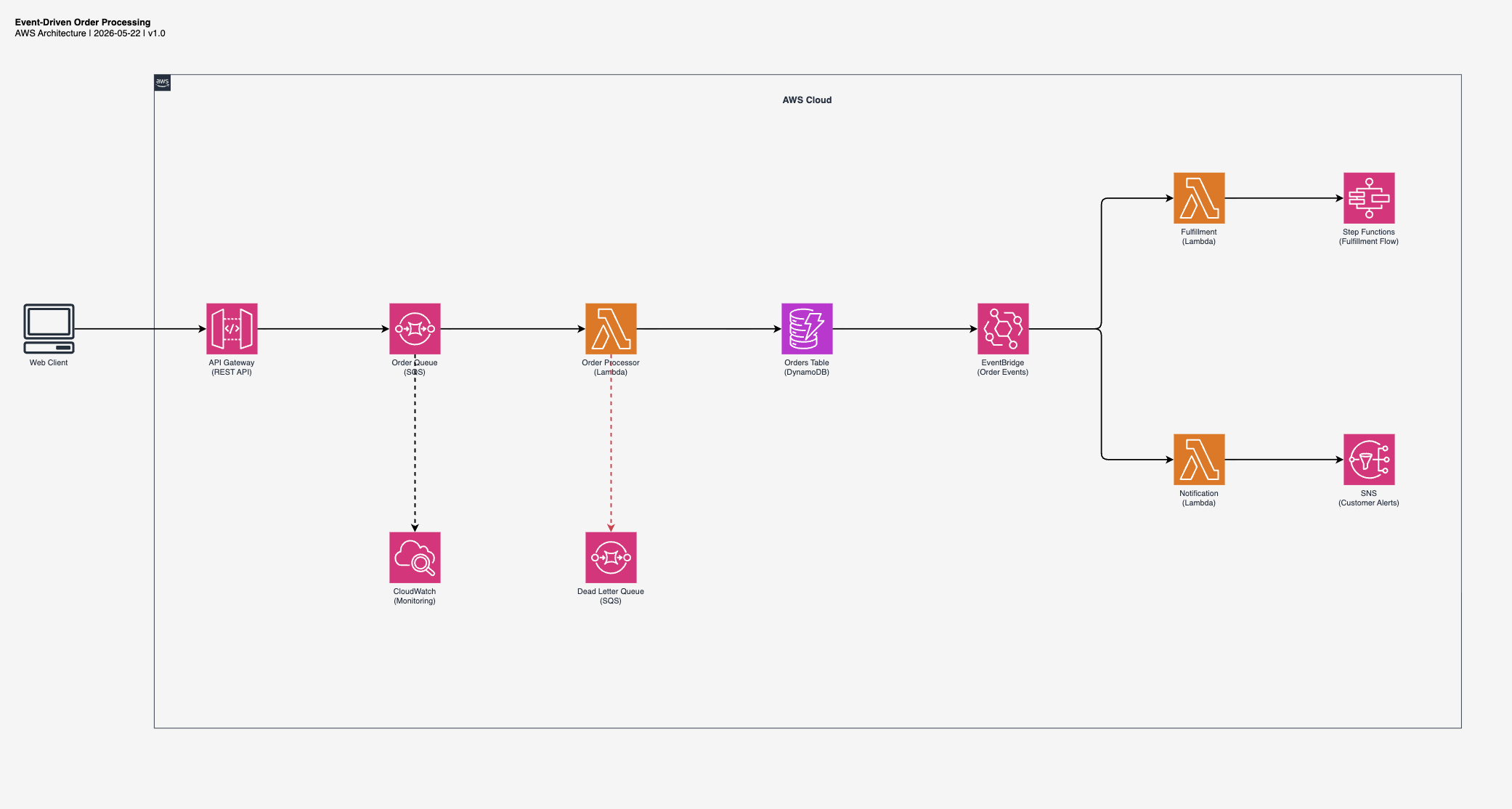
Event-Driven Order Processing
"Create an event-driven order processing architecture with SQS, Lambda, DynamoDB, and EventBridge"
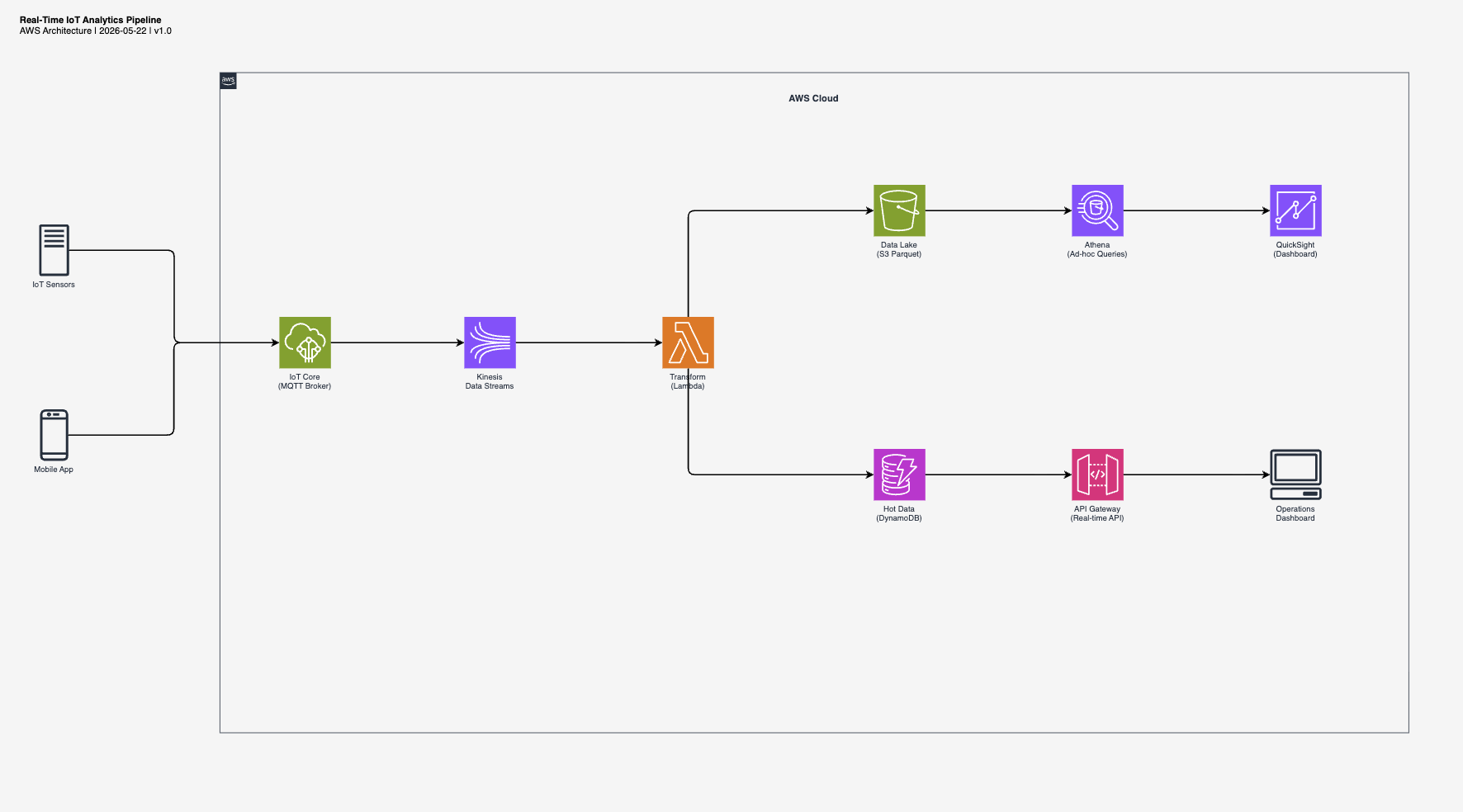
Real-Time IoT Analytics
"Create a real-time IoT analytics pipeline with Kinesis, Lambda, S3 data lake, and DynamoDB"
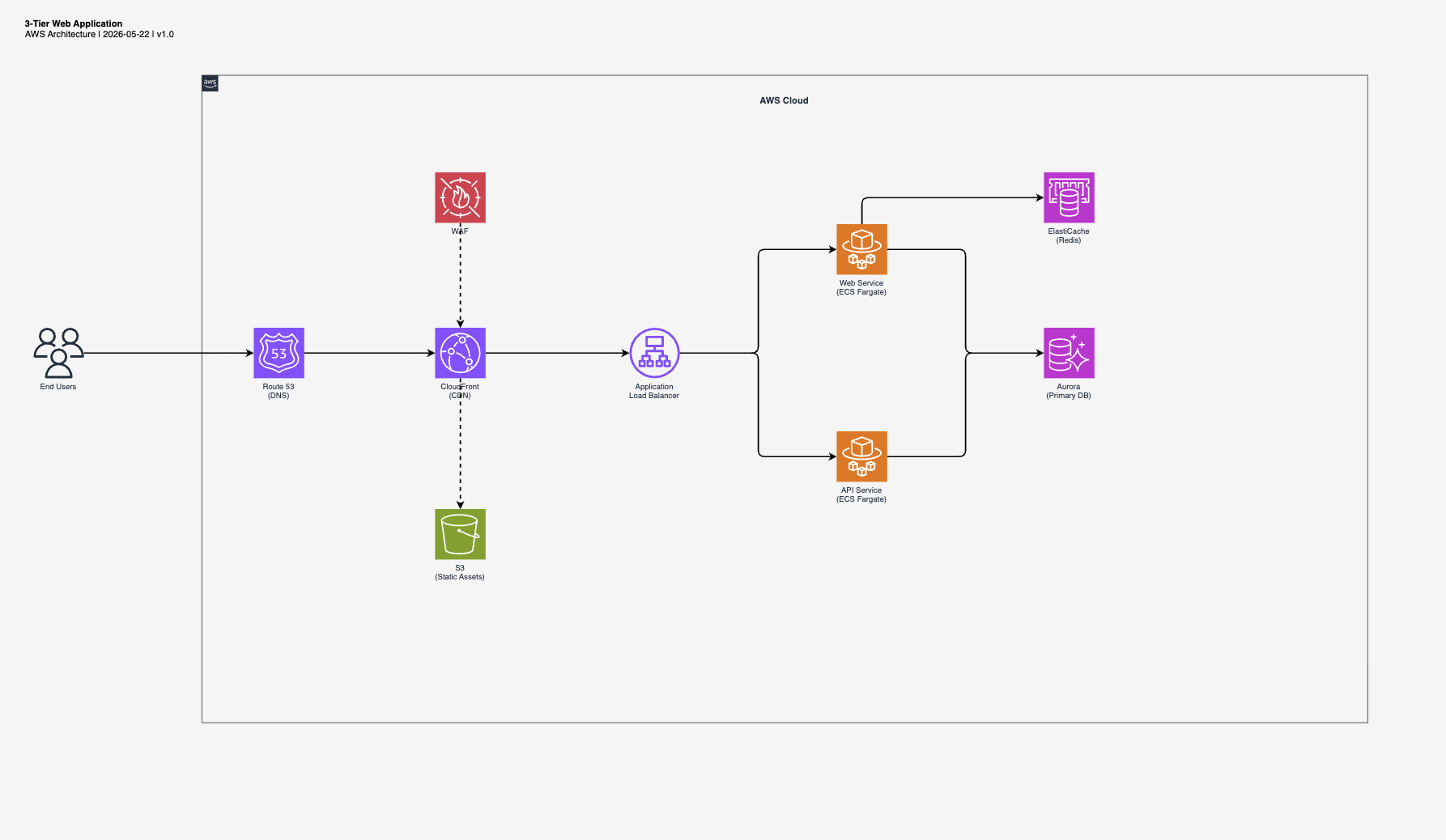
3-Tier Web Application
"Create a 3-tier web application with CloudFront, ALB, ECS Fargate, Aurora, and ElastiCache"
Structure
aws-architecture-diagram-skill/
├── README.md
├── LICENSE
├── kiro/
│   └── SKILL.md                        # Kiro CLI version
├── claude/
│   └── SKILL.md                        # Claude Code version
└── references/
    ├── aws-icons-compute.md            # Lambda, EC2, ECS, EKS, Fargate (25+ icons)
    ├── aws-icons-database.md           # DynamoDB, RDS, Aurora, ElastiCache (40+ icons)
    ├── aws-icons-integration.md        # API GW, SQS, SNS, EventBridge, Step Functions (35+ icons)
    ├── aws-icons-networking.md         # CloudFront, Route 53, VPC, ELB (40+ icons)
    ├── aws-icons-storage.md            # S3, EFS, EBS, Glacier, Backup (40+ icons)
    ├── aws-icons-security.md           # IAM, Cognito, KMS, WAF, Shield (45+ icons)
    ├── aws-icons-analytics-ml.md       # Kinesis, Athena, Bedrock, SageMaker (45+ icons)
    └── aws-icons-common.md             # Groups, general resources, edge styles, base template
Key Insight: Two Icon Patterns
draw.io AWS icons have two patterns with opposite strokeColor rules:
| Pattern | Style | strokeColor | Use for |
|---|---|---|---|
| Service-level | shape=mxgraph.aws4.resourceIcon;resIcon=mxgraph.aws4.<name> |
#ffffff (REQUIRED) |
Main service icons (colored square + white glyph) |
| Resource-level | shape=mxgraph.aws4.<name> |
none (REQUIRED) |
Sub-resources (silhouette icons) |
Confusing these patterns is the #1 cause of broken icons in AI-generated diagrams.
Supported Services (270+ icons)
| Category | Icons |
|---|---|
| Compute | Lambda, EC2, ECS, EKS, Fargate |
| App Integration | API Gateway, SNS, SQS, EventBridge, Step Functions |
| Database | DynamoDB, RDS, Aurora, ElastiCache |
| Storage | S3, EFS, EBS |
| Networking | CloudFront, Route 53, VPC, ELB (ALB/NLB) |
| Security | IAM, Cognito, KMS, WAF |
Known Broken Icons
These resIcon values do NOT render in draw.io — avoid them:
mxgraph.aws4.dynamodb_table→ usemxgraph.aws4.dynamodbinsteadmxgraph.aws4.dynamodb_stream→ usemxgraph.aws4.dynamodbwith labelmxgraph.aws4.general_saml_token→ usemxgraph.aws4.traditional_server
Comparison with Alternatives
| Solution | Type | Output | Editable | Zero-deps | Verified Icons |
|---|---|---|---|---|---|
| aws-architecture-diagram-skill | Agent Skill | .drawio |
✅ | ✅ | ✅ |
| jgraph/drawio-mcp | MCP Server + Skill | .drawio |
✅ | ❌ (MCP) | ❌ |
| awslabs/aws-diagram-mcp-server | MCP Server (Python) | PNG | ❌ | ❌ (Python+GraphViz) | N/A |
| awslabs/diagram-as-code | CLI (Go) | PNG/SVG | ❌ | ❌ (Go binary) | N/A |
| carlosmgv02/diagram-ai-generator | MCP Server | Multi-cloud | ❌ | ❌ (MCP) | ❌ |
| clouda.ai | SaaS | PNG | ❌ | N/A | N/A |
Why this approach wins:
- No runtime dependencies. It's a markdown file, not a server.
- Output is native
.drawioXML you can open, edit, and version-control. - Verified icon catalog documents which
mxgraph.aws4.*names actually render vs. silently break. - Opinionated layout: left-to-right flow with consistent spacing, not random placement.
- Works in both Kiro CLI and Claude Code.
License
MIT
Yorumlar (0)
Yorum birakmak icin giris yap.
Yorum birakSonuc bulunamadi