bulwark
Health Gecti
- License — License: Apache-2.0
- Description — Repository has a description
- Active repo — Last push 0 days ago
- Community trust — 14 GitHub stars
Code Basarisiz
- rm -rf — Recursive force deletion command in .github/workflows/release.yml
Permissions Gecti
- Permissions — No dangerous permissions requested
Bu listing icin henuz AI raporu yok.
Local-first security for developers and their AI coding agents. Finds risky agent settings (hooks, auto-approve, unpinned MCP servers), API keys leaked into agent chats, and OS weaknesses, then fixes them. Single-file CLI and desktop app for Linux, macOS and Windows. No telemetry.

Bulwark
Local-first security for developers and their AI coding agents.
Finds the risky agent settings and leaked keys attackers look for, and fixes them. Nothing leaves your machine.




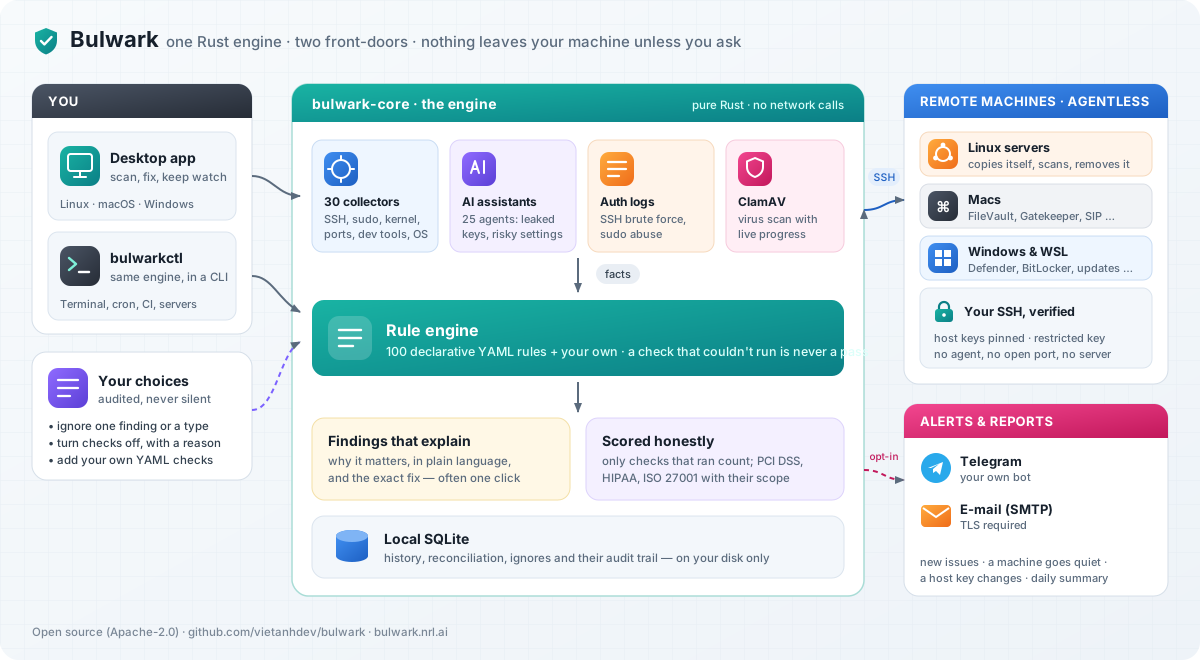
Bulwark checks what an attacker would use on a developer machine:
- AI coding agents (Claude Code, Cursor, Copilot, Codex, Gemini and 20 more): project hooks,
auto-approve modes, unpinned MCP servers, hidden instructions, keys left in chats. - Secrets and supply chain: plaintext cloud keys, SSH keys without a passphrase, malicious packages.
- The system underneath: exposed dev services, SSH, sudo, kernel, persistence.
- Your other machines, over the SSH you already use. No agent, no server.
Each problem says why it matters and how to fix it, often in one click. No account, no telemetry.
Try it
Download the CLI (a single file) or the desktop app, then:
bulwarkctl ai scan      # your AI coding agents: settings, MCP servers, leaked keys
bulwarkctl scan         # this computer
bulwarkctl ai redact    # preview removing leaked keys from agent files (--apply to do it)
bulwarkctl agent install  # let Claude Code, Codex, Copilot, Gemini CLI, OpenCode, Cursor run Bulwark
With the agent skill installed, ask your agent "Is this repository
safe?": it runs the scan, explains what it found and asks before fixing anything.
Bulwark 0.13.1 · AI coding agents · 1 project · 4 agent files checked

4 problems to fix  1 critical · 3 high

  ● Critical Project-supplied agent hooks run shell commands automatically
             This project settings file defines hooks. Claude Code hooks run shell commands
             automatically on tool/session events — a project-supplied hook can execute …
             → Remove the hooks from the repository's agent config (for example the hooks
               block in .claude/settings.json, .cursor/hooks.json, .kiro/hooks/, or a …
             in: ~/Projects/api/.claude/settings.json:1
             more: https://bulwark.nrl.ai/checks/blwk-ai-002
  …

→ 1 agent file holds leaked secrets Bulwark can remove — preview with bulwarkctl ai redact, then add --apply
--all shows everything, --json is for scripts, and the exit code works in CI.
Demo
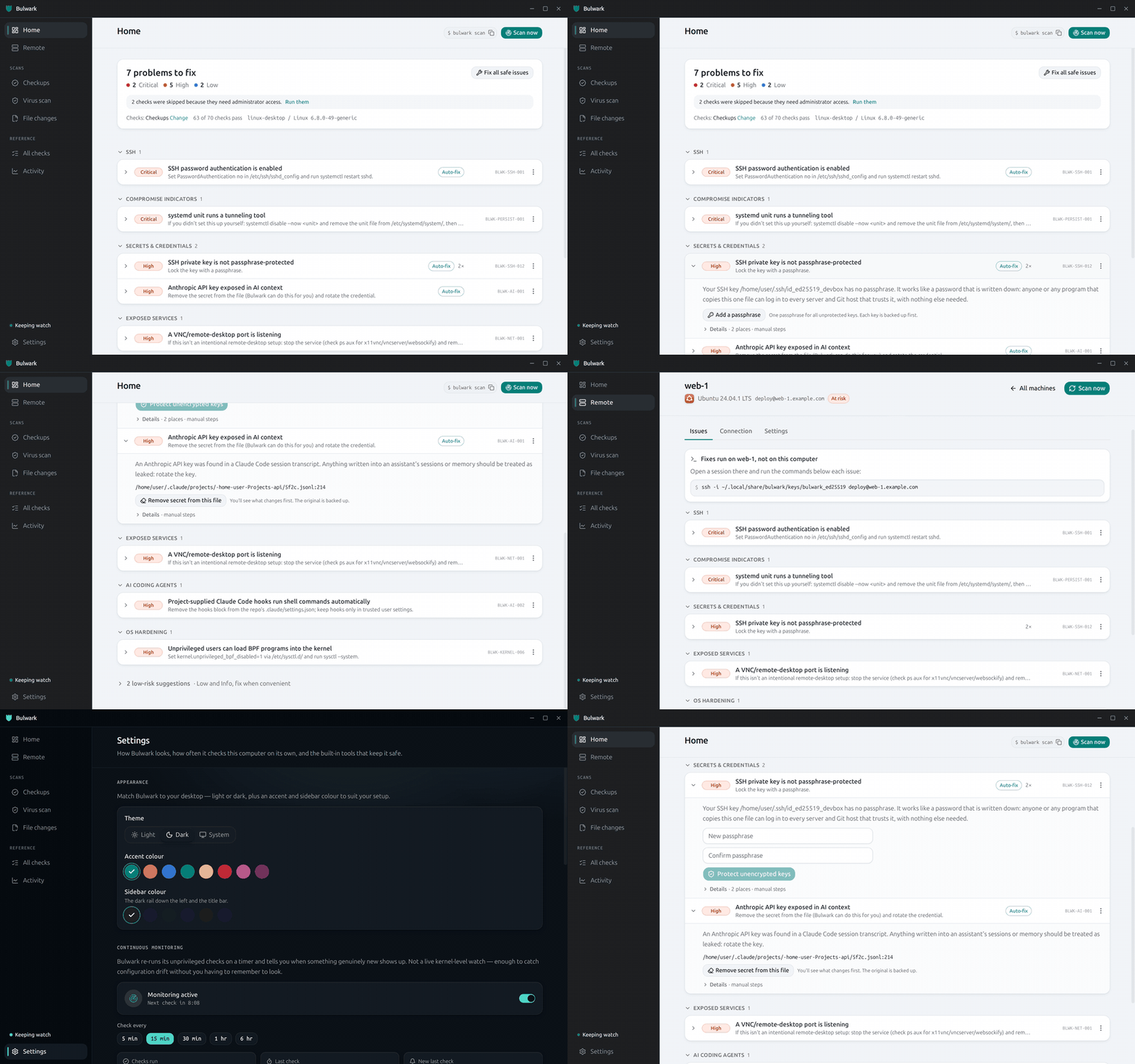
How it works
Every check is a small YAML rule over facts that a collector gathers — one place to read, one
place to fix. A check that couldn't run (no privilege, wrong OS, a file it couldn't read) is reported
as such and never counted as a pass, so a green result means something.
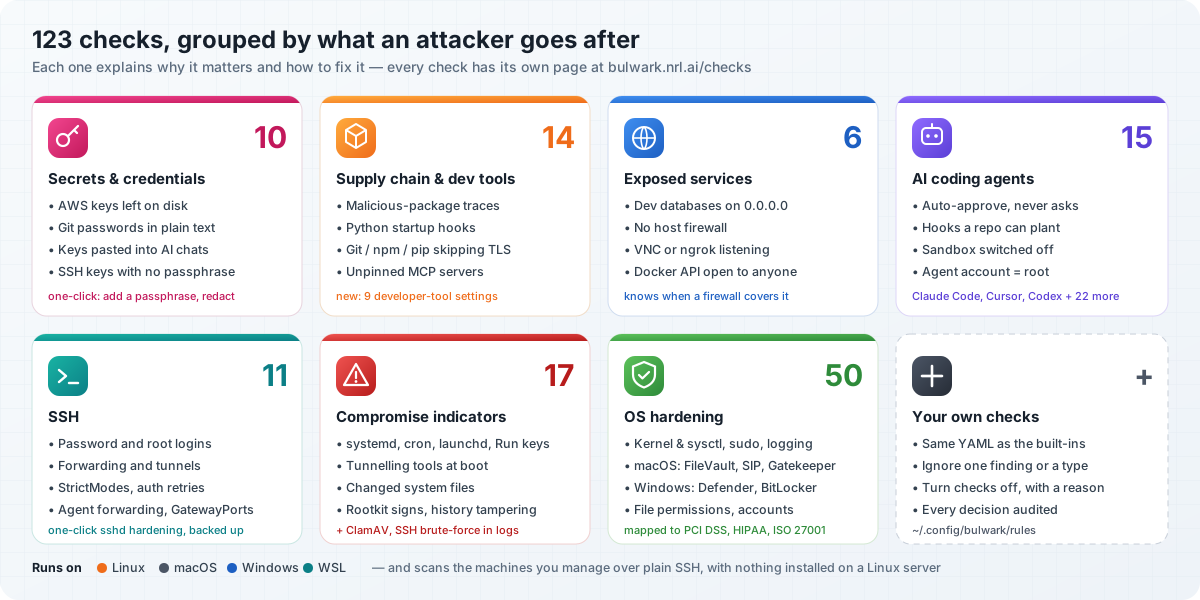
Watch your other machines
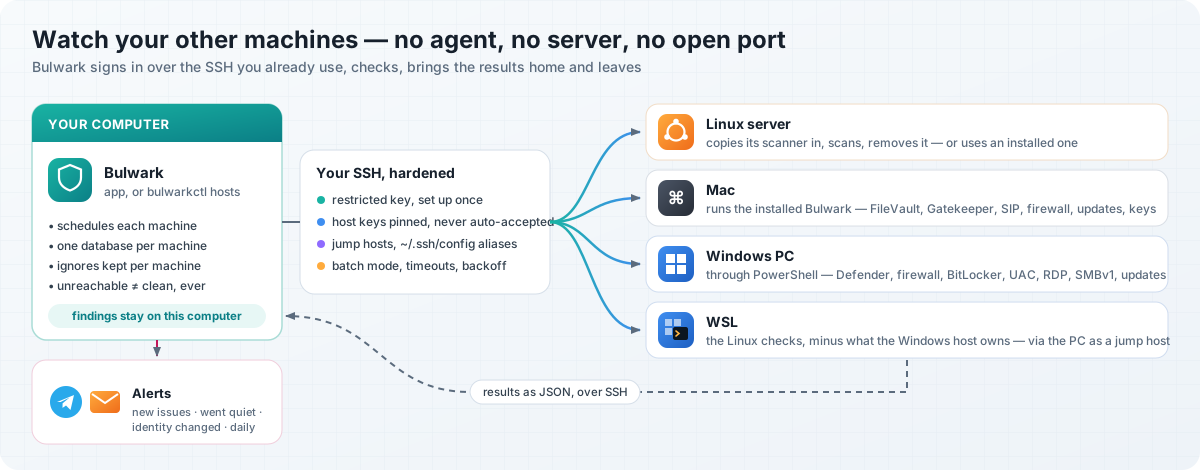
Screenshots
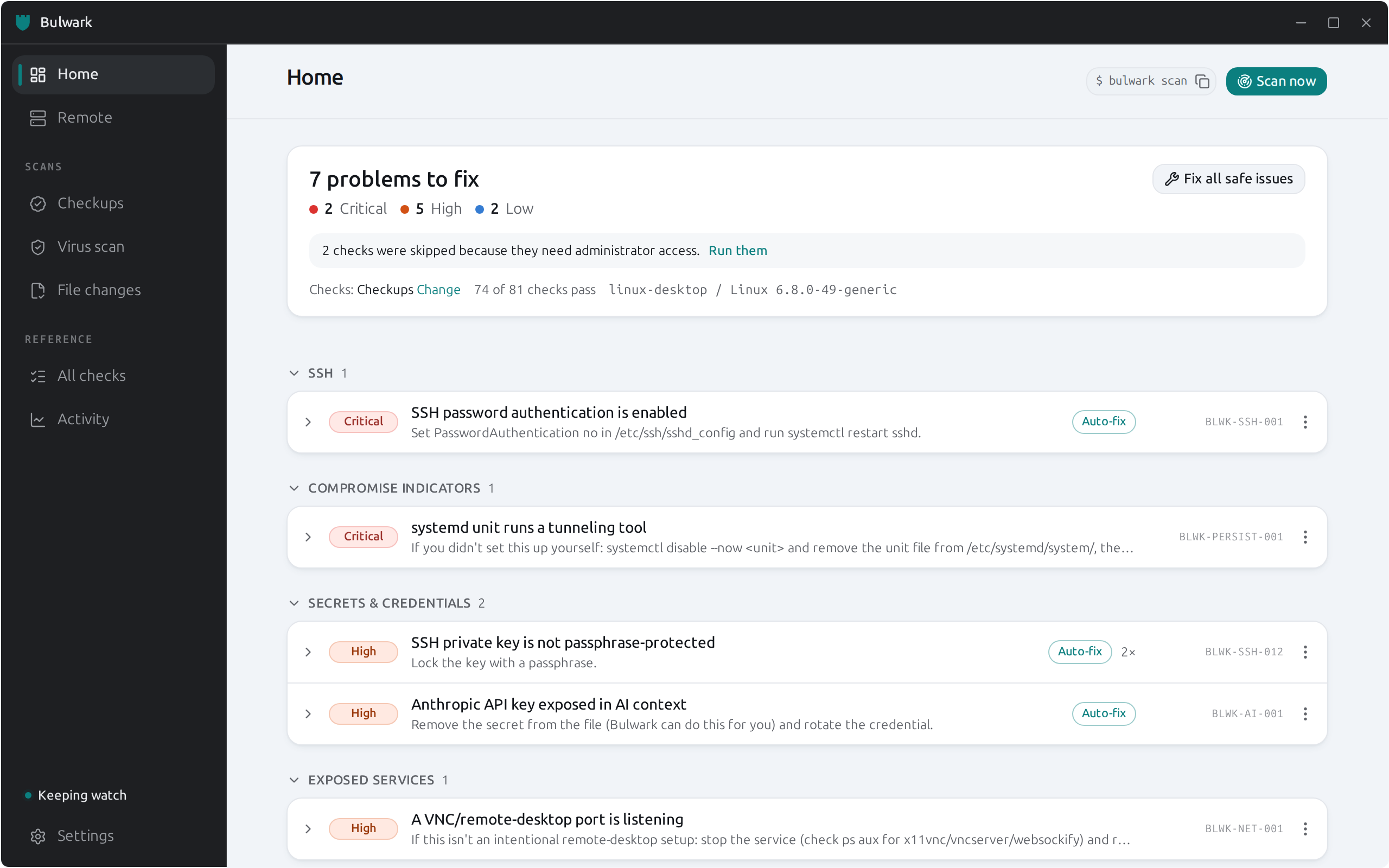 |
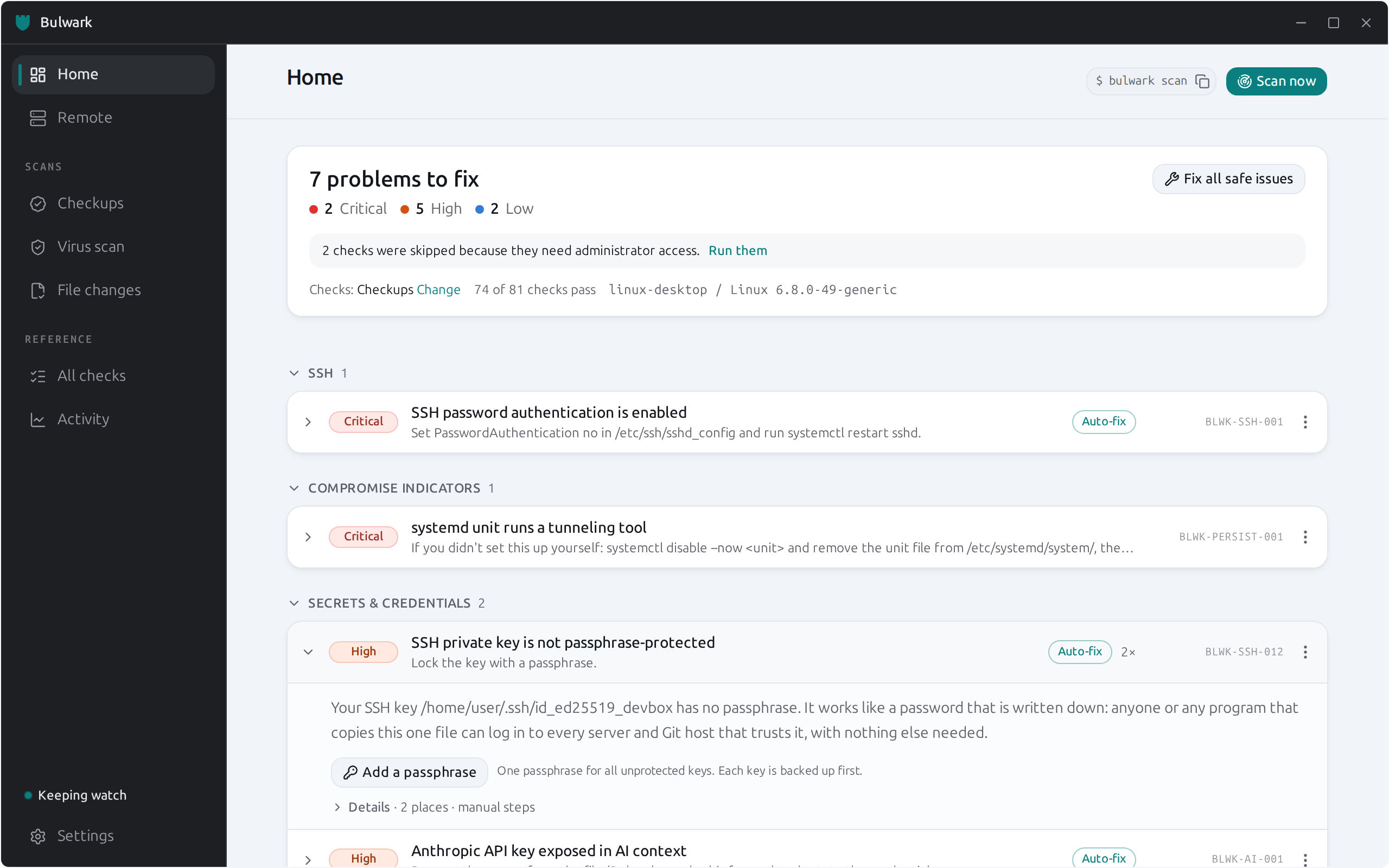 |
| Home — problems grouped by cause, ranked by severity | Fix — why it matters, the one-click fix, then details |
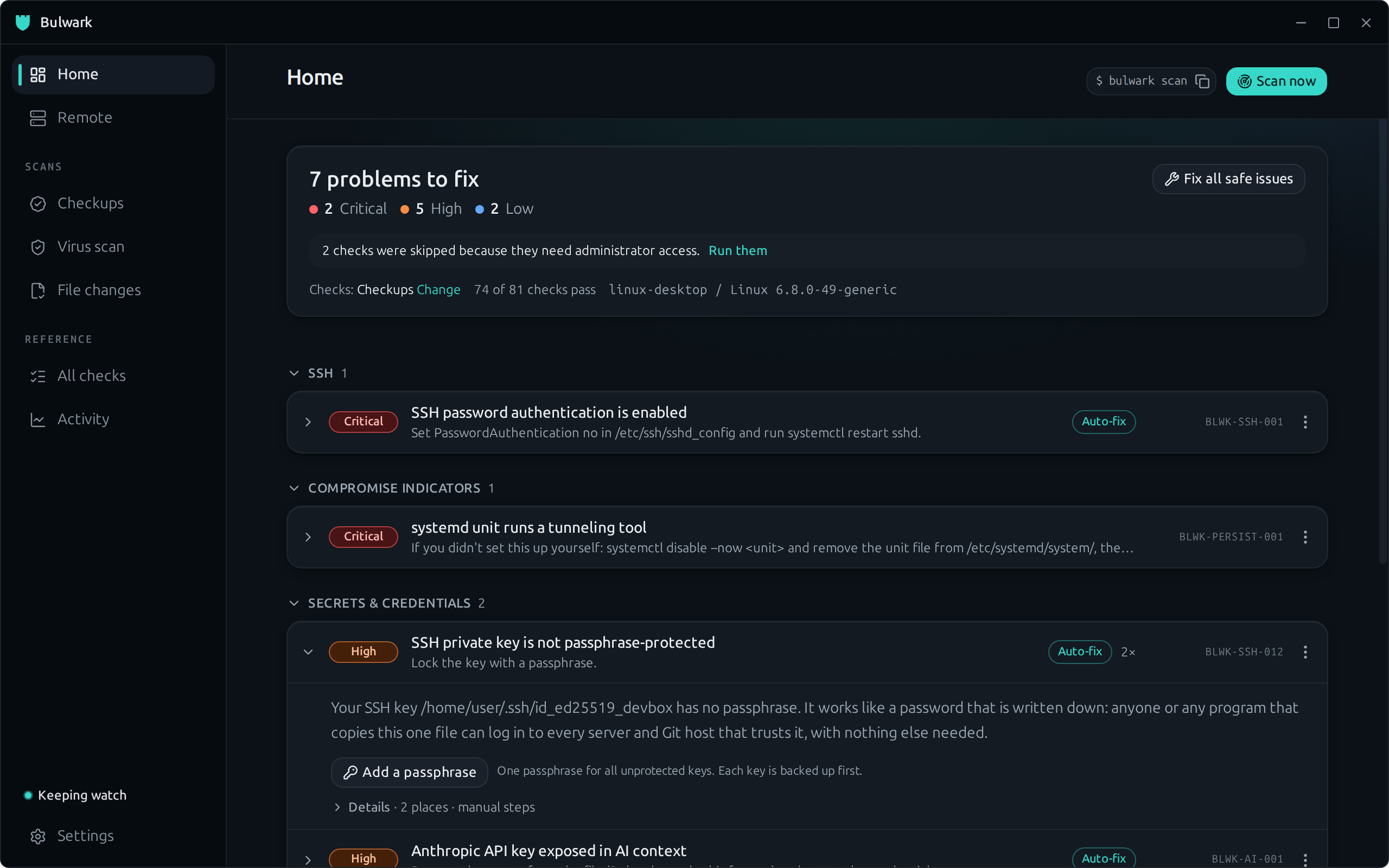 |
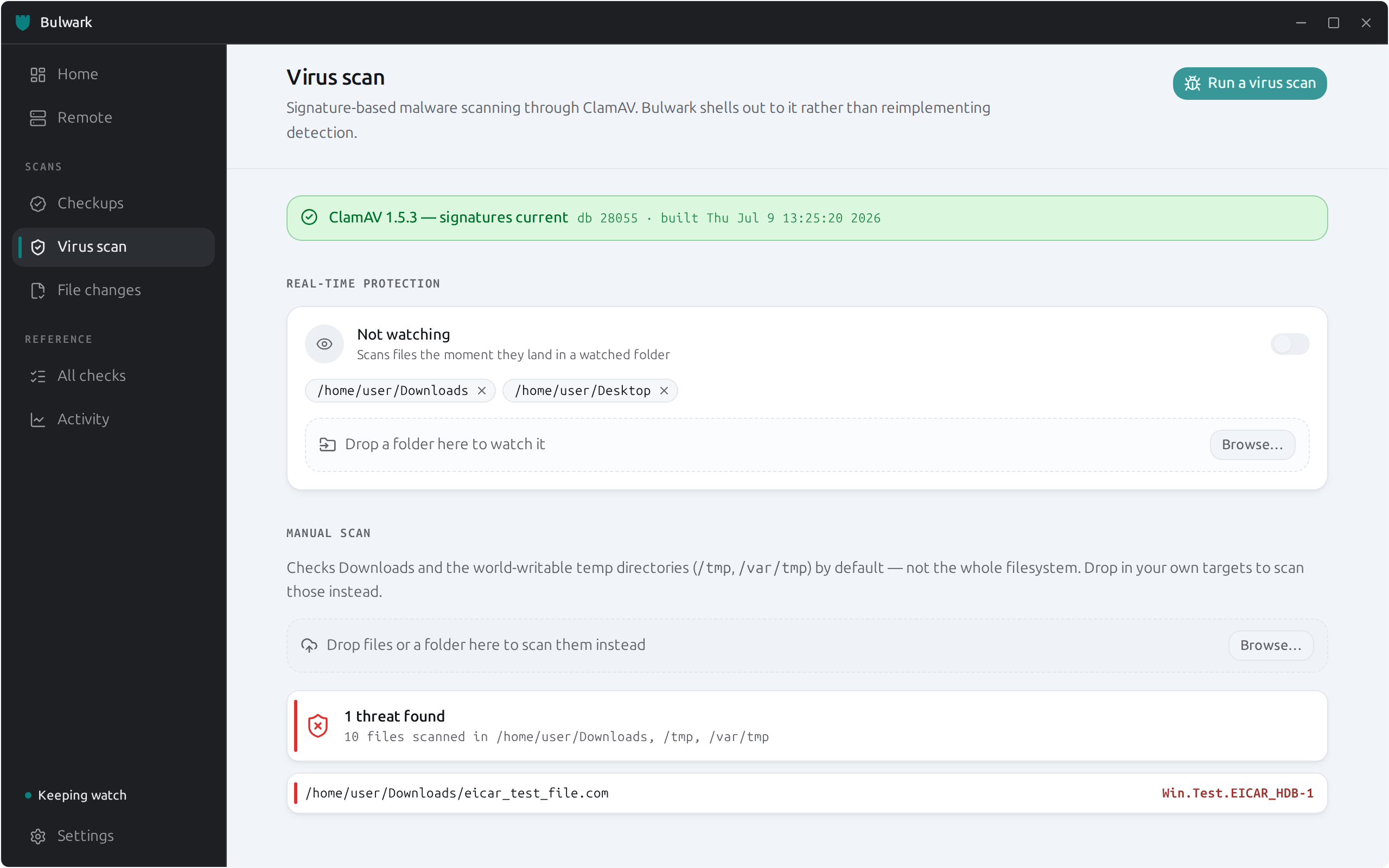 |
| Dark mode — follows your desktop or set by hand | Virus scan — ClamAV with live progress and folder watching |
 |
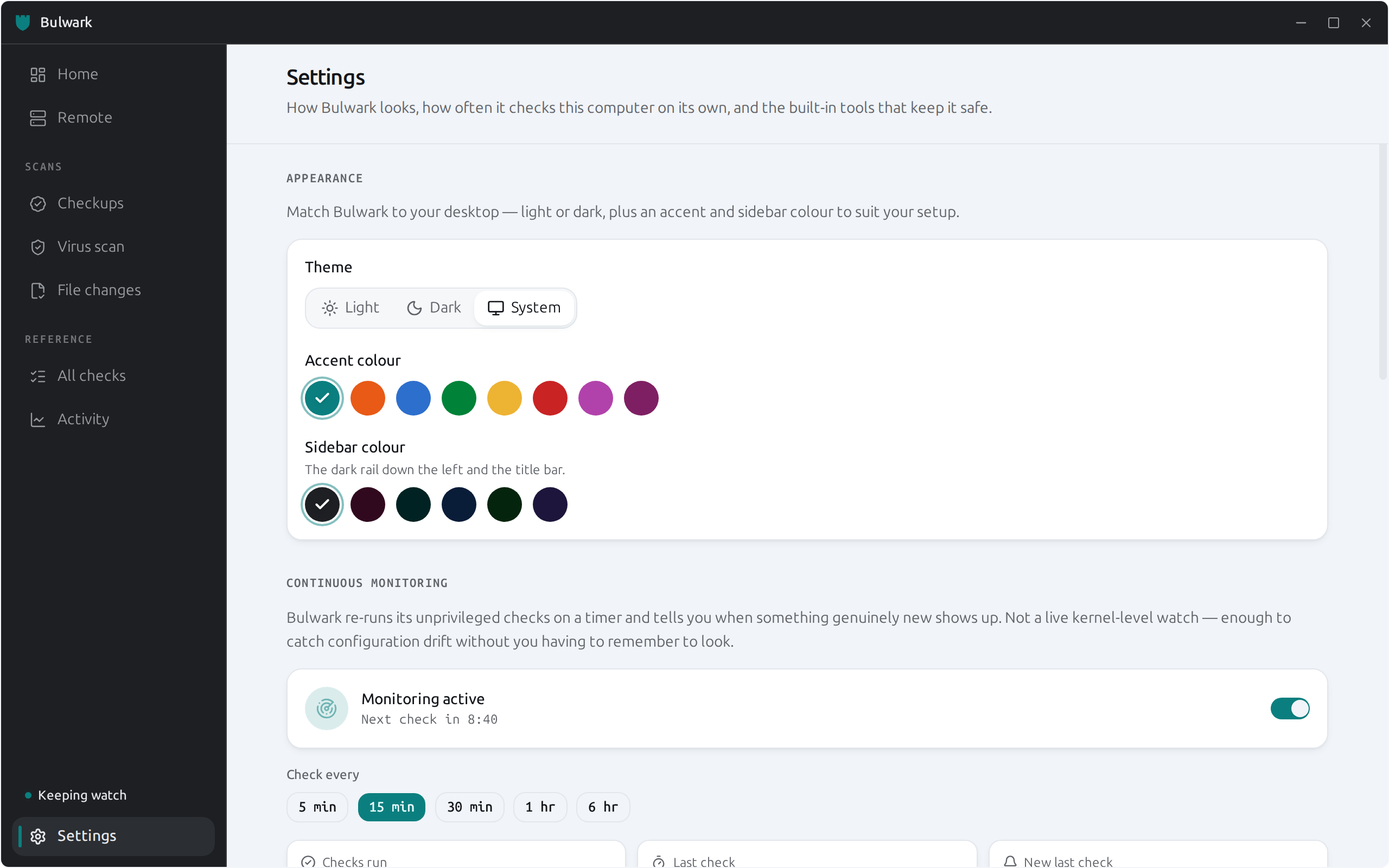 |
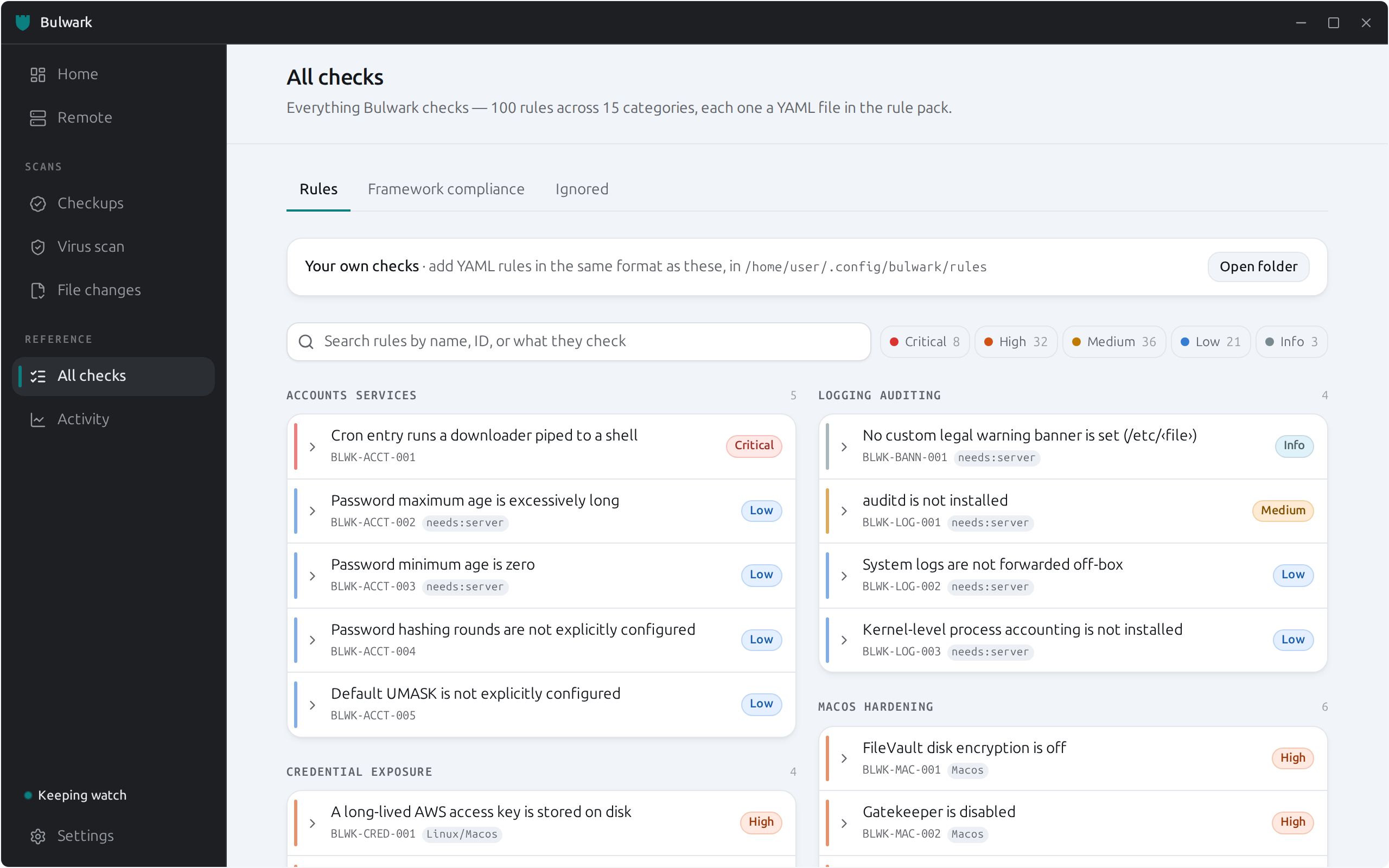
| All checks — every rule, searchable, with CIS / MITRE ATT&CK coverage | Settings — light or dark, eight accents, six sidebar colours |
 |
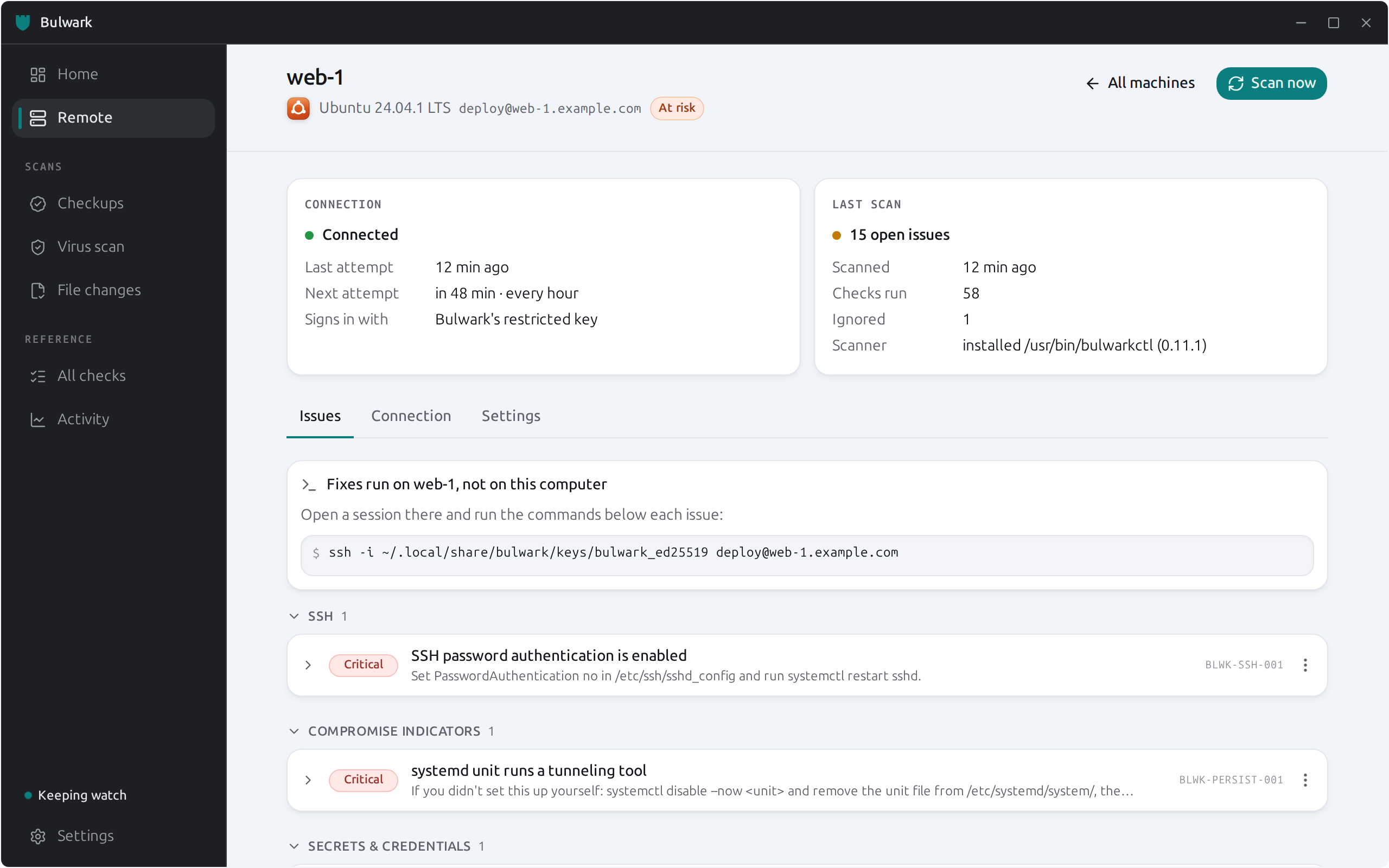 |
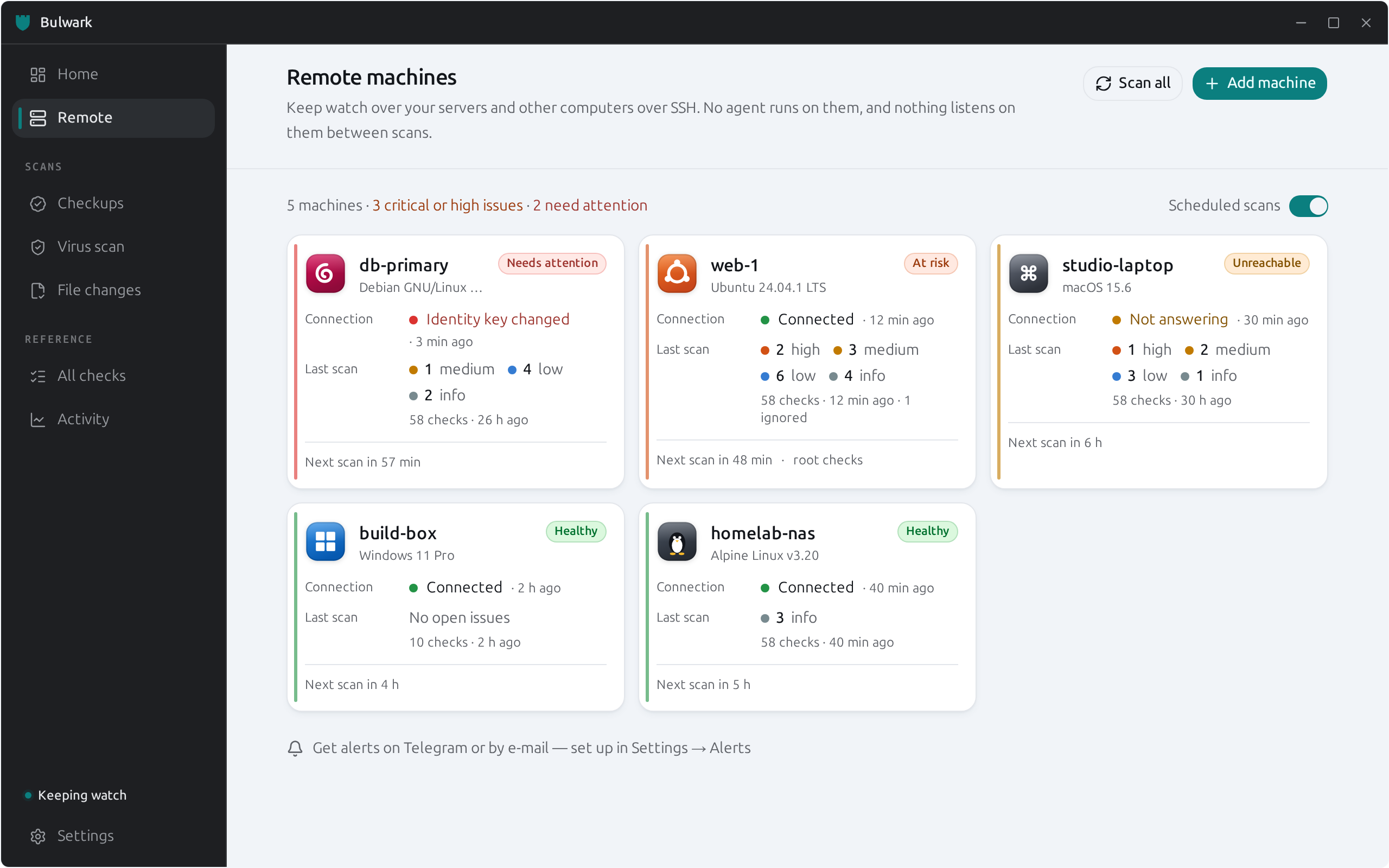
| Remote — Linux, macOS, Windows and WSL machines at a glance | One machine — connection and scan kept apart, issues grouped |
Features
- AI assistant security — scans the AI coding assistants on the machine (Claude Code, Claude
Desktop, Cursor, Copilot, Codex, Gemini, Qwen Code, Zed, Goose, OpenCode, Kilo Code, Crush, Amp,
Kiro, Amazon Q, Cline, Roo, Windsurf / Devin Desktop, Continue, Augment, JetBrains Junie, Aider,
Warp, Open Interpreter, and VS Code with its forks) for secrets leaked into
context/memory/transcripts and for dangerous agent configuration a prompt injection could turn
into code execution: project-supplied Claude Code hooks (CVE-2025-59536), VS Code
auto-approve/"YOLO mode" (CVE-2025-53773), MCP servers on unpinnednpxor vulnerablemcp-remote(CVE-2025-6514), hidden-Unicode "Rules File Backdoor" instruction files,
base-URL exfil overrides, and world-readable credential stores. Workspaces are auto-discovered;
leaked secrets are opt-in redactable (dry-run first,0600backup, permissions preserved). A
highlighted tab in the GUI andbulwarkctl ai scan/bulwarkctl ai redactin the CLI. - 100 rules across 15 categories (credential exposure, SSH/remote access, persistence, network
egress, kernel hardening, filesystem permissions, privilege escalation, logging/auditing,
accounts/services, defense evasion, rootkit/malware, file integrity, developer-tool settings, macOS and
Windows settings), each carrying a severity,
a plain-language explanation with live values interpolated in, step-by-step fix, and CIS/MITRE
ATT&CK references. Every check, including the 23 AI assistant checks, has its own page at
bulwark.nrl.ai/checks. - Monitor other machines, agentless — add servers and other computers you can SSH into, and
Bulwark scans them on a schedule with the same checks and plain-language fixes. Nothing is
installed on or listens on a monitored machine, and there is no server to run: it uses your own
SSH (config aliases, agent, jump hosts — or a password once, to install its ownrestricted
key). Every machine's identity is verified once and a changed host key stops scans; a machine it
can't reach is reported as unreachable, never as clean. A Machines page in the GUI, orbulwarkctl hosts …plus one cron line. See
Monitoring other machines. - Alerts on Telegram or by e-mail — opt-in: new issues, a machine that stops answering, a
changed host key, and an optional daily report, batched into one message per round of scans.bulwarkctl notify …or Settings → Alerts. - Antivirus scanning — shells out to a real ClamAV
clamscanon demand, plus a fast
presence/database-freshness check on every routine scan. - Log analysis — a decode → detect → correlate pipeline over the systemd journal (or any
syslog-format file) that catches events over time the config scanner can't see: SSH
brute-force, invalid-user scans, sudo/su abuse, direct root logins. Decoders (YAML regex →
fields) and rules (the same condition DSL as the config engine, plus acorrelateblock) are
data, not code, and correlation uses keyed sliding windows — "8 failed logins from one IP in
60s," not "a failed login." Run it withbulwarkctl logs scan. - Continuous monitoring — a periodic re-scan loop (default 15 min) plus a filesystem watcher
on the specific sensitive paths the rule pack actually reads (sshd_config, systemd units,
sudoers, cron,authorized_keys), so an edit to one of those triggers an immediate re-check
instead of waiting for the next tick. Findings are reconciled across runs so recurring issues
don't duplicate, and genuinely new findings raise a desktop notification. - Compliance view — every rule's CIS/MITRE ATT&CK references are cross-referenced against
open findings to show pass/fail coverage per framework. - Two front-doors, one engine — everything above is available identically from the CLI
(scriptable, cron-friendly, JSON output) and the GUI (dashboard, live scan streaming, one-click
privileged re-scan via polkit). - Extensible by design — new checks are YAML files with a small condition DSL
(==,!=,in,contains,matches,</>/<=/>=,and/or/not), not Rust code.
No plugin API to learn.
How it compares with host auditors
This table covers the host-hardening side; the AI-agent checks and what each one is grounded in are in
the AI agent security guide. On the host side Bulwark fills a specific gap: a desktop-native, continuously-monitoring host scanner with a
real GUI — most established open-source Linux auditors are CLI-only, snapshot-style tools, and
most tools with a real-time/EDR story are commercial, cloud-connected, and built for fleets, not
a single desktop.
| Tool | Type | Scope | GUI | Continuous | Compliance mapping | Remediation |
|---|---|---|---|---|---|---|
| Bulwark | Open source | Host config audit + AV + basic rootkit indicators | ✅ native desktop | ✅ periodic + file-watch | ✅ CIS/ATT&CK per rule | Plain-language fix hint |
| Lynis | Open source | Host config audit, ~300+ checks across boot, filesystem, network, auth, kernel[^1] | ❌ CLI-only[^1] | ❌ on-demand/cron only[^1] | Partial (HIPAA/ISO27001/PCI DSS via Enterprise)[^1] | Suggestions in report, no auto-fix |
| rkhunter / chkrootkit | Open source | Rootkit/backdoor signature detection[^2] | ❌ CLI-only | ❌ on-demand/cron only | ❌ | Detection only, no remediation[^2] |
| AIDE | Open source | File-integrity monitoring (checksummed baseline vs. current state) | ❌ CLI-only | ❌ on-demand/cron only | ❌ | Detection only |
| OpenSCAP / CIS-CAT | Open source | Standardized compliance scanning (CIS, DISA STIG, PCI-DSS) against SCAP content[^3] | Partial (SCAP Workbench) | ❌ on-demand/cron only | ✅ Primary purpose[^3] | ✅ Ansible/Bash remediation scripts[^3] |
| Wazuh | Open source | Full XDR/SIEM: FIM, rootcheck, log analysis, SCA, ClamAV/YARA/VirusTotal integration[^4] | ✅ web dashboard (needs a manager+indexer stack) | ✅ real-time agent | ✅ built-in SCA | Active-response scripting |
| CrowdStrike Falcon | Commercial | Cloud-native EDR — IOA/behavioral analytics, threat hunting, vulnerability mgmt[^5] | ✅ cloud console | ✅ real-time, cloud-dependent | Enterprise add-ons | Automated response |
| SentinelOne Singularity | Commercial | Local AI-driven EPP+EDR, autonomous response, rollback[^5] | ✅ cloud console | ✅ real-time, works offline | Enterprise add-ons | Automated response + rollback |
Where Bulwark sits: closer to Lynis in scope (a single-host config auditor, not a fleet-wide
SIEM) but with the desktop-native GUI, continuous file-triggered re-checks, and antivirus
integration that Lynis intentionally doesn't provide[^1]. It doesn't attempt Wazuh's or the
commercial EDR platforms' real-time syscall/process telemetry — that's real-time kernel-level
monitoring (eBPF-class), which is a deliberate v1 non-goal (see the design doc, §2 and §13
Option C) rather than a gap nobody noticed. It also doesn't do AIDE-style cryptographic
file-integrity baselining or Wazuh/rkhunter-style rootkit signature databases beyond a small,
targeted set of persistence/rootkit indicator rules — those are natural, scoped directions for
the rule pack to grow into, not architectural blockers. The one place it now steps toward
Wazuh's territory is log analysis: bulwarkctl logs scan decodes and correlates journal/auth
events (SSH brute-force, sudo abuse, invalid-user scans) with a keyed sliding-window correlator —
OSSEC's decode→detect→correlate design without its dated XML/global-list internals. This ships as
a one-shot batch command today; continuous follow-mode is the next step (see the design doc).
[^1]: Lynis on GitHub — CLI/agentless tool, plugin-extensible, HIPAA/ISO27001/PCI DSS compliance testing via CISOfy Enterprise.
[^2]: Chkrootkit and rkhunter: rootkit detectors for Linux — signature/heuristic detection tools, not remediation tools; commonly run together for coverage.
[^3]: Red Hat: CIS compliance in RHEL using OpenSCAP — SCAP-standardized scanning with CIS/STIG/PCI-DSS profiles and Ansible/Bash-based automated remediation.
[^4]: Wazuh platform overview and Wazuh malware detection — FIM (scheduled/real-time/who-data modes), rootcheck, ClamAV/YARA/VirusTotal-integrated malware detection, SCA compliance module.
[^5]: SentinelOne vs. CrowdStrike and CrowdStrike Falcon EDR — CrowdStrike is cloud-native/cloud-dependent for analytics; SentinelOne's agent runs detection locally and works offline.
Build from source
# Core + CLI
cargo build --workspace
cargo run -p bulwarkctl -- scan

# Scan another machine over SSH (agentless: reuses your ~/.ssh config, keys, and agent).
# Prefers a bulwark installed on the remote; otherwise pushes the binary + rules and cleans up.
cargo run -p bulwarkctl -- scan --ssh user@host

# Or monitor it: register it, verify it, and let cron (or the GUI) scan it on a schedule.
cargo run -p bulwarkctl -- hosts add deploy@web-1 --name web-1
cargo run -p bulwarkctl -- hosts test web-1      # step-by-step check, with the fix for each failure
cargo run -p bulwarkctl -- hosts scan --due      # put this in cron every few minutes
cargo run -p bulwarkctl -- notify telegram       # optional: alerts to your own Telegram bot

# Apply safe, reversible autofixes for what a scan finds (dry-run by default; --apply to change).
cargo run -p bulwarkctl -- fix list            # preview every available fix
cargo run -p bulwarkctl -- fix ssh-perms --apply    # tighten ~/.ssh permissions
sudo   bulwarkctl               fix all --apply     # ~/.ssh + /etc perms + sshd hardening
cargo run -p bulwarkctl -- ssh protect         # one passphrase for every unencrypted key

# GUI (from apps/bulwark-app/)
npm install
cargo tauri dev
See AGENTS.md for the full command reference, anddocs/guide/architecture.md
for architecture, data model, and the alternatives considered before landing on this design.
Adding a rule
Rules are YAML files under rules/<category>/, no Rust required:
id: BLWK-SSH-004
title: SSH X11 forwarding is enabled
category: ssh-remote-access
severity: low
collector: sshd_config
condition: x11_forwarding == "yes"
explain: "X11Forwarding is set to \"{{ sshd.x11_forwarding }}\" in sshd_config..."
fix: "Set 'X11Forwarding no' in /etc/ssh/sshd_config and run 'systemctl restart sshd'."
references: [CIS-5.2.4]
See AGENTS.md's "adding a new check" section for the full workflow, including the condition
grammar and testing expectations. The same format works for checks you keep to yourself: drop them in~/.config/bulwark/rules (guide).
Contributing
Bulwark grows one check at a time, and most checks need no Rust at all. Good ways in:
- A new check — one YAML file in
rules/, plus a test that it fires on the bad case and stays
quiet on a normal one. Seen a misconfiguration bite someone? That's a check. - A new AI coding agent — add where it keeps its settings and MCP servers to the table in
crates/bulwark-core/src/ai_scan/discovery.rs; the existing checks then cover it. - A new developer tool — a path and a small parser in
collectors/dev_tools.rs(Cargo, Gradle,
Maven and Go proxies are all open). - Windows and macOS — both have room for many more checks, each a field in one collector.
- False positives — if Bulwark flags something fine on your machine, an issue with the config
shape (no secrets!) is the most valuable report there is.
cargo test --workspace runs everything without Docker; CONTRIBUTING.md has the
rest.
License
Apache-2.0 — see LICENSE. Contributions are accepted under those same terms, with no separate CLA, signature or bot required;
see CONTRIBUTING.md.
Yorumlar (0)
Yorum birakmak icin giris yap.
Yorum birakSonuc bulunamadi