enterprise-admin-ui
Health Warn
- License — License: MIT
- Description — Repository has a description
- Active repo — Last push 0 days ago
- Low visibility — Only 6 GitHub stars
Code Fail
- exec() — Shell command execution in skills/enterprise-admin-ui/scripts/audit.js
Permissions Pass
- Permissions — No dangerous permissions requested
No AI report is available for this listing yet.
Agent Skill that makes AI coding agents (Claude Code, Codex, Cursor, Copilot) build enterprise-grade management screens: ERP, CRM, HRM and admin tables, forms, filters, bulk actions, permissions and audit.
enterprise-admin-ui
English · Tiếng Việt · 简体中文
Enterprise-grade UI for the apps behind the login. This Agent Skill teaches AI coding agents (Claude Code, Codex, Cursor, Antigravity, Copilot and others) to build management screens the way mature business software does: dense, readable tables; complete states; saving that never loses work; and none of the "AI template" look.


Install
Open a terminal in your project folder and run the command for your system. The skills CLI needs Node.js 22.20 or later. It asks which agents to install for and puts the skill in each agent's folder.
macOS / Linux (Terminal):
npx skills add vietIT2002/enterprise-admin-ui
Windows (PowerShell):
npx.cmd skills add vietIT2002/enterprise-admin-ui --copy
- Use
npx.cmd, notnpx. PowerShell's default policy blocksnpx.ps1with "running scripts is disabled on this system". In Command Prompt,npxworks. --copywrites real files. Without it, an install for several agents links them with a junction to an absolute path, which breaks when the project moves or is cloned.
Useful flags, the same on every system:
-a claude-codepicks the agent without the prompt (alsocodex,cursor,github-copilot,antigravity…), and-yskips confirmations.-ginstalls into your user folder for every project, instead of this project only.
For example, Claude Code in every project:
# macOS / Linux
npx skills add vietIT2002/enterprise-admin-ui -g -a claude-code -y
# Windows
npx.cmd skills add vietIT2002/enterprise-admin-ui -g -a claude-code -y --copy
To update later, run npx skills update (npx.cmd skills update on Windows).
Copy the folder skills/enterprise-admin-ui into your agent's skills folder (see the table). These commands install it for Claude Code in the current project; for another agent, replace .claude/skills with its folder.
macOS / Linux:
T=$(mktemp -d)
git clone --depth 1 https://github.com/vietIT2002/enterprise-admin-ui.git "$T"
mkdir -p .claude/skills && cp -R "$T/skills/enterprise-admin-ui" .claude/skills/
Windows (PowerShell):
$t = Join-Path $env:TEMP ([guid]::NewGuid())
git clone --depth 1 https://github.com/vietIT2002/enterprise-admin-ui.git $t
New-Item -ItemType Directory -Force .claude\skills | Out-Null
Copy-Item -Recurse -Force "$t\skills\enterprise-admin-ui" .claude\skills\
Copy rather than symlink, because symlinks are unreliable on Windows.
| Agent | Project folder | User folder |
|---|---|---|
| Claude Code | .claude/skills/ |
~/.claude/skills/ |
| Codex | .agents/skills/ |
~/.agents/skills/ |
| Cursor | .agents/skills/ or .cursor/skills/ |
~/.agents/skills/ or ~/.cursor/skills/ |
| GitHub Copilot | .github/skills/ or .agents/skills/ |
~/.copilot/skills/ |
| Antigravity | .agents/skills/ |
~/.gemini/config/skills/ |
| Kiro | .kiro/skills/ |
~/.kiro/skills/ |
Claude Code plugin marketplace:
/plugin marketplace add vietIT2002/enterprise-admin-ui
/plugin install enterprise-admin-ui@enterprise-admin-ui
GitHub CLI 2.90 or later (gh skill is in public preview). It installs for GitHub Copilot by default; add --agent claude-code, --agent cursor and so on for other agents:
gh skill install vietIT2002/enterprise-admin-ui enterprise-admin-ui
Kiro: import from GitHub with the skill folder URL https://github.com/vietIT2002/enterprise-admin-ui/tree/main/skills/enterprise-admin-ui.
Not yet tested end to end (the manifests follow the published formats):
agy plugin install https://github.com/vietIT2002/enterprise-admin-ui
codex plugin marketplace add vietIT2002/enterprise-admin-ui
Skills load when the agent decides they apply. To keep the core rules in every session, paste a generated snippet into your project:
| File | Paste into |
|---|---|
adapters/AGENTS.snippet.md |
AGENTS.md or CLAUDE.md |
adapters/cursor/enterprise-admin-ui.mdc |
.cursor/rules/ (it uses alwaysApply: true) |
adapters/copilot-instructions.snippet.md |
.github/copilot-instructions.md |
Use it in your project
After installing, open the project in your agent and start a new session so the agent finds the skill. Then type:
| Agent | Type in the chat |
|---|---|
| Claude Code | /enterprise-admin-ui and your request (installed as a plugin: /enterprise-admin-ui:enterprise-admin-ui) |
| Codex | $enterprise-admin-ui and your request, or pick it from /skills |
| Cursor | /enterprise-admin-ui in Agent chat |
| GitHub Copilot in VS Code | /enterprise-admin-ui in chat |
| Antigravity, Kiro and others | Your request, plus "use the enterprise-admin-ui skill" |
Examples:
/enterprise-admin-ui Build the orders list page for our ERP: filters, bulk actions, pagination
/enterprise-admin-ui Build the customer create/edit form with validation and Save draft
/enterprise-admin-ui Review app/orders/page.tsx
- Build a screen: name the screen and its data. In a project with several screens, the skill first creates
DESIGN.md(product, roles, locale, status names) from your answers or the code, and later screens follow it. - Review: ask it to "review" or "audit". It lists findings as
path:line — rule — fix, grouped by level, and changes code only when you ask for fixes. - No command needed: a request for a management screen loads the skill on its own (20/20 prompts in Claude Code). Naming it makes sure.
Scope
The skill covers screens behind a login:
- admin panels and back-office tools;
- ERP, CRM, HRM, accounting, inventory and POS back-office;
- internal tools and B2B SaaS app screens.
It is not for landing pages or marketing sites. For those, use an aesthetics skill such as frontend-design.
If your project already has a design system or a customised component library, the skill keeps your components and tokens and applies only the layout, state and behaviour rules.
What's inside
skills/enterprise-admin-ui/
├─ SKILL.md            248 lines: workflow, page recipes, states, saving, tables, foundations, Review mode
├─ references/         17 files, loaded only when the task needs them
├─ scripts/audit.js    dependency-free browser audit, 22 rules, score 0–100
└─ assets/
   ├─ tokens.css           shadcn-compatible tokens, light and dark, Tailwind v4 @theme
   └─ DESIGN.template.md   per-project decision file (Google design.md format)
Page recipes: list, record detail, create/edit form, dashboard, settings, wizard and CSV import, plus roles, permissions and approvals. Each recipe says what the screen contains, and in what order.
References:
| File | Covers |
|---|---|
tables.md |
density, alignment, sorting, selection, pagination, inline edit |
filters-search.md |
filter bars, chips, saved views, search, URL state |
forms.md |
layout, validation, save models, line items, unsaved changes |
feedback-states.md |
empty, loading and error states, toasts vs banners, confirmations, long jobs |
permissions-audit.md |
roles, approvals, audit history, status vocabulary |
navigation-layout.md |
app shell, sidebar, page header, breadcrumbs, settings navigation |
dashboards-charts.md |
operational dashboards, KPI tiles, chart choice |
tokens.md |
applying tokens in shadcn, Tailwind v3/v4 or plain CSS |
data-formatting.md |
numbers, money, dates, time zones, empty values, a vi-VN profile |
bulk-import-export.md |
select all matching, partial failures, CSV import, export |
accessibility.md |
WCAG 2.2 AA checklist for admin screens |
anti-patterns.md |
23 "AI template" tells, each with its fix and a way to detect it |
react-shadcn.md |
TanStack Table, react-hook-form + zod, URL state, shadcn Sidebar |
reports-print.md |
reports (periods, comparisons, totals, export) and printable documents (invoices, payslips) |
calendars.md |
leave, shift and booking calendars: week start, multi-day bars, coverage, keyboard grid |
boards.md |
Kanban boards: columns and limits, moving cards without dragging, side-panel details |
trees.md |
trees and split views: chart of accounts, org charts, categories |
Review mode. Ask the agent to "review this screen". It reports findings as path:line — rule — fix, grouped by level (data, states, a11y, layout, tells), and changes code only when you ask.
Audit. With a browser, inject scripts/audit.js and run enterpriseAdminAudit({ pageType: 'list' }). It measures:
- type size and scale;
- radius;
- row height and stacked rows;
- numeric alignment and tabular figures;
- a table pushed below the first screen on list pages;
- control names and target size;
- text contrast;
- gradients, glass and card shadows;
- ALL-CAPS labels;
- emoji icons;
- primary actions per header;
- hidden elements that a
flexorgridclass keeps visible; - sticky bars and headers that never stick, because their overflow wrapper grows with the content instead of scrolling;
- form labels beside their field instead of above it, and email or phone fields without
type="email"ortype="tel"; - email addresses and phone numbers shown as plain text instead of
mailto:andtel:links.
Results
How it was measured:
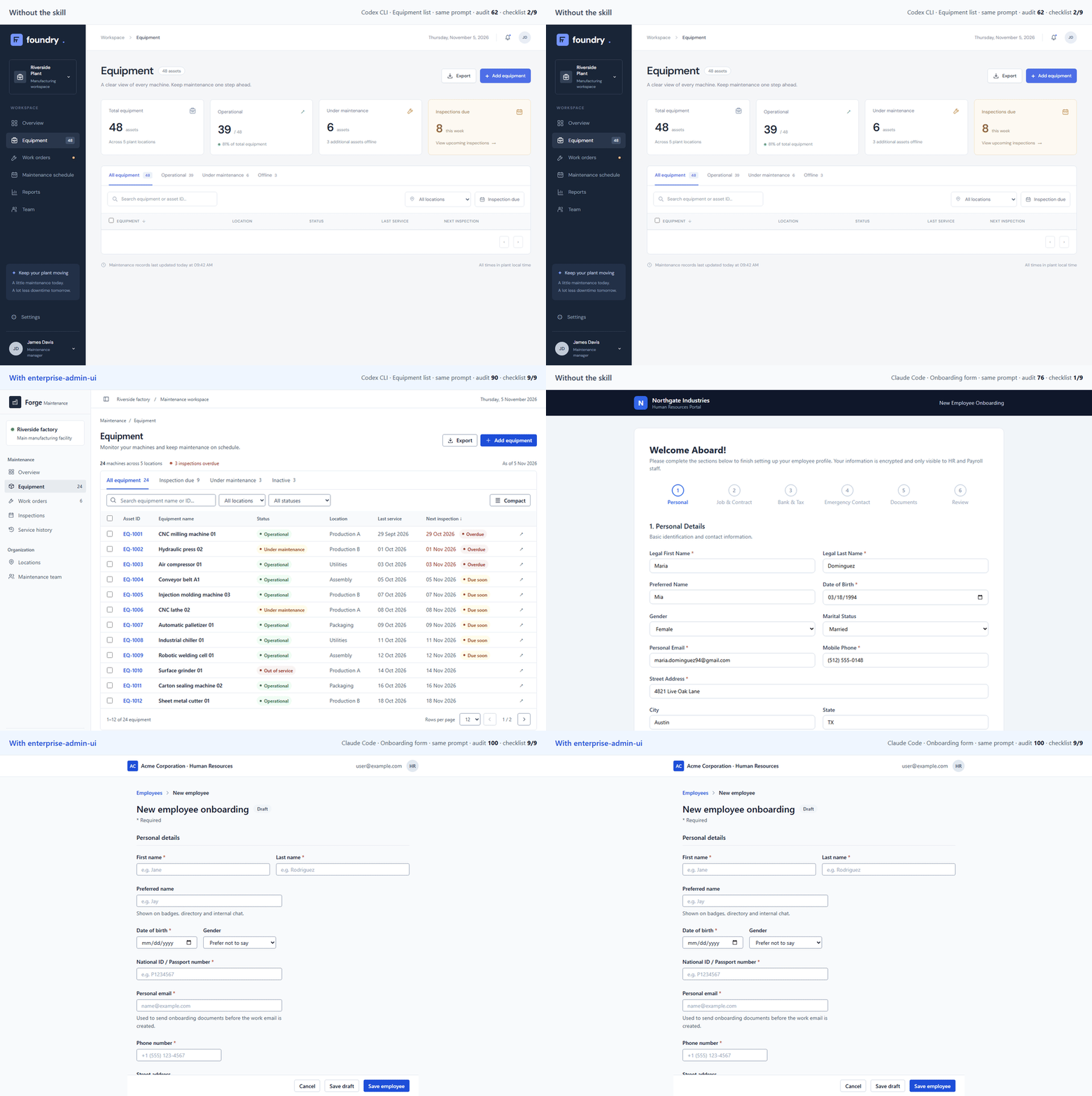
- Version: measured on 2026-11-04 with v0.1.0 (8 references). The v0.5.0 changes were re-checked on 3 new pages (median audit score 100, checklist 22/22) and on 9 fix-round pages, not on the full suite.
- Generation: the same model (Claude Sonnet 5.5) built the same screens from the same briefs, in English and Vietnamese, once as usual and once told to read
SKILL.mdfirst. Output was single-file HTML with the Tailwind CDN. - Scoring:
- the pages were scored with the skill's own audit (
scripts/audit.js) and an acceptance checklist; - one reviewer agent judged each page and knew the condition. A blind re-review of 12 pages agreed on 97% of items and gave the same gap;
- checklist reviews cover runs 1–2 of each brief.
- the pages were scored with the skill's own audit (
- Data: every generated page, screenshot, audit and review, plus the briefs, prompts and tools, is in enterprise-admin-ui-benchmark. Browse the pages side by side in the gallery.
| Without | With the skill | |
|---|---|---|
| Median score on the skill's own audit (40 pages each) | 82 | 100 |
| Pages with low-contrast text | 68% | 0% |
| Pages with ALL-CAPS labels | 73% | 0% |
| Acceptance checklist, 12 new screens whose checklists were written without reading the skill, blind review, v0.5.8 (12 pages each)‡ | 19% | 44% |
| Acceptance checklist, 3 screens the skill was never written against (6 pages each) | 35% | 72% |
| Acceptance checklist, 3 more new screens, with v0.5.2 (6 pages each)† | 39% | 89% |
| Acceptance checklist, 8 main screens (16 reviews each)* | 56% | 100% |
* The skill's recipes were written from the failures on these 8 screens, so this row overstates how it does on new screens. The held-out rows are the fairer numbers.
† These screens were written after the v0.5.2 rules. 4 of their 27 checklist items test those rules (5/8 → 8/8); the other 23 went from 35% to 87%.
‡ The fairest number. A separate agent wrote these briefs without reading the skill, in two sets of six, and reviewers saw randomly coded pages. On checklist items about UI behaviour (states, filters, formatting, accessibility, print, export) the pages went from 14% to 51%. On domain requirements the prompts did not state, such as statutory payroll deductions or masking secrets in an audit log, they went from 26% to 33%. The skill teaches UI behaviour, not your business rules. See HELDOUT3 and HELDOUT4.
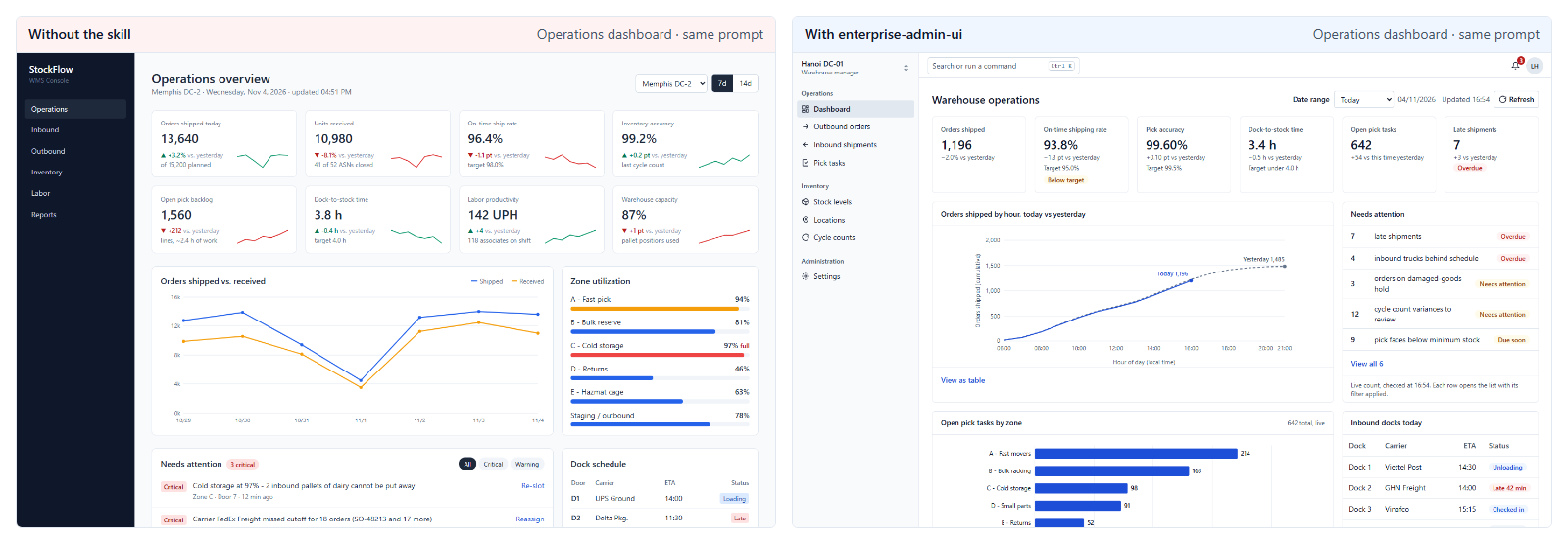
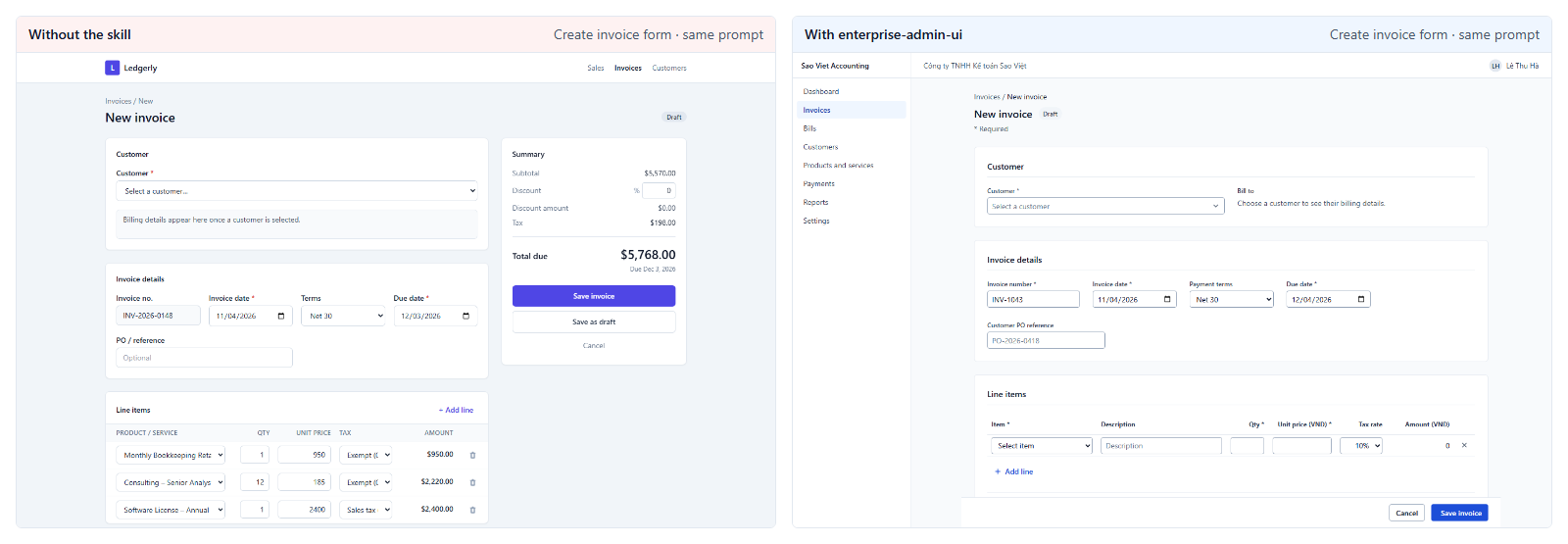
Triggering on its own (Claude Code, Sonnet 5.5, 2026-11-05): without being named, the skill loaded for 20/20 management-screen prompts (10 EN, 10 VI) and for 0/10 landing-page prompts.
Other settings (2026-11-05, the same 3 new screens, 1 page per side each):
- Codex CLI (
gpt-6.1-sol): checklist 33% → 96%, median audit score 62 → 100. - A Next.js 16 + shadcn/ui app (Sonnet 5.5): checklist 44% → 93%.
Not measured yet: Cursor and Copilot, and whether the skill loads on its own outside Claude Code.
How it compares
Based on each skill's repository as of 2026-11-04.
| Skill | Focus | Management-screen workflow |
|---|---|---|
anthropics/skills · frontend-design |
Distinctive aesthetics, "aesthetic risk" | Not its goal |
nextlevelbuilder/ui-ux-pro-max |
Catalogue of styles and product types | Light (a line on bulk actions) |
Leonxlnx/taste-skill |
Art direction, app screens, a "tells" table | Partial |
pbakaus/impeccable |
Design detector (62 rules), an "Operate" mode for app screens | Partial (no audit log or pagination) |
| enterprise-admin-ui | Deliberately unflashy business screens | Lists, filters, bulk actions, line-item forms, permissions, audit history, approvals, import, locale formatting, all states |
The skills work together. Use an aesthetics skill for the marketing site and this one for the app behind the login.
FAQ
Will it fight my design system? No. A project design system or customised component library always wins; the skill then applies only layout, state and behaviour rules. A DESIGN.md in the project records your accent, density and status vocabulary, and the skill reads it first.
How many tokens does it cost? SKILL.md is 248 lines (about 20 KB, roughly 5k tokens). References load only when the task needs them, for example tables.md for a table.
Does it handle Vietnamese and other locales? Yes. Formatting goes through Intl with the project locale. data-formatting.md has a vi-VN profile:
1.250.000 ₫;dd/MM/yyyy HH:mm;Asia/Ho_Chi_Minh;- diacritic-insensitive search.
How do I update? It depends on how you installed:
npx skills add: runnpx skills update(npx.cmd skills updateon Windows).gh skill: rungh skill update.- A plugin: it updates when the plugin version changes.
- Manual copy: copy the folder again.
See CHANGELOG.md.
Does it work without React? Yes. The rules are stack-neutral, and the examples use React, Tailwind and shadcn/ui. Single-file HTML with the Tailwind CDN is covered too.
License
Reviews (0)
Sign in to leave a review.
Leave a reviewNo results found