uah
Health Warn
- License — License: Apache-2.0
- Description — Repository has a description
- Active repo — Last push 0 days ago
- Low visibility — Only 5 GitHub stars
Code Fail
- rm -rf — Recursive force deletion command in .uah/config.toml
- rm -rf — Recursive force deletion command in internal/contextprep/testdata/round1.json
Permissions Pass
- Permissions — No dangerous permissions requested
No AI report is available for this listing yet.
A terminal coding agent that works like Codex, running on unreal-agent
uah



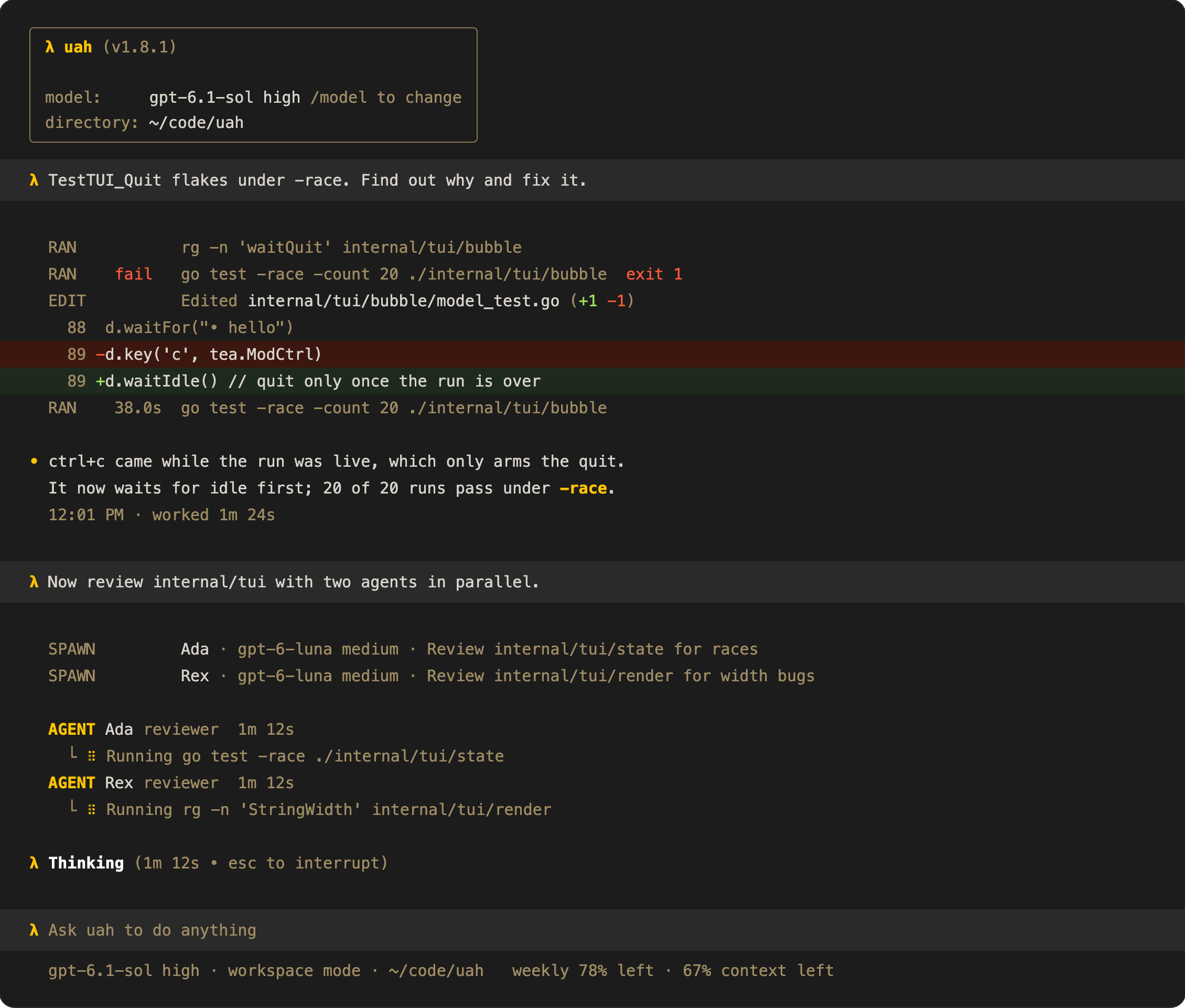
uah is a terminal coding agent that works like Codex, running on uah-core, its own runtime (derived from unreal-agent), through uagent.
brew install viktordanov/tap/uah
- Sessions you can resume, search, and take back to an earlier message, prompt history with ↑ and ctrl+r, and a headless
uah exec - Subagents that run in parallel, defined in Markdown or TOML agent files
- AGENTS.md and skills, and MCP servers with OAuth
- A sandbox (Seatbelt, bubblewrap) with approvals, permission modes, and an auto-reviewer
- Compaction,
/context, and/clear - Pasted images,
!shell commands,apply_patchdiffs, and hooks - Web search through the provider's hosted tool, on by default as in Codex
/diffand/review: your git changes, and a read-only reviewer's findings- Your ChatGPT plan's usage in the footer
- Configuration in TOML or
/config, including the prompts
[!NOTE]
The docs are kept in sync with the code by Memoria: CI fails when code changes and its README hasn't been reviewed.
Get started
Install it:
brew install viktordanov/tap/uah                                 # macOS and Linux
yay -S uah-bin                                                   # Arch Linux (AUR)
go install github.com/viktordanov/uah/cmd/uah@latest  # from source, Go 1.27.1 or later
Or grab an archive from the releases.
Sign in with
codex login; uah uses your ChatGPT account and refreshes the login as Codex does. For another provider, pass--provider(openai, openrouter, fireworks, or ollama) and set its API key variable.Run
uah doctor. It checks the login, sandbox, config, and MCP servers, and says how to fix anything that fails.Start in a repository:
cd ~/code/proj
uah                                       # the TUI
uah "Fix the failing test in pkg/foo"     # the TUI, starting with a prompt
If you installed with
go install, add shell completion (bash, zsh, fish, or pwsh):uah completion zsh > "${fpath[1]}/_uah"
Keys worth knowing:
| Key | Does |
|---|---|
| enter | Send. While the agent works, it reads the message after its running tool calls, before its next model request, as in Codex rust-v0.159.1. On an empty prompt, it sends the queued messages now, in order |
| ctrl+enter, alt+enter | While the agent works, send now: the model's response under way is dropped and asked for again with the message; running tool calls go on. Where the terminal cannot tell ctrl+enter from enter (tmux without extended keys), use alt+enter. While idle, as enter |
| tab | While the agent works, queue the message: it goes out when the run ends. While idle, send |
| ctrl+j, shift+enter | New line; ctrl+j works in every terminal. In tmux without extended keys, shift+enter arrives as enter and sends; see the keys design |
| esc esc | Interrupt; queued messages stay. While the agent is idle, on an empty prompt: go back to an earlier message and edit it |
| ↑ / ↓ on an empty prompt | Your earlier prompts in this folder, from this session and earlier ones; ↓ past the newest empties the prompt again. With messages queued, ↑ takes the last one back first |
| ctrl+r | Search your earlier prompts; see Reuse an earlier prompt |
/ |
Commands, such as /model, /effort, /compact, /context, /diff, /review, /mcp, /agents, /status, /resume, and /new |
@ |
Mention a workspace file (fuzzy search) |
| ctrl+t | The detailed view: turns, tokens, and each tool's result |
| ctrl+g | Edit the prompt in $VISUAL or $EDITOR (vim by default); the saved text comes back as the prompt, with its images. The draft file lives in ~/.uah/editor, where sandboxed commands cannot reach it |
| drag, double click, triple click | Select transcript text, a word, or a line, and copy it to the clipboard. [tui] mouse = false leaves selection to the terminal |
The TUI README lists every key and command.
Common tasks
Resume a session
uah resume              # pick one of this directory's sessions (--all: any directory)
uah resume --last       # this directory's most recent session
uah --session 3f2a      # a session by ID or unique prefix
To choose a new session's ID, as Claude Code's --session-id does, run uah --session-id <uuid> or uah exec --session-id <uuid>. The ID must be a UUID that no session has used; --session-id never resumes. A session that opened and never ran, such as a launch stopped before its first message, has no history, so --session-id takes its ID again and uah resume <id> resumes it. A new session in the TUI (ctrl+n or /new) still gets a fresh ID.
When you quit the TUI, it prints the session's token usage and the command that continues it, uah resume <id> on its own line, as Codex does; on a terminal it uses the TUI's colors. In the TUI, ctrl+s opens the picker and ctrl+n starts a new session. The picker hides sessions from uah exec and subagents, as Codex hides codex exec sessions.
Go back to an earlier message
Press esc twice on an empty prompt while the agent is idle, or type /rewind: your latest message is selected. Esc or ↑ selects an earlier one and ↓ a later one; enter puts the message back in the prompt, with its images, to edit and send again. The message and everything after it leave the agent's context and the screen, as Codex's backtrack does, and a resumed session keeps the cut. The session file keeps the old branch, and uah sessions show prints it. Files the agent changed stay changed. See the rewind design.
Reuse an earlier prompt
On an empty prompt, ↑ brings back your previous prompt in this folder, from this session or an earlier one, and ↓ goes forward again. Each folder has its own prompts, as in Claude Code: the folder is the session's workspace, and /resume into a session of another folder shows that folder's prompts. Edit a recalled prompt and it is yours: the arrows move the cursor again. A ! command comes back in shell mode; a prompt of this run comes back with its images. Ctrl+c on a draft clears it, and ↑ brings it back.
Ctrl+r searches this folder's prompts: type part of a prompt, and the composer shows the newest match. Ctrl+r or ↑ go to older matches, ctrl+s or ↓ to newer ones. Enter keeps the match to edit, and esc puts your draft back.
Prompts are kept in one file, ~/.uah/history.jsonl, private to you, in Codex's format with each prompt's folder added; slash commands are not. Lines without a folder, such as those written before uah kept one, show in no folder. [history] persistence = "none" stops writing it, and max_bytes caps it (8 MiB by default). See the prompt history design.
Select and copy text
Drag over the transcript to select text; double click selects a word and triple click a line. Letting go copies the selection to the clipboard, and the footer says how many lines. Dragging to the top row scrolls, and the wheel keeps scrolling during a drag. Esc or a click clears the selection. The copy leaves out the λ and • columns and the padding around code, so a code block pastes as code. uah copies with OSC 52, which also works over ssh, and with pbcopy, wl-copy, or xclip. To use the terminal's own selection, hold Option (iTerm2, Terminal) or Shift (most others), or set [tui] mouse = false. See the selection design.
The terminal's title shows the session's state and its workspace: uah · api when idle, uah · working · api while the agent works, and uah · approve? · api while an approval waits, which helps to find a pane among many. [tui] title = false turns it off.
Headless mode
uah exec prints progress on stderr and each answer on stdout, and exits when the agent is idle. It is named as codex exec; uah run is the same command.
uah exec "Fix the failing test in pkg/foo"
uah exec --last "Now update the changelog"       # continue this directory's latest session
git diff | uah exec -                             # all of stdin is one message
printf 'first\nsecond\n' | uah exec --stdin       # each line is a message; lines queue while the agent works
uah exec --json "..."                             # JSONL events for scripts, with the answer as it arrives (also --stream)
uah exec --ephemeral -o answer.md "..."           # keep no session; write the final answer to a file
--ephemeral keeps nothing: the session runs in a temporary directory that uah removes at exit, so sessions/, runs/, and the index do not change and uah sessions does not list it. It starts a new session, so it cannot be used with --last or --session. -o (--output-last-message) writes the last run's answer to the file at exit; with no answer, it writes an empty file and warns on stderr, as Codex does.
The TUI shows the answer as the model writes it, and --json adds text_delta, reasoning_delta, and stream_reset events before the final assistant_message. A web search is a web_search event when it starts and when it ends, with its query or URL. A compaction is compaction_started, then compacted with its stats: the strategy, the tokens before and after, and the summary call's usage. Plain uah exec prints each answer once, when it is complete. See the streaming design.
It exits 0 when the run succeeds, 1 when it fails, 2 on a usage error, 3 at the disk limit, and 130 on an interrupt. A run has no time limit; a script that needs one wraps it, as in timeout 30m uah exec … with GNU coreutils, which exits 124. Nobody can answer an approval headless, so commands that need one are declined with a reason. uah exec --help lists the flags.
Search old sessions
uah sessions                           # this directory's sessions, newest first (--all: every directory)
uah sessions --search "flaky parser"   # sessions whose prompts or answers contain the words
uah sessions show 3f2a                 # the transcript and the prompt cache line (--json)
uah sessions --json -C ~/src/app --since 2026-09-29T08:00:00Z   # a directory's sessions active since then
uah sessions rm 3f2a                   # delete a session with its runs and subagents (--dry-run, --json)
uah sessions rm removes the session's files, its tool output, its run records, its rows in the index, and the same for each subagent it started. It refuses while a run holds the session's lock; --force removes the session anyway.
Each session's sidecar, ~/.uah/sessions/<id>.uah.json, also has its workspace, its first_prompt (200 characters), its last_activity, and its last_sequence, so a program can find a session and see that it changed from that file alone. last_sequence is the Sequence of the last item in the session file when the last turn ended. A session that never ran has a sidecar and no session file: uah sessions lists it with 0 runs and no first prompt, and it resumes under its ID (a session that never ran).
Images
- Copy an image, or a screenshot, and press ctrl+v (or alt+v) in the TUI on macOS or Linux.
[Image #1]appears at the cursor. - Or paste or drop an image file on the terminal, or choose one after
@. The path becomes[Image #N]. - Write your message around the placeholders and press enter. The images go to the model with the message.
To remove an image, delete its placeholder: one backspace at its end removes it all. On Linux, uah reads the clipboard with wl-paste (Wayland) or xclip (X11); install one of them. Images larger than 2000 pixels on a side are scaled down. See the images design.
Model and effort
- By default: gpt-6.1-sol on openai-codex when your login's model list has it, else gpt-6-sol (OpenAI rolls new models out by account); on openai, gpt-6.1-sol when listed, else gpt-6-astra. Effort
high; the levels are low, medium, high, xhigh, max, and ultra, where the model accepts them. - For this session: type
/modelin the TUI and pick a model, then one of its efforts (its default is preselected; esc goes back to the models)./model gpt-6-lunaasks only for the effort, and/model gpt-6-luna lowsets both at once./effort low, or alt+, and alt+., change only the effort. It applies from the next model request, even mid-run. - At start:
uah -m gpt-6-luna -e medium, and--fastfor priority processing. - For every session:
modelandeffortin the configuration. - Adaptive effort: the model thinks less on the turns that only follow tool results.
1-stepgoes one effort level below yours on those turns,2-stepstwo, never below low; the first request and every turn with your message stay at your effort.offis the default. On the agent benchmark at high effort, at the same pass rate, it cut wall time by 18–35% and cost by 16–25%, more at 2 steps. Set it with alt+e,/adaptive [off|1-step|2-steps], or the/configrow (from the next model request, even mid-run); the footer then showshigh↓orhigh⇊, andhigh→lowwhile a lowered follow-up is out,--adaptive-effortat start, oradaptive_effortfor new sessions. A session keeps its own value, as it keeps its effort. - On gpt-6.1-sol and the other gpt-6 models, uah changes the effort as Codex does, with an update in the conversation rather than in the request, so the prompt cache survives adaptive effort's switches and
/effort. A backend that rejects the update gets the request again without it, and the session then changes the effort per request, with a one-line notice. - See what the provider offers:
uah models(--json,--refresh),/modelthen tab in the TUI, or tab after-m. In the TUI,/modelrefuses a model the provider does not list, with the nearest names ("gpt-luna-6 is not available on openai-codex; did you mean gpt-6-luna?"), anduah doctorwarns about one;-mand the configuration are not checked: the model goes to the provider as written.
Usage limits
With the default provider, openai-codex, uah shows how much of your ChatGPT plan's usage is left, as Codex does:
uah usage          # pro plan (openai-codex)
                   # weekly  [███████████████░░░░░]  22% used · 78% left · resets 15:44 on 26 Sep
uah usage --json   # the same for scripts
- In the TUI,
/usageshows the same,/statusshows a row per window, and the footer shows the tightest one beside the context meter (weekly 78% left · 64% context left). - A notice warns once when a window passes 75, 90, and 95% used. When a run stops at the limit, a notice says when to try again.
uah doctorwarns from 90% used./usage,/status, anduah sessions showalso show the session's prompt cache: how much input the cache served, and the input it missed by cause, such asprompt cache 86% · missed 119k: effort switches 72k, cold start 9k, other 38k · ≈20% of usage (API-price estimate). See session prompt cache.
Windows are named by their length (5h, daily, weekly), because a plan can have only a weekly window. uah reads the usage when you ask and after each run, never on a timer. Other providers have no usage to show.
A lost connection
When a model request fails because the connection dropped, it timed out, or the provider answered 429 or a server error, the runner's client sends it again: after 2 s, then 4, 8, and 16 s, then every 30 s. uah allows 10 attempts, about 3 minutes, so a Wi-Fi switch or a short outage does not end the run. While a request waits, the TUI's working line says so:
λ Reconnecting, attempt 3 of 10 (retrying in 8s • esc to interrupt)
When every attempt loses the connection, the run fails with "gave up after 10 attempts because the connection to the model was lost". Change the limit with request_max_attempts in the configuration, --max-attempts, or UAH_LLM_MAX_ATTEMPTS.
Command rules
When uah asks, answer
s("Yes, and don't ask again"). It saves a rule for the command's prefix.Or press shift+tab until the footer says
auto mode: the auto-reviewer then approves or declines each escalation, and you are not asked. See Switch the permission mode.Or list prefixes in the configuration:
[approvals]
allow = ["go test", "git status"]
forbid = ["git push --force"]
The approvals README gives the order in which rules, the sandbox, the auto-reviewer, hooks, and you decide.
Permission modes
Press shift+tab in the TUI. It cycles three modes, and the footer shows the current one:
| Mode | Commands can | What needs approval |
|---|---|---|
| read only | Read files; write only the session's private $TMPDIR |
You |
| workspace (default) | Write the workspace | You |
| auto | Write the workspace | The auto-reviewer decides; you are not asked |
yolo (only with --yolo) |
Anything your user can: no sandbox | Nothing: every command, patch, and MCP tool runs unasked; only forbid rules refuse |
- A change applies from the next command, even mid-run.
- A resumed session keeps its mode, with its model, effort, fast mode, and adaptive effort. Yolo mode is kept only when you give
--yoloagain; without it the session opens in the configured mode. - To start in a mode, set
permission_modein the configuration.--sandbox read-onlyor--sandbox workspace-writealso picks a mode for one session. --yolo(Codex's--dangerously-bypass-approvals-and-sandbox, which uah also accepts) starts the TUI oruah execin yolo mode, and adds yolo after auto in the shift+tab cycle. Without the flag, yolo is not offered, and no file can set it. It takes no--sandboxor--ask. Use it only where something outside uah sandboxes the machine. The footer showsyolo modein the warning color, and the terminal title saysyolo. Subagents run in their parent's mode.
Shell mode
- Type
!in the empty composer. The λ becomes!, and the footer says! shell mode. - Type the command, such as
go test ./..., and press enter. It runs in the workspace at once, also while the agent works, and its output streams into the transcript with the exit status. - Send your next message. The agent gets the command, its exit code, and its output with it, in Codex's
<user_shell_command>format. The command alone never starts a turn.
- Backspace on the empty composer, or esc, leaves shell mode. Esc esc stops a running command.
- The output the agent sees is cut to 40,000 characters, keeping the start and the end. A command stops after an hour.
- The command runs as your own, outside the sandbox and the command rules, as in Codex and Claude Code.
user_shell_sandbox = truein the configuration runs it like the agent's commands instead: in the sandbox of the current permission mode, and refused by aforbidrule.
The shell mode design compares Codex and Claude Code.
Web search
On openai and openai-codex, the model can search the web with the provider's hosted web_search tool, as in Codex. It is on by default. The transcript shows each search as a WEB line, such as searched: latest Go release or opened: https://go.dev/dl/, and uah exec prints the same line.
- The search runs on the provider's servers, so the sandbox's network rule does not block it, and it needs no approval, in every permission mode.
- To turn it off, set
web_search = "disabled"in the configuration or in/config. - The model sees its past searches on later turns, as in Codex: uah keeps them beside the session and puts them back into its requests. A resumed transcript does not show them.
The web search design compares it with Codex.
Review your changes
/diff shows the workspace's git changes in the transcript: staged, unstaged, and untracked files, with binary and large files named but not shown. The agent does not see it.
/review has a reviewer look at your changes and list findings, as Codex's /review does:
- Type
/reviewand pick a target in the menu:uncommitted,branch(then a base branch), orcommit(then one of the last 100 commits). Or type instructions:/review check the error handling. - The reviewer runs beside the session, read-only: it can run commands in the read-only sandbox and view images, nothing else, and it never asks for approval. Esc esc stops it.
- Its findings appear in the transcript with their priority, file and lines, and explanation. Your next message takes them to the agent, as in Codex, so "fix the P1" works.
review_model in the configuration picks the reviewer's model (default: the session's). The review design has Codex's behavior and the decisions.
MCP setup
uah mcp add docs -- npx -y @example/docs-mcp            # a stdio server (--env KEY=VALUE)
uah mcp add linear --url https://mcp.linear.app/mcp     # an HTTP server
uah mcp login linear                                     # OAuth in the browser, if the server asks for it
uah mcp list                                             # every server, its status, and its auth
uah mcp add writes Codex's [mcp_servers.<name>] format into your user file, so a Codex configuration copies over. /mcp in the TUI shows each server and its tools; /new picks up a server added or logged in while the TUI runs.
To stop a server's tools from asking for approval:
uah mcp add docs --approve -- npx -y @example/docs-mcp   # its tools never ask
uah mcp approve docs search --mode approve              # one tool never asks
uah mcp approve docs --mode prompt                      # every other tool always asks
uah mcp approve docs                                    # print the current modes
When the TUI asks about an MCP call, answer a ("Yes, and don't ask again for this tool"). It saves approval_mode = "approve" for the tool, and the session stops asking at once.
AGENTS.md and skills
Put them in AGENTS.md at the repository root or in any directory below it, as for Codex. To read CLAUDE.md too, set project_doc_fallback_filenames = ["CLAUDE.md"]. Skills go in .agents/skills/<name>/SKILL.md. /context shows how much of the context window they take.
Subagents and agent files
Ask for it, for example "use two subagents to review the TUI and the store in parallel". The agent starts them with Codex's tools; each shows in the transcript as AGENT <name> with what it is doing, and /agents lists them. Subagents never start subagents of their own. To define a kind of subagent, add a Markdown file with front matter, as for Claude Code (.claude/agents/*.md files work as they are), to ~/.uah/agents/, or to .uah/agents/ in a trusted project:
---
name: reviewer
description: Reviews a diff for bugs and missing tests.
tools: Bash, mcp__github
effort: high
approve: [git diff, git log, mcp__github__get_pull_request]
---

Review only; do not edit files. List each finding with its file and line.
The body is the subagent's instructions. tools limits the tools it is offered (Claude Code's Edit and Write are apply_patch; omit tools for all of them). approve lists commands and MCP tools it runs without asking, within the session's permission mode: read only stays read only, and a forbid rule still wins. Codex's TOML role files (reviewer.toml) work too. See agent files.
A subagent runs on the parent's provider. Ask for another model or effort ("use a subagent on gpt-6-luna with low effort"), set model, effort, and fast: true in its agent file, or set defaults in [agents]; see agent files. Ask for a forked subagent ("fork a subagent to write the tests for what we just discussed") to hand it the conversation so far through fork_context.
To watch a subagent, type /agents <name> or press alt+← and alt+→: the TUI shows its transcript, and what you type goes to it. When a subagent finishes or is interrupted, the main agent is told with your next message, as in Codex. uah sessions show subagent-1a2b3c4d prints a finished one's transcript.
Compaction and /clear
uah compacts automatically at 90% of the context window. It first replaces old tool outputs with short stubs, and summarizes only when that does not free enough; on openai and openai-codex the provider compacts, as in Codex. Each summary ends with a ledger of the files changed, the commands still failing, the files read, and the skills loaded, and the last five tool calls stay as they were. /compact compacts now, and /compact keep the failing test names tells the summary what to focus on. /context shows what fills the window, and uah sessions show prints what each compaction freed. The summary model, its prompt, and when compaction starts are configurable. /clear starts the agent fresh in the same session: its next request carries nothing from before, while the session keeps its history. /new starts a new session.
Custom prompts
uah prompts init           # writes compact.md, system.md, system-codex.md, system-runner.md, review.md, and the context modules to ~/.uah/prompts
uah prompts show system    # prints a built-in prompt: compact, system, system-codex, system-runner, or review
uah prompts show context/environment/fish   # prints a context module
uah context --show         # lists the context modules for this workspace and prints the context a new session gets
uah prompts init starts from the built-in compaction prompt, uah's default system prompt (system.md), and the auto-review policy. It prints the lines to add to your user file: experimental_compact_prompt_file, model_instructions_file, and [review] policy_file. The default system prompt is Codex's prompt for gpt-6.1-sol with uah's tool names (the changes). The command also writes Codex's unmodified prompt as system-codex.md and the runner's short host prompt as system-runner.md, and prints their model_instructions_file lines commented out, so each is used only when you choose it. AGENTS.md files and the environment context still follow the system prompt. Edit the files; each new session reads them. It overwrites existing files only with --force.
The prepared context a new session starts with is made of Markdown modules too. uah prompts init writes them under ~/.uah/prompts/context/; a file there replaces the built-in of the same path, so delete the ones you do not change. Add your own in ~/.uah/prompts/context.d/, or a project's in .uah/context.d/ (used after uah context trust). Each starts with front matter that says when it applies, such as when: {shell: [fish]} or files: [go.mod]. A library of modules (go, python-venv, node, rust, docker, git-lfs) ships turned off; [context] modules = ["go"] turns one on. uah context shows which modules apply here and why.
Hook setup
Add a hook, for example a notification when the agent is idle:
[[hooks.Stop]]
command = "osascript -e 'display notification \"uah is idle\"'"
Hooks in a project's .uah/config.toml run only after uah hooks trust; hooks in the user file and the layers (~/.uah/config.d/*.toml, UAH_EXTRA_CONFIG) run as written. uah hooks lists them all and whether each runs.
The /config panel
Type /config in the TUI. It lists the basic settings (compaction, the model and effort, fast mode, adaptive effort, the permission mode, web search, the details view, and the mouse) with each value and its source. ↑↓ choose, enter or space changes, esc closes. Each change is saved to your user file, keeping its comments, and applies to the running session where it can; compaction settings apply from the next session. A flag, a configuration layer, or a trusted project file that sets the same key still wins, and /config says so.
Inspect the configuration
uah config shows each setting's value and where it came from. uah doctor checks that everything works.
Configuration
Everything uah reads and writes lives in ~/.uah, as Codex keeps ~/.codex: the configuration, AGENTS.md, agents, prompts, skills, hook trust, MCP credentials, sessions, run records, the session index, pasted images, the model cache, and logs. UAH_HOME names another home; --config (UAH_CONFIG) and --state-dir (UAH_STATE_DIR) move just the user file or the state.
The TOML files, each merged over the ones before it:
| File | Applies to | When |
|---|---|---|
~/.uah/config.toml (or --config) |
Every workspace | Always |
~/.uah/config.d/*.toml, in lexical order |
Every workspace | Always; for configuration another program owns, such as a terminal host's hooks |
The file UAH_EXTRA_CONFIG names |
Every workspace | When the variable is set, as for one session's MCP servers and permissions |
<workspace>/.uah/config.toml |
One workspace | The user file or a layer marks the workspace trusted under [projects]; its hooks also need uah hooks trust |
A flag wins over the environment, which wins over a resumed session's settings (its provider, model, effort, fast mode, adaptive effort, and permission mode), then the project file, UAH_EXTRA_CONFIG, config.d, the user file, and the defaults. Unknown keys are errors, so a typo fails loudly.
Earlier versions used ~/.config/uagent, ~/.local/state/unreal-agent, and a project's .uagent. On its first start without ~/.uah, uah copies the two folders into ~/.uah and says so; the old folders are only read. It never moves a project's .uagent: uah and uah doctor show the git mv .uagent .uah that does. UAGENT_CONFIG and UAGENT_STATE_DIR are no longer read, and uah warns when either is set.
/config in the TUI changes the basic settings in the user file (see Change settings). Every key, by group. The configuration reference gives each one's type, default, flag, and merge rule, and the environment variables.
| Group | Keys |
|---|---|
| Model | provider, model, effort, fast, adaptive_effort, model_verbosity, context_preparation, web_search, max_disk, request_max_attempts |
| Sandbox | permission_mode, sandbox_mode, user_shell_sandbox; [sandbox_workspace_write] network_access, writable_roots; [shell_environment_policy] inherit, ignore_default_excludes, exclude, include_only, set |
| Approvals | approval_policy, approvals_reviewer; [approvals] allow, forbid; [review] model, effort, timeout, policy_file |
| Compaction | auto_compact_percent, model_auto_compact_token_limit, model_context_window, compact_model, compact_effort, compact_prompt, experimental_compact_prompt_file, compact_user_message_max_tokens |
| Instructions and skills | model_instructions_file, project_doc_fallback_filenames, project_root_markers, project_doc_max_bytes; [instructions] enabled, max_bytes |
| Hooks | [[hooks.<Event>]] matcher, command, timeout |
| MCP servers | [mcp_servers.<name>] command, args, env, env_vars, cwd, url, bearer_token_env_var, http_headers, env_http_headers, enabled, required, startup_timeout_sec, tool_timeout_sec, enabled_tools, disabled_tools, supports_parallel_tool_calls, default_tools_approval_mode, tools.<tool>.approval_mode, auth, scopes, oauth_resource, [oauth]; mcp_oauth_credentials_store, mcp_oauth_callback_port, mcp_oauth_callback_url |
| Subagents | [agents] enabled, max_concurrent_threads_per_session, max_depth, default_subagent_model, default_subagent_reasoning_effort |
/review |
review_model |
| TUI | [tui] details, mouse, title |
| Prompt history | [history] persistence, max_bytes |
| Projects | [projects."<path>"] trusted |
A short user file:
model = "gpt-6-sol"
effort = "high"
sandbox_mode = "workspace-write"                 # read-only, workspace-write; no sandbox is --yolo
project_doc_fallback_filenames = ["CLAUDE.md"]   # also read CLAUDE.md

[approvals]
allow = ["go test", "git status"]

[mcp_servers.docs]
command = "npx"
args = ["-y", "@example/docs-mcp"]

[projects."/Users/me/code/proj"]
trusted = true   # apply this workspace's .uah/config.toml
This repository's own .uah/config.toml is a working project file: its [approvals] forbid rules keep the agent from rm -rf /, force pushes, and git reset --hard.
How it works
Each part is documented next to its code. These are the summaries, with links to the full READMEs.
Sessions and the TUI
A session owns its settings, a message queue, at most one live run, pending approvals, and its hooks on one goroutine, and merges run events and its own events into one ordered stream. Messages queue while the agent works, a steer reaches the running agent when the engine allows it, and an interrupt keeps the queue.
The runner's session file, sessions/<id>.session.jsonl, is a versioned JSON-lines format: a version-2 header, then items numbered by Sequence, the stable cursor for paging. uah documents the format and reads it by the documented rules, and a test fails when the runner's output stops following them.
The TUI is a pure reducer from session events and user intents to state and effects, a pure renderer from state to screen lines, and a thin Bubble Tea v2 shell that turns keys into intents and runs the effects against the session. As in Codex, enter while the agent works gives it the message after its running tool calls and tab queues it for the end of the run. Esc esc interrupts, and ctrl+v pastes an image.
Read more: sessions, the session index, the session file, and the TUI with its look. Diagnostics go to ~/.uah/logs/uah-tui.log.
The engine
The embedded engine runs uah-core's packages inside uah, so messages, model, effort, fast mode, and the permission mode reach a live run. It keeps uagent's guards, session lock, and run records, applies the command rules, and writes the runner's own session files.
internal/app/setup.go builds it for every session; there is no engine to choose. What still varies is the provider and the model, such as /fast on openai and openai-codex only; the engine README lists it, and where each behavior lives.
File edits and diffs
Models edit files with Codex's apply_patch tool: a patch of *** Add File, *** Update File (with *** Move to), and *** Delete File sections with @@ hunks, parsed and applied as Codex does, with its lenient context matching and its messages. The embedded engine applies patches inside the writable roots at once, and asks for any other write as for a Bash escalation; the diff it records shows under the call in the TUI and in uah sessions show.
Read more: patches, and how patches are approved in approvals.
Instructions and skills
uah finds instruction files the way Codex does: the user's AGENTS.md, then one file per directory from the project root down to the workspace (AGENTS.override.md, else AGENTS.md, else a configured fallback such as CLAUDE.md). A line that is only @path in a file is replaced by that file's text, as Claude Code's imports are. They are joined, capped at 32 KiB, and placed after the base instructions (uah's default prompt, adapted from Codex's, or the file that Codex's model_instructions_file key names), and Codex's environment context (the workspace, shell, date, and time zone) follows them. Skills come from Codex's skill folders.
--no-instructions turns this off. Read more: instructions.
Context preparation
Every new session starts with one developer message of prepared context, before the first user message. This includes a subagent's session. The message has the git branch, the status, and the tracked files. It names the loaded instruction files, so the model does not search for more. It also gives the shell's and the OS's traps, the sandbox's limits and the session's private $TMPDIR, and how to size the Bash tool's output. The text comes from Markdown modules that uah prompts init writes to ~/.uah/prompts/context/ to edit; ~/.uah/prompts/context.d/ and a project's .uah/context.d/ add modules, and uah context shows which apply and why. The system prompt does not change, and the message stays in the session's history, so the prompt cache holds. Resumed and forked sessions get no new message. Turn it off with context_preparation = false, --no-context-preparation, or UAH_CONTEXT_PREPARATION=off.
Read more: context preparation.
Sandbox
Commands run in the operating system's sandbox, as in Codex: Seatbelt on macOS and bubblewrap on Linux. The default mode, workspace-write, lets commands read the whole disk and write only the workspace and temporary directories, without network, and keeps .git, .uah, .agents, and .codex read-only.
Read more: sandbox.
Approvals, rules, and auto-review
Each command runs in the sandbox unless a rule or an approval says otherwise: a command rule can allow, forbid, or ask; the model can ask to run a command outside the sandbox; and an escalation goes to PermissionRequest hooks, then you. The permission mode, which shift+tab cycles, picks the sandbox and who answers: you in read-only and workspace, the auto-reviewer alone in auto, and no one in yolo, which only --yolo starts. The defaults are Codex's: workspace-write, on-request, and the user as reviewer (Codex's "Ask for approval").
Read more: approvals, rules, and auto-review.
Hooks
Hooks run a command at a session event with Claude Code's contract: the event arrives as JSON on stdin, exit 0 continues, exit 2 blocks with stderr as the reason, and any other exit is reported and ignored. Project hooks run only after uah hooks trust records their exact commands and the content of any local script they run.
Read more: hooks, with every event and its payload.
MCP servers
uah runs the MCP servers in [mcp_servers] (Codex's format) on the embedded engine through the official Go SDK: stdio and streamable HTTP servers, their tools offered as mcp__<server>__<tool> and called without blocking the agent, Codex's approval modes, OAuth logins with uah mcp login kept in the OS keyring, and uah mcp to list, add, remove, and approve servers.
- Servers connect when a TUI session opens, before any message (
uah execconnects them on its first run), and stop with the session;/clearkeeps them, and/newand/resumereconnect them once. One that fails to start is shown then and left out; withrequired = true, every message fails until the server is fixed and/newconnects it. - A call runs in the background, so the agent keeps working. A tool asks for approval by its
approval_mode, as in Codex. - OAuth tokens are kept in the OS keyring (or a 0600 file without one) and refreshed as they expire. A server that needs a login shows "needs login" in
/mcpanduah doctor.
Read more: MCP, and the design and validation.
Subagents
Subagents are child sessions that a session's agent starts, messages, waits for, and closes through Codex's v1 multi-agent tools. internal/agents implements them behind the engine.Subagents seam: the embedded engine offers the tools and runs their calls in the background, and the package owns the tools, the children's lifecycle, approvals through the parent, limits, hooks, and resume.
A subagent is the same as the main agent in every way except its session, which is nested under the parent's: the same instructions, skills, sandbox, approvals, hooks, MCP servers, and compaction. It asks for approval through the parent's session. It fires the subagent hooks only, as in Claude Code: SessionStart, SessionEnd, UserPromptSubmit, and Stop fire for the main session alone, SubagentStart and SubagentStop mark a subagent's start and end, and a tool or PreCompact hook inside a subagent gets agent_id and parent_session_id.
- Its session ID is
subagent-<uuid>. A role or the spawn call can give it another model, effort, or fast mode on the parent's provider. - A role is a Markdown file with front matter, as Claude Code's, or a Codex TOML role file; it can limit the subagent's tools and approve commands and MCP tools in advance, within the permission mode.
- A subagent never starts subagents: the depth limit is 1.
fork_contextstarts it from a copy of the parent's history, so its first model request starts with the parent's, for the provider's prompt cache.- A failed subagent reports why, such as the provider's message, to the parent's
wait_agent, the TUI, anduah exec. /agents <name>shows its live transcript in the TUI.
Read more: subagents, and the design and validation.
Compaction and /context
uah compacts a long conversation as Codex does: the earlier user messages stay verbatim, and the rest is replaced by a model-written handoff summary, or on OpenAI providers by the provider's encrypted compaction item. uah adds a state ledger read from the tool calls, keeps the last tool calls verbatim, first replaces old tool outputs with stubs when that frees enough, and measures every compaction, with an offline evaluation over recorded sessions.
/context shows what fills the window, as Claude Code's does: a 10×10 grid, one cell per percent, with each category's tokens (system prompt, instruction files, skills, tools, MCP tools, your messages, agent messages, and tool calls with their results), the free space, and the auto-compact buffer, then a line per file, skill, and tool. It breaks down the last request sent, estimated at 4 bytes a token and scaled to the input tokens the provider reported (internal/contextusage).
Read more: compaction, and the design and validation.
Model catalog
uah asks the provider which models the login can use, as Codex does: the list comes from the provider at runtime, is cached for five minutes with its ETag, and falls back to Codex's bundled catalog only when the provider cannot be asked. A new model therefore needs no uah release. When the provider's list is at hand, a model it lacks is refused with the nearest names: by /model, by spawn_agent, and as a warning in uah doctor; -m at start and the configuration's model are not checked: the model goes to the provider as written.
/model, -m completion, uah models, and uah doctor read the catalog, and the context window comes from it when the provider gives one. Read more: the model catalog.
Plan usage
The usage package reads the ChatGPT subscription's rate limits for the openai-codex provider, as Codex does: one read-only GET to the ChatGPT backend's usage endpoint with the login's credentials and uah's own identity. A reader caches the answer for 60 seconds and sends one request at a time; it reads on demand and after each run, never on a timer. Other providers have no usage.
app.Setup builds one reader per session, next to the model catalog, and the TUI gets it through bubble.Deps. uah usage, /status, the footer, the warnings, and uah doctor read through it. Read more: plan usage, and the design.
Development
Tests need no model or tokens: the engine runs against testing/fakellm, a scripted Responses API, and session and TUI tests also run on uagent's fake runner through harnesstest.RunnerEngine, a test-only engine. One test drives the real uah-core-runner and the embedded engine with the same script and requires the same events; go test -short skips it. Tests never read your ~/.uah or ~/.codex: each package that could runs through harnesstest.IsolatedMain, which gives it a temporary UAH_HOME, HOME, and CODEX_HOME.
go run ./cmd/uah --version   # build and run
go test -race ./...          # unit and end-to-end tests
golangci-lint run ./...      # lint (golangci-lint v2.13.2)
The title image is docs/assets/title.html, drawn in the TUI's colors and captured with headless Chrome: chrome --headless=new --force-device-scale-factor=2 --default-background-color=00000000 --window-size=1130,1400 --screenshot=uah.png title.html, then magick uah.png -trim +repage uah.png.
Pushing a v1.2.3 tag builds the release archives for macOS and Linux (arm64 and x86_64) with scripts/package-release.sh and attaches them to the GitHub release, each with a .sha256 file. Two builds of the same commit with the same Go version give the same bytes. To rebuild an existing tag, run the Release assets workflow with the tag.
CI runs the build, the race tests, the Markdown renderer's benchmarks once (so they keep running; its tests hold the bounds), and the linter on each push; the linter also fails on a function above 20 cyclomatic complexity, a backstop for the rule of about 15. Design records, the architecture rules, and the documentation procedure are in docs:
The configuration reference, design records for the harness, the TUI, state storage, sandboxing, compaction, MCP, subagents, pasted images, streaming, Markdown rendering, going back to an earlier message, selecting text with the mouse, editing the prompt in an editor, the system prompt, web search, /diff and /review, prompt history and the composer's height, how tool calls read in the transcript, keeping the ChatGPT login fresh, and running uah as a terminal host backend, plus the architecture rules and documentation procedure for uah.
bench/tui is a separate Go module with the benchmark behind choosing Bubble Tea v2. go test -run '^$' -bench Markdown -benchmem ./internal/tui/render measures the Markdown renderer. uah compaction eval [session file or directory], a hidden command, compares the compaction strategies on recorded sessions and prints tables of numbers only; its tests hold the strategies to their bounds on a synthetic session (internal/compaction).
tools lists every harness that measures uah, with how to run each and where its results go. go run ./tools/perf is the performance harness (tools/perf); compare a change with its baseline with go run ./tools/perf -baseline tools/perf/baseline.json:
The harnesses that measure uah rather than test it: the performance harness (go run ./tools/perf), the agent benchmark against Codex (go run ./tools/agentbench), the compaction evaluation, and the TUI framework benchmark, with what each measures, how to run it, and where its results go.
License and acknowledgements
uah is licensed under the Apache License, Version 2.0.
uah owes its shape to OpenAI Codex. Its configuration format, sandbox profiles, approval rules, auto-review, compaction, apply_patch, MCP handling, subagent tools, /review, and how tool calls are classified follow Codex closely, and some of its code and prompts are adapted from Codex's (Apache License 2.0, Copyright 2025 OpenAI), with the shell word splitting Codex uses adapted from rust-shlex (MIT or Apache License 2.0). It runs on uah-core through uagent; uah-core began as a fork of unreal-agent (MIT License, Copyright 2026 Unreal Labs), and a few of uah's files are adapted from unreal-agent's, and borrows ideas from Claude Code (hooks, /context, Markdown agents, permission modes). THIRD_PARTY_NOTICES.md lists every adapted file and its license, and the one open-source project the agent benchmark carries as a task's repository (smithy-go, Apache License 2.0).
Reviews (0)
Sign in to leave a review.
Leave a reviewNo results found