big-picture
Health Warn
- License — License: MIT
- Description — Repository has a description
- Active repo — Last push 0 days ago
- Low visibility — Only 9 GitHub stars
Code Pass
- Code scan — Scanned 12 files during light audit, no dangerous patterns found
Permissions Pass
- Permissions — No dangerous permissions requested
No AI report is available for this listing yet.
Answers you can judge and act on without reading code — Claude Code plugins that keep implementation detail below a marked line. Off by default, armed one session at a time.
Big Picture
Claude Code plugins that fix what your agent tells you — not what you tell it.



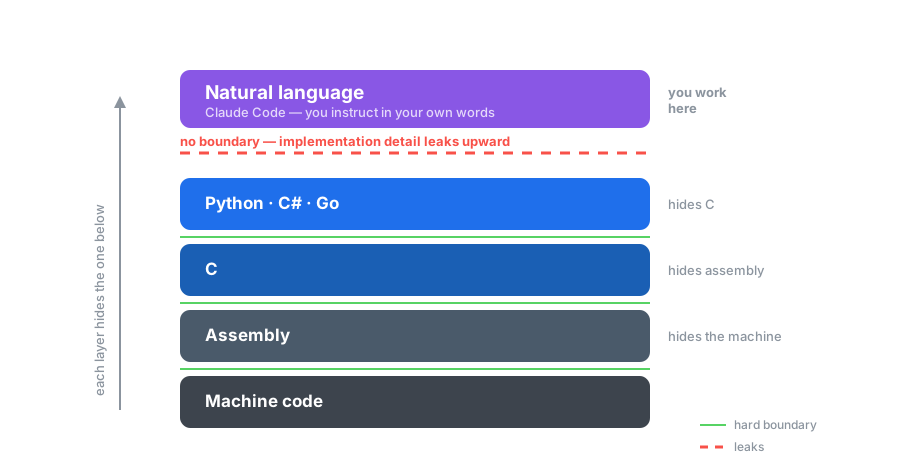
Every step on that ladder shipped with a hard boundary. You write Python without reading
the assembly it becomes, and that is not a loss — it is the entire point of the step.
The newest step did not ship one. So the detail leaks upward, and you get answers full of
code you never agreed to read, cannot check, and cannot decide on.
These plugins put the boundary back.
See the difference
SOMEONE ASKED
“The release goes out tonight. The build now fails on the server
but works on my laptop. What should we do?”
Exception in thread "main" java.lang.NoSuchMethodError: 'void com.google.common.base.Preconditions.checkArgument(boolean, java.lang.String, java.lang.Object)'
	at org.apache.hadoop.conf.Configuration.set(Configuration.java:1357)
	at com.acme.ingest.SinkFactory.build(SinkFactory.java:88)
	at com.acme.ingest.Main.main(Main.java:41)

$ mvn dependency:tree -Dincludes=com.google.guava
[INFO] com.acme:ingest:jar:7.4.0
[INFO] +- com.acme:acme-storage:jar:3.2.0:compile
[INFO] |  \- com.google.guava:guava:jar:19.0:compile
[INFO] +- org.apache.hadoop:hadoop-common:jar:3.3.6:compile
[INFO] |  \- com.google.guava:guava:jar:27.0-jre:compile  (omitted for conflict with 19.0)
[INFO] \- com.acme:acme-metrics:jar:1.9.4:compile
[INFO]    \- com.google.guava:guava:jar:32.1.3-jre:compile (omitted for conflict with 19.0)
[WARNING] Used undeclared dependencies found: com.google.guava:guava:jar:19.0
↓ answered twice ↓
| ❌ Without decision-layer | ✅ With decision-layer | |
|---|---|---|
|
🔎 Root cause: two versions of Guava are fighting, and the wrong one won. Three different things in your project want different Guava versions:
Maven can only put one copy of Guava on the classpath, so it "mediates" — picks one. ✅ Fix for tonight (low risk, ~10 minutes):
|
➜ |
The crash is a version mismatch, not a code bug: your app is pulling in an old copy of a For tonight, the fix is to pin the version explicitly instead of trusting the default Before you ship, don't treat "works on my laptop" as proof — do a clean rebuild on the
|
☝️ that last line, ▪ decision-layer, is how you know it was on
| measured on the two full replies | ❌ without | ✅ with |
|---|---|---|
| Length of the reply | 459 words | 191 words |
| Code shown to you in the prose | 23 snippets | 0 |
| Times the library is named | 11 | 0 |
| Config steps handed back to you | 4 | none |
| Ends with a decision you can make | no | ship, or slip |
[!IMPORTANT]
The left column is not wrong. It is a good technical answer, and if you write Java it is
the one you want.But the person asking has a release going out tonight, and what they need to know is
whether to ship. Only the right column answers that — "if that comes back clean, ship;
if not, slipping is the safer call" — and it does it without naming the library once.The detail is not gone. It is sitting under the line, waiting.
Both columns are real, unedited output from two live Claude Code sessions given the
identical question — one armed, one not. Run in a clean install holding this plugin
and nothing else: no personal instruction files, no project instructions, no other plugins,
so nothing but the boundary differs. Shortened here to fit the page; sentences were cut, no
word was changed. Read the full replies →
· more examples
How it works
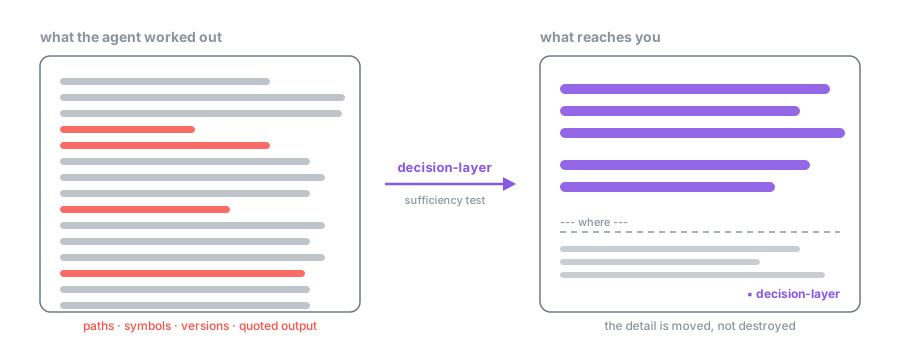
The agent still does all the work and still knows every detail. What changes is the
contract on the way back: the prose has to stand on its own, and anything you would need
a pointer for goes below a marked line, where it waits for you if you want it.
Nothing is thrown away. Ask for the code in plain words — "show me that function" — and the
boundary steps aside for that one reply.
Every reply written under the boundary ends with ▪ decision-layer. That is how you
know it was on.
Install
Three steps, about a minute.
1 — Install the plugin. In Claude Code:
/plugin marketplace add VincentHHY/big-picture
/plugin install decision-layer@big-picture
2 — Select the output style, once. /config → Output style → decision-layer:Plain.
3 — Turn it on whenever you want it.
/decision-layer
That is the whole thing. /decision-layer off turns it off again, and every new session
starts off, so it never follows you into tomorrow.
If it is not working
- Replies have no
▪ decision-layerfooter. Step 2 was skipped, or did not take. The
plugin says so at the start of every session when the style is not selected — without it
there is nothing to arm, and that is the one failure that otherwise leaves no trace. decision-layer:Plainis not offered in/config. Put"outputStyle": "decision-layer:Plain"into~/.claude/settings.jsonby hand, and restart.- The command menu shows the name twice, as
decision-layer:decision-layer. That is
Claude Code filing a skill under the name of the plugin that ships it. The short/decision-layerworks; type that. - Nothing happens at all. The plugin needs
bashand Python 3 on yourPATH. macOS and
Linux have both already; on Windows, Git Bash providesbash.
Full documentation, including the escape hatches and how the pieces fit together:
plugins/decision-layer.
Does it hold up?
Not a style guide anyone hopes is being followed. Every case runs as a real armed session
driven by the live hook and the live output style, and the headline judge is a grader that
sees only the prose — never the code, the fixture, or the question. That is the reader's
actual situation.
| ✅ with decision-layer | ❌ without | |
|---|---|---|
| reader could follow it | 100% | 20–40% |
| mechanical checks passed | 91–100% | 18–40% |
Across 55 armed replies where the boundary was meant to apply, the reader was blocked
once.
Licence
MIT.
Reviews (0)
Sign in to leave a review.
Leave a reviewNo results found