VTCode
Health Pass
- License — License: Apache-2.0
- Description — Repository has a description
- Active repo — Last push 0 days ago
- Community trust — 825 GitHub stars
Code Fail
- exec() — Shell command execution in .github/actions/setup-zig/common.js
- process.env — Environment variable access in .github/actions/setup-zig/common.js
- fs module — File system access in .github/actions/setup-zig/common.js
- network request — Outbound network request in .github/actions/setup-zig/common.js
- exec() — Shell command execution in .github/actions/setup-zig/main.js
- process.env — Environment variable access in .github/actions/setup-zig/main.js
- fs module — File system access in .github/actions/setup-zig/main.js
- network request — Outbound network request in .github/actions/setup-zig/main.js
- fs module — File system access in .github/actions/setup-zig/post.js
Permissions Pass
- Permissions — No dangerous permissions requested
No AI report is available for this listing yet.
VT Code is an open-source Rust terminal coding agent.







Contents
- New: VT Code WebMCP application
- Overview
- Quick start
- Documentation
- Providers and models
- Local inference
- Development
- Contributing
- Support
- License
New here? Start with Installation, then
Getting Started.
Overview
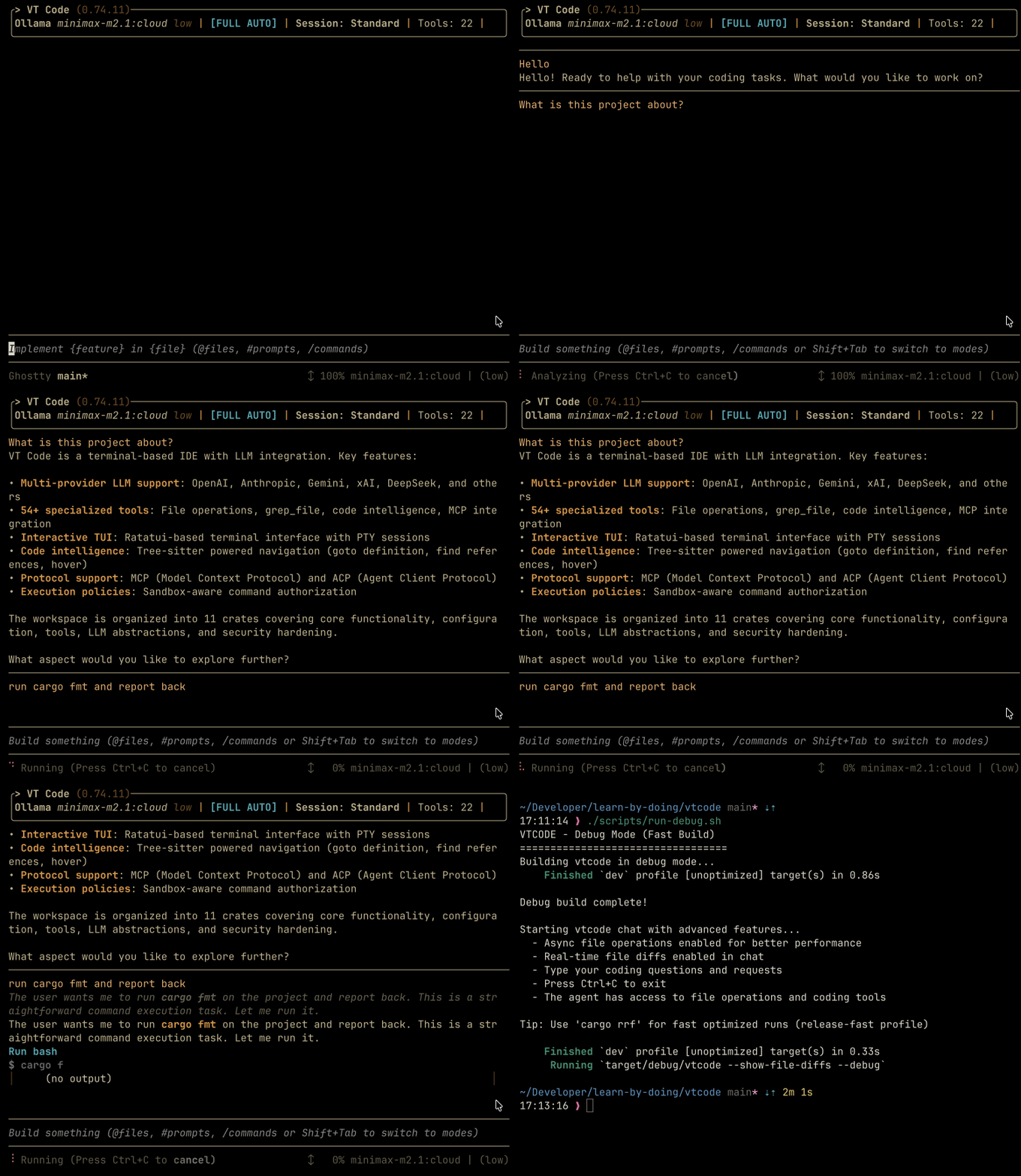
Secure, open, universal.
VT Code is an open-source Rust terminal coding agent for interactive and
long-running autonomous workflows. It combines a responsive TUI, safe terminal
tools, multi-provider LLM support, open protocols, and extensible Skills in one
tool, so you can move from a question to a reviewed change without leaving your
terminal.
Project status: Active development.
Local inference and some automation workflows are experimental, and
interfaces and configuration may change between releases.
New: VT Code WebMCP application
The WebMCP browser bridge is a first-class, opt-in VT Code integration. The
maintained browser app is published at two origins:
| Deployment | URL | Browser origin | Use it for |
|---|---|---|---|
| ChatGPT Site | https://vtcode.vinhnx.chatgpt.site/ | https://vtcode.vinhnx.chatgpt.site |
Hosted WebMCP demonstration |
| GitHub Pages | https://vinhnx.github.io/VTCode/ | https://vinhnx.github.io |
Static fallback and WebMCP reference client |
The app derives the exact pairing origin from the page currently open, so pair
the active VT Code session with /webmcp pair https://vtcode.vinhnx.chatgpt.site
for the ChatGPT Site or /webmcp pair https://vinhnx.github.io for GitHub
Pages. See the WebMCP user guide,
development guide, deployment reference,
WebMCP app guide, WebMCP app README,
and WebMCP crate documentation for
setup, integration, and implementation details.
Runtime and coding
- Agent runtime: interactive TUI, slash commands, streaming,
ask/execCLI, session resume, review workflows, and the authenticated WebMCP browser bridge - Coding tools: safe file operations, ripgrep search, ast-grep symbol maps, fuzzy discovery, code intelligence, project indexing, and terminal execution
Extensibility and providers
- Extensibility: Agent Skills, MCP client/server, Agent Plugins, lifecycle hooks, subagents, custom providers, and ACP
- Model providers: 30 built-in providers, custom OpenAI-compatible endpoints, and local inference via Ollama, LM Studio, and llama.cpp (managed with
/local)
Safety and protocols
- Safety: restricted shell sandbox, tool guardrails, subprocess isolation, audit logging, per-workspace approval before lifecycle hooks defined in workspace configuration (
vtcode.toml,.vtcode, or agent-spec files) can run shell commands, and terminal-owned WebMCP pairing/write boundaries - Provider governance:
providers_whitelistrestricts which LLM providers VT Code can access, preventing accidental data leakage to unapproved endpoints - Protocols: Open Responses, Agent2Agent (A2A), ATIF, and Anthropic Messages API
Automation and planning
- Loop engineering: worktree isolation for parallel agents, propose/verify sub-agent separation, durable loop state, and cost guardrails
- Planning workflow: iterate on a build plan with
/planand theplanprimary agent, then hand off tobuild/autothrough a structured review gate
VT Code is designed for both interactive development and unattended work. It
keeps tool execution and provider access explicit, while allowing the same
session to move from exploration to implementation and review.
Quick start
1. Install
The native installer is recommended for macOS and Linux. It installs VT Code
and the ripgrep and ast-grep search tools used by its coding workflow.
curl -fsSL https://raw.githubusercontent.com/vinhnx/vtcode/main/scripts/install.sh | bash
Other installation methods are documented in the
Installation Guide.
# Homebrew
brew install vinhnx/tap/vtcode

# Cargo
cargo install vtcode
2. Initialize a workspace
Run this from the project you want VT Code to work on:
cd path/to/your/project
vtcode init
This scaffolds project configuration and agent guidance. Review the generated
files before committing them.
3. Configure a provider
Set the API key for the provider you want to use (or configure an OAuth-based
provider with vtcode login). For example:
export OPENAI_API_KEY="sk-..."
See the provider guides for supported
providers, local inference options, and authentication details. Never commit
API keys or place them directly in vtcode.toml.
4. Launch VT Code
vtcode
VT Code opens an interactive terminal UI in the current workspace. Use ask,exec, or review when you want a one-shot workflow.
Common commands
vtcode                         # interactive TUI
vtcode init                    # scaffold project config + AGENTS.md
vtcode ask "explain Rc vs Arc" # one-shot question
vtcode exec "refactor main.rs" # headless task with full tool access
vtcode review                  # review uncommitted changes
vtcode update                  # self-update
vtcode webmcp serve --origin http://localhost:5173 --allowed-root /path/to/project
To connect a browser editor to the current interactive session, start vtcode
in the target workspace and run /webmcp pair http://localhost:5173 in the
TUI. For workspace-only browser access, use the vtcode webmcp serve command
shown above. Both paths are disabled until explicitly started and keep browser
writes behind the existing VT Code terminal or full-auto policy.
Documentation
Use the documentation by task: start with installation, then choose a user
guide, integration guide, or reference.
Start here
- Installation: installation methods, provider setup, and troubleshooting
- Getting started: first workspace, provider, and session
- Wiki: community wiki on configuration, providers, local models, skills, MCP, automation, security, and FAQ
User guides
- Interactive TUI: primary agents, slash commands (
/model,/review,/mcp,/skills,/theme,/compact) - CLI commands: command reference for interactive, headless, review, and automation workflows
- WebMCP browser bridge: connect a supported browser editor to an active VT Code session or a bounded standalone workspace bridge
- WebMCP deployment reference: public origins, pairing commands, origin-trial configuration, and deployment checks
- Full automation:
--full-autoCLI, plan-build-evaluate harness, subagents, and scheduled tasks - Providers: setup guides for all built-in providers
- Configuration:
vtcode.toml, tool config, and lifecycle hooks
Integrations
- Agent Skills: creating, loading, and sharing skills
- Agent Plugins: portable skill + MCP packages via
vtcode plugins - MCP Integration: client and server modes
- Editor guides: Zed ACP, VS Code, and Claude Code
Operations and architecture
- Safety: shell sandbox, security hardening, and threat model
- Protocols: Open Responses, ATIF, A2A, and Anthropic Messages API
- Loop engineering: worktree isolation, propose/verify, loop state, and cost guardrails
- Planning workflow:
/plan, review gate, and plan handoff to build/auto agents
Reference
- Architecture: workspace boundaries and runtime design
- Configuration field reference: complete
vtcode.tomlreference - Command security model: execution policy and sandbox boundaries
- Development setup: prerequisites and local workflow
- Testing: test profiles and verification commands
Providers and models
VT Code supports 30 built-in providers, local inference backends, and
custom OpenAI-compatible endpoints.
Provider directory
The list below is grouped by how a request reaches a model. The provider guide
is the source of truth for credentials, supported capabilities, and model
defaults.
| Category | Providers |
|---|---|
| Cloud LLMs | Anthropic · OpenAI · Gemini · Meta AI (Muse) · Z.AI · Moonshot (Kimi) · StepFun · MiniMax · Mistral · Qwen |
| Foundations | NVIDIA NIM · Xiaomi MiMo |
| Gateways | OpenRouter · Merge Gateway · Evolink · HuggingFace · Atlas Cloud · OmniRoute |
| Local inference | Ollama · LM Studio · llama.cpp |
| Other | GitHub Copilot · Anthropic API Compat · Poolside |
Additional built-in providers include DeepSeek,
xAI, OpenCode Zen,
and OpenCode Go.
See the Provider Guides for credentials,
model defaults, API capabilities, and setup details. Merge Gateway is a
built-in OpenAI-compatible gateway with curated routes and pass-through
support for valid explicit provider/model IDs.
Configure a provider
List available providers and configure one from the CLI:
vtcode models list
vtcode models config
For a quick start, set the environment variable documented by your provider.
OAuth-based providers can use their dedicated vtcode login command.
Custom providers
Use [[custom_providers]] to add a private gateway, an aggregator such as
Atlas Cloud or OmniRoute, or an internal inference cluster:
Basic configuration
[[custom_providers]]
name = "mycorp"
display_name = "MyCorp"
base_url = "https://llm.corp.example/v1"
api_key_env = "MYCORP_API_KEY"
model = "gpt-5-mini"
models = ["gpt-5-mini", "gpt-5.6-sol"]
context_window = 256000   # optional; defaults to 128000 tokens
Set the corresponding environment variable before launching VT Code:
export MYCORP_API_KEY="..."
Capability settings
context_window: capability size in tokens. It controls UI context sizing,
compaction thresholds, and preflight token checks.models: optional model IDs to expose in the model picker.modelremains
the default selection.api_format: optional value ofauto,openai-chat,openai-responses, oranthropic-messages. Omit it to preserve autodetection, or set it explicitly
to prevent fallback to another format.- Capability defaults include
supports_tools,supports_reasoning,supports_reasoning_effort,supports_vision,supports_structured_output,supports_parallel_tool_calls,supports_context_caching,supports_responses_compaction, andsupports_context_edits.
The separate context.max_context_tokens setting can impose a lower session
budget. See the configuration reference,
the custom provider configuration.
Model profiles
Use a profile for model-specific overrides:
[custom_providers.profiles."gpt-5.6-sol"]
api_format = "openai-responses"
context_window = 131072
supports_tools = true
supports_vision = false
supports_structured_output = true
Profiles apply only to an existing model identifier. They do not add models to
the picker. Use model or models on the provider entry to control model
availability.
Validate the configuration
vtcode models list
vtcode models config
vtcode ask "Summarize this repository"
See the worked provider examples
for Atlas Cloud and OmniRoute.
Provider governance
Use providers_whitelist in vtcode.toml to restrict access to approved
providers. This helps prevent accidental data leakage in corporate or
air-gapped environments.
# vtcode.toml
providers_whitelist = ["opencode-zen", "opencode-go", "gemini"]
Leave it empty, the default, to allow all built-in and custom providers. See
the configuration reference and
Getting Started for setup instructions.
Local inference (experimental)
Run models entirely on your machine for privacy, offline use, or zero token
cost. VT Code supports three local backends, all managed from the TUI:
Supported backends
- Ollama (
ollama serve), best-supported local backend; auto-loads pulled models. - LM Studio (
lms server start), OpenAI-compatible; select the loaded model in the picker. - llama.cpp (
llama-server -m model.gguf), most automated; auto-starts viaLLAMACPP_MODEL_PATH.
TUI commands
/local                 # interactive local server manager
/local start ollama   # start a specific backend
/local troubleshoot   # diagnose connection / model issues
Before each generation VT Code verifies the server is up and the model is
loaded, and on failure prints the exact recovery command (e.g.ollama pull gpt-oss:20b) instead of a cryptic error. Local inference is
experimental and depends on your hardware. See
Local Models guide for trade-offs, hardware
sizing, and a reliable-setup checklist. For the full /local reference, see
Local Inference Servers.
Development
Build from source
git clone https://github.com/vinhnx/vtcode.git
cd vtcode
./scripts/run-debug.sh
Workspace layout
Rust stable, edition 2024, MSRV 1.93.0. The workspace contains 21 crates; the
root binary and core/UI crates are included in the default build:
| Layer | Crates |
|---|---|
| Binary | vtcode |
| Common | vtcode-commons, vtcode-exec-events, vtcode-macros, vtcode-utility-tool-specs |
| Codegen | vtcode-core, vtcode-ui, vtcode-config, vtcode-llm, vtcode-skills, vtcode-safety, vtcode-a2a, vtcode-mcp, vtcode-auth, vtcode-acp, vtcode-indexer, vtcode-bash-runner, vtcode-memory, vtcode-eval |
Library use
For crate-based integrations, seevtcode-battery-pack.
Quality checks
./scripts/check-dev.sh   # fast quality gate: clippy, fmt, and check
cargo nextest run        # parallel test runner
CI runs locked dependency resolution and treats warnings as errors. For a
faster local iteration loop, use ./scripts/check-dev.sh; use nextest rather
than cargo test for the project's test suite.
Contributing
VT Code is built by an open-source community. Whether you're fixing bugs,
improving docs, proposing features, reporting security issues, or shipping
patches, all contributions are welcome.
Ways to contribute
- Security advisories: Responsible disclosure makes everyone safer. See the Security Policy for reporting guidelines.
- Bug fixes and patches: Small or large, every fix matters.
- Documentation: Guides, examples, and improvements help the whole ecosystem.
- Features and ideas: Open an issue or start a discussion.
- Code reviews and testing: Help keep the project healthy.
Getting started
- Browse good first issues
- Read CONTRIBUTING.md for humans
- Check AGENTS.md for AI agents
Contributors
Thank you to everyone who has contributed to VT Code. Your work makes this
project better for all of us.


Support
Sponsorship
VT Code is a labor of love built in my spare time. If it has helped you ship
something or learn something, a sponsorship
would mean the world.



License
First-party code is licensed under MIT OR Apache-2.0, choose whichever works best for you. See LICENSE for the full Apache-2.0 text; MIT terms are also granted under the same copyright.
Third-party and inspired-by code remains under its original licenses. See THIRD-PARTY-NOTICES for attributions.
Reviews (0)
Sign in to leave a review.
Leave a reviewNo results found