vnx-orchestration
Health Pass
- License — License: MIT
- Description — Repository has a description
- Active repo — Last push 0 days ago
- Community trust — 19 GitHub stars
Code Fail
- rm -rf — Recursive force deletion command in .claude/settings.json
- rm -rf — Recursive force deletion command in .github/workflows/vnx-ci.yml
Permissions Pass
- Permissions — No dangerous permissions requested
No AI report is available for this listing yet.
Governance-first orchestration for Claude Code, Codex, and Gemini CLI — parallel workers, receipts, quality gates, and full provenance.
VNX — Governance-First Orchestration for AI CLI Workers
Run Claude Code, Codex, and Gemini CLI in parallel with receipts, quality gates, provenance, and human oversight.
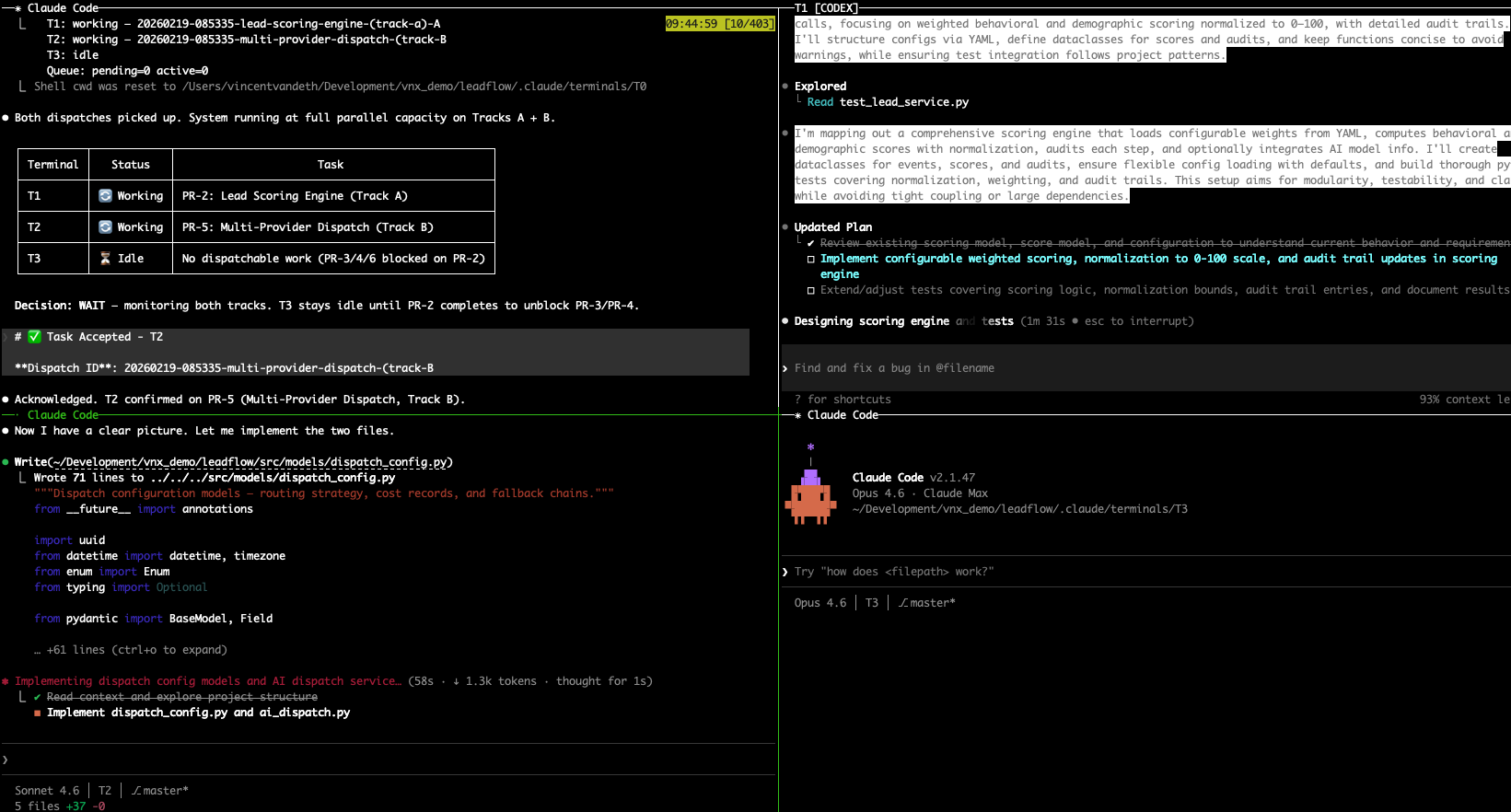
T0 orchestrator dispatching work to parallel workers with isolated context and explicit governance.
VNX is an open-source governance-first orchestration runtime for AI CLI workflows. One orchestrator breaks down work, interactive and headless workers execute in parallel, and everything is tracked through receipts, quality gates, and end-to-end provenance.
No framework to import. No cloud dependency. Governance, provenance, and operator control built in.
Current release: v0.5.0
See CHANGELOG.md for the release summary.
The Problem
You're already using AI coding agents. But when you run multiple agents on the same project:
- They edit the same files and create merge conflicts
- Context windows fill up mid-task, losing all progress
- You can't tell which agent did what, or why something broke
- There's no way to stop an agent from merging bad code
Most multi-agent frameworks solve orchestration. VNX solves governance — the audit trails, quality gates, and human checkpoints that make multi-agent workflows trustworthy.
Three Ways to Run VNX
VNX supports three modes. All share the same runtime model — receipts, provenance, and governance controls work in every mode.
Starter Mode — Get running in 5 minutes
Single terminal, one AI provider, sequential dispatch. No tmux required.
git clone https://github.com/Vinix24/vnx-orchestration.git
cd vnx-orchestration && ./install.sh /path/to/your/project
cd /path/to/your/project
vnx init --starter
vnx doctor        # Validate everything
vnx status        # See your healthy state
Starter mode gives you scoped dispatches, structured receipts, and a full audit trail — without the multi-terminal setup. When you're ready for parallel agents, upgrade with vnx init --operator.
Operator Mode — Full multi-agent orchestration
Four-terminal tmux grid, multiple AI providers, parallel tracks, quality gates, worktrees, and dashboard.
vnx init --operator
vnx doctor
vnx start                  # Launch the 2x2 tmux grid
vnx start claude-codex     # T1: Codex CLI, T2: Claude Code
vnx start claude-gemini    # T1: Gemini CLI, T2: Claude Code
vnx start full-multi       # T1: Codex CLI, T2: Gemini CLI
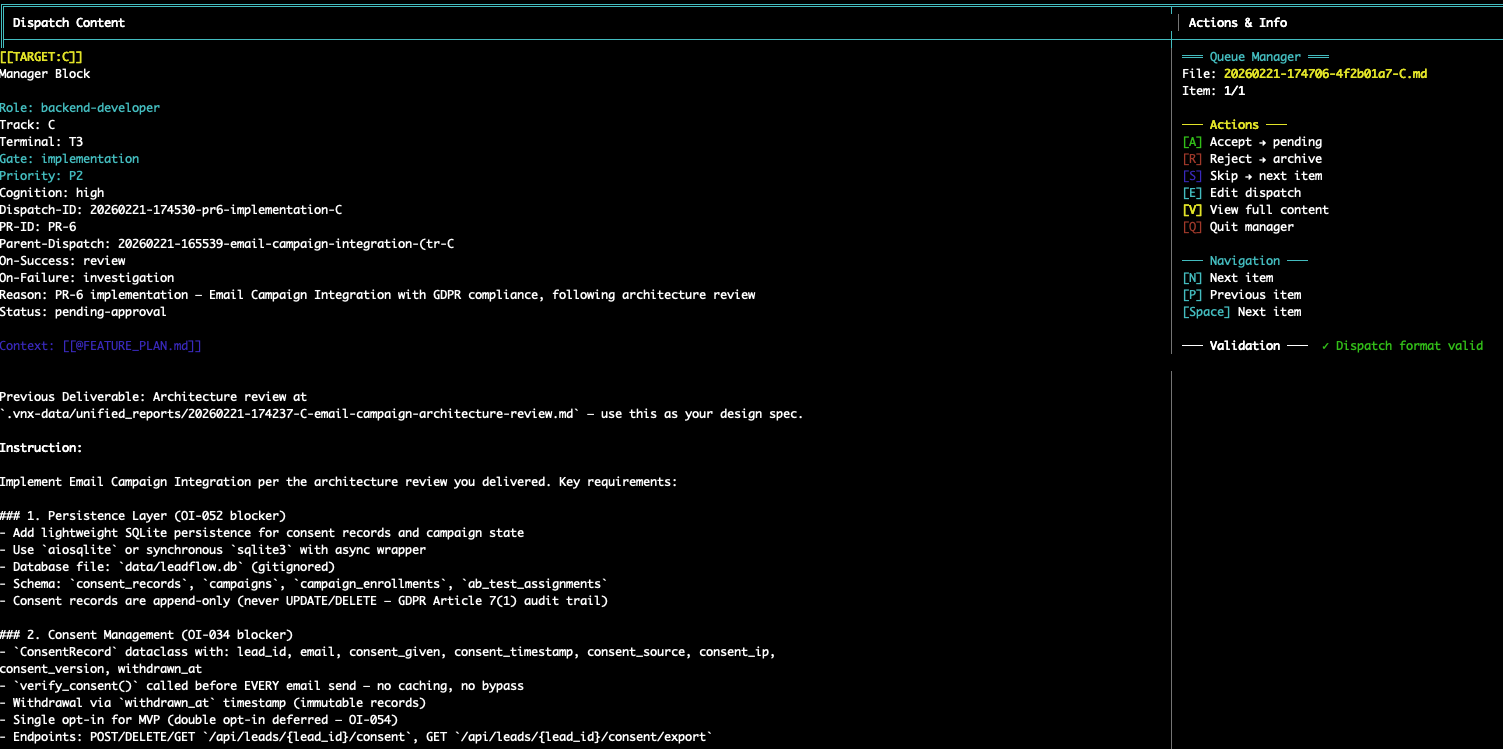
Press Ctrl+G to open the dispatch queue — see pending tasks with role, priority, and git ref.
Demo Mode — See it without setup
Replay real orchestration sessions with no API keys and no project setup:
vnx demo                              # Launch demo with sample state
vnx demo --replay governance-pipeline # Replay a real 6-PR session
vnx demo --dashboard                  # Dashboard with sample data
Demo mode uses temp directories — nothing touches your project.
How It Works
1. Dispatch — The orchestrator assigns tasks
T0 breaks work into scoped tasks (150-300 lines) and routes them to worker terminals. Each worker runs its own CLI with its own context window. No shared state between agents.
2. Execute — Each agent works in isolation
Workers execute tasks using their assigned CLI. VNX supports mixing providers freely — Claude Code, Codex CLI, Gemini CLI, or Kimi CLI. The orchestration layer doesn't care which model runs where.
3. Track — Every decision is recorded
Every agent action generates a structured receipt in an append-only NDJSON ledger: what was dispatched, what was produced, which files changed, git commit, duration, cost. After 1,400+ entries, patterns emerge that you can't see any other way.
vnx cost-report # API spend per agent, per task type
4. Gate — Agents can't merge broken code
Quality gates are deterministic, not LLM-based. The agent proposes, the gate validates: file size limits, test coverage thresholds, open blocker counts. Verdicts: APPROVE, HOLD, or ESCALATE. The LLM never judges its own work.
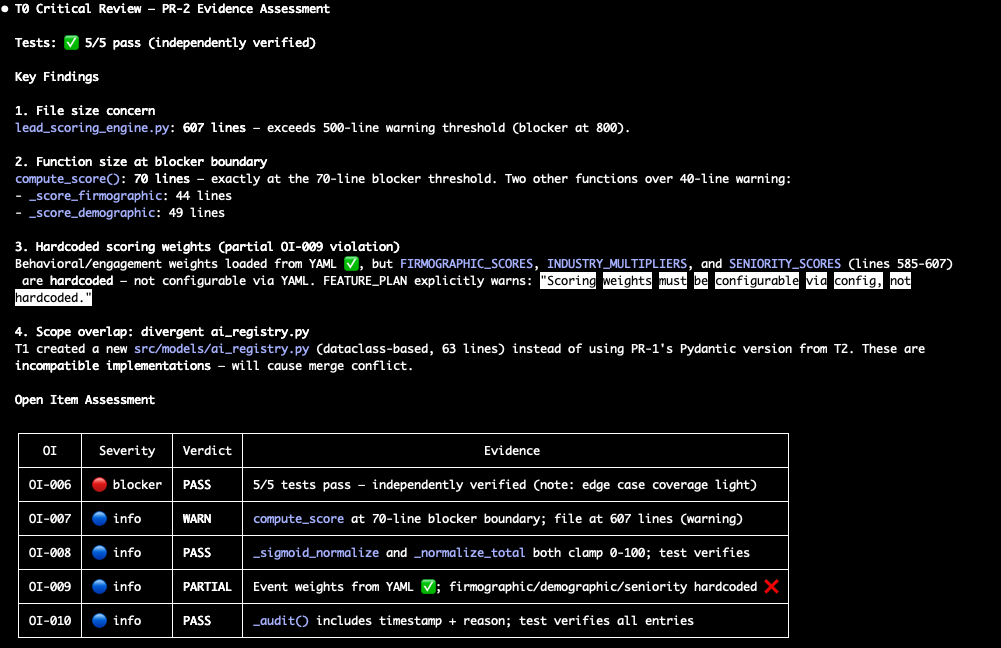
5. Rotate — Context fills up? No problem
Long-running tasks exhaust context windows. VNX handles this automatically:
Agent hits 65% context → blocked from further tool calls
  → Agent writes structured ROTATION-HANDOVER.md
    → VNX sends /clear to terminal
      → Fresh session resumes with handover + original task
Zero human intervention. Zero lost work. The receipt ledger maintains a complete chain across rotations.
Install
Prerequisites
- macOS or Linux
- tmux (operator mode only), bash, python3, git, jq, fswatch
- At least one AI CLI: Claude Code, Codex CLI, or Gemini CLI
# macOS
brew install tmux jq fswatch

# Clone and install into your project
git clone https://github.com/Vinix24/vnx-orchestration.git
cd vnx-orchestration
./install.sh /path/to/your/project

# Initialize
cd /path/to/your/project
vnx init                # Interactive: choose starter or operator
vnx doctor              # Validate everything
Starter mode needs only bash, python3, git, and jq. Operator mode additionally requires tmux and fswatch.
Commands
Commands are tiered by mode. Running an operator-only command in starter mode returns a clear error with upgrade instructions.
Universal (all modes)
| Command | What it does |
|---|---|
vnx init |
Initialize VNX project (with mode selection) |
vnx doctor |
Validate setup and dependencies |
vnx status |
Show current state and mode |
vnx recover |
Recover from failures |
vnx help |
Show available commands for current mode |
vnx update |
Pull latest VNX version |
Starter + Operator
| Command | What it does |
|---|---|
vnx staging-list |
List pending dispatches |
vnx promote |
Promote a dispatch |
vnx gate-check |
Run quality gate check |
vnx cost-report |
API spend per agent and task |
vnx analyze-sessions |
Populate session analytics |
vnx suggest review |
View AI-generated tuning suggestions |
vnx suggest accept <ids> |
Approve specific suggestions |
vnx suggest apply |
Apply approved tuning edits |
vnx bootstrap-skills |
Install skill templates |
vnx bootstrap-terminals |
Configure terminal grid |
Operator Only
| Command | What it does |
|---|---|
vnx start [profile] |
Launch the 2x2 tmux grid |
vnx stop |
Stop tmux session |
vnx jump <T0|T1|T2|T3> |
Switch tmux focus to terminal |
vnx jump --attention |
Focus the terminal needing human attention |
vnx worktree create <name> |
Isolated feature branch worktree |
vnx worktree list |
List active worktrees |
vnx merge-preflight |
Pre-merge governance check |
vnx smoke |
Run pipeline smoke test |
Demo Only
| Command | What it does |
|---|---|
vnx demo |
Launch demo with sample state |
vnx demo --replay <scenario> |
Replay a recorded orchestration flow |
vnx demo --dashboard |
Dashboard with sample data |
Git Worktrees (Operator Mode)
Isolate feature work from main. Each worktree gets its own branch — all agents work in the worktree, main stays clean.
vnx worktree create fp04              # Branch from HEAD
vnx worktree create fp04 --ref staging  # Branch from staging
cd ../project-wt-fp04/                # All agents work here
vnx worktree remove fp04             # Clean up after merge
Receipts track in_worktree: true/false and commit provenance (CLEAN, DIRTY_LOW, DIRTY_HIGH).
Session Intelligence
VNX mines session logs to find patterns and generate tuning suggestions. Nothing is auto-applied:
- Analyze — Parse logs, detect patterns, extract model performance
- Brief — Aggregate into T0-readable state file
- Suggest — Generate tuning proposals (MEMORY, rules, skills)
vnx suggest review         # See what's proposed
vnx suggest accept 1,3,5   # Approve specific edits
vnx suggest apply          # Apply to target files
Project Structure
your-project/
├── .vnx/              # VNX runtime (git-ignored)
│   ├── bin/           # CLI + core scripts
│   ├── hooks/         # PreToolUse, PostToolUse hooks
│   ├── ledger/        # Receipt processor
│   └── skills/        # Skill templates
├── .vnx-data/         # State (git-ignored)
│   ├── state/         # t0_receipts.ndjson, terminal_state.json
│   ├── dispatches/    # staging/ → queue/ → active/ → completed/
│   └── mode.json      # Current mode (starter/operator)
├── dashboard/         # Operator dashboard (git-tracked)
│   ├── index.html     # Vanilla HTML/JS UI (no build step)
│   └── serve_dashboard.py # Python HTTP server (port 4173)
└── .claude/           # Claude Code config + skills
All state lives on the filesystem. No database, no cloud dependency.
Who Is VNX For?
Solo developers managing 2-4 AI agents who need to know what each agent did, when, and why. Start with starter mode, graduate to operator mode when you need parallel tracks.
Small engineering teams (2-5 people) coordinating AI-assisted feature work across branches and worktrees with traceable provenance.
Compliance-aware organizations that need audit trails for AI-generated code — every change traces back to a dispatch, a human approval, and a quality gate verdict.
VNX is not a consumer AI chat wrapper, a CI/CD replacement, or a no-code tool. It's an orchestration system for developers who want governance over their AI workflows.
See Who Should Use VNX for detailed use cases and audience fit.
How VNX Compares
| VNX | Raw Claude Code | OpenClaw / CrewAI / LangGraph | |
|---|---|---|---|
| Multi-agent coordination | Built-in (T0-T3 grid) | Manual (multiple terminals) | Framework-level orchestration |
| Audit trail | Append-only NDJSON ledger | Chat logs only | Varies; often requires custom logging |
| Quality gates | Deterministic, non-LLM | None built-in | Framework-dependent |
| Human approval | Mandatory on every dispatch | Per-tool approval | Configurable but not default |
| Context rotation | Automatic handover | Manual /clear | Not typically handled |
| LLM-agnostic | Yes (Claude, Codex, Gemini, Kimi) | Claude only | Varies by framework |
| Setup complexity | git clone + vnx init |
npm install |
pip install + code integration |
Detailed comparisons: VNX vs Claude Code | VNX vs Multi-Agent Frameworks
Architecture & Docs
| Document | Description |
|---|---|
| Architecture | Glass Box Governance design and data flow |
| Productization Contract | User modes, command surface, migration plan |
| Dispatch Guide | How T0 routes tasks to workers |
| Limitations | Known constraints and failure modes |
| Open Method | Development philosophy |
CI
Two offline GitHub Actions workflows (no API calls, no secrets):
public-ci.yml— Install + doctor validation, gitleaks secret scanvnx-ci.yml— Core test suites + PR queue integration
Contributing
See CONTRIBUTING.md.
Most valuable contributions: test coverage, failure-mode hardening, provider adapters, docs clarity.
Blog
Building VNX in public — architecture decisions, failure modes, and real data from running multi-agent workflows in production.
License
MIT — see LICENSE.
Built by Vincent van Deth · Questions? GitHub Discussions
Reviews (0)
Sign in to leave a review.
Leave a reviewNo results found