mac-app-dualizer
Health Uyari
- License — License: MIT
- Description — Repository has a description
- Active repo — Last push 0 days ago
- Low visibility — Only 6 GitHub stars
Code Basarisiz
- fs module — File system access in .github/workflows/ci.yml
- spawnSync — Synchronous process spawning in bin/dualize.js
- fs.rmSync — Destructive file system operation in bin/dualize.js
- os.homedir — User home directory access in bin/dualize.js
- fs module — File system access in bin/dualize.js
- rm -rf — Recursive force deletion command in clone-app.sh
- exec() — Shell command execution in src/asar-tools.js
- fs module — File system access in src/asar-tools.js
- process.env — Environment variable access in src/iconbadge.js
- fs module — File system access in src/iconbadge.js
- process.env — Environment variable access in src/main.js
- fs module — File system access in src/main.js
- os.homedir — User home directory access in src/registry.js
- fs module — File system access in src/registry.js
Permissions Gecti
- Permissions — No dangerous permissions requested
Bu listing icin henuz AI raporu yok.
Clone any macOS app to run a second, fully independent instance with its own data directory and login. CLI + Electron GUI. Started for running multiple Claude desktop instances with different accounts.
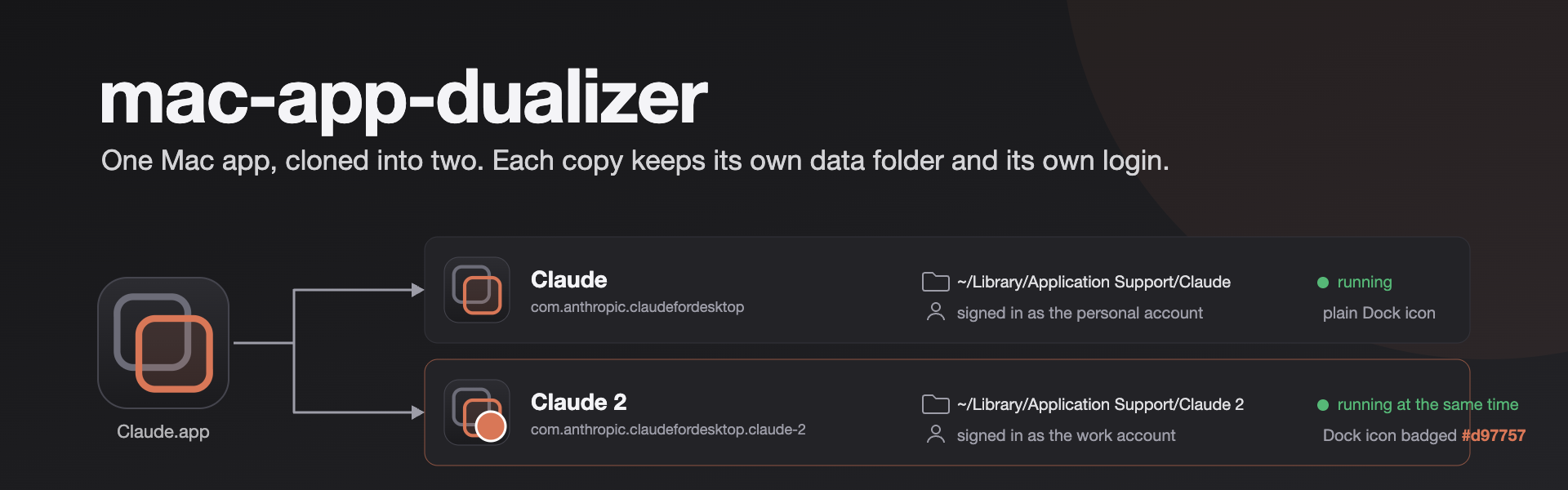
Clone a macOS app into a second copy that keeps its own data folder and its own login.
Written so two Claude accounts could run on one Mac at the same time. Works on any Electron app.








What it does · The rules it keeps · How far to trust it · How it works · Run it yourself · When something goes wrong
Why this exists
The Claude desktop app, which hosts Claude Code, runs many sessions at once but signs in to one account per install. A personal account and a work account cannot both be open. open -n -a "Claude" does not help: the second window shares the same data folder, so it shares the same login, and the two fight over lock files.
A real second instance needs four things. A bundle identifier and name of its own, so macOS treats it as another app. A data folder of its own, so it keeps its own cookies, session and login. Its Electron helper apps renamed to match, or it will not start. And a valid code signature after all of that, because macOS refuses a bundle whose signature no longer matches its contents.
That was worked out by hand for Claude, then turned into this tool so it works for any app. One command, or a small window you drag an app onto.
What it does
| Makes a second app | Copies the bundle and gives it a new bundle identifier (the original plus a slug of the name, so Claude 2 becomes com.anthropic.claudefordesktop.claude-2) and a new display name. macOS sees two apps. |
| Gives it a data folder of its own | For Electron apps, a small snippet at the top of the app's main script points userData and the logs at ~/Library/Application Support/<Clone Name>. The clone keeps its own cookies, session and login. |
| Keeps the clone able to start | Renames the Electron helper apps and their executables, repacks app.asar with exactly the files the original kept in app.asar.unpacked, restores their permissions, recomputes the ElectronAsarIntegrity hash in Info.plist, re-signs the bundle ad hoc, verifies both the signature and the hash, and registers the app with Launch Services. |
| Tells the two apart | Draws a coloured badge on the clone's icon, so the Dock and Cmd-Tab show which is which. The colour is picked from the name, or set with --tint. |
| Remembers every clone | Each clone is recorded in ~/.config/mac-app-dualizer/clones.json. dualize list shows every clone with its health: code signature and asar hash. |
| Repairs after an update | An app update overwrites the clone's bundle. dualize repair builds the clone again from the current app. The data folder, and the login in it, are untouched. |
| Removes cleanly | dualize remove deletes the app and keeps the data folder. Add --purge to delete the data too. |
| Handles deep links | By default the clone keeps the app's URL schemes, so open -a "Claude 2" "claude://..." reaches the clone. --strip-schemes removes them from the clone instead. |
| Has a window too | A small Electron app: drag an app in, see its icon, bundle id and whether it is Electron, name the clone, click Clone, then Launch or Show in Finder. |
| Fails safe | A failed clone deletes its half-written bundle. A clone whose integrity hash could not be updated, or whose main script is an ES module, is not written at all. |
The rules it keeps
- Clone only apps you are licensed to use, within each app's terms of service. This is for two accounts or two profiles on your own Mac.
- Nothing leaves your Mac. The tool copies and re-signs a bundle on disk. It sends nothing anywhere and never asks for
sudo. - The CLI needs no
npm install. The helpers use Node built-ins only.@electron/asarandpngjsare fetched on demand withnpx.npm installis only for the GUI. - Your login survives repair. Repair deletes and rebuilds the app bundle, never the data folder. Remove keeps the data folder unless you say
--purge. productNameis left alone. Only the bundle name changes, so the app's user agent and any "is this the desktop app?" check on a login page still pass.- A clone that would crash is not written. After signing, the asar hash is checked once more. A mismatch aborts the clone instead of printing "Done".
- Not affiliated with Anthropic or with any app you clone.
How far to trust it
[!IMPORTANT]
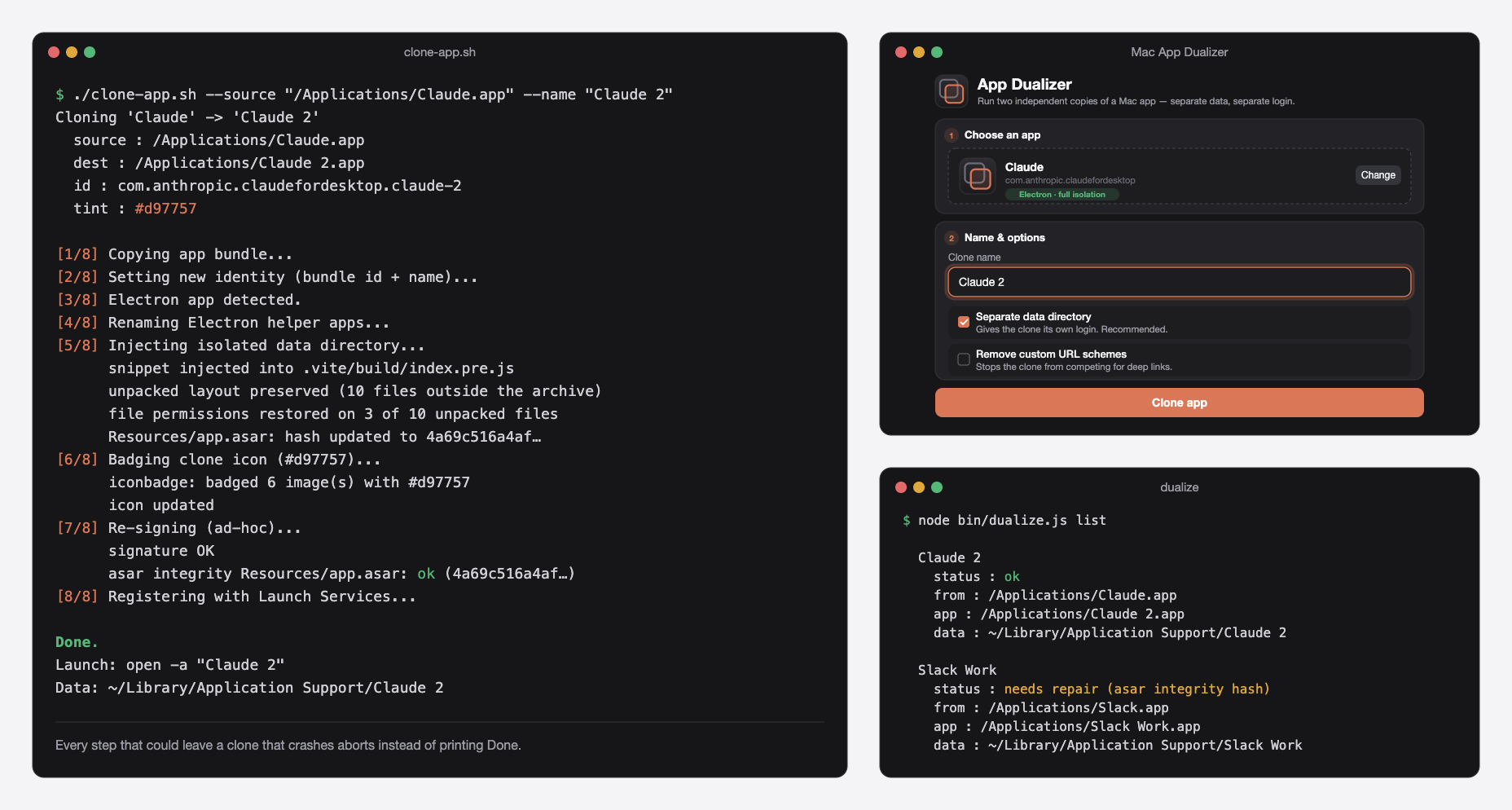
It was built for Claude, and Claude is where it has been exercised. The screens above show a realClaude 2clone on macOS 15, whichdualize listreports healthy on 7 October 2026. Other Electron apps (Slack, Notion, VS Code, Discord, Figma) go through the same eight steps and should work, but each app is its own test. Try a low-stakes app first, and read the log.
What it cannot do yet:
- Native, non-Electron apps get a new identity only. Sandboxed apps get a fresh container from that; other apps may still share data with the original.
- Apps whose main script is an ES module are refused for data isolation.
--no-isolategives a separately named copy that shares the original's data. - Auto-updates revert the clone. Run
dualize repairafterwards. - The signature is ad hoc. That is fine on the Mac that built the clone. A clone moved to another Mac needs its quarantine flag cleared (see below).
- No automated test clones an app. CI runs shellcheck,
bash -n,node --checkand apackage.jsonparse, nothing more.
How it works
flowchart LR
  subgraph you ["What you give"]
    APP["/Applications/Claude.app"]
    NAME["A name: Claude 2"]
  end
  subgraph tool ["In this repository"]
    GUI["Electron window<br/>src/main.js"]
    DZ["dualize<br/>bin/dualize.js"]
    SH["clone-app.sh<br/>copy, rename, badge, sign, register"]
    AT["src/asar-tools.js<br/>inject snippet, repack, integrity hash"]
    REG["src/registry.js<br/>~/.config/mac-app-dualizer/clones.json"]
  end
  subgraph out ["What you get"]
    CLONE["/Applications/Claude 2.app<br/>own bundle id, re-signed"]
    DATA[("~/Library/Application Support/Claude 2<br/>cookies, session, login")]
  end
  APP --> SH
  NAME --> SH
  GUI --> SH
  DZ -->|clone, repair| SH
  SH --> AT --> CLONE
  SH --> REG
  DZ -->|list, remove| REG
  CLONE -->|first launch| DATA
clone-app.sh does the work in eight numbered steps and prints each one. dualize and the window both call it; neither does anything the script cannot do on its own.
| Part | What it is |
|---|---|
clone-app.sh |
The eight steps: copy with ditto, new identity with PlistBuddy, rename helpers, isolate data, badge the icon, codesign --force --deep --sign -, check the hash, lsregister. Bash 3.2, the one macOS ships |
src/asar-tools.js |
Reads the asar header, lists what the original kept unpacked, builds the matching --unpack pattern, inserts the isolation snippet after "use strict", restores file modes, and recomputes and checks ElectronAsarIntegrity. Node built-ins only |
src/iconbadge.js |
Draws a coloured circle with a white ring on every PNG of the iconset, with pngjs |
src/registry.js |
The JSON registry at ~/.config/mac-app-dualizer/clones.json |
bin/dualize.js |
clone, list, repair, remove. Health is codesign --verify --deep plus the asar hash |
src/main.js, src/renderer/ |
The Electron window. Context isolation on, no Node in the renderer. It streams the script's log into the window |
.github/workflows/ci.yml |
shellcheck at warning level, bash -n, node --check on every script, and a package.json parse |
Run it on your machine
You need macOS (Apple Silicon or Intel), the Xcode Command Line Tools for codesign, and Node.js 18 or newer.
xcode-select --install
git clone https://github.com/vishalmeena2211/mac-app-dualizer.git && cd mac-app-dualizer
chmod +x clone-app.sh
./clone-app.sh --source "/Applications/Claude.app" --name "Claude 2"
open -a "Claude 2"
You now have Claude and Claude 2, each with its own data folder, so each can sign in to a different account and both can run at once, with separate Claude Code sessions. The clone's data lives in ~/Library/Application Support/Claude 2. The same command works for other Electron apps:
./clone-app.sh --source "/Applications/Slack.app" --name "Slack Work"
Every option
| Flag | Meaning |
|---|---|
--source PATH |
The .app to clone (required) |
--name NAME |
Display name for the clone, such as "Claude 2" (required). No quotes or backslashes |
--dest-dir DIR |
Where to write the clone (default: the folder the source is in) |
--no-isolate |
Do not give the clone its own data folder (Electron only) |
--strip-schemes |
Remove the app's custom URL schemes from the clone |
--tint "#RRGGBB" |
Badge colour for the clone's icon (default: picked from the name) |
--no-tint |
Do not badge the clone's icon |
Managing clones
node bin/dualize.js list
node bin/dualize.js repair "Claude 2"
node bin/dualize.js repair --all
node bin/dualize.js remove "Claude 2"
list shows each clone's status: ok, missing, needs repair (code signature) or needs repair (asar integrity hash). repair rebuilds the clone from the current app with the same options and keeps the login. repair --all skips healthy clones. remove keeps the data folder; add --purge to delete it too. node bin/dualize.js clone --source ... --name ... is the same as running the script.
The window
npm install
npm start
Drag an app onto the window, or click Browse. Its icon, bundle id and an Electron or Native badge appear. Give the clone a name, choose whether it gets its own data folder and whether to drop URL schemes, click Clone app, watch the log, then Launch clone. The window does not yet expose --tint or --dest-dir.
Signing the clone into a second account
A magic link signs in the app that opens it, and macOS routes claude:// links to the original app. So either start the Continue with email flow inside the Claude 2 window, which makes that instance the one that completes it, or hand the link to the clone by name:
open -a "Claude 2" "claude://magic-link#<token-from-your-login-email>"
Keep the clone's productName unchanged. The tool does this for you. Renaming it makes the web login flow treat the app as a browser and show the marketing site instead of the sign-in.
When something goes wrong
The clone crashes the instant it opens. The crash report says EXC_BREAKPOINT (SIGTRAP) in Electron Framework, and Console shows Integrity check failed for asar archive. The app checks app.asar against the ElectronAsarIntegrity hash in Info.plist, and the clone's hash is stale. Versions of this tool before September 2026 could leave it stale when run from a bare git clone: the hash step needed @electron/asar to be require()-able and silently skipped when it was not (#1). Pull the latest version and rebuild the clone. Its data folder, and your login, are kept:
node bin/dualize.js repair "Claude 2"
If the clone predates the registry and dualize list does not know it, delete the .app and run clone-app.sh again with the same name.
"could not inject the data-isolation snippet". The app's main script is not a CommonJS file the tool knows how to patch, such as an ES-module entry. Clone with --no-isolate to get a separately named copy that shares the original's data, and please open an issue naming the app.
The Dock still shows the old icon. Run killall Dock.
A clone copied from another Mac will not open. The ad-hoc signature is fine where it was made. Elsewhere, clear quarantine:
xattr -dr com.apple.quarantine "/Applications/Claude 2.app"
Removing a clone by hand, without dualize:
rm -rf "/Applications/Claude 2.app" "$HOME/Library/Application Support/Claude 2"
Repository layout
| Path | What is in it |
|---|---|
clone-app.sh |
The CLI. Everything else calls it |
bin/ |
dualize: list, repair and remove clones |
src/ |
The Node helpers (asar-tools.js, iconbadge.js, registry.js) and the Electron window (main.js, preload.js, renderer/) |
.github/ |
CI, issue and pull request templates, and the README images |
CHANGELOG.md |
What changed, including the fix for #1 |
CONTRIBUTING.md, SECURITY.md |
How to help, and how to report a vulnerability privately |
Roadmap
- A CLI that clones, isolates data, re-signs and registers
- An Electron window: drag, name, clone, launch
- Correct asar integrity hash from a bare
git clone(#1) - Registry,
list,repairandremove - Distinct icon badges
- CI: shellcheck and syntax checks
- Apps whose main script is an ES module
-
--tintand--dest-dirin the window - A packaged
.appof the window, built withelectron-builder - Better data isolation for native, non-Electron apps
- A CI job that clones a real Electron app
Contributing
Read CONTRIBUTING.md first. Test against a low-stakes Electron app before a critical one. Before a pull request, bash -n clone-app.sh, shellcheck --severity=warning clone-app.sh and node --check on each script must pass; that is what CI runs. Keep the script Bash 3.2 compatible and keep src/asar-tools.js free of third-party packages, so the CLI keeps working from a bare git clone. Say which app, macOS version and chip you tested on.
Please do not propose features aimed at circumventing licensing, DRM or an app's terms of service.
Credits
- Electron for the asar format and
@electron/asar, which extracts and repacks the archive. - pngjs for reading and writing the icon PNGs.
- Apple's
codesign,PlistBuddy,ditto,iconutilandlsregister, which do the parts that need macOS.
Licence
MIT. Use it, change it and share it, keeping the copyright notice. The apps you clone keep their own licences and terms; this tool does not change them.
Words used here
| Word | What it means |
|---|---|
| Clone | A second copy of an app, with its own bundle identifier, name, icon badge and data folder |
| Bundle identifier | The CFBundleIdentifier in Info.plist, such as com.anthropic.claudefordesktop. macOS uses it to tell apps apart |
| Data folder | Electron's userData path, where an app keeps cookies, session and login. Normally ~/Library/Application Support/<App Name> |
app.asar |
The archive inside an Electron app that holds its JavaScript. The isolation snippet goes at the top of the main script inside it |
app.asar.unpacked |
Files the app keeps outside the archive, because native modules and helper binaries cannot run from inside one. The clone keeps the same set, with the same permissions |
| Integrity hash | ElectronAsarIntegrity in Info.plist: a SHA-256 of the archive header. Apps built with Electron's integrity fuse, Claude among them, refuse to start if it does not match |
| Helper apps | The <App> Helper*.app bundles in Contents/Frameworks. Electron finds them by the main app's name, so a renamed app needs renamed helpers |
| Ad-hoc signature | codesign --sign -: a signature with no developer identity. Valid on the Mac that made it |
| URL scheme | A custom link prefix such as claude:// that an app registers to receive deep links, including magic-link logins |
| Registry | ~/.config/mac-app-dualizer/clones.json, the list of clones this tool made and the options each was made with |
Yorumlar (0)
Yorum birakmak icin giris yap.
Yorum birakSonuc bulunamadi