opendesk
Health Gecti
- License — License: MIT
- Description — Repository has a description
- Active repo — Last push 0 days ago
- Community trust — 12 GitHub stars
Code Gecti
- Code scan — Scanned 12 files during light audit, no dangerous patterns found
Permissions Gecti
- Permissions — No dangerous permissions requested
Bu listing icin henuz AI raporu yok.
Computer Use tools for integrating with your agentic harness
opendesk
Give any AI agent eyes and hands on your desktop.
Opendesk is a computer use tool to navigate your computer just like a human would. Opendesk can be integrated with Claude Code, Claude Desktop, Cursor, and Continue via MCP —
adding screenshot, click, type, scroll, clipboard, OCR, and task recording to every conversation.
macOS · Linux · Windows



Quick start
pip install 'opendesk[core,mcp]'
opendesk install
Start a Claude Code conversation and try:
Take a screenshot of my screen
Click the Chrome icon
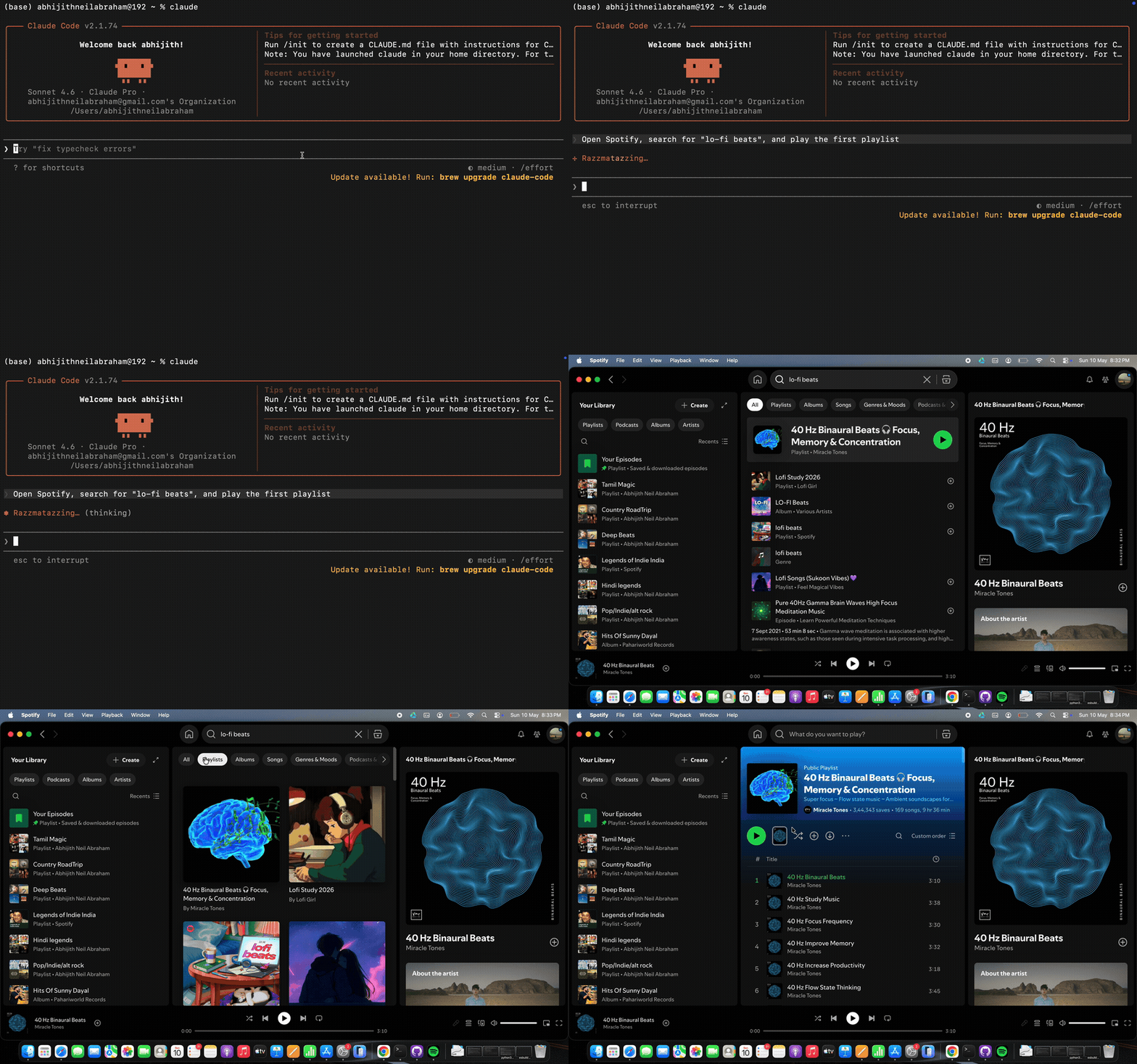
Open Spotify and play lo-fi beats
Requires Python 3.10+
Architecture
opendesk is built in three layers — each independently importable:
┌─────────────────────────────────────────────────────────┐
│  Integrations    MCP  ·  Claude Code  ·  OpenAI  ·  LangChain  │
├─────────────────────────────────────────────────────────┤
│  Tools      screenshot · mouse · keyboard · ui          │
│             clipboard · ocr · learn · schedule          │
├─────────────────────────────────────────────────────────┤
│  Computer        capture  ·  Set-of-Marks  ·  OCR  ·  sandbox  │
└─────────────────────────────────────────────────────────┘
| Layer | What it does |
|---|---|
| Computer | Low-level screen capture, SoM element detection, OCR, per-session audit log |
| Tools | One class per capability. Pydantic schema auto-shared with every integration |
| Integrations | Thin adapters for MCP, Anthropic, OpenAI, LangChain — add one tool, get all four |
| Automation | learn + schedule backed by pynput recording, JSON storage, APScheduler daemon |
Full details → docs/architecture.md
Tools
| Tool | What it does |
|---|---|
screenshot |
Capture the screen with numbered boxes on every clickable element (Set-of-Marks) |
ui |
Click and type by element name — no coordinates needed |
mouse |
Pixel-level mouse control for anything ui can't reach |
keyboard |
Type text, press keys, send hotkeys |
app |
Open, close, and focus applications |
clipboard |
Read and write the system clipboard |
ocr |
Extract text from any region of the screen |
learn |
Record a workflow once, replay it anytime |
schedule |
Run any task or learned procedure on a timer |
Full reference → docs/tools.md
Automation
Record a task once, replay it forever, or put it on a schedule.
Record
"Start recording task expense-form"
Perform the workflow yourself. The agent captures every click, keystroke, and screenshot.
Replay
"Stop recording"
"Replay expense-form"
The agent re-executes using the current screen state — no hardcoded coordinates.
Schedule
"Every morning at 9am, open my email in Chrome, take a screenshot, and summarize what's there"
"Schedule expense-form every friday at 5pm"
opendesk scheduler start
Supported timing: every 30m · every 2h · every day at 09:00 · every friday at 17:00 · raw cron
Full guide → docs/automation.md
Installation options
pip install opendesk                              # core framework only
pip install 'opendesk[core,mcp]'                  # + screen capture + MCP server (recommended)
pip install 'opendesk[core,mcp,learn]'            # + task recording and replay
pip install 'opendesk[core,mcp,learn,schedule]'   # + scheduled tasks
pip install 'opendesk[all]'                       # everything
Platform support
| Feature | macOS | Linux | Windows |
|---|---|---|---|
| Screenshot | ✓ | ✓ | ✓ |
| Mouse & keyboard | ✓ | ✓ | ✓ |
| UI element access | AppleScript | AT-SPI2 | UI Automation |
| Clipboard | pbcopy/pbpaste | xclip/xsel | pyperclip |
| OCR | Vision / tesseract | tesseract | WinRT / tesseract |
| App control | open -a |
xdg-open |
start |
| Task recording | ✓ | ✓ | ✓ |
| Scheduled tasks | ✓ | ✓ | ✓ |
System permissions
macOS
- System Settings → Privacy & Security → Screen Recording — enable for your terminal
- System Settings → Privacy & Security → Accessibility — enable for mouse/keyboard control
Linux
sudo apt install xclip xdotool python3-atspi
Windows
No extra permissions needed — opendesk uses Win32 APIs by default.
See docs/permissions.md for full setup guide.
Integrations
Claude Code
opendesk install        # registers opendesk-mcp globally
opendesk uninstall      # removes the registration
Claude Desktop
Add to your config file:
- macOS:
~/Library/Application Support/Claude/claude_desktop_config.json - Windows:
%APPDATA%\Claude\claude_desktop_config.json - Linux:
~/.config/Claude/claude_desktop_config.json
{
  "mcpServers": {
    "opendesk": { "command": "opendesk-mcp" }
  }
}
Python API
import asyncio
from opendesk import create_registry, allow_all_context

async def main():
    registry = create_registry()
    ctx = allow_all_context()

    result = await registry.get("screenshot").execute(
        ctx, registry.get("screenshot").Params(marks=True)
    )
    print(result.output)

asyncio.run(main())
Works with Anthropic SDK, OpenAI, and LangChain — see docs/integrations.md
On-device models (Ollama, LM Studio, vLLM, llama.cpp)
Any OpenAI-compatible local server works out of the box:
from openai import OpenAI
from opendesk.integrations.openai_compat import OpenAIAdapter

client = OpenAI(base_url="http://localhost:11434/v1", api_key="ollama")
adapter = OpenAIAdapter()
result = await adapter.run_loop(client, model="qwen2.5:72b", messages=messages)
Citation
If you use opendesk in your research or project, please cite it:
@software{opendesk,
  author  = {Abraham, Abhijith Neil},
  title   = {opendesk: Open Desktop Automation Framework},
  year    = {2025},
  url     = {https://github.com/abhijithneilabraham/opendesk},
  version = {0.1.2},
  license = {MIT}
}
A CITATION.cff is included — GitHub's "Cite this repository" button will pick it up automatically.
License
MIT
Yorumlar (0)
Yorum birakmak icin giris yap.
Yorum birakSonuc bulunamadi