browser-bridge
Health Uyari
- License — License: MIT
- Description — Repository has a description
- Active repo — Last push 0 days ago
- Low visibility — Only 5 GitHub stars
Code Gecti
- Code scan — Scanned 12 files during light audit, no dangerous patterns found
Permissions Gecti
- Permissions — No dangerous permissions requested
Bu listing icin henuz AI raporu yok.
Drive your real, logged-in Chrome from an AI agent (Claude Code / Codex) over MCP - 55 tools for browsing, DevTools-grade network capture, and web-security testing.
Drive your real, logged-in Chrome from an AI agent - over the Model Context Protocol.
No headless browser. No fresh profile. No re-login. Your agent reads and acts inside the exact sessions you're already signed into.







Browser Bridge is a local MCP server + Manifest V3 Chrome extension that lets AI coding agents - Claude Code and OpenAI Codex CLI - control the Chrome you use every day. Because it runs inside your real profile, the agent inherits your cookies, HttpOnly sessions, SSO, and 2FA state automatically. Ask it to "read my feed and summarize it" or "capture the API traffic on this page and show me the responses" - and it works against the live, authenticated app.
It ships 64 tools spanning everyday browsing, DevTools-grade network capture, a full web-security testing toolkit, playbooks (saved, self-healing recipes), and session recording - record an interaction into a self-contained, offline-faithful HTML replay (full-page, custom-designed player, with a smooth mouse-trail / click / keystroke overlay) and export it to a high-resolution MP4.
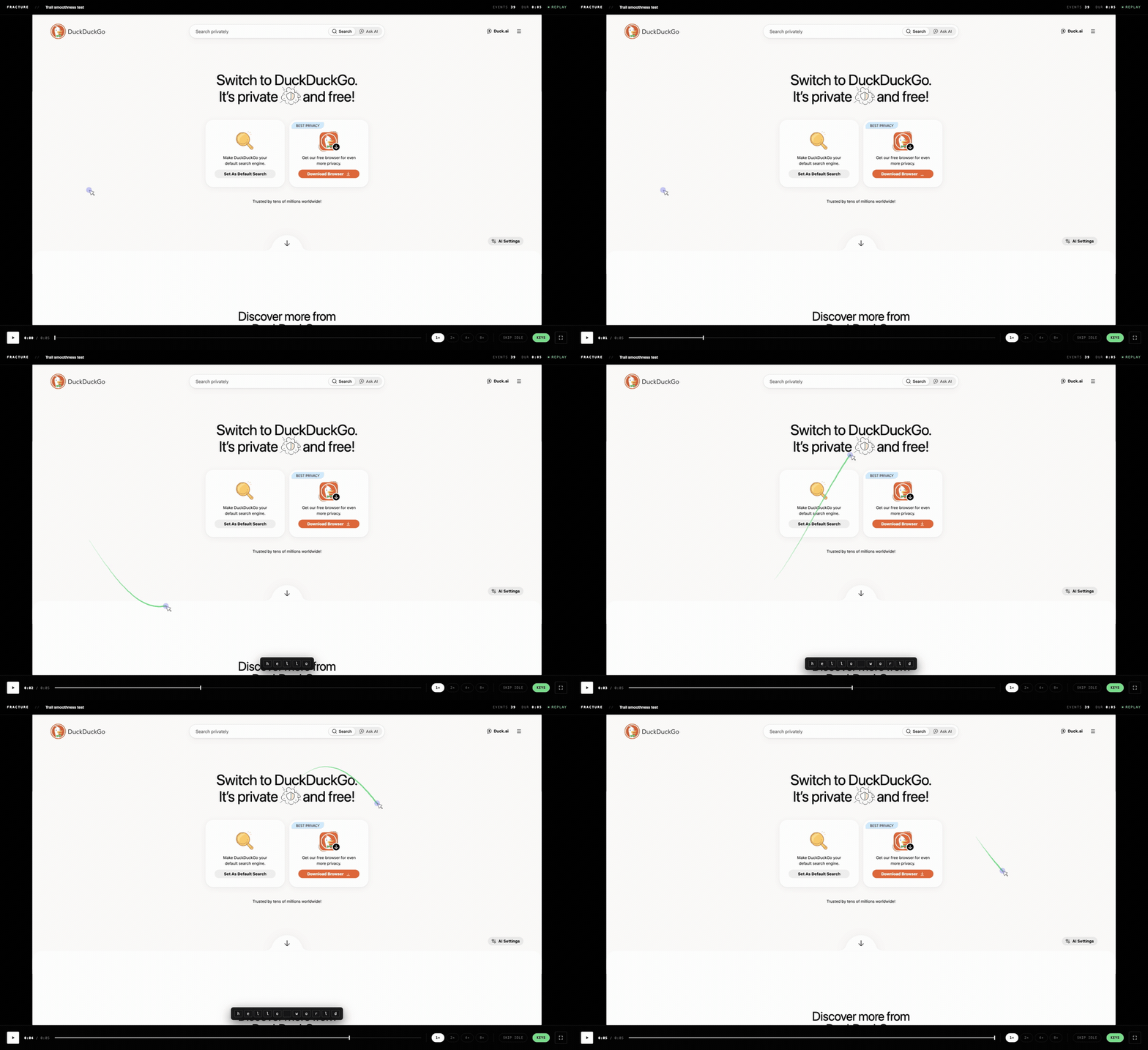
Record a session → a self-contained, offline replay with a smooth mouse-trail / click / keystroke overlay → export to a high-res MP4.
Contents
- Quick start
- Why Browser Bridge?
- See it in action
- Architecture
- Features & tools
- Playbooks
- Recording
- Setup
- Security & responsible use
- Limitations
- Roadmap
- Contributing
- License
Quick start
Build both packages, run the server, load the extension, connect your agent - about 60 seconds:
git clone https://github.com/vitalysim/browser-bridge.git && cd browser-bridge
( cd server    && npm install && npm run build )   # MCP server (TypeScript → dist/)
( cd extension && npm install && npm run build )   # bundles background.js + options.js
( cd server    && npm run install-service )        # run the server at login (systemd/launchd)
Load the extension - open
chrome://extensions, enable Developer mode, click Load unpacked, select theextension/folder, then open its options and paste the token from~/.browser-bridge/token→ Save & connect.Connect your agent:
Claude Code
claude mcp add --transport http --scope user browser-bridge \
  http://127.0.0.1:8765/mcp --header "Authorization: Bearer $(cat ~/.browser-bridge/token)"
OpenAI Codex CLI - export the token so Codex can read it, then register the server in one command:
export BROWSER_BRIDGE_TOKEN="$(cat "$HOME/.browser-bridge/token")"   # add to your shell profile
codex mcp add browser-bridge --url http://127.0.0.1:8765/mcp --bearer-token-env-var BROWSER_BRIDGE_TOKEN
Verify: curl -s http://127.0.0.1:8765/health → {"ok":true,"extensionConnected":true}. Full details, autostart options, and the manual config alternatives are in Setup.
Why Browser Bridge?
| Browser Bridge | Headless Playwright / Puppeteer | A raw CDP debug port | |
|---|---|---|---|
| Uses your real logged-in profile | ✅ | ❌ (fresh profile, re-login) | ⚠️ blocked on default profile since Chrome 136 |
| Works from Claude Code and Codex | ✅ | - | - |
| No open debug port on your session | ✅ (outbound WS) | n/a | ❌ any local process can hijack it |
| DevTools-grade capture (bodies, WS) | ✅ | partial | ✅ |
| One-command install, no native host | ✅ | ✅ | ✅ |
- One server, two clients. Both agents connect to the same token-authed endpoint
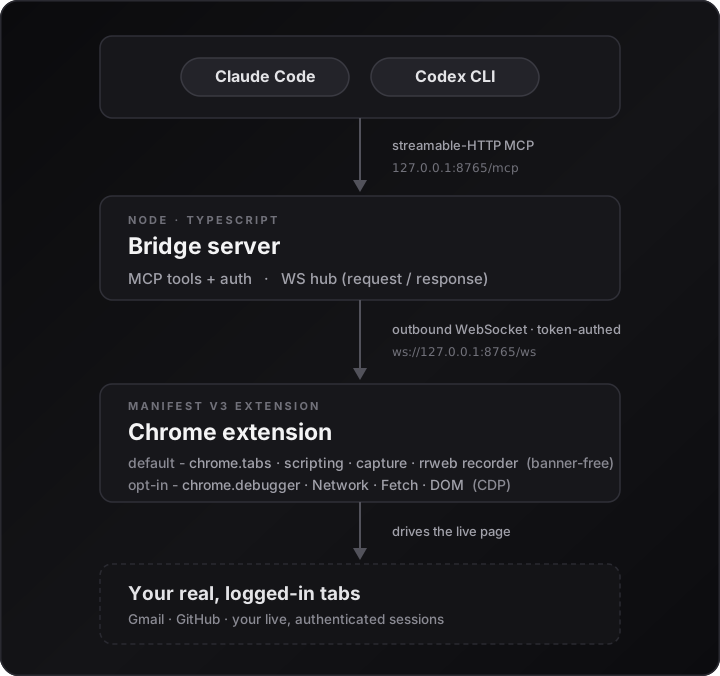
http://127.0.0.1:8765/mcp. Anthropic's Claude in Chrome is Claude-only and OpenAI's Codex browser extension is desktop-app-only - neither gives the Codex CLI a real browser. Browser Bridge does. - Extension, not a debug port. Chrome 136+ blocks
--remote-debugging-porton your default profile. A Manifest V3 extension runs inside that profile instead - banner-free by default, withchrome.debugger(CDP) power features attached only on demand. - Outbound WebSocket, no native-messaging host. The extension dials
ws://127.0.0.1:8765/ws; there are no host-manifest files to install, and the WS keepalive keeps the MV3 service worker alive. - Localhost-only + token auth. The server binds
127.0.0.1, checks a bearer token on both the MCP endpoint and the WS handshake, and rejects any WS origin that isn'tchrome-extension://.
See it in action
With Chrome open and logged in, just ask your agent in natural language:
# Everyday
list my open tabs
open github.com, read my notifications, and summarize them

# Screenshots
take a full-page retina screenshot of this page and save it to ~/Downloads/page.png

# Network capture
start a network capture on this tab, reload it, and show me the JSON API responses

# Record & export
record my session, I'll click around and type, then stop - build the HTML replay and a 2x MP4

# Web-security (authorized targets only)
capture identity "A" for app.example.com, then log in as B and capture "B";
replay the invoices request as A, B and anon and show me the authz_matrix

# Remote desktop / canvas (e.g. a CTF AttackBox)
screenshot the DCV desktop, click the terminal, type "id" and press Enter, then screenshot the output
Both Claude Code and Codex drive the same live browser through the same endpoint.
Architecture
Features & tools
- Batch multi-step work -
browser_batchruns a predictable sequence (navigate → click → fill → press_key → screenshot) in one round trip instead of five. The per-call round trip, not the browser, is what makes multi-step tasks slow, so this is the single largest speedup available. - Browse & interact - tabs, navigation, and click / fill / hover / type / scroll with auto-wait actionability (found + visible + enabled, auto-escalating to a trusted CDP click when a target is overlay-covered), plus file and image upload - all reaching into iframes (incl. cross-origin) and open shadow DOM - and coordinate-level trusted input (
input) for<canvas>remote desktops (VNC/RDP/Amazon DCV), games, and drawing apps. - Read & inspect - rendered page text, interactive-element snapshots with stable refs, screenshots (viewport → full-page retina, element clip, save-to-disk), and JavaScript evaluation that bypasses strict CSP via CDP.
- DevTools-grade capture - full request/response bodies, response headers,
Set-Cookie, timings, and WebSocket/SSE frames - with durable on-disk persistence and HAR / MHTML evidence export. - Web-security toolkit - named identities, an in-session request replayer, BOLA/IDOR/BFLA access-control diffing (
authz_matrix), Burp-style live interception, an intruder-style fuzzer (sniper/pitchfork/clusterbomb/race), passive header/CORS/secret analysis, JWT decode, and copy-as-curl. - Session & storage - read/write the real cookie jar (incl.
HttpOnly),localStorage/sessionStorage, and console + CSP + exception logs.
| Tool | Description |
|---|---|
tabs_list · tab_new · tab_activate · tab_close |
Manage tabs. tabs_list(short:true) returns id/title/origin/active only (no path/query), for quickly identifying tabs without echoing full URLs |
navigate · go_back · go_forward · wait_for |
Navigation |
click · fill · hover · type · press_key · scroll |
Interaction (iframe + open-shadow aware). Auto-waits for the element to be actionable (found + visible + enabled, timeoutMs) and returns structured {notActionable, reason} on failure. click detects overlay-covered targets and auto-escalates to a trusted CDP click (via:"trusted"); fill/type register in React inputs (native setter) and rich editors (execCommand). trusted:true for real CDP input; withSnapshot:true to get a fresh snapshot back inline |
input |
Coordinate-level trusted input via CDP for targets element selectors can't reach - a <canvas> remote desktop (VNC/RDP/Amazon DCV), a game, a WebGL app. Actions: mouse_move, left/right/middle_click, double_click, left_mouse_down/up, left_click_drag, scroll, type (to the focused element), key (combos like ctrl+c). Coords are CSS viewport pixels (= screenshotPixel / dpr, and screenshot now returns dpr). activate:true to foreground the tab so you can observe |
browser_batch |
Run a sequence of tools in one call - navigate → click → fill → press_key → screenshot as a single round trip instead of five. The per-call round trip, not the browser, is what makes multi-step tasks slow, so batching whenever you can predict two or more steps ahead is the single biggest speedup available. Runs sequentially and stops at the first error, reporting what completed plus the failing index and message. Cannot be nested; capped at 50 actions. Allowlisted to tools that add no approval surface when batched: navigation + interaction (navigate, go_back, go_forward, tabs_list, tab_new, tab_activate, click, fill, hover, type, press_key, scroll, wait_for), page reads (snapshot, get_page_text, screenshot, eval_js), pure functions (jwt_decode, response_diff) and inert status/buffer reads (bridge_status, debugger_status, identity_list, session_record_status, net_get_*, console_get, intercept_pending - each gated behind a start tool that is itself not batchable). Everything that mutates state, reads credentials, issues outbound requests or touches disk stays a direct call so it keeps its own per-call approval - including cookies_get, storage_dump, input, cdp_eval, tab_close and request_to_curl |
file_upload |
Set a file input via base64 or a local path (DOM.setFileInputFiles) |
paste_image |
Paste a local image into a rich-text / contenteditable field; trusted:true uses the real OS clipboard + a genuine Cmd/Ctrl+V for strict editors (e.g. YesWeHack) that ignore synthetic events |
| Tool | Description |
|---|---|
get_page_text |
Rendered text of the page (and its iframes). includeHidden:true reads textContent instead of innerText, capturing display:none/collapsed content (e.g. un-expanded accordion bodies) that the default drops |
snapshot |
Interactive elements with refs (+ enabled/inViewport hints); deep:true pierces closed shadow roots. Refs are held in an off-DOM registry, so a snapshot no longer mutates the page (a ref whose element was since re-rendered is reported so the caller re-snapshots). Deep-snapshot refs are numbered in their own range per snapshot generation, so they can never be confused with a plain-snapshot ref or a stale one from an earlier deep snapshot |
screenshot |
Visible viewport (banner-free) by default; fullPage for the whole page, scale for retina, format/quality, selector to clip, savePath to write a file. Returns dpr + CSS viewport size (to map screenshot pixels → input coords) and visibilityState - warns when the tab is occluded (its frame may be throttled/stale) |
download_resource |
Download a URL to disk via Chrome's own download engine - up to 100MB by default (maxBytes to raise it), correct binary handling, real session cookies, banner-free; savePath to relocate it from the Downloads folder |
eval_js |
Evaluate JavaScript in the page's main world (banner-free). Auto-falls back to cdp_eval on strict-CSP pages where in-page eval is blocked (via:"cdp-fallback"); cdp:true forces it, noFallback:true disables it. timeoutMs to wait past the 30s default |
cdp_eval |
Evaluate JS in the page's real main-world context via CDP Runtime.evaluate - not subject to CSP unsafe-eval, so it runs on strict-CSP sites, and reaches the page's live JS (in-memory state, framework internals, closures, the app's own functions). Uses chrome.debugger (shows the banner). timeoutMs raises the 30s cap for a long await/poll |
bridge_status |
Is the extension connected? |
| Tool | Description |
|---|---|
net_capture_start |
Begin capturing; then navigate/reload to record load traffic. maxEntries sizes the in-memory ring (default 500, max 5000); persist:true + savePath also streams each finished request/WS frame to a JSON-Lines file on disk (durable - survives the ring cap and, up to the last batch, a service-worker crash; persistBodies:true includes bodies) |
net_get_requests |
Requests with headers, Set-Cookie, timings, and (opt-in) response bodies |
net_get_body |
Fetch one response body on demand |
net_get_ws_frames |
Captured WebSocket / EventSource frames |
export_har |
Write the tab's captured traffic to a HAR 1.2 file (import into Burp / DevTools / Playwright); bodies included by default |
debugger_detach · debugger_status |
End a session (banner off) / inspect sessions |
| Tool | Description |
|---|---|
identity_capture · identity_list · identity_purge |
Snapshot/manage named sessions (cookies incl. HttpOnly, storage, bearer) |
replay_request |
In-session Repeater - replay a captured or ad-hoc request; override any header or swap identity (anon strips auth). viaAppClient:true replays through the page's own fetch so app CSRF/auth interceptors apply |
authz_matrix |
Replay a request set across identities and diff → flags access-control breaks (BOLA / IDOR / BFLA) |
response_diff |
Structural diff of two responses (status, length, token-Jaccard, noise-suppressed) |
intercept_start · intercept_pending · intercept_resolve · intercept_stop |
Burp-Proxy-style live interception (CDP Fetch): pause matching requests/responses, then continue (optionally mutating url/method/headers/body), fail (block), or fulfill/modify (synthesize a response). rules auto-apply; otherwise requests queue for resolution |
fuzz |
Intruder-style fuzzer over a request template - modes sniper / pitchfork / clusterbomb (multi-marker payloadSets) / race (fire N together for race conditions). Per-request status/length/timeMs with anomalies flagged first |
analyze |
One-call passive recon: grades response security headers (CSP/HSTS/CORS/X-Frame/nosniff/leaks), cookie flags, and sweeps the body for exposed secrets/API-keys/JWTs → findings ranked by severity. deep:true also fetches same-origin external <script src> bundles and sweeps those |
jwt_decode |
Decode a JWT (header/payload, no verify); flags alg:none, HS/RS confusion, expiry |
request_to_curl |
Emit a ready-to-run curl command reproducing a captured request (real sent headers incl. Cookie, plus body) or an ad-hoc one - for handoff to a terminal / Burp workflow |
| Tool | Description |
|---|---|
cookies_get · cookies_set · cookies_delete |
Read/write the real browser cookie jar via chrome.cookies - includes HttpOnly, with full flags (secure, sameSite, expirationDate) |
storage_dump · storage_set · storage_remove · storage_clear |
Read/write this origin's localStorage / sessionStorage |
console_start · console_get · console_stop |
Buffer console output, uncaught exceptions, and CSP/log violations (via CDP; CSP-independent). Filter console_get by regex pattern / level |
save_page |
Save the tab as a single self-contained .mhtml evidence snapshot |
| Tool | Description |
|---|---|
playbook_record_start · playbook_record_stop |
Record mode: stream every tool call to a JSON-Lines draft, then stop - a seed you distill into a durable playbook |
playbook_save |
Write a playbook's Markdown to disk server-side (global home or project-local), regardless of the client's write scope |
| Tool | Description |
|---|---|
session_record_start |
Start recording the tab as a session replay (rrweb) - DOM + mutations + input/scroll/mouse (~60 fps), banner-free. allFrames:true also records cross-origin iframes (best-effort, per-frame with a timeout); maskInputs:true redacts form values (default off) |
session_record_stop |
Stop and assemble a self-contained, offline-faithful HTML replay: inlines every external asset (cross-origin CSS/fonts/images/lazy-images) through the extension, strips other extensions' nodes, and renders full-page (fits the viewer at the recorded viewport's exact aspect). A custom FRACTURE-styled player (play/scrub, speed, skip-idle, fullscreen) with a live interaction overlay - smooth mouse trail, click ripples, keystroke HUD - toggleable on. Opens offline in any browser. Options: inlineAssets, assetBudgetMB, perAssetMB, skipInactive, autoplay |
session_record_status |
List active recordings (tab, events file, events so far) |
render_recording_video |
Render a saved replay .html into a high-resolution MP4 (fps, scale up to 4× ≈ retina/4K, crf). Deterministic + frame-exact: seeks the player per frame, captures lossless PNGs, then ffmpeg → H.264. Video = the recorded page + the interaction overlay, matching the live playback |
screenshot defaults to a banner-free capture of the visible viewport. Options (these use chrome.debugger, so they show the debugging banner):
| Want | Call |
|---|---|
| Entire scrollable page | screenshot(fullPage: true) |
| Retina / high-DPI (dimensions = CSS × scale) | screenshot(fullPage: true, scale: 2) |
| Smaller file | screenshot(format: "jpeg", quality: 85) |
| Just one element | screenshot(selector: "#invoice") |
| Write to disk (best for large full pages) | screenshot(fullPage: true, savePath: "/abs/path.png") |
savePath returns { path, bytes, width, height } instead of a multi-MB inline image. Capture maxes out at Chrome's ~16384px surface size, and an oversized PNG auto-falls back to JPEG.
Playbooks
Repetitive tasks - "delete this kind of post", "run a BOLA check on an endpoint" - cost expensive first-time understanding (snapshot, find selectors, trial and error). A playbook saves that resolved knowledge to a local Markdown file so the next run is cheap.
A playbook is a self-healing document, not a macro: it records intent + robust role/accessible-name locators + checkpoints + the hard-won "understanding" - never raw clicks, coordinates, snapshot refs, or captured requestIds (those are ephemeral and break next run). The agent runs it with judgment - re-perceiving each step, verifying the target before acting, and re-deriving a step that has drifted - which is the whole advantage over a brittle record-replay macro. Destructive/irreversible steps require confirmation.
Playbooks live at ~/.browser-bridge/playbooks/<slug>.md (global) or ./playbooks/<slug>.md (project-local, git-shareable); every connected agent learns the convention automatically via the MCP instructions field. Capture one with record mode: playbook_record_start → do the task once → playbook_record_stop → distill the draft → playbook_save.
Format, execution protocol, heal/safety rules, and two worked examples (a DOM delete + a BOLA/IDOR flow): docs/PLAYBOOKS.md.
Recording
Record a live interaction and replay it. session_record_start captures the DOM + mutations + input/scroll/mouse over time (rrweb), banner-free; interact with the page; session_record_stop assembles a single self-contained HTML file that plays the whole thing back with a play button, timeline scrubber, and speed control - offline, in any browser.
Because the extension injects the recorder into every frame including cross-origin iframes (which page-level rrweb can't) and is CSP-immune, it records sites and embedded frames a normal recorder can't even load on. Events stream to ~/.browser-bridge/recordings/*.events.jsonl during capture (surviving long sessions), then get inlined with the rrweb-player into the HTML on stop.
The replay is truly self-contained / offline-faithful: on stop, the server fetches every external asset the capture references — cross-origin stylesheets, fonts, images, and lazy-loaded images — through the extension (background fetch under <all_urls> has no CORS wall + sends your session cookies) and inlines them, and strips nodes injected by your other extensions. So it renders from captured data, not by re-fetching the live site (page-level rrweb can't read cross-origin CSS at all).
The player is a custom FRACTURE-styled UI: the replay fills the window at the recorded page's exact aspect ratio (rescaling on resize), with a play/scrub timeline, speed, skip-idle, and fullscreen. A toggleable interaction overlay annotates the playback with a smooth mouse trail, click ripples, and a keystroke HUD (typed text, plus physical keys like Enter / ⌘C on new recordings). Then render_recording_video turns a saved .html into a high-resolution MP4 (fps, scale up to 4× ≈ retina/4K) - a deterministic, frame-exact render (seek + lossless PNG per frame → ffmpeg H.264) whose motion matches the live playback. Note: input masking is OFF by default (cleartext values; maskInputs:true to redact); canvas/WebGL and live video pixels aren't captured by DOM replay. Details: docs/RECORDING.md.
Setup
Prerequisites
- Node.js 18+ and Chrome, Chromium, or Edge - on Linux, macOS, or Windows (Chromium-based; not Brave/Arc, not WSL)
- Claude Code ≥ 2.0.73 and/or OpenAI Codex CLI
1 · Build
git clone https://github.com/vitalysim/browser-bridge.git
cd browser-bridge
( cd server    && npm install && npm run build )   # MCP server
( cd extension && npm install && npm run build )   # bundles background.js + options.js
2 · Run the server
The server generates a random bearer token on first run and stores it at ~/.browser-bridge/token (also printed on startup). Pick one:
Autostart (recommended) - one command installs a background service for your OS (systemd user service on Linux, launchd LaunchAgent on macOS):
cd server && npm run install-service     # runs at login, restarts on crash
# Linux: to start at boot without an active login:  loginctl enable-linger "$USER"
# remove later with:  npm run uninstall-service
Manual - just run it in a terminal:
cd server && npm start # or: nohup node dist/index.js >~/.browser-bridge/server.log 2>&1 &
Verify: curl -s http://127.0.0.1:8765/health → {"ok":true,"extensionConnected":false} (becomes true once the extension is loaded). Logs: Linux journalctl --user -u browser-bridge -f; macOS/manual tail -f ~/.browser-bridge/server.log.
3 · Load the extension
- Open
chrome://extensions, enable Developer mode. - Load unpacked → select the
extension/folder. - Open the extension's popup/options → paste the token from
~/.browser-bridge/token→ Save & connect. The status turns green.
Verify: curl -s http://127.0.0.1:8765/health → {"ok":true,"extensionConnected":true}.
Reloading the extension after an update may prompt for new permissions (e.g.
webNavigation,debugger,downloads) - re-enable it if Chrome disables it.
4 · Connect your agent
Claude Code
claude mcp add --transport http --scope user browser-bridge \
  http://127.0.0.1:8765/mcp --header "Authorization: Bearer $(cat ~/.browser-bridge/token)"
Codex CLI - export the token, then register with one command:
export BROWSER_BRIDGE_TOKEN="$(cat "$HOME/.browser-bridge/token")"   # add to your shell profile
codex mcp add browser-bridge --url http://127.0.0.1:8765/mcp --bearer-token-env-var BROWSER_BRIDGE_TOKEN
Or edit ~/.codex/config.toml directly:
[mcp_servers.browser-bridge]
url = "http://127.0.0.1:8765/mcp"
bearer_token_env_var = "BROWSER_BRIDGE_TOKEN"
Codex reads the token by env-var name, so
BROWSER_BRIDGE_TOKENmust be exported in the shell that launchescodex(hence adding it to your profile). Verify withcodex mcp list.
Platform support
| OS | Server | Extension | Autostart |
|---|---|---|---|
| Linux | ✅ | ✅ | systemd user service (npm run install-service) |
| macOS | ✅ | ✅ | launchd LaunchAgent (npm run install-service) |
| Windows | ✅ | ✅ | manual (npm start); register with your service manager |
Security & responsible use
- The agent acts with your real cookies. Treat every tool call as running as you.
- Prompt injection is the ambient risk. Pages the agent reads are untrusted input; a malicious page can try to steer it. Keep write-capable tools behind your MCP client's permission prompts and don't point it at pages you don't trust.
- Debugger mode is powerful. While attached it can read full request/response bodies (including auth headers) and dispatch trusted input. It shows Chrome's "started debugging this browser" banner, auto-detaches after ~5 min idle (unless actively capturing), and can be ended immediately with
debugger_detach. - The security-testing tools are raw offensive primitives with no built-in scope guard - by design. Like Burp Suite Repeater/Intruder/Autorize, staying within an authorized engagement's scope is the operator's responsibility. Only point Browser Bridge at systems you are authorized to test.
- No secrets in the repo. The bearer token lives in
~/.browser-bridge/(gitignored); binding is localhost-only. See SECURITY.md to report a vulnerability.
Limitations
- Interaction auto-waits for actionability and, on
click, auto-escalates to a trusted CDP click when the target is overlay-covered (via:"trusted", shows the banner); force it anytime withtrusted:true. A covered/hidden/disabled target returns a structured{notActionable, reason}. - A strict page CSP (
script-srcwithout'unsafe-eval') blocks the banner-freeeval_js; it auto-falls back tocdp_eval(CDPRuntime.evaluate, banner shown), which CSP cannot block. The isolated-world read/interact tools and all CDP/background tools are unaffected by CSP either way. chrome.debuggerrequires sole access to a tab - it can't attach if DevTools is open on that tab.net_capture_startonly records traffic sent after it's called (navigate/reload to capture a page load).- The capture buffer is in-memory (a ring of
maxEntriesrequests/tab, default 500, ~512 KB/body). An active capture is not torn down by the idle sweep; for a durable record beyond the ring cap usenet_capture_start(persist:true, savePath:…), which streams to disk. Persistence is durability, not continuity - if the service worker dies the debugger detaches and capture stops until restarted; the file holds what was captured before that. - One extension connection at a time (last connect wins); multiple MCP clients can share it concurrently. A call in flight when the extension disconnects fails fast instead of waiting out the timeout.
inputcoordinates are CSS viewport pixels, but screenshots are device pixels - map with thedprthe screenshot returns (coord = screenshotPixel / dpr).inputis delivered even to a backgrounded tab, but a hidden tab's frame is throttled, so you can't observe the result until it's foregrounded (activate:true/tab_activate);screenshotflags this viavisibilityState.- The default
screenshotuseschrome.tabs.captureVisibleTab, which Chrome rate-limits to roughly 2 captures/second. Back-to-back screenshots are therefore spaced automatically (~550 ms apart) rather than failing on the quota; an isolated screenshot - the normal case - waits nothing. ThefullPage/scale/selectorpath uses CDPPage.captureScreenshotand is not subject to this limit. download_resourcealways uses the browser's live session - it can't download as a capturedidentity.Cookie/Host/Origin/Referer/Content-Lengthin itsheadersparam are browser-forbidden and silently ignored. If Chrome's "Ask where to save each file" setting is enabled, downloads may prompt for a location instead of completing automatically.
Roadmap
Shipped (newest first):
- v0.15 · Batching & latency -
browser_batchcollapses a predictable tool sequence into one round trip (allowlisted to tools that add no approval surface when batched). Plus a latency pass: screenshots no longer pay a flat 350 ms when the tab is already foregrounded (407 ms → 100 ms median, with explicit throttling so bursts can't trip Chrome's capture quota),snapshotwalks the DOM once instead of twice and caps the walk itself, andanalyze deep/session_record_stopbatch what were serial per-item round trips. Three latent fixes:timeoutMsnow reaches the hub timer, the capture sink no longer blocks the event loop onfsync, and concurrent debugger attaches on a cold tab share one attach. - v0.14 · MP4 export -
render_recording_videorenders a saved replay to a high-resolution, frame-exact H.264 MP4 (deterministic seek + lossless-PNG frames → ffmpeg); the mouse-trail / click / keystroke motion matches the live playback.chrome:trueincludes the player UI. - v0.13 · Designed replay player - a custom FRACTURE-styled player with full-page fit-to-viewport rendering and a toggleable interaction overlay: smooth mouse trail, click ripples, and a keystroke HUD (typed text + physical keys).
- v0.12 · Correctness & reliability - an audit-driven pass (56-agent review): a silent capture-loss guard on socket replacement, MV3 memory-leak caps, cross-session recording, and robust
allFramesinjection. - v0.11 · Offline-faithful replay -
session_record_stopinlines every external asset (cross-origin CSS / fonts / images, fetched through the extension - no CORS wall) and strips foreign-extension nodes, so the HTML is truly self-contained. - v0.10 · Session recording - record a live interaction and replay it as a self-contained HTML timeline (rrweb;
session_record_start/stop/status), banner-free, capturing cross-origin iframes. → docs/RECORDING.md - v0.9 · Playbooks - saved, self-healing task recipes (Markdown at
~/.browser-bridge/playbooks/; record-mode capture viaplaybook_record_start/stop/playbook_save). → docs/PLAYBOOKS.md - v0.8 · Remote-desktop pentest feedback - coordinate-level trusted input (
input) for canvas / VNC / RDP / DCV,get_page_text(includeHidden),cdp_eval/eval_jstimeoutMs, andscreenshotdpr/visibilityState. - v0.7 · Durable capture & handoff -
net_capture_start(persist)+maxEntries, copy-as-curl (request_to_curl),analyze deep, plus reliability fixes. - v0.6 · Self-healing interaction, recon & evidence - passive recon (
analyze) +jwt_decode, HAR export, fuzz modes +viaAppClientreplay. - v0.5 · Security-toolkit foundation - interception, fuzzing, cookie / storage, console / CSP capture, and MHTML.
Exploring next:
- A realtime-screencast video mode - to also capture time-based page animation (CSS keyframes / GIF /
<video>) that deterministic seek can't pin. - Source-map de-minification on downloads.
- GraphQL introspection helpers.
- A client-side DOM-XSS / postMessage / prototype-pollution suite.
Project structure
server/                 MCP server (TypeScript · @modelcontextprotocol/sdk · ws · express)
  src/index.ts            HTTP MCP endpoint + auth + session management
  src/hub.ts              single extension socket, request/response correlation, capture sinks
  src/capture-sink.ts     durable on-disk JSON-Lines sink for persist captures
  src/tools.ts            the 64 MCP tools
extension/              Manifest V3 extension (bundled with esbuild via build.mjs)
  manifest.json
  src/background.ts       service worker: WS client, injection, chrome.debugger (CDP) layer
  src/options.ts          token + connection UI
  icons/                  generated app icons
scripts/                install-service.mjs / uninstall-service.mjs (systemd or launchd)
docs/                   PLAYBOOKS.md · RECORDING.md · banner.svg · architecture.svg
  server/vendor/          rrweb-player (inlined into session-replay HTML)
  extension/vendor/       rrweb-record.js (injected recorder; built by build.mjs)
Contributing
Contributions are welcome - see CONTRIBUTING.md for the build and dev loop (including the MV3 service-worker reload gotcha) and how to add a tool. Found a security issue in the bridge itself? Please report it privately per SECURITY.md.
License
MIT - see LICENSE. Bundled third-party components (rrweb, rrweb-player - both MIT) are credited in THIRD-PARTY-NOTICES.md.
Disclaimer
Browser Bridge is provided for authorized automation, research, and security testing only. You are responsible for complying with the terms of service of the sites you automate and with the scope of any security engagement. The authors accept no liability for misuse.
Yorumlar (0)
Yorum birakmak icin giris yap.
Yorum birakSonuc bulunamadi