VelaTerm
Health Pass
- License — License: MIT
- Description — Repository has a description
- Active repo — Last push 0 days ago
- Community trust — 35 GitHub stars
Code Fail
- exec() — Shell command execution in electron/main.cjs
- fs.rmSync — Destructive file system operation in electron/main.cjs
- process.env — Environment variable access in electron/main.cjs
- fs module — File system access in electron/main.cjs
- network request — Outbound network request in electron/main.cjs
- execSync — Synchronous shell command execution in scripts/dev-instances.cjs
- fs.rmSync — Destructive file system operation in scripts/dev-instances.cjs
- fs module — File system access in scripts/dev-instances.cjs
Permissions Pass
- Permissions — No dangerous permissions requested
No AI report is available for this listing yet.
The best terminal for AI Coding
VelaTerm
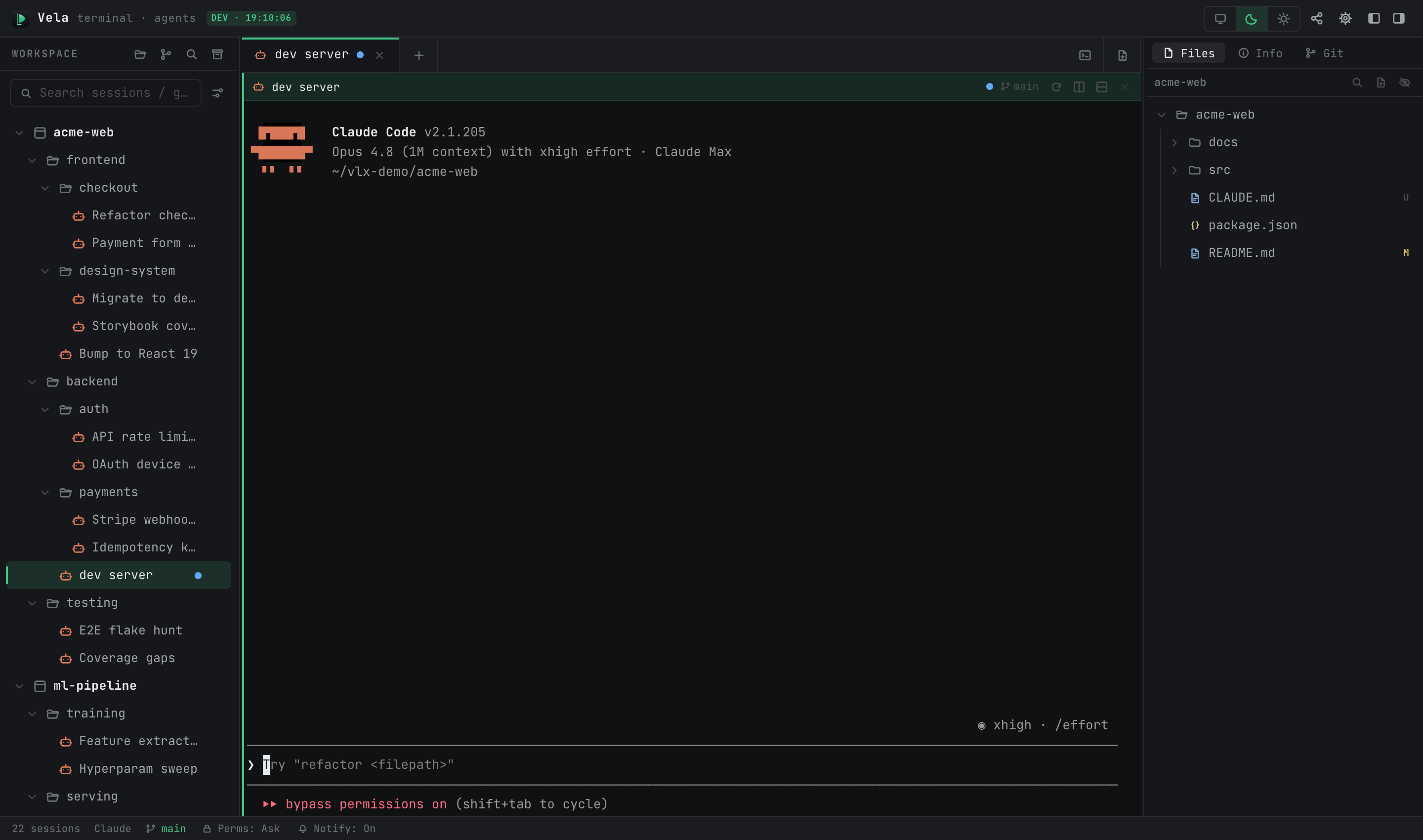
A terminal manager built for the AI-agent era. VelaTerm organizes scattered terminal sessions into a
project → group → session tree, treats coding agents such as Claude Code and Codex as first-class
citizens, and lets you take over any session from a browser or another machine.





Why
Working with coding agents breaks the assumptions traditional terminals were built on:
- Session sprawl. Several agents run at once — one refactoring, one running tests, one waiting for
approval. A flat row of tabs stops scaling quickly. - No visibility into agent state. A plain terminal cannot tell you whether an agent is working,
blocked on a question, or finished. - Lost context. Closing a terminal usually throws away the agent conversation with it.
- Tied to one desk. Long-running tasks keep going after you walk away, with no way to check in.
VelaTerm addresses each of these directly: a persistent session tree, live per-session agent status,
transcripts that survive restarts, and remote access from a browser or over SSH.
Features
- Session tree — projects, arbitrarily nested groups, and sessions, with drag-and-drop reordering,
search, and persisted collapse state. - Real PTYs — every session is a full pseudo-terminal with complete input, output, and resize
handling, kept alive in the background while you work elsewhere. - Agent awareness — per-session status for supported agents (working, waiting for input, done),
driven by the agents' own hook mechanisms, plus desktop notifications and session resumption. - Session spawning — start a child session from inside a session, optionally in its own git
worktree, and merge it back when the work is done. - Split panes — horizontal and vertical splits, with keyboard shortcuts for switching sessions.
- Document, image, and browser tabs — open Markdown in a WYSIWYG editor, source files with syntax
highlighting, images in a viewer, and URLs in a built-in browser tab. - Git integration — branch, ahead/behind, and change counts per session, plus common actions.
- Remote access — reach your sessions from a browser with end-to-end encrypted device pairing, or
connect to a remote machine over SSH and run sessions there. - Mobile view — a browser layout tuned for phones, served by the same remote access stack.
- Themes and i18n — light/dark themes that follow the system, and a fully translated interface.
Platforms
macOS (Apple Silicon and Intel), Windows (x64 and arm64), and Linux (x86_64 and aarch64).
Tech stack
| Layer | Choice |
|---|---|
| Desktop shell | Tauri 2.x (Rust backend + system WebView); an Electron shell also lives in electron/ |
| PTY | portable-pty (wezterm) |
| Frontend | React 19 + TypeScript + Vite |
| Terminal | xterm.js with the fit, web-links, search, image, and unicode11 addons |
| State | Zustand |
| Persistence | SQLite via rusqlite (bundled) |
| Styling | Tailwind v4 with CSS-variable themes |
Getting started
Prerequisites: Node.js, pnpm, the Rust toolchain, and git.
Tauri also needs its platform dependencies — see the
Tauri prerequisites guide.
pnpm install          # install frontend dependencies
pnpm dev:desktop      # build the Rust backend and open the desktop window
Other development modes:
pnpm dev:web          # headless backend + Vite, driven from a normal browser
pnpm dev:mobile       # same, with the mobile layout
pnpm dev:electron     # the Electron shell instead of Tauri
pnpm dev:ls           # list running dev instances
pnpm dev:stop <label> # stop one instance by label
Every dev instance picks a random port and carries a label, so several can run side by side. The web
and mobile modes default to an isolated database under .dev-data/, leaving your real session tree
untouched.
Build and test:
pnpm build                                        # type-check and bundle the frontend
pnpm tauri build                                  # build the desktop application
pnpm test                                         # frontend tests (vitest)
pnpm lint                                         # eslint
cargo test --manifest-path src-tauri/Cargo.toml   # backend tests
Project layout
src/              React frontend
  layout/         three-column + bottom-bar regions
  store/          Zustand state
  ipc/            invoke / listen wrappers
  terminal/       xterm instance registry
  i18n/           translations, with English as the key source
  remote/         browser remote access and pairing
  mobile/         phone browser layout
src-tauri/src/    Rust backend
  pty/            PTY manager
  db/             SQLite persistence
  agent/          agent detection, status, transcripts, spawning
  web/            embedded web server and command dispatch
  git.rs          git status probing
electron/         Electron shell
skills/           agent skills exposed inside VelaTerm sessions
docs/manuals/     user manuals
Documentation
Community
- X — release announcements and short demos.
- YouTube — demos and guided tours of the application.
- Discord — questions, bug reports and everyday discussion.
- velaterm.com — downloads, manuals and the changelog.
Contributing
Two conventions matter most in this codebase:
- All user-facing strings are English and go through i18n (
src/i18n/). English is the key
source; a missing key fails the type check. This includes strings returned from the Rust backend,
which surface directly in the UI. - All code comments are written in English.
Any command touching the network or the filesystem must be asynchronous — synchronous Tauri commands
run on the main thread and freeze the UI.
License
Copyright (c) 2026 VLINX Software. Released under the MIT License.
You may use, copy, modify, merge, publish, distribute, sublicense and sell copies of VelaTerm, for
any purpose, as long as the copyright notice and the licence text travel with it.
Reviews (0)
Sign in to leave a review.
Leave a reviewNo results found