pcx-ai-toolkit
Health Warn
- License — License: MIT
- Description — Repository has a description
- Active repo — Last push 0 days ago
- Low visibility — Only 5 GitHub stars
Code Fail
- rm -rf — Recursive force deletion command in installers/install.sh
Permissions Pass
- Permissions — No dangerous permissions requested
No AI report is available for this listing yet.
AI-powered scripting toolkit for Perception.cx — complete Enma/AngelScript/Lua docs, coding guidelines, MCP configs, LSP servers, and Claude Code skills

pcx-ai-toolkit
The Complete AI-Powered Scripting Toolkit for Perception.cx








Turn any LLM into an expert Perception.cx developer.
Complete Enma language docs, every PCX API, coding guidelines, MCP configs, and LSP servers — in one package.
Quick Start · Documentation · AI Skills · MCP Integration · Contributing
The Problem
LLMs don't know Enma. They don't know the Perception.cx API. Ask them to write a PCX script and they hallucinate function names, invent parameters, and produce code that doesn't compile.
The Solution
Give the AI 34,000+ lines of real documentation and 12 coding rules that prevent the most common mistakes. The AI reads the actual docs before writing code, follows real API signatures, and produces scripts that work.
Before:  "Write me an ESP overlay"
AI:      *invents draw_esp(), uses int for addresses, forgets null checks*
Result:  Doesn't compile. Wrong types. Silent crashes.

After:   "Write me an ESP overlay"  (with pcx-ai-toolkit loaded)
AI:      *reads render-api.md, uses draw_rect + draw_text, uint64 addresses, validates pointers*
Result:  Compiles. Runs. Correct API calls.
Quick Start
Linux / macOS / WSL / Git Bash:
git clone --recursive https://github.com/VoidChecksum/pcx-ai-toolkit.git
cd pcx-ai-toolkit
./setup.sh
Windows 10 / 11 (PowerShell):
git clone --recursive https://github.com/VoidChecksum/pcx-ai-toolkit.git
cd pcx-ai-toolkit
powershell -ExecutionPolicy Bypass -File setup.ps1
Drop the rules into your project and the AI reads docs before writing code:
cp rules/CLAUDE.md /path/to/your/pcx-project/   # Linux/macOS
copy rules\CLAUDE.md C:\path\to\your\project\   # Windows
Requirements: Node.js 18+ · Git · Git LFS (for the analysis suite)
Installation Guide
Part 1 — Toolkit (docs, skills, rules, LSP)
This is the main repo. No binary payloads, no build step.
git clone --recursive https://github.com/VoidChecksum/pcx-ai-toolkit.git
cd pcx-ai-toolkit

# Linux / macOS / WSL
./setup.sh

# Windows
powershell -ExecutionPolicy Bypass -File setup.ps1
setup.sh / setup.ps1 installs:
- LSP servers (Enma + AngelScript) built from submodules
- AI skills registered with Claude Code (if detected)
- Skill docs copied to
~/.claude/skills/
Part 2 — Analysis Suite (headless, fully automatic)
Installs the static analysis tool permanently for your OS, patches the binaries,
generates the license, activates the Python bindings, and wires up the binary
analysis MCP server for Claude Code — zero interaction, one command.
Prerequisites
| Prerequisite | Linux / WSL | macOS | Windows |
|---|---|---|---|
| Node.js 18+ | sudo apt-get install nodejs |
brew install node |
installer from nodejs.org |
| Xvfb | sudo apt-get install xvfb |
not needed | not needed |
| Git LFS | sudo apt-get install git-lfs |
brew install git-lfs |
git-lfs.github.com |
| Python 3.11+ | installed automatically via uv | installed automatically via uv | installed automatically via uv |
Why Xvfb? The installer binary uses Qt for its UI layer even in unattended mode.
The script spins up a throwaway virtual display, runs the installer through it, then
tears it down. You never see a window.
Install
# Pull the installer binaries (stored in Git LFS, ~3 GB)
git lfs pull

# Linux / macOS / WSL — one command does everything
./installers/install.sh
# Windows — run PowerShell as Administrator if installing to Program Files
git lfs pull
powershell -ExecutionPolicy Bypass -File installers\install.ps1
What happens, step by step
| Step | Linux / macOS | Windows |
|---|---|---|
| 1 | Checks Node.js + Xvfb are available | Checks Node.js is available |
| 2 | Spins up a Xvfb virtual display | — |
| 3 | Runs the native .run / .app.zip installer silently via --mode unattended |
Runs .exe installer silently via --mode unattended |
| 4 | node keygen.js patches libida.so + libida32.so (or .dylib) in-place |
Pre-patched ida.dll + ida32.dll dropped into the install dir |
| 5 | node keygen.js writes idapro.hexlic to the install dir |
Same |
| 6 | Installs uv if not present |
Same |
| 7 | Installs Python 3.11+ via uv if not present | Same |
| 8 | Activates idalib Python bindings via py-activate-idalib.py |
Same |
| 9 | uv tool install ida-pro-mcp |
Same |
| 10 | Merges binary-analysis entry into ~/.claude/mcp.json |
Merges into %USERPROFILE%\.claude\mcp.json |
Options
# Custom install location (default: /opt/ida-pro-9.3 or ~/ida-pro-9.3)
./installers/install.sh --prefix /opt/mydir

# Skip MCP server install (just install + patch the suite)
./installers/install.sh --skip-mcp
# Custom install location (default: C:\Program Files\IDA Professional 9.3)
.\installers\install.ps1 -Prefix "D:\tools\ida"

# Skip MCP server install
.\installers\install.ps1 -SkipMcp
Already have it installed?
Skip the 3 GB download — just activate the bindings and wire up MCP:
# Linux / macOS / WSL
./mcp/setup-binary-analysis.sh                            # auto-detect install dir
./mcp/setup-binary-analysis.sh --install-dir /your/path  # explicit path
./mcp/setup-binary-analysis.sh --skip-pkg                # skip package download too
# Windows
.\mcp\setup-binary-analysis.ps1
.\mcp\setup-binary-analysis.ps1 -InstallDir "D:\tools\ida"
.\mcp\setup-binary-analysis.ps1 -SkipPkg
After install
Restart Claude Code. The binary-analysis MCP server is now available:
# Headless — stdio (used automatically by Claude Code)
uvx idalib-mcp --stdio

# HTTP — for persistent sessions or multiple clients
uvx idalib-mcp --host 127.0.0.1 --port 8745

# Optional GUI plugin (connects to a live interactive session via SSE)
pip install ida-pro-mcp && ida-pro-mcp --install
Upgrade the MCP server at any time:
uv tool upgrade ida-pro-mcp
What's Inside
Documentation110 pages, 35,000+ lines
|
AI Skills18 Claude Code / OMC skills
Auto-trigger on |
Knowledge Base23 reference files
|
Tooling & Indexed KnowledgeMCP + LSP + Rules + 3 LLM-knowledge surfaces
|
Indexed Knowledge Surfaces
Three complementary surfaces let any AI tool reach the toolkit's corpus efficiently. Pick by integration model; see .claude/skills/pcx-knowledge-index/SKILL.md for the full decision tree.
| # | Surface | What it is | Who uses it | Cost |
|---|---|---|---|---|
| 1 | docs/llms.txt |
45 KB structured index (Anthropic / Mintlify convention) | Tools that auto-fetch the convention (Claude, Cursor, ...) | 45 KB context |
| 2 | docs/llms-perception-{enma,angelscript,lua}.md |
Per-language concatenated context packs (215 KB - 950 KB) | Aider /read, Cursor / Continue @file, Copilot paste |
bundle size |
| 2 | docs/llms-skills.md / llms-knowledge.md |
All 18 skills / all 23 knowledge refs concatenated | Same as above, category-focused | 300-350 KB |
| 2 | docs/llms-full.txt |
Full corpus concatenation (~2 MB) | All-language sessions in non-MCP tools | 2 MB context |
| 3 | mcp/pcx-knowledge-mcp/ |
Python MCP server with search / get_file / list_files / overview |
Claude Desktop, Cline, Continue, Zed, any MCP-aware tool | one process, <100 ms cold |
All static bundles are generated by tools/build-llms-index.py. CI runs build-llms-index.py --check on every push; the build fails if the committed bundles drift from the source.
Combine #2 + #3 for the best of both worlds: small upfront context for your primary language + searchable depth for everything else. Recommended for long sessions.
Perception IDE — Built-In Script Editor and AI Assistant
Script Editor + Settings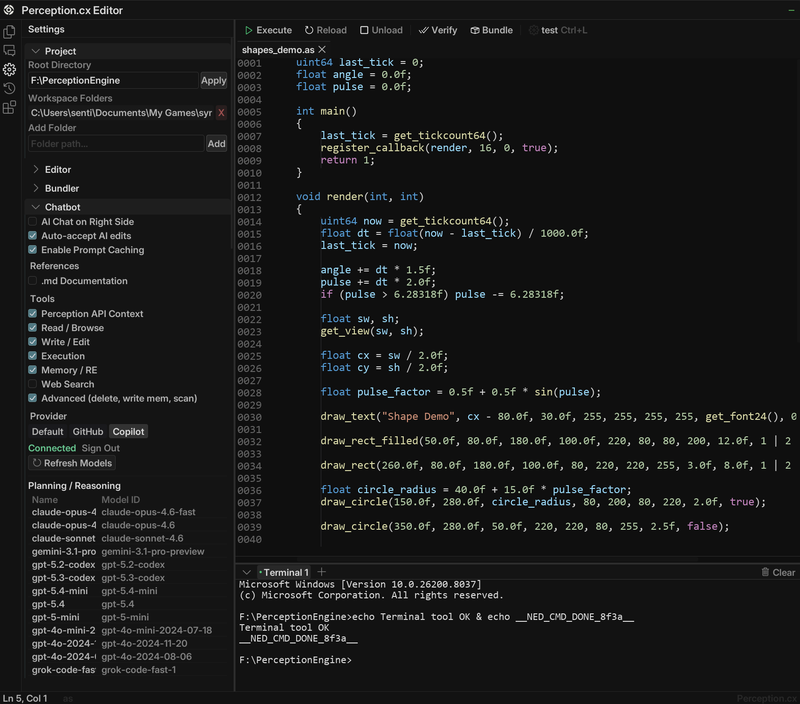
|
AI Chat + Tool Calls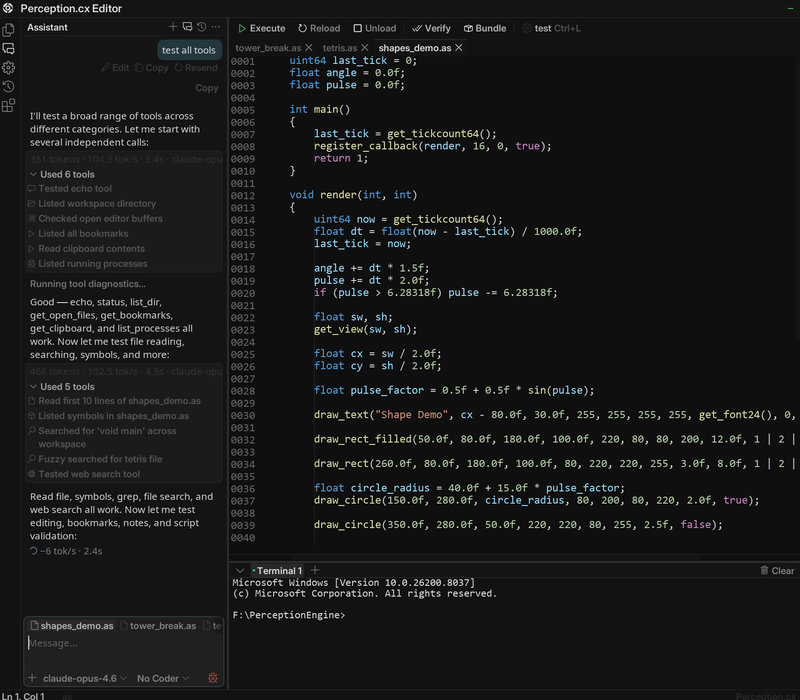
|
42+ RE Tools available via MCP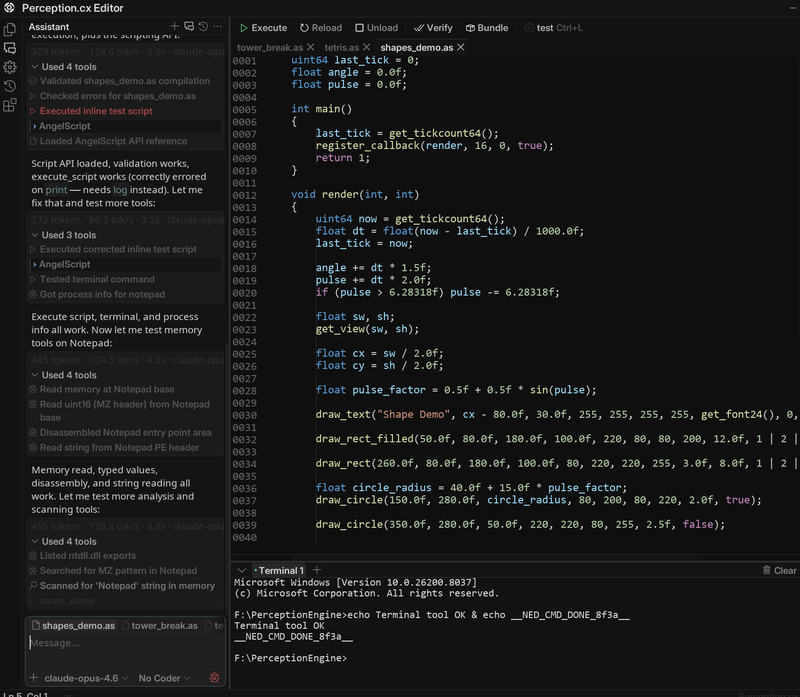
|
Screenshots from the Perception IDE documentation
Directory Structure
pcx-ai-toolkit/
│
├── docs/                             110 pages of documentation
│   ├── enma/                         ── Enma language, addons, SDK (50 files)
│   │   ├── llms-language.md              Complete language reference (2,861 lines)
│   │   ├── llms-sdk.md                   Complete SDK reference (832 lines)
│   │   ├── lang-*.md                     Language guide (10 files)
│   │   ├── addon-*.md                    18 standard library addons
│   │   └── sdk-*.md                      SDK embedding guide (17 files)
│   │
│   └── perception/                   ── Perception.cx platform APIs
│       ├── *.md                          Enma APIs (17 files)
│       ├── angelscript/                  AngelScript APIs (23 files)
│       └── lua/                          Lua APIs (17 files)
│
├── .claude/skills/                   ── AI Skills (18)
│   ├── game-hacking-pcx/                Doc index + coding rules
│   ├── game-cheat-guidelines/           12 behavioral guidelines (Enma)
│   ├── pcx-angelscript-discipline/      10 AS-specific rules
│   ├── pcx-lua-discipline/              10 Lua-specific rules
│   ├── pcx-coding-discipline/           Karpathy workflow — writing scripts
│   ├── pcx-re-discipline/               Karpathy workflow — reverse engineering
│   ├── ai-pair-programming/             Driving Claude/Cursor/Cline/Aider/Copilot well
│   ├── re-evidence-log/                 Evidence-citation discipline (E-NNN cross-refs)
│   ├── pcx-patch-day-playbook/          Patch-day triage workflow (7 steps)
│   ├── multi-binary-targeting/          One script, N versions/arches/storefronts/channels
│   ├── script-bundler/                  Packaging + ship-day hygiene + .emb workflow
│   ├── pcx-perf-budget/                 Frame-time targets + profiler recipe
│   ├── pcx-streamproof/                 Capture-path taxonomy for OBS / Discord / cards
│   ├── pcx-debug-overlay/               Diagnostic / profiler / status overlay (gated, read-only)
│   ├── pcx-knowledge-index/             How AI tools reach the corpus: llms.txt + bundles + MCP
│   ├── mcp-tool-routing/                Decision guide across the 37 Perception MCP tools
│   ├── anti-cheat-re/                   Kernel AC RE methodology (6 steps)
│   └── kernel-analysis/                 Driver analysis patterns (WDM/KMDF)
│
├── knowledge/                        ── Quick References
│   ├── enma-cheatsheet.md                Language quick-ref card
│   ├── pcx-api-cheatsheet.md             All APIs at a glance
│   ├── pcx-version-matrix.md             Since-version API matrix (sourced from changelogs.md)
│   ├── pcx-cross-language-bridge.md      Enma vs AngelScript vs Lua decision guide
│   ├── gui-design-patterns.md            PCX sidebar layout + slider/hotkey/color discipline
│   ├── script-organization-patterns.md   Multi-file project organization beyond full-project/
│   ├── anti-cheat-architecture.md        EAC/BE/Vanguard/GG architecture + detection matrix
│   ├── kernel-re-tools.md                Kernel RE tool reference (WinDbg, HyperDbg, Volatility, etc.)
│   ├── common-patterns.md                13 working code recipes
│   ├── re-plugins-and-tools.md           IDA/Ghidra plugins, FLIRT sigs, diffing, ret-sync
│   ├── offset-methodology.md             Sig scanning methodology
│   ├── aimbot-math.md                    angles, FOV, prediction, recoil comp, smoothing
│   ├── engine-cryengine.md               CryEngine family (Hunt: Showdown, Star Citizen, KCD)
│   ├── engine-frostbite.md               Frostbite (Battlefield, FIFA, Anthem, Andromeda)
│   ├── engine-godot.md                   Godot 3.x / 4.x (Brotato, Cassette Beasts, Halls of Torment)
│   ├── engine-re-engine.md               RE Engine (RE2/3/4, MH Rise/Wilds, SF6, DD2)
│   ├── network-protocol-re.md            Packet capture + dissection + wire-to-memory mapping
│   └── engine-redengine.md               REDengine (Cyberpunk 2077, Witcher 3)
│
├── installers/                       ── Analysis Suite Installers (Git LFS)
│   ├── install.sh                        Full install — Linux / macOS / WSL
│   ├── install.ps1                       Full install — Windows
│   ├── keygen.js                         License generator + in-place patcher
│   ├── ida-pro_93_x64linux.run           Linux x64 installer  [LFS]
│   ├── ida-pro_93_armlinux.run           Linux ARM64 installer [LFS]
│   ├── ida-pro_93_x64mac.app.zip         macOS x64 installer  [LFS]
│   ├── ida-pro_93_armmac.app.zip         macOS ARM64 installer [LFS]
│   ├── ida-pro_93_x64win.exe             Windows x64 installer [LFS]
│   └── kg_patch/win/                     Pre-patched Windows DLLs [LFS]
│
├── rules/                            ── Project Rules
│   ├── CLAUDE.md                         Drop-in for Claude Code
│   ├── CURSOR.md                         Drop-in `.cursorrules` for Cursor
│   ├── CLINE.md                          Drop-in custom instructions for Cline (VS Code agent)
│   ├── COPILOT.md                        Drop-in `.github/copilot-instructions.md` for GitHub Copilot
│   ├── AGENTS.md                         6 agent role definitions
│   └── KARPATHY.md                       Work-discipline drop-in (4 principles)
│
├── mcp/                              ── MCP Configs
│   ├── perception-mcp-config.json        42+ tool definitions
│   ├── claude-code-setup.md              Claude Code guide
│   ├── cursor-setup.md                   Cursor guide
│   ├── aider-setup.md                    Aider CLI integration (.aider.conf.yml, CONVENTIONS.md)
│   ├── continue-setup.md                 Continue extension (VS Code / JetBrains) integration
│   ├── zed-setup.md                      Zed editor MCP + agent panel setup
│   ├── binary-analysis-setup.md          Binary analysis MCP reference
│   ├── setup-binary-analysis.sh          MCP-only setup (if already installed)
│   ├── setup-binary-analysis.ps1         MCP-only setup — Windows
│   └── pcx-knowledge-mcp/                MCP server: search + fetch over the toolkit corpus
│
├── lsp/                              ── Language Servers (submodules)
│   ├── enma-lsp/                         Enma: completion + diagnostics
│   └── angel-lsp-pcx/                   AngelScript: completion + diagnostics
│
├── visualstudio/                     ── Visual Studio 2022 Extensions
│   ├── EnmaVS/                           Enma ILanguageClient (.vsix source)
│   └── AngelScriptVS/                    AngelScript ILanguageClient (.vsix source)
│
├── templates/                       ── Starter Scripts
│   ├── hello-world.em                    Minimal lifecycle + render
│   ├── overlay-basic.em                  GUI menu + config-driven overlay
│   ├── aimbot-skeleton.em                Closest-target-in-FOV with smoothing + RIP resolver
│   ├── minimap.em                        Rotation-aware radar with rim clamping
│   ├── full-project/                     5-file Enma project scaffold
│   └── full-project-as/                  3-file AngelScript scaffold (globals.as, feature.as, main.as)
│
├── signatures/source-engine/         ── Signature Examples
├── signatures/unreal-engine/         ── UE Reversal (GWorld, GObjects, Dumper-7)
├── signatures/anti-cheat/            ── AC Driver Patterns (EAC, BE, Vanguard, callbacks)
├── signatures/unity-il2cpp/          ── IL2CPP Patterns (metadata, static fields, schemas)
├── signatures/source2-engine/        ── Source 2 Patterns (schema system, entity list, W2S)
├── signatures/obfuscation/           ── Protector ID Patterns (VMP, Themida, OLLVM, packers)
│
├── tools/                            ── Standalone RE Tools (Python, no deps beyond stdlib)
│   ├── identify-protector.py            Detect VMProtect/Themida/UPX/etc. by sections + byte sigs
│   ├── pe-section-analyzer.py           Entropy analysis, packing detection, anomaly flagging
│   ├── resolve-api-hashes.py            Resolve API hashes (ROR13, CRC32, DJB2, FNV-1a, MurmurHash3, SDBM)
│   ├── dump-strings-xor.py              Extract XOR-encrypted strings (brute-force single-byte keys)
│   ├── anti-debug-scanner.py            Flag anti-debug surfaces in a PE (PEB / RDTSC / IsDebuggerPresent / window class)
│   ├── module-export-mapper.py          List exports; cross-reference which consumers import each
│   ├── offset-diff.py                   Diff named sigs between two binary versions (patch-day workflow)
│   ├── sig-uniqueness-checker.py        Verdict per sig: UNIQUE / AMBIGUOUS / STALE / BRITTLE
│   ├── pattern-format-converter.py      Round-trip patterns: IDA / Ghidra / x64dbg / CE / Enma / C
│   ├── dumper-to-enma.py                Dumper-7 / IL2CPPDumper / hazedumper → offsets.em
│   ├── binary-diff-summary.py           High-level diff between two PE versions (% changed, verdict)
│   ├── evidence-log-validator.py        Cross-check offsets.em vs evidence/<hash>.md citations
│   ├── script-linter.py                 Light 12-guidelines static check on .em files
│   ├── pre-ship-check.sh                Pre-release hygiene checklist (12 checks, --json output)
│   ├── install-re-tools.sh              One-command installer: IDA/Ghidra plugins + Python packages
│   └── build-llms-index.py              Generate docs/llms.txt + bundles (--check for CI drift)
├── setup.sh                          One-command LSP + skills install
├── CONTRIBUTING.md                   Contribution guide
└── LICENSE                           MIT
Documentation Coverage
107 out of 107 gitbook pages — 100% coverage of both the Enma and Perception.cx documentation.
| Corpus | Files | Lines | Coverage |
|---|---|---|---|
| Enma Language | 50 | 13,518 | Every type, operator, control flow, function, pointer, struct, class, template, coroutine, exception, FFI, annotation, module, preprocessor + all 18 addons + full SDK |
| PCX Enma APIs | 17 | 3,915 | Proc, Render, GUI, Input, CPU, Zydis, Unicorn, Net, Win, Filesystem, Sound, Lifecycle, MCP, IDE, Extensions, Analyzer |
| PCX AngelScript APIs | 23 | 10,820 | All of the above + Intrinsics, Zydis Encoder, Bit Reinterpret, Mutex, Atomic Types, CS2 Extended |
| PCX Lua APIs | 17 | 5,779 | All core APIs in Lua syntax |
| Total | 110 | 35,222 |
Plus 7 generated bundles at docs/llms-*.{txt,md} (~4.5 MB total) — the indexed-knowledge surface generated by tools/build-llms-index.py. See the Indexed Knowledge Surfaces section above.
Enma Language Docs Breakdown
Language Guide — 10 files, 3,150 lines (click to expand)| File | Lines | Topics |
|---|---|---|
lang-basics.md |
267 | Types, variables, constants, operators, control flow |
lang-functions.md |
247 | Parameters, defaults, refs, out, variadic, lambdas, closures |
lang-pointers.md |
357 | Heap pointers, address-of, member access, null, return-by-ref |
lang-structs-and-classes.md |
912 | Value/ref types, inheritance, vtable, interfaces, mixins, operators |
lang-templates.md |
173 | Generic structs and functions, monomorphization |
lang-advanced.md |
562 | Delegates, namespaces, coroutines, exceptions, smart ptrs, FFI |
lang-annotations.md |
209 | packed, align, reflect, serialize, export, dll, custom |
lang-modules.md |
100 | Import system, aliased imports, .emb, multi-module linking |
lang-pre-processor.md |
77 | #define, #ifdef, #include, #pragma |
lang-semantics-and-limits.md |
181 | Guarantees, compile-time rejects, what doesn't exist |
| Addon | Lines | Key Types / Functions |
|---|---|---|
| Core | 42 | print, println |
| Strings | 165 | format, to_int, split, replace, substr, interpolation |
| Arrays | 119 | T[], push, pop, sort, contains, slice |
| Maps | 200 | map<K,V>, imap<V>, get, set, iteration |
| Math | 137 | sin, cos, atan2, sqrt, clamp, lerp, random |
| SIMD | 128 | SSE2: f32x4, i32x4 vector ops |
| Vectors | 135 | vec2, vec3, vec4 |
| 3D Math | 182 | quat, mat4 |
| Variant | 130 | Type-erased value container |
| Atomic | 94 | aint32, aint64 atomic ops |
| Bits | 117 | popcount, clz, ctz, bswap, rotl |
| Time | 95 | time_ms, time_us, ISO 8601, sleep |
| Regex | 61 | match, find, replace, split, captures |
| File | 125 | Sandboxed file I/O (permission-gated) |
| Thread | 120 | mutex, lock_guard, condition_variable |
| Hash Set | 89 | hash_set<T> |
| Sorted Map | 89 | sorted_map<K,V> ordered iteration |
| List | 192 | Double-ended O(1) push/pop |
| JSON | 108 | json_parse, json_stringify, json_value |
| File | Lines | Topic |
|---|---|---|
sdk-quick-start.md |
126 | Minimal embedding example |
sdk-engine-lifecycle.md |
166 | Create, configure, destroy |
sdk-compilation.md |
65 | Compile from source/files |
sdk-execution.md |
103 | Contexts, execute, read returns |
sdk-calling-functions.md |
82 | Pass arguments from host |
sdk-globals.md |
79 | Read/write script globals |
sdk-type-registration.md |
862 | type_builder — expose native types |
sdk-native-functions.md |
446 | Register host-callable functions |
sdk-hot-reload.md |
64 | Replace code at runtime |
sdk-serialization-and-linking.md |
97 | .emb binaries, multi-module |
sdk-introspection.md |
317 | List functions, annotations, IR dump |
sdk-lifecycle.md |
227 | Deterministic RAII, no GC |
sdk-debug-and-gc.md |
202 | Debug hooks, budgets, heap stats |
sdk-error-handling.md |
116 | Compile/runtime error reporting |
sdk-safety.md |
121 | Fault trapping, sandboxing, permissions |
sdk-custom-addons.md |
576 | Build your own addon |
sdk-api-reference.md |
411 | Complete function listing |
AI Skills
game-hacking-pcx — Documentation Router
Forces the AI to read the correct doc file before writing any PCX API call.
User:  "Write me a render overlay"
AI:    → reads docs/perception/render-api.md (264 lines)
       → reads docs/perception/lifecycle-and-routines.md (134 lines)
       → writes code using real function signatures
Contains: file-by-file index of all 107 docs, critical Enma type rules, address type requirements, RAII notes.
game-cheat-guidelines — 12 Behavioral Rules
| # | Rule | What It Prevents |
| 1 | Ground every offset | Hours wasted on stale offsets from an old SDK version |
| 2 | uint64 for all addresses | Sign-extension corruption on high usermode addresses |
| 3 | Validate every pointer | Silent null reads returning plausible-looking garbage |
| 4 | Separate update from render | Overlay stutter when memory reads block the draw path |
| 5 | Sigs over hardcodes | Script breaking on every game patch |
| 6 | One feature, one file | 2000-line monoliths that can't be hot-reloaded |
| 7 | Construct colors/vecs per frame | Pointless globals for 4-byte stack-allocated structs |
| 8 | f suffix on float32 | Silent float64→float32 truncation in vertex buffers |
| 9 | Minimize memory writes | Unnecessary detection surface area |
| 10 | W2S once, correctly | Behind-camera coordinate mirroring, wrong matrix layout |
| 11 | GUI for all tunables | Recompiling just to change a distance threshold |
| 12 | Verify with the binary | Trusting stale cached offsets over live reality |
Each rule includes wrong/right code examples using real Perception.cx APIs.
pcx-coding-discipline — Karpathy Workflow for Writing Scripts
The four Karpathy principles rewritten for script development: state the target and tradeoff before coding, ship the simplest feature that works, keep edits to one feature per diff, and define "done" as visible success criteria on the live target — not "it compiles."
pcx-re-discipline — Karpathy Workflow for Reverse Engineering
The same four principles for offset work: hypothesize and cite evidence before trusting a field, find the shortest unique signature, re-verify only what a patch broke, and trust live memory over a stale SDK. The discipline layer above game-cheat-guidelines' code-shape rules.
anti-cheat-re — Kernel Anti-Cheat RE Methodology
Six-step workflow for reversing kernel-level anti-cheat systems (EAC, BattlEye, Vanguard, GameGuard, XIGNCODE3): map the component stack, catalog every kernel callback, trace the driver↔user-mode communication channel, identify what the AC actually scans for, analyze from below the AC's observation layer, and verify findings against live behavior.
kernel-analysis — Driver Analysis Patterns
Technical patterns for reversing Windows kernel drivers: identify WDM vs KMDF, extract the IOCTL dispatch table and decode CTL_CODE, enumerate registered kernel callbacks with structures and WinDbg commands, analyze integrity check routines (hashing, RDTSC timing, CPUID hypervisor detection, unsigned driver scanning), decode obfuscation layers (import resolution, encrypted strings, control flow flattening, VMProtect), and reconstruct shared memory communication channels.
Plus 12 more skills
pcx-angelscript-discipline · pcx-lua-discipline · re-evidence-log · pcx-patch-day-playbook · multi-binary-targeting · script-bundler · pcx-perf-budget · pcx-streamproof · pcx-debug-overlay · pcx-knowledge-index · ai-pair-programming · mcp-tool-routing
Browse the full set at .claude/skills/. Every skill auto-triggers on relevant keywords / file extensions.
Knowledge Base
Enma Cheatsheet
Every primitive type with size, all conversion rules, control flow, functions, structs vs classes, templates, arrays, maps, strings, pointers, coroutines, exceptions, modules, preprocessor, annotations. PCX API Cheatsheet
Every function signature across all 13 Perception.cx APIs: Proc, Render, GUI, Input, CPU, Zydis, Unicorn, Net, Win, Filesystem, Sound, Lifecycle, MCP. |
Common Patterns
13 complete working examples:
Offset Methodology
Pattern scanning, wildcard strategy, RIP-relative resolution table, pointer chain walking, struct_dump discovery, IDA/Ghidra cross-referencing, offset table format, patch stability analysis. Anti-Cheat Architecture
Per-AC architecture reference (EAC, BattlEye, Vanguard, GameGuard, XIGNCODE3, Theia): components, driver behavior, communication protocols, known detection vectors, detection technique matrix. Includes AC-by-game mapping for all PCX-supported titles. Kernel RE Tools
Tool reference for kernel-level RE: static analysis (IDA, Ghidra, r2), kernel debugging (WinDbg, VirtualKD-Redux, HyperDbg), memory forensics (Volatility 3, MemProcFS, PCILeech), runtime monitoring (Process Monitor, IRPMon), driver development/testing (WDK, OSR Driver Loader), and Perception.cx kernel integration. RE Plugins & Tools
Complete reference for the installed RE toolkit: 6 IDA plugins (hrtng deobfuscation, CodeXplorer vtable recovery, ClassInformer RTTI, SigMakerEx pattern generation, FIRST function fingerprints, RevEng.AI similarity), 4 Ghidra extensions (GhidrAssist LLM integration, BinDiffHelper, OOAnalyzer C++ recovery, RevEng.AI), 3 FLIRT signature databases (51 pre-selected MSVC v15 sigs), Diaphora + BinDiff for cross-patch analysis, ret-sync for live debugger↔disassembler sync, and 2,438 reversed r5sdk headers. |
Plus 17 more knowledge files
Browse the full set at knowledge/. Topics include: aimbot-math · gui-design-patterns · script-organization-patterns · pcx-version-matrix · pcx-cross-language-bridge · network-protocol-re · 5 engine RE references (CryEngine, Frostbite, RE Engine, REDengine, Godot) · obfuscation taxonomy · deobfuscation tools · game targets · custom draw patterns · community tools.
MCP Integration
Perception MCP Server
Full tool list (click to expand)42+ tools exposed via JSON-RPC — connect any MCP-compatible AI to Perception's live tooling.
Process Memoryread_memory · read_typed_value · find_pattern · read_pointer_chain · read_string · memory_write
Analysisdisassemble · struct_dump · find_xrefs · find_string_refs · find_function_bounds · analyze_function · trace_register · analyze_vtable · read_rtti · generate_signature · build_call_graph
Scanningscan_string · scan_wstring · scan_pointer_to · scan_value · scan_changed · diff_memory
Process Infolist_processes · get_process_info · get_module_exports · get_module_imports
Files & Scriptsread_file · write_file · edit_file · search_text · find_references · check_script · validate_script · execute_script · get_script_api · web_search
Config: mcp/perception-mcp-config.json
Supported AI Tools
| Tool | How | Guide |
|---|---|---|
| Claude Code | Skills + CLAUDE.md + MCP | claude-code-setup.md |
| Claude Desktop | pcx-knowledge-mcp for search; bundles for preload |
pcx-knowledge-mcp/README.md |
| Cursor | .cursorrules + MCP + @docs bundles |
cursor-setup.md |
| Cline | MCP config + rules/CLINE.md |
Wire pcx-knowledge-mcp per the README |
| Aider | CONVENTIONS.md + /read bundles |
aider-setup.md |
| Continue | .continue/config.yaml mcpServers block |
continue-setup.md |
| Zed | context_servers in settings.json |
zed-setup.md |
| GitHub Copilot | .github/copilot-instructions.md + bundle excerpts |
rules/COPILOT.md |
| Perception IDE | Native — built-in AI chat | Add docs/ as workspace folder |
| Any OpenAI-compatible | System prompt + docs | Paste rules/CLAUDE.md into prompt |
Templates
Ready-to-fill starter scripts, all following the 12 guidelines. See templates/.
| Template | What it demonstrates |
|---|---|
hello-world.em |
Minimal script — lifecycle, render routine, text drawing |
overlay-basic.em |
GUI menu, config-driven rendering, update/render separation, input polling, FPS readout |
aimbot-skeleton.em |
FOV-based closest-target picker with smoothing + RIP-relative offset resolver |
minimap.em |
Rotation-aware player-relative radar with rim clamping + GUI tunables |
full-project/ |
5-file Enma scaffold: globals · offsets · feature · menu · main — one concern per file |
full-project-as/ |
3-file AngelScript scaffold: globals.as · feature.as · main.as — parallel to the Enma version |
Each is a correct skeleton: the structure and API calls are real, the offsets and read logic are placeholders you fill for your target.
Editor Extensions
Prebuilt extensions are attached to every release — no build step needed. Both VS Code and Visual Studio 2022 are supported.
VS Code
Download the .vsix, then command palette (Ctrl+Shift+P) → Extensions: Install from VSIX...
| Extension | Language | Provides |
|---|---|---|
enma-language-*.vsix |
Enma (.em) |
Syntax highlighting, completion, hover docs (full Perception API bundled), diagnostics, snippets |
angel-lsp-*.vsix |
AngelScript (.as) |
Syntax highlighting, completion, hover docs, diagnostics, Perception API surface |
Visual Studio 2022
Double-click the .vsix, or Extensions → Manage Extensions → Install from VSIX. Requires Node.js 18+ on PATH.
| Extension | Language | Provides |
|---|---|---|
PcxEnmaVS.vsix |
Enma (.em) |
Completion, hover docs, diagnostics via LSP |
PcxAngelScriptVS.vsix |
AngelScript (.as) |
Completion, hover docs, diagnostics via LSP |
VS extensions are native ILanguageClient MEF components — see visualstudio/ for source and build details.
All extensions are MIT-licensed builds of enma-lsp and angel-lsp-pcx.
Manual / headless LSP
setup.sh / setup.ps1 build the servers from source. Wire them into any LSP client:
# Linux / macOS
Enma:        node lsp/enma-lsp/server/dist/server.js --stdio
AngelScript: node lsp/angel-lsp-pcx/server/out/server.js --stdio

# Windows
Enma:        node lsp\enma-lsp\server\dist\server.js --stdio
AngelScript: node lsp\angel-lsp-pcx\server\out\server.js --stdio
Project Rules
rules/CLAUDE.md — Drop-In Project Config
Copy into any PCX scripting project. Covers:
- Language and API declarations
- Documentation paths
- Coding standards (address types, float suffixes, RAII, conversions)
- The 12 guidelines in one-line form
- Recommended file structure
rules/KARPATHY.md — Work-Discipline Drop-In
Companion to CLAUDE.md. Where CLAUDE.md covers what the code looks like, this covers how to work: the four Karpathy principles (think before coding, simplicity first, surgical changes, goal-driven execution) condensed to one screen and framed for cheat development. Copy both into your project.
rules/CURSOR.md — Cursor .cursorrules Drop-In
Parallel to rules/CLAUDE.md but tailored for Cursor's tighter token budget. Copy to project root as .cursorrules or paste into Cursor's Rules for AI setting.
rules/CLINE.md — Cline (VS Code) Custom Instructions
Custom instructions for the Cline VS Code AI agent. Includes Cline-specific notes on auto-approval gating (read-only MCP tools safe, write/execute gated), Plan/Act mode workflow, and token-budget guidance.
rules/COPILOT.md — GitHub Copilot Drop-In
Save as .github/copilot-instructions.md for repo-wide application, or paste into Copilot's custom-instructions field. Copilot-specific notes on what it's good/bad at, steering via // from: docs/... comments above the cursor.
rules/AGENTS.md — Multi-Agent Role Definitions
Six specialist roles for orchestrated workflows:
| Agent | Responsibility |
|---|---|
| reverse-engineer | Binary analysis, sig generation, offset discovery |
| script-writer | Enma/AngelScript implementation following all rules |
| offset-maintainer | Post-patch offset table updates and verification |
| feature-builder | Feature implementation using common patterns |
| reviewer | Correctness, style, and detection surface review |
| anti-cheat-researcher | Kernel AC analysis, callback mapping, driver RE |
Contributing
See CONTRIBUTING.md for full details.
- Fork and clone with
--recursive - Add or improve: docs, patterns, templates, sigs, knowledge files
- Test with
./setup.shon a clean clone - Open a PR
New working patterns and documentation improvements are especially welcome.
Reviews (0)
Sign in to leave a review.
Leave a reviewNo results found