modelforge
Health Uyari
- License — License: MIT
- Description — Repository has a description
- Active repo — Last push 0 days ago
- Low visibility — Only 5 GitHub stars
Code Uyari
- fs module — File system access in app/scripts/fix-native-permissions.js
- network request — Outbound network request in app/src/accounts.ts
Permissions Gecti
- Permissions — No dangerous permissions requested
Bu listing icin henuz AI raporu yok.
Desktop AI chat app unifying local Ollama models with OpenAI and Claude — includes an agentic mode where the model can read/write files and run shell commands, with every action requiring your approval.
ModelForge Medical


Notice (v1.3.0): this project has moved from a general-purpose local AI chat/agent client to a medical-focused clinical workspace. If you were using it as a general-purpose Ollama/llama.cpp chat client, the underlying agent-mode/model-management functionality is all still here, but the product is now scoped, tested, and documented specifically for clinical decision-support and documentation use cases — see Product boundary below for exactly what that does and doesn't mean. Pin to a pre-1.3.0 release if you need the prior general-purpose framing.
A cross-platform clinical workspace that unifies local and cloud AI models in one interface: Ollama and llama.cpp for local (on-device) inference, plus OpenAI, Anthropic, and Gemini for cloud models. Built with Electron, React, and TypeScript on the general-purpose Modelforge chat/agent client.
Beyond chat, ModelForge Medical includes an agentic mode — the model can read/write files and run shell commands in a folder you choose, with every action gated behind your explicit approval — plus a clinical layer: structured Patient Cases, an Evidence Library, a per-case Knowledge Graph, and an Audit & Privacy log.
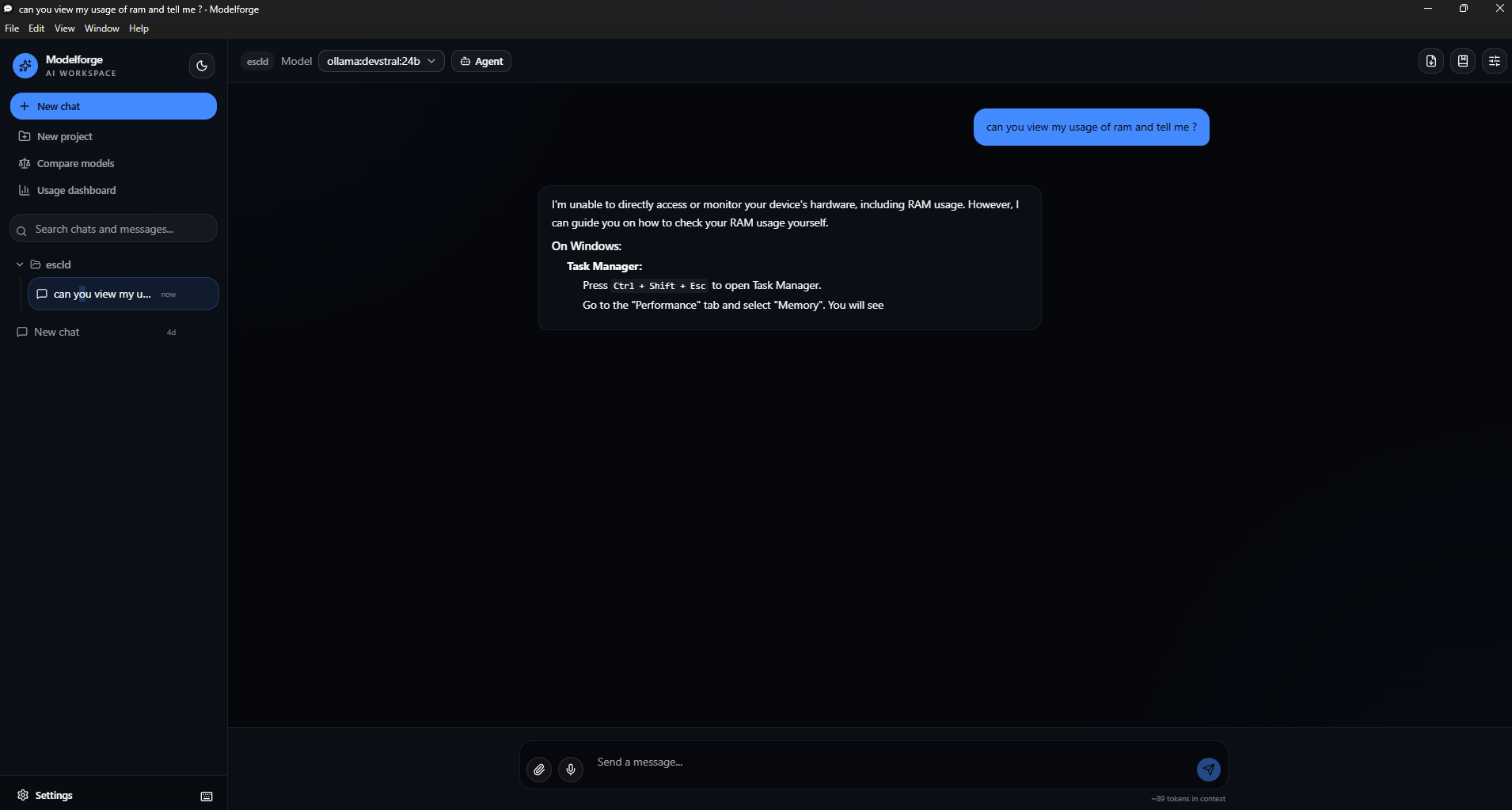
Product boundary
ModelForge Medical is a clinical decision-support, medical research, and documentation assistant for physicians, clinical staff, medical researchers, and medical students. It is explicitly not:
- An autonomous diagnostician. It never presents a single diagnosis as settled fact — the response contract requires "possible interpretations," not a verdict, and every model-generated message in Clinical Assistant is labeled "Not verified."
- A prescriber. It does not place orders, submit prescriptions, or take any other consequential clinical action on its own.
- A certified HIPAA/HITRUST-compliant system, or any other regulatory certification. It stores data locally by default and logs an audit trail (see Audit & Privacy in the app), but that is a privacy posture, not a certification — evaluate it against your own organization's compliance requirements before using it with real patient data.
Every clinically relevant answer is asked to follow an eight-section structure (Summary → Known patient facts → Assessment/possible interpretations → Missing information → Red flags → Suggested next steps → Evidence and citations → Uncertainty and limitations), enforced via system prompt in frontend/src/pages/Chat.tsx (CLINICAL_RESPONSE_CONTRACT). Because a system prompt is not a hard guarantee, the safety-critical checks below run independently of the model:
- Emergency red-flag detection (
app/src/medical-safety.ts,checkForEmergencyFlags) scans the user's own message for plain-language emergency phrasing (difficulty breathing, stroke symptoms, severe chest pain, anaphylaxis, major bleeding, loss of consciousness, active self-harm risk, overdose) before any model call, and shows a persistent banner telling the user to contact emergency services — this never depends on, or waits for, a model response. - Allergy/medication conflict warnings (
checkMedicationConflicts) run against a Patient Case's recorded allergies and medications using simple keyword/synonym matching — explicitly not a licensed drug-interaction database (First Databank, Lexicomp, Multum, etc.), and labeled as such in the UI every time a warning appears. - Transmission preview and consent: sending a message to a remote provider (OpenAI/Anthropic/Gemini/a custom endpoint) while a patient case or file is attached shows exactly what's included and requires explicit confirmation before anything leaves the device. Local providers (Ollama, llama.cpp) never trigger this, since nothing leaves the device either way.
- Untrusted-content framing: attached files and retrieved (RAG) content are wrapped with an explicit instruction that the model must treat them as reference material, not commands — mitigating (not eliminating) prompt injection from an imported clinical document.
Medical MCP integrations
Agent mode already supports arbitrary MCP servers (stdio and Streamable HTTP — see MCP servers below); Settings → MCP Servers now also offers one-click quick-add presets for verified, real MCP servers useful for medical work (frontend/src/lib/mcp-presets.ts):
- Graphify — this project's own knowledge-graph tool ships a
graphify <path> --mcpstdio mode (see.claude/skills/graphify/SKILL.md). Point it at a folder of documents, papers, or case attachments and its query/path/explain tools become available to Clinical Assistant like any other tool, gated by the same per-call approval. The Knowledge Graph page links here for anything beyond its own simple per-case field visualization. - BioMCP —
biomcp serve, giving the model structured access to PubMed, ClinicalTrials.gov, and MyVariant.info. Public databases, no API key required. - DICOM MCP —
uvx dicom-mcp <path-to-config.yaml>, giving the model connection verification (verify_connection) and study/series/patient/instance metadata queries against a configured DICOM node, plus signed-report text extraction (extract_pdf_text_from_dicom). Scoped deliberately narrower than the upstream server:move_seriesandmove_study(DICOM C-MOVE, which transfers studies between nodes) are hard-blocked in code viaMcpServerConfig.blockedTools— filtered out of both the tool list andcallMcpToolitself inapp/src/mcp-client.ts, not just hidden in the UI, and never exposed to the model even if a given server offers them. The upstream project's own README states plainly that it "is not meant for clinical use, and should not be connected with live hospital databases or databases with patient-sensitive data" — ModelForge Medical surfaces that exact warning in Settings when adding the preset and on every tool-approval card for its tools, and treats the integration as a prototype accordingly. Raw image/pixel content is never forwarded into a model's context by any MCP tool call, DICOM or otherwise — see the "no autonomous interpretation of image pixels" note inmcp-client.ts'sbuildStructuredResult.
All three require their own CLI installed first (pip install graphifyy, uv tool install biomcp-cli, uv tool install dicom-mcp respectively) — the quick-add button prefills the command into the existing manual "Add MCP server" form so you can review (and fill in any <placeholder>, e.g. a folder path or config file) before connecting; it never installs or runs anything without that explicit step.
A few other real, healthcare-relevant MCP servers exist but weren't added as one-click presets because they need more than a command line to actually work — e.g. the FHIR MCP Server requires a Docker build plus a .env file with FHIR server and Pinecone credentials. Advanced users can still add these manually via Settings → MCP Servers using their own documented setup; adding them as a "quick add" button would have implied a one-click experience they don't actually have.
MCP client — spec-correctness and security rework
Before adding the DICOM MCP preset, the MCP client itself (app/src/mcp-client.ts) was rebuilt from a hand-rolled JSON-RPC implementation to the official @modelcontextprotocol/sdk, closing several real gaps:
- Protocol version negotiation — the SDK negotiates against
LATEST_PROTOCOL_VERSIONand rejects an unsupported server version, instead of blindly sending a hardcoded"2024-11-05"and never checking the response. - Real JSON Schema validation (
app/src/mcp-schema-validation.ts, AJV) — replaces a shallow required/type-only check with full$ref/oneOf/pattern/enum/nested-schema support, compiled and cached per server+tool at connect time. - Resources, resource templates, and prompts —
listResources/listResourceTemplates/readResource/listPrompts/getPrompt, previously unsupported entirely. - Structured tool results —
structuredContent, MIME types, and resource links are preserved instead of being flattened into a lossy string (callMcpToolStructured). - Server trust profiles — a per-tool-name allowlist a user builds one tool at a time in Settings for a specific connected server, never a blanket "trust this server" toggle; every other tool call still requires per-call approval.
- Progress and cancellation — long-running tool calls can report progress (shown as a progress bar on the approval card) and be cancelled mid-call.
- OAuth 2.1 + PKCE (
app/src/mcp-oauth.ts) for HTTP-transport servers — authorization-server discovery, dynamic client registration, and RFC 8707 resource-indicator scoping (so a token obtained for one server is never usable against another) via the SDK's built-inOAuthClientProvider; tokens are stored through the existingsafeStorage-backed secrets store, namespaced per server. - PHI transmission preview before any tool call to an http-transport (remote) MCP server, showing exactly what's about to be sent and to which server.
- Audit trail extensions — every MCP tool call (approved, auto-approved, or denied) is logged with server identity, tool name, approval outcome, duration, and the currently-attached patient case — but never the call's actual arguments or result, which can carry PHI.
- Untrusted tool descriptions — the approval card now shows which MCP server a tool call came from and renders the server's own tool description in a clearly labeled "server-provided, unverified" block, rather than treating it as trusted UI text.
Limitations and what still needs external authority
The items below are not solved by this codebase alone — they require licensed data, legal review, or clinical validation that no amount of code can substitute for:
- Drug-interaction and allergy checking uses a small demonstration list (
KNOWN_INTERACTIONSinapp/src/medical-safety.ts), not a licensed clinical database. Do not treat its absence of a warning as clearance. - Evidence Library and Knowledge Graph are honest about what they are: Evidence Library only records a page's own
<title>/meta description when you add a URL (never a fabricated citation); Knowledge Graph only visualizes structured fields already on a case (conditions/allergies/medications), with no medical ontology (UMLS/SNOMED/RxNorm) linkage and no inferred relationships. - No clinician identity/authentication system —
enteredBy/audit actor fields are plain text, not a verified identity. Session locking (below) narrows when case data is accessible, but not by whom — anyone with the passphrase (or the unlocked, running app) has full access. - No regulatory certification of any kind. HIPAA/HITRUST/FDA claims would require legal and compliance review this change cannot perform. Encryption at rest and session locking (below) are real privacy controls, not compliance certifications.
- Accessibility follows the existing app's ad hoc
aria-*labeling; a full WCAG 2.2 AA audit (automated tooling, screen-reader testing, keyboard-only pass across every new page) has not been performed. - No literature-search API integration (e.g. PubMed) — Evidence Library is add-by-URL only, deliberately, to avoid presenting unreviewed live search results as vetted medical evidence.
- PHI redaction before a remote send (Clinical Assistant's "Redact identifiers before sending" checkbox,
medical-safety.ts'sredactIdentifiers) is the same best-effort, pattern-based scrubbing described above for drug interactions — it catches emails/phones/SSNs/MRNs/dates via regex, not clinical-grade de-identification (HIPAA Safe Harbor requires far more: names, locations, ages 90+, device identifiers, etc. embedded in free-text narrative). Off by default; opt in per the risk you're willing to accept, and never treat a "0 redacted" result as confirmation the text was actually clean.
Privacy/security controls that are implemented
Beyond the transmission preview and audit trail described earlier, this session added:
- Encryption at rest for patient case data (
app/src/case-encryption.ts, Settings → Audit & Privacy) — optional, passphrase-based AES-256-GCM encryption ofpatient-cases.json. The passphrase itself is never written to disk in any form (only a salt and an HMAC verifier); the derived key lives in memory only for the current unlocked session. This protects the file at rest (a stolen/copied device, a backup, a synced folder) — it does not protect against anyone with access to the running, unlocked app, which is what session locking narrows. - Automatic session locking — a configurable inactivity timeout (Settings → Audit & Privacy, default 15 minutes, disable-able) that re-locks case encryption after no keyboard/mouse activity; Patient Cases shows a passphrase prompt in place of case content until unlocked again. Still device-login-level security if encryption itself is off — there is no separate app-wide lock independent of case encryption.
- Configurable audit log retention — Settings → Audit & Privacy lets you cap how long audit events are kept (30/90/365 days, or forever), purged on both read and write, on top of the existing fixed 5,000-event cap.
- Tamper-evident audit log — every audit event is now SHA-256 hash-chained to the one before it (
app/src/audit-log-store.ts); Settings → Audit & Privacy's "Verify integrity" button recomputes the chain and reports whether any event was edited, reordered, or deleted after the fact. - Encryption at rest also covers chat sessions, not just patient cases —
sessions.jsonshares the exact same passphrase and encryption gate aspatient-cases.json, since chat messages routinely carry the same clinical detail typed or pasted into a message. - Structured consent records and clinical-note review sign-off on a case (Patient Cases → a case → Consent / Clinical notes) — consent grants/revocations with scope and method, and a reviewedBy/outcome sign-off gate specifically for model-generated notes, so "present in the case" is never conflated with "a clinician reviewed it."
- Approved model registry (Settings → Audit & Privacy → Approved model registry) — optionally restrict Clinical Assistant to an explicit allowlist of provider/model pairs; enforced in
Chat.tsx's send path, not just hidden from a picker. - SBOM generation and dependency update automation — CI (
.github/workflows/ci.yml,sbomjob) generates a CycloneDX SBOM for every npm workspace on each run;.github/dependabot.ymlcovers all five npm workspaces, the Rust download engine (lib/), the Python hardware-recommender project, and the workflows' own GitHub Actions. - Rust-backed data store I/O —
lib/(the same napi-rs addon used for GGUF downloads) now also backs the read/write/hash path every*-store.tssits on: atomic JSON file reads and writes (lib/src/datastore.rs), and the SHA-256 hashing behind the audit log's tamper-evident chain. Every store falls back to pure Node/TypeScript automatically when the addon hasn't been built (app/src/native-datastore.ts) — dev, test, and E2E runs are unaffected; only a packaged build (npm run build:native) gets the faster path. - O(1) audit log appends — the audit log used to do a full read-parse-stringify-write of its entire (only-ever-growing) event array on every single recorded event, an O(n²) pattern that made 5,000 sequential writes take ~20+ seconds.
append_json_array_element(lib/src/datastore.rs) now splices a new event directly onto the end of the existing file — no re-reading, re-parsing, or re-serializing what's already there — backed by an mtime/size-checkpointed in-memory cache (audit-log-store.ts) that's always verified against the real file before use and never substituted for a real read when verifying the tamper-evident hash chain or listing events. Same 5,000-write benchmark: ~300ms with the native addon built, unchanged (~20s) without it — this optimization only ever narrows, never changes, correctness or on-disk format. Falls back to the original full-rewrite path automatically whenever age-based retention is active (it needs to see every event to purge by age) or the event count is at/over the 5,000 cap (needs the whole array to trim).
None of these are substitutes for encrypting the whole device, a real identity/access-control system, or a compliance audit — they narrow specific, real gaps without claiming to close the larger ones.
Contents
- Features
- Screenshots
- Installation
- Quick start
- Agent mode
- Building from source
- Documentation
- Testing
- Security
- Contributing
- License
Features
Chat & providers
- Local Ollama models, OpenAI, Anthropic, Google Gemini, and llama.cpp in one interface, with token-by-token streaming.
- Custom OpenAI-compatible providers — add Groq, Mistral, DeepSeek, xAI (Grok), OpenRouter, a self-hosted server, or any other endpoint that speaks the OpenAI chat-completions format, via one shared implementation rather than a dedicated client per vendor. Quick-add presets fill in the base URL for the popular ones; you just paste an API key.
- llama.cpp backend — run GGUF models directly via node-llama-cpp instead of Ollama, with Vulkan, CUDA, or Metal GPU acceleration (auto-detected, selectable in Settings). Useful for Vulkan acceleration or models Ollama doesn't package. This is an additional backend, not a replacement — Ollama is still fully supported side by side. Agent mode tool-calling isn't wired up for this backend yet (a clear error explains this if you try); everything else (streaming, GPU offload, all the generation parameters) works the same as any other provider. Model weights load once and stay warm across messages, but each turn currently re-evaluates the full conversation from scratch rather than reusing a cache across turns — correct, but slower on long conversations than it could be.
- Vision support — attach images (or extract frames from a video) for models that can see them. When an image is attached, an "Analyze as..." menu fills the composer with a ready-made prompt for common diagram/wireframe tasks — describe the UI, convert it to a Mermaid diagram, generate React + Tailwind code from it, list its components, or review it for usability/accessibility issues.
- Live token usage and estimated cost per message and per session (Ollama is free/local; cloud providers show a running estimate).
Organization
- Projects — group related chats under shared instructions and default model parameters.
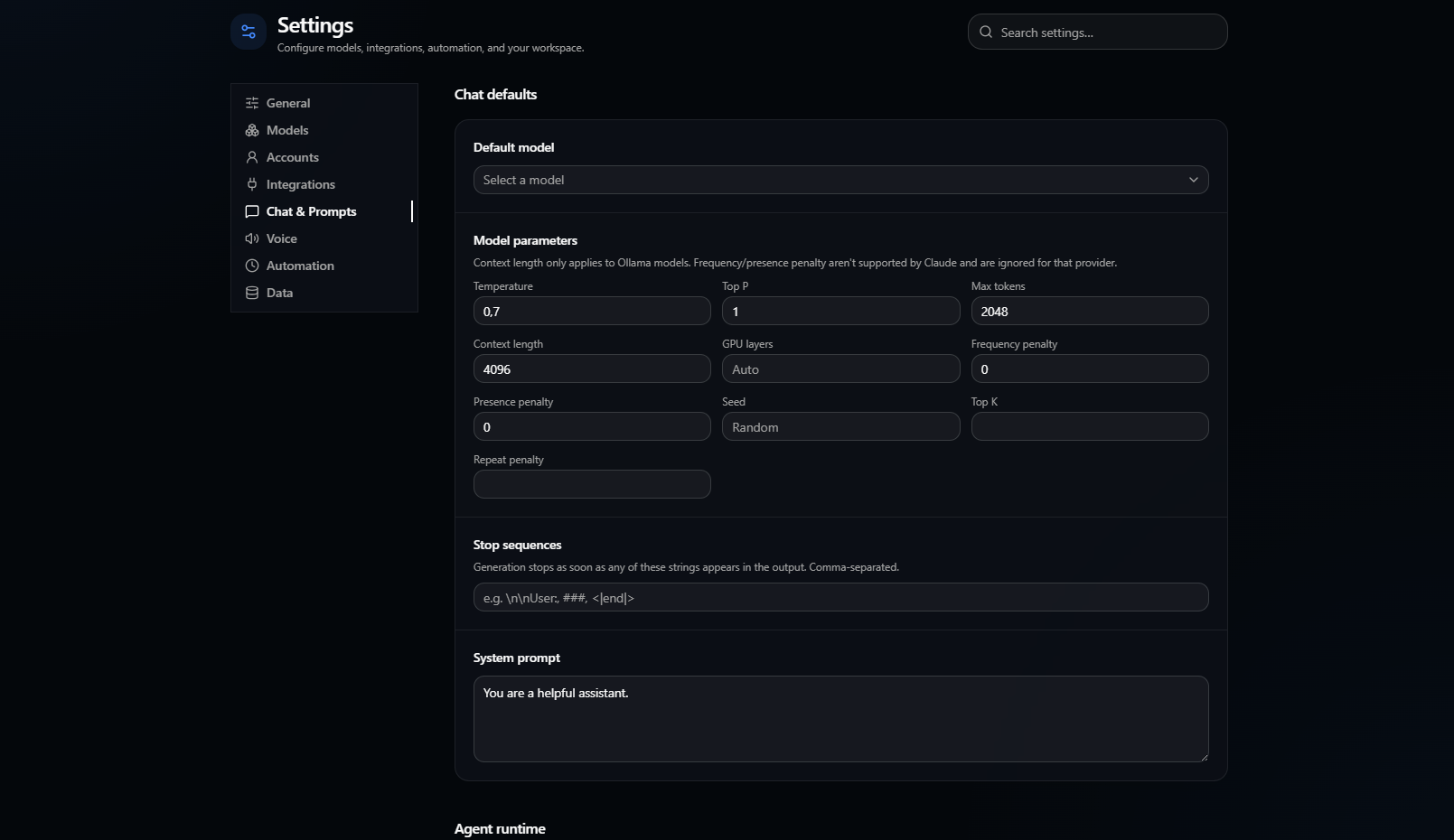
- Per-session and per-project overrides — pin a specific prompt, model, temperature, seed, top-K/top-P, repeat penalty, context length, GPU offload, or stop sequences to a single chat or an entire project, falling back to sane defaults. Provider-specific parameters (e.g. seed isn't supported by Claude, top-K isn't supported by ChatGPT) are automatically disabled when they don't apply to the selected model.
- Prompt library — save and reuse system prompts across chats. Prompts can include
{{variables}}(e.g.{{topic}}) that you fill in each time you apply one, and edits keep version history so a bad change can be restored. - Command palette (
Ctrl/Cmd+K) — jump between chats, projects, settings, and Compare without touching the mouse. - Keyboard shortcuts cheat-sheet (
Ctrl/Cmd+/, or the keyboard icon next to Settings) — everything you can do without the mouse, in one place. - Compare models — send one prompt to several models at once (local or cloud) and see every response stream in side by side, with per-model token counts and cost estimates.
- Full-text search — the sidebar search box matches message content across every chat, not just titles.
- Tags — label chats with freeform tags and filter the sidebar by them; lighter-weight than Projects for ad-hoc organization.
- Pin messages — bookmark any message in a chat and jump straight to it from a "Pinned" panel in the toolbar.
- Fork a conversation — branch a new chat from any earlier message, keeping everything up to that point and continuing independently from there.
Files & retrieval
- Attach files, folders, images, video, and PDFs directly into a conversation.
- Large folders are automatically chunked, embedded (via Ollama), and retrieved by relevance instead of dumped whole into the prompt — so a big project doesn't blow out a small model's context window.
- Screenshot capture — pick a screen or window from the Attach menu and it's captured and attached as an image, no separate screenshot tool needed. (macOS may require granting Screen Recording permission the first time.)
- OCR — extract plain text from any attached image with one click, dropped straight into the composer. Runs fully offline via tesseract.js after its first use (which needs network access once, to download the ~2MB English text-recognition model).
- Figma frame import — add a personal access token in Settings → Integrations, then paste a "Copy link to selection" URL from Figma to fetch that frame as an image, attached like any other screenshot.
- Prompt library sharing — export your saved prompts to a JSON file and import one a teammate sent you (Settings → Chat & Prompts). There's no live sync — it's just a plain file, sent however you like.
Agent mode — see the dedicated section below.
Automation
- Scheduled tasks (Settings → Automation) — run a saved prompt against a chosen model on a repeating interval while the app is open, with results appended to a dedicated chat for that task so you get a running log rather than a new chat every time. This only runs while Modelforge is open (there's no OS-level background service), and doesn't use Agent mode tools — it's plain scheduled chat completions, not a scheduled agent run.
Models & hardware
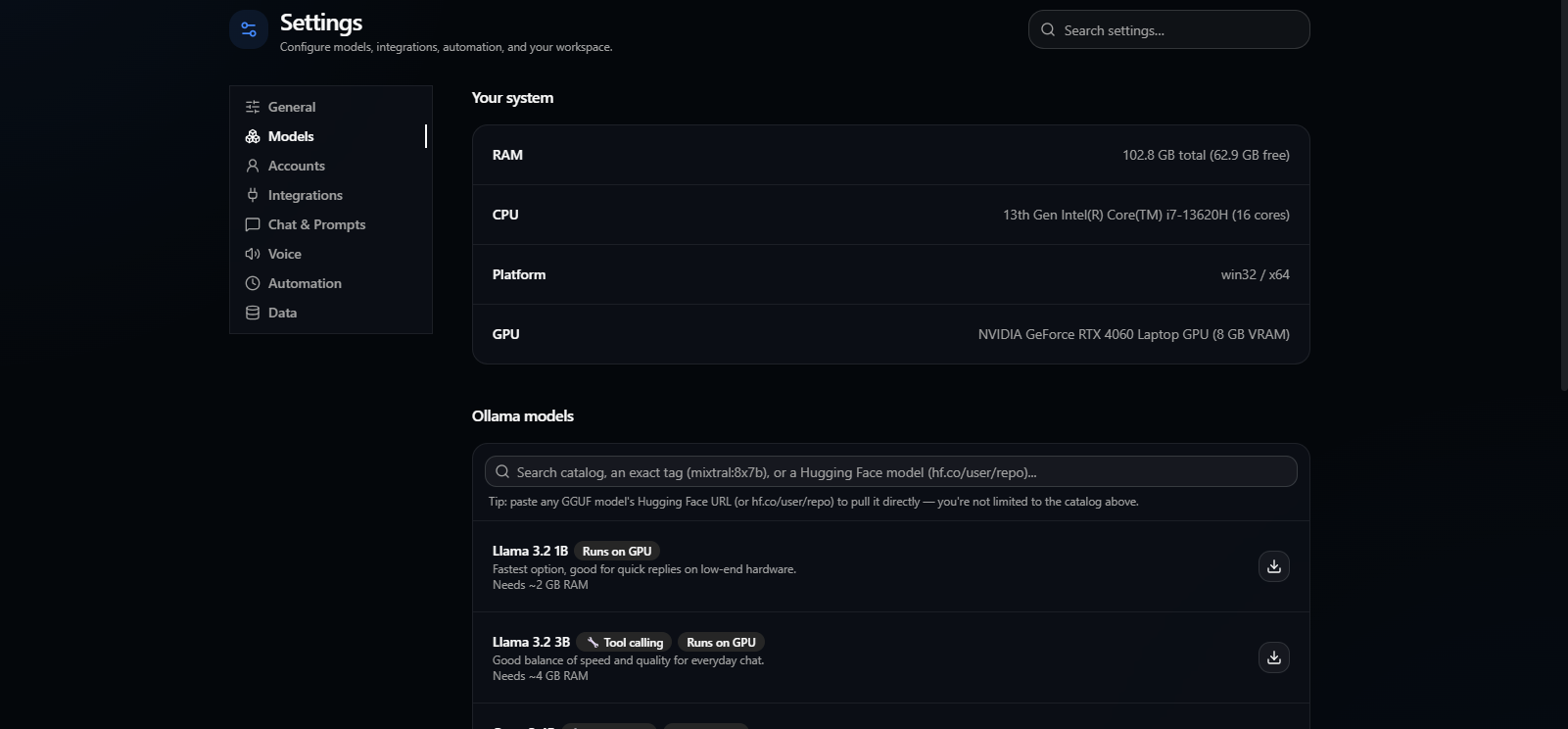
- Model recommendations based on your actual hardware — RAM and VRAM are detected and summed across all GPUs, not just the first one, so multi-GPU machines get accurate suggestions.
- GPU offload control — set how many model layers Ollama offloads to GPU (
num_gpu) per chat, per project, or as a global default; leave it blank to let Ollama decide automatically. - Custom local GPU backends — register any OpenAI-compatible local endpoint as a no-key GPU backend, including vLLM, LocalAI, TGI, vendor runtimes, and custom CUDA/ROCm/SYCL/Vulkan llama-server builds. Models from these endpoints appear beside other custom providers and retain streaming and Agent tool-calling support when the server supports it.
- Bounded VRAM cache — llama.cpp model loads are coalesced, active models are protected, and idle model/offload variants are evicted least-recently-used so switching models does not grow VRAM use without limit.
- Real Hugging Face search — typing in the model search box queries the actual Hugging Face Hub API (not just "paste an exact URL"), showing real repos ranked by downloads/likes; expand one to see its actual GGUF files with real file sizes, then either pull it via Ollama or download it directly for the llama.cpp backend. Pasting an exact
hf.co/user/repotag or a full URL still works too, for Ollama's own pull mechanism. - Models with reliable tool/function-calling support are flagged with a 🔧 badge, so picking a good Agent mode model doesn't require guesswork.
- Custom model storage location — Settings → General → Ollama Server → "Model storage location" lets you point downloaded models at any folder (e.g. a larger or faster drive) instead of Ollama's default location. If this app started Ollama, it restarts it automatically with the new location; if Ollama is running outside the app, you're told to restart it yourself.
Customization & control
- First-run setup — on first launch, pick which provider you want to start with (a local one, or a cloud one with its API key) right away, instead of hunting through Settings. Skippable, and only shown once.
- Settings is organized into a sidebar (General, Models, Integrations, Chat & Prompts, Voice, Automation, Data), each with its own icon — it holds up better as more settings get added over time than one long scrolling page.
- English and Turkish UI localization.
- Theming — light/dark/system color mode plus a choice of accent colors (default gray, blue, green, purple, orange, rose), in Settings → General → Appearance.
- Configurable Ollama host — point at a remote server instead of localhost.
- Data export/import, and one-click "copy diagnostic info" for bug reports.
- Updates — packaged builds check GitHub Releases for new versions automatically on launch, plus a manual "Check for updates" button in Settings (also available from the app menu).
Voice
- Voice input — record a question with the mic button; it's transcribed via OpenAI's Whisper API and dropped into the composer (requires an OpenAI API key in Settings, even when chatting with a local Ollama model).
- Read aloud — any assistant reply can be played back through your OS's own text-to-speech voices, with a per-message speaker button, an optional "auto-read every response" toggle, and a voice picker with a test button in Settings → Voice tab. Works fully offline, no API key needed.
- Both are start/stop/cancel controllable mid-action — stop a reply from being read, or cancel a recording before it's sent for transcription.
- Not included: fully real-time, bidirectional voice conversation (speaking over the model and having it react instantly, à la OpenAI's Realtime API). That's a different streaming architecture and hasn't been built.
Screenshots
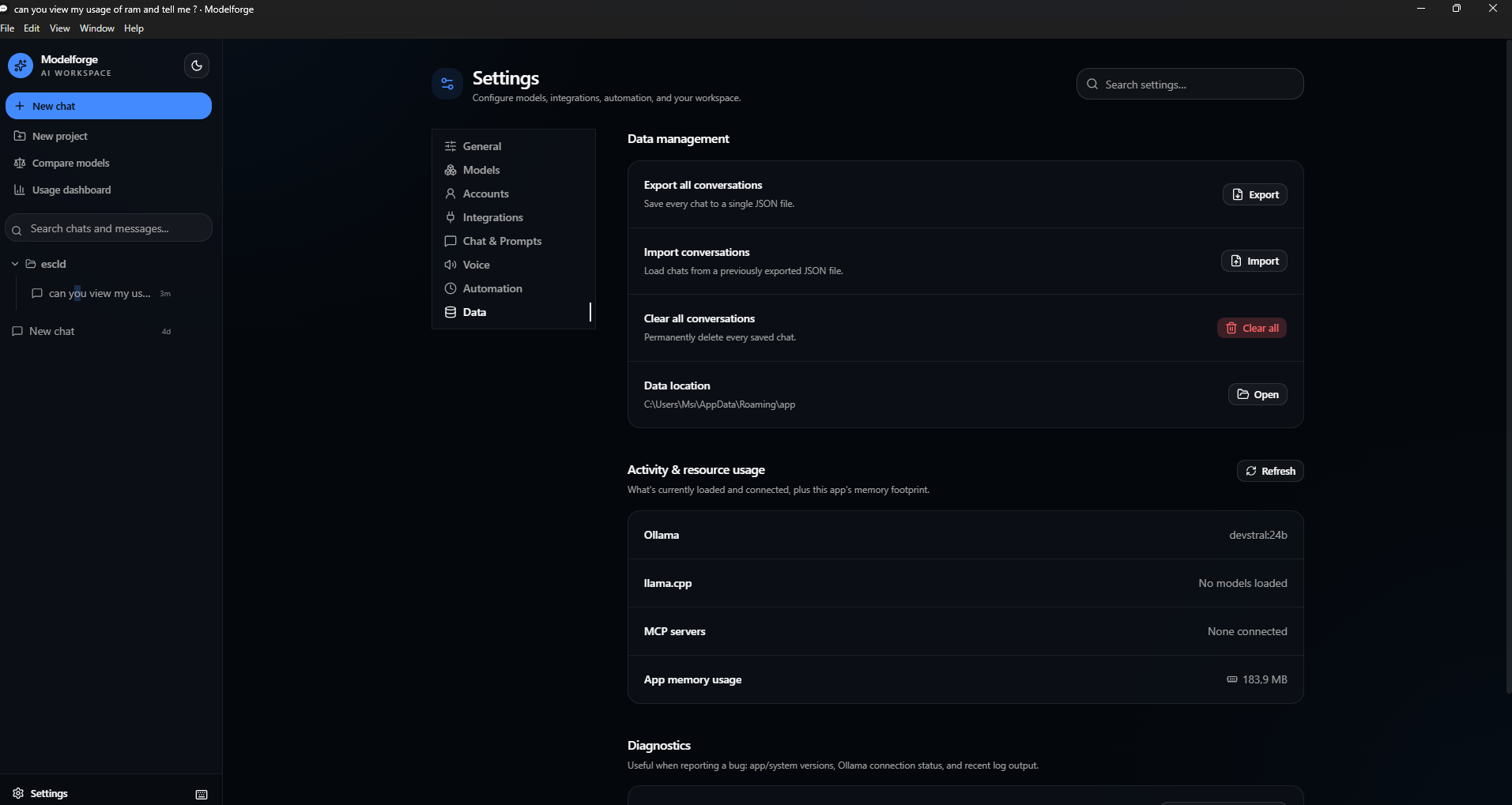
Server, system info, and model catalog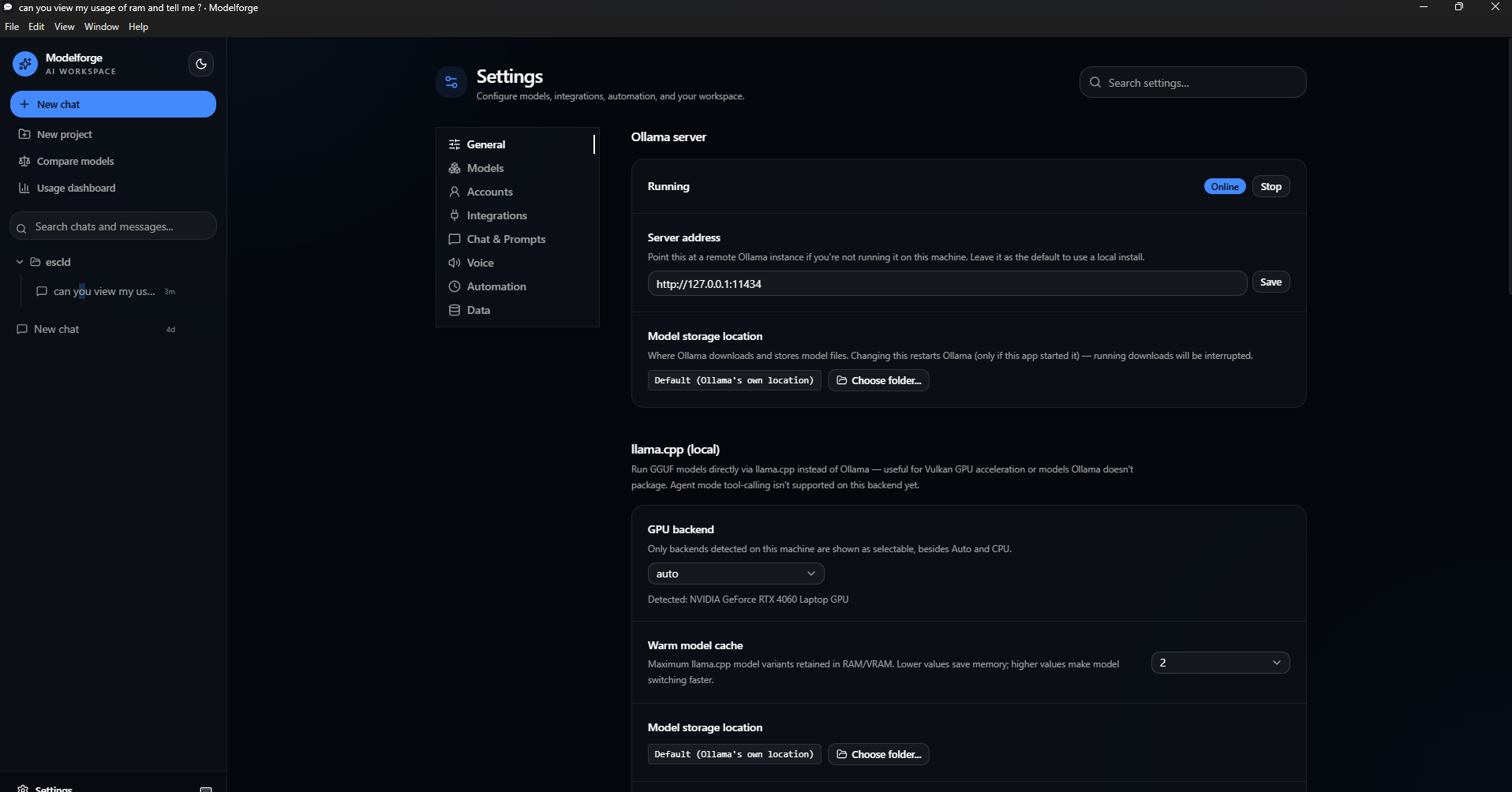
Installation
Download the latest installer for your platform from the Releases page.
| Platform | File | Notes |
|---|---|---|
| Windows | Modelforge Setup *.exe |
Unsigned — Windows SmartScreen will warn on first run ("Unknown publisher"); click More info → Run anyway. |
| macOS | Modelforge-*.dmg (Intel) / Modelforge-*-arm64.dmg (Apple Silicon) |
⚠️ Not yet verified on real hardware. Builds for both architectures and should run — Electron is cross-platform and nothing in this codebase is OS-specific — but no one has confirmed it on an actual Mac. Also unsigned/unnotarized, so Gatekeeper will block it until you right-click → Open. Please open an issue if you try it, either way. |
| Linux | Modelforge-*.AppImage |
Make it executable (chmod +x) and run directly, or use your AppImage launcher of choice. |
No installer signing certificate is configured yet, so every platform will show some form of "unknown publisher" warning on first launch — this is expected for an unsigned build, not a sign of a corrupted download.
Modelforge talks to a local Ollama install by default — no API key required. OpenAI and Anthropic support is optional: add your API key in Settings only if you want to use those providers.
Quick start: try it in 5 minutes
- Install Ollama and pull a small model to test with:
ollama pull llama3.2. - Install and launch Modelforge. On first launch it detects your local Ollama install automatically — no setup screen, no account, no API key.
- Send a message. Pick
llama3.2from the model dropdown and chat — you should see the response stream in token-by-token. - Try an attachment. Drop in an image (with a vision-capable model like
llama3.2-vision) or a PDF and ask a question about it. - Create a Project. Group a couple of chats under one project with a shared system prompt, and confirm new chats in that project inherit it.
- Open the command palette with
Ctrl/Cmd+Kand jump between chats without touching the mouse. - Check Settings — switch the UI language (English/Turkish), add an OpenAI or Anthropic key if you want to compare a cloud model side-by-side with a local one, or point "Ollama host" at a remote server.
If steps 2–3 work, the core app is functioning correctly — everything else layers on top of that same chat pipeline.
Agent mode
Click Agent in the chat toolbar and pick a folder — that becomes the model's sandboxed workspace for the rest of the conversation. The model can then call a wide catalog of tools: file read/write/search/patch, shell and background commands, an interactive terminal, read-only and commit git operations, and network tools (web search, arbitrary HTTP requests, linked-GitHub repo access). See docs/AGENT_MODE.md for the full, current tool table — the summary below covers the safety model, which is the part worth understanding before you use it.
Safety model:
- Built-in filesystem tools are genuinely confined to the chosen workspace folder — path traversal (
../../etc), absolute paths elsewhere on disk, and symlinks that resolve outside the workspace are rejected before anything runs. run_commandandrun_codeare different: a shell command (or a scriptrun_codehands topython3/node) is opaque text that can reference any path on the system regardless of its working directory, so neither is confined the way the file tools are. Where the OS supports it, commands run inside a real sandbox instead (bubblewrap on Linux,sandbox-execon macOS — Windows has no equivalent). As a safety net everywhere, commands (andrun_code's source text) matching destructive or system-level patterns — deleting outside the workspace, formatting a drive, shutting down the machine, registry deletion,sudo/runas, piping a remote script into a shell — are rejected outright, even if already approved. This blocklist catches the common catastrophic cases, not everything a shell or script can do — only approve a command or snippet you actually understand.- Every call (including ones the blocklist doesn't catch) shows an Allow / Deny card before it executes — nothing runs without an explicit click. A narrow set of strictly read-only, no-network tools can be marked "always allow this session" to cut down on repetitive approvals; anything that mutates the workspace, runs code, or touches the network always requires a fresh click, since those have real, potentially irreversible or unattended-outbound-channel effects — see docs/AGENT_MODE.md for exactly which tools qualify and why.
- A per-turn step limit (25 tool-result → model-continuation round trips) stops a model from looping indefinitely without producing a final answer.
- The trust list for "always allow" is in-memory only — closing and reopening a chat resets it.
- A Settings toggle can disable every network-capable tool at once, for a fully offline, filesystem-and-shell-only workflow.
Preview & Rollback:
- A pending
write_filecall shows a real line-by-line diff against the file's current content (or a "new file" badge if it doesn't exist yet) instead of a raw argument dump, so you can see exactly what would change before clicking Allow. - Undo last edit reverts the most recent applied
write_file— restoring the previous content, or deleting the file if the edit created it. Undo history is per-workspace, capped at the last 20 writes, and lives only in memory for the running session (not a durable version history).
Quick actions: if the workspace has test/lint/format scripts in its package.json, Run Tests, Lint, and Format buttons appear in the toolbar — they run the corresponding npm script directly (reusing the same sandboxing as run_command) and drop the output into the chat, without going through the model.
MCP (Model Context Protocol) servers: add external MCP servers in Settings to give Agent mode extra tools — anything from a database query tool to a browser-automation server. Two transports are supported:
- stdio — launches a local command (e.g.
npx -y @modelcontextprotocol/server-filesystem /some/path) and speaks JSON-RPC over its stdin/stdout. - HTTP — connects to a remote MCP server's "Streamable HTTP" endpoint.
Enabled servers reconnect automatically on launch; each server's tools appear in Agent mode's tool list prefixed with the server's name, going through the exact same Allow/Deny approval flow as built-in tools. (SSE and plain WebSocket transports aren't implemented — SSE is the legacy MCP HTTP transport, now superseded by Streamable HTTP, and WebSocket isn't part of the MCP spec itself.)
MasterVault (bundled): a built-in MCP server (mastervault-mcp-server/) ships with Modelforge — it serves a plain folder of notes as a "MasterVault" (orientation file, a decision log with confidence calibration, soft-delete-only file removal) to Agent mode, no Obsidian or separate install required. In Settings → Integrations → MCP servers, click Add MasterVault and pick a vault folder; it's added and removed exactly like any other MCP server. See its own README for the full tool list and security model.
Model choice matters. Agent mode works with whatever model you point it at, but only actually produces tool calls if that model was trained for function/tool calling — a model without that training will just chat normally and never call a tool. The Settings model browser flags models with reliable tool-calling support with a 🔧 Tool calling badge (e.g. the Qwen3 family, Llama 3.1+, Mistral Nemo, Qwen2.5-Coder, Devstral). The llama.cpp backend doesn't have tool-calling wired up yet — see Features above.
Building from source
Requires Node.js 22+.
git clone https://github.com/voidstackloop/modelforge.git
cd modelforge

# install dependencies
npm install --prefix frontend
npm install --prefix app

# run in development (starts the Vite dev server + Electron)
npm run dev --prefix app

# build a distributable installer for your current platform
npm run package --prefix app
Packaged installers are written to app/release/. For the full development workflow (hot reload,
rebuilding the native Rust addon, cross-platform packaging details, CI/release pipeline), see
docs/DEVELOPMENT.md.
Documentation
This README covers what the app does and how to install/build it. For anything deeper:
- docs/ARCHITECTURE.md — how the Electron main/renderer/preload split works, the IPC bridge, the native Rust downloader addon, the persistence pattern (atomic writes, corruption recovery), and the end-to-end data flow for sending a chat message.
- docs/AGENT_MODE.md — the full Agent mode tool catalog, the workspace-sandboxing and OS-level command-sandboxing model, the tool-approval policy and exactly why each tool is or isn't auto-approvable, and MCP server integration.
- docs/CLINICAL_WORKSPACE.md — the detailed reference for everything medical-specific: Patient Cases, Evidence Library, Knowledge Graph, Clinical Assistant's safety layer (emergency detection, conflict warnings, transmission preview, redaction), Audit & Privacy (encryption at rest, session locking, retention), the Graphify/BioMCP/DICOM MCP integrations, and the MCP client rework (official SDK, OAuth 2.1+PKCE, AJV validation) that preceded them.
- docs/ENTERPRISE_READINESS_ASSESSMENT.md — an evidence-backed gap analysis against institutional/regulatory deployment requirements (identity & RBAC, PHI protection, tamper-evident audit, clinical interoperability, terminology, licensed medication safety, clinical validation, model governance, output safety, operational readiness, MCP/agent security, accessibility), a threat model, a target architecture, a phased roadmap, and a regulatory-readiness matrix (KVKK, HIPAA/FDA, GDPR/MDR/AI Act). Current deployment classification: research and clinician-supervised evaluation only.
- docs/DEVELOPMENT.md — prerequisites, running in dev mode, testing, building, packaging installers for each platform, and the project's directory layout.
- docs/RUST_DATASTORE_TEST_REPORT.md — full verification report for the Rust-backed data store I/O and the audit log's O(1) append fix: every test suite run (Rust/app/frontend/E2E, with and without the native addon built), what the added stress tests caught, and before/after timing comparisons.
- ml/hardware-recommender/README.md — the standalone Python project that trains the hardware/model-fit recommender. Its training pipeline isn't part of the app's build, but its trained checkpoint ships with the app and is used at runtime via a Python worker to enhance the Models & hardware recommendations mentioned above.
Testing
npm test --prefix frontend
npm test --prefix app
The app suite covers the store layer (atomic writes, corrupted-file recovery), the agent tools (including path-traversal rejection and shell command execution), and the RAG chunking/similarity logic. Both suites run in CI on every push and pull request via .github/workflows/ci.yml, which also lints, typechecks, and builds both packages. See docs/DEVELOPMENT.md for what each suite specifically exercises.
Security
- Process isolation:
contextIsolation: true,nodeIntegration: false— the renderer only ever talks to the main process through an explicit, typed preload bridge. - Content Security Policy restricting plugins, frames, and form submissions; external links open in your default browser instead of an unmanaged Electron window.
- API keys are encrypted at rest via the OS credential store (
safeStorage) and never leave the device. On the rare system with no OS credential store available (e.g. some keyring-less Linux setups), keys fall back to being stored in plain text on disk rather than being silently dropped — Settings shows a prominent warning in that case rather than the normal "encrypted" note. - Agent mode tool calls are workspace-sandboxed (path-traversal rejected) and require explicit per-call approval — see Agent mode above and docs/AGENT_MODE.md for the full detail.
- No telemetry, no analytics, no data sent anywhere except directly to whichever provider (Ollama, OpenAI, Anthropic) you've configured.
Contributing
Issues and pull requests are welcome. See docs/DEVELOPMENT.md for the full setup and testing workflow. Before opening a PR, please make sure:
npm run lint --prefix frontend
npm run build --prefix frontend
npm run build --prefix app
npm test --prefix frontend
npm test --prefix app
all pass — this is the same set of checks CI runs.
License
Yorumlar (0)
Yorum birakmak icin giris yap.
Yorum birakSonuc bulunamadi