vzt-flow
Health Uyari
- License — License: MIT
- Description — Repository has a description
- Active repo — Last push 0 days ago
- Low visibility — Only 6 GitHub stars
Code Basarisiz
- rm -rf — Recursive force deletion command in .github/workflows/build.yml
- rm -rf — Recursive force deletion command in .github/workflows/release.yml
Permissions Gecti
- Permissions — No dangerous permissions requested
Bu listing icin henuz AI raporu yok.
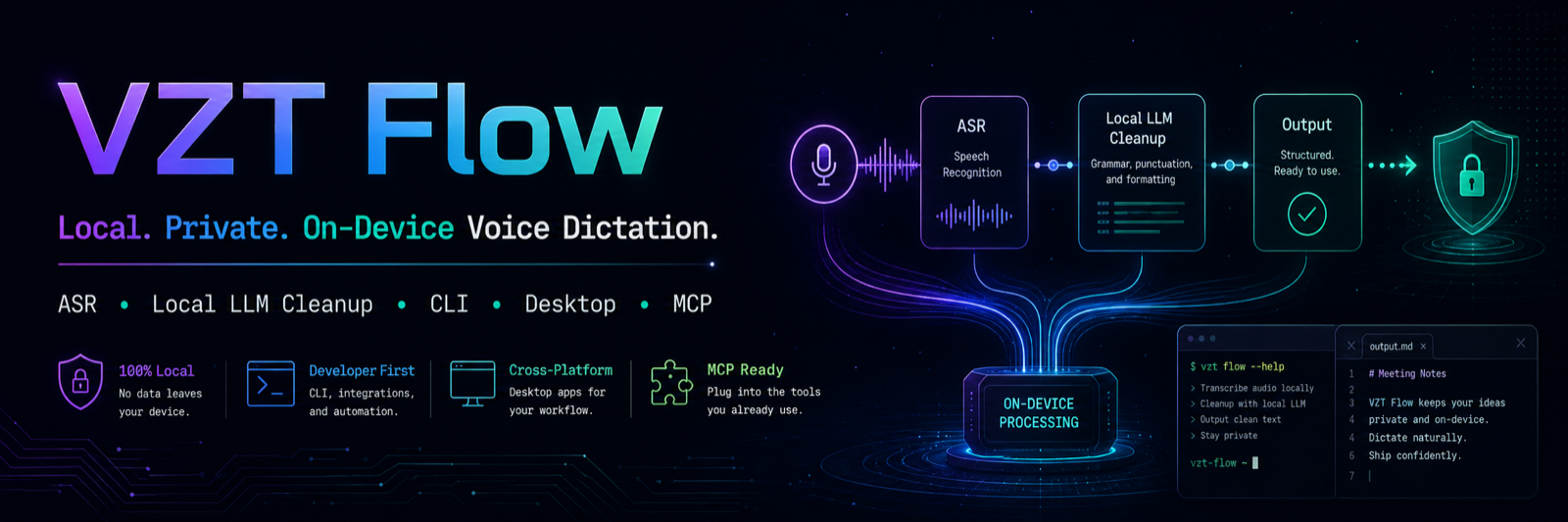
Local, private, on-device voice dictation. Hold a key, talk, and the transcript lands at your cursor. Free, offline, and signed + notarized by Apple, so it just opens. Parakeet TDT ASR + optional Qwen3 cleanup. macOS and Windows verified on real hardware. Also a CLI and an MCP voice-input tool for Claude Code.
Download for macOS · Three-step setup · What it does
VZT Flow





Hold a key, talk, and the transcript lands wherever your cursor is — no
subscription, no word limits, and nothing but the model downloads ever
touch the network. Hold-to-talk (or tap for hands-free) → local ASR
(Parakeet TDT) → optional local LLM cleanup (Qwen3) → paste. Also works
headless as a CLI and as an MCP voice-input tool for
Claude Code.
Why
Cloud dictation apps like Wispr Flow are good
products, but they cost $12-15/month, and every recording — audio,
sometimes screenshots for app-aware formatting — leaves your machine and is
processed on someone else's servers. VZT Flow exists because none of that is
actually necessary for a hold-key-and-talk workflow on Apple Silicon: a
0.6B-parameter ASR model and a 1.7B cleanup LLM both run comfortably local,
fast enough that the round trip to the cloud was never buying you much.
| VZT Flow | Cloud dictation apps | |
|---|---|---|
| Cost | $0, forever | $12-15/mo subscription |
| Where transcription happens | 100% on-device (ONNX + Metal / CoreML) | Cloud |
| Audio/screenshots leave your machine | Never | Sent to their servers |
| Word/usage limits | None | Plan-dependent |
| Per-app behavior | Bundle-id profiles (profiles.toml), editable |
Limited, closed |
| Code mode (identifiers, symbols, no LLM rewrite) | Yes, deterministic | No |
| Custom dictionary (names, jargon, spellings) | Yes, local file | Varies |
| Text snippets/expansion | Yes, local file | Limited |
| CLI | Yes (flow listen, flow transcribe, flow doctor, ...) |
No |
| Scriptable / MCP voice input for agents | Yes (listen, transcribe_file, dictation_history, meeting_transcript) |
No |
| Source | Open, MIT | Closed |
This isn't a claim that VZT Flow's transcription quality beats a
cloud-scale model — Parakeet TDT 0.6B is very good, not the biggest ASR
model in existence. The trade being made deliberately is: give up a little
headroom at the top end in exchange for zero cost, zero network dependency,
and a hard privacy guarantee you can verify yourself by reading the source.
Feature tour
How to dictate
Two gestures, one key. This is the authoritative reference — everything
else in the docs links back here rather than restating it.
| Gesture | Mode | Stops when |
|---|---|---|
| Hold Right Option, talk, release | Push-to-talk | You release the key |
| Tap Right Option (<300 ms), talk | Hands-free | ~2.5 s of silence, or a second tap |
(Windows/Linux use Ctrl+Shift+Space for the same two gestures instead of
Right Option — see Windows /
Linux below.)
To change the key: Settings → Hotkey. Nine modifiers are offered — Right
Option (default), Right Shift, Right Control, Right Command, Fn, and the four
left-side equivalents, which are labelled as conflicting with typing for good
reason. You can also set hotkey_keycode in ~/.config/vzt-flow/config.toml.
Only modifier keys are valid: a letter key auto-repeats keyDown while held,
which destroys the press/release edges the hold-vs-tap logic reads. Caps Lock is
excluded on purpose — its flag reports the latched state, not the physical key,
so binding it would start recording and leave Caps Lock on. And because macOS
reports modifier flags without telling you which side they came from, a binding
on one Shift can be "held open" by the other one; that is why the left-side keys
carry a warning. On Windows and Linux the hotkey is fixed at
Ctrl+Shift+Space and hotkey_keycode is ignored.
- Esc cancels either mode outright — nothing is transcribed or pasted.
- The tap only arms hands-free if no other key was pressed during it.
Right Option is macOS's special-character modifier (Option+e = ´,
Option+n = ˜, …), so holding it and pressing any other key is treated
as typing, not push-to-talk — special characters via Option never
false-trigger a recording. If a hold had already started before the extra
key landed, that false start is discarded immediately (the accidental-
press guard); the typed character still reaches the app either way (the
hotkey tap isListenOnly, so it never swallows the keystroke). - Both modes get rolling transcription with a live preview in the
overlay pill — see Long-form dictation
below. - After each synthetic Cmd+V, paste verification reads the focused field
via the Accessibility API (~150ms later); if the field is readable and the
transcript tail is missing, the paste is retried once, then (still
missing) left on the clipboard with a "paste may have failed" overlay.
Unreadable fields — most web/Electron/secure inputs — are assumed
successful (prior behavior), and the whole check is bounded under 400ms. - Every recording mode is hard-capped at 600s (10min)
(max_hold_secs/max_handsfree_secs) so a stuck key can never record
forever; hitting the cap transcribes what was captured rather than
discarding it.
Config knobs, with real defaults (crates/flow-core/src/config.rs):
| Field | Default | Meaning |
|---|---|---|
hotkey_keycode |
61 (Right Option) |
The hold/tap key |
hold_threshold_ms |
300 |
Hold vs. tap threshold (ms) |
handsfree_silence_secs |
2.5 |
Silence before hands-free auto-stops (s) |
max_hold_secs |
600 |
Hard cap on a held recording (s) |
max_handsfree_secs |
600 |
Hard cap on a hands-free recording (s) |
A small floating pill overlay tracks the whole lifecycle: a live level
meter while Recording, a mode badge (raw/clean/polish/code) while
Transcribing, a brief Done flash, and short-lived Message states
for non-fatal issues ("Secure field — transcript on clipboard", "No
Accessibility permission", "Microphone disconnected").
On-device ASR: Parakeet TDT 0.6B v3
Speech-to-text runs through transcribe-rs
on an int8-quantized NVIDIA Parakeet TDT 0.6B v3
ONNX model, with the CoreML execution provider on Apple Silicon. Measured on
this repo's own hardware (M5 MacBook Air, flow transcribe on an 8.6s
synthesized clip): 0.83s wall time, RTF 0.097x — about 10x realtime.
Windows runs the same model on plain CPU ONNX (no CoreML there), so expect a
lower realtime factor. Per NVIDIA's model card, Parakeet TDT v3 covers 25
European languages.
Long-form dictation: 10-minute holds, chunked so they don't OOM
Recording caps are sized for holding the key down for several minutes at a
stretch, not just short commands. The bundled Parakeet engine
(transcribe-rs) has no internal audio chunking and its memory use grows
faster than linearly — roughly quadratically — with a single recording's
length: measured on this repo's M5, ~15.6GB peak for 49s of audio, ~37GB for
93s, and an out-of-memory kill at ~146s. Rather than lower the cap to match
that ceiling, recordings longer than ~35s are transparently split into ~30s
chunks (cut at the quietest point of a 25-35s window, so seams land in
natural pauses — see crates/flow-core/src/chunking.rs) and transcribed one
after another on the same engine, bounding peak memory to a single chunk's
footprint regardless of total recording length. Measured on a real ~7-minute
(438s) take: ~32.5s wall time, RTF 0.074, ~8.9GB peak RSS — comfortably
inside the 10-minute cap. The cleanup-LLM deadline scales with transcript
length too (cleanup_timeout_ms base + cleanup_timeout_per_char_ms per
character, capped at cleanup_timeout_max_ms), and the overlay pill shows a
running mm:ss timer with an amber warning in the last 30s before the cap.
Rolling transcription takes long holds one step further: instead of
waiting for release to transcribe everything, each silence-completed ~30s
chunk is transcribed while you're still talking (on the same engine,
reusing the chunker's cut points and seam-dedup), so at release only the
final <35s tail remains. Measured on a real ~7¾-minute (465s) M5 clip, the
transcript pastes ~0.5s after you release the key instead of ~25s
(0.53s vs. 25.15s — an identical 7745-char transcript, just with the work
moved off the critical path; peak RSS stays ONNX-inference-bound, unchanged).
A subdued live-preview line in the pill shows the raw tail as it accrues. On
by default (rolling_transcription); recordings under ~35s are unaffected
(no chunks to roll, single transcribe at release). Seecrates/flow-core/src/rolling.rs; exercise it on any wav with the hiddenflow rolling-test <file>.
Meeting transcription: local, dual-stream, speaker-labelled
flow meeting live-transcribes a Zoom/Google Meet/Microsoft Teams call (or
anything else playing audio) fully locally — no audio ever leaves the
machine. It captures system/participant audio via ScreenCaptureKit and
your microphone as two separate streams, transcribes both through the
same local Parakeet engine, and writes a timestamped Me:/Them: Markdown
transcript with an echo filter (Jaccard similarity > 0.7 on time-overlapping
lines) that drops your own mic re-picking-up speaker audio from participants
without headphones. Stopping the meeting appends a local Qwen3-generated
summary and action items. A meeting_transcript MCP tool exposes transcripts
to Claude Code ("summarize my last meeting", "pull the action items"). A
background auto-detector (tray → Meeting auto-detect ▸ Ask/Auto/Off)
combines frontmost-app matching (Zoom/Meet/Teams) with a mic-live signal to
offer or auto-start flow meeting when a call begins — 100% local,
titles-only, no screenshots. macOS only (ScreenCaptureKit is a macOS 13+
framework). Full guide, permissions, and transcript-format details:
docs/MEETINGS.md.
AI cleanup: on-device Qwen3-1.7B, three modes, a hard deadline
clean and polish modes run Qwen3-1.7B-Instruct
(Q4_K_M GGUF, via unsloth's
re-quantization) through embedded llama.cpp
with the Metal backend. clean (the default) strips filler words, false
starts, and repeats, and fixes grammar/punctuation while preserving your
wording; polish restructures the dictation into clear, well-formatted
writing for the target app and tone; raw never touches the LLM at all —
Parakeet already punctuates.
Cleanup is deadline-bound: cleanup_timeout_ms (2500ms default) races
generation on a worker thread against a timer. Measured on this machine,
warm generation for a short sentence lands around 0.3s — well inside the
deadline — but if the deadline is ever missed, the dictionary-corrected raw
transcript is pasted instead and the worker thread is cooperatively
cancelled and joined (never detached, so a slow generation can't leak a
live Metal context). The pipeline never blocks indefinitely, and never
silently rewrites you past what you actually said — worst case you get
your own words back, on time.
Code mode: deterministic spoken-form → identifiers
code mode is a pure, no-LLM transform (crates/flow-core/src/codemode.rs)
so it's exact and instant — no model in the loop at all:
| Spoken | Result |
|---|---|
camel case user id |
userId |
snake case api key |
api_key |
pascal case flow core |
FlowCore |
kebab case my app |
my-app |
open paren close paren |
() |
fat arrow |
=> |
dollar sign |
$ |
get user open paren close paren |
getUser() (implicit call-name merge) |
console dot log open paren close paren |
console.log() |
Language keywords (const, return, async, if, class, ...) stay
literal and act as boundaries, so full statements dictate cleanly:"const camel case user profile equals await get user open paren close paren" → const userProfile = await getUser().
Per-app profiles, computed locally
profiles.toml maps macOS bundle IDs (with optional * prefix matching) to
a mode/tone pair, resolved from the frontmost app via NSWorkspace — no
screenshot, no window content ever inspected, just the bundle identifier.
Terminal, iTerm2, and Warp are seeded to code mode out of the box; Mail
gets clean/formal; Slack gets clean/casual. Anything else falls back
to [default].
Personal dictionary + voice snippets
The dictionary (dictionary.json) fixes ASR mishearings before cleanup or
code-mode ever see the transcript — fuzzy (edit-distance) matching for terms
4+ characters (superbase/super base → Supabase), exact-match only for
shorter terms so they don't misfire. Snippets (snippets.json) expand a
trigger phrase into fixed text when it's the entire dictation — say "my
email" or "insert my email" to fire the seeded [email protected]
expansion, or add your own.
MCP server for Claude Code — dictate your prompts by voice
This is the headline differentiator: a small MCP server
(mcp/src/index.ts) that gives Claude Code a listen tool, so you can
dictate a prompt out loud instead of typing it.
cd mcp && npm install && npm run build
claude mcp add vzt-flow --scope user -- node "$(pwd)/dist/index.js"
Once registered, just ask Claude Code to listen for your voice input and it
invokes listen directly — no alt-tabbing out to a separate dictation app.
It talks to the running desktop app's daemon socket when available (driving
the same overlay you see everywhere else), falling back to the standaloneflow CLI otherwise. Three more tools ship alongside it: transcribe_file
(an existing audio file), dictation_history (recent dictations), andmeeting_transcript (read/summarize a flow meeting transcript by index or
filename).
Full CLI + daemon socket
flow listen --mode clean | pbcopy      # dictate straight to the clipboard
flow transcribe recording.wav          # transcribe an existing file
flow history -n 20                     # recent dictations
flow doctor                            # environment/model/daemon diagnostics
flow is daemon-first (drives the desktop app's overlay when it's running)
with a fully standalone fallback (capture/transcribe/cleanup, no daemon
required) — see CLI reference for the
complete command list, including the hidden diagnostic commands
(paste-test, clean-test, code-test). On Windows the same daemon
path runs over a native named pipe (\\.\pipe\vzt-flow-daemon), soflow status/toggle/cancel/listen and the MCP server are daemon-first
there too — verified end to end on real Windows hardware (2026-07-10), not
just in CI's pipe unit tests.
Resource discipline
The Parakeet and cleanup models are lazy-loaded on first use and idle-
unloaded after idle_unload_secs (300s default) of inactivity, so VZT Flow
doesn't sit holding ~1.5GB of models in memory between dictations. The
packaged .app bundle itself measures 36MB on this build — small enough
that Tauri's native-webview approach (vs. bundling a full Chromium/Electron
runtime) is doing real work here, not just a marketing line.
Install
macOS 13.0 (Ventura) or newer on Apple Silicon; 13.3 or newer on Intel,
because the bundled onnxruntime dylib refuses to load below that. You need
about 700 MB of disk for the app plus the speech model, and roughly 4 GB of RAM
free while dictating (the model unloads after 5 minutes idle, back down to
~105 MB).
The install paths are not equivalent. Only the one-liner leaves you with a
system that works the moment it finishes:
| App | flow CLI |
MCP server | Speech model | Launches app | |
|---|---|---|---|---|---|
| One-liner (recommended) | yes | yes | yes, if claude is on PATH |
yes, downloaded | yes |
| Homebrew cask | yes | no | no | no — download it from Settings | no |
Manual .dmg |
yes | no | no | no — download it from Settings | no |
| Build from source | yes | yes | manual | manual | no |
With Homebrew or a manual .dmg you get the menu-bar app and nothing else. The
app still works — its Settings window has a Download button for the speech model
— but there's no flow command and no voice input for Claude Code until you
also run the installer with NO_APP=1, which adds those without touching the
app you already installed.
The whole thing, in three steps
- Install. Paste the one-liner below into a terminal. It downloads the app,
theflowCLI, the MCP server and the speech model, then launches the app. - Say yes to three permissions. macOS asks for Microphone, Accessibility and
Input Monitoring the first time each is needed. Nobody can grant these for you
— not an installer, notsudo, not an AI agent. It has to be you, clicking.
What each one does. - Hold Right Option, talk, let go. The transcript appears at your cursor.
There is no account, no licence key, and nothing to configure. The app is a
menu-bar icon — no Dock icon and no main window, so if you're hunting for it
after install, look in the top-right of your screen, not the Dock.
The app is signed with an Apple Developer ID and notarized, so it opens by
double-clicking like any other Mac app — see
Gatekeeper.
Where to download
Everything ships from the Releases page.
Pick the file that matches your Mac — Apple menu → About This Mac tells you
which chip you have:
| Your Mac | Download | Minimum macOS |
|---|---|---|
| Apple Silicon (M1–M5) | VZT.Flow_<version>_aarch64.dmg |
13.0 (Ventura) |
| Intel | VZT.Flow_<version>_x64.dmg |
13.3 |
Every .dmg is signed with an Apple Developer ID and notarized by Apple, with
the ticket stapled, so it opens by double-clicking. Nothing about VZT Flow costs
money, phones home, or needs an account.
The .dmg gives you the app alone. The one-liner below gives you the app plus
the flow CLI, the MCP server, and the speech model — which is why it's the
recommended path.
Let Claude do it
Paste this into Claude Code and it installs
everything — app, flow CLI, MCP server, and the Parakeet speech model
(456 MB download, ~640 MB on disk) — then proves it worked by runningflow doctor and transcribing a real audio clip:
Install VZT Flow on this machine by following
https://raw.githubusercontent.com/vonzelle-vzt/vzt-flow/main/AGENT-INSTALL.md
AGENT-INSTALL.md is a runbook written for an agent rather
than a person: non-interactive flags, download-timeout guidance, aflow doctor + TTS round-trip verification step, and an explicit list of what
an agent can't do (the three macOS permission grants are TCC-protected —
no shell, sudo, or plist edit can grant them, so that step stays human, and
the agent is told not to claim the hotkey works until you've tested it).
You will still have to grant the three permissions yourself, and the agent is
instructed to say so rather than pretend it finished.
macOS: one-liner
curl -fsSL https://raw.githubusercontent.com/vonzelle-vzt/vzt-flow/main/scripts/install.sh | bash
What it does, in order. It resolves the latest GitHub Release, downloads the.dmg matching your chip, and then:
| Step | Where it lands |
|---|---|
| Installs the menu-bar app | /Applications/VZT Flow.app |
Installs the flow CLI |
/usr/local/bin/flow, or ~/.local/bin/flow if that isn't writable |
| Installs the MCP server | ~/.vzt-flow/mcp/ |
| Registers it with Claude Code | via claude mcp add, only if the claude CLI is on your PATH |
| Downloads the speech model | ~/.config/vzt-flow/models/ (456 MB download, ~640 MB on disk) |
| Launches the app | menu bar, top-right — no Dock icon |
Nothing here needs sudo, and nothing is installed system-wide beyond/Applications. To remove it all: delete those five paths.
What happens next. The app opens its Settings window once, showing a live
permission panel that re-checks every two seconds. Grant
the three permissions, hold Right Option, and talk.
The app is Developer ID signed and notarized, so it opens on a normal
double-click no matter how it reached your disk (see
Gatekeeper). curl | bash sets no quarantine
attribute, so this path doesn't even show the "downloaded from the Internet"
confirmation.
If you'd rather read the script before piping it into a shell — a reasonable
instinct — it's scripts/install.sh, and it is linted and
executed against a clean macOS and Linux runner on every change.
Four environment variables change what it does:
| Variable | Default | Effect |
|---|---|---|
INSTALL_MODELS |
asr |
none skips model downloads; asr fetches Parakeet (456 MB); all adds the Qwen3 cleanup model (~1.1 GB) |
INSTALL_YES |
0 |
1 overwrites an existing install without asking. Required when a script or agent runs the installer — otherwise the overwrite prompt blocks forever on a non-interactive stdin |
NO_LAUNCH |
0 |
1 installs without launching the app |
NO_APP |
0 |
1 installs only the CLI, MCP server and models, leaving /Applications alone. Use this alongside a Homebrew cask install |
# everything, including the optional cleanup LLM, no prompts
INSTALL_YES=1 INSTALL_MODELS=all curl -fsSL https://raw.githubusercontent.com/vonzelle-vzt/vzt-flow/main/scripts/install.sh | bash
macOS: Homebrew
brew install --cask vonzelle-vzt/vzt/vzt-flow
Installs VZT Flow.app from the
vonzelle-vzt/homebrew-vzt tap
(Apple Silicon or Intel .dmg auto-selected by arch). Some Homebrew versions
refuse to install a cask from a third-party tap that isn't marked trusted —
if brew install --cask errors on that, run brew trust --cask vonzelle-vzt/vzt/vzt-flow first, then re-run the install.
The tap follows releases automatically — it checks daily and bumps itself — sobrew upgrade --cask vzt-flow picks up a new version within a day of it
shipping. If you want a release the moment it lands, take the .dmg from the
Releases page or use the
one-liner below; both track releases/latest directly.
The cask installs the menu-bar app only — no flow CLI, no MCP server, no
speech model, and it does not launch the app. Open it from /Applications and
use the Download button in its Settings window to fetch the model.
For the CLI and MCP server alongside a cask install, run the installer withNO_APP=1:
NO_APP=1 curl -fsSL https://raw.githubusercontent.com/vonzelle-vzt/vzt-flow/main/scripts/install.sh | bash
That flag matters. Without it the installer replaces /Applications/VZT Flow.app — it does not detect or defer to Homebrew — which leaves brew with
a receipt for a bundle it no longer wrote, and brew upgrade managing a file it
didn't install. NO_APP=1 skips the .dmg entirely and installs only the CLI,
MCP server, and models.
Upgrading a cask installed at v0.3.0 or earlier needs a one-time re-grant;
see Upgrading. From v0.3.1 on, cask upgrades keep your
permissions like any other install path.
Manual: download from Releases
Grab the .dmg (macOS), .msi/-setup.exe (Windows), or .deb/.AppImage
(Linux) from the Releases page.
Since v0.3.1 the .dmg is Developer ID signed and notarized, so it opens on a
double-click even though a browser download quarantines it — see
Gatekeeper. You get the app only; add the CLI
and MCP server with NO_APP=1 curl … | bash as above.
Build from source
git clone https://github.com/vonzelle-vzt/vzt-flow.git
cd vzt-flow
cargo build --release -p flow-cli
./target/release/flow doctor
./target/release/flow models download parakeet-v3
cd apps/desktop && npm install && cargo install tauri-cli --version "^2" && cargo tauri build
Full prerequisites and platform notes: docs/USAGE-macOS.md.
First run
The installer launches the app for you. It appears as a menu-bar icon — there
is no dock icon and no main window. On first launch only, it opens its Settings
window so you can see what's still missing; after that it never nags again.
That window has a live permission panel. It re-checks every two seconds, so you
can leave it open, grant things in System Settings, and watch each row go green
without restarting anything.
Then hold Right Option, say a sentence, and let go. The text lands wherever
your cursor is. That is the whole product.
If you installed via Homebrew or a manual .dmg, the speech model isn't on disk
yet. The Settings window has a Download button for it, or runflow models download parakeet-v3 if you have the CLI. If you press the hotkey
without it, the overlay tells you so rather than failing silently.
The three permissions
macOS gates every part of this behind a separate grant, and it will not let any
installer, script, sudo command, or AI agent grant them for you. It has to be
you, clicking. What each one buys, and how it fails without it:
| Permission | Without it |
|---|---|
| Microphone | No audio is captured. macOS prompts the first time you dictate. |
| Input Monitoring | The hotkey never fires. Holding Right Option does nothing — no overlay, no error. |
| Accessibility | Audio records and transcribes fine, but the text never pastes. You'll find it in flow history and nowhere else. |
Two behaviors worth knowing. When you toggle Input Monitoring, macOS quits the
app and you have to reopen it. And once a grant lands, the app re-arms its
event tap within about two seconds on its own — you do not need to relaunch it
to pick up a late grant.
Upgrading
From v0.3.1 onward your permissions survive upgrades. macOS ties Accessibility
and Input Monitoring to a code requirement; for a Developer ID signature that
requirement names the team, which is stable across releases, so the grants keep
matching. Nothing to do.
Upgrading from v0.3.0 or earlier costs you one last re-grant. Those releases
were ad-hoc signed, and macOS pinned the grants to the exact binary hash, which
changed on every build. Your existing rows still show a ticked checkbox in System
Settings while describing a binary that no longer exists — so macOS denies, and
the hotkey does nothing, with no dialog and no log line.
Un-ticking and re-ticking the checkbox does not fix that — it toggles the
stale row. The row has to be deleted so macOS asks again from scratch.
The one-liner installer handles it: it compares the app's code hash before and
after, and when the identity changed and the app is not Developer-ID-signed on
both sides, it clears exactly those two grants and prints a banner telling you
to re-grant. If you upgrade some other way — Homebrew, a manual .dmg,cargo tauri build — do it yourself:
tccutil reset Accessibility  com.vzt.flow
tccutil reset ListenEvent    com.vzt.flow   # ListenEvent == Input Monitoring
open -a "/Applications/VZT Flow.app"
Then press the hotkey once and allow Input Monitoring; dictate once and allow
Accessibility. In practice the microphone grant survives — and if it doesn't,
macOS simply asks again, because the bundle carries a microphone purpose string.
(Builds before v0.2.1 did not, and macOS terminated them on the spot the first
time they opened the mic. If an old build "force quits when I try to talk," that
is why, and upgrading fixes it.)
Troubleshooting: I hold the hotkey and nothing happens
Work down this list — it's ordered by how often each one is the answer.
0. Are you running the build you think you are? Cheapest check, and it has
been the answer before. If you ever built from source and copied the app into/Applications, that copy is still there — silently older than every release
you've installed since.
flow status | grep version          # the running daemon's own version
codesign -dv --verbose=2 "/Applications/VZT Flow.app" 2>&1 | grep -E "flags|TeamIdentifier"
A release prints flags=0x10000(runtime) and TeamIdentifier=LKHKU5BW73. If
you instead see flags=0x2(adhoc) and TeamIdentifier=not set, you're running
a local build — reinstall from Releases
or brew upgrade --cask vzt-flow. A stale local build in /Applications is
how you end up running a version whose known crash was fixed months ago.
1. Is the tap even armed? Hold the hotkey while watching:
flow status # state: idle → recording → transcribing → idle
If state never leaves idle, the keypress isn't reaching the app: that's
Input Monitoring. If you just upgraded, it's the stale-grant problem above.
2. Does it record but nothing appears? If state cycles correctly andflow history shows your words, the pipeline is healthy and only the paste
failed: that's Accessibility.
3. Does the overlay say the speech model is missing? Runflow models download parakeet-v3.
4. Is the app actually running? It has no dock icon, so a crash looks
exactly like a broken hotkey — there's no dialog and no dock icon to disappear.
Check the menu bar, or:
pgrep -f vzt-flow-desktop || open -a "/Applications/VZT Flow.app"
If it wasn't running, check whether it quit rather than never started:
ls -t ~/Library/Logs/DiagnosticReports/vzt-flow-desktop-*.ips | head -3
A report dated when you last tried to dictate means the app crashed. Versions
before 0.3.3 had exactly this bug — the auto-paste could abort the process at
the very end of an otherwise-successful dictation (details in the
changelog). Upgrade. If you see a crash on 0.3.3 or later,
please open an issue with that .ips file attached.
5. Still stuck? flow doctor prints the model, daemon, hotkey binding, and
MCP registration state in one shot. Include its output in a bug report.
Recording never stops and the mic stays live? First, give it a second — a
cancel issued immediately after a start leaves state: recording briefly while
the microphone device opens, and that is normal. Only a state that stays put
is a fault.
If it genuinely persists: on 0.3.3 and earlier, a stop or cancel that arrived
while the audio worker wasn't capturing was silently discarded, so flow status
could pin at state: recording with the microphone live and neitherflow cancel nor flow toggle able to clear it. 0.3.4 closes that hole —
upgrade. It affected the tray toggle and the daemon/MCP paths, never
hold-to-talk. On an affected build, restarting is the only recovery:
pkill -f "VZT Flow.app/Contents/MacOS/vzt-flow-desktop" && open -a "/Applications/VZT Flow.app"
0.3.4 makes the acknowledgement mandatory, so a cancel now always either ends a
live recording or clears a stuck one. If you still see a recording that stays
stuck on 0.3.4 or later, please open an issue — the original stall was never
reproducible on demand, so a report with flow status output would genuinely
help.
Two traps that look like bugs but aren't. Holding a different Option key than
the one you bound does nothing, and CGEventFlags cannot tell left from right —
so if you bind Right Shift and happen to be holding Left Shift, releasing your
bound key emits no release event and recording keeps running. And a keyboard
shortcut bound to your hotkey in another app can swallow the keypress before it
reaches the tap.
Models
Models are not bundled with the app — they download separately and live
under ~/.config/vzt-flow/models/. The one-liner fetches Parakeet by default;
everything else fetches nothing until you ask.
| Model | Purpose | Size |
|---|---|---|
| Parakeet TDT v3 (int8 ONNX) | Speech-to-text (always required) | 456 MB download (~640 MB on disk) |
| Qwen3-1.7B-Instruct (Q4_K_M GGUF) | Optional clean/polish LLM rewrite |
~1.1GB |
flow models download            # parakeet-v3 (the default)
flow models download cleanup    # optional — needed for clean/polish modes
Raw dictation works with Parakeet alone. The cleanup model only matters if you
want the clean or polish modes; without it those fall back to raw output.
Gatekeeper and code signing
Since v0.3.1, releases are signed with an Apple Developer ID certificate
and notarized by Apple, with the notarization ticket stapled to both the app
and the .dmg. They run the hardened runtime.
You can therefore open the app by double-clicking it, however it reached your
disk — browser download, Homebrew cask, or curl | bash. There is no
right-click → Open, no "Apple cannot check it for malicious software," and no
trip to Privacy & Security. Because the ticket is stapled rather than fetched
from Apple on demand, the first launch also works offline.
One dialog does remain, and it is the ordinary one every downloaded Mac app
shows: if the .dmg came from a browser or Homebrew, macOS quarantines it, and
the first launch asks "VZT Flow is an app downloaded from the Internet. Are you
sure you want to open it?" Click Open, once, and never again. curl | bash
sets no quarantine attribute, so that path shows nothing at all.
Verify it yourself:
codesign -dv --verbose=4 "/Applications/VZT Flow.app" 2>&1 | grep Authority
#   Authority=Developer ID Application: Neil Brown (LKHKU5BW73)
#   Authority=Developer ID Certification Authority
#   Authority=Apple Root CA
xcrun stapler validate "/Applications/VZT Flow.app"
spctl -a -vv "/Applications/VZT Flow.app"
Every release is blocked unless CI can prove all of this on the artifact you
download — Developer ID authority, hardened runtime, the microphone entitlement,spctl acceptance, and a stapled ticket.
Releases up to and including v0.3.0 were ad-hoc signed, which is why they
needed a right-click → Open from a quarantined download, and why they lost two
permission grants on every upgrade. Local cargo tauri build output is still
ad-hoc — see the rebuild gotcha.
Building from source: the rebuild gotcha
Every cargo tauri build mints a new ad-hoc signature, so macOS silently
revokes the previous build's Input Monitoring and Accessibility grants — the
same mechanism as an upgrade, hit far more often. If the hotkey dies right after
a rebuild, that is almost always why; run the two tccutil reset commands
above. See
docs/USAGE-macOS.md#permissions for the full
remove/re-add procedure.
Intel Mac
CI also builds and packages an x86_64-apple-darwin .dmg/CLI tarball
(vzt-flow-macos-x86_64-dmg / vzt-flow-cli-macos-x86_64.tar.gz), cross-
compiled from an Apple Silicon runner. CPU-only inference (no Metal/CoreML)
— slower than Apple Silicon, especially for clean/polish cleanup, but
functionally the same pipeline. scripts/install.sh auto-detects Intel vs.
Apple Silicon and grabs the right asset. Never run on real Intel hardware —
see Hardware requirements for
the honest performance estimate and the ort-has-no-prebuilt-binaries gap
this build works around.
Windows (experimental)
[!WARNING]
Experimental, but verified end to end on real Windows hardware
(2026-07-10): install, model download, transcription (RTF 0.131x on CPU
ONNX), the Ctrl+Shift+Space hotkey, hands-free auto-stop, the full
desktop-app-as-daemon round trip over the named pipe
(\\.\pipe\vzt-flow-daemon), the MCP server, and a real human dictating
by voice — all working. One bug found in that run: v0.3.1's auto-paste
silently does nothing (your words still land on the clipboard — press
Ctrl+V); fixed in v0.3.2, verified on the same machine — upgrade if
you're on v0.3.1. Still no per-app profiles and noclean/polishcleanup
LLM on Windows.
Install — one PowerShell line, no admin needed (Windows 10 1803+/11,
x64, ~1.2 GB disk):
iwr https://raw.githubusercontent.com/vonzelle-vzt/vzt-flow/main/scripts/install.ps1 -UseBasicParsing | iex
That installs the tray app, the flow CLI (open a new terminal to pick up
the PATH change), the MCP server for Claude Code, and the Parakeet speech
model — then hold Ctrl+Shift+Space, talk, let go (or tap it for
hands-free). The hotkey is fixed on Windows — the hotkey picker in Settings
only applies to macOS. The installers are unsigned — there is no code
signing in CI — so a browser-downloaded installer may hit SmartScreen's
"Windows protected your PC" on first run: choose More info → Run anyway.
(The Apple Developer ID signing described under
Gatekeeper covers the macOS .dmg only.)
The full Windows guide — quick start, day-to-day dictation notes,
troubleshooting, CI/bleeding-edge installs, build-from-source, and the
real-hardware test matrix — is
docs/USAGE-Windows.md. Windows on Arm
(aarch64-pc-windows-msvc) is attempted in CI as an allowed-to-fail job —
see
docs/USAGE-Windows.md#hardware-requirements
for current status.
Linux (unsupported / community-maintained)
[!WARNING]
Linux is unsupported and community-maintained — it has never been run
on real Linux hardware, has no global hotkey under Wayland, and doesn't get
the same pre-release verification the macOS build does. The.deb/.AppImage/ CLI artifacts keep shipping every release (people have
installed them since v0.2.1) and nothing here is being deleted, but they're
provided as-is: use at your own risk. On X11 it behaves like the
Windows build (hold-to-talk, auto-paste, tray, overlay). On Wayland
it's degraded: no global hotkey across native apps, clipboard-only paste
(with a "press Ctrl+V" notification), best-effort overlay — Wayland denies
clients global input grabs and cross-app synthetic input by design. Use the
tray's Start/Stop item + clipboard on Wayland. Default hotkey is
Ctrl+Shift+Space. Full caveats: docs/USAGE-Linux.md.
curl -fsSL https://raw.githubusercontent.com/vonzelle-vzt/vzt-flow/main/scripts/install.sh | bash
The installer detects Linux and grabs the .deb (Debian/Ubuntu, via apt) or.AppImage. The tray needs libayatana-appindicator3 installed; meeting mode
is not yet available (needs a PipeWire capture backend — on the roadmap). Full
X11-vs-Wayland support matrix, runtime deps (Ubuntu/Fedora), and build-from-
source steps: docs/USAGE-Linux.md.
Hardware compat matrix
| Platform | Status | Notes |
|---|---|---|
macOS Apple Silicon (aarch64-apple-darwin) |
Supported, tested | Primary dev platform (M5 MacBook Air); Metal cleanup + CoreML ASR |
macOS Intel (x86_64-apple-darwin) |
Built in CI, CPU-only inference | Never run on real Intel hardware; effective floor is macOS 13.3, not the 12.0 in tauri.conf.json — see USAGE-macOS.md |
Windows x64 (x86_64-pc-windows-msvc) |
Built in CI, experimental — verified on real hardware (2026-07-10) | Install/ASR/hotkey/daemon-over-named-pipe/MCP/human-dictation all verified on a real Windows 11 machine; v0.3.1 auto-paste broken (fixed in v0.3.2, verified); still no per-app profiles/cleanup LLM |
Windows Arm (aarch64-pc-windows-msvc) |
Attempted in CI, allowed to fail | Status depends on upstream (ort, WebView2-on-Arm) support this week — check the latest build workflow run |
Linux x64 (x86_64-unknown-linux-gnu) |
Unsupported, community-maintained | Never run on real Linux hardware; not part of the supported release surface — .deb + .AppImage keep shipping from CI (built + unit-tested on every push), provided as-is. X11: hotkey/paste/tray/overlay all work as designed. Wayland: no global hotkey across native apps (no fix planned), clipboard-only paste, best-effort overlay (Wayland denies clients global input grabs). No cleanup LLM / profiles / meeting mode (as Windows). See USAGE-Linux.md |
None of the non-"tested" rows are claimed to work beyond "compiles and
packages in CI" — see each platform's usage doc for what's actually been
verified vs. what's an honest "should work per the code, untested"
statement.
Screenshots
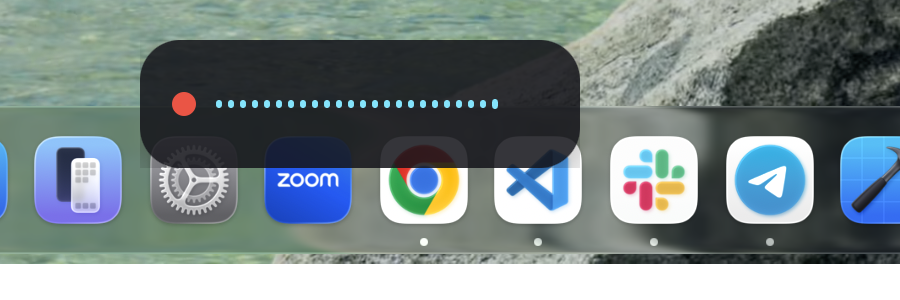
The overlay pill mid-recording — a live level meter, floating above the Dock.
(More UI screenshots — the tray menu and Settings window — are planned; the
menu-bar extra on this multi-monitor dev machine doesn't render reliably
under scripted/synthetic clicks, so they're left out rather than faked. See
Contributing if you'd like to add them from a
single-display setup.)
Architecture
 hold-to-talk hotkey (Right Option, or tap for hands-free)
        │
        ▼
   audio capture (cpal) ──► Parakeet TDT v3 (ONNX, int8) ──► raw transcript
                                                                   │
                              dictionary correction (local)  ◄────┘
                                                                   │
                per-app profile: raw | clean | polish | code ◄────┘
                       (code = deterministic; clean/polish = local
                        Qwen3-1.7B via llama.cpp, deadline-bound)
                                                                   │
                          snippet expansion (local)          ◄────┘
                                                                   │
                     clipboard save → set → simulate paste ◄──────┘
                     → restore clipboard after a short delay
| Crate/app | Role |
|---|---|
crates/flow-core |
The engine: audio capture, ASR, LLM cleanup, dictionary, code mode, snippets, profiles, history, hotkey monitoring, paste, model download/management, daemon IPC. Platform-agnostic; macOS-only pieces are #[cfg(target_os = "macos")]-gated. |
crates/flow-cli |
The flow binary. Daemon-first, standalone fallback. |
apps/desktop |
The Tauri 2 menu-bar app: tray icon, overlay, Settings window, hotkey, daemon control socket. The dictation loop is supervised — a panic mid-dictation resets the recorder, says so in the overlay, and restarts, rather than leaving the hotkey silently dead. |
mcp/ |
Node/TypeScript MCP server (listen, transcribe_file, dictation_history, meeting_transcript) for Claude Code. |
Key dependencies: Tauri 2 (native webview shell — an
8-12MB installer footprint instead of bundling Chromium the way Electron
does, which is most of why the packaged app measures 36MB total rather than
150MB+), transcribe-rs (ONNX ASR
runtime), cpal (cross-platform audio
capture), llama-cpp-2 (Rust
bindings for llama.cpp), enigo
(cross-platform input simulation for the paste step).
Configuration quick reference
Persisted at ~/.config/vzt-flow/config.toml (macOS) / %APPDATA%\vzt-flow\config.toml
(Windows). Full field-by-field docs, including which fields apply live vs.
require a restart: docs/USAGE-macOS.md#config-reference-configtoml.
| Field | Default | Meaning |
|---|---|---|
hotkey_keycode |
61 (Right Option) |
Hold-to-talk key — changeable in Settings → Hotkey; only the modifier keycodes are valid (a non-modifier key auto-repeats keyDown instead of the clean hold/tap transition detection relies on, see docs/USAGE-macOS.md#config-reference-configtoml) |
hold_threshold_ms |
300 |
Hold vs. tap threshold (ms) |
idle_unload_secs |
300 |
Model idle-unload timer (s) |
max_hold_secs |
600 |
Hard cap on a held recording (s) |
max_handsfree_secs |
600 |
Hard cap on hands-free recording (s) |
cleanup_timeout_ms |
2500 |
LLM cleanup deadline before raw fallback (ms) |
handsfree_silence_secs |
2.5 |
Silence before hands-free auto-stops (s) |
launch_at_login |
false |
Mirrors tauri-plugin-autostart |
Roadmap
- Windows per-app profiles +
clean/polishcleanup LLM (still macOS-only;
the daemon control socket already works on Windows over a named pipe) - Real-hardware validation on Windows (everything today is CI-built, never
hand-tested — see docs/USAGE-Windows.md) - Apple's on-device
SpeechAnalyzeras an alternate ASR engine option - Code signing/notarization so permission grants survive rebuilds without
the manual remove/re-add workaround - A dedicated "polish for Claude Code" cleanup mode tuned for dictating
prompts rather than prose - Command mode ("rewrite selection") — voice-driven editing of existing
text/code rather than only inserting new dictation
Contributing
Issues and PRs welcome. The codebase is small enough to read end to end —
start with crates/flow-core/src/lib.rs and the module list above. Please
verify claims against the code the way the docs in this repo try to (see
the doc comments throughout flow-core for the standard).
CONTRIBUTING.md has the build/test commands, the
verification norms (test with real speech; report measured numbers, not
adjectives), and the two gotchas most likely to waste your afternoon —
unsigned rebuilds dropping macOS permission grants, and Parakeet's quadratic
memory growth on long audio. Participation is governed by the
Code of Conduct.
Found a security problem? Don't open a public issue — see
SECURITY.md.
License
MIT — see LICENSE. Copyright (c) 2026 VZT Tech Consulting.
Credits
- transcribe-rs / Handy (cjpais) — the ONNX transcription plumbing and pre-packaged Parakeet int8 model archive this project uses.
- NVIDIA Parakeet TDT — the local ASR model.
- Qwen3 (via unsloth's GGUF re-quantization) — the local cleanup/rewrite LLM.
- llama.cpp / llama-cpp-2 / ggml — local LLM inference.
- Silero VAD — voice activity detection informing hands-free auto-stop.
- Tauri — the desktop app shell.
FAQ
Is anything sent to the cloud? No. Audio, transcripts, and screenshots
never leave your machine. The only network traffic VZT Flow ever makes is
downloading the Parakeet/Qwen3 model files once, from Hugging Face.
Why is my first dictation slow? The Parakeet model isn't loaded until
the first recording finishes (lazy load), and is idle-unloaded again afteridle_unload_secs of inactivity — expect a few seconds of one-time load
latency on that first dictation only. If you're using clean/polish, the
cleanup LLM pre-warms (model load + a throwaway generation to force Metal
kernel JIT compilation) as soon as a recording starts, in parallel with
you talking, so it's typically already warm by the time you finish speaking.
Does it work offline? Yes, fully, once the models are downloaded.
Apple Silicon only? No — Intel Macs (x86_64-apple-darwin) are also
built in CI (CPU-only inference, no Metal/CoreML; never run on real Intel
hardware — see Hardware compat matrix). Windows
builds target x86_64-pc-windows-msvc, with aarch64-pc-windows-msvc
attempted as an allowed-to-fail CI job.
Yorumlar (0)
Yorum birakmak icin giris yap.
Yorum birakSonuc bulunamadi