emacs-claude-code
Health Uyari
- License — License: GPL-3.0
- Description — Repository has a description
- Active repo — Last push 0 days ago
- Low visibility — Only 5 GitHub stars
Code Gecti
- Code scan — Scanned 12 files during light audit, no dangerous patterns found
Permissions Gecti
- Permissions — No dangerous permissions requested
Bu listing icin henuz AI raporu yok.
Client for the Claude Code CLI
English | 日本語
Emacs Client for Claude Code
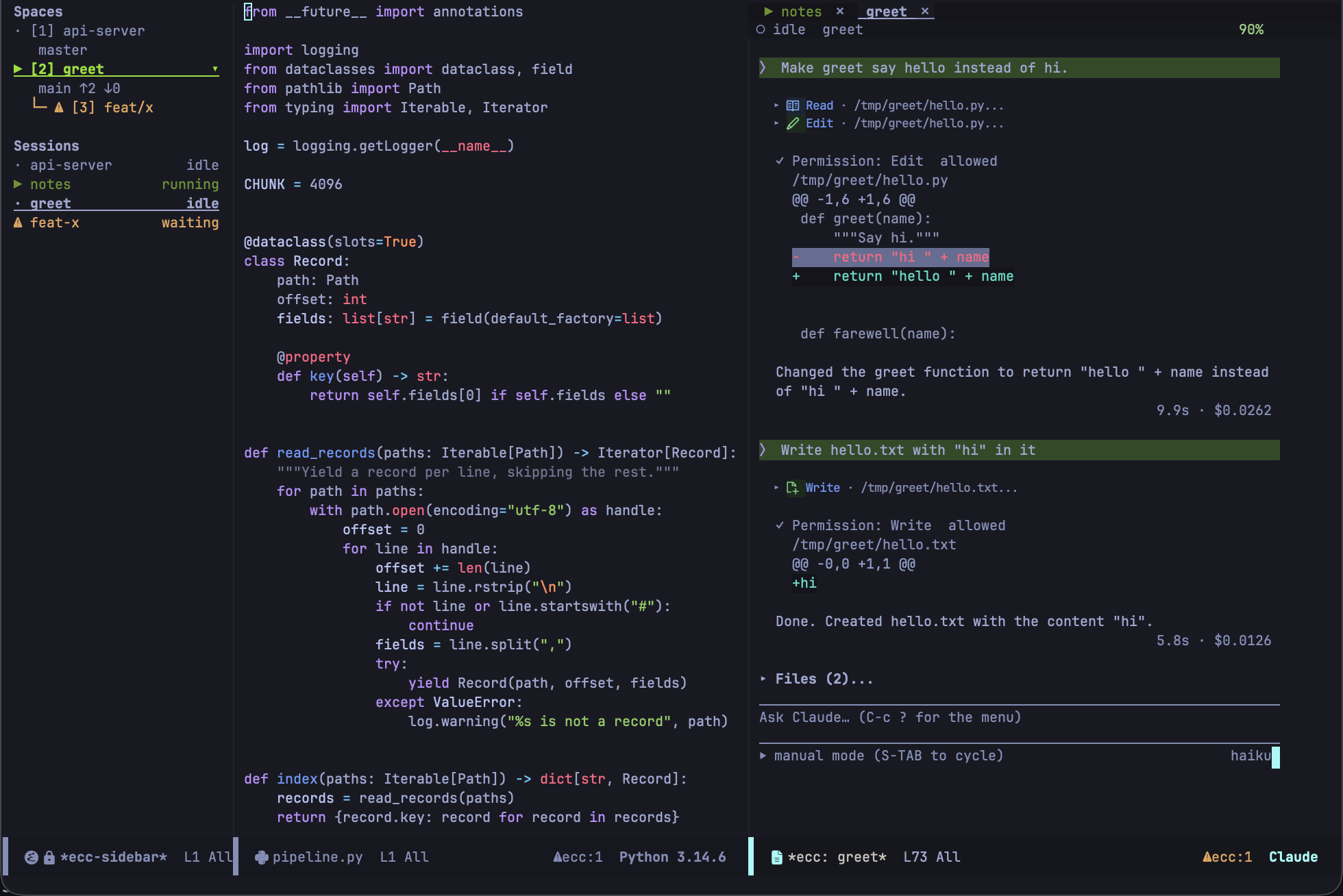
An Emacs client for the Claude Code CLI. Conversations run directly inside ordinary Emacs buffers.


Documentation: https://wakamenod.github.io/emacs-claude-code/
Pre-1.0. ecc is not stable yet, and breaking changes are likely: commands, key bindings and settings can change or go away from one release to the next. Read CHANGELOG.md before upgrading.
Overview
ecc runs claude in headless mode, communicates over pipes using its stream-json protocol, and renders the session in a standard Emacs buffer.
Because the transcript is standard buffer text, you can use regular Emacs workflows: search, occur, narrowing, copying, and exporting to Markdown. Buffer faces are applied on insertion and can be customized with M-x customize.
Scope and Trade-offs
- No terminal emulation: ecc does not replicate the CLI's terminal UI. Use
ecc-tui-opento hand off a live session to a terminal and bring it back when finished. - Claude Code only: ecc speaks the Claude Code protocol directly; it is not a general-purpose LLM frontend.
- Built-in renderers: Markdown, tables, and diffs are rendered using ecc's lightweight built-in parsers rather than heavyweight external dependencies.
- Direct protocol reflection: Permission requests, usage metrics (
get_usage), and conversation logs come directly from the CLI without guesswork.
Key Features
- Diff reviews: Inspect all changes made during a session in a single
diff-modebuffer, regardless of how they were made. Edits, shell commands, and scripts all read the same. Add inline comments to hunks and submit them as a single prompt. Settingecc-review-styleopens the same review in ediff, with every file side by side in one session. - Interactive edits: Review and modify proposed file edits before approving them.
- Plan mode: Work through proposed execution plans in a writable buffer.
- Global access: Approve or deny pending tool requests from any buffer.
- Session management: Manage multiple concurrent sessions from a dashboard.
- Spaces and worktrees: Every project gets an Emacs tab of its own -- a Space -- and the windows in it stay where you put them (
ecc-use-spaces, on by default). A sidebar lists every project and session with what each is doing, andecc-start-worktreechecks a branch out beside the repository and opens it as a Space of its own. - Safe defaults: Nothing is approved without you -- there is no auto-approval, and a request that can no longer be answered is recorded as denied. The built-in loopback MCP server is disabled by default, and evaluating Elisp requires explicit opt-in.
Requirements
- Emacs 29.1+ (
transientis built-in; no required external packages) - Claude Code CLI on
PATHor configured viaecc-executable
Optional Dependencies
These packages enhance functionality when available, but ecc falls back gracefully if they are absent:
- ghostel — Terminal emulator for sessions handed over by
ecc-tui-open. - posframe — Floating popups for
/btwside-queries and usage reports. - nerd-icons — Icons for tool calls in the transcript.
- markdown-mode — Major mode for plan and review buffers.
Installation
ecc is not currently on MELPA; install it directly from this repository.
Emacs 30+ (use-package with :vc)
(use-package ecc
  :ensure t
  :vc (:url "https://github.com/wakamenod/emacs-claude-code" :rev :newest))
Note: You can pin a specific commit by passing :rev "<commit-sha>".
Emacs 29 (package-vc-install)
M-x package-vc-install RET https://github.com/wakamenod/emacs-claude-code RET
Then configure it with a standard use-package declaration (without :vc).
Because the repository name is emacs-claude-code while the package name is ecc, package managers that infer the package name from the repository URL must declare it explicitly:
;; straight.el
(use-package ecc
  :straight (ecc :type git :host github :repo "wakamenod/emacs-claude-code"))

;; Elpaca
(use-package ecc
  :ensure (ecc :host github :repo "wakamenod/emacs-claude-code"))
Configuration
(use-package ecc
  :ensure t
  :vc (:url "https://github.com/wakamenod/emacs-claude-code" :rev :newest)
  :bind-keymap ("C-c c" . ecc-global-map)
  :custom
  (ecc-permission-mode "auto")
  (ecc-notify-level 'pulse)
  (ecc-usage-display 'posframe)
  (ecc-btw-display 'posframe)
  (ecc-prompt-suggestions-enabled t)
  ;; Uncomment to review in ediff instead of one diff-mode buffer.
  ;; (ecc-review-style 'ediff)
  ;; The Emacs MCP server: xref, imenu and flymake for Claude, and the
  ;; tool that hands work to a session in a worktree of its own.
  (ecc-mcp-enabled t))
For all other settings, check the configuration reference.
Quickstart
- Run
M-x ecc-startin a project buffer to start a session. - Type your message in the bottom prompt region.
- Press
C-c C-cto send (RETinserts a newline). - When Claude requests tool permissions, press
C-c C-ato allow orC-c C-dto deny. - Press
C-c ?to open the command menu.
Key Bindings
For prompt and transcript keybindings, see
Prompt and transcript.
For global keybindings accessible from any buffer, see the
keybindings reference.
Acknowledgements
ecc builds on ideas from:
- claude-code-ide.el — IDE-side CLI integration patterns.
- claude-code.el — Terminal-buffer ergonomics in Emacs.
- eca-emacs — Buffer-based chat formatting and inline overlays.
- emacs-gravity — Structured tree navigation, plan reviews, and approval workflows.
Comparison
Comparison of Emacs packages for Claude Code:
| Project | Protocol / Transport | UI Type | Dependencies | Emacs Version | Source |
|---|---|---|---|---|---|
| claude-code-ide.el | CLI TUI + WebSocket MCP server | Terminal emulator | websocket, transient, web-server |
28.1 | GitHub |
| claude-code.el | CLI TUI | Terminal emulator | transient, inheritenv |
30 | GitHub |
| eca-emacs | JSON-RPC via standalone eca binary |
Markdown buffer + overlays | dash, s, f, markdown-mode, compat |
28.1 | MELPA |
| emacs-gravity | Plugin hooks + Node shim + socket | Magit-section tree | magit-section, transient, Node.js |
27.1 | GitHub |
| ecc | Headless claude stream-json via pipe |
Standard buffer (transcript + prompt) | None | 29.1 | GitHub |
Dependencies are what each project's Package-Requires names besides Emacs itself, read from the projects on 2026-09-18. transient has been part of Emacs since 28.1, so a package using the bundled version does not declare it; the three that do require a newer one than the Emacs they support ships. ecc uses posframe and nerd-icons when they happen to be installed and works without either, which is why neither is a dependency.
Architectural Focus
- claude-code-ide.el: Preserves the native TUI in a terminal buffer while providing full IDE-side MCP integration.
- claude-code.el: Lightweight wrapper running the native CLI TUI directly in an Emacs terminal buffer.
- eca-emacs: Provider-agnostic architecture backed by an external server binary.
- emacs-gravity: Deep hook-based integration capturing external sessions across Emacs, tmux, and system trays.
- ecc: Converts CLI streams into standard editable Emacs text buffers without running a terminal emulator.
License
GPL-3.0-or-later. See LICENSE.
Yorumlar (0)
Yorum birakmak icin giris yap.
Yorum birakSonuc bulunamadi