herdr-assist
Health Uyari
- License — License: MIT
- Description — Repository has a description
- Active repo — Last push 0 days ago
- Low visibility — Only 5 GitHub stars
Code Basarisiz
- rm -rf — Recursive force deletion command in libraries/lvgl/env_support/cmsis-pack/gen_pack.sh
Permissions Gecti
- Permissions — No dangerous permissions requested
Bu listing icin henuz AI raporu yok.
Physical desk panel for Herdr, the terminal multiplexer for AI coding agents — shows session state in color and rings a bell when an agent stops to ask for a decision. ESP32-S3 + LVGL, prebuilt firmware.
herdr-assist
🇧🇷 Este documento também existe em português: README.pt-BR.md
A dedicated physical panel for monitoring and controlling Herdr
sessions — the terminal multiplexer for coding agents. It runs on an ESP32-S3 kit with a
3.5" touch display and sits on your desk next to the keyboard: agents show up with their
state in color, and when one of them stops to ask for a decision the panel rings a bell
that opens the right session with a single tap, with no hunting for the window in your
terminal.
| Home | Sessions | Dashboards |
|---|---|---|
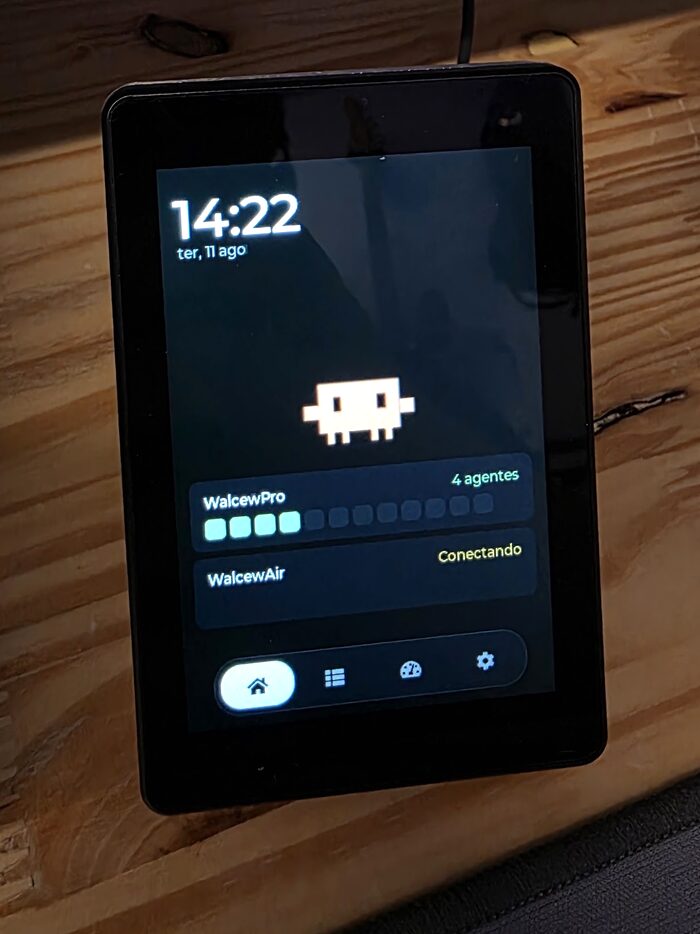 |
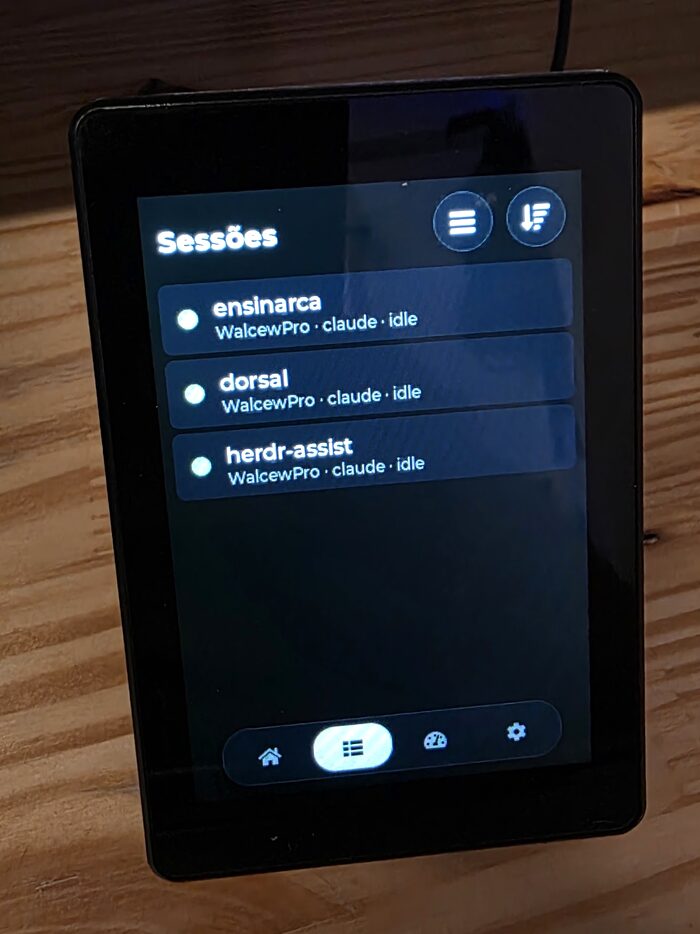 |
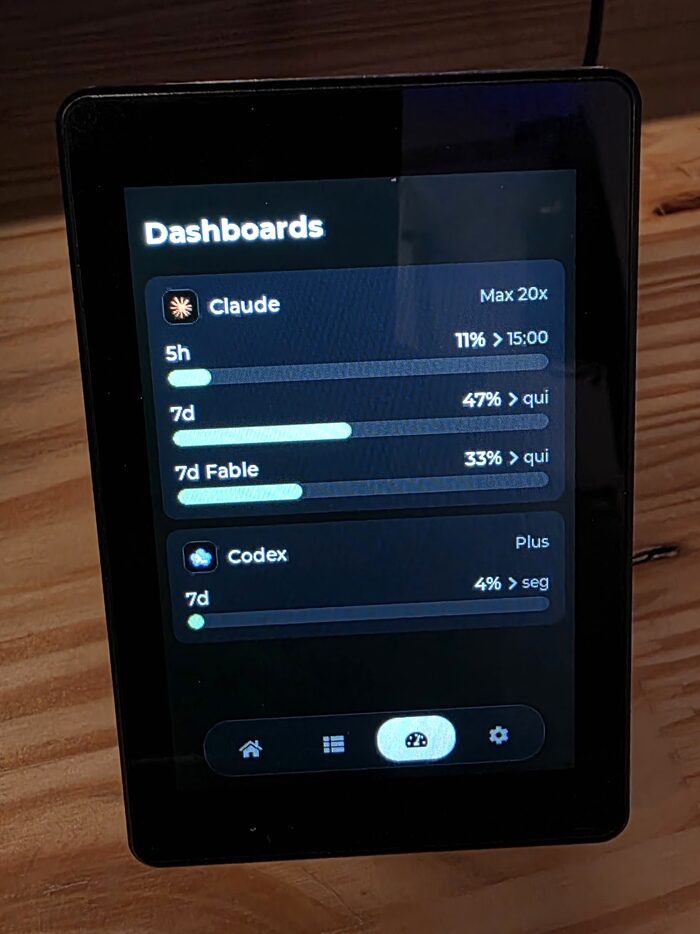 |
| Clock, mascot and a heatmap per host | Sessions with state, grouped by host | Claude and Codex usage limits |
Requires Herdr. This panel is a client, not a standalone device — it needs a running
Herdr instance on every machine you want to monitor. The bridge inplugin/ships as a Herdr plugin and speaks its native socket, so everything the panel
shows comes from Herdr's own event stream.
Quick start
Three steps: flash the panel, install the bridge on the machine you want to control, and
pair the two. No toolchain and no compiling — the release ships prebuilt binaries.
1. Flash the panel
Download the latest binaries from the
releases page, plug the board
into USB, and write the image:
# esptool is the only requirement
pipx install esptool          # or: brew install esptool

# find the port — it changes with the USB socket you used
esptool.py chip_id            # macOS: /dev/cu.usbmodemXXXX, Linux: /dev/ttyACM0

esptool.py --chip esp32s3 --port /dev/cu.usbmodemXXXX \
    write_flash 0x0 herdr-assist-v0.5.0-install.bin
The panel reboots into the settings screen: pick your Wi-Fi network from the list and
type the password. Leave the hosts alone for now — step 3 fills them in for you.
Installing vs. upgrading. The
-install.binimage spans0x0–0x10000, which
covers the NVS partition, so it erases the panel config (Wi-Fi, hosts, tokens,
language). That is what you want on a fresh board — and the required path when
migrating from v0.4.0 or older, whose partition table has no OTA slots.From v0.5.0 on the panel updates itself: Settings → Device → Update firmware,
and a toast announces new releases (checked once a day). USB is only needed again
if a panel cannot reach GitHub; in that case erase otadata first (so the bootloader
boots the slot being written) and flash the app alone, keeping the config:esptool.py --chip esp32s3 --port /dev/cu.usbmodemXXXX erase_region 0xd000 0x2000 esptool.py --chip esp32s3 --port /dev/cu.usbmodemXXXX \ write_flash 0x10000 herdr-assist-v0.5.0-update.bin
If a write keeps dropping mid-transfer, put the board in download mode
first: hold BOOT, tap RST, release BOOT (the screen stays dark — that is
the point). A panel with no bootable app resets about once a second, and each
reset re-enumerates the USB device, which can cut esptool off mid-write and
leave the slot half-written — the failure feeds itself. In download mode the
chip never resets on its own and the write runs to completion.
2. Install the bridge on the host
The bridge is a Herdr plugin. Run this on every machine you want to reach from the panel:
herdr plugin install walcew/herdr-assist/plugin            # registers and enables it
herdr plugin action invoke herdr-assist.restart-bridge     # start it right now
Herdr clones the repo, shows what the plugin declares, and starts the bridge with every
session from then on — the second command just skips waiting for the next one. The bridge
is pure Python stdlib: it works with the python3 macOS ships (3.9+), with no toolchain.
From then on the bridge updates itself. Once a day it compares the version it declares
with the newest release — the same manifest.json the panel reads, since one tag covers
both — and reinstalls and restarts when there is a new one. Herdr has noherdr plugin update, and swapping the files never swapped the process: the bridge runs
detached and outlives new sessions, so restarting is part of the job.
It also checks every minute whether the code on disk is still the code it is running. That
covers a herdr plugin install done by hand, whose companion step (restart-bridge) is
the one everybody forgets — within a minute the bridge notices and comes back on its own.
To turn it off, put AUTO_UPDATE=0 on a line of the env file in the config directory. A
linked checkout is never reinstalled over: there, git pull is what updates it. To
hack on the plugin, git clone the repo and herdr plugin link herdr-assist/plugin.
A bridge installed before this version will not update itself to it — it lacks the code
that does so. That first hop is manual, once per host:herdr plugin install walcew/herdr-assist/pluginfollowed byherdr plugin action invoke herdr-assist.restart-bridge.
Each bridge's version shows up in the admin screen and, on the panel, under
Settings → Update firmware next to the installed one — that is where you see a host
that fell behind.
3. Pair the panel
Typing 32 hex characters on a 3.5" touchscreen is not viable, so the direction is
reversed: the host sends the finished config to the panel.
- On the panel: Settings → Pair with a host. It shows a 6-character code and starts
announcing itself over UDP broadcast for 3 minutes. - On the host, inside any Herdr pane, open the admin screen and press
p:herdr plugin pane open --plugin herdr-assist --entrypoint admin - Pick the code shown on the panel screen from the list.
- Still in the admin screen, press
kto install theprefix+akeyboard shortcut —
from then on the screen opens without the command line (ctrl+b, thena).
The host sends name, address, port and token; the panel writes them to NVS and reboots
already connected. Nothing is typed on the touchscreen.
Step-by-step with screenshots, Windows/headless pairing, manual setup for networks
that filter broadcast, and troubleshooting: pairing manual —
the same guide the QR code on the panel's Pair screen opens.
That's it — the panel now lists your sessions. The rest of this document is reference.
Language
The interface speaks English and Portuguese, and the firmware is the same for both:
the language comes from NVS (Settings → Device → Language, which toggles on tap) and
takes effect on the next reboot, together with the rest of the config. A factory-fresh
panel boots in English. The admin screen on the host follows the machine locale (LANG
and friends, or HERDR_ASSIST_LANG to force it).
Orientation
The panel runs portrait (320×480) or landscape (480×320), set in Settings → Device →
Orientation, which toggles on tap and takes effect on the next reboot — same as the
language. Portrait is the factory default and the panel's native mode.
Standing up, the dock moves from the bottom edge to the left one and the home screen splits
in two columns: clock and mascot on the left, host cards on the right. Everything else —
lists, the terminal, the keyboard, the lock pattern — resizes to the new proportion. The
terminal in particular trades height for width, going from roughly 43×19 to 66×10 cells,
and the bridge is told the new geometry.
Avatars
The mascot on the home screen is a package, not compiled code. One engine plays any.hav file: the built-in Clawd, embedded in the flash, and whatever else sits on the
panel's microSD card. Tapping the mascot cycles through what is installed.
Before this, each avatar was a driver with its sprites as static const arrays — five of
them took 3.2 MB and were 65% of the firmware. Adding one meant recompiling, and nobody
outside the project could add anything. Now the app is a third of the flash slot and an
avatar is a file.
Settings → Device → Avatars lists what the configured repositories offer plus whatever
is already on the card. Tap a row to install it, or to make an installed one current; the
trash icon removes it. A repository is nothing but a base URL serving static files —
GitHub raw, GitHub Pages, GitLab or a plain nginx, no vendor API involved:
GET <base>/index.json    {"avatars":[{"id":"sonic","name":"Sonic","size":38392}]}
GET <base>/sonic.hav     →  /sd/avatars/sonic.hav
Besides the built-in default, repositories come from two fields on that screen (saved on
the spot, no reboot), from /sd/avatars/repos.txt (one URL per line, # comments), and
from the bridge — put your URLs in avatar_repos inside the plugin's config directory
($HERDR_PLUGIN_CONFIG_DIR, which under Herdr is~/.config/herdr/plugins/config/herdr-assist/) and the plugin pushes them on every
connection. Duplicate ids keep the first one seen, and the default
repository is read first, so a third-party repo cannot hijack an official avatar's name.
Every package is validated before it is trusted — magic, animation table, frame offsets,
sequence indices — and the RLE decoder is bounded by the end of the buffer, because a
package comes off a card or off the internet. A package that fails validation is refused
and dropped from the tap cycle instead of blocking it.
Packages are generated by scripts/hav_pack.py and the format is documented insrc/avatar_pack.h. Reading one takes seconds off the card (1.5 MB at ~520 KB/s), so the
engine loads it on a separate task: the current avatar keeps animating, dimmed, until the
new one is ready.
Hardware
JC3248W535EN (Guition/Sunton), around US$ 25 on AliExpress:
| Component | Spec |
|---|---|
| MCU | ESP32-S3-WROOM-1 (240 MHz, 2 cores) |
| Memory | 8 MB PSRAM (OPI) + 16 MB flash |
| Display | 3.5" IPS 320×480, AXS15231B controller over QSPI |
| Touch | Capacitive, same AXS15231B, over I2C (SCL 8 / SDA 4) |
| Network | Wi-Fi 2.4 GHz + BLE |
| Storage | microSD (TF) slot, SPI on IO10/11/12/13 — holds the avatar packages |
Relevant pinout in src/esp_bsp.h; schematics and datasheets in docs/.
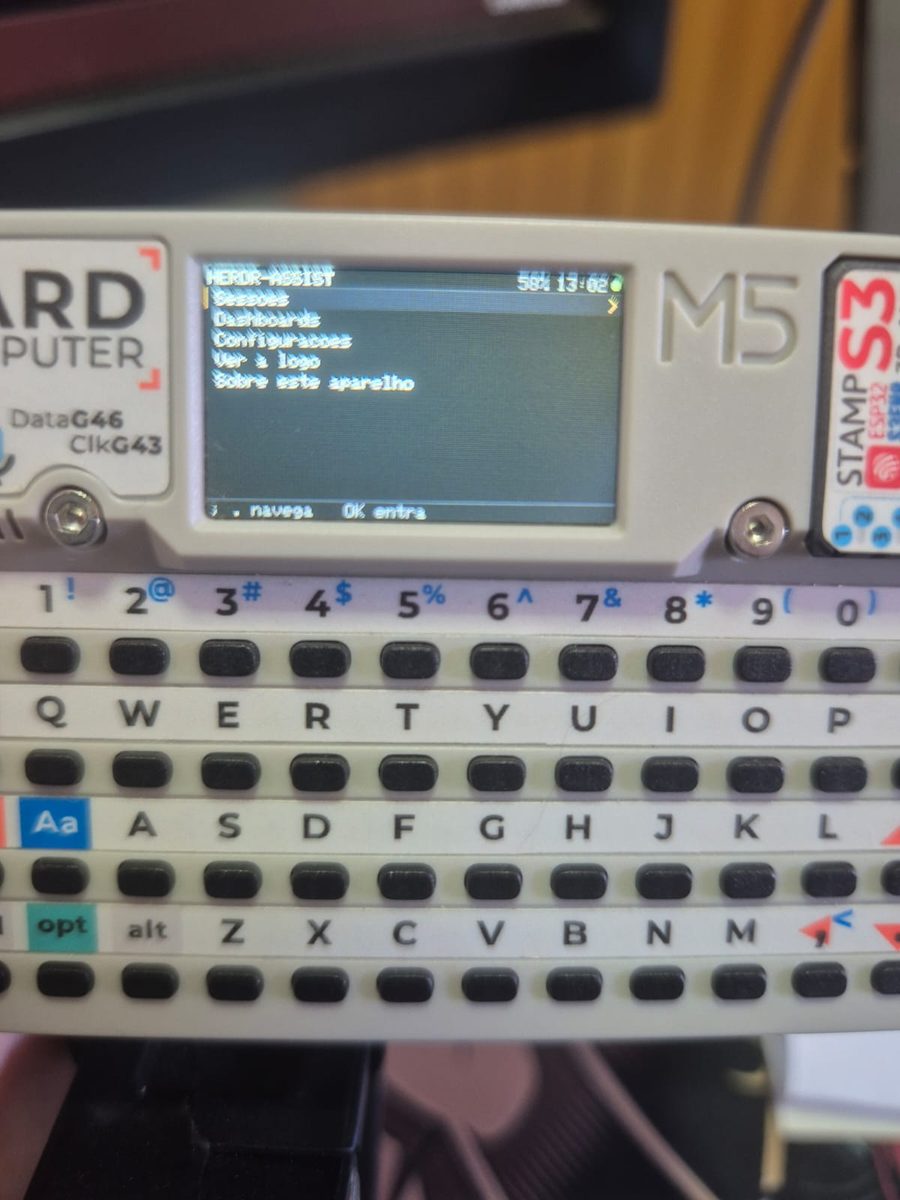
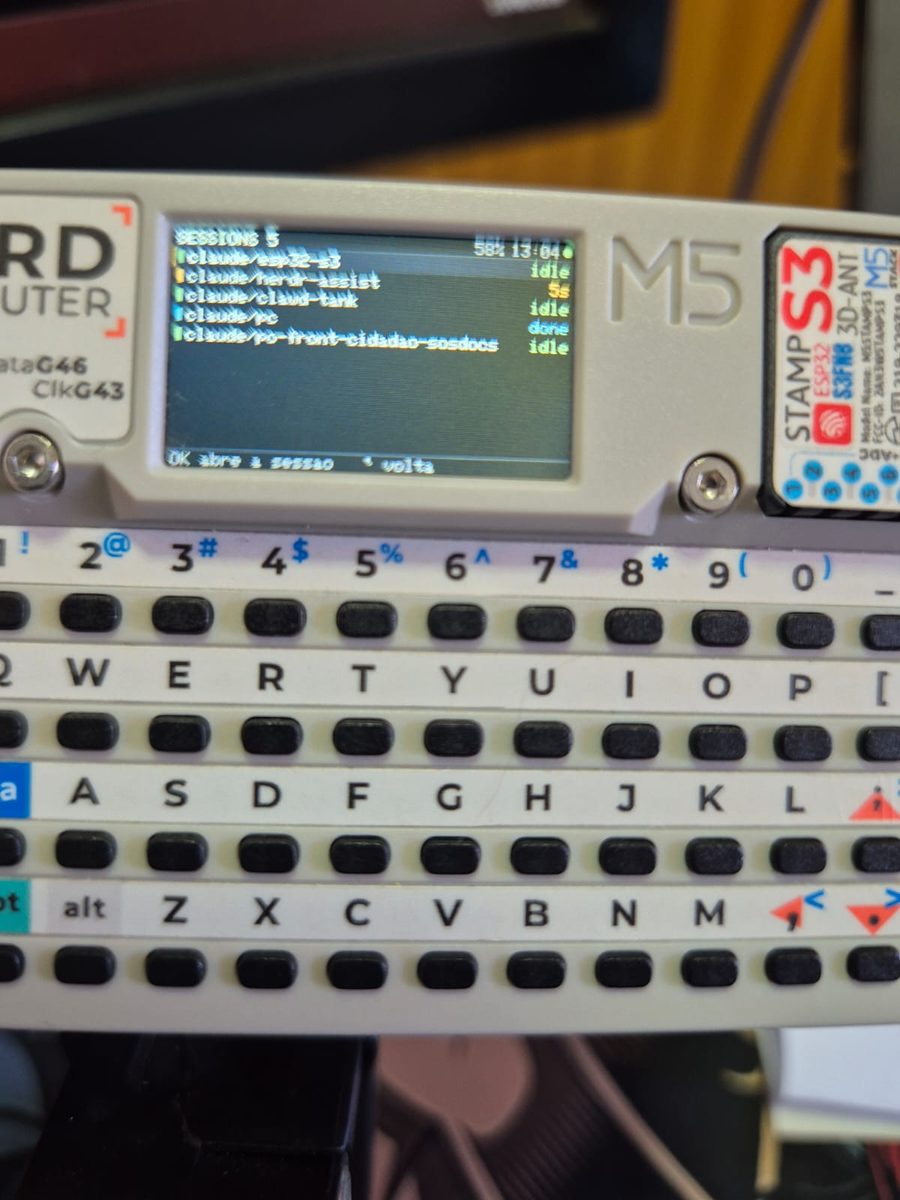
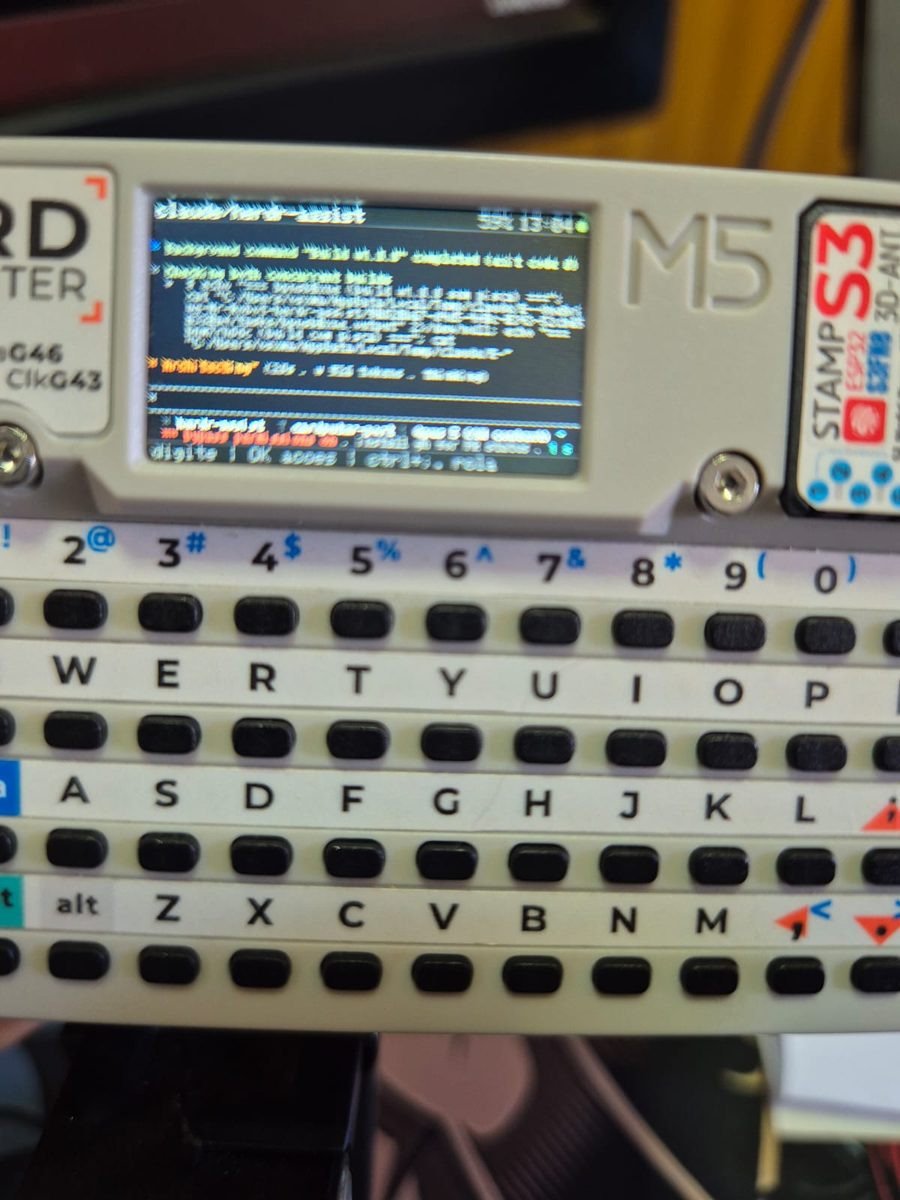
Other boards: M5Stack Cardputer
cardputer/ holds a port to the M5Stack Cardputer (240×135 plus a 56-key
keyboard), a separate PlatformIO project built on Arduino + M5GFX. It talks to
the same bridge, pairs the same way and shares the protocol modules with the
panel — and, having a keyboard, it answers agents with free text instead of the
allowlisted keys alone. See cardputer/README.md.
 |
 |
 |
|---|
Architecture
Herdr exposes its API on a local unix socket, which a device on the network cannot reach.
The bridge (plugin/herdr_bridge.py, pure stdlib) translates that to TCP and nothing
else: it subscribes to Herdr's events, so the panel receives changes by push, with no
polling. It is packaged as a Herdr plugin (plugin/herdr-plugin.toml), which Herdr
starts along with the session — one plugin per machine you want to drive from the panel.
┌─ JC3248W535EN ─────────────┐     Wi-Fi / LAN      ┌─ Mac ───────────────────────┐
│ herdr-assist               │ ◄── TCP + JSON ───►  │ herdr-assist plugin (:9375) │
│ ESP-IDF 5.2 + LVGL 8.4     │    one message       │          │ unix socket      │
│ UI: list, terminal, actions│    per line          │          ▼                  │
└────────────────────────────┘ ◄── UDP discovery ─► │   herdr (events.subscribe)  │
                                  (:9375, auto)     └─────────────────────────────┘
Panel → bridge: hello (token, mandatory on the 1st line), then read_pane (which
also carries the panel screen geometry), send_keys, send_text, focus, scroll_pane,release_pane, ping.
Bridge → panel: agents (state of all of them, including whoever is blocked),pane_content (the terminal screen with SGR/colors, faithful to the host — only
trailing blank lines are stripped; the emulation is done by the Ghostty engine embedded in
Herdr, via pane.read format:"ansi", and the panel only parses SGR and paints), limits
(AI provider usage limits for the Dash tab — collected from the Claude Code and Codex
usage endpoints using the credentials those CLIs keep refreshed in~/.claude/.credentials.json and ~/.codex/auth.json; no token leaves the Mac, only
percentages), pong.
Windows. From plugin 0.5.0 the bridge also runs on a Windows host. There
the Herdr socket is a named pipe whose name is the whole path
(\\.\pipe\C:\Users\...\herdr.sock), which Python cannot open — so the bridge talks to
Herdr through the CLI instead, and reconciles by polling rather than byevents.subscribe. Pairing is done with plugin/pair.py; the curses admin
screen stays macOS/Linux only.
The bridge is where the security decisions happen, because anyone on the LAN can reach
that port. Every connection requires a token (hello handshake on the first line;
without it the bridge disconnects in 5 s). On top of that: only keys from an allowlist get
through, text has a size cap, and commands only apply to panes that exist. The token is
generated on the plugin's first start (0600 in the config dir); the Show panel token
action in Herdr displays the value.
Host discovery (auto mode)
DHCP moves hosts around, so a slot paired since plugin 0.4 stores no IP at all: the
panel finds the bridge by UDP broadcast (herdr-find → herdr-here, same port 9375) at
boot and whenever the connection drops, keeping the discovered address in RAM only. The
handshake proves possession of the token without ever putting it on the wire — the reply
carries h = HMAC-SHA256(token, "nonce|ip|port|name"), and the panel adopts the signed
ip/port, never the datagram sender, so a neighbor cannot redirect the panel by replaying
probes. Typing an address in the host editor turns discovery off for that slot (static
mode) — use it on networks that filter broadcast. Auto mode needs plugin ≥ 0.4 on the
host; discovery shares the pairing's requirements (same L2 segment, broadcast allowed)
and requires the default BRIDGE_BIND 0.0.0.0 (a specific bind address goes deaf to
broadcast).
Using the admin screen
With the shortcut installed (press k in the screen itself, or see below): ctrl+b,
then a. From the command line, inside any Herdr pane:
herdr plugin pane open --plugin herdr-assist --entrypoint admin
The screen opens as a 76×22 popup over the session — a small TUI you can drive with
the mouse (click any row or button) or entirely from the keyboard: p pairs a panel,r rotates the token, x restarts the bridge, k installs the keyboard shortcut,
arrows + enter navigate, q/esc closes. The status block refreshes on its own.
Over SSH,
herdrmay not be on the PATH (a non-interactive session does not load the
Homebrew environment): use the full path, usually/opt/homebrew/bin/herdr.
A keybinding is the way in, because Herdr 0.8.0 has no UI surface for plugins — no
menu, palette or picker lists plugin panes or actions, and plugins cannot ship default
keybindings (keys belong to the user's config, by design). Pressing k in the admin
screen sets this up for you: it appends the block below to ~/.config/herdr/config.toml
(backup first), validates with herdr config check — rolling back on failure — and
applies it with herdr server reload-config. prefix+a is unbound in the stock 0.8.0
defaults; if your config already uses it, k refuses and you pick a key manually:
[[keys.command]]
key = "prefix+a"          # ctrl+b then "a"
type = "plugin_action"
command = "herdr-assist.admin"
description = "herdr-assist admin"
herdr config check validates and herdr server reload-config applies without a restart.
The same admin screen shows the bridge state, the token and the connected panels. From the
CLI, the token also comes out of:
cat "$(herdr plugin config-dir herdr-assist)/token"
The bridge log lives in <state-dir>/bridge.log — Herdr uses~/.local/state/herdr/plugins/<id>/, which is not the config dir.
The plugin also accepts optional config in
<config-dir>/env(BRIDGE_PORT,BRIDGE_BIND) — the config dir comes out ofherdr plugin config-dir herdr-assist.
Building from source
Only needed if you are changing the firmware — to just use the panel, see
Quick start.
Requires PlatformIO (pipx install platformio). The ESP-IDF
toolchain downloads itself on the first build (~1 GB).
pio run                                        # build
pio device list                                # the port changes with the USB socket
pio run -t upload --upload-port /dev/cu.usbmodemXXXX
The firmware is generic — no credentials are compiled in. On first boot (or after erasing
NVS) the panel opens the settings screen: pick the Wi-Fi network from the list, type the
password, and register up to 4 Herdr hosts (name, IP or hostname, port and bridge
token). Everything lives in NVS and survives app reflashes; saving reboots the panel.
To regenerate the terminal font (only needed when changing glyph ranges):
./scripts/gen_font.sh
Cutting a release
Push a v* tag and the workflow builds, merges the
install image and publishes the release with both binaries, their checksums and a
fixed-name manifest.json — the file panels poll (via releases/latest/download/)
to discover updates OTA:
git tag -a v0.5.0 -m "v0.5.0"
git push origin v0.5.0
The version baked into the binary comes from the tag (the workflow writes it toversion.txt before building), so the panel's strcmp against the manifest matches
exactly. Local builds fall back to git describe, which never equals a release tag —
a dev panel therefore always sees the current release as "available", which is handy
for testing the flow.
Structure
| File | Role |
|---|---|
plugin/herdr-plugin.toml |
Herdr plugin manifest (startup, admin pane, actions) |
plugin/start.py |
Plugin startup: starts the bridge detached, idempotent, cross-platform |
plugin/pair.py |
Pairing from the command line, no curses — the Windows path |
plugin/herdr_bridge.py |
Bridge: Herdr socket ↔ TCP, token handshake, allowlist, sanitizing, usage-limit collection (Claude/Codex) |
plugin/admin.py |
Admin screen in Herdr: status, token, pairing, keybinding install |
plugin/i18n.py |
Admin screen strings (en/pt), language taken from the host locale |
src/pairing.c |
Panel pairing mode: broadcast announcement + config reception |
src/DEMO_LVGL.c |
Entry point: brings up panel, config, Wi-Fi, connections and UI |
src/panel_cfg.c |
Persistent config (NVS): Wi-Fi network + up to 4 Herdr hosts + language |
src/net.c |
Wi-Fi station with automatic reconnection and scanning for the config screen |
src/herdr_conn.c |
One TCP connection per host, protocol parsing, ping and reconnection |
src/herdr_model.c |
State shared between the network tasks and the UI task (mutex + generation) |
src/term_parse.c |
Pure SGR parser (no LVGL/ESP): ANSI snapshot → grid of colored runs; testable on a Mac (scripts/term_parse_test.c) |
src/term_view.c |
Custom widget for the terminal screen: draws the grid with per-run color/style, faithful horizontal pan |
src/i18n.c |
Interface strings (en/pt) in a single list that generates both enum and table |
src/ui_theme.c |
Palette, fonts, topbar and dock shared by the screens |
src/herdr_ui.c |
LVGL UI: home (clock, mascot, summary, heatmap), sessions, limits dash, terminal, actions, keyboard |
src/herdr_ui_settings.c |
Settings tab: Wi-Fi scan, password, host editor, language, firmware update |
src/sd.c |
microSD mount (/sd) over SPI3, retried — the card keeps its state across a warm reset |
src/avatar_pack.c |
.hav format: header, animation table, validation of packages that come off a card or the internet |
src/avatar.c |
Avatar engine: plays any package, cycles on tap, loads from the card off the UI task |
src/avatar_store.c |
Avatar marketplace: repository catalog, download and install; also the panel's single avatar-I/O task |
src/fw_update.c |
OTA via GitHub Releases: daily manifest check, download with esp_https_ota, rollback confirm |
src/lv_font_terminal_12.c |
Generated font (do not edit) — see scripts/gen_font.sh |
src/esp_bsp.c, src/esp_lcd_axs15231b.c, src/lv_port.c |
Vendor BSP (display, touch, LVGL port) |
Implementation notes
full_refresh = 1(lv_port.c) is not an aesthetic choice, and it is expensive:
307 KB per frame on the QSPI bus even when a single line of text changes. Two things
prevent partial rendering on this panel. The first is known: the driver skipped RASET
(0x2B) on QSPI (esp-bsp#724) — already
fixed here. The second is not in the issue and was found the hard way:draw_bitmapuses
RAMWRC (0x3C, "continue the previous write") whenevery_start != 0, ignoring the
window it just defined. That works for sequential scanning, which is what full refresh
does; with arbitrary areas, each region lands in the wrong place and the screen
scrambles. Enabling partial also requires swapping that RAMWRC for RAMWR — untested.- Internal RAM is the scarce resource here, not flash or PSRAM. The chip has 242 KB of
it and the panel ends its boot spending almost all of it: display 80 KB, UI 43 KB, Wi-Fi
66 KB, bridges 22 KB. Two things fall out of that. Creating a task can genuinely fail, so
check the return — the avatar task did not, and the marketplace was silently dead for
several builds. And the LCD's two transport buffers, which move the framebuffer from
PSRAM to the panel, werehres*vres/10= 30 KB each: with them the panel had ~17 KB free
and the TLS handshake could not allocate (esp-aes: Failed to allocate memory), so
neither OTA nor the marketplace worked. They are/20now — 47 KB free, and a full-screen
flush costs 33.7 ms instead of 29.7 ms (measured). - Rotation is always done in software. The panel ignores MADCTL, so it cannot be
changed while running: the orientation is read from NVS at boot and picked inDEMO_LVGL.c, and switching it in Settings → Device → Orientation saves and restarts,
like every other config change. Portrait (0°, native 320×480) skips the rotation copy in
the flush; landscape pays for it and gives 480×320. If landscape comes out upside down on
your stand, swapUI_LANDSCAPE_ROTforLV_DISP_ROT_270. - Touch is capacitive and needs no calibration — what matters is remapping the
coordinates according to rotation, done inlv_port.c. - Fonts: none of the fonts shipping with LVGL work here — Montserrat and unscii cover
only ASCII 0x20–0x7F, so box-drawing and spinners turn into empty rectangles, and labels
like "Sessões" and "Endereço" lose their accents. Two families are generated: the
terminal uses the whole JetBrainsMono Nerd (scripts/gen_font.sh) and the interface uses
Montserrat with the full Latin-1, merged with LVGL's own FontAwesome so theLV_SYMBOL_*
keep working (scripts/gen_font_ui.sh), plus typographic punctuation/arrows from
Montserrat itself and✓ ✗ ⚠ ●from DejaVu Sans — symbols that reach the alerts in text
coming from the terminal. The Nerd Font, even whole, does not cover everything Claude
Code draws (spinner✢✳✻✽,⏺ ⏵ ⏸ ⏳,◑ ◼ ✅ ✔ ⧉ ※— audited against the cmap): those
become visual neighbors the font does have (⏺→●,✳→✶,✅→✓...) in theGLYPH_SWAPS
table ofreplace_missing_glyphs()— swapping in another font would break term_view's
7 px grid, which assumes uniform advance. - The language is decided at boot and does not change at runtime. The LVGL screens are
built once inherdr_ui_init()and stay alive hidden — retranslating would mean
destroying and rebuilding all of them, or storing the key of every label. Since changing
network or hosts already reboots the panel, the language took the same path: the settings
screen edits the copy, the toast warns that it is pending, and the reboot settles it.i18n.hholds a single X-macro list (I18N_STRINGS) from which both the key enum and
the translation table are generated, so there is no case of adding a string in one
language and forgetting the other — both translations live on the same line. The tables
areconst char *const: they live in flash (3.2 KB of rodata for both languages
together, measured on the.o), and the only RAM cost is theuint8_tof the active
language. pt_BR and en_US fit in the Latin-1 the UI fonts already cover, so nothing had
to be regenerated. Left out of the bilingual scope, in fixed English:herdr-plugin.toml
(the manifest is read by Herdr with no per-language field) and the twostart.py
messages the admin screen echoes when restarting the bridge — a shell script cannot
follow the locale without carrying a table just for that, and English is the same
criterion as the manifest. - The interface follows the "herdr-assist" project in Claude Design — neutral palette
(color only in status), topbar with no solid bar, and a floating four-tab dock. When
changing the visuals, update it there too:src/ui_theme.his the direct translation of
those screens. - The terminal screen renders the real formatting (
term_parse.c+term_view.c): the
bridge askspane.readwithformat:"ansi"— Herdr's internal emulator is libghostty,
which re-emits the screen as lines with SGR (SGR only: no cursor/OSC, confirmed on a real
sample) — and the panel parses that into a grid of runs and draws it withlv_draw_rect/lv_draw_labelon a 7×19 px cell (metrics fromlv_font_terminal_12). No
re-wrap: the grid stays at the pane's real width on the host, anchored vertically at the
end with pan preserved between refreshes — horizontal pan still exists as a safety net
for when the resolution lock (below) does not take. Caps: 220 columns × 48 lines × 12 KB
(HERDR_CONTENT_LEN, matched to the bridge's cap of 12000). Accepted limitations: italic
has no visual effect (single bpp1 font), bold becomes a lightened color (bright in the
indexed palette, +30% white in truecolor), and emoji become"* "(2 cells, preserving
alignment). An identical snapshot does not repaint: dedup byseqin the model avoids the
307 KB full refresh for nothing. - A session opened on the panel runs at the panel screen's resolution. Inheriting the
host's ~135 columns forced you to drag the screen sideways to read anything, soread_panecarries the geometry that fits (term_view_fit(): 42 × 18) and the bridge
locks the pane at that size while the panel is reading. Herdr's JSON API has no terminal
size (pane.resizeis a split ratio), so what does it is theherdr terminal session control <pane_id> --cols N --rows MCLI, which resizes the pty
for real (TIOCSWINSZ) and keeps the size locked as long as the process lives. Releasing
has three independent paths:release_panewhen closing the detail, panel disconnection,
and bridge death — in the last one the child sees EOF on stdin and detaches by itself,
which is why its stdin is a pipe. Accepted consequence: while locked, that pane also
shows up narrow in Herdr on the Mac, and every open/close makes the agent reflow. - Terminal scrolling is the host's, not the widget's. Dragging vertically becomes
scroll_pane→terminal.scrollwithsource:"wheel"on the controller, and from there
Herdr decides: an app with mouse tracking (Claude Code) receives the event and scrolls its
own content, otherwise the emulator scrollback moves. That is whypane.readusessource:"visible"— the viewport is what scrolling moves; with"recent"the panel would
be stuck at the end. Two things that cost measurement: the pointer position goes along
(the cell under your finger — with the wheel outside the transcript area Claude Code
simply ignores it), and one dragged cell equals one line. LVGL's vertical axis is only
released when the content does not fit (term_view_set_ansitogglesLV_DIR_HOR/LV_DIR_ALL), in which case the resolution lock failed and scrolling locally
is the right thing. - A pending decision is a beacon, not a rebuilt form. When an agent enters
blocked, a
red bell shows up on the home screen — on the clock line, on the opposite side — swinging
until someone acts; tapping it opens the session that is waiting (with the session count
in the label when there is more than one). Before this, the bridge tried to recognize the
form with regex, sent the question and the detected options, and the panel built a modal
with one button per option; answering made the bridge navigate the cursor with arrows and
confirm. That came out whole: with the panel terminal already running at screen resolution
and with scrolling, seeing the question as it is and answering with ↑/↓/Enter is more
faithful than guessing it — and the class of error where the button did not match what was
on screen disappears. What backs the beacon is theagent_statusthatagentsalready
carried. Accepted consequence: the alert only exists on the home screen (the modal
appeared over any screen). - The home clock depends on SNTP (
net.c), with the timezone fixed at UTC-3. Without
syncing, the home shows--:--instead of an invented time. - Dead-connection detection (
herdr_conn.c): with push, silence is the normal state, so
a drop cannot be inferred from the absence of data. The panel sendspingevery 20 s and
gives up on the connection after 50 s without an answer — this covers the case where TCP
stays open but stops receiving (Wi-Fi that goes away, a Mac that sleeps), which would
otherwise leave the panel stuck at "connecting" forever. - Large buffers live in static memory, never on the stack: the LVGL task has 8 KB and
the network one 6 KB, while a single terminal read is over 8 KB. Declaring those structs
as local variables blows the stack and takes the device down with a corrupted backtrace.
Credits and license
The BSP, the display/touch drivers and the LVGL port come from
NorthernMan54's PlatformIO port, which
packages the original vendor material (Shenzhen Jingcai / Guition). LVGL 8.4 is vendored inlibraries/lvgl, pruned of the demos and examples that do not enter the build.
The protocol design (the agents / pane_content types, and the blocked with detected
approval options, which existed here until the beacon replaced it) came from the
herdr-remote relay, used as a reference
before we swapped it for our own bridge speaking Herdr's native socket.
MIT — see LICENSE.
Yorumlar (0)
Yorum birakmak icin giris yap.
Yorum birakSonuc bulunamadi