deepcove
Health Uyari
- License — License: Apache-2.0
- Description — Repository has a description
- Active repo — Last push 0 days ago
- Low visibility — Only 6 GitHub stars
Code Basarisiz
- rm -rf — Recursive force deletion command in build/vm-artifacts.sh
- rm -rf — Recursive force deletion command in install.sh
- network request — Outbound network request in install.sh
Permissions Gecti
- Permissions — No dangerous permissions requested
Bu listing icin henuz AI raporu yok.
Run coding agents in their own VMs, across all your machines.
deepcove
A web dashboard for running coding agent sessions in isolated sandboxes across your own machines.
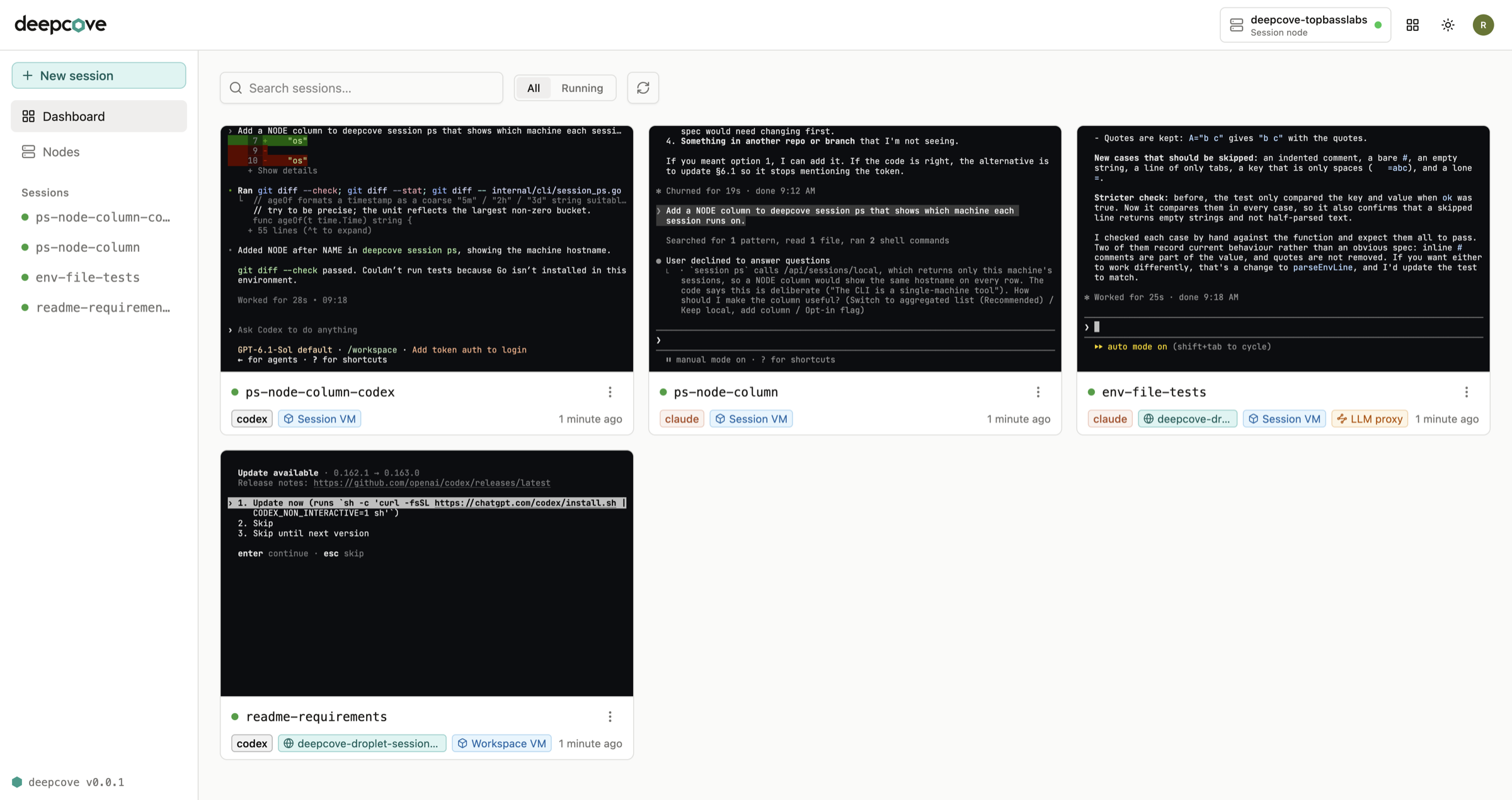
deepcove runs each agent in a sandbox on one of your machines and puts its terminal in your browser.
The dashboard shows a live preview of every session, so you can see what each agent is doing without
opening it. Sessions keep running after you close the browser, and a session on another machine
behaves exactly like one on your laptop.
Install
curl -fsSL https://deepcove.dev/install.sh | sh
Runs on macOS, or Linux with KVM. It installs to ~/.local/bin with no sudo, checks the download
against the release's checksums, and starts deepcove in the background.
Then run deepcove open. To add your other machines, run deepcove network login on each one
and sign in to Tailscale.
Sandboxes
Virtual machine (Apple Virtualization on macOS, Cloud Hypervisor on Linux). Each session boots its
own Linux guest with its own kernel, so it is isolated from the host and from every other session.
No sandbox. Runs on the machine itself with your files, network and logins. Nothing is isolated.
Your machines
One machine needs nothing but deepcove. To use more than one, sign each of them into your Tailscale
network and they find each other on their own: the dashboard lists every session on every machine, and
starting one somewhere else is the same click.
You can also open https://app.deepcove.dev from any browser, such as your phone's, with nothing
installed. Sign in with your Tailscale account and it finds your machines.
Nothing is published to the internet. The dashboard listens on 127.0.0.1, and over your tailnet only
your own Tailscale identity is let in.
Build from source
You need Go and Node, at the versions pinned in go.mod and ui/package.json.
cd ui && npm install   # once, for the dashboard build
make build
On macOS the build signs the binary with no certificate, which is what lets it start virtual machines.
Run
./deepcove start
Then run ./deepcove open in another terminal.
To keep it running in the background, starting again with your login session:
./deepcove service install
./deepcove service status
deepcove service uninstall removes it and leaves your data alone.
Upgrade
./deepcove upgrade --check
./deepcove upgrade
It verifies the download against the release's checksums before replacing anything, and restarts the
service if you installed one. If Homebrew put the binary there, it tells you to use brew upgrade
instead of overwriting a file Homebrew tracks.
Develop
make run    # build everything, then ./deepcove start
make test
make lint
License
Apache 2.0. See LICENSE.
Yorumlar (0)
Yorum birakmak icin giris yap.
Yorum birakSonuc bulunamadi