bili-downloader
Health Uyari
- License — License: MIT
- Description — Repository has a description
- Active repo — Last push 0 days ago
- Low visibility — Only 7 GitHub stars
Code Basarisiz
- spawnSync — Synchronous process spawning in scripts/check-ffmpeg.mjs
Permissions Gecti
- Permissions — No dangerous permissions requested
Bu listing icin henuz AI raporu yok.
A cross-platform Bilibili downloader with 8K video support, batch downloads, AI-powered watermark removal, subtitles, and MCP integration for AI agents.

Bili Downloader
Your favorite bilibili videos, saved to your own drive. Copy a link, paste it, hit download: videos, collections, anime and courses come down in one go, in up to 8K / Dolby Vision, with subtitles, danmaku and chapters saved alongside. Wipe watermarks with AI while you're at it, or let an AI agent do the legwork. Free and open source for Windows, macOS and Linux.







Website · Download · Get started · Let AI do it (MCP) · FAQ
English | 简体中文 | 日本語 | 한국어 | Français | Italiano | Русский | हिन्दी
The app's interface is currently in Simplified Chinese only. This README gives each Chinese label with an English translation.
See it first
AI watermark removal, before and after: the original download on the left, AI refine on the right.
https://github.com/user-attachments/assets/835dda86-4575-4311-808b-507c04bbd589
Source: “陈翔六点半:一念贪虚妄,半生困赌局” by the bilibili creator 陈翔六点半. Original video: https://www.bilibili.com/video/BV1vU446BEiU. All rights belong to the original creator; we encourage you to watch the original on bilibili.
This excerpt is used solely to demonstrate the software’s features, for personal study only, and may not be redistributed. If you believe it infringes your rights, please contact us via Issues and it will be removed promptly.
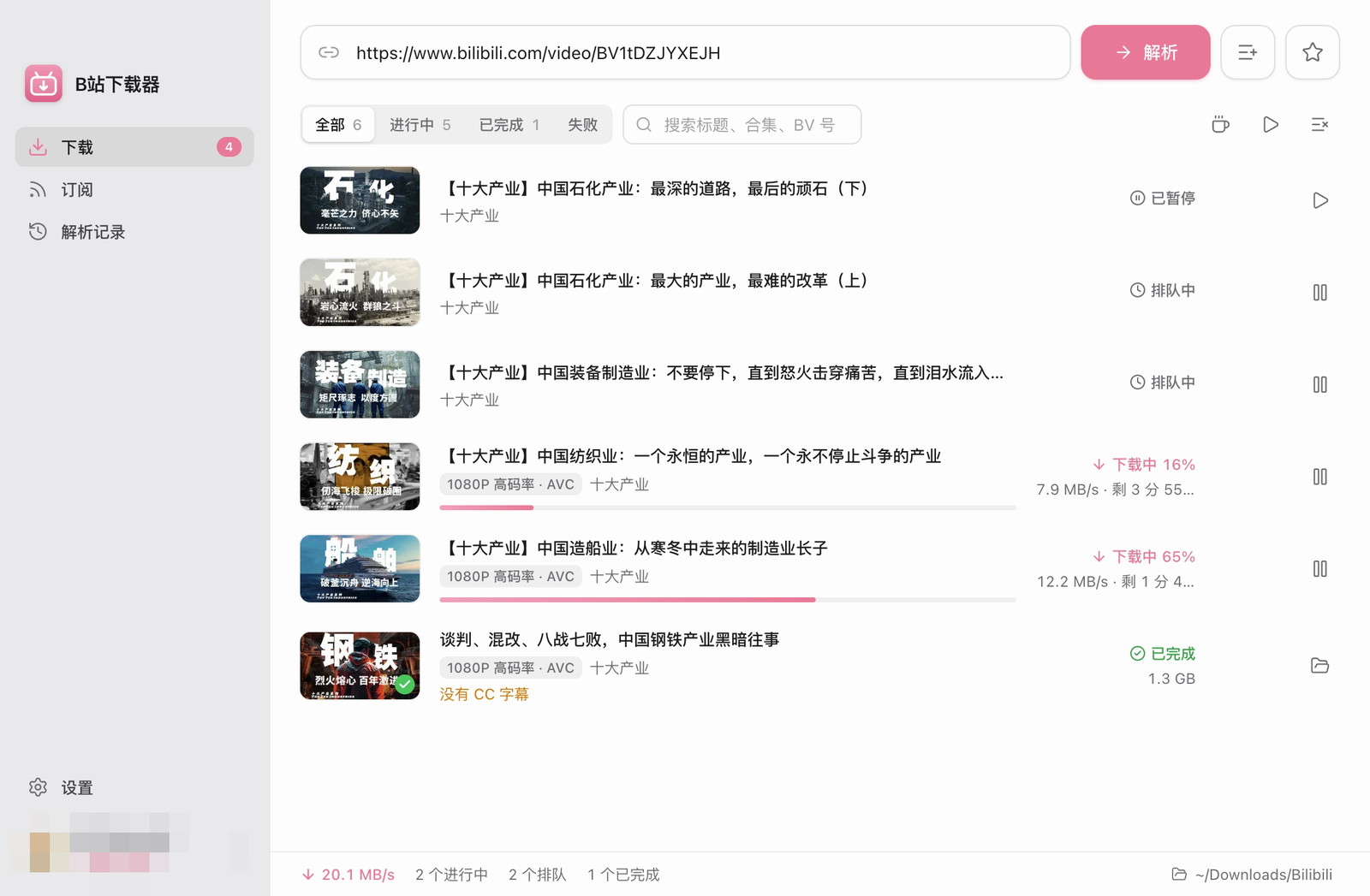
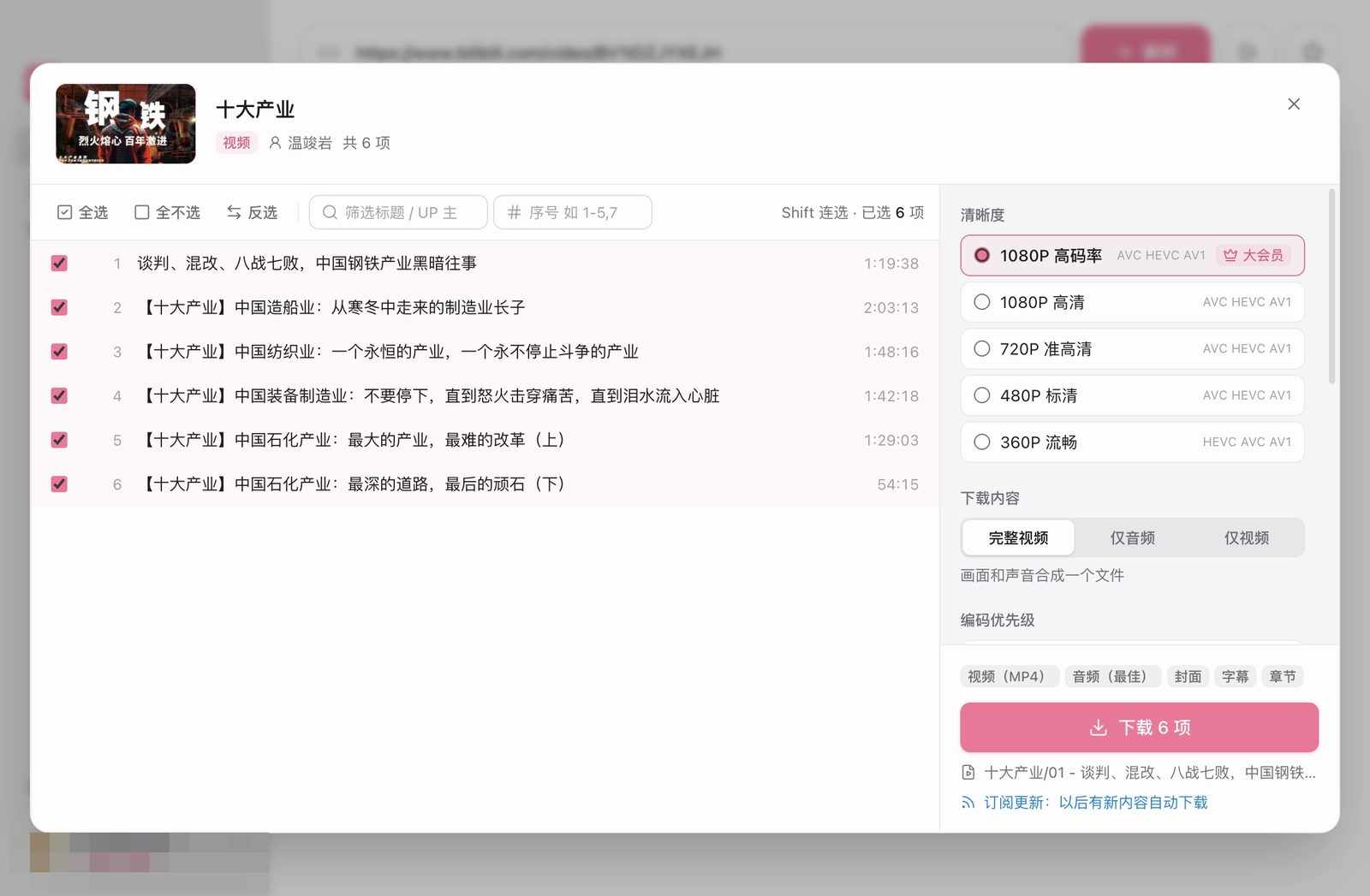
What you get
| Max out the quality 8K, Dolby Vision, HDR: if your account can watch it, you can download it. Pick AVC / HEVC / AV1, get audio up to Dolby Atmos and Hi-Res FLAC, and keep the original streams with no re-encoding by default. |
Just drop a link Single videos, multi-part videos, collections, anime, movies, courses, favorites, Watch Later, uploader pages, audio, rankings… whole lists parse in one go, and b23.tv short links and share text work too. |
| AI watermark removal Corner watermarks get spotted automatically, or draw a box yourself; turn on “AI refine” and it repaints what's underneath, frame by frame. |
Subtitles, danmaku, the lot CC subtitles as .srt or embedded in the video, danmaku as .ass / .xml, plus chapters, covers and NFO for Kodi / Jellyfin. |
| Queue it and walk away Resumable, multi-threaded downloads with speed limits, auto-retry and naming templates; subscribe to uploaders, favorites or collections and new uploads download themselves. |
Let AI do it for you A built-in local MCP server lets Claude and other AI clients search, parse links, queue downloads, remove watermarks and keep an eye on progress. |
[!NOTE]
This is an unofficial project and is not affiliated with or endorsed by bilibili. Only download content your own account is allowed to watch, for personal use, and respect the rights of creators and bilibili's terms of service.
Get started in four steps
Download the installer for your system from Releases:
System File macOS, Apple Silicon (M1 and later) bili-downloader-<version>-arm64.dmgmacOS, Intel bili-downloader-<version>-x64.dmgWindows x64 bili-downloader-<version>-x64.exeLinux x64 bili-downloader-<version>-x86_64.AppImageorbili-downloader-<version>-amd64.debSign in to your bilibili account (see Signing in). The app needs an account to parse links.
Paste a link. The app picks it up from the clipboard when you switch back to it, or press ⌘V (CtrlV on Windows and Linux) in the input box and click 解析 (Parse).
Pick and download. Choose the items (select all, invert, Shift-click a range, or filter by title or index such as
1-5,7), set the quality, output type and extras, then click 下载 (Download).
You can also type these keywords instead of a link: 稍后再看 or watchlater (Watch Later), 每周必看 (Weekly Must-Watch), 排行榜 (rankings).
Installation
macOS
Download the latest
.dmgfrom Releases:arm64for Apple Silicon,x64for Intel.Open the dmg and drag B站下载器 into Applications.
The app is ad-hoc signed but not notarized, so macOS blocks it the first time. Try to open it once, then go to System Settings → Privacy & Security and click Open Anyway. (Since macOS 15, right-click → Open no longer works.) Alternatively, run:
xattr -dr com.apple.quarantine "/Applications/B站下载器.app"
Requires macOS 12 or later.
Windows
Download bili-downloader-<version>-x64.exe from Releases and run the installer. It installs for the current user and does not require administrator access. The installer is unsigned, so Windows may show an unknown-publisher warning.
Linux
AppImage or deb (64-bit x86 only)AppImage (any distribution, updates itself):
bili-downloader-<version>-x86_64.AppImage. Make it executable and run it:chmod +x bili-downloader-*-x86_64.AppImage ./bili-downloader-*-x86_64.AppImageAppImages need FUSE 2. If it does not start, install it (
sudo apt install libfuse2t64on Ubuntu 24.04 and later,libfuse2on older releases), or run it with--appimage-extract-and-run.deb (Debian, Ubuntu and derivatives):
bili-downloader-<version>-amd64.deb. Install it withsudo apt install ./bili-downloader-<version>-amd64.deb; B站下载器 then appears in your application menu.
When the window is closed to the background, click the tray icon to bring it back. On GNOME this needs the AppIndicator extension (Ubuntu ships it by default). The menu bar is hidden; press Alt to show it.
Updates
Once installed, the app checks for updates itself. The macOS app, Windows installer and Linux AppImage install updates in place; the deb version shows the release notes and points you to the download page.
AI watermark removal
Uploader watermark stuck in the corner? There are two ways to get rid of it:
| Mode | How it works | Best for |
|---|---|---|
| Fast (default) | Finds the watermark in a corner and fills it in from the surrounding pixels with ffmpeg's delogo |
Quick results, static backgrounds |
| AI refine (AI 精修) | Repaints what is under the watermark frame by frame with the LaMa inpainting model | Much cleaner results, moving scenes |
- Turn it on in the download options, or with the 下载后去水印 (Remove watermark after download) switch above the download list, which you can change at any time.
- For a finished download, drag a box over the watermark and remove it by hand.
- AI refine shows an estimated time before it starts and uses the GPU when one is available. The model (~200 MB) is not in the installer; it is downloaded the first time you use AI refine and checked against its SHA-256.
- Removing a watermark re-encodes the video. HDR and Dolby Vision videos are skipped.
Let AI do the downloading (MCP)
Switch on the app's local Model Context Protocol server and AI clients like Claude can search bilibili, queue downloads and track progress for you. Once it's set up, just say what you want:
Search bilibili for “Blender tutorial” videos between 30 and 60 minutes long, pick the five with the most plays, and download them as one batch.
The agent calls search_videos to find candidates, download_batch with the five videos to queue them as one batch, and get_batch_status to follow the progress until it is done.
Download every video in this collection that I don't have yet, then remove the watermarks with AI refine: https://space.bilibili.com/…
Here the agent uses parse_link to expand the collection, download_batch (already-downloaded items are skipped), get_batch_status to see which files carry a watermark and how long removal would take, and remove_watermark to clean them.
Setup
- Go to 设置 → 网络与高级 → MCP 服务 (Settings → Network & Advanced → MCP server) and turn it on.
- Use the buttons in the same section to copy the client configuration (JSON) or the Claude Code command, which already include your access token.
{
  "mcpServers": {
    "bili-downloader": {
      "type": "http",
      "url": "http://127.0.0.1:39231/mcp",
      "headers": { "Authorization": "Bearer <your-token>" }
    }
  }
}
claude mcp add --transport http bili-downloader http://127.0.0.1:39231/mcp --header "Authorization: Bearer <your-token>"
| Tool | Description |
|---|---|
get_status |
Login and premium (大会员) status, queue summary, free space in the download folder, and anything that needs attention. Call it first |
parse_link |
Parse a bilibili link (video, collection, anime, course, favorites, uploader…); lists are paged through automatically. Item ids are stable; results can be read in pages and multi-part videos expanded |
download_batch |
Queue a whole link or selected items as one batch and return a batch_id. Already-downloaded items are skipped by default, and resubmitting does not download anything twice. Pass videos to submit several videos, such as search results, as one batch |
get_batch_status |
Batch progress: counts per status, speed, estimated time left, actual quality, failure reasons, plus which videos carry a Bilibili watermark and how long each removal mode would take. wait_seconds waits for changes |
list_batches |
Recently submitted batches |
list_tasks |
List tasks page by page, filtered by batch, status or title |
control_tasks |
Pause, resume, retry, redownload or remove tasks in bulk (downloaded files are never deleted), or cancel a running watermark removal |
remove_watermark |
Remove the watermark from downloaded videos, fast or with AI refine; can estimate the time first. Re-encodes and replaces the original file |
get_settings / update_settings |
Read or change the download folder, concurrency, threads, speed limit, auto-retry, default quality and download options |
search_videos |
Search videos by keyword, with date and duration filters. Results include title, uploader, publish time, duration, play count, category, tags and a short description |
search_users |
Search uploaders by name and return their mid, followers, video count and a space link for parse_link |
get_video_info |
Details for up to 20 videos at once: stats, tags, description, part count and collection, optionally with related videos |
get_video_transcript |
What a video is about: Bilibili's AI summary and outline, chapters and full subtitles, which can be read in pieces. Availability varies by video, and the AI summary and AI subtitles need a login |
get_video_comments |
Comments and their replies with cursor paging, sorted by popularity or time. Without a login Bilibili returns only a few |
start_login |
Sign in when the app is not logged in: imports the login from the user's browser (Chrome first, using whichever browser is readable), or opens the login window for a QR scan with method=qr |
get_login_status |
Follows the login, or lists the browsers on this computer. With wait_seconds it returns the moment the login succeeds, which is how the agent learns the scan is done |
The server listens only on 127.0.0.1 (the port is configurable), requires the Bearer token, and checks the Host / Origin headers to prevent DNS rebinding. You can regenerate the token at any time.
Full feature list
Supported links- Videos (BV / av), multi-part videos, collections, anime and movies (ep / ss / md), and paid courses
- Favorites folders, Watch Later, an uploader's videos, collections and series (with keyword filtering)
- Audio tracks and audio playlists (au / am), Weekly Must-Watch, and the popularity rankings by category
- Short links (b23.tv and others) and share text that has the title mixed in with the link
- Parse several links at once, and load paged lists (favorites, uploader pages) page by page
- The quality list comes from the API (8K / Dolby Vision / HDR / 4K / 1080P60 / …), with premium-only (大会员) tiers marked
- Codec priority AVC / HEVC / AV1, with audio up to Dolby Atmos and Hi-Res lossless FLAC
- Full video, audio only, or video only; MP4 or MKV
- By default ffmpeg copies the streams straight into the output file with no re-encoding; the video is re-encoded only when watermark removal is on
- Cover: save it as an image and/or embed it in the file
- CC subtitles: save them as
.srtand/or embed them in the video - Danmaku (bullet comments) as
.assand/or.xml, with adjustable font size, opacity and duration - The chapter markers on bilibili's progress bar, written as real chapters
- NFO metadata for Kodi / Jellyfin media libraries
- Watermark removal, fast or with AI refine (see AI watermark removal)
- Adjustable concurrency, multi-threaded segmented downloads, speed limit, automatic retry on network errors
- Pause, resume, and resume after a restart; clear notes for tasks that cannot be downloaded
- Proxy: direct, system, or manual; pick the fastest bilibili CDN node with a built-in latency test
- Optionally keep the computer (or the display) awake while downloading, and send a notification when the queue finishes
- Naming templates with variables (
{title},{series},{index:03},{pubdate:YYYY-MM-DD}, …), optional segments and folder levels, set separately for single videos, collections and anime - Spots items you have already downloaded, and asks / skips / downloads again
- Subscriptions: check favorites, collections or uploaders on a schedule and download new items automatically
- Parse history, clipboard watching, light / dark theme, run in the background, import / export settings
- In-app updates from GitHub Releases, with release notes and an option to skip a version
Signing in and privacy
Sign in and you can download every quality and video your account can watch, including 1080P and above and premium content. Pick whichever of the three ways suits you:
- 从浏览器导入 (Import from browser): reuse the login cookies from Chrome, Edge, Brave, Arc (macOS only), Vivaldi, Opera, Chromium, Firefox or Safari (macOS only).
- macOS protects the data of Chrome, Edge, Brave and Safari, so first enable the app under System Settings → Privacy & Security → Full Disk Access and restart it. Importing from Chromium-based browsers also asks for Keychain access.
- On Linux, Chromium-based browsers keep the cookie key in the system keyring (GNOME Keyring / libsecret). The app reads it with
secret-tool(sudo apt install libsecret-tools), and the keyring may ask to be unlocked. Snap and Flatpak installs of Firefox and the Snap Chromium are supported too. - On Windows, Chromium-based browsers lock their cookie database while running, so quit the browser completely (including any background process) before importing. Cookies written by Chrome 127 or later use app-bound encryption and cannot be imported; if the login cookie is one of them, use in-app sign-in or paste a cookie string instead.
- 在应用内登录 (Sign in within the app): opens bilibili's official login page, supporting QR code, password and SMS login.
- 手动粘贴 Cookie (Paste cookies): a semicolon-separated cookie string, or the JSON exported by a browser extension.
The app checks the login state on launch, when you return to the window, while parsing, and whenever the API reports an expired session. If the login has expired, it asks you to sign in again, pauses fetching new streams, and resumes the queue once you are back. Signing out only clears the app's own cookies. It does not sign you out of your browser.
Where your data goes
- Your bilibili cookies are kept in the app's own data folder and are only sent to bilibili. They are never returned to AI clients over MCP.
- Downloads, merging and watermark removal all run locally. There is no sign-up, no telemetry and no server of ours in between.
- Besides bilibili, the app only contacts GitHub (to check for updates) and ModelScope or Hugging Face (to download the AI refine model once).
- Over MCP,
start_logindoes nothing if the app is already logged in, so an agent cannot switch accounts. If a browser must be closed first (Windows locks the cookie database while the browser runs), the app asks you in a dialog and only you can approve it.
FAQ
Can I use it without signing in?No. The app needs you to sign in before it can parse links, and the qualities you get are the ones your account can watch.
Why can't I choose 1080P / 4K / 8K?The quality list comes straight from bilibili for your account. Higher tiers (1080P+ high bitrate, 4K, 8K, HDR, Dolby Vision) usually need a premium (大会员) account, and not every video is uploaded in every quality.
macOS says the app can't be opened. Now what?The app is not notarized by Apple. Open it once, then click Open Anyway in System Settings → Privacy & Security, or run the xattr command in Installation.
The installer is not code-signed. Click More info → Run anyway.
Why does a task say 无法下载 (cannot be downloaded)?DRM-protected content, region-locked content, and content your account is not allowed to watch cannot be downloaded. The task shows the reason.
Why is watermark removal so slow?AI refine repaints every frame, so it is much slower than the fast mode, especially without a GPU. The app shows an estimated time before it starts; use the fast mode when speed matters more than quality.
Is the app available in English?Not yet. The interface is currently in Simplified Chinese only; this README translates every label it mentions.
Limitations
- DRM-protected content, region-locked content, and content your account is not allowed to watch cannot be downloaded. Those tasks are marked as 无法下载 (cannot be downloaded) with the reason.
- Windows x64, macOS x64 / arm64 and Linux x64 are supported. Windows and Linux ARM builds are not provided.
Building from source
Requires Windows, macOS or Linux, Node.js 22.12 or later, and npm.
git clone https://github.com/wangzi6224/bili-downloader.git
cd bili-downloader
npm install
npm run dev          # development mode
npm test             # unit tests
npm run typecheck    # type check
npm run build:mac    # on macOS: build x64 and arm64 dmg / zip into dist/
npm run build:linux  # on Linux: build x64 AppImage / deb into dist/
npm run build:win    # on Windows: build x64 NSIS installer into dist/
See CONTRIBUTING.md for the development workflow and docs/RELEASING.md (in Chinese) for packaging and releases.
Project structure
src/main/auth               Sign-in: cookie storage, in-app login window, browser import, expiry detection
src/main/bili               bilibili APIs: WBI signing, video / anime / course / list parsing, streams, subtitles, danmaku
src/main/download           Download queue, resumable downloads, ffmpeg muxing, extras (cover, subtitles, NFO…)
src/main/watermark          Watermark detection and removal (ffmpeg delogo); ai/ is AI refine (LaMa model on onnxruntime)
src/main/net                Proxy and CDN selection
src/main/update             In-app updates: check update.json, verify downloads, install .app / AppImage / NSIS updates
src/main/mcp                Local MCP server
src/main/subscriptions.ts   Subscriptions
src/shared                  Types, link parsing and naming templates shared by all processes
src/renderer                User interface (React + Tailwind CSS + zustand)
scripts                     Fetch ffmpeg, generate icons, publish releases
website                     Product website (Next.js, deployed to GitHub Pages)
Contributing
Issues and pull requests are welcome. Please read CONTRIBUTING.md first. Enjoying it? Drop a ⭐ so more people can find it.
Acknowledgements
- bilibili-API-collect for its documentation of the bilibili APIs
- FFmpeg and ffmpeg-static
- Electron, electron-vite, electron-builder
- React, Tailwind CSS, zustand, Lucide
License
MIT © wangzi6224
The app bundles static FFmpeg binaries from ffmpeg-static (b6.1.1). FFmpeg runs as a separate program under its own license and is not covered by the MIT license above. Its license text ships inside the app at Contents/Resources/ffmpeg/LICENSE (macOS) / resources/ffmpeg/LICENSE (Windows and Linux); see also FFmpeg License and Legal Considerations.
AI refine runs the LaMa inpainting model (Apache-2.0; ONNX export from Carve/LaMa-ONNX) with onnxruntime (MIT, bundled with the app). The model is not shipped in the installer; it is downloaded the first time you use AI refine.
Yorumlar (0)
Yorum birakmak icin giris yap.
Yorum birakSonuc bulunamadi