claude-sessions-dashboard
Health Gecti
- License — License: MIT
- Description — Repository has a description
- Active repo — Last push 0 days ago
- Community trust — 10 GitHub stars
Code Uyari
- Code scan incomplete — No supported source files were scanned during light audit
Permissions Gecti
- Permissions — No dangerous permissions requested
Bu listing icin henuz AI raporu yok.
A live, local dashboard to browse, search, resume & manage every Claude Code session on your machine — full conversation transcripts, an artifacts view, and usage stats. Pure Python stdlib, no dependencies.

Claude Code Sessions
A live, local dashboard to browse, search, resume, and manage every Claude Code session on your machine.
No more digging through ~/.claude/projects or guessing session names — one click to refresh, rename, delete, open, or copy a resume command.
▶ Try it in 10 seconds — no setup, no real data: claude-sessions --demo
Why
Claude Code stores each session as a .jsonl file under ~/.claude/projects/…. Over time you accumulate hundreds, and resuming the right one means remembering exact names and directories (claude --resume "name" fails with "no session named X" if you're in the wrong folder). This turns that pile into a fast, searchable dashboard — served locally, in your browser.
Features
Find
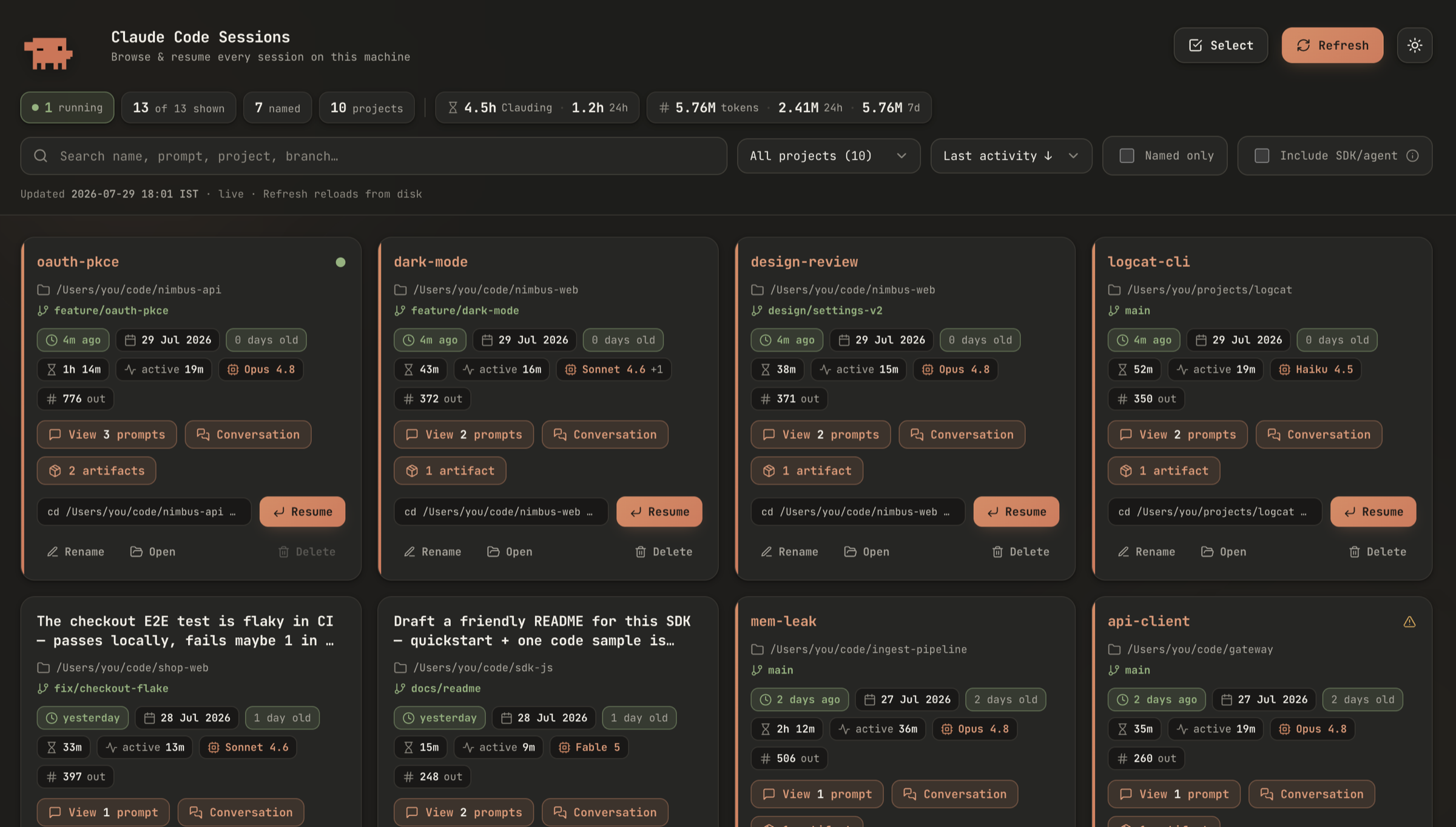
- 🔎 Search across names, prompts, project paths, branches, and session ids
- 🗂️ Filter & sort — by project, and by last activity / oldest / duration / most prompts / named / project
- ☑️ Named-only and Include SDK/agent toggles (the latter reveals programmatic/subagent sessions, hidden by default)
- 🎬 Demo mode —
--demofills the UI with fictional sessions to explore or screenshot; never reads your real data
Live status
- 🟢 Running indicator — a pulsing dot on sessions an agent is working in: writing right now, or gone quiet while blocked on a subagent or a long-running tool (detected from an unanswered tool call, so delegating work doesn't make a session look idle)
- ⬆️ Running sessions sort to the top, with a "N running" counter in the header
- 🔄 Auto-refresh — the list picks up new sessions and updated counts every 10s on its own; Refresh forces an immediate rescan
Header totals
- ⏳ Clauding — total active working time, all-time and over the last 24h. Overlapping turns are counted once, so parallel tool calls and subagents can't inflate it past the wall clock
- 🔢 Tokens — input + output + cache, all-time and over the last 24h / 7 days
Per-session insight (each card)
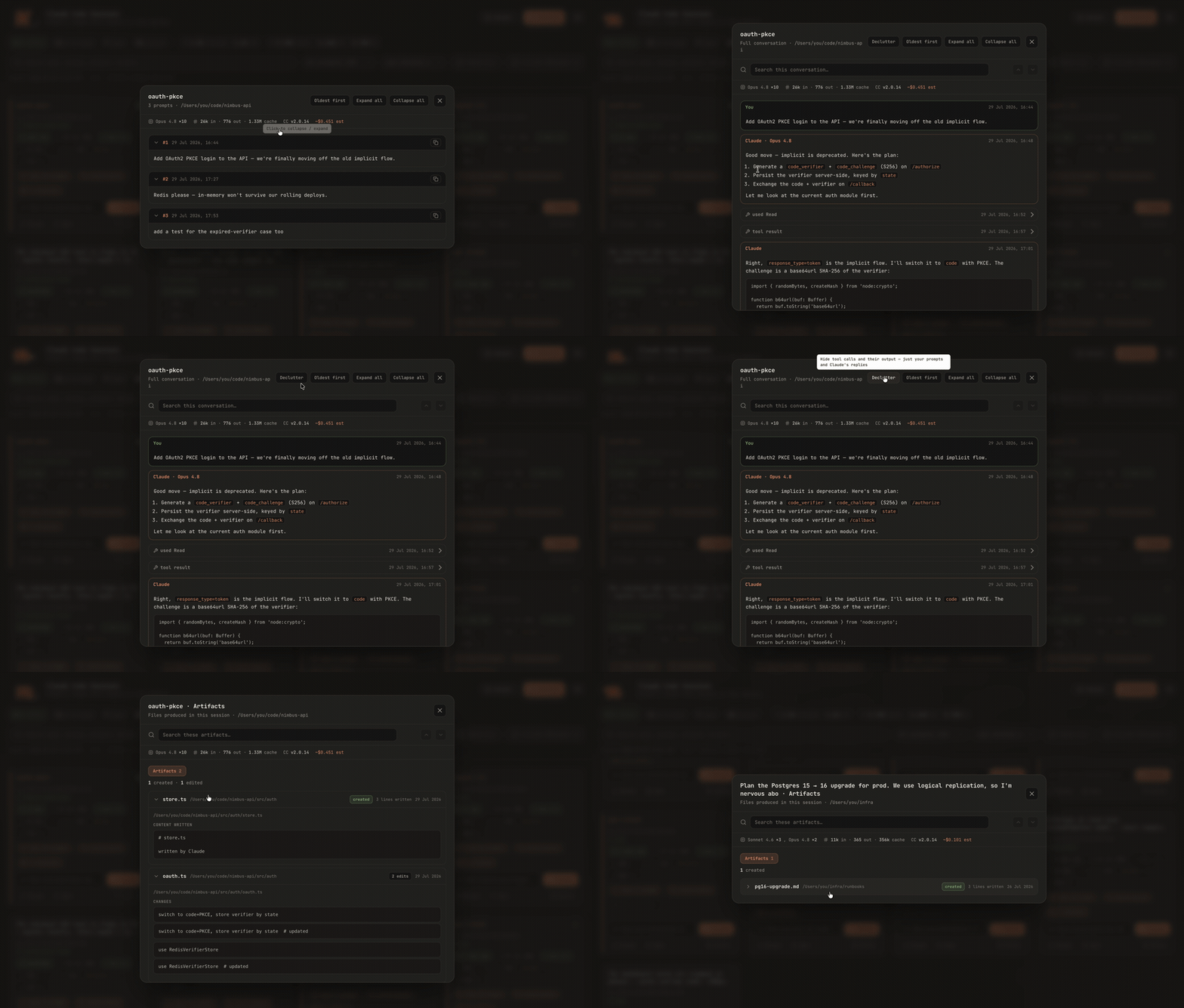
- 📦 Artifacts button — how many files this session produced, one click to see them
- 🧠 Model chip — the model(s) used, e.g.
Opus 4.8 +1; hover for the per-model turn breakdown - 🔢 Output-tokens chip — tokens generated; hover for input / output / cache
- 🕐 Relative + absolute last activity, age, session duration, and active working time
- 📁 Project path shown from home as
~/…(full absolute path on hover) with the git branch below - 🔖 Named sessions show their name as the card title in the Claude accent colour
Manage (no terminal round-trip)
- ✏️ Rename inline (writes a
custom-titlerow to the session file, preserving its mtime so a rename never looks like agent activity) - 🗑️ Delete with a confirm step — and multi-select for bulk delete. Sessions an agent is working in are refused, whether named by id, title or resume name, in the UI and on the CLI
- 📂 Open the project folder in your file manager
- 📋 Resume — copies
cd /path && claude --resume "name", ready to paste
Artifacts (what the session actually produced)
- 📦 One row per file, not per tool call — 46 edits to one file read as a single artifact with 46 changes, instead of 92 rows of "used Edit / tool result"
- 📄 Inline content Claude wrote, or a red/green diff of its edits (latest hunks, so they match the version shown)
- 🏷️ Claude's own files are split out and tagged —
memory(auto-memory notes) andconfig(.claude/settings,launch.json,CLAUDE.md) — behind their own filter chips, so the default view is your real work product - 🚫 Temp/scratch dirs,
.git/, and Claude Code's internal state are skipped — with a visible count of what was left out, never a silent trim - ⚠️ A
gonebadge when a file no longer exists at that path (deleted, moved or renamed since)
Read
- 📝 Prompts — every prompt you sent, including pasted images, collapsible with copy-per-prompt
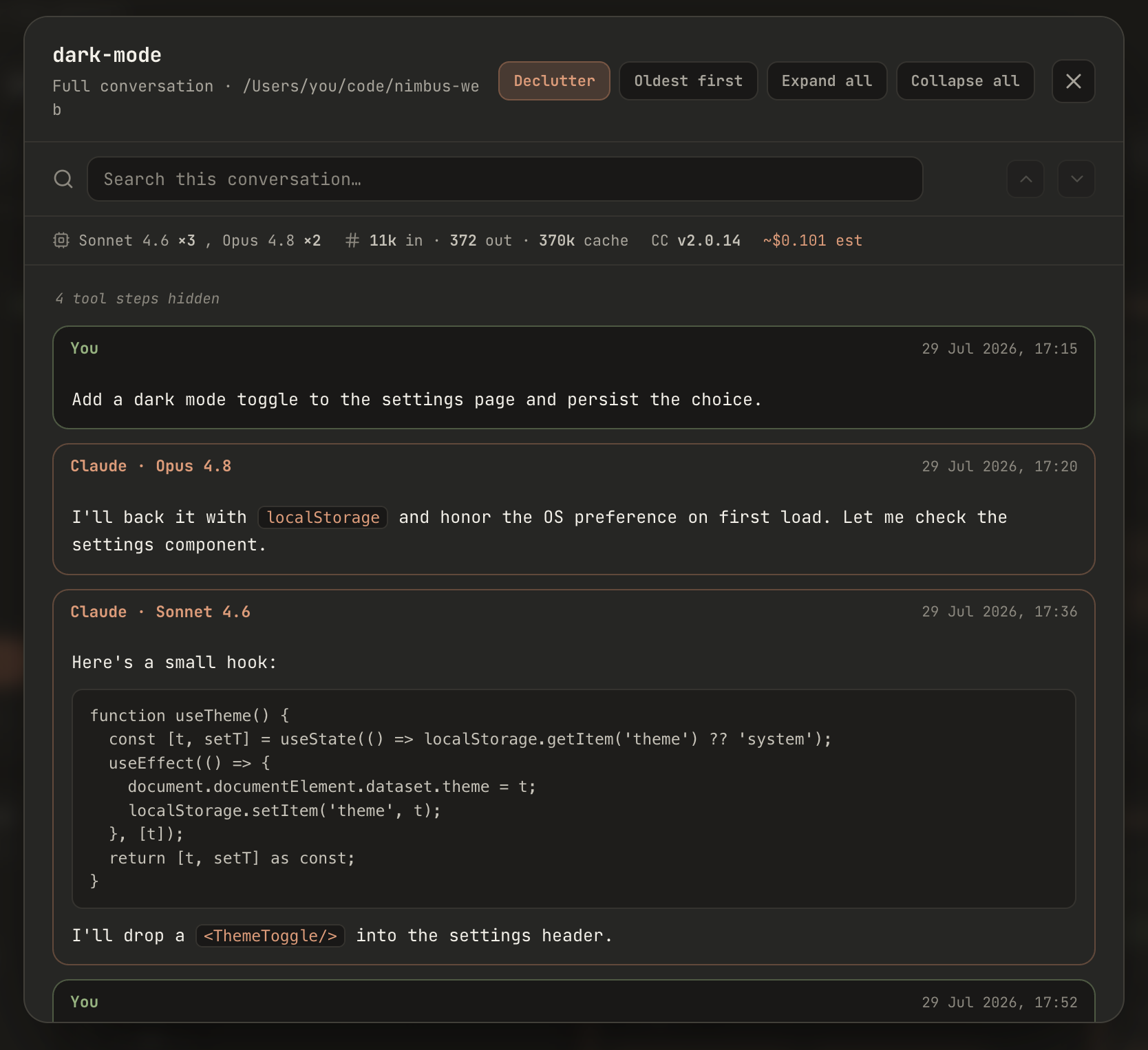
- 💬 Full conversation transcript — your prompts + Claude's replies rendered as Markdown (headings, lists, code blocks, links) and any pasted images, with tool calls & results as collapsible rows, and the model labelled per turn (only when it changes)
- 🧹 Declutter — one click hides every tool call and its output, leaving just the exchange the way a terminal session reads back (you in green, Claude in terracotta), with a count of the steps hidden
- 🔦 Search inside a conversation —
⌘/Ctrl-Fto highlight matches withn/totalcount and up/down navigation - ↕️ Oldest ↔ Newest order toggle in both viewers
- 📊 Stats strip — models × turn counts · input/output/cache tokens · web-search/fetch counts · Claude Code version · optional cost estimate
Look & feel
- 🌙 Dark by default, with a light/dark toggle (your choice is remembered)
- ⌨️ Clean monospace UI in the Claude palette; themed tooltips; respects
prefers-reduced-motion
Private & self-contained
- 🔒 Pure Python standard library — no
pip install, no dependencies, no network - Binds to
127.0.0.1only, rejects non-loopback hosts, and requires JSONPOSTbodies (so a random web page can't reach it)
Requirements
- Python 3.7+ — standard library only
- macOS, Linux, or Windows
- Some Claude Code sessions in
~/.claude/projects(nothing to configure — it uses your home dir)
Install
# grab the script and make it executable
curl -fsSL https://raw.githubusercontent.com/wannabemrrobot/claude-sessions-dashboard/main/claude-sessions -o claude-sessions
chmod +x claude-sessions

# put it on your PATH
mv claude-sessions /usr/local/bin/      # or ~/bin, ~/.local/bin, …
…or clone:
git clone https://github.com/wannabemrrobot/claude-sessions-dashboard.git
cd claude-sessions-dashboard && chmod +x claude-sessions
./claude-sessions
Usage
claude-sessions                 # launch the live dashboard (opens your browser)
claude-sessions --demo          # explore a UI full of fictional sessions (never reads your real data)
claude-sessions --all           # also include SDK/agent-spawned sessions
claude-sessions --port 7842     # choose a preferred port
claude-sessions --root PATH     # use a non-standard projects dir
claude-sessions --no-open       # serve without opening the browser
claude-sessions --static        # write a portable, self-contained .html instead
claude-sessions --json          # dump session metadata as JSON
claude-sessions --rename ID_OR_NAME "New name"
claude-sessions --delete ID_OR_NAME [ID_OR_NAME …]
The live dashboard runs until you press Ctrl+C.
Two modes
| Mode | Command | Refresh / Rename / Delete / Conversation | Portable |
|---|---|---|---|
| Live (default) | claude-sessions |
✅ one-click | needs the process running |
| Static | claude-sessions --static |
read-only (prompts only) | ✅ single self-contained .html |
Shortcuts & deep-links
⌘/Ctrl-F— search inside an open conversation ·Enter/Shift+Enter— next / previous match ·Esc— clear search, then close- Append to the URL:
?theme=light|dark·?conversation=<id>(optionally&find=<text>) ·?prompts=<id>·?order=oldest|newest
Configuration
Everything works out of the box. A couple of knobs live at the top of the script:
- Cost estimate —
SHOW_COST(on/off) andPRICING(USD per 1M tokens, by model family). The shipped rates are examples — verify and edit them; models without a rate are excluded and the figure is marked "(partial)". The estimate is not meaningful on a Max/Pro subscription (usage isn't billed per token), so treat it as a rough API-rates approximation only. ACTIVE_WINDOW_S— how recently a session's file must have changed to count as "running" (default 60s).WAITING_WINDOW_S— how long a quiet session with an unanswered tool call still counts as running, which is what a main agent waiting on subagents looks like from the outside (default 20 min). Bounded so a session killed mid-tool stops showing as running instead of forever.
How it works
It scans ~/.claude/projects/<encoded-cwd>/<uuid>.jsonl, extracts each session's title, project, branch, timestamps, duration, prompts, and model/token usage, and serves a dashboard from a tiny http.server bound to 127.0.0.1. Conversations and artifacts are parsed on demand (so the list stays fast). Nothing leaves your machine. Rename appends a custom-title row to the session file; delete removes the file.
A few details worth knowing:
- Artifacts are derived from the session's
Write/Edit/MultiEdit/NotebookEditcalls, grouped by file path. Files written byBash(heredocs,cp, redirects) are invisible here — a tool call alone doesn't reliably say what a shell command touched, so they're left out rather than guessed at. A file is only marked created when this session authored it outright; if it was read or edited first, it already existed. - Active time is the union of each turn's duration interval, not their sum — transcripts genuinely contain overlapping turns, and summing them reports more working time than the session physically spans.
- Line counts on an artifact describe the content Claude wrote; later edits (and anything that touched the file after the session) can change the file, which is why the badge reads "lines written".
Privacy & safety
Everything is local. The server listens only on 127.0.0.1, makes zero outbound requests, guards against non-loopback hosts and path traversal, and the --static export embeds only the metadata you already see. It's a single, readable Python file — audit it in a minute.
Credits
Icons from Lucide (ISC). Built with Claude Code.
License
MIT © wannabemrrobot
Yorumlar (0)
Yorum birakmak icin giris yap.
Yorum birakSonuc bulunamadi