ALIGN-Agentic-Loop-Image-GeneratioN
Health Gecti
- License — License: MIT
- Description — Repository has a description
- Active repo — Last push 0 days ago
- Community trust — 22 GitHub stars
Code Basarisiz
- exec() — Shell command execution in examples/qianli-process/src/tail3.js
Permissions Gecti
- Permissions — No dangerous permissions requested
Bu listing icin henuz AI raporu yok.
Agentic loop image generation without diffusion or autoregressive image models. Coding agents draw in p5.js, using iterative refinement and adversarial visual review for high-fidelity art and method figures. Skills for Claude Code and Codex.
ALIGN — Agentic Loop Image GeneratioN

🎨 Let coding agents paint. ALIGN explores image generation beyond diffusion and autoregressive image models: a powerful coding agent studies a reference, writes p5.js to draw the picture, and improves the program through independent visual review. Every stroke, layer and construction stage lives in source you can read, edit and replay.
English · 中文 · Interactive gallery

Qingming in Wuhan · Claude executor + Codex MCP reviewer · 11 versions. Explore the scroll and replay its construction →
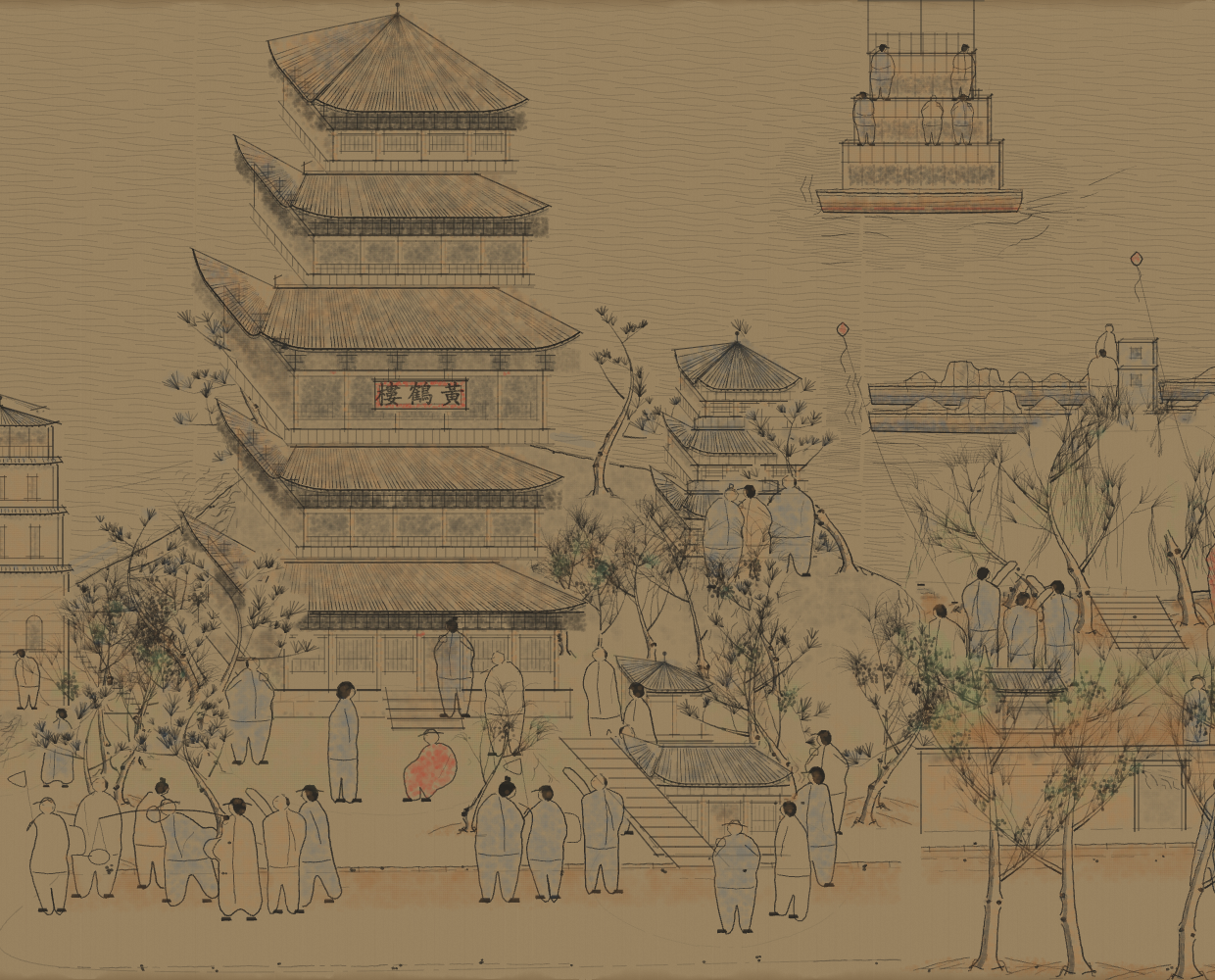
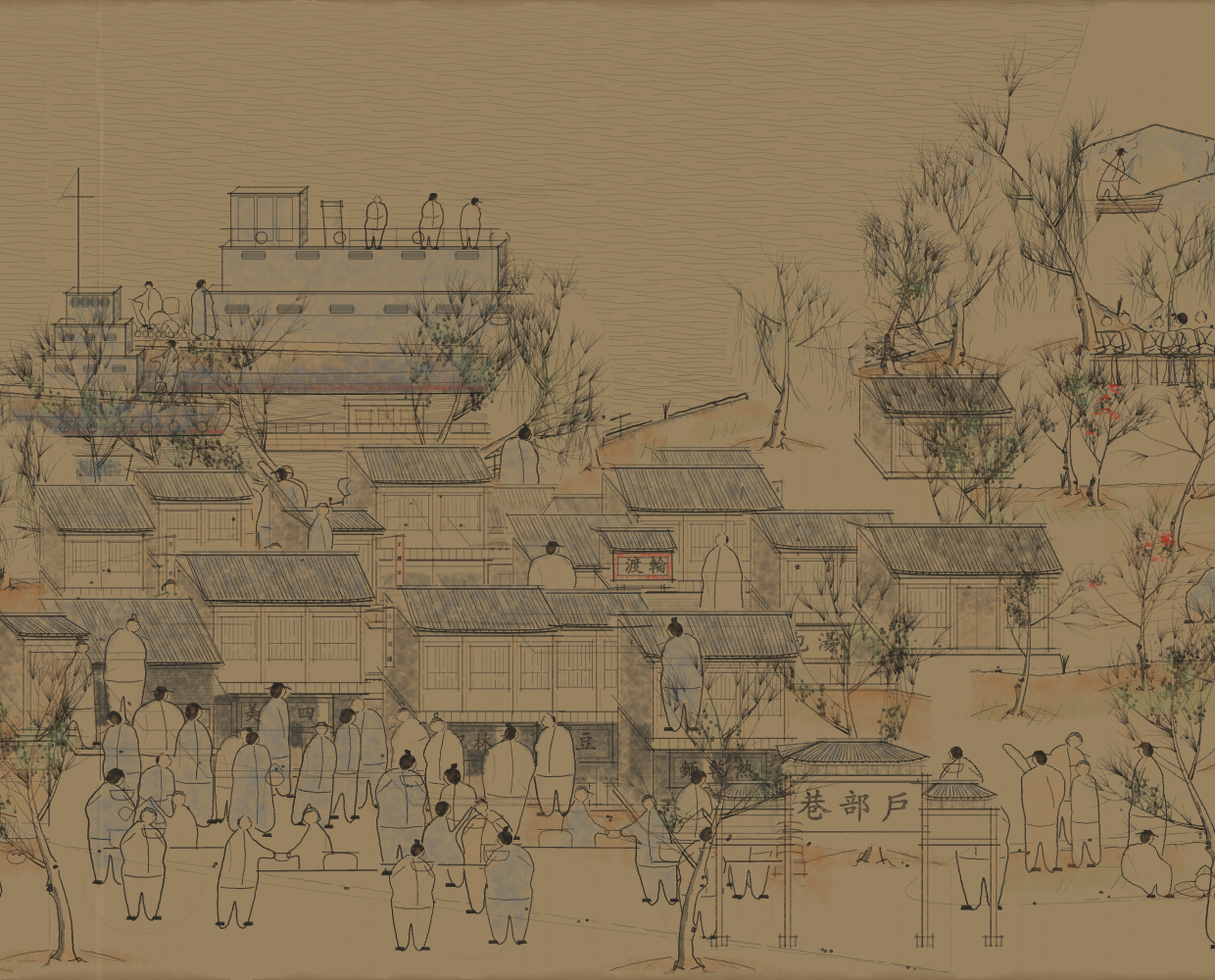
A closer look: Yellow Crane Tower (left) · Hubuxiang street life (right). Click either image to explore that part of the scroll.

A Thousand Li of Rivers and Mountains · Claude executor + Codex MCP reviewer · Ten painting stages. Explore the scroll and replay its construction →
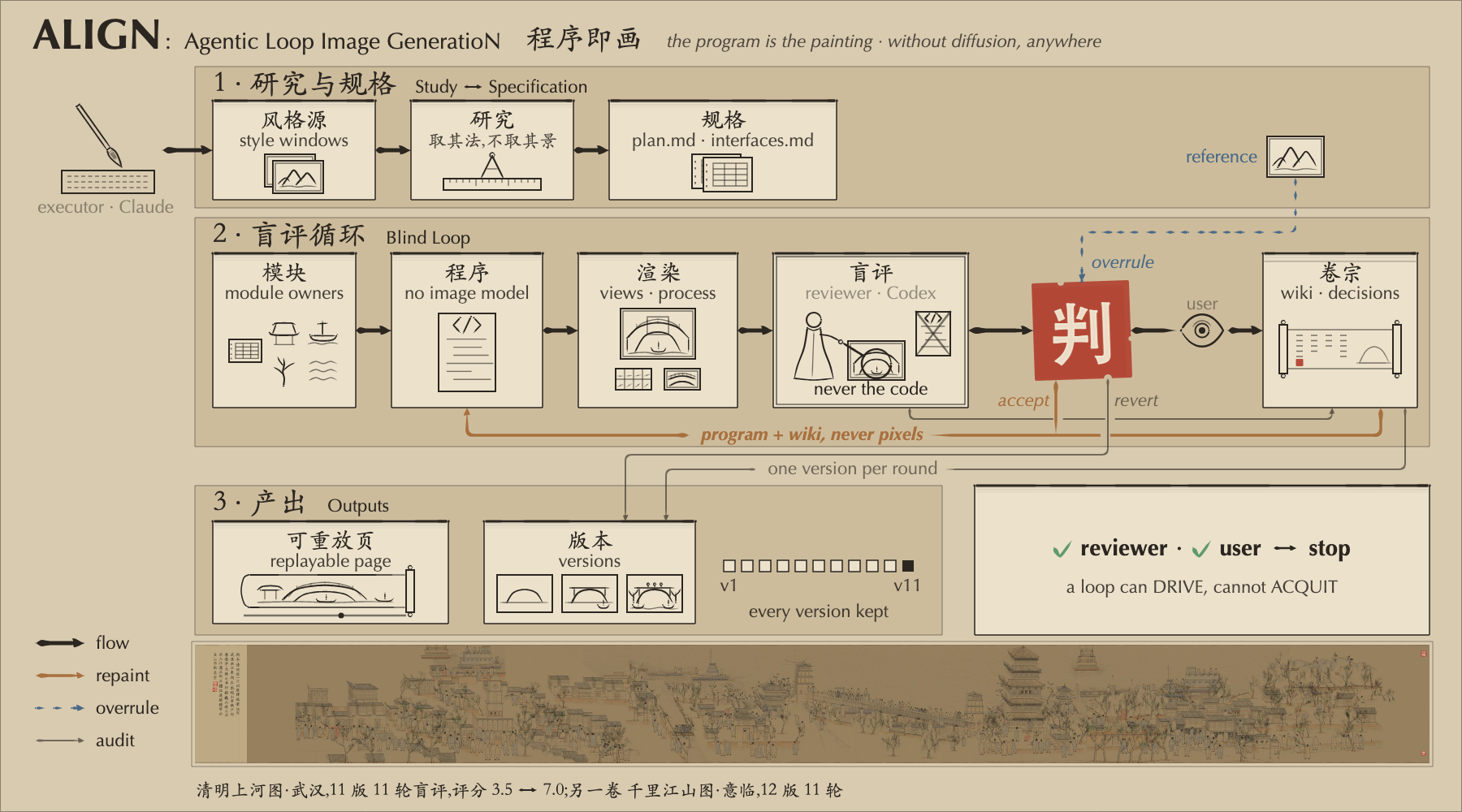
Figure 1 is itself a p5.js program: six construction stages and an SVG export.
The loop is straightforward: study the reference, specify the work, draw and render, ask a fresh reviewer to look at the pixels, then change the program. A small wiki keeps the decisions and reasons across rounds. Feedback can be accepted, challenged against the reference, or reverted when the result gets worse. The skills follow HERO: useful work and concrete checks, without extra defensive machinery.
Why an Agentic Loop Works Better
Planning starts the picture; visual feedback drives the next iteration. Even with detailed plans and a strong coding agent, our first render had floating figures, repetitive buildings and weak spatial relationships.
ALIGN brings two core ideas from our ARIS (Auto-Research-In-Sleep) project into programmatic image generation. The first is an agentic loop that turns critique into action. Here it takes the form render → review → revise: each image gives the reviewer concrete evidence, its critique gives the executor a new problem to solve, and the program and wiki carry decisions forward. Reasoning continues through the consequences of earlier choices.
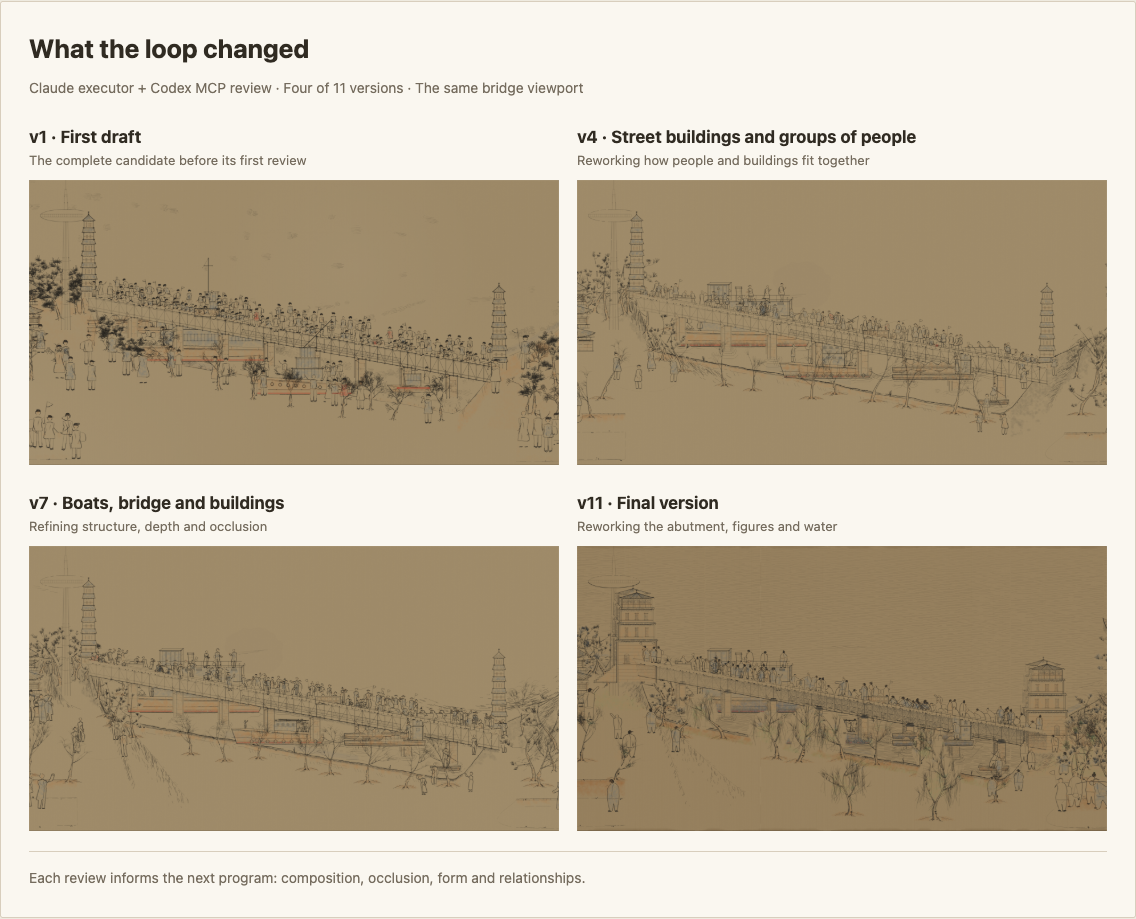
Some improvements required changing how objects were constructed. B3 identified that adding more poses would leave the same underlying figure template. In v4, people became action groups sharing contact points and weight; repeated facades became continuous streets with recessed shops, side walls and overlapping roofs. Changing a shared drawing rule can improve many passages at once. The decision · All 11 versions.
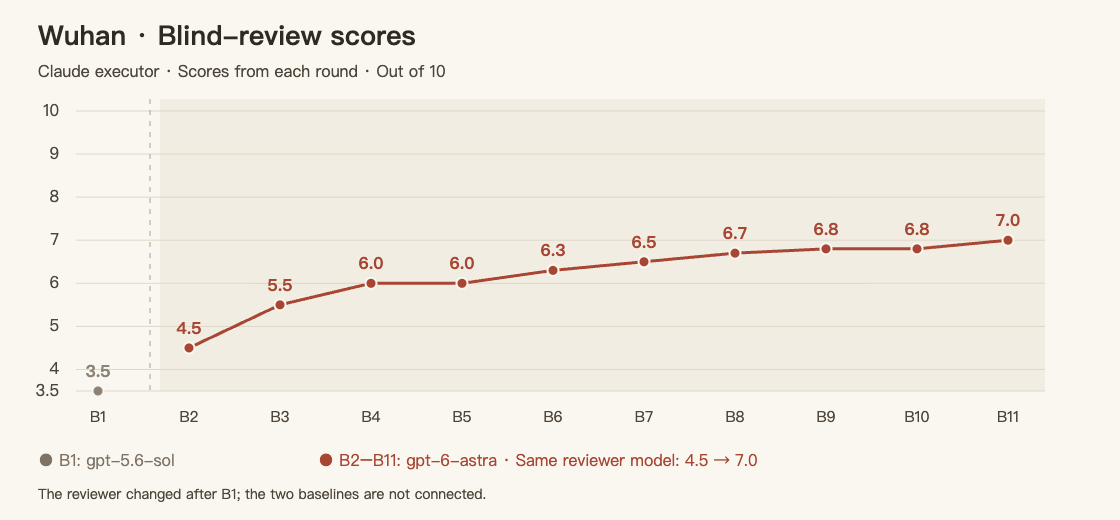
B2–B11 used gpt-6-astra: 4.5 → 7.0, with two plateaus. Progress included reversals: v5's tree rewrite looked worse, so the next version restored the earlier construction and made a smaller correction. B1 used gpt-5.6-sol and is shown separately. The vertical axis starts at 3.5; scores are out of 10. Original review log.
Why Cross-Family Adversarial Review Is Necessary
The second core idea comes from ARIS: the executor creates; a reviewer from another model family actively challenges the result. A fresh thread separates context, but models from the same family can still share habits and blind spots. Cross-family review is intended to challenge those recurring assumptions. In ALIGN's main workflow, Claude draws and Codex examines the pixels for what still fails.
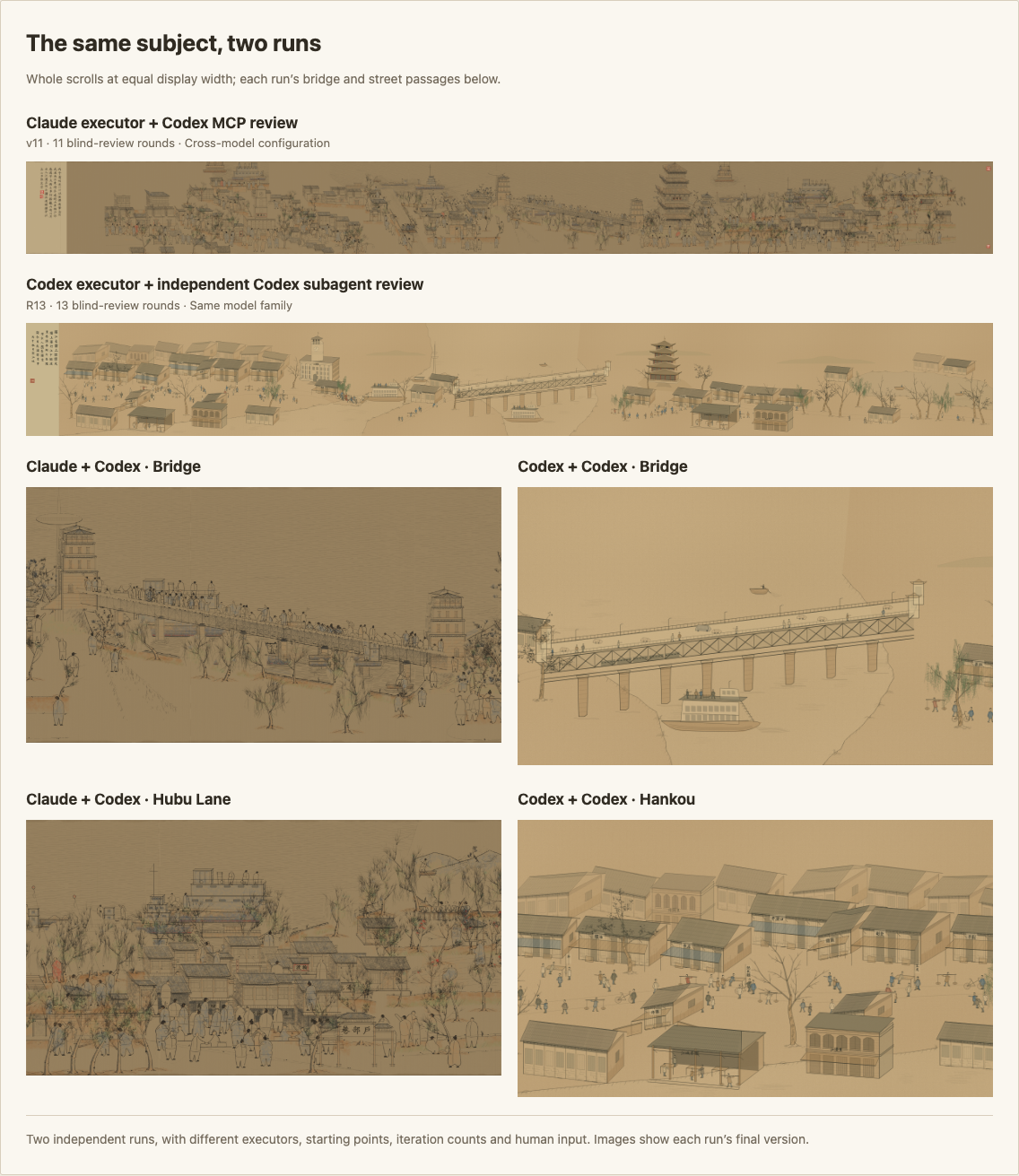
In these two runs, the Claude + Codex result has richer street scenes, more varied groups of people and more depth around the bridge and boats. The Codex + Codex result retains more repeated building blocks. Both used review loops: 11 rounds for the former, 13 for the latter. Open the comparison →
Adversarial review gives the executor a concrete challenge. The reviewer sees the rendered picture and reference, without access to the source code. Its job is to identify the most visible failures and check whether previous ones remain. In B1, it found that the left city dominated the composition, despite the plan calling for the bridge to be the focus. The executor then reduced the competing city crowds and reorganized the bridge events. The criticism changed the composition. Decision D-07.
Both configurations here use independent review; the comparison shows how different executor–reviewer pairings developed the same subject. Our reading of these runs is that useful critique and the executor's ability to act on it matter together: more rounds alone do not explain the stronger result.
Quick Start
Claude Code · Codex · Update
Two tasks, with a complete skill for each runtime:
| Task | Claude Code | Codex |
|---|---|---|
| Paint from a reference, or carry its craft into a new subject | reference-art-loop | reference-art-loop-codex |
| Draw a method figure with construction replay and SVG export | method-figure-loop | method-figure-loop-codex |
Clone once, then choose your runtime below. Replace ~/your-project with the folder where you want to work.
git clone https://github.com/wanshuiyin/ALIGN-Agentic-Loop-Image-GeneratioN.git ~/ALIGN-Agentic-Loop-Image-GeneratioN
Claude Code
Claude draws; Codex reviews through MCP. With Claude Code installed, run:
# 1. Link both skills into <project>/.claude/skills/
bash ~/ALIGN-Agentic-Loop-Image-GeneratioN/tools/install.sh claude ~/your-project

# 2. Set up Codex for visual review (skip install/login if already set up)
npm install -g @openai/codex
codex login
claude mcp add codex --scope user -- codex mcp-server

# 3. Open your project
cd ~/your-project
claude
In Claude Code, attach your reference image and invoke either skill:
/reference-art-loop Qingming Along the River → Wuhan → p5.js handscroll, rounds: 8
/method-figure-loop Reference Figure 1 → my method → p5.js, rounds: 5
Codex
Codex draws and opens a fresh Codex subagent for each visual review. This version uses native subagents and needs no MCP setup.
# 1. Link both skills into <project>/.agents/skills/
bash ~/ALIGN-Agentic-Loop-Image-GeneratioN/tools/install.sh codex ~/your-project

# 2. Install and sign in (skip if already set up)
npm install -g @openai/codex
codex login

# 3. Open your project
cd ~/your-project
codex
In Codex, attach your reference image and invoke either skill:
$reference-art-loop-codex Qingming Along the River → Wuhan → p5.js handscroll, rounds: 8
$method-figure-loop-codex Reference Figure 1 → my method → p5.js, rounds: 5
Both skills are also available when you open the ALIGN checkout itself in Codex. More Codex examples · Codex CLI installation.
For either runtime, provide a reference image, an output directory and the subject or method to draw. The agent needs image viewing, local browser rendering and its reviewer tools. Skills are discovered through Claude Code's .claude/skills/ or Codex's .agents/skills/.
Update
The installer creates symlinks to the full skill folders. Keep the checkout in place; pulling changes updates both runtimes' installed skills:
git -C ~/ALIGN-Agentic-Loop-Image-GeneratioN pull --ff-only
You can rerun the installer; existing links to this checkout are kept. If the agent still shows an older skill, restart the session.
Install for all your projectsUse your home directory as the destination. Choose either runtime, or run both:
# Claude Code: ~/.claude/skills/
bash ~/ALIGN-Agentic-Loop-Image-GeneratioN/tools/install.sh claude ~

# Codex: ~/.agents/skills/
bash ~/ALIGN-Agentic-Loop-Image-GeneratioN/tools/install.sh codex ~
If a skill folder already exists there, the installer leaves it in place and prints its path. Move that folder aside if you want to replace it with the linked version.
Three worked examples
All three main examples were drawn in Claude Code and reviewed through Codex MCP.
| Example | What you can explore |
|---|---|
| Qingming in Wuhan | 11 runnable versions, fixed-view evolution, process sheets and review decisions |
| Figure 1 | Final program, seven PNG/SVG versions, five blind-review replies and design decisions |
| A Thousand Li of Rivers and Mountains | Final program, ten painting stages, an evolution sheet and 11 blind-review records |
The review records also show the limits. Neither main painting passed its visual gate; the Codex Wuhan run did not pass either. Figure 1's last independent review was v5 at 7/10; v6 and v7 were self-reviewed. The two Wuhan runs differed in starting point, iteration count and human input, so the comparison describes these works. The planned tests of specifications versus direct coding, and external review versus self-review, have not been run.
MIT for original repository content. Third-party sources and licenses.
Yorumlar (0)
Yorum birakmak icin giris yap.
Yorum birakSonuc bulunamadi