contribute-now
Health Uyari
- License — License: GPL-3.0
- Description — Repository has a description
- Active repo — Last push 0 days ago
- Low visibility — Only 5 GitHub stars
Code Uyari
- network request — Outbound network request in landing/src/main.ts
Permissions Gecti
- Permissions — No dangerous permissions requested
This developer CLI tool automates Git workflows, including branching, staging, committing, and creating pull requests. It features built-in support for multiple branching strategies and uses AI to assist with generating commit messages.
Security Assessment
As a Git automation tool, it inherently interacts with local file systems and executes shell commands to manipulate repositories. The automated scan noted an outbound network request in `landing/src/main.ts`, which is typical for fetching external assets or checking for updates, though developers should verify the exact destination. There are no hardcoded secrets detected, and the tool does not request any dangerous system permissions. Overall risk: Medium. Any tool that automatically executes Git commands requires careful review of exactly what actions it is taking under the hood.
Quality Assessment
The project is actively maintained, with its most recent code push happening today. It uses a standard GPL-3.0 license, making it open-source and freely available. However, it currently suffers from very low community visibility, having only accumulated 5 GitHub stars. Because it is relatively new and hasn't been widely adopted or battle-tested by a large audience, its reliability for critical production workflows remains unproven.
Verdict
Use with caution — while the project is active and licensed, its minimal community adoption and inherent execution of Git commands warrant a thorough review of its source code before integrating it into important repositories.
When Git meets AI automation
contribute-now
contribute-now is a developer CLI that automates git workflows — branching, syncing, staging, committing, and opening PRs — so you can focus on shipping, not on memorizing git commands.
It natively supports multiple workflow models and commit conventions, with AI-powered assistance throughout.


Demo
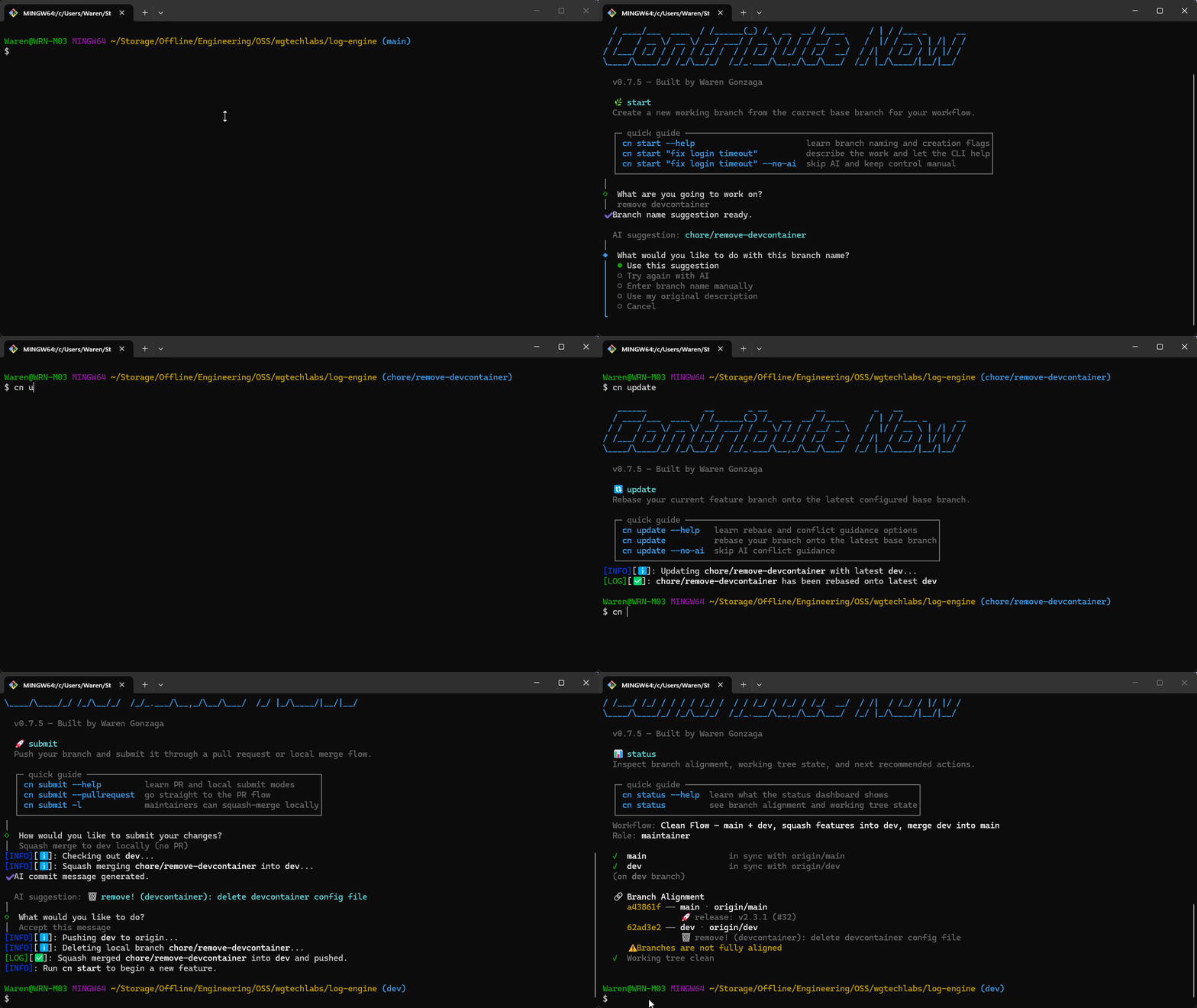
Workflow Modes
Pick the model that matches your project during cn setup. contribute-now adapts its commands to your chosen workflow automatically — no manual branch names to remember.
| Mode | Branches | Strategy | Default |
|---|---|---|---|
| 🌊 Clean Flow (by WGTech Labs) | main + dev + feature branches |
Squash features → dev, merge dev → main |
✅ |
| 🐙 GitHub Flow | main + feature branches |
Squash/merge features → main |
|
| 🔀 Git Flow | main + develop + release/hotfix branches |
Full ceremony branching |
Commit Conventions
contribute-now validates commit messages and guides your AI toward the right format — based on whichever convention you configure.
| Convention | Format | Default |
|---|---|---|
| 🧹 Clean Commit (by WGTech Labs) | <emoji> <type>[!][(<scope>)]: <description> |
✅ |
| 📝 Conventional Commits | <type>[!][(<scope>)]: <description> |
|
| 🚫 None | No enforcement |
Quick Start
bunx contribute-now setup
Or install globally:
bun install -g contribute-now
contribute setup
contribute-now now runs on Bun at runtime. Use bunx for one-off execution and bun install -g for a global install.
contributeis the primary command;cnis the short alias for the same binary — use whichever you prefer.The older
contribalias is being phased out. Please switch tocontributeorcn.Fun fact:
cnis shorter thangit. Yes, your workflow command is now faster to type than git itself. 🚀
Installation
# one-off
bunx contribute-now setup

# global
bun install -g contribute-now
If you prefer to install the package from npm, install Bun first and then install contribute-now:
npm install -g bun
npm install -g contribute-now
Once installed, you can use either alias:
contribute setup  # primary command — spelled out
cn setup          # short alias — even shorter than git!
The legacy
contribalias still works but is being phased out. Prefercontributeorcn.
Prerequisites
- Git — required
- GitHub CLI (
gh) — recommended; required for PR creation, role detection, and merge status checks - GitHub Copilot — optional; one of the supported AI providers
- Ollama Cloud or OpenRouter API key — optional; alternative AI providers
Commands
cn setup
Interactive setup wizard. Configures your repo's workflow mode, commit convention, your role, branch/remote names, and AI provider settings. Writes local config to .git/contribute-now/config.json by default.
cn setup
Steps:
- Choose workflow mode — Clean Flow, GitHub Flow, or Git Flow
- Choose commit convention — Clean Commit, Conventional Commits, or None
- Choose whether AI features should be enabled for this repo
- If using Ollama Cloud or OpenRouter, enter your API key; pick from the available models returned by your key, or enter one manually
- Detect remotes and auto-detect your role (maintainer or contributor)
- Confirm branch and remote names
- Write
.git/contribute-now/config.json(or update.contributerc.jsonif that legacy file is still the active source)
If you want to disable AI completely for a repo, run cn setup and turn AI off, or set "aiEnabled": false in the active config file. Per-command --no-ai flags still work as one-off overrides when AI is enabled globally.
If you want a cleaner output once you're familiar with the CLI, set "showTips": false in the active config file to hide the beginner quick guides and loading tips.
cn config
Inspect the active repo config or edit it without rerunning the full setup flow.
cn config
cn config --json
cn config --edit
Use --edit to update workflow settings, branch names, commit convention, AI provider details, stored API keys (Ollama Cloud or OpenRouter), and to choose from the currently available models for the selected provider.
cn sync
Pull the latest changes from the correct remote branch based on your workflow and role.
cn sync         # with confirmation
cn sync --yes   # skip confirmation
| Role | Clean Flow / Git Flow | GitHub Flow |
|---|---|---|
| Maintainer | pulls origin/dev |
pulls origin/main |
| Contributor | pulls upstream/dev |
pulls upstream/main |
cn start
Create a new feature branch from the correct base branch, with optional AI-powered branch naming.
# Direct branch name
cn start feature/user-auth

# Natural language — AI suggests the branch name
cn start "add user authentication"

# Skip AI
cn start "add user authentication" --no-ai
cn commit
Stage your changes and create a validated, AI-generated commit message matching your configured convention.
cn commit                     # AI-generated message
cn commit --no-ai             # manual entry, still validated
cn commit --model gpt-4.1    # specific AI model
cn commit --group             # AI groups changes into atomic commits
After the AI generates a message, you can accept, edit, regenerate, or write manually. Messages are always validated against your convention — with a soft warning if they don't match (you can still commit).
Group commit mode (--group): AI analyzes all staged and unstaged changes, groups related files into logical atomic commits, and generates a commit message for each group. Great for splitting a large set of changes into clean, reviewable commits.
If aiEnabled is set to false in .contributerc.json, cn commit stays manual and --group is unavailable.
cn update
Rebase your current branch onto the latest base branch, with AI guidance if conflicts occur.
cn update
cn update --no-ai   # skip AI conflict guidance
cn submit
Push your branch and open a pull request with an AI-generated title and description.
cn submit
cn submit --draft
cn submit --no-ai
cn submit --model gpt-4.1
cn clean
Delete merged branches and prune stale remote refs.
cn clean          # shows candidates, asks to confirm
cn clean --yes    # skip confirmation
cn status
Show a sync status dashboard for your main, dev, and current branch.
cn status
cn doctor
Diagnose the contribute-now CLI environment and configuration. Checks tools, dependencies, config, git state, fork setup, workflow, and environment.
cn doctor          # pretty-printed report
cn doctor --json   # machine-readable JSON output
Checks include:
- CLI version and runtime (Bun)
- git and GitHub CLI availability and authentication
- active repo config validity and storage location
- Git repo state (uncommitted changes, lock files, shallow clone)
- Fork and remote configuration
- Workflow and branch setup
cn log
Show a colorized, workflow-aware commit log. By default it shows only local unpushed commits — the changes you've made since the last push (or since branching off the base branch). Use flags to switch between different views.
cn log                # local unpushed commits (default)
cn log --remote       # commits on remote not yet pulled
cn log --full         # full history for the current branch
cn log --all          # commits across all branches
cn log -n 50          # change the commit limit (default: 20)
cn log -b feature/x   # log for a specific branch
cn log --no-graph     # flat view without graph lines
When no upstream tracking is set (branch hasn't been pushed yet), the command automatically compares against the base branch from your config (e.g., origin/dev). Protected branches are highlighted, and the current branch is color-coded for quick orientation.
cn branch
List branches with workflow-aware labels and tracking status.
cn branch             # local branches
cn branch --all       # local + remote branches
cn branch --remote    # remote branches only
cn branch --sync      # sync refs (friendly alias of --prune)
cn branch --prune     # fetch remotes + prune deleted remote branches
Branches are annotated with workflow labels (e.g., base, dev, feature) and tracking info (upstream, gone, no remote).
cn hook
Install or uninstall a commit-msg git hook that validates every commit against your configured convention — no Husky or lint-staged needed.
cn hook install     # writes .git/hooks/commit-msg
cn hook uninstall   # removes it
- Automatically skips merge commits, fixup, squash, and amend commits
- Won't overwrite hooks it didn't create
cn validate
Validate a commit message against your configured convention. Exits 0 if valid, 1 if not — useful in CI pipelines or custom hooks.
cn validate "📦 new: user auth module"     # exit 0
cn validate "added stuff"                   # exit 1
cn label
Apply existing labels to issues and pull requests, or get ranked label suggestions from content. All operations are non-interactive and automation-friendly.
# Apply one or more labels to an issue
cn label add --issue 42 bug,enhancement

# Apply labels with spaces in their names (no quotes needed in most shells)
cn label add --issue 42 bug,good first issue

# Apply labels to a PR
cn label add --pr 7 enhancement,needs triage

# Get ranked label suggestions for an issue
cn label suggest --issue 42

# Get ranked label suggestions for a PR
cn label suggest --pr 7

# Auto-apply top labels to a PR
cn label apply --pr 7

# Auto-apply top labels to an issue
cn label apply --issue 42

# Bulk preview (safe default): inspect open issues and PRs
cn label apply

# Bulk apply to open issues and PRs
cn label apply --yes

# Bulk apply to PRs only with custom limits
cn label apply --prs --yes --limit 30 --count 2 --min-score 5

# Force heuristic-only ranking (no AI)
cn label apply --pr 7 --no-ai

# Use a specific AI model for ranking
cn label apply --pr 7 --model gpt-4.1
Label source strategy:
- Repository labels are fetched once and cached locally (
.git/contribute-now/labels.json). - If the repository labels are a 100% name-match against the Clean Labels dataset, Clean Labels (with canonical descriptions) are used as the source.
- Otherwise, repository-specific labels are used.
- The local cache is used by default — no repeated
ghAPI calls. - On label-not-found errors, the cache is automatically resynced and the operation is retried once.
Auto-apply behavior (cn label apply):
- Uses the same label scoring engine as
cn label suggest(label names + descriptions vs issue/PR content). - Applies only existing repository labels (never creates labels).
- Filters out labels that are already present on the target issue/PR.
- In bulk mode (no
--issue/--pr), defaults to dry-run unless--yesis provided. - Supports tunable controls:
--count,--min-score,--limit,--issues,--prs, and--dry-run. - Uses AI ranking by default when AI is enabled in your config, with automatic fallback to heuristic scoring.
- Pass
--no-aito force heuristic-only scoring or--model <name>to pick a specific AI model.
Label input format:
- Commas are the separator between labels.
- Spaces are part of a label name (
good first issueis one label, not three words). - Unknown labels are reported with close-match suggestions.
AI Features
All AI features are optional — every command has a manual fallback. Three providers are supported: GitHub Copilot, Ollama Cloud, and OpenRouter.
| Command | AI Feature | Fallback |
|---|---|---|
commit |
Generate commit message from staged diff | Type manually |
commit --group |
Group related changes into atomic commits | Manual staging + commit |
start |
Suggest branch name from natural language | Prefix picker + manual |
update |
Conflict resolution guidance | Standard git instructions |
submit |
Generate PR title and body | gh pr create --fill or manual |
Pass --no-ai to any command to skip AI entirely. Use --model <name> to select a specific model (e.g., gpt-4.1, claude-sonnet-4).
AI Providers
| Provider | Auth | How it works |
|---|---|---|
| GitHub Copilot (default) | gh auth login |
Uses your existing GitHub/Copilot auth via the @github/copilot-sdk |
| Ollama Cloud | API key (stored in local secrets) | OpenAI-compatible API; model list fetched from your key on setup |
| OpenRouter | API key (stored in local secrets) | Unified API that routes to many model providers (OpenAI, Anthropic, Google, etc.) |
Select your provider during cn setup or change it later with cn config --edit. API keys for Ollama Cloud and OpenRouter are stored as plain JSON in ~/.contribute-now/secrets/store.json with file permissions restricted to the current user (mode 0600) — never in the plain config file.
Commit Convention Reference
Clean Commit (default)
Format: <emoji> <type>[!][(<scope>)]: <description>
| Emoji | Type | When to use |
|---|---|---|
| 📦 | new |
New features, files, or capabilities |
| 🔧 | update |
Changes, refactoring, improvements |
| 🗑️ | remove |
Removing code, files, or dependencies |
| 🔒 | security |
Security fixes or patches |
| ⚙️ | setup |
Configs, CI/CD, tooling, build systems |
| ☕ | chore |
Maintenance, dependency updates |
| 🧪 | test |
Adding or updating tests |
| 📖 | docs |
Documentation changes |
| 🚀 | release |
Version releases |
Examples:
📦 new: user authentication system
🔧 update (api): improve error handling
⚙️ setup (ci): configure github actions
🔧 update!: breaking change to config format
Conventional Commits
Format: <type>[!][(<scope>)]: <description>
Types: feat, fix, docs, style, refactor, perf, test, build, ci, chore, revert
Examples:
feat: add user authentication
fix(auth): resolve token expiry issue
docs: update contributing guide
feat!: redesign authentication API
Config File
cn setup writes .git/contribute-now/config.json by default. If a legacy .contributerc.json already exists, it remains the active source until you migrate or remove it:
{
  "workflow": "clean-flow",
  "commitConvention": "clean-commit",
  "role": "contributor",
  "mainBranch": "main",
  "devBranch": "dev",
  "upstream": "upstream",
  "origin": "origin",
  "branchPrefixes": ["feature", "fix", "docs", "chore", "test", "refactor"]
}
Use cn config --edit to change these values later without rerunning the full setup flow. If you are still on the legacy .contributerc.json, keep that file ignored until you migrate away from it.
Development
git clone https://github.com/warengonzaga/contribute-now.git
cd contribute-now
bun install

bun run build   # compile to dist/index.js
bun test        # run tests
bun run lint    # check code quality
The CLI is Bun-first end to end: local development, tests, packaged runtime, and one-off execution all assume Bun.
🎯 Contributing
Contributions are welcome, create a pull request to this repo and I will review your code. Please consider to submit your pull request to the dev branch. Thank you!
Read the project's contributing guide for more info.
🐛 Issues
Please report any issues and bugs by creating a new issue here, also make sure you're reporting an issue that doesn't exist. Any help to improve the project would be appreciated. Thanks! 🙏✨
🙏 Sponsor
Like this project? Leave a star! ⭐⭐⭐⭐⭐
Want to support my work and get some perks? Become a sponsor! 💖
Or, you just love what I do? Buy me a coffee! ☕
Recognized my open-source contributions? Nominate me as GitHub Star! 💫
📋 Code of Conduct
Read the project's code of conduct.
📃 License
This project is licensed under GNU General Public License v3.0.
📝 Author
This project is created by Waren Gonzaga, with the help of awesome contributors.
💻💖☕ by Waren Gonzaga & YHWH 🙏 — Without Him, none of this exists, even me.
Yorumlar (0)
Yorum birakmak icin giris yap.
Yorum birakSonuc bulunamadi