multi-plc-agent
Health Pass
- License — License: Apache-2.0
- Description — Repository has a description
- Active repo — Last push 0 days ago
- Community trust — 10 GitHub stars
Code Pass
- Code scan — Scanned 12 files during light audit, no dangerous patterns found
Permissions Pass
- Permissions — No dangerous permissions requested
No AI report is available for this listing yet.
One MCP server for AI-written ladder logic in 9 PLC tools: Mitsubishi GX Works2, Siemens TIA Portal, Omron CX-Programmer and Sysmac Studio, CODESYS, Schneider Machine Expert - Basic, Delta WPLSoft, Outseal Studio and Haiwell Happy
multi-plc-agent
Bahasa Indonesia: README.id.md
One MCP server that lets an AI agent write ladder logic in many PLC engineering tools: Mitsubishi GX Works2, Siemens TIA Portal, Omron CX-Programmer and Sysmac Studio, CODESYS, Schneider Machine Expert - Basic, Delta WPLSoft, Outseal Studio and Haiwell Happy.
multi-plc-agent starts one MCP server per tool, gives every tool a vendor prefix (mitsubishi_, siemens_, omron_, sysmac_, codesys_, schneider_, delta_, outseal_, haiwell_) and exposes them as one server. Each backend keeps its own approval flow and safety checks. The router adds one shared rule on top: tools that act on a live PLC or delete project content are not exposed. The GX Works2, TIA Portal and CX-Programmer backends are existing third-party projects; the other backends live in backends/.
Contributions are welcome: see CONTRIBUTING.md.
Supported software
Status
A box is checked only after the tool was run on real software: program written, compile/build with 0 errors, and read-back matched. Unchecked boxes are planned; they get checked in the PR that adds and verifies the backend.
Supported (9 tools, 7 vendors)
- Mitsubishi GX Works2 (FX3U)
- Siemens TIA Portal V20 (S7-1200)
- Omron CX-Programmer (CP1E; CP1H X/XA and CP2E N via seven examples, hardware not tested)
- Omron Sysmac Studio (NX/NJ)
- CODESYS V3.5
- Schneider EcoStruxure Machine Expert - Basic (M221)
- Delta WPLSoft (DVP)
- Outseal Studio (Nano / Mega)
- Haiwell Happy (C/T/N/H)
Planned
- Mitsubishi GX Works3 (iQ-F / iQ-R): blocked, GX Works3 crashes on the development machine
- Siemens TIA Portal V21: backend supports it, not yet run here
- Omron CP1L / CJ2 and broader CP1H/CP2E instruction coverage
- Beckhoff TwinCAT 3
- Delta ISPSoft
- Delta DIADesigner
- Schneider EcoStruxure Machine Expert (M241/M251/M262)
- Rockwell Connected Components Workbench (Micro800)
- Rockwell Studio 5000 (ControlLogix/CompactLogix)
- Inovance AutoShop / InoProShop
- LS Electric XG5000
- Keyence KV Studio
- Xinje XDPPro
- Panasonic FPWIN GR7
- Schneider Control Expert (M340/M580)
- ABB Automation Builder
- B&R Automation Studio
Details
| Vendor | Software | Backend | How it writes | Verified on |
|---|---|---|---|---|
| Mitsubishi | GX Works2 1.580 and 1.635 | Wayan123/gxworks-agent (fork of Arienax/gxworks-agent) | Drives the GX Works2 UI: CSV import of the program and device comments | 1.580.0.1 English UI, FX3U: program and comments imported, Check Program "No error found" |
| Siemens | TIA Portal V20 / V21 | bulaofen0036-coder/TIA_Portal_Openness_MCP v2.7.8 | Official TIA Openness API: LAD as S7DCL text, timers/counters as SCL external source | V20, S7-1200 1212C: FB + FC + OB1 + tags imported, compile 0 errors / 0 warnings |
| Omron | CX-Programmer 9.x, CP1E / CP1H X/XA / CP2E N | BlackUppsss/Cx-Proggrammer-MCP | Edits .cxt/.cxp; original examples and guarded MCP loader |
9.75: CP1E-NA plus eight CP1H X/XA/CP2E N example projects, native compile 0 errors / 0 warnings; example instruction read-back identical; no physical PLC/CX-Simulator test |
| Omron | Sysmac Studio 1.47 (NX/NJ) | backends/sysmac |
Generates IEC 61131-10 XML, imports it with Tools > IEC 61131-10 XML > Import through UI Automation, builds, reads the stored ladder back | 1.47.0.64008, NX1P2-1040DT: 6 rungs imported (new and replaced program), build 0 errors / 0 warnings, read-back matches |
| CODESYS | CODESYS V3.5 SP21 | backends/codesys |
Official ScriptEngine, headless (--noUI --runscript): new project, PLCopen XML LD import, build, export back |
3.5.21.0, Control Win V3 x64: 6 rungs, "Compile complete -- 0 errors, 0 warnings", exported logic matches |
| Schneider | EcoStruxure Machine Expert - Basic 1.3 (M221) | backends/schneider |
Writes the rungs as IL into the .smbp XML project, then compiles in the tool through UI Automation (optional IL → LD conversion by the tool) |
1.3.0.215, TM221M16R: 6 rungs, status "No error", read-back matches |
| Delta | WPLSoft 2.52 (DVP-ES2/SS2) | backends/delta |
Writes the program words into the .dvp file, then runs WPLSoft's Instruction ⇄ Ladder compile and saves |
2.52, DVP-SS2: 7 rungs, 0 errors, IL read-back identical |
| Outseal | Outseal Studio 3.6 (Nano / Mega boards) | backends/outseal |
Writes the .plc project file directly, then runs Studio's Test through UI Automation |
V.3.6 Beta5, Nano V5: 7 rungs written, Test 0 errors, hex generated; codec round-trips all 18 bundled examples |
| Haiwell | Haiwell Happy 2.2.13 (C/T/N/H series) | backends/haiwell |
Types rungs into the LD editor with its keyboard shortcuts, then exports IL and compares it with the expected IL | V2.2.13.240603, AT16S0T/P: 7 rungs written, IL read-back identical, compile 0 errors / 0 warnings |
| Mitsubishi | GX Works3 | none yet | Planned: ladder editor [Edit] → [Import File] CSV | Not supported. On the development machine GX Works3 1.055H crashes on [Project] > [New]; see ROADMAP.md |
"Verified on" lists only what was actually run. Other CPUs, versions and UI languages may work, but they have not been tested. Planned tools (Beckhoff TwinCAT, Delta ISPSoft/DIADesigner, Rockwell, Keyence, Inovance, LS and more) are listed in ROADMAP.md.
Ready-to-use examples
The Omron examples guide contains source instructions, CX-Programmer projects, setup details, and reproducible checks:
| Example | PLC | Topic |
|---|---|---|
| 01 — Digital I/O | CP1H-X40DT-D | Start/stop, interlock and warning horn |
| 02 — Digital I/O | CP1H-XA40DT-D | Start/stop and warning horn |
| 03 — Analog I/O | CP1H-XA40DT-D | Four analog inputs and two outputs |
| 04 — Analog scaling | CP1H-XA40DT-D | Input and output scaling |
| 05 — XY-MD02 Modbus | CP1H-X40DT-D and CP1H-XA40DT-D | Sensor reads, errors and stale data |
| 06 — XY-MD02 Modbus | CP2E-N30DT-D | Sensor communication |
| 07 — Traffic light | CP1H-X40DT-D | Four approaches and a pedestrian phase |
These are educational examples. Native compilation and offline scenarios do not establish physical operation or functional safety; see each example's hardware and simulator limitations before use.
Demo
The agent wrote the same conveyor specification into each tool through this router:
- start/stop with an E-stop
- a 3 s warning horn before the motor starts
- a stop after a batch of 10 products
Each recording is one continuous run: the agent's MCP calls appear in the log window, and the result is then checked in the vendor software. The GIFs play at 1.5× speed. Paths on the development machine are masked.
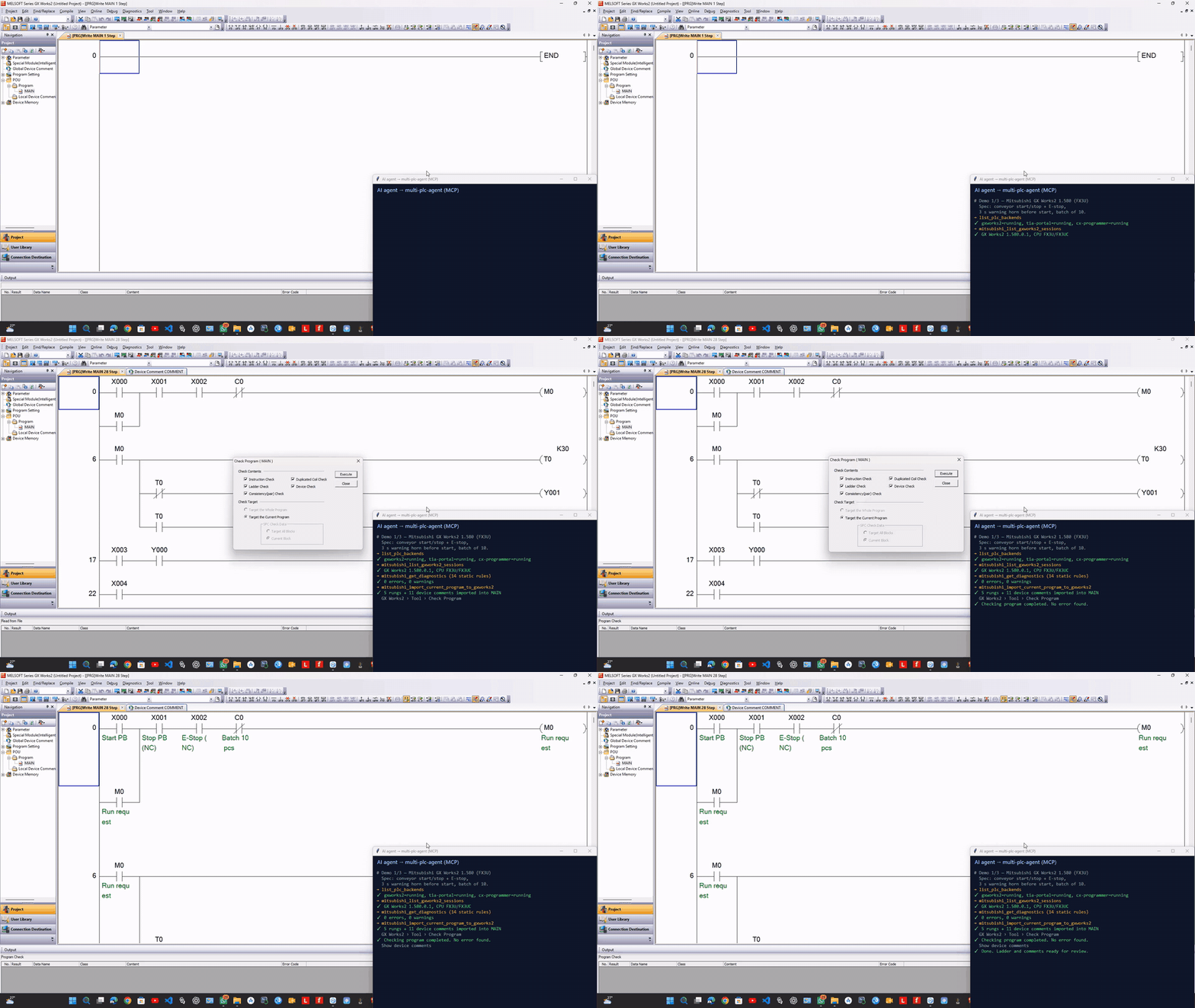
Mitsubishi GX Works2 1.580 (FX3U)
The agent imports 5 rungs and 11 device comments into MAIN, and Check Program reports "No error found".
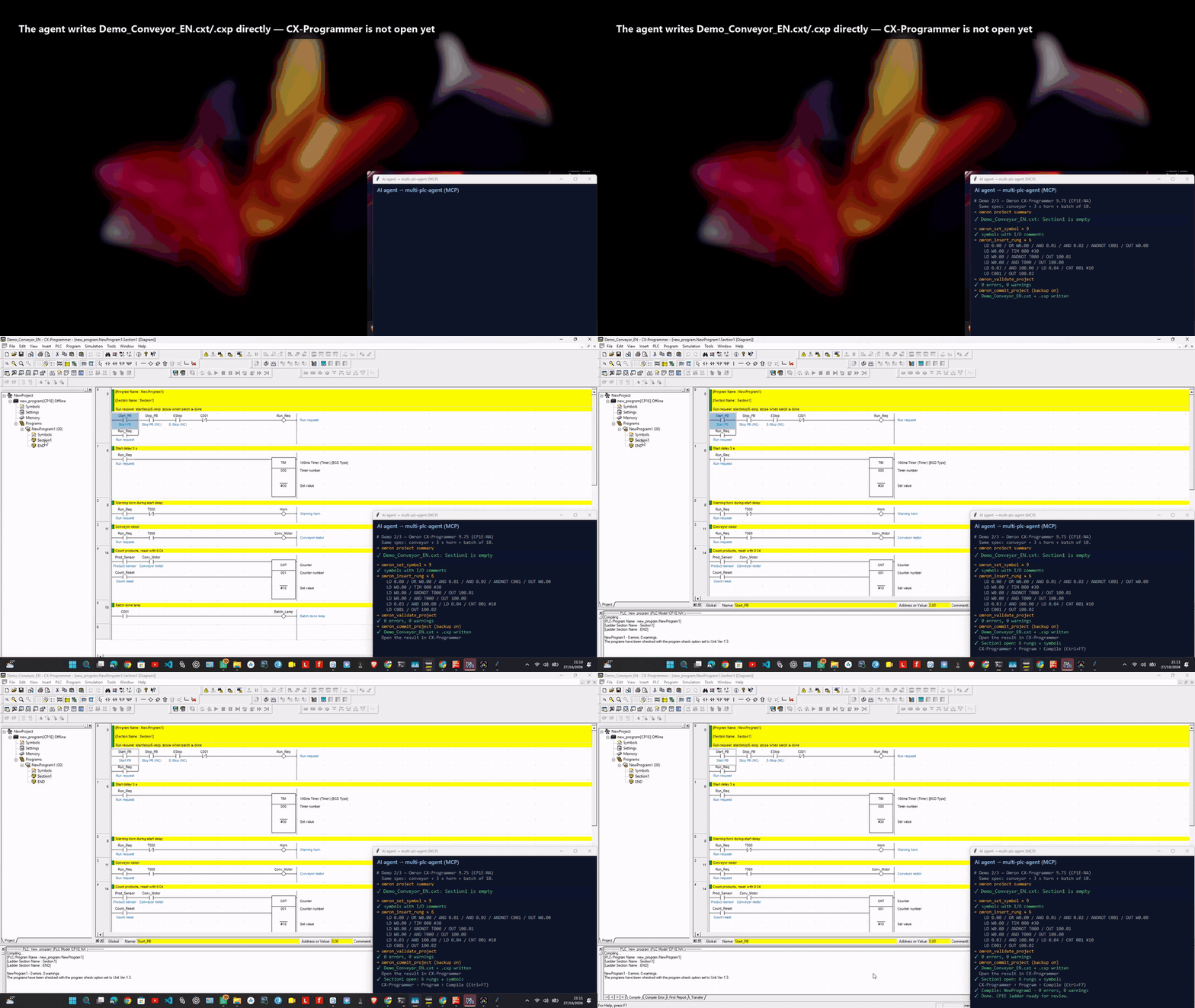
Omron CX-Programmer 9.75 (CP1E-NA)
The agent writes 6 rungs and 9 symbols directly to the .cxt/.cxp project, which is then opened in CX-Programmer. Compile reports 0 errors and 0 warnings. The desktop is blurred while the agent writes the file, because CX-Programmer is not open yet at that point.
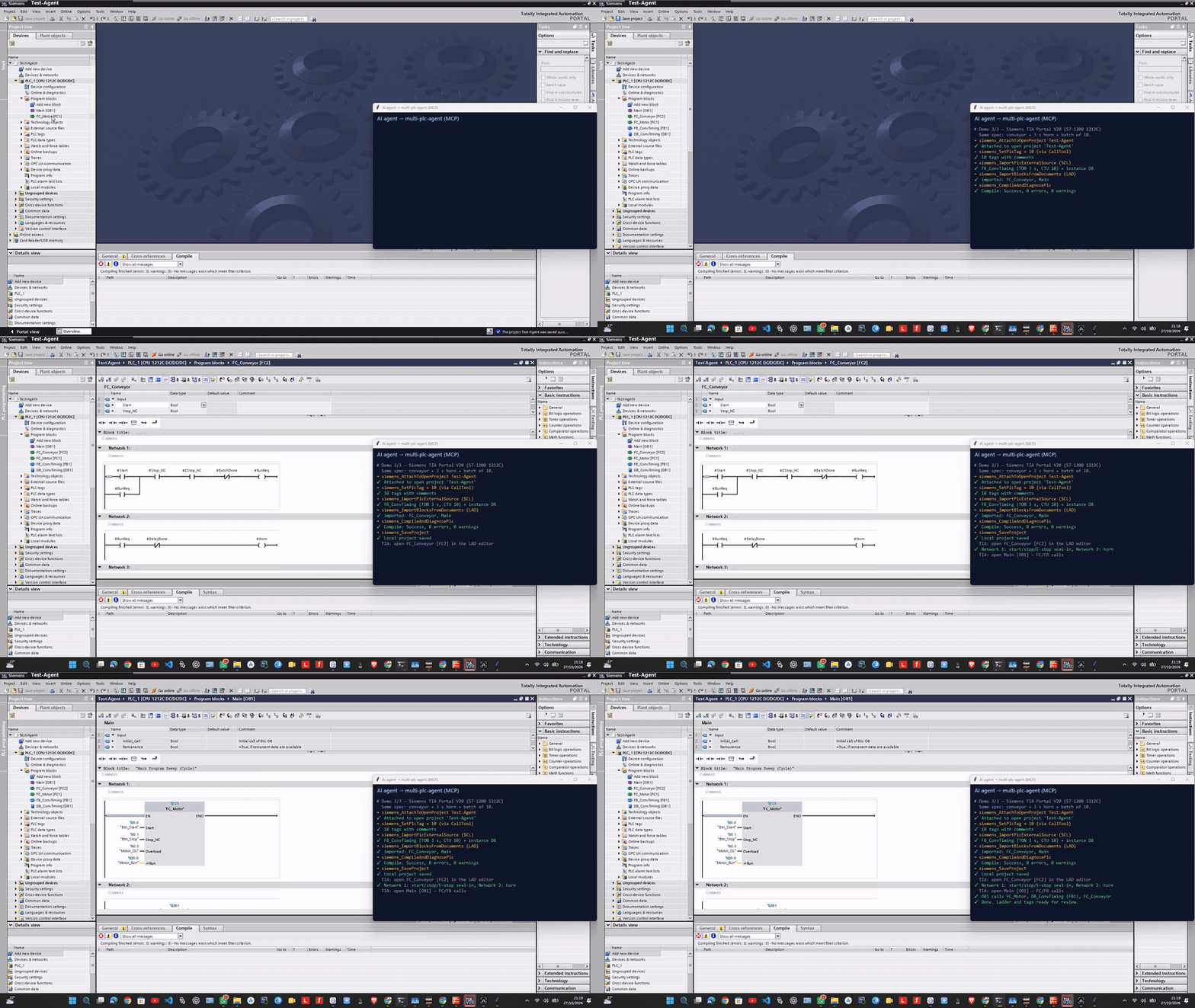
Siemens TIA Portal V20 (S7-1200 1212C)
The agent creates 10 tags, an SCL FB for the timer and counter, a LAD FC and OB1 calls, and compile reports 0 errors and 0 warnings. FC_Conveyor and OB1 are then opened in the editor.
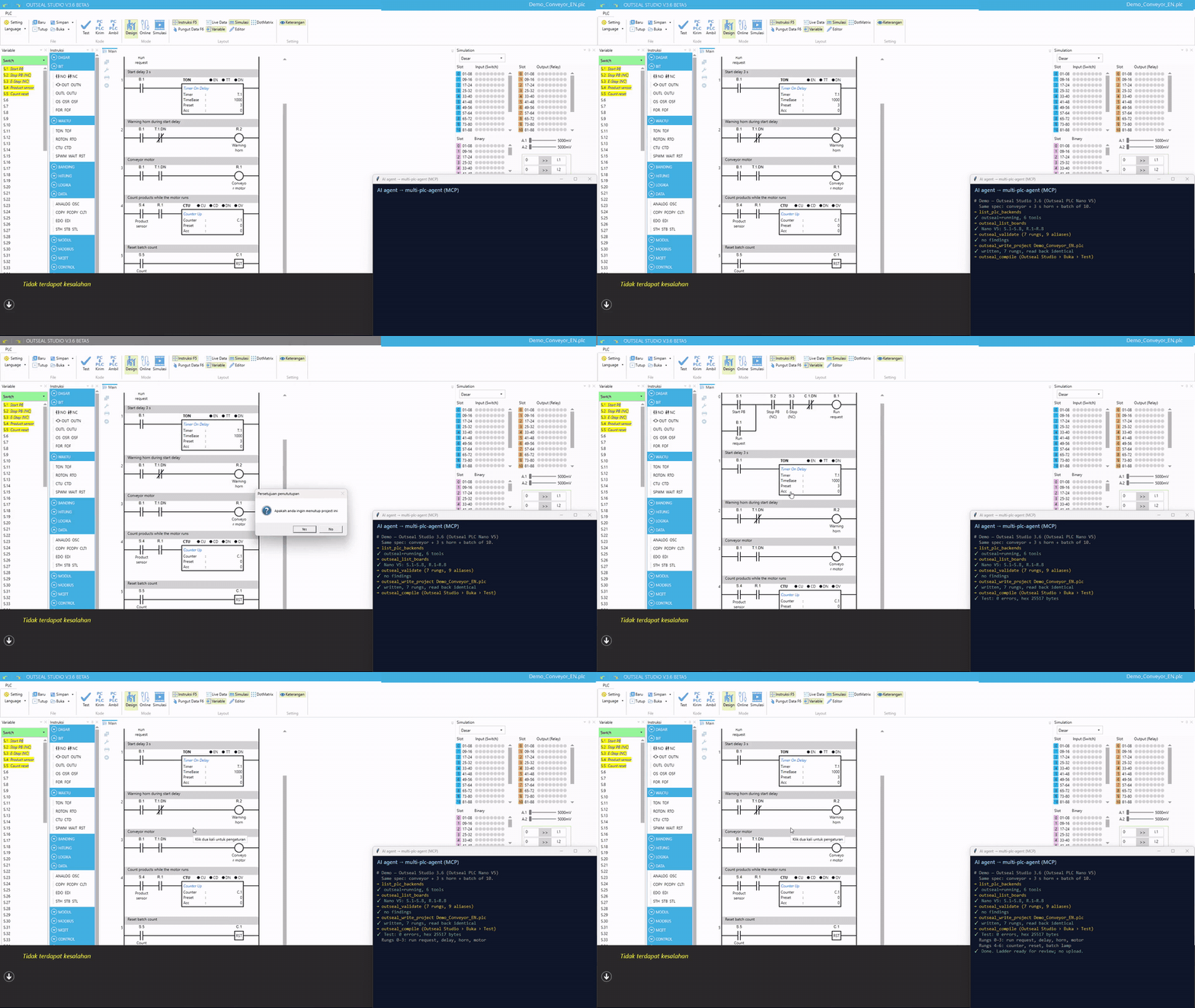
Outseal Studio 3.6 (Outseal PLC Nano V5)
The agent validates 7 rungs for the Nano V5 I/O range, writes the .plc file (read back identical), and Outseal Studio's Test reports 0 errors and builds the hex file.
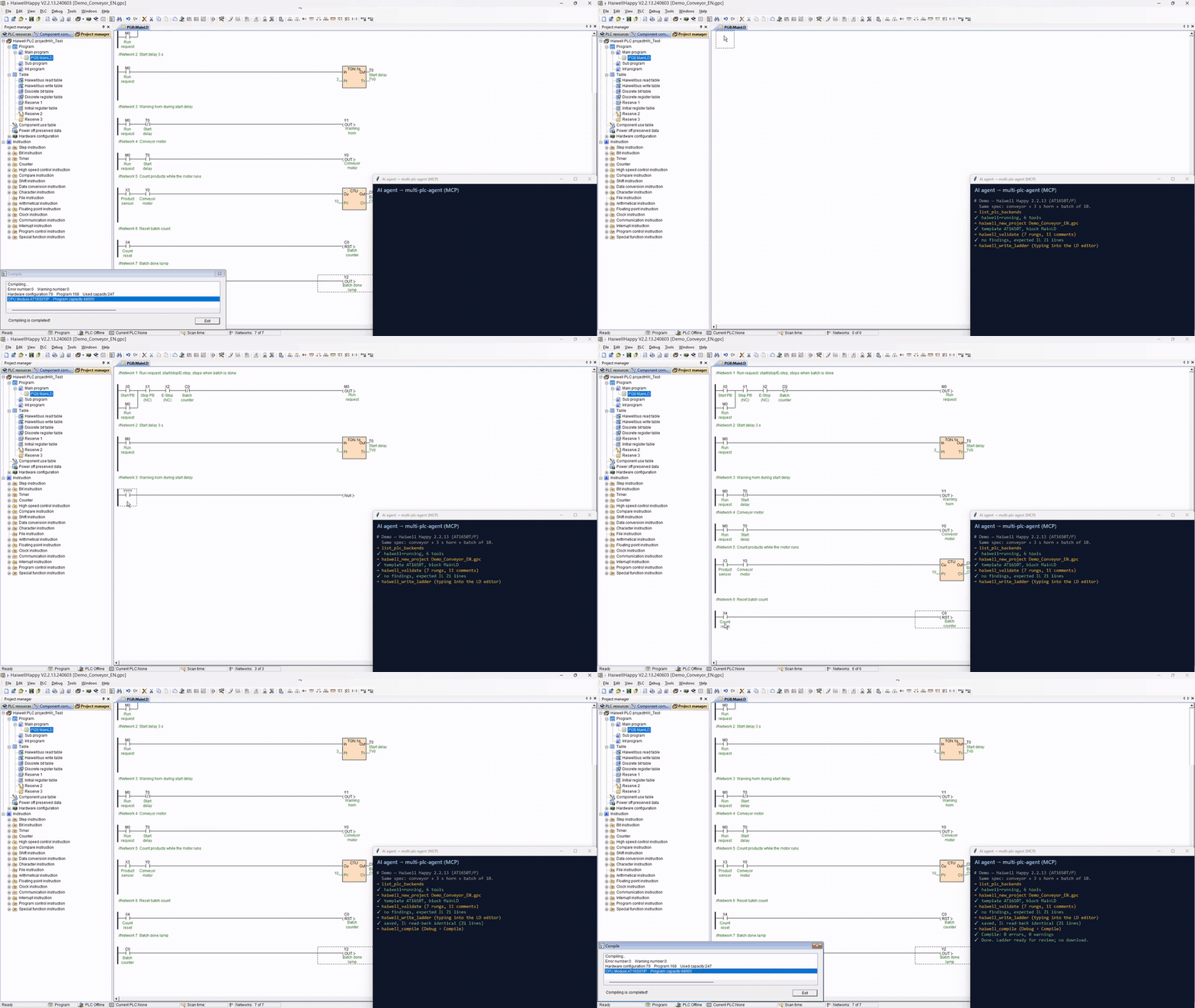
Haiwell Happy 2.2.13 (AT16S0T/P)
The agent types 7 rungs with network and component comments into the LD editor, saves, and the IL exported by Haiwell Happy matches the expected IL line for line. Compile reports 0 errors and 0 warnings.
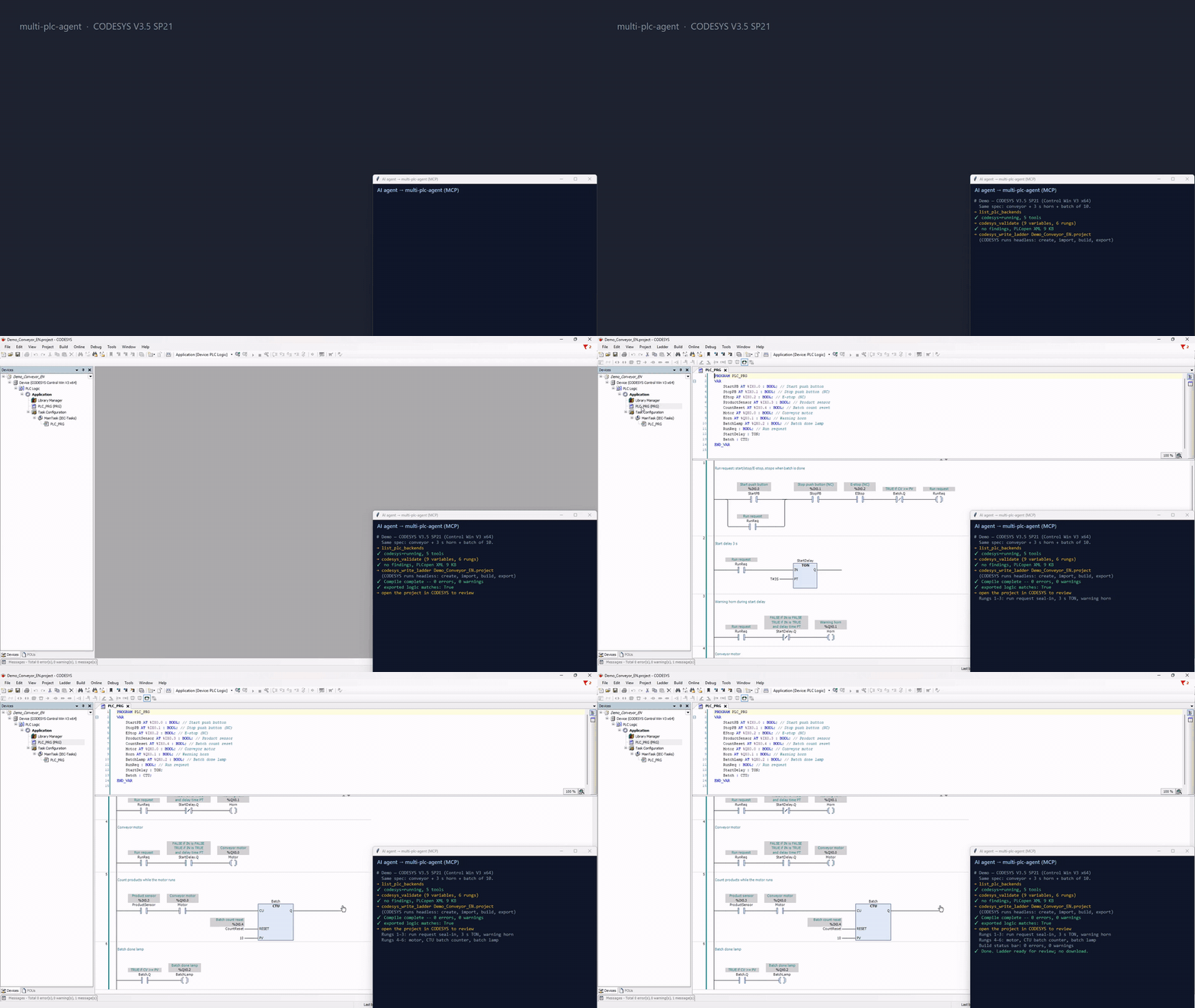
CODESYS V3.5 SP21 (CODESYS Control Win V3 x64)
CODESYS runs headless while the agent creates the project, imports the LD program as PLCopen XML and builds it: "Compile complete -- 0 errors, 0 warnings", and the exported logic matches the request. The project is then opened in CODESYS to review PLC_PRG. The headless build is shown at 4× speed.
Full-length MP4 videos (1080p) are kept on Google Drive, not on GitHub: see docs/media.md. The Sysmac, Schneider and Delta backends have been verified by tool output; recordings will follow.
Install (Windows)
Install each third-party backend you need by following its own README, then:
git clone https://github.com/Wayan123/multi-plc-agent.git
cd multi-plc-agent
py -3 -m pip install .
copy config.example.json config.json
The router has no dependencies outside the Python standard library (3.10+). The in-repo backends that drive a desktop program need a Windows Python with pywinauto and pywin32 (py -3 -m pip install pywinauto pywin32). The CODESYS backend needs no extra packages.
Edit config.json, or set the variables it refers to:
| Variable | Points to |
|---|---|
GXWORKS_AGENT_DIR |
gxworks-agent checkout with its .venv-mcp |
TIA_MCP_DIR |
extracted TIA_MCP_Delivery_v* folder |
CX_MCP_DIR |
Cx-Proggrammer-MCP checkout with its .venv |
CX_PROJECT |
the .cxt file the Omron CX-Programmer backend edits |
MULTIPLC_DIR |
this checkout (for the in-repo backends) |
GUI_PYTHON |
Windows python.exe with pywinauto and pywin32 |
Set "enabled": false on any backend you don't use. Check that every backend starts:
multi-plc-agent --config config.json --check
The command exits with 0 only when every enabled backend reports running.
Connect an MCP client
The router writes the entry for your client. One entry covers the IDE, CLI and desktop versions of each product: VS Code (GitHub Copilot), GitHub Copilot CLI, OpenAI Codex (CLI, IDE extension, desktop app), Cursor (IDE and CLI), Devin (Desktop and CLI), ZCode, Claude Desktop, Claude Code (CLI and IDE extensions), Google Antigravity (app, IDE and CLI) and Gemini CLI.
multi-plc-agent --config config.json --client list                        # which clients are installed
multi-plc-agent --config config.json --client all --client-write          # register in every installed client, keeps a .bak
multi-plc-agent --config config.json --client claude-code                 # print one entry only
multi-plc-agent --config config.json --client cursor --scope project --project C:\work\line1 --client-write
multi-plc-agent --config config.json --client status                      # where it is registered; exit 1 if an entry is stale
It sets a 15-minute tool timeout where the client supports one. docs/clients.md has every client's files, timeout and limits, explains why cloud agents can't be used, and describes the monthly check that the vendors' formats haven't changed. For any other client, adapt this entry:
{
  "mcpServers": {
    "multi-plc": {
      "command": "multi-plc-agent",
      "args": ["--config", "C:\\path\\to\\config.json"]
    }
  }
}
Ask the agent to call list_plc_backends first. It returns each backend's status, server identity, exposed tool count and the tools that were withheld.
What is not exposed
| Backend | Withheld by default | Why |
|---|---|---|
| Siemens | DownloadToPlc, GoOnline, SetWatchTableModifyValue, every Delete*, ClearExports, EnsureOpennessUserGroup, Doctor |
Live PLC writes, deletions, and a group change that runs through UAC |
| Siemens | The same names called through CallTool |
CallTool reaches tools that aren't listed, so the router checks the inner name |
| Omron CX-Programmer | delete_rung |
Deletion |
| In-repo backends | (nothing to withhold) | They have no tools that go online, download or upload |
To expose a withheld tool on one backend, add "allow": ["ToolName"] to it. To withhold more tools, use "deny".
Per-backend notes
- GX Works2. Native compile and live ST/FBD sessions still require 1.635.0.1. On 1.580, only Ladder CSV import and export are enabled. Save the project in GX Works2 yourself, because the tool won't save an unnamed project. The 1.580 support lives in the fork; upstream focuses on editing
.gxwfiles directly (Arienax/gxworks-agent#11). - TIA Portal. Add your Windows user to the
Siemens TIA Opennessgroup yourself and sign in again before the first start. Otherwise the server tries to do it through UAC and exits if that fails. TIA Portal asks for Openness access on every connect unless you choose "Yes to all". - CX-Programmer. The backend edits one project file, set by
--project. Close the project in CX-Programmer before the agent commits. If it was open, close it without saving and reopen it. The backend was written for CP1E. Its address and instruction checks do not cover CP1L, CP1H, CJ or CS. - Sysmac Studio. Started by the backend with
-elevate, which keeps Sysmac in the normal user session so UI Automation works (a plain launch restarts itself as Administrator, and then nothing can automate it). It writes into the open project, or creates an NX1P2 project if none is open. Read-back parses Sysmac's stored ladder listing, observed on 1.47. Map I/O to variables yourself. About 1 minute per write. - CODESYS. Runs CODESYS headless with your installed profile (
--profile, defaultCODESYS V3.5 SP21); no window appears. Creates a new.projectper write (an existing file is replaced only withoverwrite=true, keeping a.bak). Variables are named IEC variables, optionally with%IX/%QXaddresses. About 30 s per write. CODESYS 3.5 SP22+ also offers an official, licensed MCP Server add-on; this backend does not need it. - Machine Expert - Basic. Replaces all rungs of the first POU of a
.smbp. Only the TM221M16R template is bundled; for another M221 save an empty project from the tool and pass its path.compiletakes about 1 minute (2.5 minutes withto_ladder). - WPLSoft. Replaces the whole program of a
.dvpand adds device comments; rung (segment) comments are not written yet. Only the DVP-SS2 template is bundled. Menus are clicked by position inside WPLSoft's own window, so another version or UI language may need adjustment. - Outseal Studio.
outseal_write_projectwrites the file without the GUI;outseal_compileopens it in Outseal Studio and clicks Test. Addresses are checked against the board's I/O count. The backend never uploads to a board. - Haiwell Happy. There is no ladder import, so
haiwell_write_laddertypes into the editor. Don't use the keyboard or mouse while it runs (about 2 minutes for 7 rungs); it stops if another window takes focus. It replaces the first program block and keeps a.bakcopy. Supported: NO/NC contacts, parallel branches (first leg one contact, no nesting), one output per rung: OUT, SET, RST, TON (1 s base), CTU. Only the AT16S0T/P template is bundled; for other CPUs create the project in Haiwell Happy and pass its path.
Backends that drive a desktop program run one call at a time. Don't run two GUI backends at once on the same desktop.
Safety
Generated ladder logic is a draft. Review it and test it in a simulator (GX Simulator2, PLCSIM, CX-Simulator, CODESYS Control Win, the M221 simulator, Haiwell Happy's offline simulator) before it reaches equipment. Emergency stop, guarding, two-hand control and overload protection must be implemented by independent safety hardware, not by AI-generated logic.
Development
py -3 -m pip install pytest
py -3 -m pytest tests backends -q
The router tests start fake stdio backends. The backend tests check file formats, validation, code generation and read-back comparison. None of them need PLC software. Set OUTSEAL_SAMPLES to a folder of Outseal Studio .plc files to round-trip them too.
Contributing
New backends, verification on other versions and translations are welcome. Read CONTRIBUTING.md first: commits need a DCO sign-off (git commit -s), and vendor manuals, DLLs, sample projects and customer data must never be committed. Report security issues privately (SECURITY.md).
Support the project
multi-plc-agent is free and maintained by one developer in Indonesia. Each new backend needs time with the vendor software and real CPUs. If it saves you work, you can support it:
- Ko-fi: ko-fi.com/wayan123
- Star the repository and tell other automation engineers about it
- Report a run on a PLC, version or UI language that isn't verified yet
Contact: Wayan Dadang · [email protected] · wayan123.github.io · LinkedIn · X @wayandadang · Medium
License
Apache-2.0, see LICENSE. The GX Works2, TIA Portal and CX-Programmer backends are separate projects under their own licenses, see NOTICE; this repository does not include or redistribute their code. The backends in backends/ are part of this repository and under its license. The bundled templates are empty projects saved by a contributor, with vendor preset texts removed. Vendor product names are trademarks of their owners; this project is not affiliated with any vendor, and you need your own licensed installation of each tool.
Reviews (0)
Sign in to leave a review.
Leave a reviewNo results found