claude-usage-dashboard
Health Uyari
- No license — Repository has no license file
- Description — Repository has a description
- Active repo — Last push 0 days ago
- Community trust — 10 GitHub stars
Code Gecti
- Code scan — Scanned 2 files during light audit, no dangerous patterns found
Permissions Gecti
- Permissions — No dangerous permissions requested
This is a standalone terminal dashboard that displays real-time usage statistics and limits for Claude Pro/Max plans, automatically refreshing the display every 5 minutes.
Security Assessment
Overall risk is rated as Low. The script reads sensitive data locally by accessing the `~/.claude/.credentials.json` file to extract your authentication tokens. It does not execute local shell commands, and the light code audit found no hardcoded secrets or dangerous patterns. It does make outbound network requests, but strictly to the official Anthropic API endpoint (`api.anthropic.com`) to fetch your current utilization data.
Quality Assessment
The project is actively maintained, with its most recent push happening today. The codebase is lightweight (only 2 files scanned), uses zero external dependencies, and includes clear documentation and contribution guidelines. The tool currently has a modest community footprint with 10 GitHub stars. It is worth noting a discrepancy in the repository health check: while the automated scan flagged a missing license, the README explicitly states it is licensed under Creative Commons Attribution 4.0 International (CC BY 4.0). Finally, the author clearly discloses that the API endpoint queried is undocumented and may break in the future.
Verdict
Safe to use.
Real-time Claude Code usage monitor
claude-usage-dashboard
Real-time Claude Code usage monitor for the terminal (Pro/Max plans).
Prerequisites
- Python 3.11+
- Claude Code installed and authenticated (
~/.claude/.credentials.jsonmust exist)
Installation
No external dependencies. Clone the repository and run directly:
git clone https://github.com/wcruz-br/claude-usage-dashboard.git
cd claude-usage-dashboard
Usage
python claude_usage.py
The dashboard refreshes automatically every 5 minutes. Press Ctrl+C to exit.
Example output
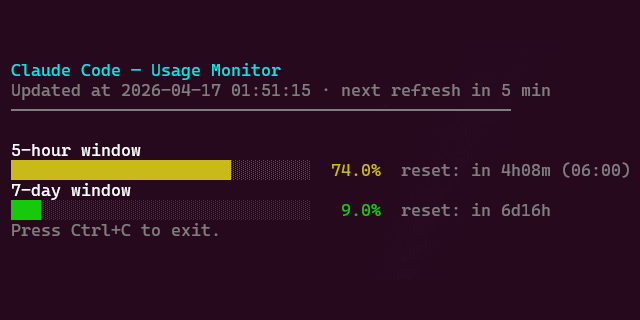
Bars change color based on utilization: green (< 60%), yellow (60–84%), red (≥ 85%).
Configuration
No environment variables. The only tunable constants are in the script itself:
| Constant | Default | Description |
|---|---|---|
REFRESH_INTERVAL_SECONDS |
300 |
Refresh interval (seconds) |
BAR_WIDTH |
30 |
Progress bar width (characters) |
Contributing
Linting
The project uses ruff for linting and formatting. ruff.toml contains project-specific rules.
ruff check --fix claude_usage.py
ruff format claude_usage.py
API endpoint
The script queries GET https://api.anthropic.com/api/oauth/usage with the header anthropic-beta: oauth-2025-04-20. Response shape:
{
  "five_hour": { "utilization": 4.0, "resets_at": "2026-04-16T17:45:00Z" },
  "seven_day":  { "utilization": 31.0, "resets_at": "2026-04-20T09:00:00Z" }
}
utilization is a raw percentage (e.g. 4.0 = 4%). Either field can be null. This endpoint is undocumented and may change without notice. If the script breaks, check whether ~/.claude/.credentials.json changed format or the endpoint was updated. Alternative: ccusage.
Submitting changes
- Fork the repository
- Create a feature branch (
git checkout -b feature/your-feature) - Commit your changes following Conventional Commits
- Open a pull request describing what changed and why
Author
Willian Cruz — [email protected] · github.com/wcruz-br
License
This project is licensed under Creative Commons Attribution 4.0 International (CC BY 4.0).
You are free to share and adapt the material for any purpose, provided appropriate credit is given.
Yorumlar (0)
Yorum birakmak icin giris yap.
Yorum birakSonuc bulunamadi