webmcpx
Health Uyari
- License — License: MIT
- Description — Repository has a description
- Active repo — Last push 0 days ago
- Low visibility — Only 5 GitHub stars
Code Gecti
- Code scan — Scanned 12 files during light audit, no dangerous patterns found
Permissions Gecti
- Permissions — No dangerous permissions requested
Bu listing icin henuz AI raporu yok.
Make your site agent-ready: one script tag gives every page WebMCP tools; one MCP server gives your agent WebMCP on every site. Linter, site scanner, and a public benchmark: up to 62× fewer tokens (best case).

Make your site agent-ready.
One script tag on your site, one line in your agent: AI agents call real tools on your pages instead of
reading and clicking their way through. In our benchmark, agents used up to 62× fewer tokens with
WebMCP (best case: a Notion docs question, GPT-6 Luna, 64.7k → 1.0k tokens;
every question, losses included).



Scan your site · Leaderboard ·
How verdicts work · llms.txt
🌐 English · 中文 · हिन्दी ·
Español · Français · বাংলা ·
Português · Русский ·
Bahasa Indonesia · Deutsch · 日本語
See it work
No browser flag, no setup: list a live site's WebMCP tools, then call one.
$ npx webmcpx tools developers.notion.com
Notion API quickstart https://developers.notion.com/guides/notion-api/quick-start

✓ 5 WebMCP tools registered by the site
  get_site_overview  read-only Get an outline of the Notion Docs documentation, grouped by section, wi…
  navigate_page                Navigate the current browser tab to a Notion Docs documentation page.
  read_page          read-only Read the full content of a Notion Docs documentation page as markdown.
  read_skill         read-only Read a Notion Docs agent skill document by name.
  search_docs        read-only Search the Notion Docs documentation for relevant pages and content.

+ standard tools webmcpx adds to every page
  get_page_context   read-only Describe the page the user is on: title, URL, language, meta descriptio…
  search_page        read-only Find passages on the current page that match a query. Returns up to `li…
  fetch_as_markdown  read-only Return the main content of the current page as Markdown. Long pages com…

$ npx webmcpx call developers.notion.com search_docs '{"query": "rich text limit"}'
## Example rich text text object with link
URL: https://developers.notion.com/reference/rich-text
Rich text object limits Refer to the request limits documentation page for information about limits on
the size of rich text objects.
…
That is what your agent gets: the answer from the site's own search, not a page to read and guess from.
(Recorded on 9 November 2026 with webmcpx 0.2.7; the site's tools are Notion's, and may change.)
Get started
| You want | Do this | |
|---|---|---|
| Your site | Agents call your pages instead of guessing at them | One script tag, below |
| Your agent | WebMCP on every site it opens, for fewer tokens | One MCP server, below |
Also: scan any site · lint your tools · write your own tools
For your site
Paste this before </body>:
<script type="module" src="https://cdn.jsdelivr.net/npm/[email protected]/dist/auto.js"></script>
Your page now registers search_page, fetch_as_markdown and get_page_context with
WebMCP (document.modelContext.registerTool()), so an agent
in the browser calls a function instead of guessing at buttons. Where the browser lacks WebMCP (Firefox,
Safari, Chrome without the flag), the script first adds the
W3C WebMCP polyfill, a separate ~5 KB file fetched only there.
Check it, localhost included: npx webmcpx tools localhost:3000. Then add your own tools,
and show it.
For your agent
Add the MCP server: it opens pages in a private, headless copy of your installed Chrome (or Chromium, Edge,
Brave) with the W3C polyfill loaded before the page, so the site's own tools work too, and every page gets
the standard ones.
claude mcp add webmcpx -- npx -y webmcpx mcp     # Claude Code
codex mcp add webmcpx -- npx -y webmcpx mcp      # Codex


In your OpenClaw config, under mcp.servers (docs):
mcp: { servers: { webmcpx: { command: "npx", args: ["-y", "webmcpx", "mcp"] } } }
In ~/.hermes/config.yaml (docs):
mcp_servers:
  webmcpx:
    command: "npx"
    args: ["-y", "webmcpx", "mcp"]
opencode mcp add webmcpx -- npx -y webmcpx mcp
(docs)
KiroIn .kiro/settings/mcp.json (this workspace) or ~/.kiro/settings/mcp.json (every workspace)
(docs):
{ "mcpServers": { "webmcpx": { "command": "npx", "args": ["-y", "webmcpx", "mcp"] } } }
A local (stdio) server: command npx, args -y webmcpx mcp.
Then try it on one task; paste this into your agent:
Try WebMCP on this task: set up webmcpx (read https://webmcpx.dev/llms.txt), open https://webmcpx.dev, list its WebMCP tools and call one. Use them before reading or clicking the page. If it works, ask me whether to add a rule to AGENTS.md (or CLAUDE.md) to use WebMCP first on every site.
Agents that drive their own browser (Playwright, Selenium, Puppeteer, browser-use, CDP; Chrome,
Firefox, Safari) call document.modelContext in the page, which every site with webmcpx has:
const mc = document.modelContext;
const tool = (await mc.getTools()).find((t) => t.name === "search_page");
const envelope = JSON.parse(JSON.parse(await mc.executeTool(tool, { query: "pricing" })));
(executeTool() resolves with JSON text, and webmcpx tools return their envelope as JSON text: parse
twice.) Tested in Chromium, Firefox and WebKit by site/tests/engines.spec.ts.
The ChatGPT desktop app and the Codex app also call WebMCP tools
natively; the prompt still applies, since they may drive another browser from a script.
Your own tools
The standard tools read the page. Your own tools act: add to cart, book a table, filter results. Same
contract (checked input, one result shape, no silent failures), in a few lines:
import { tool } from "webmcpx";

tool({
  name: "add_to_cart",
  description: "Add a product to the cart by SKU.",
  input: { sku: "string", "qty?": "integer" },
  acts: true,
  run: ({ sku, qty = 1 }) => cart.add(sku, qty),
});
No JavaScript? A form with toolname is a tool: the WebMCP
declarative API, which
the script tag adds where the browser doesn't have it yet. With toolautosubmit, your submit handler getsevent.agentInvoked and can answer with event.respondWith(...).
<form toolname="add_to_cart" tooldescription="Add a product to the cart by SKU." action="/cart" method="post" toolautosubmit>
  <input name="sku" required toolparamdescription="Product SKU, e.g. MUG-01">
  <input name="qty" type="number" min="1" toolparamdescription="How many (default 1)">
  <button>Add to cart</button>
</form>
In a component, useTool(...) from webmcpx/react (16.8+), webmcpx/vue (2.7+) or webmcpx/svelte (3+)
registers it while the component is mounted. Then see it, no browser flag: npx webmcpx tools localhost:3000.
Benchmark
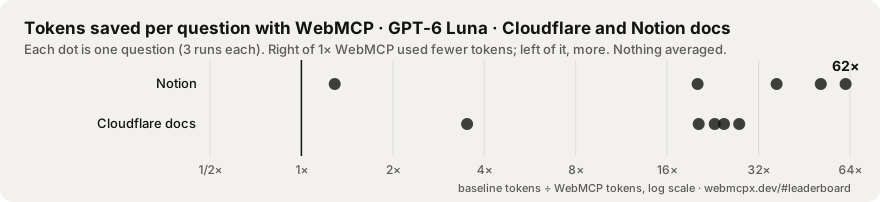
Same model, prompt and step limit; one arm is a competent DOM browser agent (reads the page in parts, opens
links and URLs, clicks and fills), the other only calls the WebMCP tools the page registers. 30 questions on 6
sites, 3 runs each per arm, six models, graded by facts in the answer, never by an LLM. Method, changes and
audits: bench/METHODOLOGY.md, bench/CHANGELOG.md,
bench/audits/. The chart shows the two public docs sites with GPT-6 Luna, the leaderboard's
best case (python3 scripts/bench-chart.py); every site, losses included, is in the table below.
Both arms solve almost every question; the WebMCP arm used 2.7× to 6× fewer tokens per run across the
six models (method v2). The best case on the leaderboard is 62× (GPT-6 Luna, a Notion docs question,
64.7k → 1.0k tokens).
Per site, never averaged (GPT-6.1 Sol; tokens per run on that site's best and worst question):
| Site | Best question | Worst question | Fully solved (of 5) |
|---|---|---|---|
| Cloudflare docs | 34.2k → 1.0k (34×) | 3.6× fewer | 5 → 5 |
| Notion | 19.1k → 1.1k (18×) | 4.3× fewer | 5 → 5 |
| Kiln & Co (demo store) | 13.5k → 2.2k (6.1×) | 2.1× fewer | 5 → 5 |
| specification.website | 20.2k → 3.7k (5.5×) | 2.4× fewer | 5 → 5 |
| Orbit docs (demo) | 2.9k → 1.0k (2.8×) | 1.5× fewer | 5 → 5 |
| WooCommerce demo | 3.8k → 3.2k (1.2×) | 2× more | 5 → 5 |
Not every case wins: the WooCommerce demo store's tools return more than a page snapshot, so WebMCP used
more tokens on some of its questions. Tokens, not time: the benchmark measures what the agent reads and
writes. The published runs were made from a working tree with uncommitted changes (each results file says
so); the next run will come from a clean commit.
Every question, both arms, every model.
What's inside
| Loader · npm | The script above: standard tools with one result shape, output budgets and paging, correct annotations, invisible characters stripped; the W3C polyfill where the browser lacks WebMCP. About 2.7 KB on load. |
Agent bridge · npx webmcpx mcp |
An MCP server for Claude Code, Codex, Cursor and others: it opens pages in a local Chromium and hands the agent their WebMCP tools as typed tools. Also npx webmcpx tools <url> and call to check yours. |
| Linter · crates.io | webmcpx lint checks your own registerTool() calls. It catches the silent failures: too many tools, the removed provideContext, the legacy navigator.modelContext, hidden characters. |
| Scanner | Paste a URL: which tools a site registers, what the linter thinks, what an agent would read instead, and an agent-ready score. Shareable result, README badge. |
| Benchmark | The same agent and question, with and without WebMCP, on live sites. Deterministic grading, losses included. |
Show you're agent-ready
Scan your site at webmcpx.dev. Agent-ready means a score of 70 or more with WebMCP
tools and no lint errors (how verdicts work). Then put the badge in your
README; it shows your site's latest scan (within a week, or "scan" until there is one) and links to a live
re-scan:
[](https://webmcpx.dev/scan/yoursite.com)
If webmcpx saved your agent some tokens, a ⭐ helps others find it.
FAQ
Is WebMCP the same as MCP? No. WebMCP borrows MCP's tool model, but it is a browser API: the tools live
in the page and run in the user's tab. The webmcpx MCP server connects the two, so an MCP client can call a
page's WebMCP tools.
Polyfill or bridge? The polyfill (the W3C one, loaded by the script tag where the browser lacks WebMCP)
makes document.modelContext exist in any browser. The bridge (npx webmcpx mcp) is for agents: it opens
pages in its own Chromium and exposes their tools over MCP.
Standard tools or my own? The script tag gives every page three read-only tools (search, read as
Markdown, page context). Actions specific to your site, such as adding to a cart, are tools you write
(above); webmcpx checks their input and shape.
Do I need a browser flag? No. Chrome's native WebMCP is behind a flag today; the script tag and the
bridge use the W3C polyfill wherever it is missing.
Is WebMCP a standard? Not yet: a W3C Community Group draft (2 November 2026). webmcpx tracks it and is
pre-1.0.
Safety and data
- The bridge (
npx webmcpx mcp,tools,call) starts your installed Chrome, Chromium, Edge or Brave,
headless, with a fresh temporary profile (deleted on exit), so it has none of your cookies or logins
unless you attach it to your own browser with--cdp. webmcpx has no telemetry, and that browser starts
with background networking off: it talks to the pages you open. - Tools that change something are marked: webmcpx passes a tool's
consequentialHintto MCP clients asdestructiveHint, so your client can ask you first. - The scanner at webmcpx.dev logs each scan's address and result, never who ran it, and the site sets no
cookies. See SECURITY.md to report a vulnerability.
More ways in
npx -y webmcpx mcp                     # MCP server: your agent calls the tools of any page
npx webmcpx tools localhost:3000       # list a page's WebMCP tools, no browser flag
npx webmcpx call localhost:3000 search_page '{"query": "pricing"}'
npm i webmcpx                          # import { register } from "webmcpx"; await register();
npx skills add webmcpx/webmcpx -y      # teach your coding agent to add and check WebMCP tools
npx webmcpx lint src/                  # the linter (no Rust needed; or cargo install webmcpx); --format json
Or paste this into your coding agent: Add WebMCP to this site with webmcpx: runnpx skills add webmcpx/webmcpx -y, follow the skill, then check the tools withnpx webmcpx tools <local URL>.
Got a scan result you disagree with? Open an issue.
That's the most useful feedback there is.
Community
CONTRIBUTING.md · Security · Code of Conduct ·
Self-hosting the site and scanner · For agents: llms.txt
MIT; the name and logos follow the trademark policy. An independent project, not
affiliated with or endorsed by W3C, Google, Microsoft, OpenAI, Anthropic or the Model Context Protocol
project.
Yorumlar (0)
Yorum birakmak icin giris yap.
Yorum birakSonuc bulunamadi