process-forge
Health Uyari
- License — License: Apache-2.0
- Description — Repository has a description
- Active repo — Last push 0 days ago
- Low visibility — Only 5 GitHub stars
Code Gecti
- Code scan — Scanned 12 files during light audit, no dangerous patterns found
Permissions Gecti
- Permissions — No dangerous permissions requested
Bu listing icin henuz AI raporu yok.
File-first process system for governed repeatable AI-workflows
ProcessForge
A platform-neutral, AI-provider-neutral framework for creating and running AI-assisted processes.






Russian documentation: README.ru.md
ProcessForge is a file-first framework for creating, versioning, and executing
AI-assisted processes. It is independent of concrete implementation platforms
and AI providers: domains, toolchains, knowledge packages, templates, runtime
drivers, and platform contracts are attached through versionable files instead
of being hardcoded into the core.
This README is written for people. AI agents should use the command runbook in
docs/getting-started/agent-prompts.md,
which is limited to commands and mechanics implemented in the current codebase.
Why Use It
ProcessForge turns repeatable AI work into explicit process assets:
- formal process definitions with stages, roles, artifacts, gates,
capabilities, tools, hooks, and handoff rules; - project-local
.pf/state for assignments, runs, tasks, iterations,
artifacts, reviews, logs, handoffs, snapshots, and private runtime data; - formalized knowledge through knowledge packages, resource indexes, source
metadata, load policies, and update policies; - reusable templates, tool registrations, MCP registrations, runtime drivers,
and platform contracts that compose project context without core hardcode; - cascade-based context resolution from workplace and project resources into
locked snapshots, assignment capsules, resolved rules, and parameters; - versioned files, checksums, release manifests, archive validation, and update
checks from declared sources.
The result is a workflow system that a human can inspect in Git and an AI agent
can execute without relying on a hidden SaaS backend, one specific model, or one
specific product platform.
Two Work Modes
Garage Mode (1-1-1-1)
Use this for normal work: one human operator, one primary agent session, one
project, and one active process/run. The primary agent performs the work, runs
checks, writes artifacts, and finishes with a summary or handoff.
Garage mode does not require PF Runtime, Codex hooks, or a manually created
Ledger session.
Forge / Factory Mode
Use this when work must be split into independent branches. An orchestrator can
create bounded assignments and capsules, launch or coordinate worker sessions,
collect their outputs, and integrate the result through handoffs and reviews.
Runtime, host telemetry, and worker orchestration are opt-in infrastructure for
this mode.
Quick Start
Check Your Environment
Use Python 3.11+ and install the dependencies from requirements.txt in the
Python environment your agent will use. See requirements
for Python modules, local storage, optional integrations and app-server memory
planning. The installation guide walks
through setup and verification.
Place ProcessForge
Download the ZIP and its adjacent manifest from the
latest published release,
then unpack the ZIP into a stable folder that your AI agents can access, for example
a shared agent tools folder. Use that folder as <processforge-root> in the
prompts below. Use the asset names shown on the release page; keep the manifest
outside the ZIP for verification and updates.
If you work from a source checkout, use the repository root as<processforge-root>. Local release builds write the archive todist/processforge.zip; that build output is not included inside the archive.
Start With An Agent Prompt
For guided setup, copy this into your AI agent:
Initialize ProcessForge in step-by-step mode. It is located at
<processforge-root>.
For automatic setup, use this only when you already know the target paths and
want the agent to inspect existing instructions and resources first:
Initialize ProcessForge in fully automatic mode. It is located at
<processforge-root>. First inspect the current AGENTS.md and setup skills.
After the workplace is ready, connect a project:
Connect this project to my existing ProcessForge workplace.

Inspect the project first, choose a conservative project type, create the
project-local .pf state and root AGENTS.md, read that entry contract, inspect the current
context through ProcessForge, and summarize what ProcessForge now knows about
the project.

Keep global resources in the workplace. Do not copy heavy documentation,
source mirrors, toolchains, or the ProcessForge repository into this project.
Inside an onboarded project, start from root AGENTS.md (explicit .pf/AGENTS.md fallback in an unmigrated project). The normal path is pf.context, optionalpf.search/pf.resolve, then pf.work.start; use its returned identities withpf.work.state and pf.work.transition until run_completed. Runtime and host
integration are operator concerns. See entry compatibility.
More starter prompts are in QUICKSTART.md.
Operating Model
What ProcessForge Is
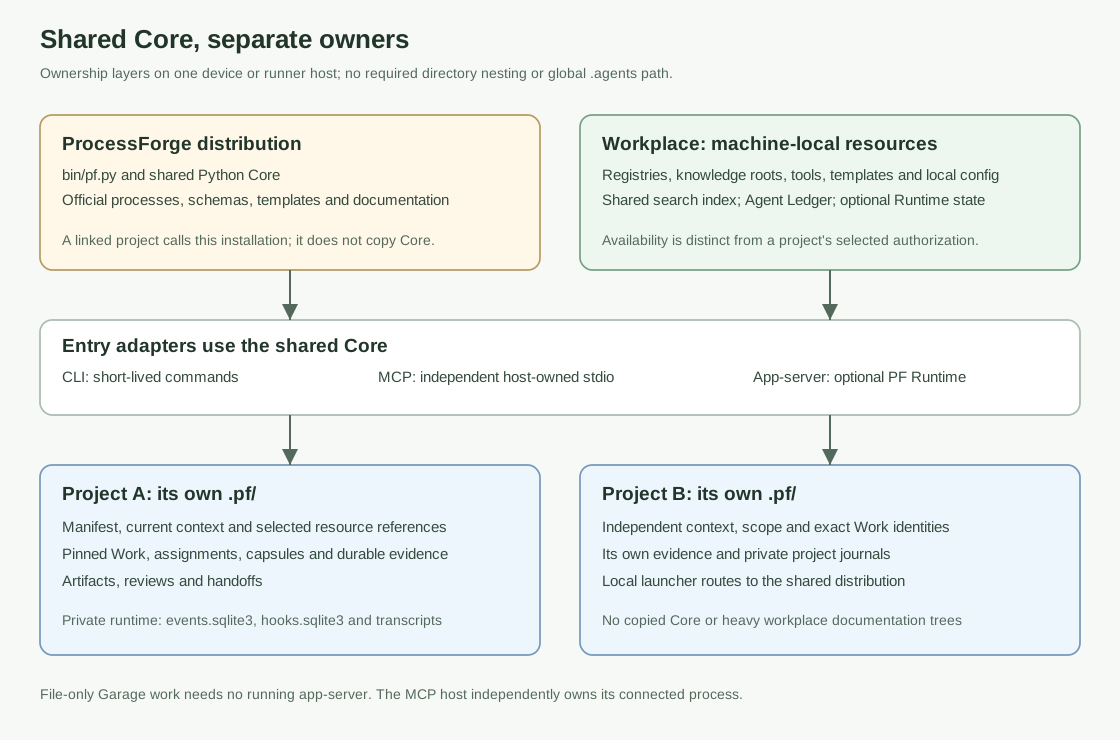
A workplace is a physical or virtual machine where humans and AI agents work:
a desktop, laptop, server, or runner host. ProcessForge is installed once as a
tool for that workplace.
The workplace stores global machine-level resources: process definitions,
knowledge packages, reusable templates, tool registrations, MCP registrations,
platform contracts, roots, registries, cache, runtime events, and logs.
Each project keeps its own .pf/ layer. The project layer stores project
context, selected global resources, assignments, runs, tasks, iterations,
artifacts, reviews, handoffs, hooks, and private runtime files.
Project context has a lock-file model. .pf/process-forge.yaml declarescontext_requirements; project-context-refresh resolves them into.pf/contexts/project-context.snapshot.yaml plus immutable generations under.pf/contexts/project-context.snapshots/. project-context-check reportsfresh, fresh_with_updates, stale, or broken; assignment capsules pin a
snapshot id/checksum and are not rewritten by later refreshes.
How The Layers Relate
Use ProcessForge from the outside in:
- ProcessForge tool root: the installed CLI, built-in processes, schemas,
checks, docs, and prompt templates. - Workplace: machine-level state and reusable resources shared by projects.
- Workplace resources: knowledge roots/packages, reusable templates, tools,
MCP providers, package roots, process definitions, and platform contracts. - Project
.pf/: project context, selected resources, assignments, runs,
tasks, iterations, artifacts, reviews, handoffs, and hooks.
The project layer depends on the workplace layer. It should not contain copied
ProcessForge source code, heavy documentation mirrors, shared toolchains, or
global resource payloads.
Initialization Order
Use this order for a new workplace:
- Install the ProcessForge distribution.
- Verify the ProcessForge distribution.
- Run guided workplace setup by default for a human-led first setup.
- Configure path constants and roots.
- Configure knowledge roots, especially local documentation roots.
- Register tools and MCP servers.
- Create or import knowledge packages.
- Create reusable templates.
- Create platform contracts from the resources above.
- Onboard projects into the workplace.
- Create run/task workflows for real work.
- Create custom processes when the built-in mechanics are not enough.
Do not start with a platform contract if its required packages, templates,
tools, MCP servers, processes, coding standards, or capabilities do not exist
yet. Create or register the dependencies first, then compose the platform.
Use workplace-setup as the default setup path when an AI agent configures a
new machine for a human. The agent should ask questions in blocks, writeanswers.yaml, produce proposal.md, ask for approval, apply the workplace,
run doctor-workplace, and only then move to resource authoring or project
onboarding.
The launch directory is not a ProcessForge role. During machine setup the agent
must use explicit paths for the installed ProcessForge distribution, the
workplace root, optional global agent/instruction roots, and real project roots.
Folders named .codex, .claude, .agents, or any custom agent root can be
knowledge or instruction sources; they do not become projects unless the
operator explicitly targets them with project-onboard.
Use first-run, workplace-init, and direct create/register commands as the
fully automatic path only when the operator explicitly requests automation and
provides the required paths and answers.
Work Modes In Detail
Garage Mode (1-1-1-1)
The atomic execution unit is 1-1-1-1: one human operator, one primary agent
session, one project, and one active process/run. In the default single-agent
flow the primary agent performs the work, runs CLI checks, writes artifacts,
and checks out; Worker and Inspector are phases/checks of the same session, not
separate participants. Agent Ledger is CLI/files, not a separate agent.
Basic prompt:
Initialize this project with ProcessForge, connect the required tools and
knowledge, and use it for <what we are doing>. Fill all required artifacts.
Start a work session:
Use ProcessForge for this work.

Read root AGENTS.md (or .pf/AGENTS.md in an unmigrated project), verify current
context with pf.context. For new work, use pf.work.start with an explicit
authorized scope_intent. To continue existing work, discover continuations,
select exact Run, assignment and context identities, then pf.continuation.resume.
Never infer the target from an objective or the newest assignment.
Use the returned Run, assignment and capsule identities; inspect pf.work.state,
record evidence through pf.work.transition, and continue until run_completed.
Handle process_choice_required using the returned choices. Keep artifacts and
handoffs within the assignment scope.
Forge / Factory Mode
A workplace can be Director-capable while individual projects remain simple.
Project coordination mode resolves as simple, organized, or inherit from
the workplace default. Use organized only for projects that should use the
workplace Director Office; simple projects keep the normal 1-1-1-1 flow.
Director and Supervisor/Execution Inspector are only needed for multi-agent,
process-transition, or external runtime-worker scenarios. See
docs/concepts/agent-session-model.md.
For shell-agent plans, orchestrator-shell-plan-apply --model <model> passes
one selected model to every shell worker in the applied plan. Reasoning effort
is selected separately in the plan (runtime.reasoning_effort or workerreasoning_effort) or on worker-run prepare/start with --reasoning-effort.
Core Building Blocks
Process definitions describe process mechanics. They are configurable YAML
constructors with any number of stages, roles, artifacts, gates, capabilities,
allowed tools, and hooks. They do not need to name an implementation platform.
Platform contracts are composition entities for a concrete project context. A
platform may be single or composed as parent plus child. The contract connects
the required and recommended stack of knowledge packages, templates, tools, MCP
providers, capabilities, processes, coding standards, project type hints, and
policy data. ProcessForge core resolves these contracts from manifests; it does
not hardcode any real product, CMS, framework, marketplace, or business domain.
Supported Wizards And Creation Commands
ProcessForge currently supports file-first creation flows for:
- workplace initialization:
workplace-init/init-workplace - guided workplace setup:
workplace-setup start,workplace-setup review,workplace-setup apply, andworkplace-setup status - project onboarding:
project-onboard/init-project - coordination modes:
workplace-mode status,workplace-mode set,project-mode status,project-mode set,director-inbox-submit,director-case-refresh, anderror-route - first run bootstrap:
first-run - process authoring:
process-authoring-start,process-authoring-review,process-authoring-apply, and one-commandprocess-create - knowledge packages:
knowledge-package-create,knowledge-add-url,knowledge-add-resource,knowledge-index-refresh,knowledge-package-doctor - reusable templates:
template-create,template-add,template-doctor - platform contracts:
platform-create,platform-contract-install,platform-contract-doctor - tools and MCP providers:
tool-register,mcp-register - runs, tasks, and iterations:
run-create,task-create,iteration-add,
completion, summary, and doctor commands - multi-agent orchestration:
orchestrator-plan create,orchestrator-plan validate,orchestrator-plan apply,orchestrator-plan status, andworker-launch-prompt create - agent ledger and handoffs:
agent-register,agent-checkin,agent-availability,agent-lease-grant,process-route-list,handoff-create,handoff-status, andagent-director-tick - primary agent sessions:
session-start,session-heartbeat,session-status, andsession-end - orchestrator shell agents:
orchestrator-shell-plan-create,orchestrator-shell-plan-validate, andorchestrator-shell-plan-apply - runtime drivers and worker execution:
runtime-driver list,runtime-driver validate,worker-run prepare,worker-run start,worker-run status,worker-run collect,supervisor tick,supervisor run, and the semantic aliasesexecution-inspector-tickandexecution-inspector-run
supervisor is the historical technical command name for the Process
Execution Inspector. It checks assigned worker runtime state; it is not the
Agent Director. The responsibility boundary is documented in
docs/concepts/director-ledger-inspector-boundary.md.
The --interactive flag is accepted by first-run initialization commands for
UX compatibility, but the current implementation is file-first and does not
require terminal prompting.
Documentation Map
For humans:
- Quickstart prompts
- Installation and requirements
- Guided workplace setup
- Initialization order
- Workplace vs project
- Resource authoring
- Project onboarding
- Built-in process stages
For AI agents:
- Agent command runbook
- Workplace initialization agent prompt
- Guided workplace setup agent prompt
- Project onboarding agent prompt
- Release checklist
Detailed index:
- Documentation index
- Installation and requirements
- Initialization order
- Agent command runbook
- Built-in process stages
- Context resolution
- Cascade merge
- Workplace vs project
- Runtime model
- Runtime drivers
- Agent session model
- Project coordination modes
- Process supervisor
- Agent ledger
- Process transitions
- Handoff contracts
- Agent Director
- Shell agent subagent policy
- Platform contracts
- Platform inheritance
- Knowledge resource navigation
- Update sites
- Update lifecycle
- Update system quick start
- Runs, tasks, and iterations
- Authoring parity
- Known limitations
Requirements
Runtime requirements:
- Python 3.11+ is recommended.
- Python 3.10+ is allowed only when the current test suite confirms compatibility.
- Python package dependencies from
requirements.txt, currentlyPyYAML. - Use a UTF-8 capable filesystem.
- The user or agent needs read/write access to the ProcessForge distribution,
workplace, and project folders. - Runtime usage does not require PowerShell.
- ProcessForge does not require a daemon or background process in file-only mode.
- Runtime drivers are opt-in. The default
manualdriver writes launch state
and does not start a process.
Development and release-check requirements:
- Python 3.11+.
- Python package dependencies from
requirements.txt. - Git for source installation and release checks such as
git diff --check. - Ability to run subprocesses and create temporary directories.
- ZIP support from the Python standard library.
- Update tests are deterministic and use local-file fixtures; public
release checks do not require real network access.
Optional integrations include MCP servers, external tools, browser checks, and
version-control workflows. Runtime usage from a release archive does not require
Git unless the user wants version-control integration.
Using ProcessForge With Agent Environments
Do not copy the whole ProcessForge repository into .codex, .claude,.agents, or similar agent configuration folders.
Install ProcessForge once as a tool, initialize a workplace, and add a short
instruction to the agent configuration telling it where ProcessForge is
installed. Project entry uses root AGENTS.md (explicit .pf/AGENTS.md fallback in an unmigrated project). A configuration pointer alone does not prove that the client loaded it.
License
ProcessForge is licensed under the Apache License, Version 2.0. See
LICENSE and NOTICE.
Yorumlar (0)
Yorum birakmak icin giris yap.
Yorum birakSonuc bulunamadi