aweshare
Health Uyari
- License — License: NOASSERTION
- No description — Repository has no description
- Active repo — Last push 0 days ago
- Low visibility — Only 5 GitHub stars
Code Basarisiz
- Hardcoded secret — Potential hardcoded credential in resources/template/producer.config.toml
Permissions Gecti
- Permissions — No dangerous permissions requested
Bu listing icin henuz AI raporu yok.
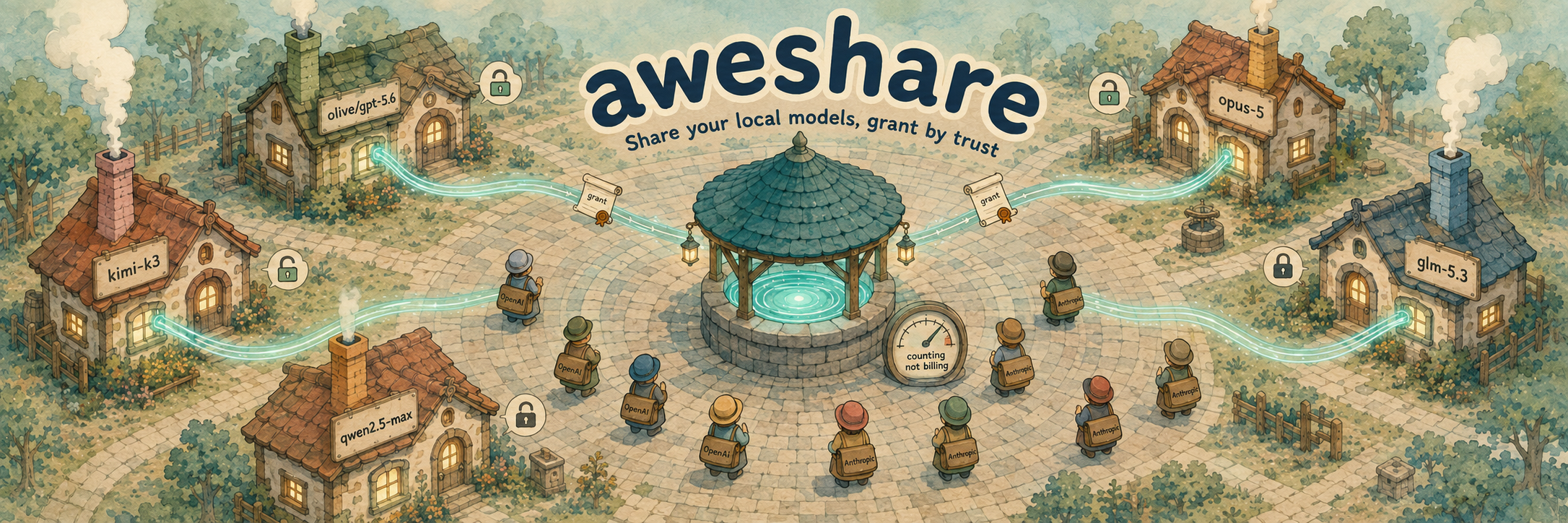
aweshare: Local-first AI Capability Relay
An open-source, local-first AI capability relay: share your idle local models and token subscriptions, or use what others share — a sharing economy for tokens.
Share local Ollama/vLLM or authorized OpenAI/Anthropic backends through a self-hosted hub, consumed with standard SDKs via namespace/alias.
Upstream API keys never leave the producer's device.












Producers run a lightweight agent on their own machine and share local Ollama/vLLM or authorized OpenAI/Anthropic backends. Upstream API keys live only on the producer's device and are injected by the local agent at forwarding time. Consumers point a standard OpenAI/Anthropic SDK at the hub and call models by
namespace/alias— exactly like using any other model vendor.
Consumer (standard SDK, zero changes)         Producer side
┌───────────────────────┐            ┌────────────────────────────┐
│ Claude Code           │            │ aweshare producer (Node CLI)   │
│  ANTHROPIC_BASE_URL ──┼──► HTTPS ──┤  ~/.aweshare/config.toml   │
│ OpenAI SDK / Codex    │            │  ~/.aweshare/secrets.json  │
└───────────────────────┘            │   │ upstream key injection  │
           │ /v1/messages            │   ▼ (the only place it happens)
           │ /v1/chat/completions    │  Ollama / vLLM / OpenAI / Anthropic
           ▼                         │
┌─────────────────────────────┐      │
│ aweshare hub (public, 1 node)│◄───── WSS reverse tunnel (agent dials out)
│ auth / route / meter         │      no public IP, no port forwarding needed
└─────────────────────────────┘
- Invite-only trust: admission runs through one-time invite codes the operator mints; every admitted consumer may call every offering. No payments, no marketplace.
- Namespaced aliases:
peng/gpt-4ois globally unique with one owner — routing is a deterministic lookup. - v1 relays native transparent SSE for OpenAI↔OpenAI (chat completions and Responses), Anthropic↔Anthropic. No cross-protocol conversion, no smart routing, no web console.
Trust boundary (read this first)
- To route and meter, consumer prompts and model responses transit the hub in plaintext — this is not end-to-end encryption. The hub persists no request/response content, but the hub operator can technically see it. Only use a hub instance you trust — which is why the hub is open source and self-hostable.
- Upstream API keys never leave the producer's device and are never sent to consumers. Tokens are stored twice on purpose: a peppered SHA-256 hash drives authentication, and the plaintext is kept so the operator can hand a lost one back (
hub invite --list --token). Invite codes work the same way — their plaintext is re-viewable withhub invite --list --reveal. A DB leak therefore exposes every identity, so guard the data dir. - Token revocation is reversible suspension (
hub revoke --id N/hub restore --id N, by invite), and an invite and the producer it minted move together: revoking a redeemed code suspends that producer (and closes its tunnel), and restoring from either handle revives both. Nothing is deleted on revoke — offerings and usage history survive a suspension.
Compliance and disclaimer
- aweshare is relay software: it cannot and does not judge whether you are allowed to share a given upstream key or subscription — that question is between you and the upstream provider. Being able to call an API yourself does not mean you may resell or re-provide it to third parties.
- Before sharing anything, read the upstream's terms (account rules, subscription and seat limits, forwarding, commercial-use clauses). Sharing a personal-subscription key — coding plans included — with third parties likely violates those terms; self-hosted open models have no such issue. When in doubt, don't share.
- Sharing a CLI login (
login = "codex") raises the stakes further: the credential is account-wide — it unlocks every subscription under that login, not one scoped key — so relaying it to third parties carries a higher risk of account suspension or termination than sharing an API key.aweshare producer doctorrepeats this warning; the decision and its consequences sit with the producer. - The producer bears the consequences of sharing (key revocation, account suspension or termination by the upstream). The hub operator is responsible for operating the hub lawfully and for informing consumers of the plaintext-transit boundary above.
- The software is provided "as is" under the proprietary license — free to use and self-host, no redistribution — without warranty of any kind. The authors and contributors are not liable for how aweshare is used or for any damage arising from sharing access through it.
Quickstart
Published as aweshare on npm (requires Node ≥ 22) and as a Docker image (ghcr.io/wehuman01/aweshare). No clone needed.
Let an AI agent set it up
Working in Claude Code, Codex, or another coding agent? Tell it:
Read https://github.com/wehuman01/aweshare/blob/main/README.ai.md and follow it to install and configure aweshare.
The agent installs the CLI and the skill, asks whether you are a hub operator, producer, or consumer, and does everything that is safe to automate — editing configs, minting invites, running producer doctor. Steps that print one-time tokens (hub init, consumer join) or start long-running services (hub serve, producer start) stay in your terminal. After setup you can ask things like "share my local Ollama model as peng/qwen2.5.7b", "why is my producer offline?", or "who used my models this week?".
Manual setup
1. Start the hub (operator, one VPS)
npm (simplest):
npm install -g aweshare
aweshare hub init        # data in ~/.aweshare-hub; prints the admin token — save it
aweshare hub serve       # listens on :8787 (put Caddy/nginx TLS in front)
The hub can also host models itself — no producer machine needed. Add [[backends]]/[[offerings]] sections to ~/.aweshare-hub/config.produce.toml (same format as a producer's config, alias namespace hub/…), put the upstream keys in ~/.aweshare-hub/secrets.json, and run:
aweshare hub produce # serve + the hub's own models; consumers dial hub/<name> like any offering
docker:
docker run -d --name aweshare-hub --restart unless-stopped \
  -p 127.0.0.1:8787:8787 -v "$PWD/data:/data" ghcr.io/wehuman01/aweshare:latest
docker exec aweshare-hub aweshare hub init   # first run: prints the admin token, save it
Then bring people in. Producers join on their own — invite codes (asi_…, single use). Two modes:
# bound: lock the code to a specific name ("inviting that user")
aweshare hub invite --name peng [--expires-in 7d]      # → asi_..., send to the producer

# unbound: batch hand-out; the producer submits name + email at redeem (stored on the hub)
aweshare hub invite --count 10 [--expires-in 7d]

# the producer redeems it themselves (no token hand-off needed):
aweshare producer join --hub https://hub.example.com --code asi_... [--name NAME --email [email protected]]
Consumers join the same way — a consumer code redeems into an asc_ key the consumer keeps:
aweshare hub invite --role consumer --name alice [--expires-in 7d]   # → asi_..., send to the consumer

# the consumer redeems it themselves (prints the asc_ token once, with the SDK
# env vars ready to paste — save the token, it will not be shown again):
aweshare consumer join --hub https://hub.example.com --code asi_...

# no aweshare installed? one curl works too:
# curl -s -X POST https://hub.example.com/invites/v1/redeem \
#   -H 'content-type: application/json' -d '{"code":"asi_..."}'
Three token roles, one per party:
| Role | Who holds it | How it's used |
|---|---|---|
admin |
hub operator (you only) | the admin REST API (/admin/v1/*); CLI side: hub invite (mint; --list for the ledger) / status / revoke / restore |
producer (asp_...) |
the agent on the producer's machine | set as token in ~/.aweshare/config.toml; the agent registers its offerings with it |
consumer (asc_...) |
whoever calls the models | set in SDK env vars (ANTHROPIC_AUTH_TOKEN / OPENAI_API_KEY); it identifies the consumer for metering, limits and suspension |
The producer's name becomes their alias namespace (the peng/ in peng/gpt-4o).
The operator owns admission: one-time invite codes for both roles, the only admission path (every identity carries its invite handle for its whole lifecycle). A redeemed consumer key may call every offering on the hub — if you let someone in, they can use what is shared. Guardrails: per-consumer hub limits (rate, concurrency, token budgets), per-offering caps (maxConcurrentUsers, dailyTokens) and hub revoke suspension, all enforced by the hub.
2. Producer first run (in this order)
npm install -g aweshare   # ⓪ once, on the producer machine (Node ≥ 22)

# ① join with your invite code (writes ~/.aweshare/config.toml + secrets.json, 0600)
aweshare producer join --hub https://hub.example.com --code asi_...
#    or, with a producer token handed to you directly:
aweshare producer init --hub https://hub.example.com --token asp_...

# ② Edit the config (see below); put upstream keys in secrets.json — they never leave this machine

# ③ doctor: pre-flight checks, ordered to find the first failing link
aweshare producer doctor

# ④ Start (long-running; when it stops, aliases go offline and consumers get 503)
aweshare producer start            # foreground; add --background to detach it
#    detached runs are checked with 'aweshare producer doctor --status'
#    and stopped with 'aweshare producer stop'
3. Consumer first run (in this order)
# ⓪ redeem your invite code (skip if the operator handed you an asc_ key directly)
#    prints the token once with ready-to-paste env vars — save it, it will not be shown again
aweshare consumer join --hub https://hub.example.com --code asi_...

# ① one small curl to prove the path
curl https://hub.example.com/v1/chat/completions \
  -H "Authorization: Bearer asc_..." -H "content-type: application/json" \
  -d '{"model":"peng/qwen2.5.7b","messages":[{"role":"user","content":"ping"}]}'

# ② configure your tool (below) → run one minimal task
# ③ check usage: GET /admin/v1/usage with your consumer key (you only see your own rows)
# ④ only then move to real workloads
Consumer tool configuration
OpenAI SDK / any OpenAI-compatible tool
const client = new OpenAI({ baseURL: 'https://hub.example.com/v1', apiKey: 'asc_...' })
await client.chat.completions.create({ model: 'peng/gpt-4o', messages: [...] })
Claude Code (the key is the asc_ consumer key — not any upstream x-api-key)
export ANTHROPIC_BASE_URL=https://hub.example.com
export ANTHROPIC_API_KEY=asc_...
claude --model peng/sonnet
If Claude Code has a stale OAuth login it overrides env config — switch with /login or clean stored credentials.
Codex (the default Responses wire protocol works — the alias must be backed by a responses-protocol offering; wire_api = "chat" against an openai-protocol offering also works)
[model_providers.aweshare]
base_url = "https://hub.example.com/v1"
Discovering models: GET /v1/models (OpenAI SDK client.models.list()) returns every alias registered on the hub, with online status.
Producer config reference (~/.aweshare/config.toml)
hubUrl = "https://hub.example.com"
token = "asp_..."

[[backends]]
id = "ollama"
protocol = "openai"                      # openai-style baseUrl includes /v1 (SDK convention)
baseUrl = "http://127.0.0.1:11434/v1"

[[backends]]
id = "anthropic-main"
protocol = "anthropic"                   # anthropic-style baseUrl excludes /v1 (agent adds it)
baseUrl = "https://api.anthropic.com"
keyRef = "anthropic-key"                 # key lives in secrets.json under this name

[[backends]]
id = "glm-responses"
protocol = "responses"                   # responses-style baseUrl includes the version path
baseUrl = "https://open.bigmodel.cn/api/v1"
keyRef = "glm-key"                       # e.g. a GLM coding-plan key (Codex-ready)

[[backends]]
id = "codex-account"
protocol = "responses"
baseUrl = "https://chatgpt.com/backend-api/codex"
login = "codex"                          # account auth instead of a key; exclusive with keyRef

[[offerings]]
alias = "peng/qwen2.5.7b"                # namespace must be your producer name
backend = "ollama"
upstreamModel = "qwen2.5:7b"             # the real backend id (full tag from `ollama list`)
maxConcurrencyPerUser = 1                # concurrent requests per consumer on this alias
# maxConcurrentUsers = 3                 # distinct concurrent consumers (hub default 3)
# dailyTokens = 1000000                  # shared tokens per UTC day (default 1M; 0 = unlimited)
One offering exposes exactly one upstream model: consumers call the alias and the hub rewrites the request's model to upstreamModel before dispatch — they can never pick another model. To share more models, add more [[offerings]].
One alias can also speak several wire protocols at once: replace backend = "…" with a list — backends = ["a", "b"] — and the block registers one offering per backend. Registrations are keyed by alias + protocol, so the listed backends must use distinct protocols (the hub rejects a duplicate); no conversion ever happens — each registration relays on its own wire. Consumers call the same alias with whichever SDK they prefer, and producer list / consumer list merge the rows into one.
Per-offering usage caps ride along in the same block; the optional two are enforced by the hub (defaults apply when unset, including for agents that predate them):
| Key | Default | Meaning | Enforcement |
|---|---|---|---|
maxConcurrencyPerUser |
1 | concurrent requests per consumer on this alias | 429 PRODUCER_MAX_CONCURRENCY |
maxConcurrentUsers |
3 | distinct consumers with a request in flight on this alias | 429 PRODUCER_MAX_USERS |
dailyTokens |
1000000 | tokens (prompt + completion) shared across all consumers on this alias, per UTC day; 0 = unlimited |
429 QUOTA_EXCEEDED (resets at UTC midnight) |
maxConcurrencyPerUser caps each consumer's in-flight requests; maxConcurrentUsers caps in-flight people — a consumer firing 5 parallel requests needs maxConcurrencyPerUser ≥ 5 for itself alone, while the total on the alias is bounded by maxConcurrentUsers × maxConcurrencyPerUser. Daily caps count recorded usage (see "Honest limits" below). (Renamed in v0.4.3 from maxConcurrency, which capped the alias's total in-flight requests.)
Key hygiene: use dedicated, least-privilege, revocable keys with budget alerts; keep secrets.json at 0600 and out of git/screenshots; rotate on suspected leaks. Before sharing, check the upstream's terms: account rules, subscription limits, forwarding and commercial-use constraints.
Account-login backends (login = "codex") authenticate with the producer machine's own codex login instead of a key — the fixed official upstream is https://chatgpt.com/backend-api/codex, responses wire. Other protocols or base URLs are rejected so the account credential cannot be sent elsewhere. How it behaves:
- The login is read from
${CODEX_HOME|~/.codex}/auth.json, stays in producer memory only, and is re-read whenever the file changes or a request comes back 401 — so a freshcodex loginon the producer machine is picked up without a restart. No secrets.json entry exists for it. - The producer injects the headers the Codex CLI itself sends and forces
store: falseon every request (the chatgpt backend requires it; consumer tools don't always send it). - Consumers must speak
/v1/responses: Codex CLI (defaultwire_api), opencode (via@ai-sdk/openai), Cline (OpenAI Native provider). Chat-completions tools and Claude Code cannot use these offerings. - Tokens are never refreshed by aweshare: when the login expires the offering degrades (2 consecutive 401s → 503
BACKEND_DEGRADED) and recovers on its own once you re-runcodex login— the 30s recovery probe re-reads the file. - Sharing a subscription login is higher-risk than sharing an API key — see the compliance section above: the credential is account-wide, and the producer bears suspension of the whole account.
Consumer limits (hub-wide defaults + per-consumer overrides)
Every consumer gets the hub-wide defaults (AWESHARE_CONSUMER_RPS / BURST / CONCURRENCY, see Operations). On top of that, the hub admin can set sparse per-consumer overrides — only the keys you set take effect, everything else keeps the defaults:
aweshare hub limits alice --tpm 60000 --max-total-tokens 5000000  # set (merges into stored)
aweshare hub limits alice                                        # view current overrides
aweshare hub limits alice --clear                                # back to hub-wide defaults

# the same knobs over the admin REST API (PUT / DELETE the same path):
curl -X PUT https://hub.example.com/admin/v1/consumers/alice/limits \
  -H "Authorization: Bearer asa_... (the admin token)" -H "content-type: application/json" \
  -d '{"tpm":60000,"maxTotalTokens":5000000}'
| Key | Meaning | Enforcement |
|---|---|---|
rps / burst / maxConcurrent |
override the hub-wide rate/inflight defaults for this consumer | 429 RATE_LIMITED |
tpm |
max tokens (prompt + completion) in any sliding 60s window | 429 RATE_LIMITED (in-memory window, like the RPS bucket) |
maxTotalTokens |
lifetime token budget for this consumer | 429 QUOTA_EXCEEDED (sums usage_events) |
Honest limits: token-based caps count what upstreams report — Ollama streams report no usage, so they contribute 0. Both TPM and the lifetime budget are observed-usage thresholds, not hard reservations: one request can cross the threshold, and concurrent requests that start before earlier usage is recorded can overshoot it further. Once recorded usage has reached the threshold, new requests are rejected.
Endpoints and errors
| Endpoint | Purpose |
|---|---|
POST /v1/chat/completions · POST /v1/messages · POST /v1/responses |
inference (Bearer or x-api-key) |
GET /v1/models |
every alias registered on the hub, with status |
GET /v1/catalog |
every offering on the hub — producer, alias, protocol, status, the per-offering caps, live in-flight occupancy (activeUsers/activeRequests) and today's used/remaining tokens (discovery view for aweshare consumer list) |
GET /healthz |
liveness |
GET /admin/v1/offerings |
registered offerings with live status, caps, in-flight occupancy and today's used tokens — admin sees everything, a producer token only its own slice (aweshare producer list) |
/admin/v1/* |
token/limit/usage management (admin or producer token) · usage: GET /admin/v1/usage (newest-first log) and GET /admin/v1/usage/summary (group=consumer-alias|consumer|alias, since=30m|12h|7d|all, default 7d, consumer/producer/alias filters; every role sees its own slice) · consumer limit overrides: GET/PUT/DELETE /admin/v1/consumers/{name}/limits (admin only) |
Error semantics: 401 invalid key · 401 TOKEN_REVOKED suspended token (ask the operator to restore it) · 403 HUB_FULL producer capacity reached · 404 unknown alias · 400 PROTOCOL_MISMATCH protocol/alias mismatch · 429 rate limit, TPM or producer concurrency cap (PRODUCER_MAX_USERS = distinct-consumer cap; QUOTA_EXCEEDED = lifetime or daily token budget hit) · 502 upstream/tunnel failure (upstream 4xx/5xx passes through verbatim) · 503 producer offline / backend degraded · 504 timeout. Errors carry {error:{code,message,requestId}}; the requestId spans both sides' logs.
Usage metering: one row per request (alias, real model, status, duration, byte counts, best-effort token counts), zero content stored. aweshare hub usage (and aweshare producer usage on a producer's machine, scoped to its own models) answers "who used how much" by default: server-side aggregation on the hub's SQLite, one row per consumer × model — a person's rows stay together, busiest person and busiest model first — with request/error counts, best-effort token totals, an explicit unknown-token count (streaming backends that report no counts) and mean duration. The window defaults to 7 days and is printed with the table (--since 30m\|12h\|7d\|…\|all); --group-by consumer rolls up to per-person totals, --group-by alias to per-model totals. --details switches to the per-request log (GET /admin/v1/usage; admin sees everything, producers and consumers their own slice, rows carry the consumer/producer names).
Command reference
Both sides at a glance — details in the sections above.
Hub (operator) — needs the admin token from aweshare hub init; for a hub on another server, run these on the server or set AWESHARE_HUB_URL:
| Command | Purpose |
|---|---|
aweshare hub init |
create data dir + admin token (printed once) |
aweshare hub serve [--host H] [--port N] |
run the hub |
aweshare hub produce [--host H] [--port N] |
run the hub with its own models attached — same as serve; the [[backends]]/[[offerings]] sections of config.produce.toml become hub/… offerings served in-process (keys in the data dir's secrets.json; edits hot-reload) |
aweshare hub invite [--role producer|consumer] [--name NAME] [--count N] [--expires-in D|none] |
mint one-time invite codes (asi_…, printed once, expire after 7 d by default; re-view with invite --list --reveal); --expires-in also bounds the lifetime of the token it mints — an expired key fails auth with 401 TOKEN_EXPIRED (none = code and identity never expire; identities minted before this change never expire); producer codes: bound (--name) or unbound (name + email at redeem, --count batches); consumer codes: always bound to one name |
aweshare hub invite --list [--reveal] [--token] [--json] |
the invite ledger: every code, the identity it minted and its lifecycle (pending/used/suspended/revoked/expired; a redeemed code shows expired once its identity's expiry passes); --reveal re-shows the codes, --token the minted tokens with last seen |
aweshare hub status |
the hub's live state: producer slots, the producer and consumer rosters (status, ONLINE live-tunnel state, last seen), offerings counted per deduplicated alias (several protocols → one verdict, the worst), a per-alias table — the same columns as consumer list and producer list, worst status first — with live occupancy (IN USE n/max) and today's remaining daily tokens, and a last-5m requests/ok-rate/errors line from the usage summary (hub-admission 429s are not metered) |
aweshare hub limits NAME [--rps N] [--burst N] [--max-concurrent N] [--tpm N] [--max-total-tokens N] [--clear] [--json] |
show, merge or clear one consumer's limit overrides (unset keys keep the hub-wide defaults) |
aweshare hub usage [--details] [--consumer NAME] [--producer NAME] [--alias ns/model] [--group-by consumer-alias|consumer|alias] [--since 7d|all] [--limit N] [--json] |
who used how much (default): aggregate per consumer × model, a person's rows together, busiest first — requests, errors, rate, best-effort token totals, unknown-token count, mean duration; window defaults to 7d and is printed with the table · --details: per-request log, newest first, zero content stored, each row naming its consumer |
aweshare hub revoke --id N · aweshare hub restore --id N |
kill an invite / undo — a redeemed code suspends the producer it minted, restore revives both |
Token issuance runs through invites (both roles). limits and usage are thin wrappers over the admin REST API (/admin/v1/*, see Endpoints and errors) — curl works too.
invite --list, status and the usage views print aligned tables by default; append --json (where documented) for the raw API response.
Producer — runs on the producer's machine (the one with the backends):
| Command | Purpose |
|---|---|
aweshare producer init [--hub URL] [--token asp_…] |
write config templates into ~/.aweshare |
aweshare producer join --hub URL --code asi_… [--name NAME --email [email protected]] |
redeem an invite code into a producer token and write it into the config (--name/--email for unbound codes; probes the hub first — plain HTTP outside the LAN needs --allow-http) |
aweshare producer config path · config show · config edit |
locate / inspect (secrets redacted) / edit the config |
aweshare producer doctor [--status] |
diagnose end to end: background instance, config, backend probes, hub (including how many of your offerings are registered), recent log (--status skips the network probes for an instant answer) |
aweshare producer list [--json] |
what this producer has registered on the hub — alias, protocol, live status, caps, live occupancy (IN USE, distinct consumers in flight right now), today's token use — plus the local background instance state and drift against config.toml (hubUrl/token come from config.toml) |
aweshare producer usage [--details] [--consumer NAME] [--alias ns/model] [--group-by consumer-alias|consumer|alias] [--since 7d|all] [--limit N] [--json] |
who used this producer's models (the producer token scopes the hub's metering to its own slice): aggregate per consumer × model by default — a person's rows together, busiest first, window defaults to 7d · --details: per-request log, newest first, each row naming its consumer |
aweshare producer start [--background] |
connect and relay (long-running; --background detaches it — logs to ~/.aweshare/producer.log, pid to producer.pid) |
aweshare producer reload |
signal the background producer (SIGHUP) to re-read config.toml + secrets.json and re-register its offerings on the open tunnel — no disconnect; a broken config keeps the previous values |
aweshare producer stop |
stop the background producer (SIGTERM, SIGKILL after 10s) and clean up its pidfile |
Consumer — two commands, on the consumer's machine; day-to-day they point a standard SDK at the hub (see Consumer tool configuration):
| Command | Purpose |
|---|---|
aweshare consumer join --hub URL --code asi_… [--allow-http] |
redeem a consumer invite into an asc_ token — printed once with ready-to-paste SDK env vars (save it; the operator can re-view it with hub invite --list --token) |
aweshare consumer list --hub URL --token asc_… [--all] [--json] |
discovery view of the hub: online offerings by default (degraded stay listed; --all includes offline) — every producer, alias, protocol, status, the per-offering caps, live occupancy (IN USE n/max — distinct consumers with a request in flight right now; an alias at max/max admits no new consumer until one settles) and remaining daily tokens |
CLI maintenance: aweshare self-update [--check] updates the npm-installed CLI (--check only compares versions).
Operations
No always-on box to share from, or looking for models others share? The project's developer runs a community hub at https://aweshare.wehuman.top (invite-based — request a code at [email protected]); docs/community-hub/ is a step-by-step guide for connecting as a producer or consumer (中文版).
The hub reads config.toml from its data dir (~/.aweshare-hub/config.toml; Docker: /data/config.toml). aweshare hub init writes the template with every key commented out — uncomment to override a default. Keys use the same names as below, camelCase (consumerRps, headTimeoutMs, …). Precedence: serve flags (--host/--port) > env vars > config.toml > defaults. A broken file (invalid TOML, unknown key, non-positive value) fails fast at startup with the key named; AWESHARE_HUB_DATA_DIR itself stays env-only (it locates the file).
Hot reload: every tunable in the table except host/port applies live on SIGHUP (kill -HUP <pid>; Docker: docker kill -s HUP aweshare-hub) — the new file is validated first, and a broken edit is logged while the previous values keep serving. Env vars are fixed at process start, so keys pinned by AWESHARE_* ignore the reloaded file (same precedence as startup); host/port need a restart. Producer-side offerings and caps reload via aweshare producer reload.
Hub-hosted models (hub produce): config.produce.toml carries [[backends]] and [[offerings]] sections (producer format; alias namespace hub/… — bare names are auto-prefixed) with upstream keys in secrets.json next to it (chmod 600). config.toml remains exclusively for Hub runtime settings. Those offerings appear in the catalog under producer hub and are served by the hub process directly — no tunnel, and they never count against AWESHARE_MAX_PRODUCERS. Caps (maxConcurrencyPerUser, maxConcurrentUsers, dailyTokens), usage metering and consumer limits apply exactly as for remote producers. The built-in hub producer is not an identity (no token, no invite, cannot be revoked); it appears in the hub status producers roster — status built-in — only while it carries offerings. Catalog and key edits hot-reload like the tunables; a broken catalog keeps the previous one and is logged.
| Env var | Default | Purpose |
|---|---|---|
AWESHARE_HUB_DATA_DIR |
~/.aweshare-hub |
data dir (SQLite/pepper/admin token/config.toml; volume-mount = backup) |
AWESHARE_HUB_PORT / HOST |
8787 / 0.0.0.0 | listen address |
AWESHARE_CONSUMER_RPS / BURST / CONCURRENCY |
10 / 20 / 8 | per-consumer limits |
AWESHARE_HEAD_TIMEOUT_MS / IDLE_TIMEOUT_MS |
120000 / 300000 | response-head timeout / stream idle timeout |
AWESHARE_MAX_BODY_BYTES |
32MB | request body cap |
AWESHARE_INVITE_REDEEM_PER_MIN |
10 | redeem entry global insurance budget (valid-format attempts shared by every origin) |
AWESHARE_INVITE_REDEEM_PER_IP_MIN |
5 | redeem entry per-origin-IP bucket (CF-Connecting-IP behind a tunnel/proxy) — one visitor cannot monopolize admission; both keys reload via SIGHUP |
AWESHARE_MAX_PRODUCERS |
10 | max active producers — token issuance (admin API), invite redeem and restore refuse with 403 HUB_FULL when full |
AWESHARE_NO_UPDATE_CHECK |
unset | set to 1 to disable the passive update reminder |
Health: agent heartbeats every 15s, silent 45s = dead; backends with 2 consecutive AUTH/QUOTA failures auto-degrade (alias shows degraded, dispatch stops), 30s probes recover. A new connection with the same producer token replaces the old one (latest-wins).
Updating a npm install: aweshare self-update (asks before installing; --check only shows versions). The CLI also reminds you at most once a day when a newer npm release exists.
Updating a Docker deployment: docker compose pull && docker compose up -d. State lives in the ./data volume; producers redial automatically after the restart, and consumers see 503 only during the brief restart window.
Known limitations (v1)
- No cross-protocol conversion: an alias speaks exactly one wire (openai chat, anthropic messages, or openai responses).
- Account-login backends never refresh tokens: an expired codex login degrades the offering until someone runs
codex loginagain on the producer machine (recovery is automatic once the file changes). - Ollama streams carry no usage → token counts recorded as NULL (best effort by design).
- Single hub instance + SQLite; no horizontal scaling.
- Corporate proxies may block the WebSocket tunnel (environmental limit).
Development
pnpm install
pnpm test        # 197 tests: protocol / hub contract (fake agent vs real hub) / agent unit / e2e (real SDKs)
pnpm build       # tsc -b, whole monorepo
pnpm check       # biome
To run the CLIs from a source checkout without node apps/.../dist/cli.js, link them once after building:
npm link                 # or: pnpm link --global — exposes the single `aweshare` bin
aweshare hub serve
aweshare producer doctor
Releasing: push a v* tag with a matching ## [x.y.z] section in docs/CHANGELOG.md; CI publishes the aweshare package to npm via Trusted Publishing (OIDC, no token secret), pushes the Docker image to ghcr.io/wehuman01/aweshare, and mirrors user-facing docs to the public repo (wehuman01/aweshare).
Layout: packages/protocol (shared wire protocol) · packages/producer-core (shared producer runtime) · apps/hub (HTTP+WS+SQLite+CLI) · apps/agent (CLI). Design docs live in docs/specs/; the changelog in docs/CHANGELOG.md; contribution scope in CONTRIBUTING.md.
Support
If aweshare saves you a subscription or a GPU box, consider supporting it:
- ⭐ Star the repo — it helps others find it.
- ☕ Ko-fi — buy me a coffee.
- 💬 WeChat — scan the QR code below.
aweshare is free to use and self-host. Sponsors keep it maintained — thank you.
Licensed under the aweshare Proprietary License — free to use and self-host,
no redistribution. See LICENSE.
Yorumlar (0)
Yorum birakmak icin giris yap.
Yorum birakSonuc bulunamadi