simplicio-mapper
Health Warn
- License — License: MIT
- Description — Repository has a description
- Active repo — Last push 0 days ago
- Low visibility — Only 7 GitHub stars
Code Fail
- rm -rf — Recursive force deletion command in .claude/settings.json
- network request — Outbound network request in .github/workflows-templates/telemetry-worker.js
Permissions Pass
- Permissions — No dangerous permissions requested
No AI report is available for this listing yet.
Agentic stack-neutral starter pack with instant project auto-mapping. Perfect bootstrap for Claude Code, Cursor, Hermes and multi-agents — full context from minute one.
LLM Project Mapper
🇺🇸 English. Leia em português: README.pt-BR.md.
Live docs site: wesleysimplicio.github.io/llm-project-mapper
AI-friendly, stack-neutral repository scaffold. Drop it into any project — new or existing — and any agent CLI (Claude Code, Codex, Cursor, GitHub Copilot, Aider with Deepseek/Kimi/MiniMax/GLM, Hermes, OpenClaw) gets the context it needs to ship work the same day.
Starter pack, not a framework. Ships structure, instructions, process. Stack is yours.
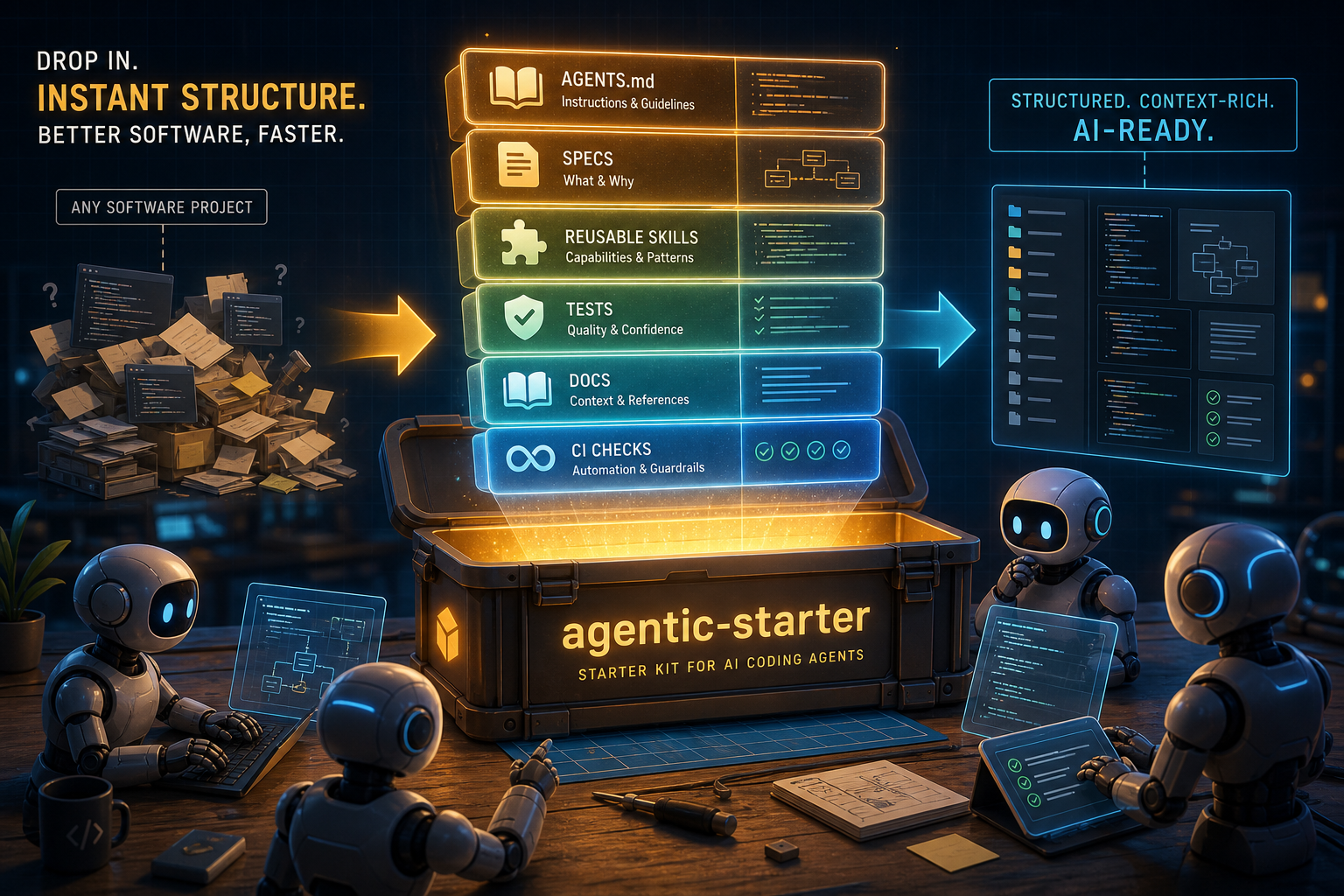
Visual summary: drop the starter into a messy software project and it turns scattered context into structure, reusable skills, tests, docs, and guardrails for AI coding agents.
Watch: why llm-project-mapper? (53s)

Click the cover to play. Direct link:
video/assets/why-llm-project-mapper.mp4· English version:video/assets/why-llm-project-mapper-en.mp4· both renders now ship with narration plus burned-in captions.
Operational Docs For Agents
This starter now includes generic, fill-in templates that make any project easier for agents to operate:
docs/local-setup.md: how to install, start, validate and access the project.docs/domain-map.md: business concepts, critical rules and edge cases.docs/architecture-map.md: system shape, request path and integrations.docs/features/README.md: feature documentation template with files, endpoints, rules and evidence.docs/evidence/README.md: screenshot/video/trace policy and artifact naming.docs/troubleshooting.md: repeatable diagnosis and fixes.scripts/: stack-neutral placeholders for start, test and evidence commands.tests/e2e/smoke.spec.ts: generic Playwright smoke test driven byBASE_URL.
Fill these files after installing the starter in a real project. The goal is to reduce discovery time for humans and agents without forcing a framework.
Patterns
- Canonical spec: YOOL_TUPLE_HAMT.md
- Receipts schema and storage conventions: Receipt schema
The yool / tuple / HAMT pattern is the capability-addressing model this scaffold is standardizing for multi-agent repos. Keep the root spec vendored so agents can reach it from the repository root in one click.
TL;DR — get going in 60 seconds
Pick one of the install paths below and run it inside your project folder. The bootstrap now starts an automatic local mapping pass immediately; INIT.md becomes an optional refinement step for a stronger agent.
| OS | Recommended one-liner |
|---|---|
| macOS | npx @wesleysimplicio/llm-project-mapper |
| Linux | npx @wesleysimplicio/llm-project-mapper |
| Windows (PowerShell) | npx @wesleysimplicio/llm-project-mapper |
| Windows (cmd.exe) | npx @wesleysimplicio/llm-project-mapper |
Same command everywhere. No bash dependency, no clone, no global install.
What LLM Project Mapper Changes
The point of the starter is not “more files”. It is faster agent execution with less ambiguity, less tribal knowledge, and safer delivery loops.
01 · From project chaos to operational structure

Drop the starter into an existing codebase and it converts scattered context into repeatable docs, validation, agent instructions, and delivery guardrails.
02 · Shared context for parallel agents

Agents stop working as isolated chat sessions and start collaborating around the same project map: architecture, tasks, checks, and output expectations.
03 · A stable foundation for safe speed

The end state is an agent-ready project foundation: domain context, architecture, workflow, quality gates, and evidence paths that make automation reliable instead of risky.
Prerequisites
| Requirement | macOS | Linux | Windows |
|---|---|---|---|
Node.js >= 16.7 (for npx) |
brew install node |
sudo apt install nodejs npm (Debian/Ubuntu) · sudo dnf install nodejs npm (Fedora) · or nvm |
nodejs.org installer or winget install OpenJS.NodeJS.LTS |
| Git | preinstalled / brew install git |
sudo apt install git / sudo dnf install git |
git-scm.com or winget install Git.Git |
Bash 4+ (only if you use bootstrap.sh) |
preinstalled (Bash 3.2 works too) | preinstalled | Git Bash (ships with Git for Windows) or WSL |
PowerShell 5.1+ / pwsh 7+ (only for bootstrap.ps1) |
brew install --cask powershell |
sudo snap install powershell --classic |
preinstalled |
Pick one runtime: npx works everywhere; bootstrap.sh for Unix shells; bootstrap.ps1 for native Windows.
What it ships
your-project/
├── AGENTS.md                 # master agent instructions (read by every CLI)
├── CLAUDE.md                 # mirror of AGENTS.md (Claude Code)
├── INIT.md                   # one-shot prompt the agent runs after bootstrap
├── .github/
│   ├── copilot-instructions.md    # mirror of AGENTS.md (Copilot)
│   ├── workflows/                  # CI + Definition-of-Done gate
│   ├── PULL_REQUEST_TEMPLATE.md
│   └── ISSUE_TEMPLATE/
├── .specs/                   # canonical docs (specs as code)
│   ├── product/              # VISION, DOMAIN, PERSONAS
│   ├── architecture/         # DESIGN, PATTERNS, ADRs
│   ├── workflow/             # WORKFLOW, CONTRIBUTING, RELEASE
│   └── sprints/              # BACKLOG + sprint folders
├── .skills/                  # reusable agent skills
├── .agents/                  # custom sub-agents
├── .claude/                  # Claude Code config + hooks
├── .codex/                   # Codex CLI config
├── playwright.config.ts      # default E2E
└── presentation/             # method slides (Marp)
Stack-neutral: the bootstrap now fills the first pass automatically from the real project, and INIT.md remains available for deeper agent-driven refinement.
Install paths
A. npx — recommended, cross-platform, zero clone
# inside your project folder (works on macOS, Linux, Windows)
npx @wesleysimplicio/llm-project-mapper
Runs interactively. Asks only:
- Which CLI/LLM to hand off to after the automatic mapping pass (auto-detects which ones are installed and marks them
[installed]). - Append recommended ignores to
.gitignore? (yes/no — never overwrites your existing.gitignore).
Everything else — PRODUCT_NAME, stack, dependencies — auto-detected from package.json / pyproject.toml / go.mod / *.csproj / Cargo.toml / pubspec.yaml / composer.json / Gemfile / mix.exs / pom.xml / build.gradle*.
Non-interactive (CI / scripts)
npx @wesleysimplicio/llm-project-mapper --yes --cli skip --append-gitignore no
Update an existing starter overlay
npx @wesleysimplicio/llm-project-mapper@latest --update
This is equivalent to --yes --force --append-gitignore yes --cli skip: it refreshes starter-managed files, updates the starter .gitignore block, preserves existing instruction files, and does not launch an agent.
Preview without writing
npx @wesleysimplicio/llm-project-mapper --dry-run --yes
Full flag list
| Flag | Purpose |
|---|---|
-y, --yes |
Non-interactive (defaults: no .gitignore append, skip CLI handoff) |
-f, --force |
Overwrite starter template files. Never touches user instruction files (AGENTS.md, CLAUDE.md, INIT.md, .github/copilot-instructions.md, .gitignore) |
--update |
Safe update mode for an existing overlay: force starter files, update .gitignore, skip handoff |
--dry-run |
Print actions without writing |
--cli <key> |
Pick CLI for INIT.md handoff: claude, codex, copilot, cursor, deepseek, kimi, minimax, glm, hermes, openclaw, aider, other, skip |
--append-gitignore <yes|no> |
Append recommended ignores to .gitignore |
--skip-meta |
Do not write .starter-meta.json |
--silent |
Minimal output |
-v, --version |
Print version |
-h, --help |
Show help |
B. bootstrap.sh — Unix shells (macOS / Linux / Git Bash / WSL)
Clone the starter and run the script:
git clone --depth=1 https://github.com/wesleysimplicio/llm-project-mapper.git tmp-starter
cp -R tmp-starter/. ./ && rm -rf tmp-starter
chmod +x ./bootstrap.sh   # only the first time
./bootstrap.sh
C. bootstrap.ps1 — native Windows (PowerShell)
git clone --depth=1 https://github.com/wesleysimplicio/llm-project-mapper.git tmp-starter
Copy-Item -Recurse -Force tmp-starter\* .\
Remove-Item -Recurse -Force tmp-starter

# PowerShell 7+ (pwsh)
pwsh -File .\bootstrap.ps1

# PowerShell 5.1 (built-in on Windows 10/11)
powershell -ExecutionPolicy Bypass -File .\bootstrap.ps1
All three paths produce the same result and ask the same two questions.
D. Overlay onto an existing project (private, gitignored)
Want to drop the starter into a project that already has its own git, without polluting the host repo? Each dev installs locally, files stay gitignored. Full step-by-step in INSTALL.md. Short version:
# from inside the host project root
git clone --depth=1 https://github.com/wesleysimplicio/llm-project-mapper.git /tmp/llm-project-mapper-src
# --ignore-existing protects your host's package.json/README.md/etc from being overwritten
rsync -av --ignore-existing --exclude='.git' /tmp/llm-project-mapper-src/ ./
rm -rf /tmp/llm-project-mapper-src
# append the "LLM Project Mapper (overlay privado)" block from INSTALL.md to your .gitignore FIRST
# then run bootstrap
./bootstrap.sh
CLI handoff — supported agents
After scaffolding and auto-mapping, the bootstrap can optionally launch a CLI/LLM with INIT.md for a second-pass refinement. Detected installs get a [installed] mark in the menu.
| # | CLI / LLM | Native agent loop? | Install docs |
|---|---|---|---|
| 1 | Claude Code | yes | https://docs.claude.com/claude-code |
| 2 | Codex CLI | yes | https://github.com/openai/codex |
| 3 | GitHub Copilot CLI | no — paste prompt manually | gh extension install github/gh-copilot |
| 4 | Cursor Agent | yes | npm i -g cursor-agent (or Cursor IDE) |
| 5 | Deepseek (via Aider) | yes | pip install aider-chat |
| 6 | Kimi K2.6 (via Aider, OpenRouter) | yes | pip install aider-chat |
| 7 | MiniMax M2.7 (via Aider, OpenRouter) | yes | pip install aider-chat |
| 8 | GLM 5.1 (via Aider, OpenRouter) | yes | pip install aider-chat |
| 9 | Hermes Agent (Nous Research) | yes | https://github.com/NousResearch |
| 10 | OpenClaw | yes | https://github.com/openclaw |
| 11 | Aider (pick model interactively) | yes | pip install aider-chat |
| 12 | Other / manual (clipboard) | — | — |
| 13 | Skip — run INIT.md later |
— | — |
For Copilot CLI (no native agent loop), the bootstrap copies the prompt to your clipboard (pbcopy on macOS, xclip/wl-copy on Linux, clip.exe on Windows/WSL) and you paste it into Copilot Chat.
What INIT.md does — the safety contract
When the chosen CLI runs INIT.md, it reads .starter-meta.json and follows three hard rules:
read_only_globsare intouchable. Any file matching these globs (**/*.razor,**/*.cs,**/*.csproj,**/*.sln,package.json,pnpm-lock.yaml,yarn.lock,package-lock.json,**/*.py,**/*.go,**/*.rs,**/*.java,**/*.kt,**/*.dart,**/*.php,**/*.rb) is read-only. The agent reads it for context but never writes. Ifgit statusshows any after init — that is a bug.init_must_mergepreserves your essence. IfAGENTS.md/CLAUDE.md/.github/copilot-instructions.mdalready existed before bootstrap, the agent reads them, preserves the content, and merges the starter structure on top. Never a clean rewrite.init_must_askonly asks 4 things.team,domain,vision_oneliner,primary_personas— once, in a single message. Everything else (product_name,stack) is auto-detected.
The agent then writes — and only writes — inside the whitelist:
.specs/**          .agents/**         .skills/**
.claude/**         .codex/**
.github/copilot-instructions.md
.github/copilot/**
.github/PULL_REQUEST_TEMPLATE.md
.github/ISSUE_TEMPLATE/**
.github/workflows/ci.yml
.github/workflows/dod.yml
AGENTS.md  CLAUDE.md  README.md  README.pt-BR.md
playwright.config.ts (only if missing or our template)
Anything outside this whitelist and not from the starter template = untouched.
Troubleshooting
macOS / Linux
| Symptom | Fix |
|---|---|
./bootstrap.sh: Permission denied |
chmod +x ./bootstrap.sh |
command not found: npx |
Install Node.js (see Prerequisites) |
Claude Code not installed after pick |
Install Claude Code or pick [12] Other to copy the prompt to clipboard |
Old Bash on macOS (bash --version shows 3.2) |
Works — script is Bash 3.2-compatible. If problems, brew install bash for Bash 5+ |
Windows
| Symptom | Fix |
|---|---|
bootstrap.ps1 cannot be loaded ... execution policy |
Run with powershell -ExecutionPolicy Bypass -File .\bootstrap.ps1 (per-session bypass, no permanent change) |
Line endings broken when running .sh from Git Bash |
git config --global core.autocrlf input then re-clone |
npx not found in cmd.exe |
Open new terminal after Node install (refreshes PATH), or use full path C:\Program Files\nodejs\npx.cmd |
pwsh not found |
You have PowerShell 5.1 (built-in) — use the powershell -ExecutionPolicy Bypass ... form. To install pwsh 7: winget install Microsoft.PowerShell |
Cross-platform
| Symptom | Fix |
|---|---|
Bootstrap exits with aborting: existing files would be overwritten |
Re-run with --force (only overwrites starter template files, never your instruction files) |
git status shows package.json / source files modified after init |
Stop. That is a read_only_globs violation. Open an issue with the file path |
.gitignore got rewritten |
The starter never overwrites it — only appends if you said yes. If yours was replaced, you ran --force; restore from git |
Want to re-run INIT.md later |
claude "$(cat INIT.md)" (or equivalent for your CLI). The handoff is just a launcher |
Suggested reading order (human)
README.md(this file) — overview.AGENTS.md— agent master instruction..specs/README.md— specs navigation map..specs/product/VISION.md— product context..specs/architecture/DESIGN.md— architecture..specs/workflow/WORKFLOW.md— process..skills/README.md— agent capabilities.
Quickstart for the agent (after INIT.md)
- Read
AGENTS.md(root). That is the contract. - Read
.specs/product/VISION.mdfor the why. - Read
.specs/architecture/DESIGN.mdandPATTERNS.mdfor the how. - Pull the next task from
.specs/sprints/sprint-XX/. - Run the mandatory loop: read task → plan → edit → lint → unit → e2e → fix → commit.
- Validate Definition of Done before opening a PR.
Optional: clean up starter files
After the agent finishes INIT.md, the bootstrap files are no longer needed.
macOS / Linux / Git Bash / WSL:
rm _BOOTSTRAP.md INIT.md bootstrap.sh bootstrap.ps1
git add -A && git commit -m "chore: remove starter bootstrap files"
Windows PowerShell:
Remove-Item _BOOTSTRAP.md, INIT.md, bootstrap.sh, bootstrap.ps1
git add -A; git commit -m "chore: remove starter bootstrap files"
.starter-meta.json stays as a reference for future re-runs.
Companion tooling
- SkillOpt optimizer —
npx @wesleysimplicio/llm-project-mapper skillopt --suite <suite.json>(ornode bin/skillopt.js) optimizes aSKILL.md/prompt with the SkillOpt loop (Rollout → Reflect → Edit → Gate). The skill document is the only trainable artifact; edits are accepted only when they improve a held-out task split. Outputsbest_skill.mdplus an optional report and receipt. See .skills/skillopt/SKILL.md. - VS Code extension —
vscode-extension/ships a sidebar TreeView for.specs/sprints/, plus commands to open the current task, create ADRs, and run theINIT.mdhandoff. See vscode-extension/README.md. Will be published to the Marketplace aswesleysimplicio.llm-project-mapper-vscode. - Telemetry (opt-in) —
bin/cli.jsaccepts--telemetry on|off. Default is off. See PRIVACY.md for the exact payload and how to deploy your owntelemetry-worker.js.
Philosophy
- Specs as code. What is not in
.specs/, the agent does not see. - Atomic tasks. One task = one small reviewable PR.
- Automated DoD. What does not pass the gate, does not merge.
- Reusable skills. A capability that becomes a pattern becomes a
SKILL.md. - Tight loop. Edit, test, fix, repeat. Never accumulate invisible debt.
- Never destroy. User files are read-only; starter files merge instead of overwrite.
License
MIT © 2026 Wesley Simplicio.
Next steps
- Run the bootstrap.
- Let the agent execute
INIT.md. - Fill specs with real product context (the agent does most of this from the code).
- Run the first sprint using
.specs/sprints/sprint-01/. - Watch
presentation/ai-agent-specialist.pdffor the full method.
Reviews (0)
Sign in to leave a review.
Leave a reviewNo results found