ducter
Health Uyari
- License — License: Apache-2.0
- Description — Repository has a description
- Active repo — Last push 0 days ago
- Low visibility — Only 7 GitHub stars
Code Gecti
- Code scan — Scanned 12 files during light audit, no dangerous patterns found
Permissions Gecti
- Permissions — No dangerous permissions requested
Bu listing icin henuz AI raporu yok.
A personal AI you run yourself: talk to one partner; it hands the work to AI agents like Claude Code and Codex on your own machines and comes back when it's done, with proof.
Ducter
Say it once. Hear back when it's done.
Ducter is an open-source personal AI that runs on your own Mac or server. You talk to one
partner; it hands the work to the AI agents you already use (Claude Code, Codex, pi, DeepSeek
Harness), on the plans you already pay for, and comes back when the work is done or a
decision is yours to make.


ducter.ai · Getting started · Docs · 中文
What it feels like
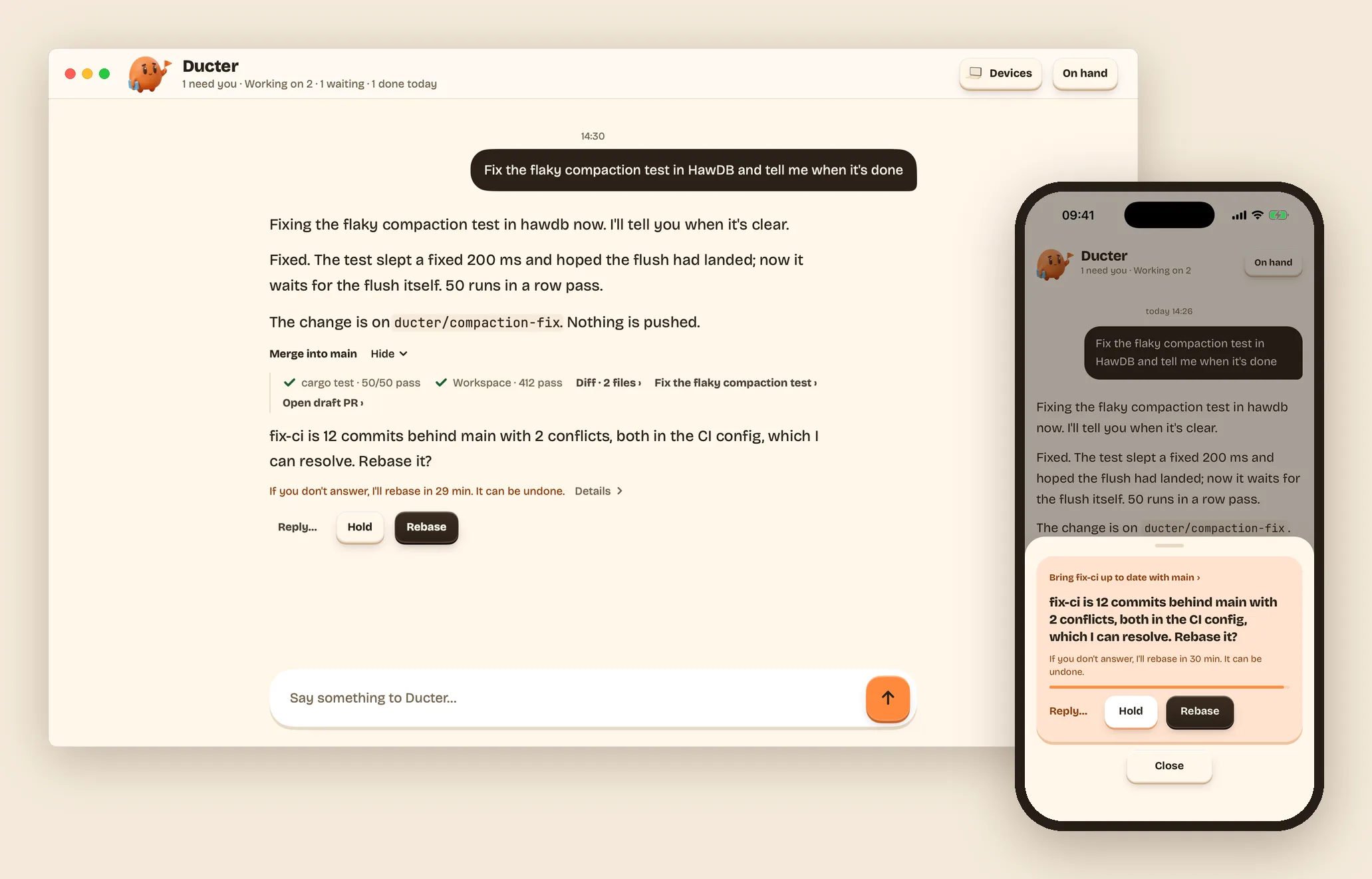
You write to Ducter the way you'd write to a colleague: "Fix the flaky compaction test in
HawDB and tell me when it's done." It says it's on it, and then it's quiet. The work happens
in the background, on your Mac or a server you own, in a separate copy of your project.
When it's done, it tells you what it did in a line or two, with Merge into main right
there and the proof one tap away (the tests it ran, the diff). When it needs you, it asks one
plain question with a default, "Rebase it? If you don't answer, I'll rebase in 29 min," and
you take it, hold it, or reply in your own words, on the Mac or on your phone.
Silence means it's going fine. Everything it's doing is one click away whenever you want to
look.
Why it's different
- One partner, all your agents. You don't tend sessions. Your partner starts them, watches
them and reports back; you open any of them when you want to. - Your computers, your subscriptions. It runs on your Mac or a Linux server you own, with
your own sign-ins. No Ducter account, no Ducter cloud, no lock-in to one AI company. - It knows when to stay quiet. Done comes with proof, questions come with a default, and on
a quiet day you hear nothing at all. - Ready the first time you open it. One line installs it, it sets up what's missing, and it
greets you with things to start from your own accounts and folders, not a blank box.
What you can do today
- Hand off coding work. "Fix the failing tests in my-app." "Upgrade OAR to 0.96 and fix
what breaks." Each task gets its own git worktree andducter/…branch; merging is your
call. - Ask for reviews and write-ups. "Review this week's open PRs." "Write the v0.4 release
notes once CI is green." - Leave it things that take time. "Tell me when #1592's CI passes." "Keep fixing until the
tests are green." "Every Monday at 9, check HawDB's dependencies." It waits, keeps trying, or
runs on a schedule, and all of it shows on On hand. - Look things up on the web. On a Mac, Ducter reads pages in its own Chrome window, separate
from yours. Logins, forms and payments stay with you. - Answer from your phone. Decisions arrive with the default already chosen, and your nights
stay quiet. - Keep it working while your Mac sleeps. Run Ducter on a Linux server, and lend it other
computers to work on; one switch lets your Mac do tasks for the server. Each task says which
computer it runs on and why, and asks only when the right one is asleep or a task would get
more access. (Moving Ducter itself from your Mac to a server is coming soon.) - Hear about what matters in your mail and calendar. Say yes once after you add your
accounts, and your partner tells you only what needs you: a morning message with at most
three things, right away only when it can't wait, nothing on a quiet day. - Use the AI agents you already have. Ducter works with Claude Code, Codex, pi and DeepSeek
Harness today, on your own logins, settings and skills. Your partner thinks with Claude Code
and picks which agent does each task; you can switch it for any task. English and 中文
throughout.
 |
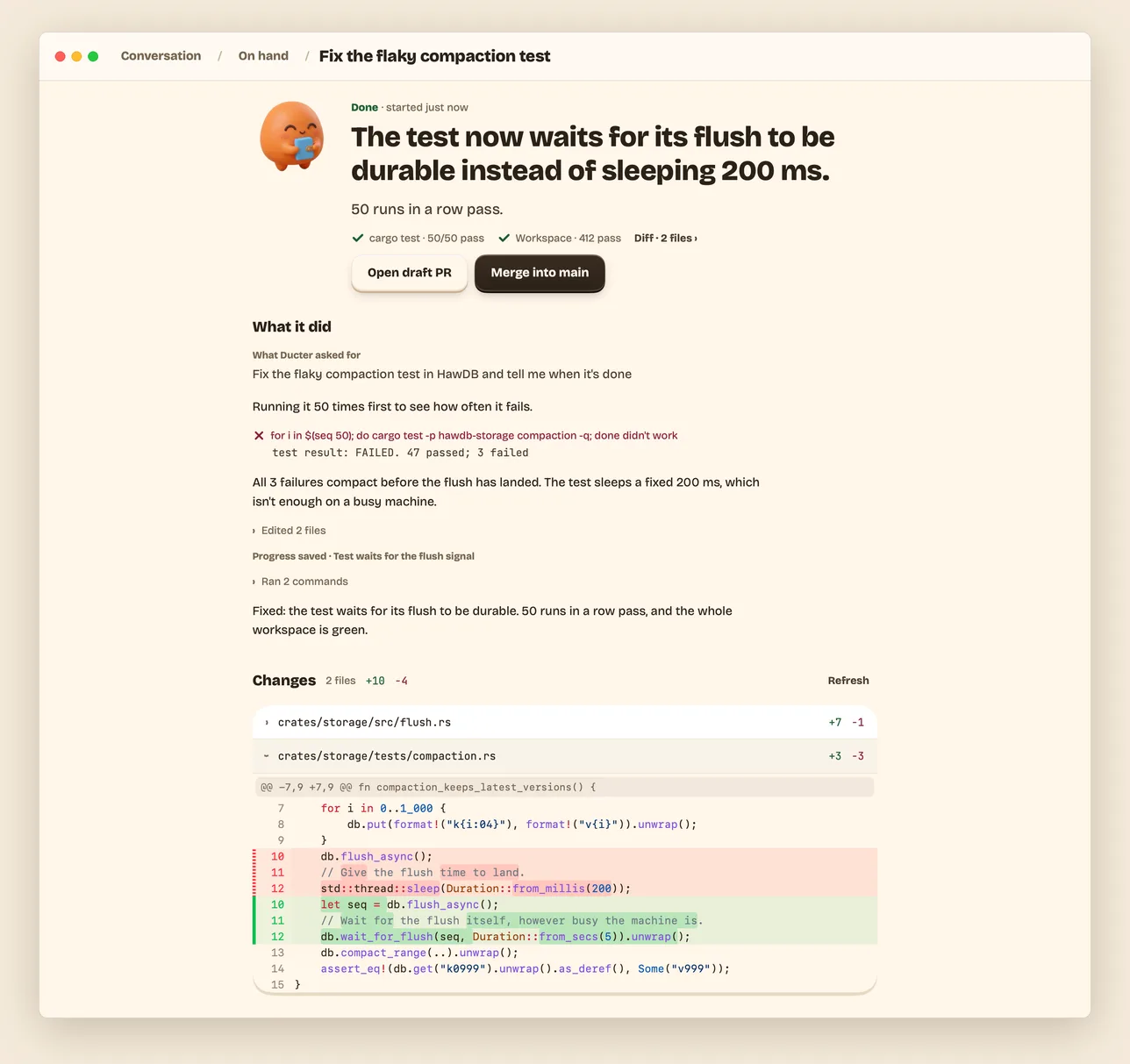 |
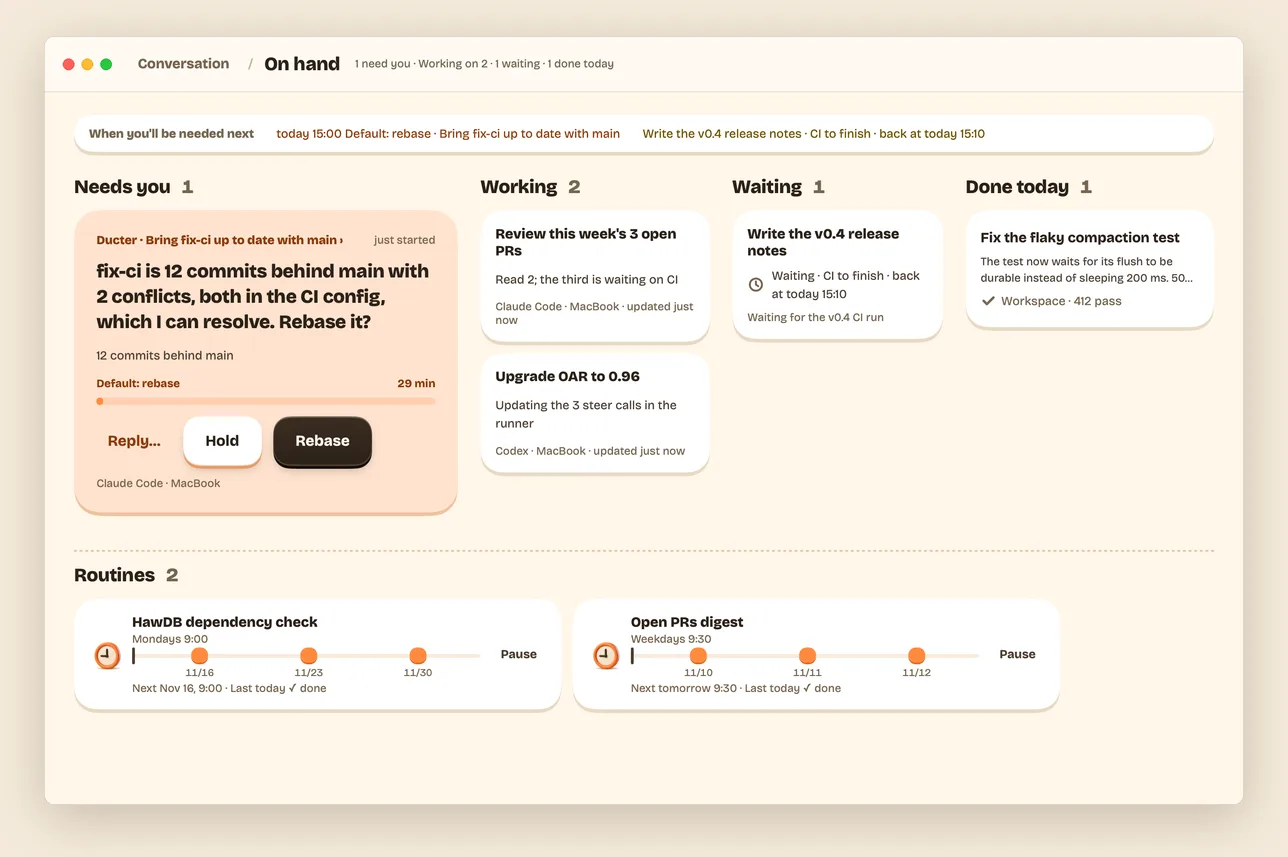
| On hand. Every task at a glance, what is waiting for you, and your routines. | An opened task. The outcome first, then what it did and its changes. |
 |
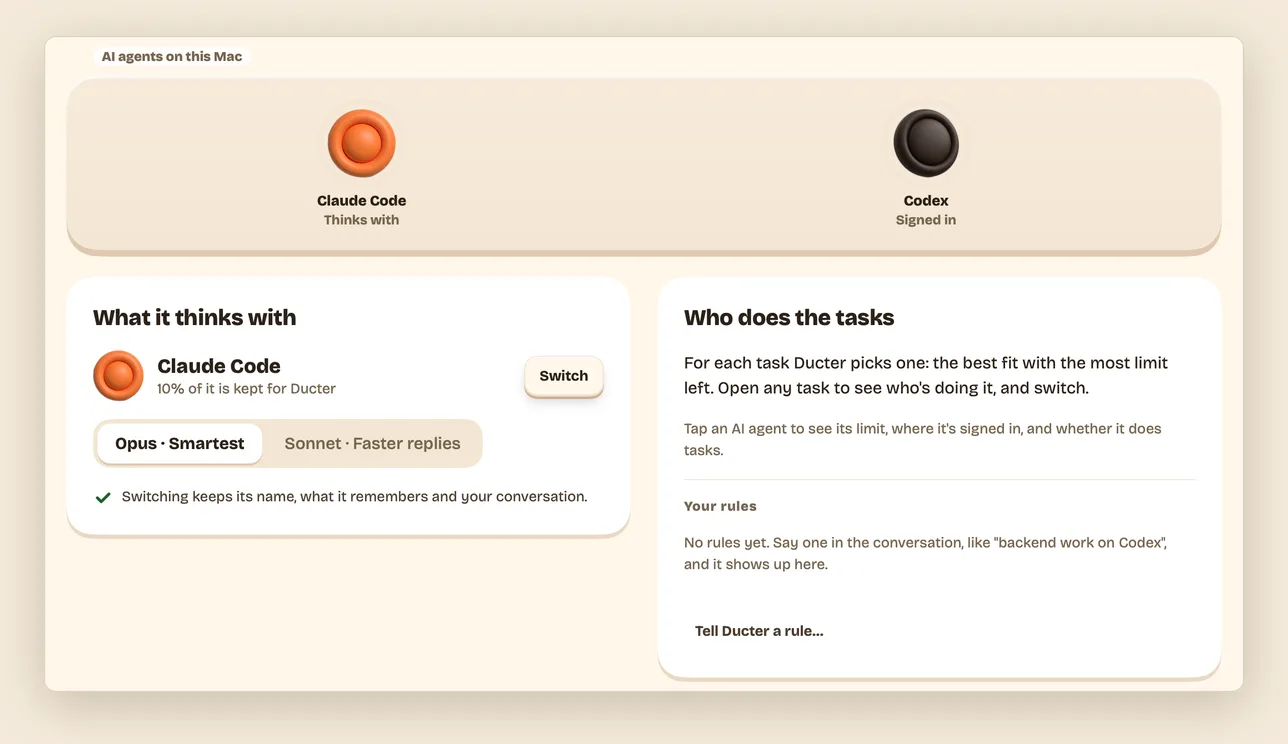 |
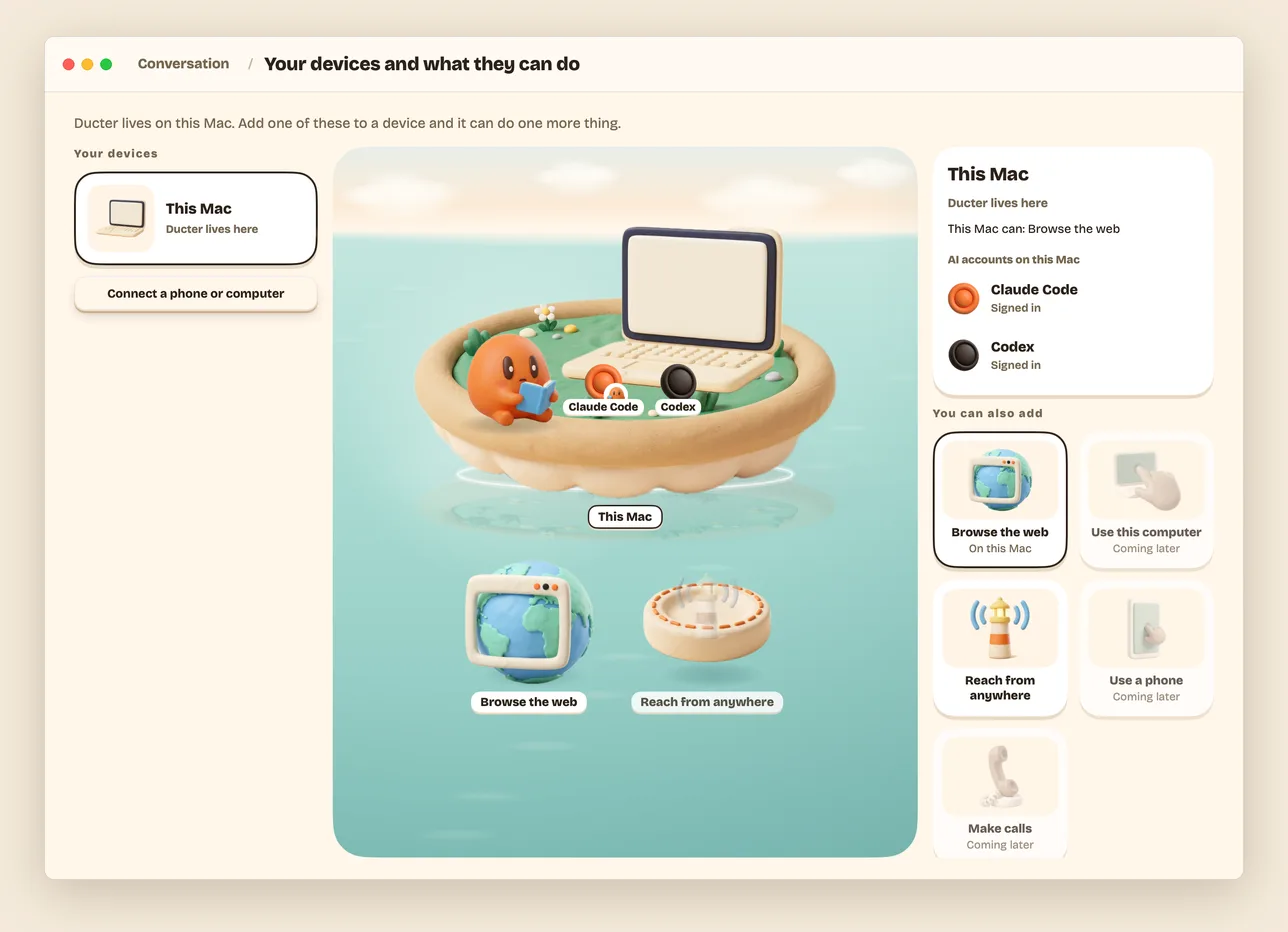
| Your devices. The computers Ducter works on, and what each one can do. | Partner. What it thinks with, and who does the tasks. |
Early preview. Ducter works end to end on a Mac and on a Linux server. Expect rough edges
and breaking changes. The desktop app is macOS (Apple silicon) only;
the phone version runs in your phone's browser, and the iPhone app is in public beta on
TestFlight.
It doesn't start from zero
Much of what your partner needs to know is somewhere else: in your mail, your calendar, and
last week's sessions with your other AI tools. Most of that it can use today, and none of it
needs your passwords.
- One memory for all your AIs (works today, optional). Nowledge Mem
keeps what you've decided and what you're working on, from every AI tool you connect to it.
Your partner reads from it and adds to it, and you see Noted when it does; its tasks can use
it too, under your partner's name. Mem is free to download and never required: without it,
your partner remembers your conversation. - Your mail, calendar and other accounts (works today). Ask, and your partner reads your
Gmail, calendar, Slack or GitHub. On Partner › Accounts it can read, tap Use these
accounts if you use oo, or add an address and key from your
OpenConnector. The AI agents never see your
passwords. Reading just happens; sending or changing anything waits for your Go. If you say
yes, it also keeps an eye on them and speaks only when something needs you, and it never
tells you how much it read. Accounts your partner can read. - Your AI agents, reaching each other (early, coming soon). With Nowledge Bridge, the
Claude Code session in your terminal can hand your partner a job, and your partner can ask
that session what it knows. It checks with you before it takes the job or sends the question.
Get Ducter
You need Claude Code or
Codex, signed in with your own account
(which AI agents). If neither is on your Mac
yet, the app installs one and walks you through signing in.
Install the Mac app
On a Mac with Apple silicon, paste this into Terminal:
curl -fsSL https://ducter.ai/install.sh | sh
It downloads the latest release, checks its checksum and notarization, puts Ducter in
Applications, links the ducter command into ~/.local/bin, and opens it. In a terminal,ducter doctor checks your Mac and ducter up starts your partner. Or download Ducter-<version>-arm64.dmg from the
latest release on GitHub (signed and
notarized), open it, and drag Ducter to Applications. Ducter checks your Mac, sets up
what's missing without a Terminal, and opens the conversation. Closing the window doesn't stop
it; Stop Ducter in the menu does. Getting started walks you
through the first five minutes.
Build from source
git clone https://github.com/wey-gu/ducter && cd ducter
scripts/make-app.sh        # dist/Ducter.app and a .dmg
Without a Developer ID the app is signed ad hoc, so macOS needs one extra step the first time
(what to do). For the ducter command alone,scripts/install.sh builds it and puts it in ~/.local/bin.
On a server
Keep your partner awake while your Mac sleeps. Ducter runs as a systemd user service and listens
on 127.0.0.1 only; you reach it through your own domain or an SSH tunnel, and your phone and
Mac connect with a one-time code.
curl -fsSL https://ducter.ai/install.sh | sh -s -- --service    # on the server (x64 or arm64)
ducter domain ducter.example.com     # after an A record points that name at the server: HTTPS, then a code
From the source instead: scripts/install.sh --linux ducter-linux on your Mac, copy the folder
for your server's CPU, and run sh ducter/install.sh --service there.
The walkthrough is in Install.
iPhone app (public beta)
The iPhone app is in public beta: join it on TestFlight,
then connect it with the address and code from ducter pair. Your phone's browser works too.
For AI agents
Let your AI agent (Claude Code, Codex, or another) set Ducter up and run it for you. Theskills/ folder holds three Agent Skills:
ducter-deploy (install on a Mac or a server, domain, pairing, workers, clean reinstall),
ducter-operate (talk to a running Ducter from a terminal) and ducter-troubleshoot.
Copy them to ~/.claude/skills/ (or your agent's skills folder), or point your agent at the
folder; each is also at https://ducter.ai/skills/<name>/SKILL.md. Then ask:
Install the ducter-deploy skill from github.com/wey-gu/ducter/tree/main/skills and deploy
Ducter on my server.
More in For AI agents.
How it works
flowchart LR
  you(["You<br/>Mac · phone · terminal"]) <-->|one connection| partner
  subgraph main["Ducter, on your Mac or your server"]
    partner["Your partner<br/>Claude Code + Ducter's tools"]
    log[("The Log<br/>local SQLite")]
    partner <--> log
  end
  partner -->|task| t1["Claude Code<br/>its own worktree and branch"]
  partner -->|task| t2["Codex, pi, DeepSeek Harness<br/>here or on a machine you lend it"]
  partner <-.->|memory, optional| mem[("Nowledge Mem")]
- One partner talks with you. It runs on Claude Code with Ducter's own tools, answers
quick things itself, and turns bigger work into tasks. - Tasks run on real AI agents. Each is a session of Claude Code, Codex, pi or DeepSeek
Harness started through OAR, in its own worktree. It
reports back with a summary, how it checked, and questions that carry a default. - One local log holds everything. The conversation, On hand and every task view are read
from it, so nothing is lost when a session ends or a window closes. - Clients are thin. The Mac app is native (MyGo, no
webview); the phone client is a small web app. Both speak the same protocol.
Under the hood
For people who already run several AI agents at once, this is what makes them hold up as one
partner:
- One adapter for four agents. Claude Code, Codex, pi and DeepSeek Harness, started through
OAR in clean sessions that still carry your own skills and settings. - Small windows on purpose. The partner and its tasks work in about 200K tokens; a long
conversation stays coherent through digests and recall
(memory, context). - One registry of facts per agent. Windows, compaction points and verified versions live in
harness-facts.ts
(readable twin);bun scripts/probe-harnesses.tsre-checks the installed
programs andducter doctorwarns when yours is outside the verified range. - Each agent's own browser and computer use first, Ducter's own Chrome as the fallback.
- Keys stay out of tasks. A pasted key or token is removed from what a task is told and
hidden everywhere a task is shown, with one detector for both. - Budgets are tests. Prompt and tool-list sizes fail the build when they grow, a partner
change carries a fresh eval result, andbun run e2e:linuxrehearses installs and in-place
updates on a Linux VM before a release.
Privacy and safety
- Nothing lands without you. Ducter never merges, never works in your own checkout, and never
types your passwords. In a folder that isn't a git repo, every change can be undone with one
tap. Every result says what was sent out. - Your machines, your accounts. There is no Ducter cloud and no Ducter account. Your work
reaches an AI provider only through your own AI agent's login or key. - Only your devices get in. A server listens on itself only; a phone or another computer
connects with a one-time code, and you can disconnect it at any time.
The details are in Privacy and safety.
Docs
- Using Ducter: Getting started · Install ·
Waiting, keep going, routines ·
Your partner and settings · Accounts it can read ·
Your devices ·
Your phone ·
Privacy and safety · FAQ ·
Troubleshooting · For AI agents - Building Ducter: why it exists, the
principles, the design notes, every command in
build and run, and the roadmap.
Contributing
Ducter writes its design down before its code. CONTRIBUTING.md explains how a
change is made and what is wanted now. Report security issues as described in
SECURITY.md.
A thank-you: Ducter is made by the people behind Nowledge Mem. Once a pull request of yours is
merged, mention it and we'll send you a free lifetime Nowledge Mem license
(details).
中文
Ducter 是跑在你自己 Mac 或服务器上的开源个人 AI。你只跟一个伙伴说话,它把活儿交给你已经在用的
AI agent(Claude Code、Codex、pi、DeepSeek Harness),用的是你本来就在付的订阅。做完了,它一两句话告诉你结果,证据点开就能看;只有真要你拍板的事才来找你,而且先替你想好默认的做法。等消息、反复试到成功、每周例行的事,都在「手头的事」里一眼看清。
加上邮箱和日历以后,你点一次头,它就替你留意着:早上最多说三件事,没事的日子一句不说,也从不替你发信、付钱。每件事跑在哪台电脑上,它会用一句话说清楚。
现在是早期预览版:Mac(Apple 芯片)和 Linux 服务器都能用,手机上可以看进展、做决定,界面中英双语。上手请看
Getting started。
License
Yorumlar (0)
Yorum birakmak icin giris yap.
Yorum birakSonuc bulunamadi