sqraft
Health Uyari
- License — License: Apache-2.0
- Description — Repository has a description
- Active repo — Last push 0 days ago
- Low visibility — Only 5 GitHub stars
Code Basarisiz
- spawnSync — Synchronous process spawning in apps/desktop/scripts/dist.mjs
- process.env — Environment variable access in apps/desktop/scripts/dist.mjs
- fs module — File system access in apps/desktop/scripts/make-icon.cjs
- process.env — Environment variable access in apps/desktop/scripts/release-utils.mjs
Permissions Gecti
- Permissions — No dangerous permissions requested
Bu listing icin henuz AI raporu yok.
AI-friendly, lightweight UI design tool — local-first desktop app with MCP access for agents
Sqraft
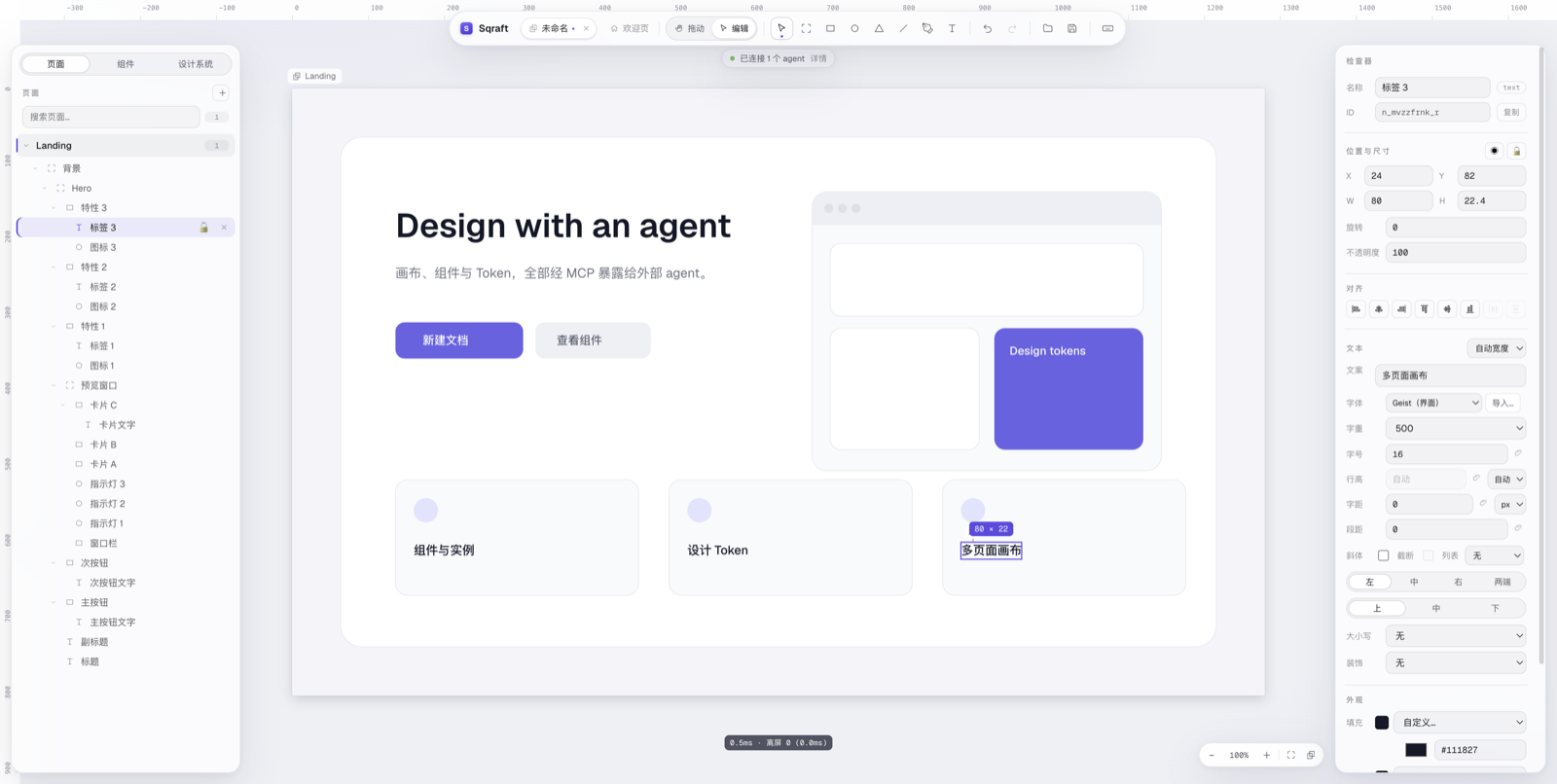
AI-friendly, lightweight UI design tool — a desktop app with local files that works offline.
Design interfaces with frames, components, auto layout and design tokens; the same capabilities are exposed over MCP to agents such as Claude Code and Cursor, so "edit the design in natural language" is a first-class entry point.
The app is fully local: no account, no cloud, no model calls. A design is simply a .sqraft file on disk.
Download
⬇ Download the latest version
- macOS · Apple Silicon (M series) · about 120 MB
- Windows · x64 · about 100 MB · unsigned
- Under Assets on the Releases page pick
Sqraft-<version>-arm64.dmg(manual install) orSqraft-Setup-<version>.exe; the.zipis what the macOS updater downloads - Windows 10 22H2 or Windows 11, x64. Linux is not supported
- Older versions and release notes: Releases
Install
macOS
- Open the downloaded
.dmgand drag Sqraft into Applications - The app is signed but not yet notarized, so Gatekeeper asks once on the first launch: open System Settings → Privacy & Security and click Open Anyway next to Sqraft
- Afterwards the app checks for updates on launch: new versions download in the background, a "Restart to update" button appears in the toolbar, and quitting or clicking it finishes the upgrade
If you would rather not auto-update, Help → Check for Updates… checks manually at any time.
Windows
- Run
Sqraft-Setup-<version>.exe. SmartScreen warns because the installer is unsigned: click More info → Run anyway - The wizard lets you choose the install folder; by default it installs for the current user (no administrator rights). Start-menu and desktop shortcuts are created — just delete the desktop one if you don't want it
- Double-click any
.sqraftfile to open it in Sqraft - Updates are manual: when a new version is out, the app shows a Download chip that opens the Releases page; uninstalling keeps your data in
%APPDATA%\Sqraft
What you can do
- Vector canvas: rectangles, ellipses, polygons, lines, pen paths, text; infinite canvas with multiple pages
- Auto layout: direction, gap, padding, hug / fill / fixed, wrapping, drag to reorder
- Components: main components, instances, slots, overrides, swapping, and component sets with enumerated variants
- Prototype links: click a layer to jump to another page or go back, with instant / fade transitions; present mode scrolls pages and
Hhighlights hotspots - Design tokens: colors and numbers (font size, radius, spacing…); change once and it applies everywhere
- Editing: multi-select, marquee, align and distribute, drag to reparent, grouping, guides, snapping
- Effects: drop shadow, inner shadow, layer blur, background blur
- Gradients: linear, radial, angular and diamond fills and strokes, editable down to each color stop
- Images: drag in, paste, crop, mask, linked images (cached locally); drop an
.svgto import editable vectors, or hold⌥to insert it as an image - AI editing: agents search and read only the page or subtree they need (even in 100k-layer files), create nodes and change styles over MCP, and get warnings on every write (zero-size, clipped text, missing tokens) so they fix themselves; models without vision can read a text summary of the screen. They can also wire prototype links, so a generated design is clickable; one tool call = one undo step
- Export: PNG 1×/2×/4× and SVG from the selection or the active page, plus
Copy as ▸for the clipboard - Interface languages: 中文 / English / 日本語 / 한국어, with optional automatic system-language detection
Connect AI
Sqraft never calls a model and needs no API key. While the app is running it serves an MCP endpoint on localhost, so you can attach the agent you already use:
http://127.0.0.1:7331/mcp
The app must stay running (there is no CLI, and clients cannot launch it). If the port is taken the app moves to the next free one; the actual address is shown on the welcome page and under Sqraft → Configure MCP… (in the File menu on Windows).
Open Sqraft → Configure MCP… and tick the clients you use. Sqraft writes only its own sqraft entry, backs up the config first, and keeps the address in sync when the port changes; restart the client afterwards. If a client is not detected, its CLI is missing, or the config is not writable, copy a snippet instead. On Windows the one-click setup is implemented but not yet verified on a real machine — the snippets below always work.
claude mcp add --transport http sqraft http://127.0.0.1:7331/mcp
{
  "$schema": "https://opencode.ai/config.json",
  "mcp": {
    "servers": {
      "sqraft": { "type": "remote", "url": "http://127.0.0.1:7331/mcp" }
    }
  }
}
{
  "mcpServers": {
    "sqraft": { "url": "http://127.0.0.1:7331/mcp" }
  }
}
[mcp_servers.sqraft]
url = "http://127.0.0.1:7331/mcp"
{
  "mcpServers": {
    "sqraft": { "type": "http", "url": "http://127.0.0.1:7331/mcp" }
  }
}
{
  "context_servers": {
    "sqraft": { "url": "http://127.0.0.1:7331/mcp" }
  }
}
The endpoint only listens on 127.0.0.1 and rejects requests carrying an Origin header, but it has no token: any other process on the same machine can connect. Concurrent requests from multiple clients run one at a time.
Local-first
- A design is a
.sqraftfile on disk (a zip container: snapshot + image assets); no cloud service involved - No account, no backend, no telemetry; the only outbound requests are update checks and linked images you added yourself
- Operation logs go to the system log directory (macOS:
~/Library/Logs/Sqraft/); Help → Open Logs Folder takes you there - Uninstalling removes the app; data and preferences stay in
~/Library/Application Support/Sqraft/(macOS) or%APPDATA%\Sqraft(Windows) and can be deleted as well
Build from source
Requirements: macOS on Apple Silicon or Windows x64, Node.js 22.12 (see .nvmrc) and pnpm 10.33.4.
pnpm install
pnpm dev      # electron-vite dev server with renderer HMR
pnpm test     # vitest across packages
pnpm build    # type check + production bundle
pnpm dist     # host platform: macOS arm64 dmg + zip, or the Windows x64 installer
See CONTRIBUTING.md for the project layout and the review process.
Requirements and known limitations
- macOS Apple Silicon (M series); Intel Macs are not supported
- Windows 10 22H2+ or Windows 11 (x64); Windows on ARM (ARM64) and Linux are not supported
- The macOS app is signed but not notarized: the first launch needs one manual allow (see Install). The Windows installer is unsigned, so SmartScreen warns on the first run
- Auto-update is macOS-only; on Windows you download and run the new installer yourself
- CJK text uses each system's own fonts, so line breaks can shift between macOS and Windows
- No real-time collaboration, no accounts, no cloud sync
License and feedback
Sqraft is open source under the Apache License 2.0. The "Sqraft" name and the application icon are not covered by the license — forks must use a different name and icon.
Contributions are welcome; see CONTRIBUTING.md. For bugs or feature requests, open an issue.
Sqraft = Square + Craft.
Yorumlar (0)
Yorum birakmak icin giris yap.
Yorum birakSonuc bulunamadi