HermOS-IDE
Health Warn
- License — License: MIT
- Description — Repository has a description
- Active repo — Last push 0 days ago
- Low visibility — Only 7 GitHub stars
Code Warn
- process.env — Environment variable access in next.config.ts
- process.env — Environment variable access in scripts/ensure-extra-prisma-engines.mjs
- network request — Outbound network request in scripts/ensure-extra-prisma-engines.mjs
Permissions Pass
- Permissions — No dangerous permissions requested
No AI report is available for this listing yet.
Local-first, open-source AI agent desktop IDE. Autonomous subagents edit code, run terminal commands, and automate browsers natively on your machine with 100% privacy and zero cloud telemetry.
HermOS IDE — Local-First AI Coding Environment
Your code stays on your machine. Your models, your keys, your data — never leaves your device.
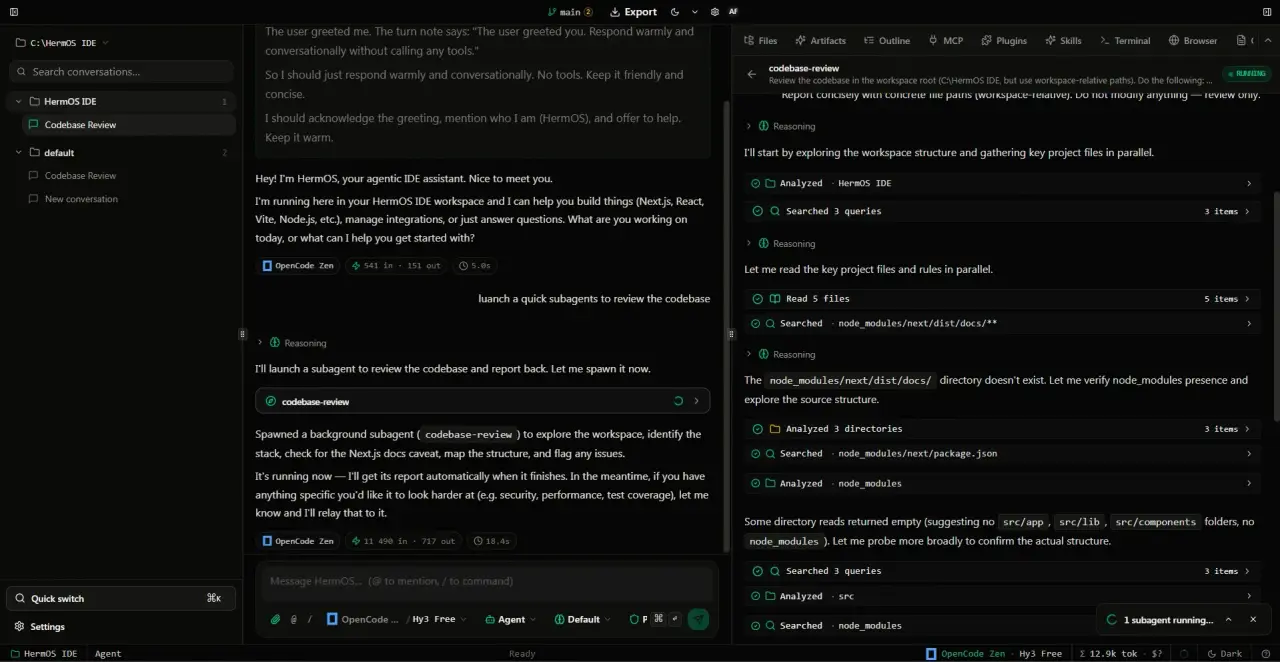
HermOS IDE is a desktop code editor with a built-in autonomous coding agent. It runs entirely offline on your computer: edit files, run commands, browse the web, and generate documents — all powered by your own AI provider keys. No accounts, no cloud, no telemetry.
Why HermOS?
- 100% Local & Private — All data lives in a local SQLite database on your machine. No remote servers, no tracking.
- Bring Your Own Keys — Works with OpenAI, Anthropic Claude, Groq, Mistral, Together, Ollama (local), and more. You control which model runs.
- Agent That Codes — Chat, Architect, and Agent modes handle everything from quick questions to multi-step refactors.
- Works Offline — Once installed, the editor, terminal, and local models (Ollama) run without internet.
- Extensible — Model Context Protocol (MCP) servers, plugins, and skills extend the agent with your own tools.
Features
| Autonomous Agent | Multi-step coding tasks: read, edit, run, test — locally. |
| Integrated Terminal | Full shell access rooted in your project folder (commands run with your OS privileges). |
| Built-in Browser | Headless browser panel synced to the editor for live previews. |
| MCP Support | Connect any stdio/SSE MCP server (filesystem, GitHub, databases…). |
| Office Builder | Generate PPTX, DOCX, and PDF directly from the agent. |
| Plugins & Skills | Install community tools or build your own. |
| Cross-Platform | Native installers for Windows, macOS (Apple Silicon & Intel), and Linux. |
Download
Get the latest release for your platform:
| Platform | Download |
|---|---|
| Windows | HermOS IDE for Windows — grab the .msi under Assets |
| macOS | HermOS IDE for macOS — Apple Silicon & Intel, grab the universal .dmg |
| Linux | HermOS IDE for Linux — grab the .deb under Assets |
Or browse all assets on the Releases page.
Website & Docs: https://hermos.is-a.dev/
Getting Started (3 Steps)
1. Install
Download and run the installer for your OS. On first launch HermOS creates its local data folder and encryption keys — no setup wizard, no login.
2. Add a Provider Key
Open Settings → Providers and paste an API key:
- Cloud: OpenAI, Anthropic, Groq, Mistral, Together, OpenRouter, NVIDIA NIM, Zen …
- Local (offline): Ollama — run
ollama serveand addhttp://localhost:11434/v1
Keys are encrypted at rest with a per-install secret.
3. Start Coding
- Open a folder — click the project selector in the top bar → “Open Folder / New Project” (desktop) or use the Files panel, or drop files into the workspace.
- Ask the agent —
Chatfor Q&A,Architectfor planning,Agentfor autonomous execution. - Run & preview — The terminal and browser panel are right inside the IDE.
Privacy & Security
- Local-first — Database, uploads, and secrets live under your OS app-data folder (
%APPDATA%\com.hermos.ideon Windows,~/.configon Linux,~/Library/Application Supporton macOS). Nothing is sent to HermOS servers — there are none. - Encrypted keys — Provider API keys are stored AES-256-GCM encrypted. The encryption key is generated per install and never leaves your device.
- No telemetry — No analytics, no crash reporting, no update phoning home beyond the optional GitHub Releases check.
- Loopback only — The bundled server binds to
127.0.0.1and rejects non-local requests.
System Requirements
- Windows 10/11 (x64) · macOS 12+ (Apple Silicon & Intel) · Linux (Ubuntu 22.04+ / Debian)
- 4 GB RAM minimum, 8 GB recommended
- ~300 MB disk for the app + space for your projects
- For local models: Ollama + a capable GPU recommended
FAQ
Is HermOS free?
Yes — MIT licensed. You only pay your AI provider (or run Ollama for free locally).
Does it need internet?
Only to call cloud model APIs. The editor, terminal, file tools, and Ollama work fully offline.
Where is my data?
On your machine. Uninstalling the app does not delete the data folder — remove it manually if desired.
Can I use it on a shared machine?
HermOS is single-user, bound to the OS account that installed it.
Support & Contributing
- Issues & feature requests: GitHub Issues
- For developers: See CONTRIBUTING.md for build, test, and packaging instructions.
License
MIT — see LICENSE.
Reviews (0)
Sign in to leave a review.
Leave a reviewNo results found