ai-usagebar
Health Uyari
- License — License: MIT
- Description — Repository has a description
- Active repo — Last push 0 days ago
- Low visibility — Only 7 GitHub stars
Code Gecti
- Code scan — Scanned 12 files during light audit, no dangerous patterns found
Permissions Gecti
- Permissions — No dangerous permissions requested
Bu listing icin henuz AI raporu yok.
Gnome extension to monitor the status of Anthropic (Claude), OpenAI (Codex), Z.AI / GLM, OpenRouter, DeepSeek, and Kimi
AI Usage Bar
A GNOME Shell extension that shows your AI plan usage in the top panel for seven
vendors — Anthropic (Claude), OpenAI (Codex), Z.AI / GLM,
OpenRouter, DeepSeek, Kimi, and Ollama Cloud — plus one
custom provider you map yourself.
Overview
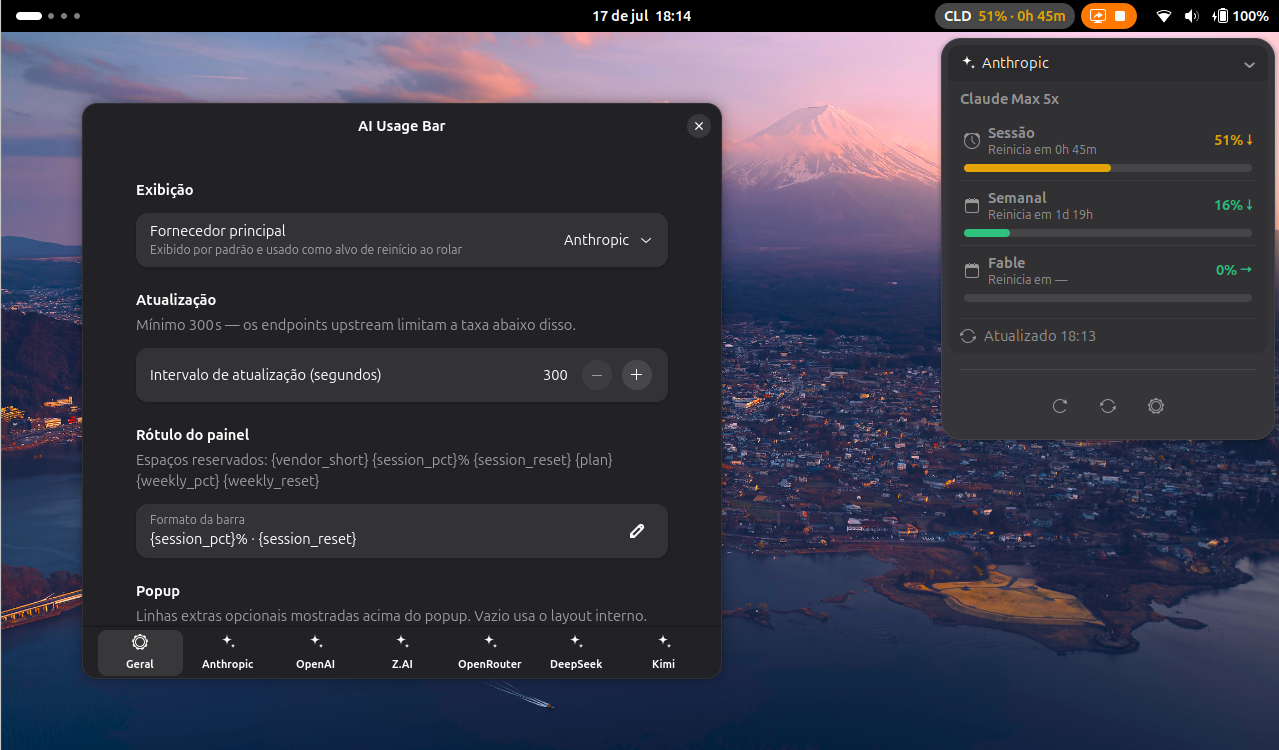
The panel shows a compact label for the active vendor — e.g.Claude 42% · 3h12m — colored by severity as you near a limit. Click it to open
a popup with a collapsible section per enabled vendor, and scroll the panel
button to cycle between them.
Supported vendors
| Vendor | What is shown | Auth model |
|---|---|---|
| Anthropic (Claude) | Session + weekly usage %, model-scoped weekly caps, extra usage, banked resets, reset countdowns, plan; optionally your Claude Code sessions' context | OAuth credentials from ~/.claude/.credentials.json, auto-refreshed |
| OpenAI (Codex) | 5h + weekly usage %, code review, credits, banked reset credits | OAuth from ~/.codex/auth.json; optional admin key for org usage |
| Z.AI / GLM | Plan usage and reset windows | API key (env var or prefs entry) |
| OpenRouter | Credit balance and usage | API key (env var or prefs entry) |
| DeepSeek | Balance / credits | API key (env var or prefs entry) |
| Kimi | Weekly quota + 5h window usage %, reset countdowns, plan | API key (env var or prefs entry) |
| Ollama Cloud | Session + weekly (or monthly) usage %, top 5 models per window, cost | API key (env var or prefs entry) |
| Custom provider | Any metrics and texts you map from a JSON endpoint | Optional key in a header you choose (see Custom provider) |
Only the active vendor is polled on the refresh timer; other enabled vendors
render from the last fetched result and are refreshed lazily on scroll-cycle or
via the popup's "Refresh all" button.
Install
This extension targets GNOME Shell 50. There is no build step — it is plain
GJS / ES modules.
[!NOTE]
Not on extensions.gnome.org. This extension is distributed only through
GitHub releases, not the official extensions.gnome.org
From a packed zip
Download
[email protected]from the
latest release,
or build it from a checkout withmake pack.Install it:
gnome-extensions install --force [email protected]Or unzip it manually into
~/.local/share/gnome-shell/extensions/ai-usagebar@wilfison/.Log out and back in (on Wayland a full relog is required to load a new
extension), then enable it:gnome-extensions enable ai-usagebar@wilfison
Authentication
Credentials are read locally from disk or the environment — they are never
sent anywhere except the vendor's own usage endpoint.
Anthropic (Claude). Reads OAuth credentials from
~/.claude/.credentials.json(the same file the Claude CLI writes). The
access token is refreshed automatically when it expires, and the refreshed
token is written back to that file. The credentials path is configurable in
preferences.OpenAI (Codex). Reads OAuth credentials from
~/.codex/auth.json. An
optional admin API key (default env varOPENAI_ADMIN_KEY) can be set for
organization-level usage. The auth path is configurable in preferences.Z.AI / GLM, OpenRouter, DeepSeek, Kimi, Ollama Cloud. Use an API key. The
key is resolved in this order:- the named environment variable (defaults
ZAI_API_KEY,OPENROUTER_API_KEY,DEEPSEEK_API_KEY,KIMI_API_KEY,OLLAMA_API_KEY) if it is set; - otherwise the inline key entered in preferences;
- otherwise the vendor reports a configuration error in its popup section.
Ollama Cloud's key comes from https://ollama.com/settings/keys; the local
~/.ollama/id_ed25519signing key is never read. Its usage route reports no
plan name, so set one in preferences if you want it in the popup title.- the named environment variable (defaults
Custom provider
One extra slot turns any endpoint that answers a GET with JSON into a vendor.
Enable it on the Custom preferences page and fill in:
- Name — shown in the popup and notifications; its first three letters
become the panel badge (Team API→TEA). - URL — must be
https://, unless Allow plain HTTP is on (for a local
service). A URL with a user name or password is refused. Redirects are
followed only within the same scheme, host and port; a redirect to another
origin stops and shows as an HTTP error, so the key never leaves that origin. - API key (env var or inline), auth header (default
Authorization) and
auth scheme (defaultBearer; empty sends the key bare). With no key, no
auth header is sent. - Extra headers — a JSON object of string values, e.g.
{"X-Team": "core"};
it must not repeat the auth header. - Mapping — which fields of the response to show, each addressed by a
JSON Pointer.
Given a response like
{
  "account": {"tier": "Team"},
  "requests": {"used": 420, "limit": 1000, "resets_at": "2026-10-01T00:00:00Z"},
  "tokens": {"percent": 91.5, "seconds_left": 5400},
  "status": {"region": "sa-east-1", "healthy": true}
}
this mapping shows two usage rows and two text rows:
{
  "planPath": "/account/tier",
  "metrics": [
    {"label": "Requests", "used": "/requests/used", "limit": "/requests/limit",
     "resetsAt": "/requests/resets_at", "windowSecs": 86400},
    {"label": "Tokens", "percent": "/tokens/percent", "resetsAfterSeconds": "/tokens/seconds_left"}
  ],
  "texts": [
    {"label": "Region", "value": "/status/region"},
    {"label": "Healthy", "value": "/status/healthy"}
  ]
}
- A metric has either
used+limit(shown as420 of 1000) or a singlepercent, never both. Numbers may be JSON numbers or plain numeric strings. resetsAttakes an RFC 3339 timestamp or a Unix epoch in seconds or
milliseconds;resetsAfterSecondstakes the seconds left instead. WithwindowSecs(at least 60) and a reset, the row gets the pace marker.- A text shows a string, number or boolean as
label: value. plansets a fixed title;planPathreads it from the response instead.- Labels are 1–64 characters and unique. The preferences check the mapping when
the editor loses focus and keep the last valid one. - A pointer that does not resolve, or resolves to the wrong type, fails the
refresh; the last good figures stay on screen, marked stale.
In bar-format, the first two metrics are {session_pct}/{session_reset} and{weekly_pct}/{weekly_reset}; every metric is also {custom_<i>_pct} and{custom_<i>_reset} (from 0), and the plan is {custom_plan}.
Configuration
Open preferences with gnome-extensions prefs ai-usagebar@wilfison (or the
gear button in the popup footer). The prefs window exposes:
- Primary vendor — the default active vendor on startup.
- Show vendor logos — each vendor's logo as the panel badge and in the popup
headers; off shows the short code and a generic icon. - Panel position — the panel area (left, center beside the clock, or right
beside the system menu) and the position within it. The default is right of
the clock; changes apply immediately. - Refresh interval — seconds between polls (minimum 300; the vendor
endpoints rate-limit below that). - Per-vendor enable — toggle each of the seven vendors on or off; only enabled
vendors appear in the popup and the scroll cycle. - Panel label format (
bar-format) — a template with{token}placeholders,
e.g. the default{session_pct}% · {session_reset}. The active vendor is
identified by a badge before the text: its logo, or its short code (CLD,GPT, …) when Show vendor logos is off or for the custom provider. Add
the{vendor_short}token if you also want the short code in the text. - Tooltip / extra rows format (
tooltip-format) — optional additive rows
prepended to a vendor's popup section. - Severity colors — the green / orange / red / critical threshold colors.
- Pace marker — show an on-/off-pace indicator comparing usage against
elapsed time in the window. - Per-vendor auth — credentials path (Anthropic/OpenAI), API-key env-var name
and inline key (Z.AI/OpenRouter/DeepSeek/Kimi/Ollama), Z.AI plan tier, and
Ollama plan name.
Placeholders
bar-format and tooltip-format substitute {token} placeholders from the
active vendor's values. A token the vendor does not provide is left as is; a
window the vendor did not report resolves to an empty string rather than a
made-up 0. Reset tokens hold a countdown such as 4h 05m (— when there is
none).
Shared by every vendor — {icon}, {vendor_short}, {plan},{session_pct}, {session_reset}, {session_elapsed}, {weekly_pct},{weekly_reset}, {weekly_elapsed}. *_elapsed is how much of the window has
passed, in percent. Vendors with a reset instant also give {session_pace} and{weekly_pace}: ↑ ahead of pace, → on track, ↓ under, and nothing while
the window is too new to judge, already at its cap, or has no reset.
| Vendor | Its own tokens |
|---|---|
| Anthropic | {sonnet_pct}, {sonnet_reset}, {sonnet_elapsed}, {sonnet_pace}; for each of session, weekly, sonnet: _pace_indicator, _pace_pct, _pace_pts, _pace_delta, _pace_abs_delta; {extra_spent}, {extra_limit}, {extra_pct}; {resets_available} (banked resets), {resets} (2 resets available) |
| OpenAI | {oai_plan}; {oai_session_*} and {oai_weekly_*} with _pct, _reset, _elapsed, _pace, _pace_indicator; {oai_code_review_pct}, {oai_credit_balance}, {oai_local_msgs}, {oai_cloud_msgs}; {oai_resets_available}, {oai_resets} |
| Z.AI | {zai_plan}; {zai_session_*}, {zai_weekly_*}, {zai_mcp_*} with _pct, _reset, _elapsed, _pace, _pace_indicator |
| OpenRouter | {or_label}, {or_balance}, {or_total}, {or_used}, {or_used_today}, {or_used_week}, {or_used_month}, {or_consumed_pct}, {or_free_tier}, {or_limit}, {or_limit_remaining} |
| DeepSeek | {ds_balance}, {ds_granted}, {ds_topped_up}, {ds_available}, {currency} |
| Kimi | {kimi_plan}, {kimi_window_pct}, {kimi_window_reset}, {kimi_weekly_pct}, {kimi_weekly_reset}, {kimi_monthly_pct}, {kimi_monthly_reset} |
| Ollama Cloud | {oll_plan}, {oll_cost}; {oll_session_*}, {oll_weekly_*}, {oll_monthly_*} with _pct, _reset, _elapsed (never paced: the API reports no reset) |
| Custom provider | {custom_plan}, {custom_<i>_pct}, {custom_<i>_reset} for each metric from 0 |
For OpenRouter and DeepSeek, which have no usage windows, the sharedsession_/weekly_ tokens hold the consumed share (OpenRouter) or 0.
Refresh, cache and notifications
- Cache. Each vendor keeps its last good figures in
~/.cache/ai-usagebar/<vendor>/— only the projected snapshot the popup
needs, never a raw response. A result younger than 60 seconds is reused
without a request. When a refresh fails, the last good figures stay on screen
with a⏸mark, for at most 7 days; after that, or with no cache, the
error itself is shown. - Rate limits. An HTTP 429 from any endpoint pauses that vendor for 5
minutes: no request at all (token refresh included) until it passes, and
the popup says when the next attempt is. - Redirects. Redirects are followed only within the same scheme, host and
port, at most 10 hops; a redirect to another origin stops there, so a
credential never follows it. - Notifications. Each usage window notifies once when it reaches the
threshold (default 97%; 100% and above is sent as critical). It fires again
only after usage drops more than 7 points below the threshold or the window
resets. A banked reset credit is announced once, 48 hours before it expires.
Only a fresh fetch notifies, never a cached or stale one.
Context monitor
On the Anthropic preferences page, Show session context lists your most
recent Claude Code sessions under the Claude section, each with how much of its
context window the latest response used (input plus cache tokens). It reads the
transcripts in ~/.claude/projects (configurable) — only while the option is
on, only after a successful Claude refresh, and only the last 2 MiB of the eight
most recent sessions, asynchronously. Set a default window size and, optionally,
a JSON map of per-model sizes; without one a session shows its raw token count
instead of a guessed percentage.
Privacy & security
- The extension reads your local credential files
(~/.claude/.credentials.json,~/.codex/auth.json) and any API keys you
configure, only to authenticate requests to each vendor's usage endpoint. - It contacts only the vendor usage APIs, over HTTPS, to fetch your plan
status — plus the URL you configure for the custom provider (HTTPS unless you
allow plain HTTP). - The context monitor, when you turn it on, reads your local Claude Code
transcripts; what it shows stays in the popup. - There is no telemetry and no third-party analytics. Nothing is sent
anywhere other than the vendor whose usage you are viewing. - Credential files such as
*.credentials.jsonandauth.jsonare never copied
or logged; refreshed tokens are written back only to the same local file they
came from. - A 401/403 response body is never stored or shown (it can echo a credential);
other error bodies and all vendor text are stripped of control characters
before display.
Development
There is no build step; GNOME Shell loads the JS directly.
Dependencies
gjs— runs the pure-JS unit suite (make test) and the extension itself.glib2— providesglib-compile-schemas(make schemas) and thegnome-extensionspacking tool (make pack).gettext—msgfmt/msgmerge/xgettextfor the i18n targets.libsoup3— the libsoup3 typelib, sogi://Soupresolves in tests.mutter-dev— to launch a nested Wayland session withmake run
On Ubuntu
sudo apt install gjs libglib2.0-bin gettext gir1.2-soup-3.0 mutter-dev-bin
On Arch
sudo pacman -S gjs glib2-devel gnome-shell gettext libsoup3 mutter
ESLint (make eslint) additionally needs Node and the dev deps: npm ci.
The Makefile is the canonical dev loop — run make to list all targets. The
common ones:
make test      # gjs pure-JS unit suite
make lint      # hygiene lint
make eslint    # GNOME Shell flat eslint config (needs npm ci)
make validate  # metadata.json + schema --strict
make run       # launch a throwaway nested gnome-shell (Wayland) to test live
make logs      # follow the gnome-shell journal
make pack      # build the installable zip (with compiled locales)
Contributions and bug reports are welcome at the project repository:
https://github.com/wilfison/ai-usagebar.
Credits
This extension is an independent GNOME Shell port inspired by theakitaonrails/ai-usagebar Waybar
widget. Vendor names (Claude, OpenAI, Z.AI/GLM, OpenRouter, DeepSeek, Kimi, Ollama) are
used nominatively to identify each provider; no affiliation or endorsement is
implied.
Trademarks & logos
The extension ships a monochrome logo for each vendor under icons/
— Claude, OpenAI, Z.AI/GLM, OpenRouter, DeepSeek, Kimi, and Ollama — shown in the
panel badge, the popup headers and the preferences pages only to identify
which service an entry refers to (nominative use). The custom provider, which
the user names, uses the generic icons/ai-symbolic.svg.
Sources and licences for every mark are listed inicons/README.md. The marks remain the property of their
owners; no affiliation with, sponsorship by, or endorsement from those companies
is implied, and this project is not affiliated with any of them. Turn Show
vendor logos off in preferences to show the plain short codes (CLD, GPT, ZAI,
OPR, DSK, KMI, OLL) instead.
License
MIT — see LICENSE. The MIT license is GPL-compatible, so the
extension can be freely used and redistributed alongside GPL-licensed GNOME
components.
Yorumlar (0)
Yorum birakmak icin giris yap.
Yorum birakSonuc bulunamadi