klaudio-panels
Health Warn
- License — License: MIT
- Description — Repository has a description
- Active repo — Last push 0 days ago
- Low visibility — Only 5 GitHub stars
Code Pass
- Code scan — Scanned 12 files during light audit, no dangerous patterns found
Permissions Pass
- Permissions — No dangerous permissions requested
No AI report is available for this listing yet.
Klaudio Panels — Tauri v2 + SolidJS desktop that embeds the Claude Code CLI in a PTY, with panels for the terminal, shell dock, git changes and a file tree.
Klaudio Panels
A native desktop window that embeds the real Claude Code CLI via PTY, with a Slack-style projects sidebar, multi-tab sessions, and auto-resume.
Built with Tauri v2 + SolidJS + xterm.js. The app is a thin shell around the claude CLI — it does not reimplement Claude Code's UI, it embeds it. You get every CLI feature for free: slash commands, permission prompts, the -r session picker, autocomplete, hooks, colors, mouse tracking.
Status: v1.1.2 — first public release. Multi-project + multi-tab + auto-resume, file tree with notify watcher, JSONL session watcher, klaudio shell command, and the Homebrew tap are all shipped. Diff viewer and code signing are the next milestones.
Why
Claude Code's terminal UI is already excellent. What's missing when you run it in Terminal.app is a shell around it:
- Multiple projects side by side, one click away.
- Multiple sessions per project, each in its own tab with its own PTY, independent scrollback.
- Auto-resume the last active session when you reopen a project.
- Real session titles (
/rename) in the sidebar, not just session IDs. - A live file tree + a shell dock at the bottom of the window, so you can inspect files and run commands alongside your Claude session without leaving the app.
- Terminal editors embedded in a secondary PTY. Click any file in the tree → pick your editor → it opens in-window. Today: Neovim, Vim, Helix, Micro. Plus "Open in…" routing for GUI editors (VS Code, Cursor, Windsurf, Zed, JetBrains family, Xcode, Sublime, etc.) via
open -a. - (Coming soon) a diff viewer showing what Claude is touching, without parsing the PTY — we watch the filesystem and git instead.
Think of it as a native window around the CLI, not a replacement for it.
Install (macOS)
Klaudio Panels ships as a universal .dmg — one binary that runs natively on both Apple Silicon and Intel Macs.
Via Homebrew (recommended):
brew tap willywg/klaudio-panels
brew install --cask klaudio-panels
Or download directly: grab Klaudio Panels_<version>_universal.dmg from the latest release and drag the app into /Applications.
First launch
Klaudio Panels is not yet signed with an Apple Developer ID — see Platform support for why. On first launch, macOS will refuse to open the app and show one of these two warnings:
"Klaudio Panels" can't be opened because it is from an unidentified developer
- Open
/Applicationsin Finder. - Right-click (or Control-click) on Klaudio Panels → Open.
- Click Open in the confirmation dialog.
After that one-time approval, the app launches normally like any other app.
"Klaudio Panels" is damaged and can't be opened
Run this once in Terminal:
xattr -cr "/Applications/Klaudio Panels.app"
Then open the app normally. This clears a macOS quarantine flag that sometimes lingers on unsigned downloads.
Both warnings are Gatekeeper defaults for unsigned apps, not signs that anything is wrong with the binary — the source is public and inspectable right here.
Platform support
| OS | Status | Notes |
|---|---|---|
| macOS 14+ (Sonoma, Sequoia) | ✅ primary target | Tested on Apple Silicon and Intel. Universal .dmg is what the maintainer ships. |
| Linux | 🧪 untested | Should build via bun tauri build (Tauri is cross-platform). Help validating is very welcome — see #1. |
| Windows | ❌ not supported yet | Several backend modules are stubbed on Windows. Help porting is welcome — see #2. |
About code signing. Apple's Developer Program is US$99/year. We'll pay it once the project has real usage; until then, the first-launch workaround above is the cost of keeping the project free. Apple has been tightening the unsigned-app escape hatches with each macOS release, so this is a temporary state, not a permanent stance.
Screenshots
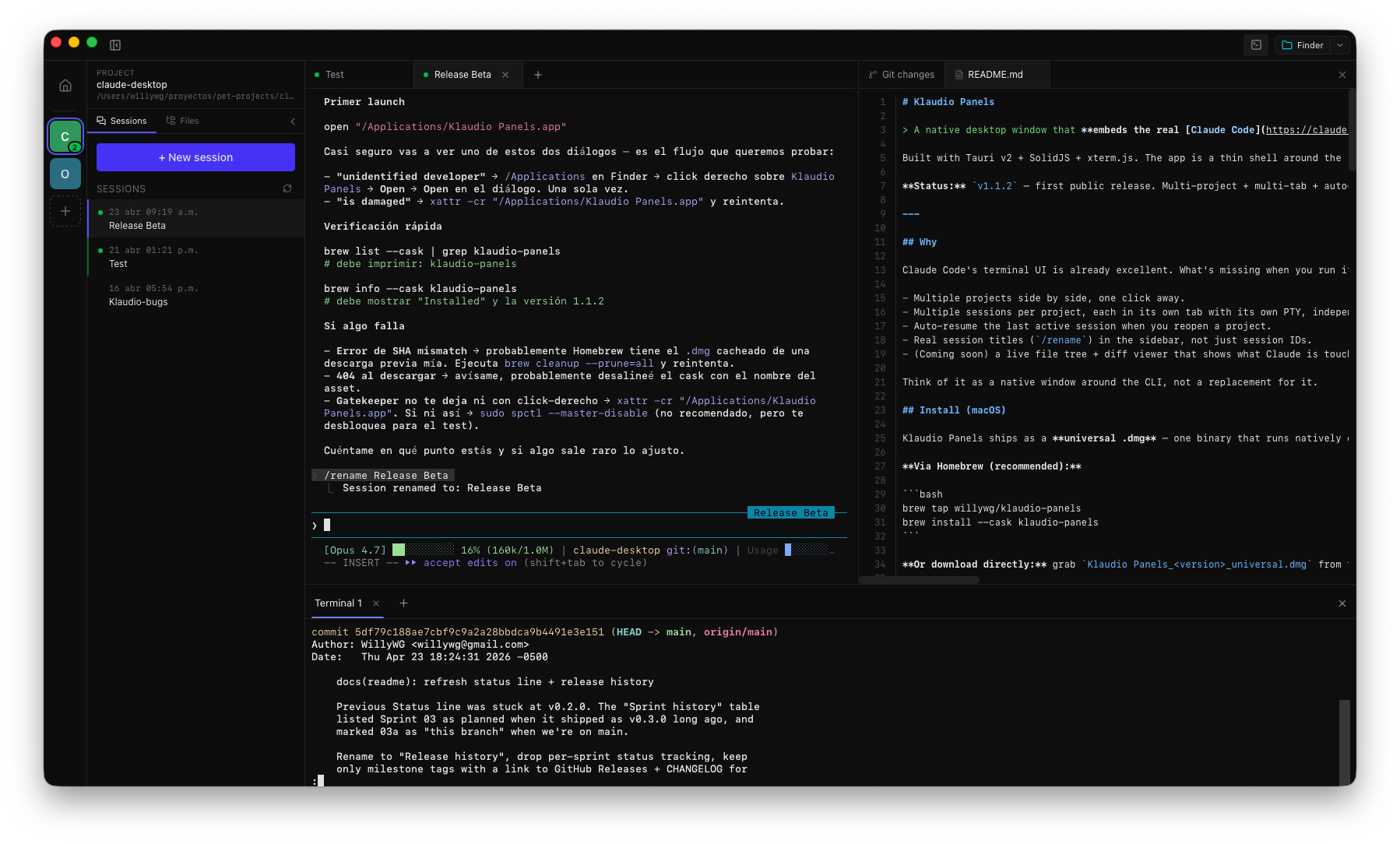
Sessions sidebar + inline Markdown preview with the shell dock at the bottom.
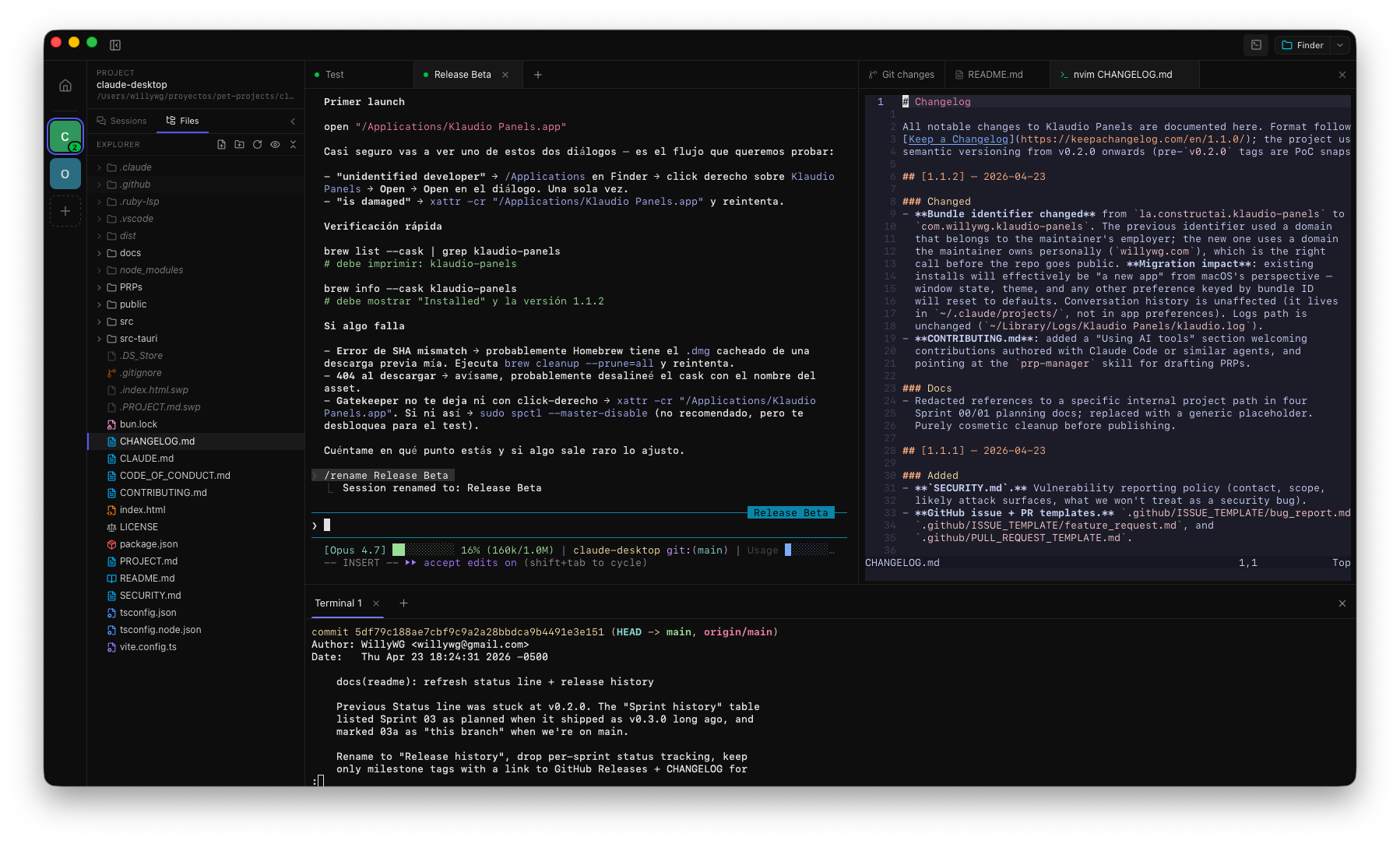
File tree on the left, Neovim embedded in a secondary PTY on the right, Claude session in the middle.
Notifications
Klaudio Panels surfaces three kinds of signals when a Claude session
needs your attention: a chime, a native macOS notification banner,
and an amber ring on the project's avatar in the sidebar (plus a Dock
badge counting how many projects are waiting). All three are
suppressed when you're already focused on the project the event came
from — they only fire for background activity.
🔔 Recommended: install the warp plugin first. Without it,
Klaudio falls back to the noisier transcript-watcher path, which
fires once per Claude turn (often several times a minute on long
agentic work). With the plugin you get the cleanerpermission_requestchannel — Claude pings you only when it's
actually waiting for you. Five-second install, see Permission
requests (recommended warp plugin).Want to mute or change which channels notify you? Click the bell in
the titlebar → ⚙️ Settings — toggle Task complete, Permission
requests, and Sounds independently.
Permission requests (recommended warp plugin)
The transcript watcher cannot see when Claude wants to run a tool
(Bash, Edit, etc.) that requires your approval — that signal
never gets written to disk. To catch those, install the warp Claude
Code plugin. It
emits OSC 777 sidechannel events
that Klaudio Panels parses out of the PTY stream. The same plugin
also works in warp.app and any other terminal
that speaks the warp://cli-agent protocol — install once, get
notifications everywhere.
# Requires `jq` on PATH (brew install jq if missing)
claude plugin marketplace add warpdotdev/claude-code-warp
claude plugin install warp@claude-code-warp
Restart your Claude session afterwards so the plugin loads. From then
on, permission requests get a more attention-grabbing chime + a
banner on top of the built-in turn-completion notifications.
Built-in fallback (zero-config)
Out of the box, Klaudio Panels watches the Claude transcript files
under ~/.claude/projects/ and notifies you whenever a session ends
its turn. This works for every Claude session you run inside Klaudio,
no extra setup needed — but Claude reaches "end of turn" after every
tool-free reply, which means several notifications per minute on
busy work. The warp plugin (above) is the cleaner signal; this path
is the safety net if you can't install it. You can also disable it
entirely from the bell's ⚙️ Settings panel.
The plugin also emits an
idle_promptevent every 60s while the
Claude prompt sits empty (which fires while you're reading
output too). Klaudio drops it server-side because it's noise, not
signal —permission_requestalready covers the actually-blocked
case.
Why this approach? Klaudio's non-negotiable
rule #2 is to never parse Claude's terminal
output — it's brittle across Claude versions. OSC 777 with thewarp://cli-agentsentinel is a different beast: a stable, public,
versioned wire contract. Klaudio's sniffer insrc-tauri/src/cli_agent.rsobserves those frames without mutating
the byte stream (xterm.js still renders the terminal exactly as
Claude sent it).
Architecture at a glance
┌─────────────────────────────────────────────────┐
│  Tauri v2 Window (Rust)                         │
│                                                 │
│  ┌───────────────────────────────────────────┐  │
│  │  SolidJS UI (webview)                     │  │
│  │  ┌────────┬─────────┬──────────────────┐  │  │
│  │  │Projects│Sessions │  xterm.js        │  │  │
│  │  │sidebar │sidebar  │  (renders PTY)   │  │  │
│  │  └────────┴─────────┴──────────────────┘  │  │
│  └───────────────────────────────────────────┘  │
│                                                 │
│  Rust backend                                   │
│  ├─ binary.rs    : detect `claude` on PATH      │
│  ├─ shell_env.rs : hydrate login shell env      │
│  ├─ sessions.rs  : read ~/.claude/projects/*    │
│  └─ pty.rs       : portable-pty spawn + stream  │
└─────────────────────────────────────────────────┘
Key rules (see CLAUDE.md for the full set):
- Claude runs interactively in a PTY. No
-p, no--output-format. xterm.js renders bytes as-is. - We never parse the PTY output. If a feature seems to need it, we watch the filesystem + git instead.
- Shell env hydration is mandatory. macOS GUI apps inherit a stripped PATH; we merge the login shell's env so
node,nvm,git,rgwork inside Claude's Bash tool. - Sessions live in
~/.claude/projects/. We read JSONL files for sidebar previews; we never write there. - Each tab is its own PTY. Switching tabs toggles visibility (never re-creates xterm, to preserve scrollback + WebGL).
- Persistence is minimal.
localStorageforlastSessionId:<projectPath>. SQLite is for later.
Full design doc: PROJECT.md.
Prerequisites
- Bun 1.3+
- Rust stable toolchain
- The
claudeCLI installed and authenticated (runclaudeonce in a terminal first). - macOS is the primary development target. See Platform support for Linux / Windows status.
Development
bun install
bun tauri dev
First cold Rust build: ~3–5 minutes. After that HMR is instant.
Other useful commands:
bun run typecheck               # tsc --noEmit
cd src-tauri && cargo check
cd src-tauri && cargo clippy -- -D warnings
Building a release
On macOS, build a universal binary (native on both Apple Silicon and Intel):
rustup target add aarch64-apple-darwin x86_64-apple-darwin   # one-time
bun run release:mac
Artifacts land under src-tauri/target/universal-apple-darwin/release/bundle/.
Building with a plain bun tauri build is fine for local smoke-testing, but don't ship it — it produces a host-arch-only binary, which on an x86_64 toolchain means Intel-only, and Apple Silicon users will run it under Rosetta and see macOS's "End of support for Intel-based apps" warning.
On Windows / Linux, bun tauri build is still the right command; artifacts land under src-tauri/target/release/bundle/.
Note: release builds are not yet signed with an Apple Developer ID. End-users hit a Gatekeeper warning on first launch — see First launch for the one-time workaround.
Release history
Milestones only — intermediate tags (v0.4.x through v0.9.x) covered polish and bug fixes on the Sprint 02/03 feature set. Full detail in CHANGELOG.md; every tag is at GitHub Releases.
| Tag | Milestone | Status |
|---|---|---|
v0.0.1-stream-json-poc |
Sprint 00 — stream-json PoC, pivoted to PTY | ✅ archived |
v0.1.0-pty |
Sprint 01 — claude in PTY, single tab, sidebar sessions |
✅ shipped |
v0.2.0 |
Sprint 02 — multi-tab, multi-project, auto-resume | ✅ shipped |
v0.3.0 |
Sprint 03 — file tree, notify watcher, JSONL session watcher |
✅ shipped |
v1.0.0 |
Rename "Klaudio UI" → "Klaudio Panels" | ✅ shipped |
v1.1.0 |
klaudio shell command + klaudio:// URL scheme |
✅ shipped |
v1.1.2 |
First public release — Homebrew tap, OSS hygiene, bundle id | ✅ shipped |
| next | Sprint 04 — diff viewer (@pierre/diffs) |
🔜 planned |
| later | Code signing + notarization (Apple Developer Program) | 🔜 planned |
Retros live in docs/; PRPs in PRPs/.
Troubleshooting
Klaudio Panels writes a diagnostic log on every run. If something goes
wrong, grab it before filing an issue:
macOS — ~/Library/Logs/Klaudio Panels/klaudio.log
tail -n 200 "$HOME/Library/Logs/Klaudio Panels/klaudio.log"
open "$HOME/Library/Logs/Klaudio Panels"   # reveal in Finder
Linux — ~/.klaudio-panels/logs/klaudio.log
tail -n 200 "$HOME/.klaudio-panels/logs/klaudio.log"
Please redact anything you'd rather not share (project paths, usernames,
tokens). The bug report template has a slot for the log chunk.
Contributing
See CONTRIBUTING.md. In short:
- All repo artifacts (code, comments, docs, PRs, issues, commits) in English.
- Open an issue before a large PR so we can agree on scope.
- Conventional commits (
feat:,fix:,docs:,refactor:,chore:). - Run
bun run typecheck+cargo check+cargo clippy -- -D warningsbefore pushing.
Credits
- Claude Code — the CLI we embed. Without it, there's no app.
- OpenCode Desktop — the reference architecture for embedding a CLI in a Tauri native window. We borrowed the
probe_shell_env/load_shell_env/merge_shell_envpattern verbatim from theirpackages/desktop/src-tauri/src/cli.rs. - Claudia — used during the Sprint 00 stream-json PoC for
claudebinary detection and JSONL parsing patterns.
License
MIT © 2026 William Wong Garay
Reviews (0)
Sign in to leave a review.
Leave a reviewNo results found