brito
Health Warn
- License — License: NOASSERTION
- Description — Repository has a description
- Active repo — Last push 0 days ago
- Low visibility — Only 5 GitHub stars
Code Fail
- rm -rf — Recursive force deletion command in desktop/linux/install.sh
- os.homedir — User home directory access in desktop/main.mjs
- process.env — Environment variable access in desktop/main.mjs
- fs.rmSync — Destructive file system operation in desktop/package.mjs
- process.env — Environment variable access in desktop/package.mjs
Permissions Pass
- Permissions — No dangerous permissions requested
No AI report is available for this listing yet.
Coding-agent CLI with a code knowledge graph, memory and reviewable skills. CLI de agente de código com grafo de conhecimento, memória e skills revisáveis.
Brito
English · Português
A coding agent for your terminal (
brito-cli) and your desktop (a native app) that knows your codebase as a graph and learns your project's procedures as skills you review.
Brito is an agent for software development. Use it in the terminal (brito-cli on npm) or as a desktop app (an executable for macOS, Windows and Linux): same agent, same graph, same skills. Instead of grepping and reading files blindly, it keeps a knowledge graph of your code (symbols, who calls whom, who imports whom) and answers questions like "what breaks if I change this?" straight from the graph, in a fraction of a second. It also keeps memory notes and skills: reusable procedures learned from your own work, which only become active after you approve them.
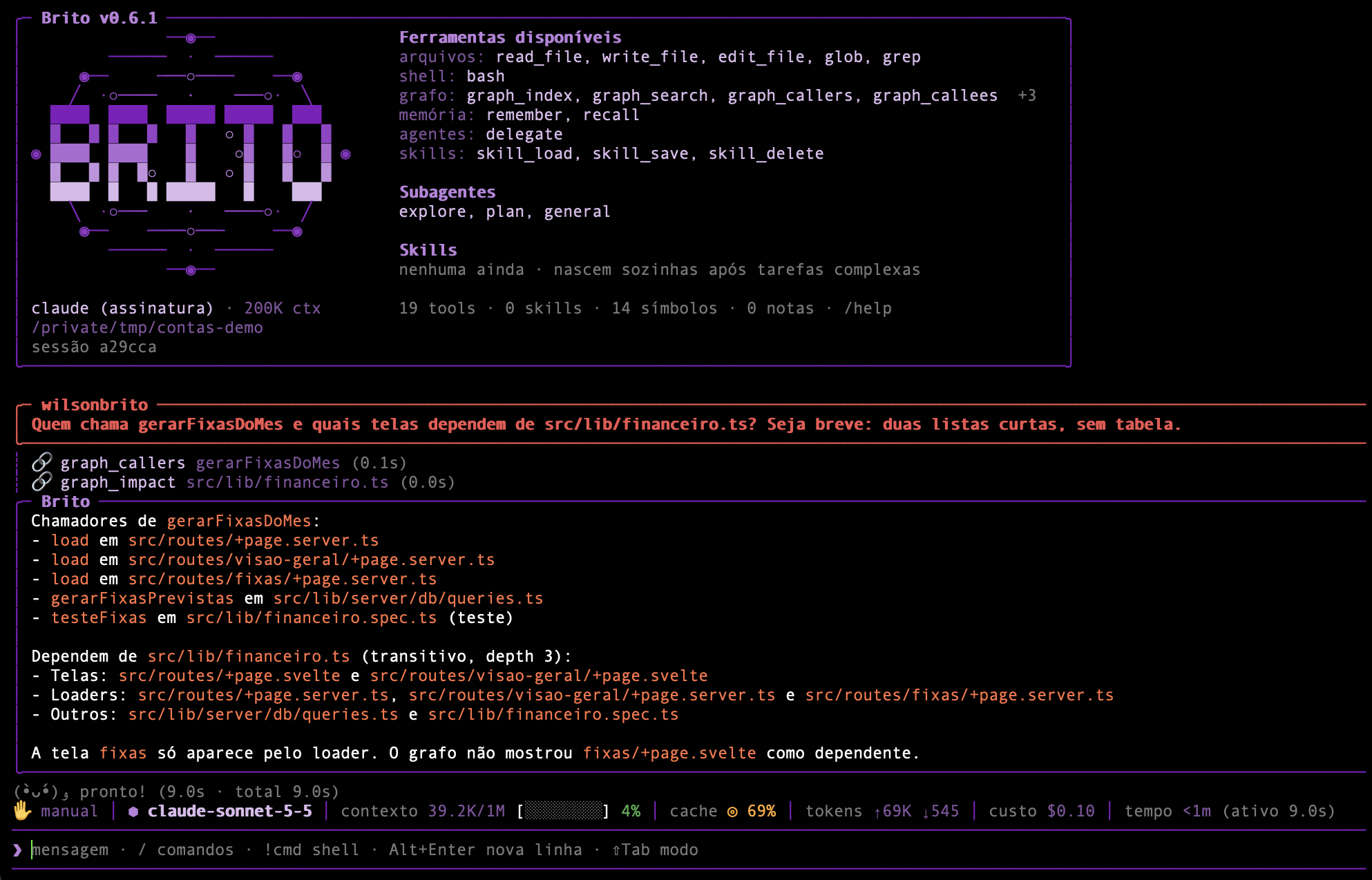
A real session on a small SvelteKit project: one question, two graph calls (0.1 s and 0.0 s), and an answer that already includes the .svelte components depending on the file. The status bar shows the real cost of the turn.
Highlights
Upgrading to 0.6: the graph engine changed from Kùzu (discontinued) to LadybugDB. The graph is rebuilt automatically on first use; your old
.brito/graph.kuzuis kept. Brito asks once whether to copy your notes (memory) to the new graph, or runbrito migrar-notasany time. Tests run in CI on macOS, Linux and Windows (use 0.6.1 or later on Windows/Linux). See the CHANGELOG.
- Graph-first exploration.
graph_search,graph_context,graph_callers,graph_calleesandgraph_impactanswer "where is it, who uses it, what breaks" without reading whole files. The graph is embedded (LadybugDB, fork mantido do Kùzu), local and incremental. - Wide coverage. TypeScript/JavaScript, Python and the script blocks of
.svelte,.vueand.astrocomponents. Import aliases (tsconfigpaths,package.jsonimports, SvelteKit's$lib) become real edges. Files ignored by.gitignorestay out. - Skills that learn on their own, on probation. After a task that tripped or was corrected, Brito reflects and creates a skill in trial without interrupting you. A skill proves itself by use: 3 clean uses promote it, 2 stumbles archive it (recoverable). Anything risky, or any change to a skill you approved, still waits for your
/skills approve.BRITO_SKILLS=askrestores approval-for-everything;offdisables learning. - Safety rails for what gets learned. A lint rejects secrets, credentials embedded in URLs,
curl | shand prompt-injection phrasing, and warns about destructive commands (see below). - Permission modes. manual, auto-edits, plan and "everything allowed" (
Shift+Tabcycles them). Autonomous skills do not depend on the mode: they are created in trial and judged by results. - Two backends, one interface. Use an Anthropic API key, or your Claude Code subscription through the
claudeCLI. Brito never reads or sends your subscription token. - Terminal or desktop app.
npm i -g brito-cligives you thebritocommand; the desktop app is a native executable with a window (projects and sessions in a sidebar, chat, permission prompts), no Node or terminal needed. See Install. - Images. Drag an image file into the prompt (or paste its path) and it is attached to the turn: PNG, JPEG, GIF or WebP, up to 5 MB.
- Subagents.
explore,planandgeneralrun in isolated contexts (read-only ones in parallel); add your own in.brito/agents/*.md. - MCP server.
brito mcp-serveexposes the graph, memory and skills to other MCP clients such as Claude Code. The query tools are markedalwaysLoad, so they are not hidden behind tool search.
How it works
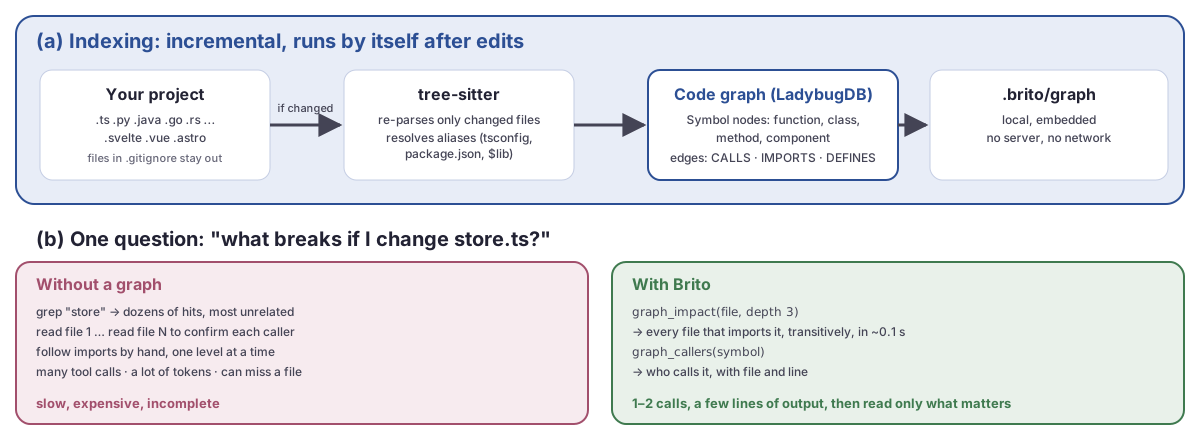
The graph is built once and updated incrementally; a question like "what breaks if I change this?" becomes one or two graph calls.
flowchart LR
    code["Your project<br/>.ts · .js · .py · .java · .kt · .go · .rb · .php · .cs · .rs · .svelte · .vue · .astro"] -->|"tree-sitter<br/>incremental"| cg[("Code graph<br/>symbols · calls · imports")]
    cg <-->|"graph_search · graph_callers<br/>graph_impact · graph_context"| agent{{"Brito agent"}}
    mem[("Memory<br/>decisions · conventions")] <-->|"recall / remember"| agent
    agent -->|"after a complex task"| learn["Reflection"]
    learn -->|"creates"| trial["Skill in trial"]
    trial -->|"3 clean uses"| skills[("Skills<br/>.brito/skills")]
    trial -->|"2 stumbles or 21 idle days"| trash["Archived (.trash)"]
    learn -->|"risky or changes yours"| pending["Pending<br/>/skills approve"]
    pending --> skills
    skills -->|"skill_load"| agent
    trial -->|"skill_load"| agent
- Code graph: functions, classes, methods and components as nodes;
CALLSandIMPORTSas edges. It re-parses only files whose hash changed and updates itself after edits. - Memory: durable notes (decisions, conventions, bugs found) linked to files and symbols, retrieved with
recall. - Skills: step-by-step procedures for your project (commands, order, traps, how to verify). The agent loads one with
skill_loadbefore a task it covers. - Journal: Brito remembers across sessions which tasks repeated, which is the best hint that a procedure is general and worth saving.
Architecture at a glance
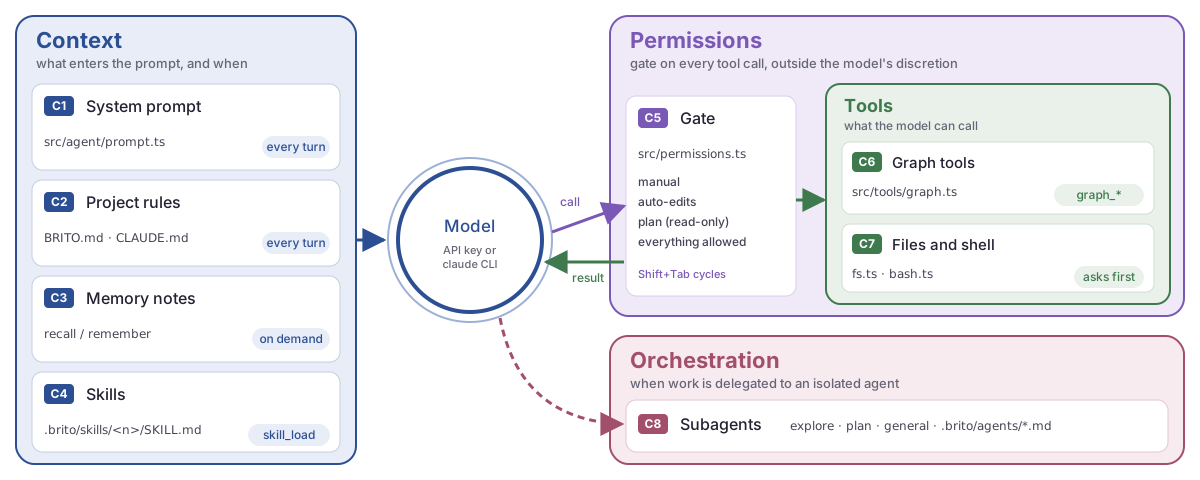
Everything the model sees or can do is one of eight components, grouped by role. The mono-spaced text is the real file or command; the pill says when it fires.
Skills that earn their place
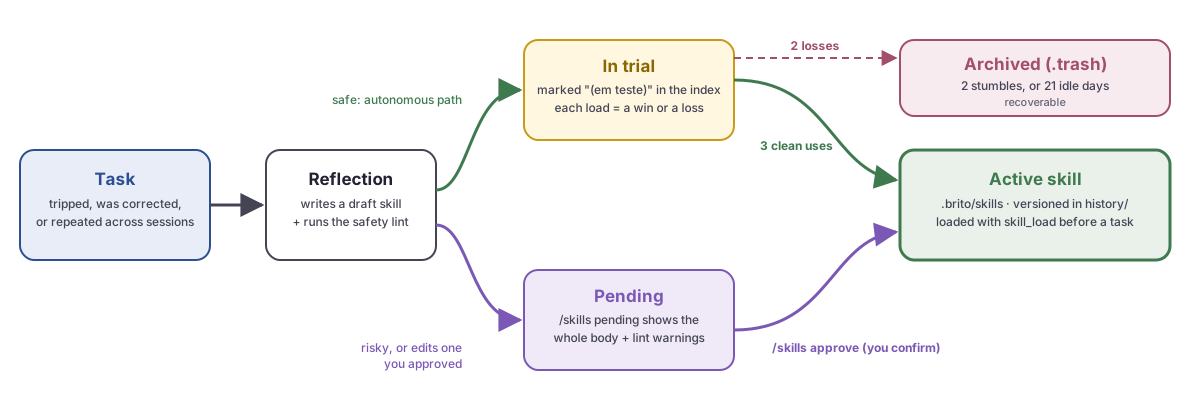
The two paths a skill can take. Safe ones prove themselves in trial; risky ones wait for your approval.
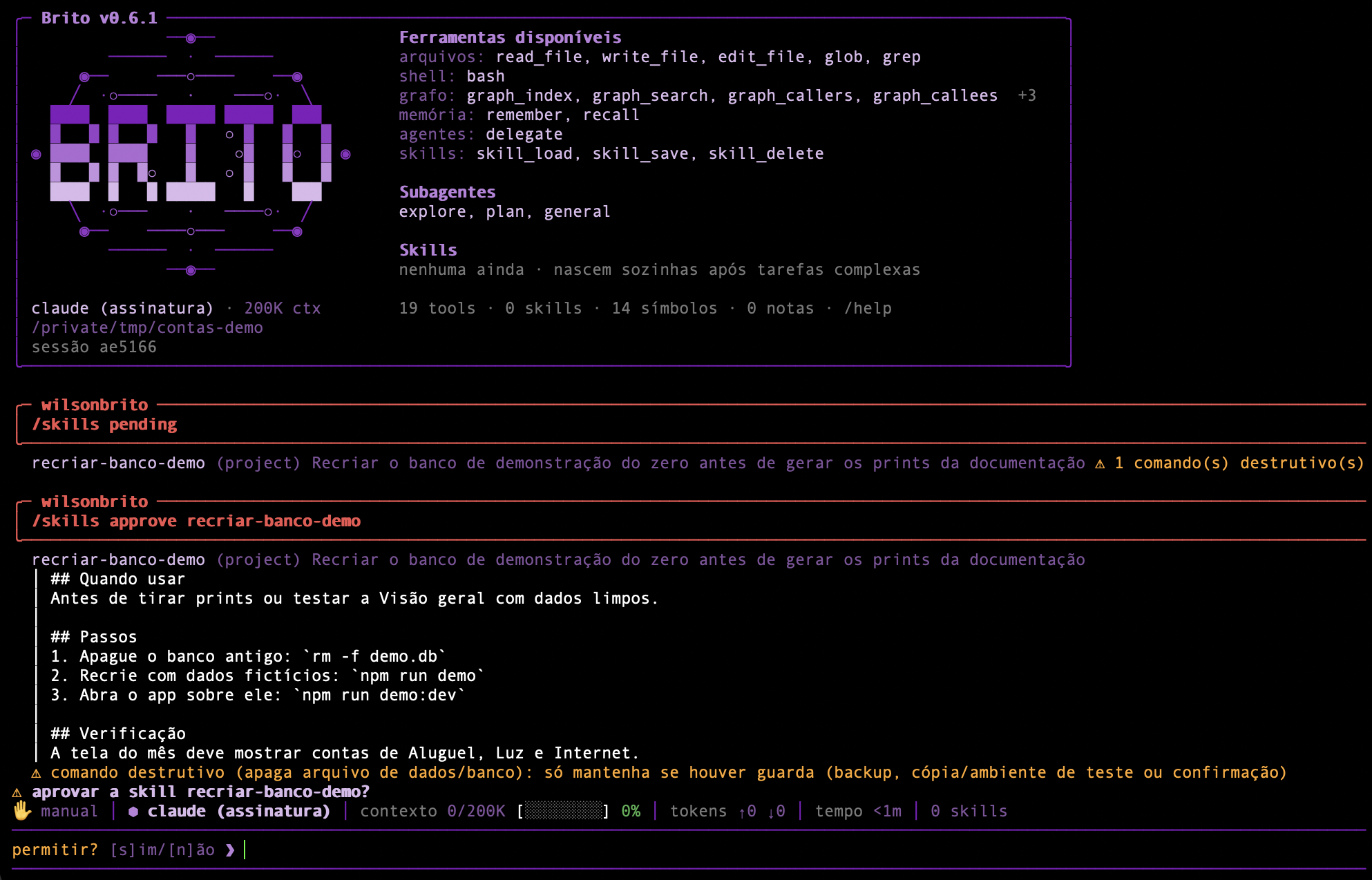
- Autonomous path (default). The reflection saves a new skill as trial, marked "(em teste)" in the index. Each turn that loads it counts as a win (no error-then-fix, no user correction) or a loss. 3 wins (and at most 1 loss per 3 wins) promote it; 2 losses without more wins, or 21 days unused, archive it to
.brito/skills/.trash. Brito prints one line per promotion or archive. Limits: at most 3 new automatic skills a day, project scope only, and a weekly automatic consolidation that only touches automatic skills. - Review path. Skills with destructive commands, and changes to skills you approved, appear in
/skills pending, flagged when they contain destructive commands. /skills approve <name>shows the whole body and the lint warnings, then asks for confirmation. That confirmation is required even in "everything allowed" mode.- Approved skills are versioned (
history/), ranked by use, and flagged when the files they cite no longer exist./skills consolidatemerges duplicates and prunes unused ones. - A skill can be project-scoped or global (valid in every project);
/skills promotemoves one to global.
The lint rejects secrets/tokens, absolute user paths, credentials in URLs (user:password@host), curl | sh, and instructions to override rules or skip approval. It warns (without blocking) about commands that destroy data: removing database or data files, DROP/TRUNCATE, DELETE without WHERE, migration resets, git reset --hard, force-push, Docker volume removal. A skill is a standing instruction, so a step that was only safe in the state of one moment must not silently become the default.
Install
Terminal (brito-cli)
Requires Node >= 20. Developed on macOS; Linux should work. On Windows use npm i -g brito-cli (the install.sh script needs bash); install Git for Windows so the bash tool runs bash commands, otherwise it falls back to cmd.exe (override with BRITO_SHELL).
# from npm (the command is `brito`)
npm i -g brito-cli

# or one line
curl -fsSL https://raw.githubusercontent.com/wilsonbrito/brito/main/install.sh | bash

# or straight from GitHub
npm i -g github:wilsonbrito/brito

# or cloning
git clone https://github.com/wilsonbrito/brito && cd brito
npm install && npm run build && npm link
Pick a backend:
export ANTHROPIC_API_KEY=sk-ant-...      # Anthropic API
# or: install Claude Code, run `claude` and /login — Brito will use your subscription
Desktop app (executable)
The same agent in a window: projects and sessions in a sidebar, chat with markdown, collapsible tool calls, permission prompts, and pickers for model, effort and permission mode. It needs neither Node nor a terminal.
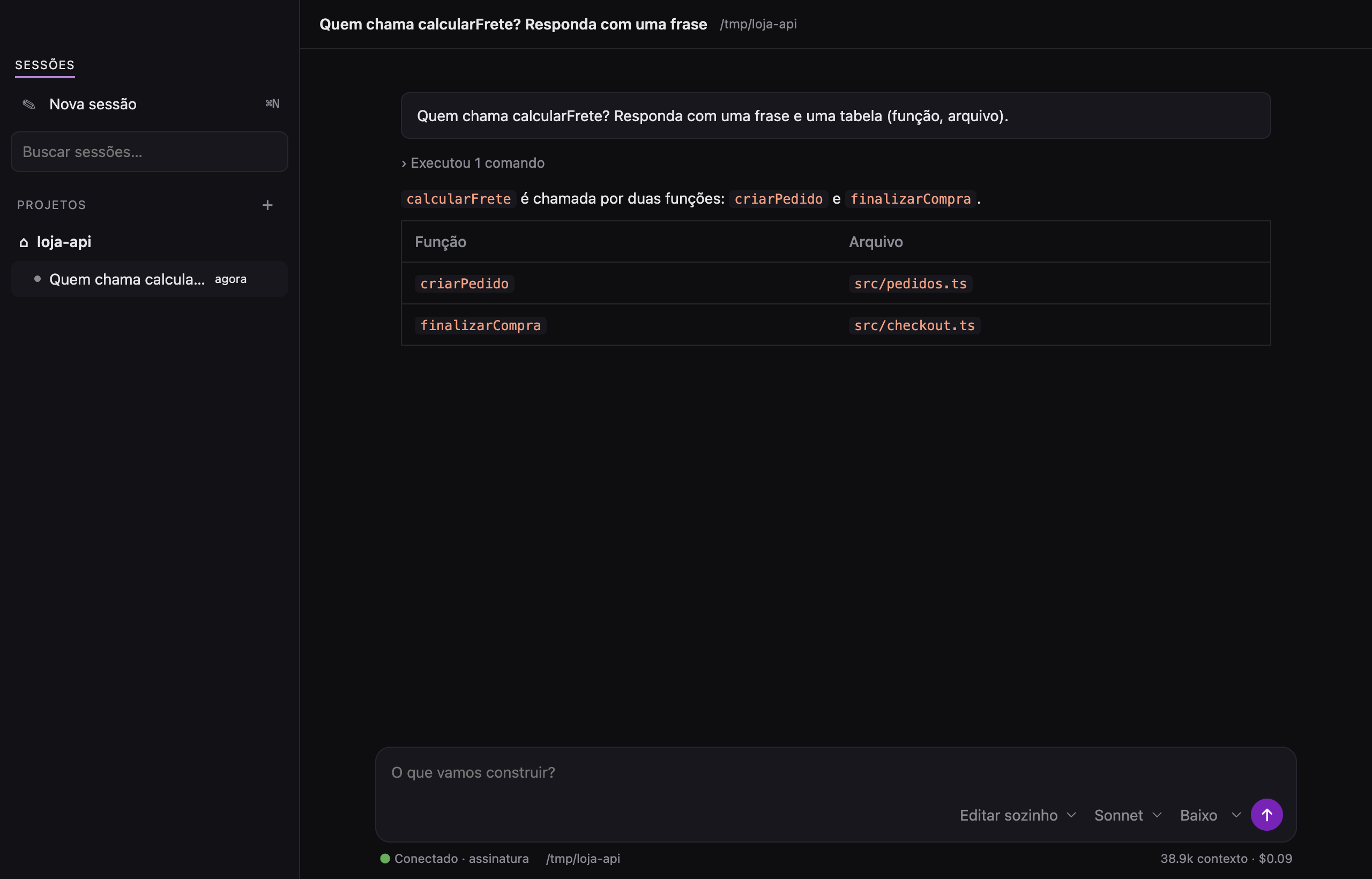
The desktop app on a small project: one question, one graph call (the collapsed "ran 1 command" line), and the answer as a table. The sidebar groups sessions by project; the footer shows the backend, the folder, the context size and the cost.
Download it from the Releases page:
| System | File |
|---|---|
| macOS | Brito-<version>-macos-arm64.dmg (Apple Silicon) or -x64.dmg (Intel): open it and drag Brito to Applications |
| Windows | Brito-<version>-windows-x64-setup.exe |
| Linux | Brito-<version>-linux-x64.tar.gz: extract it and run ./install.sh (adds Brito to the applications menu) |
The builds are not signed with an Apple Developer ID or a Windows certificate, so macOS ("unidentified developer": right-click, then Open) and Windows SmartScreen warn on the first launch. macOS is the platform exercised the most; the Windows and Linux builds come from CI and have had less testing.
Like the terminal version, it uses ANTHROPIC_API_KEY when your shell exports it, otherwise your Claude Code subscription (claude, then /login). Opened from the Finder, the app reads your login shell to find them.
To build it yourself: npm run desktop (development), npm run desktop:app (macOS: installs /Applications/Brito.app) or npm run desktop:dmg.
Quick start
cd your-project
brito                       # opens the REPL
brito "who calls parseConfig?"   # single prompt, no REPL
brito index                 # (re)index the graph; it is also kept up to date automatically
brito query "MATCH (c:Symbol {kind:'component'})-[:CALLS]->(f:Symbol) RETURN c.file, f.name LIMIT 5"
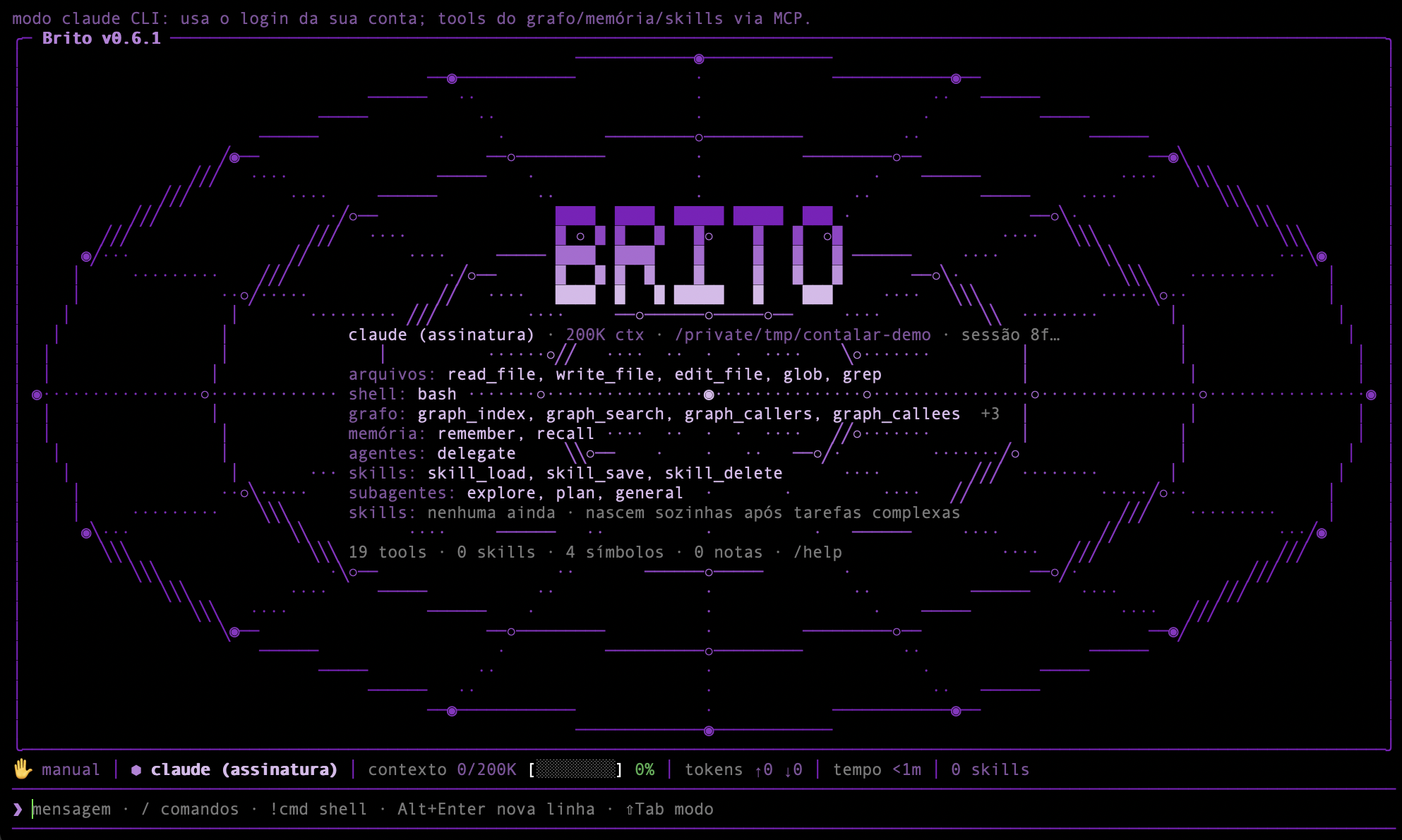
A real brito index on the sample project above:
OK: 20 arquivos, 66 símbolos, 54 chamadas, 17 imports | +0 ~0 -0 =20 (28ms)
Inside the REPL
| Command | What it does |
|---|---|
/help |
list commands |
/model, /effort, /reasoning |
choose model, reasoning effort and thinking (session, global or once) |
/fallback |
shows the main model and the fallback (qwen), and whether the switch already happened |
/modo or Shift+Tab |
switch permission mode: manual → auto-edits → plan → bypass ("everything allowed") |
/skills |
list skills · pending · approve <name> · reject <name> · consolidate · rm <name> · promote <name> |
/learn |
extract skills from the last turn now |
/agents, /tools, /index, /context |
inspect subagents, tools, the index and the context window |
!command |
run a shell command directly, without calling the model |
/clear, /exit |
clear the conversation, quit |
What the graph indexes
- Languages: TypeScript/JavaScript (
.ts .tsx .mts .cts .js .jsx .mjs .cjs), Python (.py), backend languages — Java (.java), Kotlin (.kt), Go (.go), Ruby (.rb), PHP (.php), C# (.cs), Rust (.rs) — and the.svelte,.vueand.astrocomponents. In components Brito reads the script block(s) (and Astro's frontmatter) and records calls made from the template to functions the script declares or imports; each component becomes acomponentsymbol. - Scope: inside a git repository, only what git considers part of the project (tracked + untracked-but-not-ignored), so anything in
.gitignorestays out. Outside git, or withBRITO_INDEX_IGNORED=1, it indexes by glob (still skippingnode_modules,dist,build,target,vendor,obj,.gradle,.venv,.brito). - Imports: relative and aliased. Resolves
paths/baseUrlfromtsconfig.json/jsconfig.json(following relativeextends, like.svelte-kit/tsconfig.json),package.jsonimports(#internal/*) and SvelteKit's$lib. Configuration applies per file (nearest config), so monorepos work; editing a tsconfig re-indexes the affected files. - Backend languages: the graph holds classes/interfaces/structs/traits/enums/modules, functions and methods (
Class.method), calls and imports. Imports name a package, not a path, so Brito matches them against the end of your files' paths (com.acme.Repo↔src/main/java/com/acme/Repo.java; PHP PSR-4 namespaces; Rustuse crate::…; Rubyrequire/require_relative; Go packages through thego.modmodule path). External packages (java.util,serde,github.com/gin-gonic/gin) never match and create no edges. There is no type inference: a call likeuserRepository.save()is linked by matching the receiver name to a type in the project (UserRepository),this/self/receivers resolve to the enclosing class, and a bare call inside a class tries the class's own methods first. - Not yet:
extendsby package (@tsconfig/node20), sibling-workspaceexports, and function references without a call in a template (onclick={fn}). Calls are resolved statically with name-based fallbacks, so dynamic dispatch and reflection are not captured.
Databases and other sensitive resources
Brito has no database drivers and connects to nothing on its own. When it needs to touch a database, it uses your project's own tooling through the shell, under the permission mode you chose. Because every project is different (a local file, a remote server, a container), declare the sensitive parts in BRITO.md (or CLAUDE.md / AGENTS.md), which is read into the system prompt:
## Protected resources
- Database: local SQLite file `local.db` (never commit, never recreate).
  Test destructive changes on a copy: `cp local.db /tmp/test.db` and set `DATABASE_URL`.
  Schema changes: additive only, back up first (`cp local.db backups/pre-change.db`).
- Staging Postgres: connection string is in `$STAGING_DATABASE_URL` (read-only role). Never touch production.
- Credentials never belong in skills or notes: the lint rejects them. Cite the name of the environment variable instead.
- Prefer read-only roles and non-production environments when you give an agent database access.
- A proposed skill that contains a destructive command is highlighted at review time, so you decide whether it needs a guard (backup, copy, confirmation).
OpenAI-compatible endpoint (e.g. Qwen on OCI)
Full step-by-step (install, key, profile, and how to give people access to the repository, in Portuguese): docs/GUIA-QWEN.md.
Besides Claude, Brito runs on any model served through the OpenAI Chat Completions API (vLLM, OCI Generative AI, LiteLLM, Ollama…) with tool calling. Add a profile to ~/.brito/config.json:
{
  "providers": {
    "qwen": {
      "type": "openai",
      "label": "Qwen 27B (OCI)",
      "baseURL": "https://inference.generativeai.<region>.oci.oraclecloud.com/openai/v1",
      "model": "<model id; on OCI, the dedicated endpoint OCID>",
      "apiKeyEnv": "BRITO_QWEN_API_KEY",
      "contextWindow": 262144,
      "vision": false,
      "thinkingToggle": true
    }
  }
}
The key is not stored in the config: put it in the environment variable named by apiKeyEnv. Then:
brito --model qwen            # this session
/model qwen --global          # inside the REPL: make it the default
With a profile selected, everything goes to the endpoint: main agent, subagents (explore stops using Haiku), context summaries and skill learning; Brito starts without ANTHROPIC_API_KEY and without the claude CLI. /reasoning none turns the model's reasoning off (much faster answers on Qwen). thinkingToggle: true only for servers that accept chat_template_kwargs (vLLM/Qwen); without it /reasoning none has no effect, but no unknown parameter is sent. Images are only sent with "vision": true. Deliberate exception: BRITO_EXPLORE_MODEL still decides the explore subagent; a BRITO_LEARN_MODEL pointing at Claude is ignored while a profile is active. A broken profile in the config never falls back to Claude: Brito warns and stops. /effort stays exclusive to claude CLI mode, and a profile does not run inside the claude CLI (/model tells you to reopen with --model).
Fallback to Qwen
With Claude as the main model (API or claude CLI), the qwen profile is the automatic fallback — always that one, no new config key. If Claude fails because of a subscription limit, rate limit, credit, authentication, overload or network error, Brito warns and redoes the request on Qwen with the conversation so far (tools that already ran stay in the history, so they are not repeated). In claude CLI mode the whole engine switches to Brito's own loop.
- The switch happens once per session and never reverts on its own:
/model <claude>goes back to Claude (and the fallback can trigger again later). - It does not switch on Ctrl+C or on content errors (invalid request,
max_tokens, broken tool). - Without
ANTHROPIC_API_KEYand without theclaudeCLI, Brito opens straight on Qwen, with a warning. If the fallback is not ready, the usual error includes why (e.g.BRITO_QWEN_API_KEYis missing). An invalidqwenprofile is still an error, never a silent fallback. /fallbackshows the state. In the desktop app, send/fallbackas a message; the status bar shows Qwen while the fallback is active.
Configuration
BRITO_MODEL, BRITO_EFFORT, BRITO_EXPLORE_MODEL, BRITO_LEARN_MODEL, BRITO_HOME (where global skills and history live), BRITO_CONFIG, BRITO_COLOR, BRITO_BANNER (compact or full; default: full screen on windows of 95+ columns and 28+ rows), BRITO_INDEX_IGNORED, BRITO_SKILL_MIN_TOOLS (how long a turn must be to trigger reflection when nothing else does), BRITO_SKILLS (auto default, ask, off), BRITO_SHELL (shell used by the bash tool; on Windows defaults to Git Bash when installed).
Project data lives in .brito/ (graph, project skills, agents) and global data in ~/.brito. The graph, memory and skills stay on your machine; as with any coding agent, the code the model reads is sent to the model provider you configured.
Limitations
- Early software (v0.5.0), one maintainer.
- The desktop app is new: a single window (no tabs yet), and with an API key (no
claudeCLI) the model does not resume a conversation after you reopen the app, although the screen shows it. - The interface and the agent's default language are Brazilian Portuguese. Translating them is a welcome contribution.
- Skill learning is a heuristic: it proposes, you decide. Expect some proposals to be rejected.
Development
git clone https://github.com/wilsonbrito/brito && cd brito
npm install
npm run dev          # runs via tsx
npm run typecheck
npm test             # 190+ tests, including a real MCP server and a real REPL
| Path | What |
|---|---|
src/graph/ |
indexer (tree-sitter), .svelte/.vue/.astro support, import aliases, Ladybug (Kùzu) store |
src/skills/ |
store, lint, reflection, journal, consolidation |
src/agent/ |
agent loop, prompts, subagents, claude CLI backend |
src/tools/ |
graph, memory, skills, filesystem and shell tools |
src/mcp/ |
MCP server |
src/repl.ts, src/ui/ |
terminal interface |
src/desktop/ |
brito gui-serve: the backend the desktop window talks to (JSON over stdio) |
desktop/ |
Electron window and packaging (package.mjs); npm run bundle builds the single-file backend it uses |
License
PolyForm Noncommercial 1.0.0: free to use, study and modify for any noncommercial purpose (personal use, research, education, hobby, nonprofits). Commercial use is not permitted. This is source-available, not OSI open source. Need a commercial license? Open an issue.
Reviews (0)
Sign in to leave a review.
Leave a reviewNo results found