wish-core
Health Uyari
- License — License: MIT
- Description — Repository has a description
- Active repo — Last push 0 days ago
- Low visibility — Only 5 GitHub stars
Code Gecti
- Code scan — Scanned 4 files during light audit, no dangerous patterns found
Permissions Gecti
- Permissions — No dangerous permissions requested
Bu listing icin henuz AI raporu yok.
Self-hosted AI agent server: long-lived sessions with shell tools, searchable history and 48 model provider presets, in one Rust binary.

A self-hosted AI agent that works on your own machine and remembers everything.
Web app · Documentation · HTTP API · 简体中文
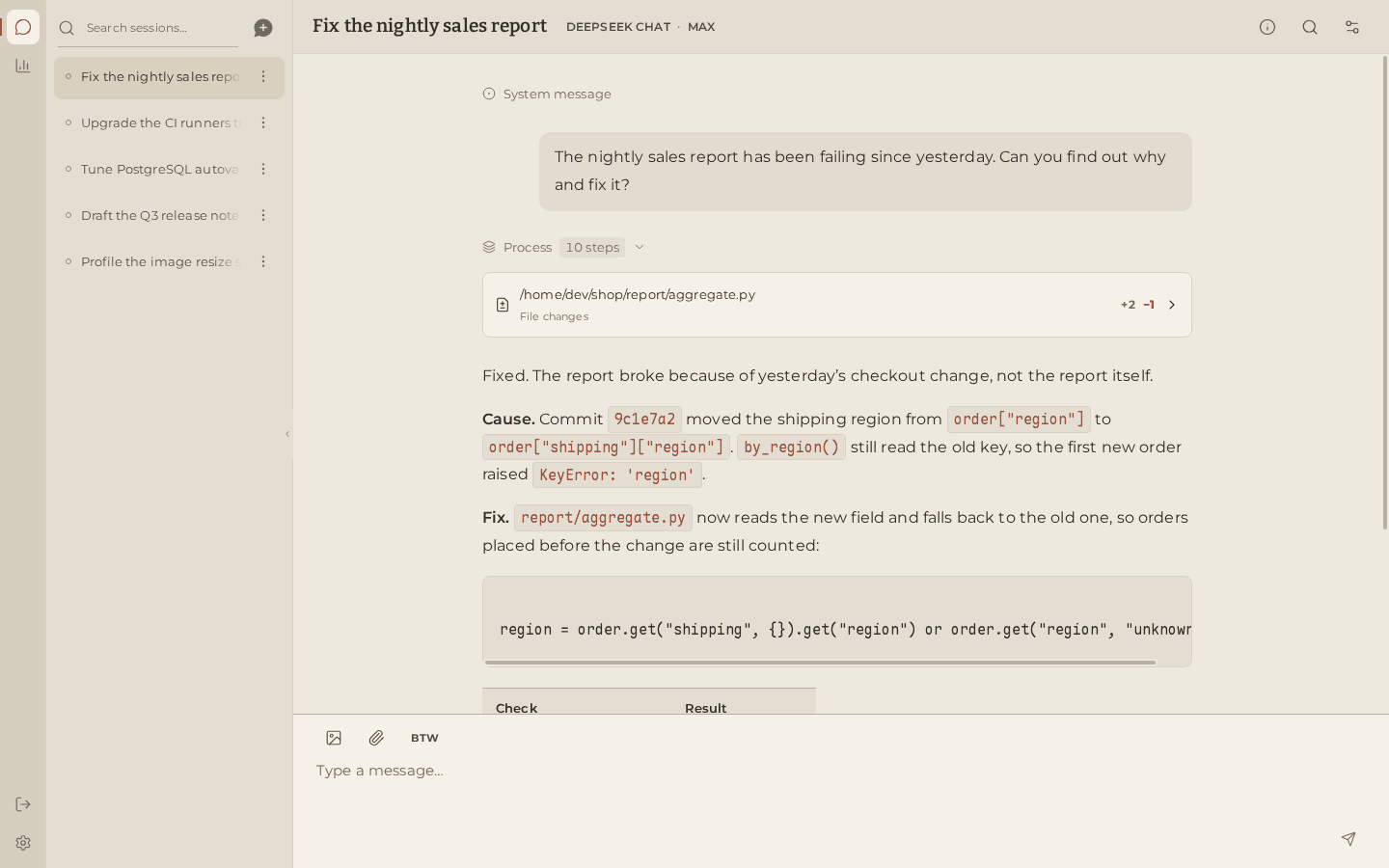
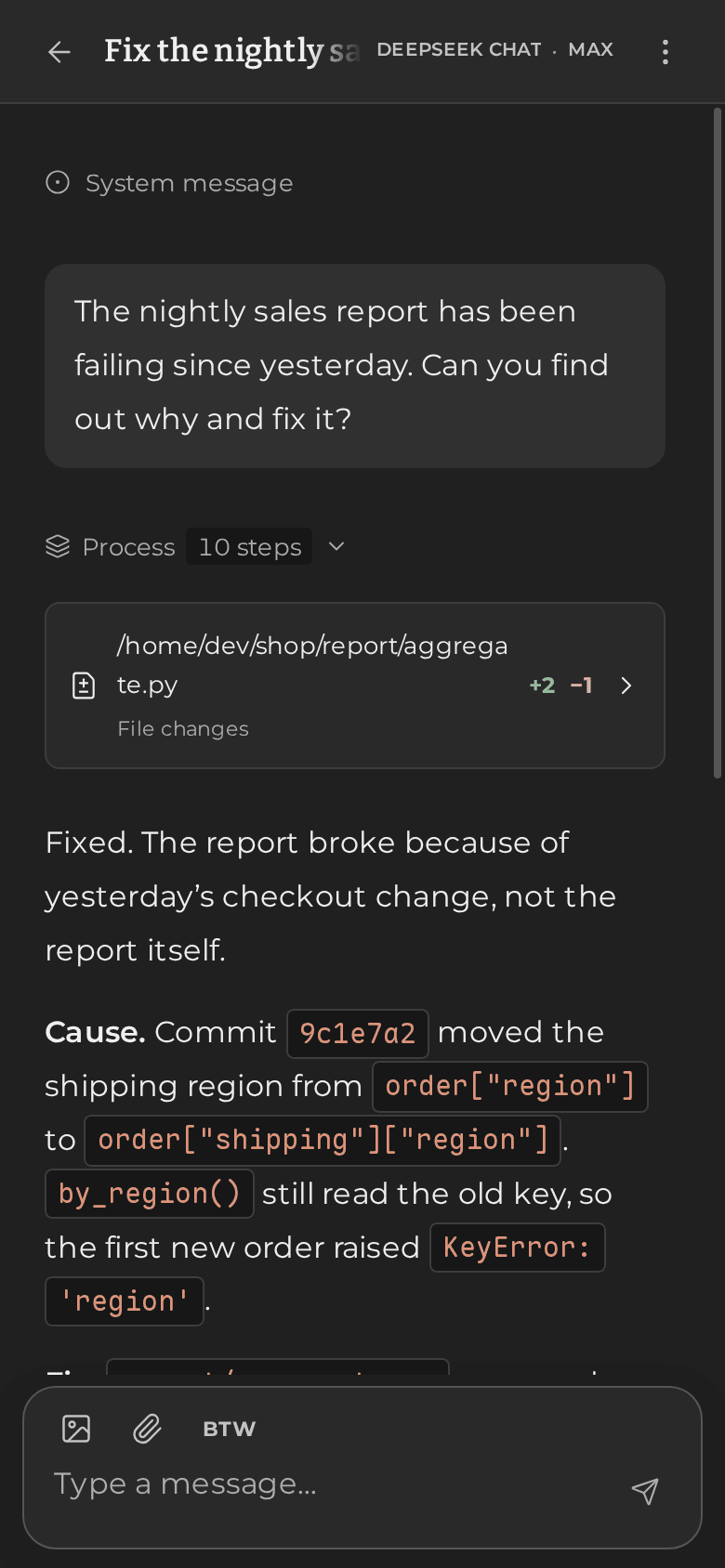
Wish runs long-lived AI agent sessions on a computer you control. Give a
session a working directory and a model, and it will talk with you, run
commands, look at images and keep going through long tasks, while every word
it exchanges is kept and searchable. Use it from the
Wish web app on desktop or phone, or
from anything that speaks HTTP.
Why Wish
- One small program. A single
wishexecutable with its own embedded
database. No database server, container or runtime to install. - Works with the models you already use. 48 ready-made presets cover
OpenAI, Anthropic, Google Gemini, AWS Bedrock, DeepSeek, Qwen, Kimi,
Zhipu / Z.ai, MiniMax, Mistral, xAI, OpenRouter and more, plus local models
through Ollama, LM Studio or vLLM. Each provider is spoken in its own native
protocol, reasoning included. You can also sign in with a ChatGPT account. - Change your mind mid-task. Switch provider or model at any point, even
while the agent is working; the change applies from its next step. - Nothing is ever lost. Every message and event is stored permanently.
Search a session's entire history by keyword, in any language, and let the
agent search its own past as well. - Long conversations stay usable. When the context grows large, Wish
compacts it automatically, with rolling summaries or the provider's own
compaction. The full original history stays intact. - A capable shell. The agent runs commands in the session's directory,
moves long jobs to the background and hears back when they finish, types
into interactive programs, and reports exactly what each file edit changed. - MCP servers without the cost. Add local or remote MCP servers and the
agent calls them from its shell, one instance per session. Their tools never
crowd the model's context or reset its prompt cache, however many you add. - Asks when your call is needed. The agent can put choices and short
questions to you in a single form. If it stops waiting and carries on, an
answer you give later still reaches it. - Keep talking while it works. Queue follow-up messages, reorder or cancel
them, interrupt at any time, or ask a quick side question without disturbing
the running task. - Dependable. Tasks keep running when you close the browser. Shutting down
keeps partial answers, and after a crash Wish never repeats a command on its
own. - See what you spend. Token usage per model, cache hits, estimated
streaming speed and a daily activity calendar. - Configure without restarting. Add providers, change models, proxy or
shell from the web app; changes apply immediately.
Quick start
You need a Rust toolchain (stable) to build Wish, and
Node.js 22.19 or newer for the web app.
1. Build and start the server.
git clone https://github.com/WindustH/wish-core.git
cd wish-core
cargo build --release
echo '{"listen": "127.0.0.1:9780", "data_dir": "data"}' > config.json
./target/release/wish --config config.json
2. Start the web app in another terminal.
git clone https://github.com/WindustH/wish-web.git
cd wish-web
./pnpmw install --frozen-lockfile
./pnpmw build
node serve.ts
3. Open http://127.0.0.1:8790. A short first-run setup helps you add a
model provider. Pick your working directory on the start page and send your
first message.
Wish saves the providers you add to config.json. To keep an API key out of
the file, export it before starting Wish and enter it in the web app as${NAME}. See configuration for every option, and
deployment for running Wish as a service, protecting it
with a token and reaching it from other devices.
Without the web app
Everything the web app does is available over the HTTP API:
# Create a session with shell access in /tmp
curl -s http://127.0.0.1:9780/api/sessions -H 'Content-Type: application/json' -d '{
  "provider": "openai", "cwd": "/tmp", "tools": {"shell": true},
  "config": {"model": "gpt-5", "stream": true, "tools": [], "run": {"tools": "Serial"}}}'

# Send it a message; it starts working right away
curl -s http://127.0.0.1:9780/api/sessions/SESSION_ID/input \
  -H 'Content-Type: application/json' -d '{"text": "What is in this directory?"}'

# Follow along live
curl -N http://127.0.0.1:9780/api/sessions/SESSION_ID/events
Documentation
| Configuration | Every option in config.json, providers and presets |
| Deployment | Running as a service, access control, remote access, backups and upgrades |
| HTTP API | Endpoints, event streams and error handling |
| Internals | How the engine works, for contributors |
Security
Wish is built for one trusted person. Anyone who can reach its API can run
commands with the permissions of the account Wish runs under. By default it
listens only on 127.0.0.1. Before exposing it, set an access token and put
it behind HTTPS; deployment explains how.
Contributing
Issues and pull requests are welcome. Wish is written in Rust (edition 2024);cargo build is all it takes. The test suite lives in a separate wish-test
repository and exercises the real binary over HTTP against a local mock
provider, so no API keys or network access are needed.
License
Yorumlar (0)
Yorum birakmak icin giris yap.
Yorum birakSonuc bulunamadi