routeros-skills
Health Uyari
- License — License: MIT
- Description — Repository has a description
- Active repo — Last push 0 days ago
- Low visibility — Only 6 GitHub stars
Code Basarisiz
- rm -rf — Recursive force deletion command in scripts/install-skills.sh
Permissions Gecti
- Permissions — No dangerous permissions requested
Bu listing icin henuz AI raporu yok.
Agent skills that teach AI agents how to work with MikroTik RouterOS
routeros-skills
Agent skills that teach AI coding agents how to work with MikroTik RouterOS.
Each skill is a folder with a SKILL.md (short, task-oriented instructions) and a references/ folder that holds the
official documentation for that area as plain Markdown. The instructions tell an agent what to do and what to avoid; the
references let it look up the exact command, property or procedure instead of guessing.
The skills use only the portable Agent Skills format: a name and a description in the front matter, then Markdown.
They work with Claude Code, Codex, GitHub Copilot and any other agent that reads SKILL.md folders.
Browse and install the skills on skills.sh.
Status: public. The skills work together with mikrotik-mcp: the agent plans
with the skills and inspects or changes the router through the MCP tools (see Related projects).
With routeros-lsp they are meant to become the knowledge layer of a MikroTik
agent. Changes go through pull requests (see CONTRIBUTING.md).
See it work
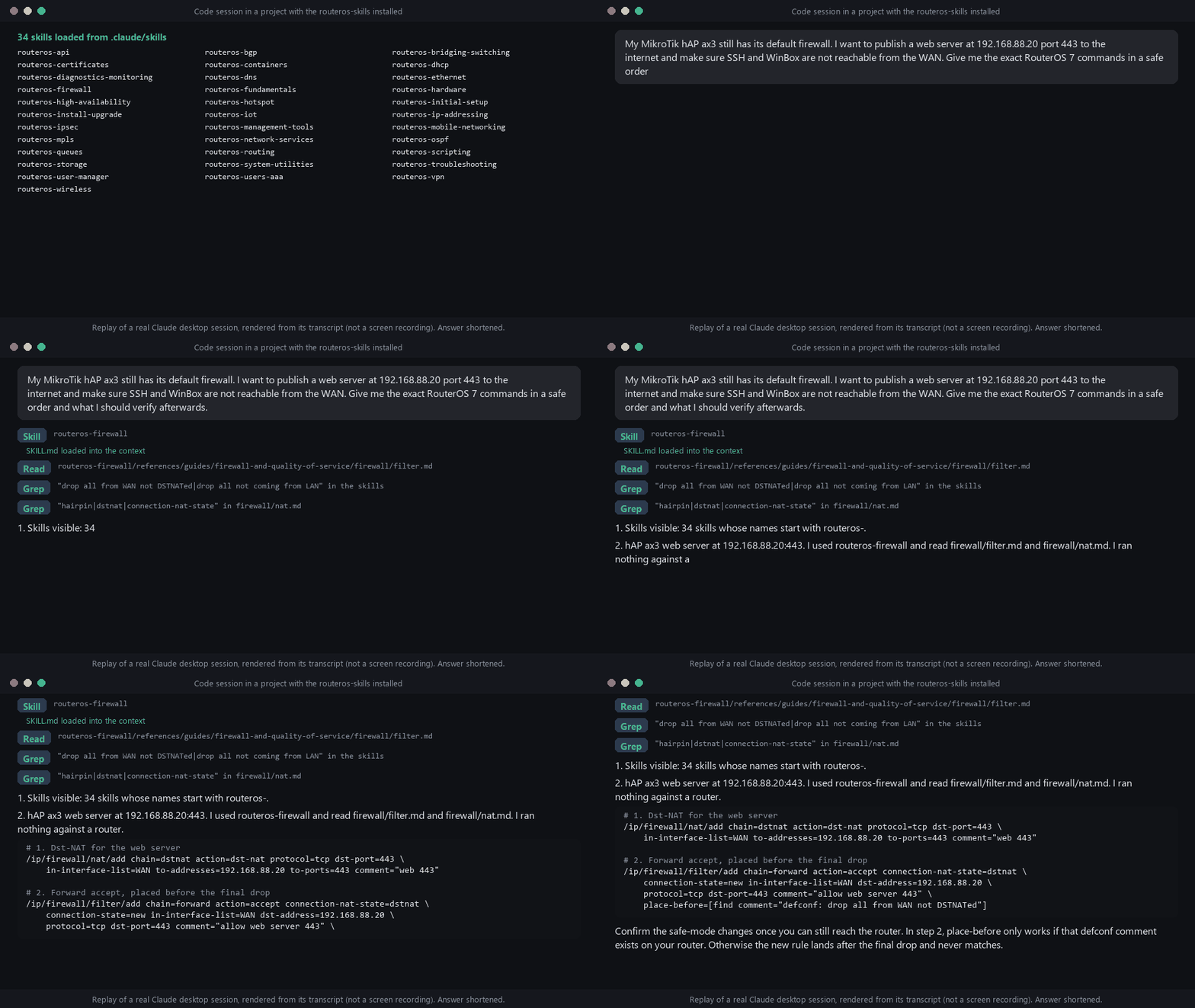
A replay of a real session in the Claude desktop app's Code tab, drawn from its transcript. It is not a screen recording,
and the answer is shortened. The skills sit in the project's .claude/skills folder (see Install); the session
lists them, loads the one that fits the task and opens the reference files it needs.
Skills
Start here
Read routeros-fundamentals first; it explains the console conventions and maps the other skills.
| Skill | Covers |
|---|---|
| routeros-fundamentals | CLI syntax, menu hierarchy, safe mode, export and import, v6 versus v7, map of the other skills |
| routeros-initial-setup | First configuration, default config, WAN and LAN setup, hardening, backup, export, import, reset |
| routeros-install-upgrade | Upgrade and downgrade, packages, Netinstall, CHR and x86 installation, RouterBOOT, licensing, v7 migration |
| routeros-troubleshooting | Method and symptom-to-skill routing, supout.rif, recovery (reset button, backup bootloader, Netinstall, lost password), triage script |
Security and access
| Skill | Covers |
|---|---|
| routeros-firewall | Filter, NAT, mangle and raw rules, connection tracking and FastTrack, address lists, packet flow, IPv6 firewall, hardening recipes |
| routeros-users-aaa | Router users and groups, SSH keys, RADIUS client, PPP profiles and secrets, 802.1X |
| routeros-certificates | Certificate templates, signing, import and export, ACME and Let's Encrypt, SCEP, CRL, trust stores |
| routeros-management-tools | WinBox, WebFig, SSH, serial console, MAC server, RoMON, Quick Set, TR-069, CMR, The Dude, branding |
| routeros-api | REST API and binary API: least-privilege users, HTTPS, requests, queries, limits, sentences, tags, REST helper script |
Interfaces and IP services
| Skill | Covers |
|---|---|
| routeros-ethernet | Ethernet and SFP ports, auto-negotiation, forced mode, FEC, MTU and L2MTU, interface lists, PWR-Line |
| routeros-bridging-switching | Bridges, VLAN filtering, STP/RSTP/MSTP, hardware offloading, IGMP snooping, DHCP snooping, VXLAN, MACsec, SwOS, CRS switch chips |
| routeros-ip-addressing | IPv4 and IPv6 addresses, pools, ARP, neighbor discovery and RAs, SLAAC, kernel IP settings |
| routeros-dhcp | DHCP server, client, relay, leases, options, DHCPv6 server/client and prefix delegation |
| routeros-dns | DNS resolver and cache, static entries and forwarders, adlists, DNS over HTTPS, mDNS repeater, DNS update |
| routeros-queues | Simple queues and queue trees, HTB, PCQ, CAKE and FQ-CoDel, bursts, queue sizes |
| routeros-network-services | MikroTik cloud (DDNS, Back To Home, cloud backup, File Share), web proxy, reverse proxy, SOCKS, Socksify, OpenFlow |
Routing, tunnels and redundancy
| Skill | Covers |
|---|---|
| routeros-routing | Static routes, routing tables and rules, policy routing, VRF, route filters, ECMP, nexthop lookup, RIP, IS-IS, BFD, multicast, v6 to v7 routing migration |
| routeros-ospf | OSPFv2 and OSPFv3 instances, areas, interface templates, redistribution, neighbours, area types |
| routeros-bgp | BGP connections, templates and sessions, filters, route reflectors, roles and route-leak prevention, RPKI, EVPN |
| routeros-mpls | MPLS switching, LDP, VPLS, traffic engineering, MPLS MTU and L3VPN pointers |
| routeros-vpn | WireGuard, L2TP, SSTP, OpenVPN, PPTP, PPPoE, EoIP, GRE, IPIP, 6to4, ZeroTier tunnels |
| routeros-ipsec | IKEv1/IKEv2, policies, peers and identities, certificates and EAP, road warrior and site-to-site examples, troubleshooting |
| routeros-high-availability | VRRP, bonding (LACP), load balancing, failover and redundancy |
Wireless, mobile and access networks
| Skill | Covers |
|---|---|
| routeros-wireless | Wi-Fi 5/6/7 (wifi package), legacy wireless, CAPsMAN, Nv2, W60G 60 GHz, regulatory, troubleshooting |
| routeros-mobile-networking | LTE and 5G interfaces, APN profiles, dual SIM, eSIM, SMS, GPS, modem troubleshooting |
| routeros-hotspot | HotSpot captive portal: setup, user profiles, authentication methods, walled garden, customization |
| routeros-user-manager | User Manager RADIUS and billing server: routers, users, profiles, limitations, payments |
Operations and automation
| Skill | Covers |
|---|---|
| routeros-system-utilities | Clock and NTP, scheduler, services, device mode, files, fetch, email, identity, neighbor discovery, UPS, TFTP, Wake on LAN |
| routeros-diagnostics-monitoring | Logging, SNMP, Netwatch, ping and traceroute, torch, sniffer, bandwidth test, traffic flow, graphing, health, watchdog |
| routeros-scripting | Script language, pitfalls, permissions and jobs, events that run scripts, dry-run checker for .rsc files |
Hardware, storage and apps
| Skill | Covers |
|---|---|
| routeros-hardware | 246 product manuals with a search script, model naming, RouterBOOT, PoE, LEDs, ports, USB, SFP modules, grounding, pre-RMA checklist |
| routeros-storage | Disks, mount points, RAID, Btrfs, encryption, SMB, NFS, iSCSI, NVMe over TCP, SSHFS, rsync, DLNA |
| routeros-containers | Containers (Docker images), veth networking, mounts, env lists, resource limits and the /app catalog |
| routeros-iot | MQTT client, Bluetooth, GPIO, Modbus, LoRaWAN gateways, Wiliot |
How a skill is laid out
skills/<name>/
  SKILL.md        instructions: when to use it, workflow, recipes, pitfalls, where to look
  scripts/        optional shell, PowerShell or Python helpers (only when they add value)
  references/     the documentation for this area
    INDEX.md      what is inside, one line per file (start here)
    guides/       narrative pages of the manual, same path as on manual.mikrotik.com
    cli/          the CLI reference; one file per menu, including its commands
    products/     hardware manuals (routeros-hardware only)
    help/         pages that exist only on help.mikrotik.com
An agent loads only the name and description of every skill, reads SKILL.md when a task matches, and opens a reference
file only when it needs that detail. Keep that in mind when you write or review a skill: SKILL.md should be enough to do
the common task correctly, and the references should be enough to do the rare one.
Install
With the skills CLI (Node 22.20 or newer). This repository is listed on the
skills.sh hub:
npx skills add wiresage/routeros-skills                                   # choose skills and agents interactively
npx skills add wiresage/routeros-skills -s routeros-firewall routeros-vpn # selected skills
npx skills add wiresage/routeros-skills --list                            # only show what is available
The CLI reports each install anonymously to skills.sh; set DISABLE_TELEMETRY=1 to turn that off. How this repository
is published there is described in docs/skills-sh.md.
Skills are plain folders, so installing also means copying or linking them into the place your agent reads skills from.
The installers in this repository do that without Node:
scripts/install-skills.sh --target ~/.claude/skills            # every skill
scripts/install-skills.sh --target .agents/skills routeros-firewall routeros-vpn   # selected skills
scripts/install-skills.ps1 -Target "$HOME\.claude\skills"
Common locations (check your agent's documentation, they change): Claude Code .claude/skills/ or ~/.claude/skills/,
Codex .agents/skills/, GitHub Copilot .github/skills/. Use --link (-Link) to symlink instead of copy so that agit pull updates the installed skills.
Where the content comes from
| Source | Used for |
|---|---|
| manual.mikrotik.com | The primary source: every page in its llms.txt index (narrative guides and the CLI reference) and the hardware manuals |
| help.mikrotik.com/docs | The older Confluence documentation, which MikroTik has frozen. Used only for pages the manual does not have: quick guides, a few user manuals, knowledge-base articles and a handful of concept pages |
The snapshot date and the page counts are in docs-snapshot.json. The crawl, the conversion to
Markdown and the checks that every page arrived complete are part of this repository (see CONTRIBUTING.md),
so the snapshot can be refreshed when MikroTik updates the manual. docs/skill-coverage.md shows how
much of each skill's references its SKILL.md leads an agent to, and docs/manual.lock.json records which manual version the
snapshot was last compared with.
Not included: the manual's blog and its documentation change log (they are not RouterOS documentation), tag listing pages
(they only repeat links), pictures (each reference has a Source: link to the page with the figures), the translations in
the quick guides (the English text is complete), and one help page about exam proctoring. Details are in docs-snapshot.json.
Related projects
- routeros-lsp: language server for RouterOS scripts. Use it to check
.rscfiles
before they reach a router. - mikrotik-mcp: MCP server that lets an agent read and change a real device.
Load it together with the skills and they work well side by side: the skills tell the agent what a safe RouterOS setup
looks like and which commands matter, and the MCP tools read the router and apply the change. We tested the two together
on a lab router (a read-only firewall audit and one reversible change). The MCP has no tools yet for some things the skills
cover, such as/ip/serviceand interface lists, so those steps stay manual.
The skills in this repository are written so that they also work when the agent has no live access: they tell it which
commands to propose and how to verify them.
License
The instructions, scripts and tools in this repository are available under the MIT License.
The documentation copied into the references/ folders belongs to MikroTik; see NOTICE.md.
See also AGENTS.md (for agents that work on this repository), CONTRIBUTING.md and
SECURITY.md.
Yorumlar (0)
Yorum birakmak icin giris yap.
Yorum birakSonuc bulunamadi