padu
Health Uyari
- License — License: GPL-3.0
- Description — Repository has a description
- Active repo — Last push 0 days ago
- Low visibility — Only 5 GitHub stars
Code Gecti
- Code scan — Scanned 12 files during light audit, no dangerous patterns found
Permissions Gecti
- Permissions — No dangerous permissions requested
Bu listing icin henuz AI raporu yok.
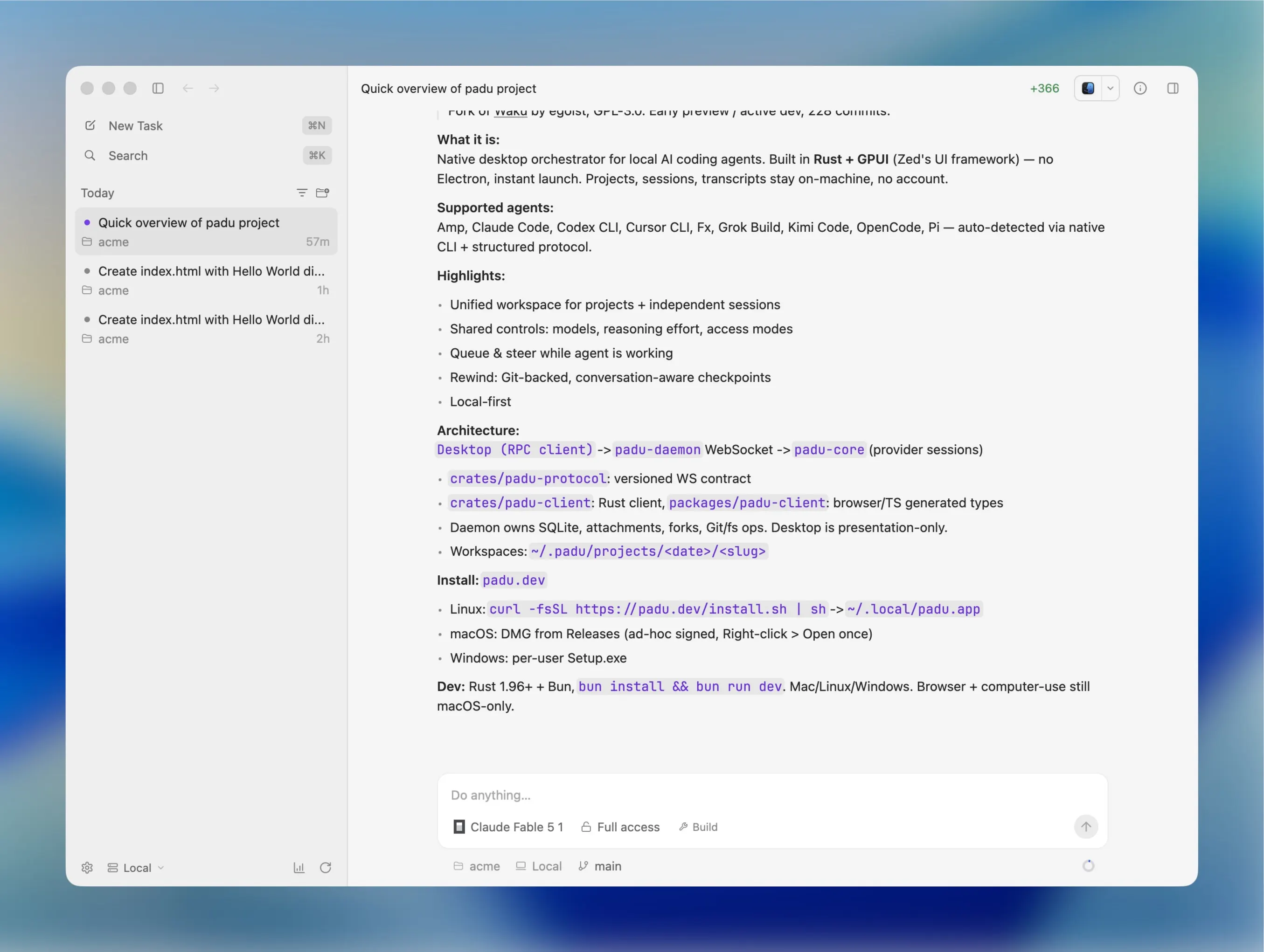
Native desktop app for orchestrating AI coding agents (Claude Code, Codex, Cursor CLI) — built in Rust, no Electron, instant launch.

One native app for all your coding agents.


Download · Overview · Agents · Highlights · Architecture · Development · License
[!NOTE]
Under Active Development: Padu is in active development and early preview. You may encounter bugs, incomplete features, or rough edges. Bug reports and contributions are very welcome!
Overview
Padu is a fast, native desktop app for working with local coding agents. Built
in Rust with GPUI,
it keeps projects, sessions, and transcripts entirely on your machine.
Download
The recommended way to download and install Padu on macOS, Windows, and Linux is via:
| Platform | Download / Install | Notes |
|---|---|---|
| macOS | Download .dmg |
Apple Silicon & Intel, Developer ID signed and Apple-notarized |
| Windows | Download .exe Setup |
x64 & ARM64 installers, per-user install |
| Linux | Download .tar.gz |
x86_64 & ARM64 tarballs, Wayland & X11 support |
You can also find all release assets and checksums on GitHub Releases.
Command Line Install
Linux
Install directly into ~/.local/padu.app without root or package managers:
curl -fsSL https://padu.dev/install.sh | sh
Windows
Install per-user via PowerShell:
# Open download page in browser:
Start-Process https://padu.dev/download
ℹ️ The Windows installer installs to
%LOCALAPPDATA%\Programs\Paduwithout requiring administrator privileges. If Microsoft Defender SmartScreen prompts, click More info → Run anyway.
Supported agents
Padu works with:
Install and authenticate at least one supported agent CLI before starting Padu.
Padu detects available CLIs automatically and uses each provider's native
structured protocol and session continuity.
Highlights
- Unified workspace — Keep projects and independent agent sessions in one
native app. - Shared controls — Switch models, reasoning effort, and access modes from
a single interface. - Queue & steer — Send follow-up messages while an agent is still working.
- Rewind — Git-backed task history with conversation-aware checkpoints.
- Local-first — Everything stays on your machine. No Padu account or remote
service required.
Architecture
The native desktop is an RPC client of the standalone padu-daemon process.
Provider sessions run in padu-core, behind the
authenticated, versioned WebSocket contract inpadu-protocol. Padu Desktop depends onpadu-client, not on the daemon implementation. The
daemon owns task SQLite data, uploaded attachments, provider-native session
forks, and all workspace filesystem and Git operations; paths returned by it
always refer to the daemon host. The desktop retains only presentation state
and a disposable preview cache.
The browser client lives at apps/web and uses the generated
browser transport in packages/padu-client. Its
checked-in types are generated directly from the Rust protocol, while its
WebSocket client implements the same handshake, request IDs, subscriptions,
sequence deduplication, and replay cursors as the Rust client. Runbun run protocol:generate after changing a wire type andbun run protocol:check to verify that generated files are current.
Projectless task workspaces live on the daemon host under~/.padu/projects/<date>/<slug>. The daemon moves workspaces created by the
older ~/.padu/<date>/<slug> layout on first load.
Configuration ownership is separate too: the Release desktop writes~/.padu/app.json, while Debug stays isolated at temp/app.json. Daemon
provider and Computer Use settings live in ~/.padu/settings.json. The
desktop's Settings → Daemon page can explicitly
expose the child daemon on a fixed port, configure exact browser origins, and
copy its stable authentication token. It remains loopback-only by default.
When connected to a daemon managed outside the desktop process, Padu never
interprets daemon paths on the client machine. The local folder picker and PTY
are therefore unavailable until the protocol gains daemon-host picker and
terminal-stream endpoints; files, diffs, Git, skills, usage, task state, and
attachments already use daemon RPC.
Release apps bundle and sign padu-daemon. Development keeps the daemon attarget/debug/padu-debug-daemon, allowing provider-only edits to rebuild and
replace the daemon without relaunching Padu Debug.
Development
Development is supported on macOS, Linux, and Windows and requires
Rust 1.96 or newer and
Bun. Linux supports both Wayland and X11, and Windows needs
the MSVC toolchain; install the native build prerequisites listed in
CONTRIBUTING.md first.
bun install
bun run dev
The embedded browser and experimental computer-use integration currently
remain macOS-only. Agent sessions, projects, transcripts, skills, usage,
diffs, file editing, and the terminal run natively on Linux and Windows.
See CONTRIBUTING.md for the development workflow and checks.
Release maintainers should also read RELEASING.md.
Sponsorship
You can support the project development via
GitHub Sponsors.
License
Padu is licensed under the GNU General Public License v3.0 only.
See NOTICE.md for full license attribution and details.
Yorumlar (0)
Yorum birakmak icin giris yap.
Yorum birakSonuc bulunamadi