withHuman
Health Warn
- License — License: NOASSERTION
- Description — Repository has a description
- Active repo — Last push 0 days ago
- Low visibility — Only 5 GitHub stars
Code Fail
- rm -rf — Recursive force deletion command in deployment/cli/install.sh
- network request — Outbound network request in deployment/cli/install.sh
Permissions Pass
- Permissions — No dangerous permissions requested
No AI report is available for this listing yet.
The approval layer for AI Agents.


Approval layer for AI Agents
Put your most consequential agent actions behind human approvals, so your
agents can do real work.







Website · Docs · Quickstart · Protocol · Contributing
withHuman lets you decide which actions agents can take automatically,
which they can't, and which need a human's approval first.
Connect your agents and manage their approval rules, reviewers, and
decision history in one place.
An adapter (a runtime hook or an SDK wrapper) intercepts each call before it executes
and sends the tool name and arguments to withHuman over the
Agent Approval Protocol (AAP). The
server runs the organization's approval pipeline and answers approved ordenied, or holds the request as pending and notifies reviewers along an
escalation path.
This repository contains:
withhuman(cmd/withhuman): the server. One Go
binary with embedded PostgreSQL and Temporal, the product and AAP HTTP
APIs, the review web app, and a management MCP server.withhumanCLI (cmd/withhuman-cli): installs
AAP hooks into coding agent runtimes and enrolls them as agent instances.- Agent skills for coding agents that set withHuman up.
- Examples: the same refund support agent built on nine
frameworks (LangGraph, Deep Agents, Pydantic AI, Google ADK, OpenAI
Agents SDK, Claude Agent SDK, CrewAI, Vercel AI SDK and Mastra). Each
wraps its tools with an AAP SDK, so every tool call, including calls
from sub-agents, waits for withHuman before it runs.
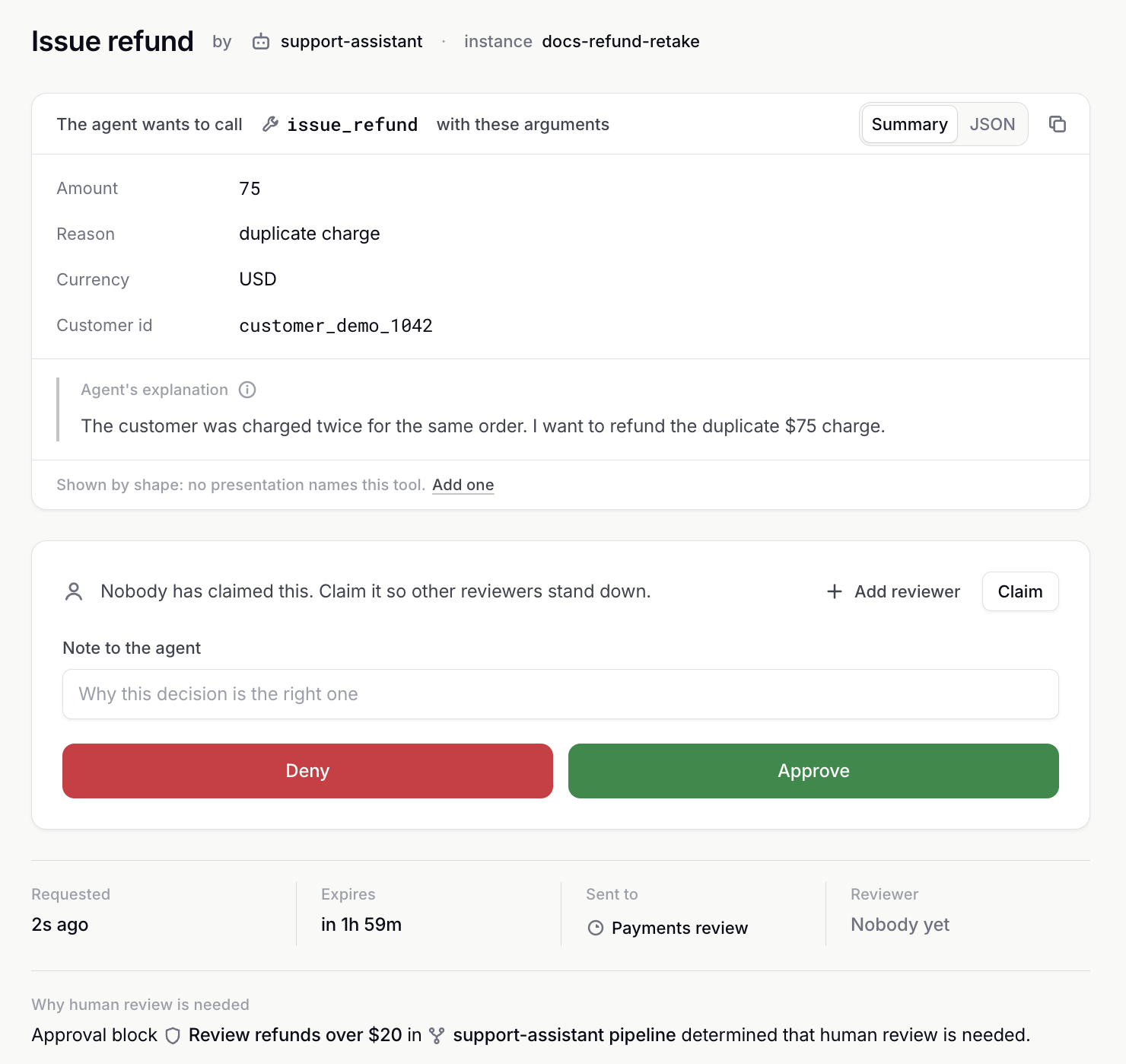
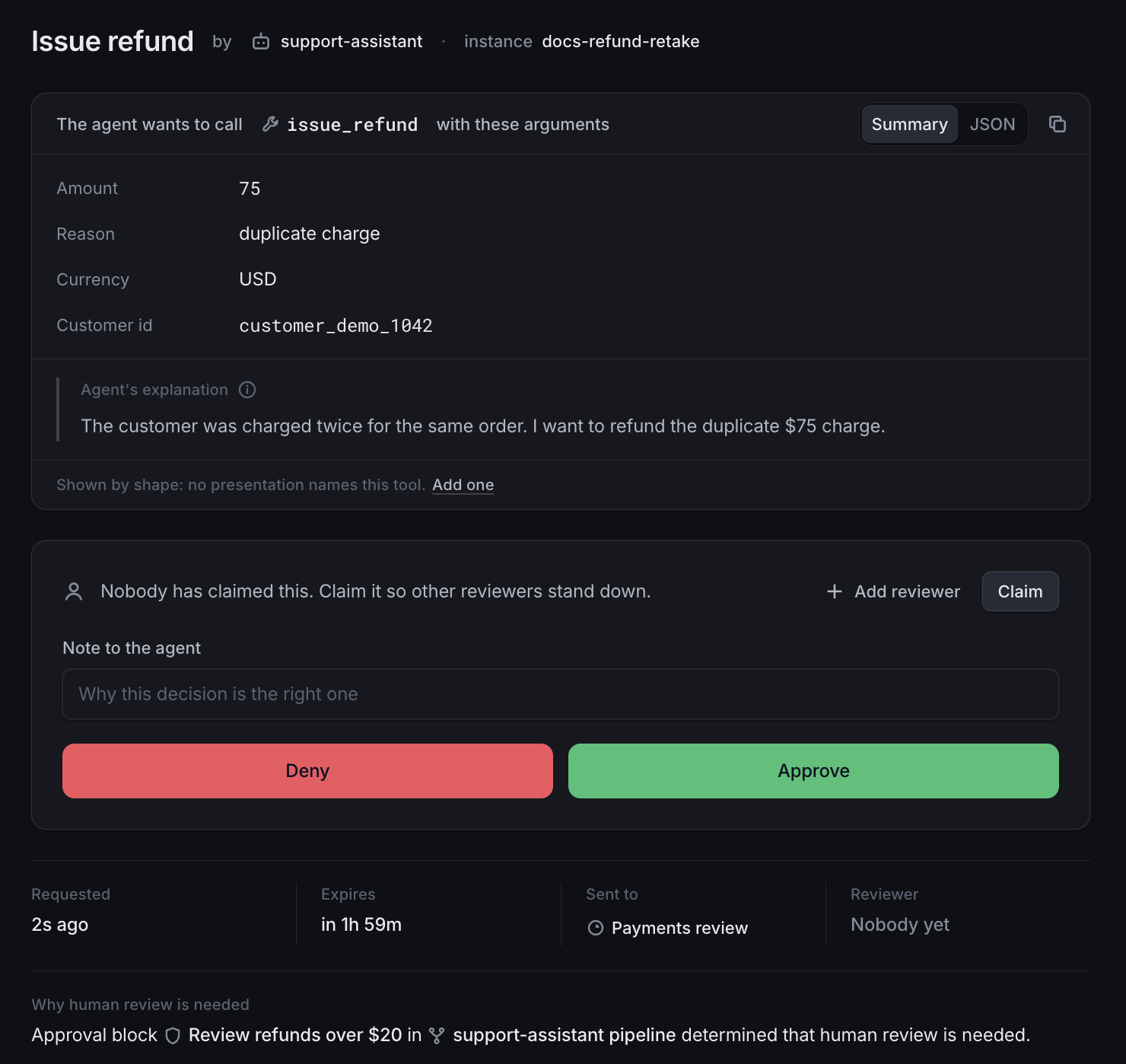
What you can do
- Keep the agents you already use. Connect Claude Code, Codex,
OpenClaw, Pi, Hermes or DeepSeek with
one command. Their tools don't change: withHuman
sees each call before it runs. - Connect the agents you build. Agents built with LangGraph, Pydantic
AI, the OpenAI Agents SDK, CrewAI, Mastra and other frameworks connect
through the Agent Approval Protocol SDKs. See the examples. - Decide what needs a person.
Approval pipelines approve, deny or ask
someone based on the tool and its arguments, such as "approve refunds up
to $20, ask payments above that". - Reach the right people.
Escalation paths choose who is asked and
when, by team, level and working hours. People are notified by
email,
Slack or
Discord. - Decide with the full picture. In the
review queue, reviewers see the exact
arguments, the agent's explanation and why the request needs them, then
approve or deny with a note the agent reads. - Run it yourself. One binary with its database and workflow engine
built in. Start it with Docker or from source, with no other services. - Build on an open protocol. Agents talk to withHuman through the
Agent Approval Protocol, an open
specification.
How it works
sequenceDiagram
    participant Agent as Your agent
    participant WH as withHuman
    participant You as You
    Agent->>WH: Wants to call issue_refund(amount: 75)
    WH->>WH: Checks your approval pipeline
    WH->>You: Asks for approval by email, Slack or Discord
    You->>WH: Approve
    WH->>Agent: Go ahead
    Agent->>Agent: Runs issue_refund
Calls your rules approve go straight through, and calls they deny never
run. Learn the concepts behind it:
- How withHuman works: the three core
concepts and how they fit together. - Agents: what agents and instances are.
- Approval pipelines: how a request
gets its decision. - Escalation paths: who reviews a request,
when they're contacted, and what happens if nobody decides. - Requests and decisions: what
happens next for the agent.
Quickstart
You need Docker.
1. Start withHuman
docker run -d --name withhuman -p 8080:8080 -v withhuman-data:/data \
  quay.io/withhuman/bundle:latest
2. Create your account
Print the one-time setup secret:
docker exec withhuman cat /data/bootstrap-secret
Open http://localhost:8080, choose First
setup, and enter the secret.
3. Connect your agent
The welcome page walks you through connecting your first agent and choosing
which calls need your approval. It ends with a test call for you to approve.
To connect another machine later, install the CLI there and point it at
your server:
curl -fsSL https://downloads.withhuman.ai/install.sh | sh
withhuman agent install --url https://approvals.example.com
The quickstart guide
covers each step in detail, and the CLI guide
covers every command.
You need Go (the version in go.mod) and Node 25.
make frontend
go run ./cmd/withhuman
State lives in ~/.withhuman (set --data-dir or WITHHUMAN_DATA_DIR to
move it), and the setup secret is in ~/.withhuman/bootstrap-secret. The
first start downloads PostgreSQL (about 32 MB); later starts work offline.
Let your coding agent set it up
withHuman publishes agent skills that teach a coding agent how
to connect runtimes and write approval pipelines for you:
npx skills add https://withhuman.ai
Configuration
Settings are environment variables. .env.example lists
them for docker run --env-file. Nothing is required to try withHuman on
your own machine.
| Variable | Purpose |
|---|---|
WITHHUMAN_PUBLIC_ORIGIN |
The exact origin people use to reach the server, such as https://approvals.example.com. Default http://localhost:8080. |
WITHHUMAN_HTTP_ADDRESS |
Listen address. Default :8080. |
WITHHUMAN_DATA_DIR |
Where all state lives. Default ~/.withhuman, or /data in the image. |
WITHHUMAN_BOOTSTRAP_SECRET |
The secret for creating the first owner. Generated into the data directory when unset. |
WITHHUMAN_TRUSTED_PROXIES |
CIDRs of reverse proxies whose forwarded headers to trust. |
WITHHUMAN_SECRETS_KEY |
Encrypts stored secrets. Required for webhook blocks, Slack and asynchronous agent replies. |
WITHHUMAN_SMTP_HOST, _PORT, _USERNAME, _PASSWORD, _FROM |
Email delivery for invitations, password resets and notifications. |
WITHHUMAN_SLACK_APP_ID, _CLIENT_ID, _CLIENT_SECRET, _SIGNING_SECRET |
Slack notifications. See deployment/slack. |
WITHHUMAN_DISCORD_CLIENT_ID, _CLIENT_SECRET, _BOT_TOKEN |
Discord notifications. See deployment/discord. |
Generate a secrets key with:
openssl rand -base64 32 | tr '+/' '-_' | tr -d '='
Interactive CLI commands check downloads.withhuman.ai for a newer CLI
once a day. Set WITHHUMAN_NO_UPDATE_CHECK=1 to turn that off.
Deploy to a server
Checklist before you go beyond your own machine- Put it behind an HTTPS reverse proxy and set
WITHHUMAN_PUBLIC_ORIGIN
to that origin. - Set
WITHHUMAN_TRUSTED_PROXIESto your proxy's addresses only. - Set
WITHHUMAN_SECRETS_KEYand keep it safe. Losing it makes stored
webhook and Slack secrets unreadable. - Configure SMTP so invitations and password resets reach people.
- Back up the whole data directory. It holds the database, the workflow
state and the setup secret together.
Hosted edition
Don't want to run it yourself? withhuman.ai runs
it for you, and adds the audit log, the AI judge block, the MCP gateway,
text message, WhatsApp and phone app notifications, organization API keys,
and single sign-on with directory sync.
Contributing
Bug reports, ideas and pull requests are welcome. Read
CONTRIBUTING.md to get set up, and follow our
code of conduct. Report security vulnerabilities
privately as described in SECURITY.md.
make test        # build the frontend, then run Go tests and vet
make verify      # also validate the OpenAPI contract and deployment files
make frontend    # rebuild the React assets embedded in the binary
make smoke       # run one real approval against a running server
webapp/assets is generated and not committed, so use the Make targets
rather than plain go test or go build from a clean checkout. The smoke
test signs in as [email protected] with local-development-password
(set WITHHUMAN_SMOKE_PASSWORD to change it). The HTTP API contract is
served at /api/openapi.yaml and lives ininternal/httpapi/openapi.yaml.
cmd/                         process composition only
domain/                      provider-neutral identity and approval types
application/                 focused storage and orchestration ports
approvalblock/               serializable CEL block definitions and Go authoring DSL
authn/                       human sessions, agent enrollment and credentials
entitlements/                open plan-gating adapters (unlimited by default)
loggermdc/                   shared logging bootstrap and immutable correlation context
internal/approvalpipeline/   safe block execution contract and compiled CEL runtime
internal/approvals/          use-case validation and long-poll behavior
internal/orchestration/      Temporal client, workflow, and activities
internal/postgres/           canonical product storage and atomic authorization
sealbox/                     AES-GCM sealing for secrets at rest
authz/                       the permission checks every service uses
internal/httpapi/            Gin boundary and embedded frontend
frontend/                    React web application
db/migrations/               application-owned migrations
deployment/temporal/         Temporal-owned migration and namespace setup
The server evaluates the active pipeline synchronously, then atomically
commits the request, its state, any automatic decision and a pending-only
workflow-start outbox item. Temporal coordinates human approvals, deadlines
and retries, and is never used for policy evaluation or as the read model:
API reads, the queue stream and long polls read PostgreSQL only. The
architecture rules live in CLAUDE.md.
License
withHuman core is licensed under the Elastic License 2.0. In
short, you may use, modify and self-host it, but you may not provide it to
others as a hosted or managed service or remove its licensing notices. The
license text has the exact terms. The Agent Approval Protocol
specification and its Go library are licensed separately under the Apache
License 2.0.
withHuman and the withHuman logo are trademarks of Metoro, Inc. The
license covers the code, not the name or logo. Don't use them in a way
that suggests your product or service is withHuman or is endorsed by us.
Reviews (0)
Sign in to leave a review.
Leave a reviewNo results found