antigravity-pet
Health Uyari
- License — License: MIT
- Description — Repository has a description
- Active repo — Last push 0 days ago
- Low visibility — Only 6 GitHub stars
Code Basarisiz
- rm -rf — Recursive force deletion command in .github/workflows/build-macos.yml
- fs module — File system access in .github/workflows/community-pet-approve.yml
- child_process — Shell command execution capability in .github/workflows/community-pet-pr-check.yml
- fs module — File system access in .github/workflows/community-pet-pr-check.yml
Permissions Gecti
- Permissions — No dangerous permissions requested
Bu listing icin henuz AI raporu yok.
Native Windows & macOS pixel-art desktop companion for Google Antigravity — 8+ pets, standalone 5-tab settings window, 11-locale i18n, live GitHub updates, 1-image custom pets & zero runtime dependencies.
Antigravity Pet — a native pixel-art desktop companion for Antigravity




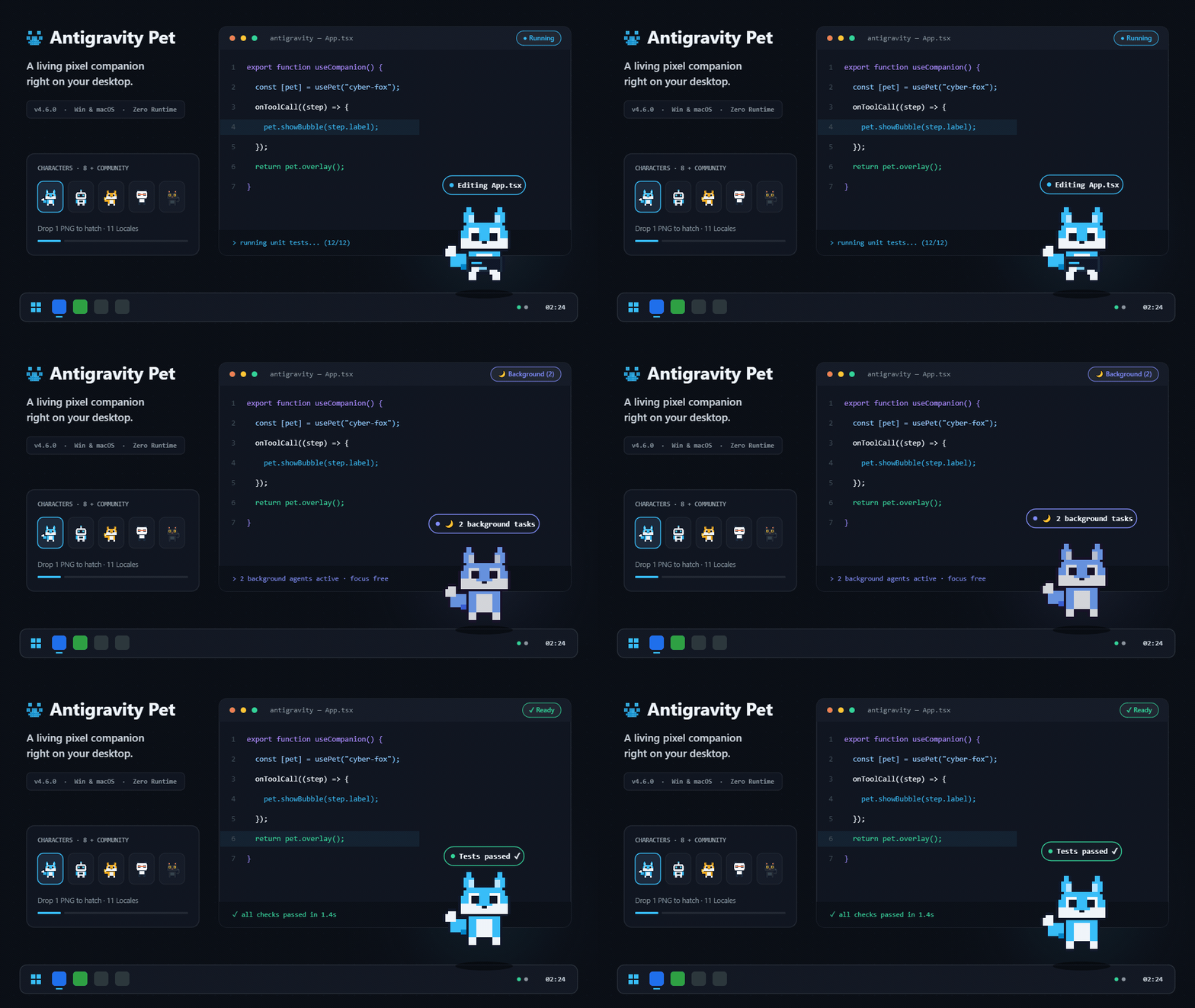
An open-source native pixel-art desktop companion for Google Antigravity on Windows and macOS — built with zero external runtime dependencies. It reflects what your AI agent is doing in real time, tracks background tasks without stealing focus, and reacts playfully while you type.
- Live tool status & calm
BackgroundRunning(🌙): Shows single-line live action bubbles (Reading server.mjs,Editing App.tsx,Tests passed) directly above your pet. When the foreground chat is idle while background tasks run, the pet switches to a calm lavender-blue resting pose with a🌙badge — click stacked task bubbles to expand the list and jump straight to any session. - 8 built-in mascots + Community Workshop: Switch between 8 built-in pixel companions (
cyber-fox,astro-bot,shadow-cat,byte-ghost,shiba-dog,pixel-dragon,android-bugdroid,flutter-dash) or install community packs (gemini-chan,cyber-panda,pixel-octopus,coffee-slime,star-hamster) in one click inside the Settings panel. - 1 static PNG comes alive: Drop a single static PNG into the built-in Pack Studio (or use the
hatch-petskill), and the procedural animation engine brings it to life with breathing, parabolic hops, and squash-and-stretch bounces — or supply a full1536×2288(8×11) v3 multi-frame sprite sheet. - Playful typing sync & tiered boredom: Bounces with your typing cadence (frequency-only sliding window — zero keylogging); type faster than 5 keys/s and watch dizzy stars orbit its head. Leave it idle and it wanders with
?/♪cues before curling up for aZzznap — one keystroke wakes it in 0.3s. - Standalone Settings window & edge peeking: Right-click the pet for a clean
460×800standalone Settings window (Characters / Behavior / Bubbles / System / Updates), smooth0.33x–3.00xscaling, half-body screen-edge peeking, fullscreen auto-hide, and one-click in-app self-updates. - 11-locale full-stack localization: Automatically follows your Antigravity locale (or switch anytime) across the Settings UI, live tool bubbles, background counters, approval prompts, and context menu:
English,简体中文,繁體中文 (TW),Français,Deutsch,日本語,한국어,हिन्दी,ไทย,Español (ES), andEspañol (MX).
How it works
Antigravity agent ──hooks.json──▶ scripts/hook-bridge.mjs ──▶ HTTP 127.0.0.1:47821
                                                                      │
Native Overlay (app/AntigravityPet.cs | app/AntigravityPet.swift) ◀──┘
      └── Right-click Settings ──▶ Standalone Panel (sidecars/panel/server.mjs :47822)
- Lifecycle hooks (
plugin.json+hooks.json): Triggersnode ./scripts/hook-bridge.mjsacrossSessionStart,PreInvocation,PreToolUse,PostToolUse,PostInvocation, andStop, mapping tool calls viascripts/tool-label-mapper.mjsand pushing compact state updates to127.0.0.1:47821. - Native transparent overlay: Compiled directly with built-in OS toolchains (
csc.exe/.NET Framework 4.xon Windows;swiftcon macOS) — no Electron, no Python runtime, and no extra SDK required.
Install & Download
Runtime requirements: Zero extra dependencies. Uses built-in .NET Framework 4.x on Windows 10/11 and built-in swiftc on macOS 12+.
For AI Agents (Quick Install)
If you are an AI coding agent installing Antigravity Pet into a user's workspace, pick the row matching the host OS, run the build/launch script once, and inform the user of the toggle shortcut:
| Platform | Plugin Path | Build & Launch Command | Toggle Shortcut |
|---|---|---|---|
| Windows 10/11 | %USERPROFILE%\.gemini\config\plugins\antigravity-pet |
.\build.ps1 -Launch |
Win + Alt + P |
| macOS 12+ | ~/.gemini/config/plugins/antigravity-pet |
chmod +x build.sh && ./build.sh --launch |
⌥ + ⌘ + P |
Option 1: Download Prebuilt Release (Recommended)
Windows 10 / 11
- Download the latest release
.zipand extract it to:%USERPROFILE%\.gemini\config\plugins\antigravity-pet\ - Run the one-click launcher in PowerShell:
cd "$env:USERPROFILE\.gemini\config\plugins\antigravity-pet" .\build.ps1 -Launch - Right-click the pet for Settings, or press
Win + Alt + Panytime to show or hide it.
macOS 12+ (Apple Silicon & Intel)
- Download the latest release
.zip(orAntigravityPet-macOS-universal.zip) and extract it to:~/.gemini/config/plugins/antigravity-pet/ - Build and launch via built-in
swiftc:cd ~/.gemini/config/plugins/antigravity-pet chmod +x build.sh && ./build.sh --launch - Press
⌥ + ⌘ + P(Option + Command + P) to toggle visibility, or open Desktop Pet Settings from Antigravity's...menu.
Option 2: Git Clone & Build from Source
# Windows PowerShell
git clone https://github.com/Wlaeg/antigravity-pet.git "$env:USERPROFILE\.gemini\config\plugins\antigravity-pet"
cd "$env:USERPROFILE\.gemini\config\plugins\antigravity-pet"
.\build.ps1 -Launch
# macOS
git clone https://github.com/Wlaeg/antigravity-pet.git ~/.gemini/config/plugins/antigravity-pet
cd ~/.gemini/config/plugins/antigravity-pet
chmod +x build.sh && ./build.sh --launch
Updating & Uninstalling
- Update: Open Settings → Updates for one-click in-app self-update, or run
git pullfollowed by.\build.ps1 -Launch/./build.sh --launch. - Uninstall: Close the pet from its right-click menu and remove the
antigravity-petfolder under.gemini/config/plugins/.
States & Behaviors
| State | Trigger | Visual Behavior |
|---|---|---|
idle |
SessionStart, Stop (all tasks idle) |
Gentle breathing & eye blink |
walk |
Autonomous patrol / cursor follow | Left/right walking frames across taskbar or dock |
running |
Active foreground tool / model turn | Working pose with single-line live tool bubble |
background_running |
Foreground idle while background tasks run | Calm lavender-blue rest pose with 🌙 badge & clickable task stack |
needs_input |
PreToolUse approval or ask_question |
Attentive cue with quick inline Approve / Deny bubble |
ready |
Turn completed cleanly | Celebration hop / wave with subtle non-stealing alert |
blocked |
Tool failure or blocked turn | Dizzy error loop alerting you to check the session |
typing_sync |
Active keyboard input | Rhythmic bounce synced to typing speed (1.5s sliding window) |
dizzy |
Typing speed > 5 keys/s | 3 orbiting pixel stars above the pet's head |
bored / nap |
Extended inactivity | Wanders with ? / ♪ cues, then curls into Zzz nap |
edge_peek |
Dragged to screen edge | Half-body peeking from left/right monitor border |
Built-in Pets & Community Workshop
- 8 Built-in Pets:
cyber-fox,astro-bot,shadow-cat,byte-ghost,shiba-dog,pixel-dragon,android-bugdroid,flutter-dash - Community Workshop: Browse, star, and 1-click install community packs directly inside Settings → Community (including
gemini-chan,cyber-panda,pixel-octopus,coffee-slime,star-hamster). - Unlockable Accessories: Earn frame-synced accessories as your completed task count grows (Glasses, Dev Cap, Coffee Cup, Gold Crown).
- Create & Submit Your Own: Drop a single PNG into Pack Studio or build a full
1536×2288(8×11) v3 pack following CUSTOM_PET_SPEC.md, then submit via the Community Pet Submission form.
Security & Privacy
- Zero telemetry: Antigravity Pet never collects analytics or phones home. Outbound HTTPS requests occur only when you explicitly browse the Community Workshop, star a pack, or check for updates on GitHub.
- Zero keylogging: Typing sync measures only a 1.5-second rolling keystroke frequency count — key codes, characters, and prompt contents are never recorded or stored.
- Loopback-only local IPC: The overlay (
127.0.0.1:47821) and Settings panel (127.0.0.1:47822) bind strictly to localhost loopback. - No hidden startup entries: By default, the pet launches and exits with Antigravity without modifying OS startup registries.
- See SECURITY.md for reporting security issues.
Contributing & Community
Contributions, bug reports, new pixel mascots, and community packs are welcome:
- Read CONTRIBUTING.md and docs/DEVELOPMENT.md before opening a pull request.
- Open a Bug Report, Feature Request, or Community Pet Submission.
- Participation is governed by our Code of Conduct.
Project Layout
plugin.json, hooks.json         Antigravity plugin manifest & lifecycle hooks
app/                            Native Windows (C# WinForms) & macOS (Swift AppKit) overlay
sidecars/panel/                 Standalone Settings & Community Workshop UI (:47822)
scripts/                        Hook bridge, tool-label mapper, MCP server & pack validator
pets/                           8 built-in pixel-art pets
community/                      Approved community pet packs & full-body preview images
assets/                         Hero showcase GIF, logo & UI icons
skills/                         Built-in `pet` and `hatch-pet` Antigravity skills
docs/DEVELOPMENT.md             Architecture, state machine & local HTTP API reference
CUSTOM_PET_SPEC.md              v3 sprite sheet & community submission specification
build.ps1, build.sh             Zero-dependency Windows & macOS build/launch scripts
CHANGELOG.md                    Full release history (v3.0.0 – v4.6.0)
LICENSE                         MIT License
Notes
- Why is there no taskbar / Dock icon? The overlay uses
WS_EX_TOOLWINDOW(Windows) andLSUIElement(macOS) intentionally to stay out of your window switcher. UseWin + Alt + P(⌥ + ⌘ + Pon macOS) or right-click the pet anytime. - Does it stay running in the background after closing Antigravity? No — by default it follows Antigravity's lifecycle and exits automatically when Antigravity closes.
- Released under the MIT License.
Yorumlar (0)
Yorum birakmak icin giris yap.
Yorum birakSonuc bulunamadi