connect-ai-video-motion
Health Warn
- License — License: NOASSERTION
- Description — Repository has a description
- Active repo — Last push 0 days ago
- Low visibility — Only 6 GitHub stars
Code Warn
- process.env — Environment variable access in bin/cli.mjs
Permissions Pass
- Permissions — No dangerous permissions requested
No AI report is available for this listing yet.
An AI content employee for commerce and knowledge content: motion graphics on top of your own video, never on your face. Runs on Remotion.
connect-ai-video-motion
Open source by CONNECT AI LAB · AI education for everyone. An AI content employee for commerce and knowledge content. Give it your video, and it puts motion graphics on top.
Start
One line. It gives your coding agent (Claude Code, Codex, Antigravity) the skill:
npx connect-ai-video-motion install-skill
Then open a new chat with your agent, drop in your video and say "put motion graphics on my video". The agent runs the kit for you: analyze, plan, check, render.




Yeongsa Film Painter (CONNECT AI HQ PixelCrew) — gently animated pixel portrait that switches expression as it greets, tracks face/hands, edits, and finishes your video.
Watch it work
 The Short Plays here without sound. Made with this kit on my own video. Watch with sound: YouTube · Instagram · TikTok |
  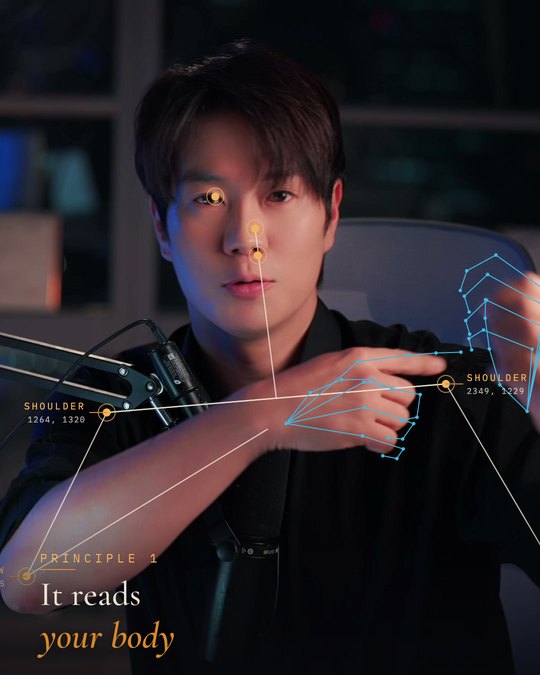  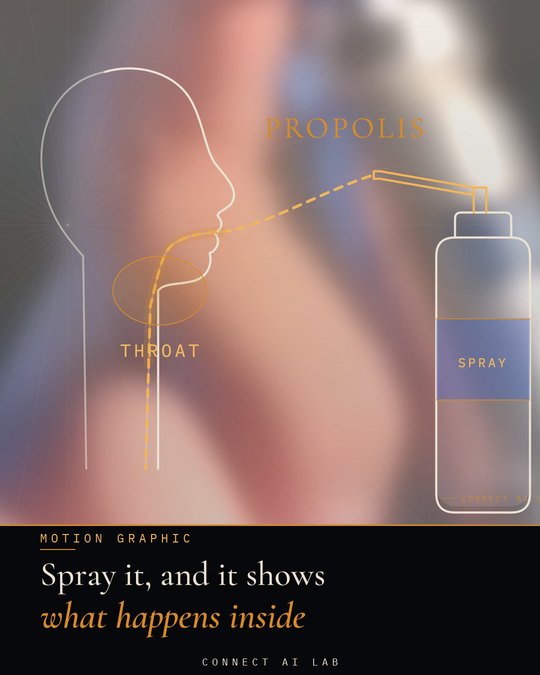 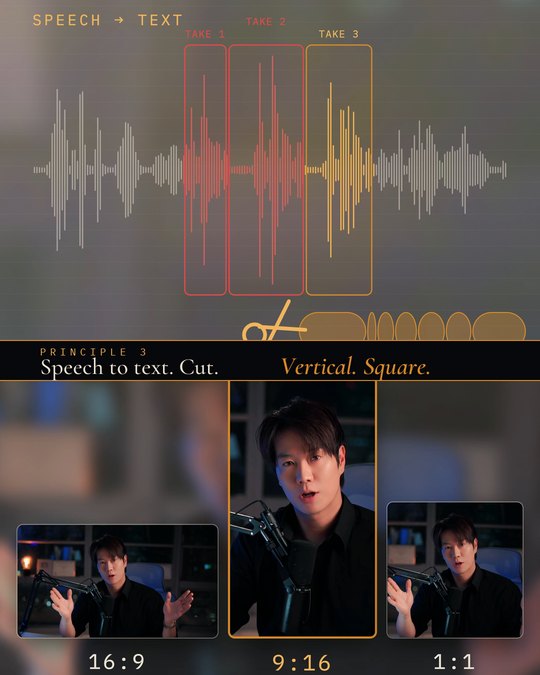 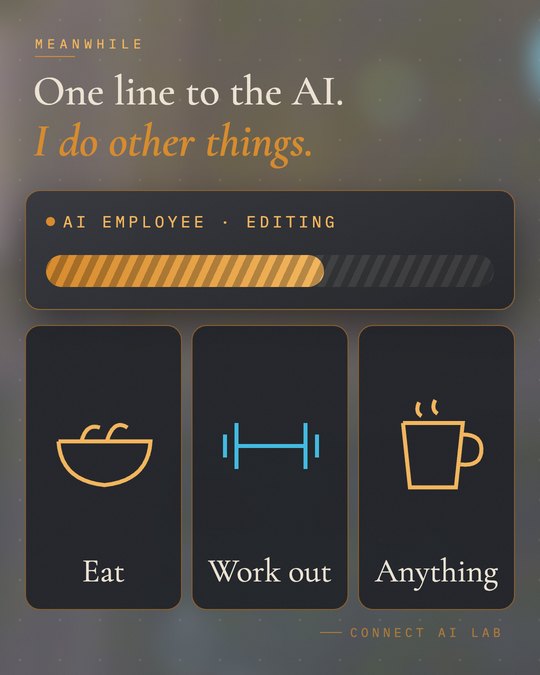  How it works, in 8 slides Instagram carousel · Learn the whole process: Visual Vibe Coding |
Showcase
Made with this kit on the author's own videos (AI Mentor Jay, shown with his permission). The words on screen are words he said. Not one pixel of him was changed. Under each: what it does and its one line of plan.json.
 Hologram from your hand A 3D object spins over your raised hand, a beam runs from your palm. {"kind":"body/palm-hologram","text":"3D"} |  Word behind you Big words stand behind you. You stay in front. {"kind":"body/behind-text","text":"Open source","behind":true} |
 Write in the air Your fingertip is a pen of light. What you draw in the air is drawn big on the wall behind you. {"kind":"body/air-draw","text":"Store it"} |  Aura around you Your outline grows into turning colour light behind you. {"kind":"body/aura"} |
 Words circling your head Your words orbit your head, behind you and out the other side. {"kind":"body/halo-words","text":"Connect AI Lab"} |  Spotlight where you point A cone of light leaves your finger where you really point and lands as a spotlight behind you, your word inside. {"kind":"body/point-spot","text":"Interaction"} |
 Room turns into data The room behind you turns into data pixels. You stay real. {"kind":"body/room-to-data","text":"Analyze"} |  Energy between your hands Strands of light run from palm to palm and bend with the real distance of your hands. {"kind":"body/hand-arc","text":"Physical"} |
 Object passes behind you A 3D object flies through the room at eye height and passes behind your head, leaving a trail of light. {"kind":"body/pass-behind","text":"AI native"} |  Afterimages of your motion Your outline from a moment ago trails you as colour silhouettes. Move your arms and a rainbow follows. {"kind":"body/afterimage"} |
 Dial you turn by hand A round gauge stands by your raised hand. Its needle follows the real tilt of your hand. {"kind":"body/hand-dial","text":"Quality"} |  Scramble title (GSAP) A thin title decodes letter by letter and a gold line draws under it. {"kind":"hyperframes/gold-scramble-title","text":"Predict","sub":"the future"} |
More you can make
The catalog has 80 graphics, each one line of plan.json. Open a group to see them; the catalog page has every one as a living clip with a prompt to copy.
 Count on the beat |  Line around you |  Finger count stamp |  Card in your hand |
 Chart your hand draws |  Tag on the hand |  Ray from your finger |  Body data beside your shoulder |
 Card that makes way |  Robot on your hand |  Robot behind your shoulder |
 Words rise (GSAP SplitText) |  Title card (HyperFrames) |  Chapter line |  Key word |
 Name tag |  Check mark (Lottie) |  Words lit in time |  Letters fold up (GSAP) |
 Fit-to-space word |  Fast word with trail |  Jitter to clean word |  Square brackets |
 Swoosh underline |  Pen box |  Highlighter |  Message bubble |
 Speech callout |  Hexagon badge |  3D hex badge |  Hopping character (Lottie) |
 Shape label (HyperFrames) |  Screen card + arrow |  1 · 2 · 3 steps |  Signal pulse (Lottie) |
 Chip to card |  Cursor clicks a button |  Contour map label |  Signal wave |
 Bracket list |  Arrow with a word |  Triangle marker |
 Ring counter (GSAP) |  Circle stat (HyperFrames) |  Pill stat (HyperFrames) |  Number counter |
 Journey A to B |  Shape morph, before to after |  Strike out |  Rising bars |
 Star seal |  Rays behind a number |
 Neon word stack (GSAP) |  End card |  Orbit arcs (Lottie) |  Light leak behind you |
 Flow field lines |  Curve draws itself |  Spirograph draws itself |  Pie to a percent |
 3D gold coin |  Agent robots pass the ball |
 Clock wipe, before to after |  Card flip, before to after |  Iris, before to after |  Push cut with flash, before to after |
 Push slide, before to after |  Diagonal wipe, before to after |
Open the catalog page: all 80 graphics as living clips on real footage, filter by kind, copy a prompt for your coding agent.
How it works
Every motion graphic ecosystem, called with one line, placed around you. Remotion packages, HyperFrames blocks, Lottie files and your own components all go through one layer that knows where your face, body and hands are, puts each graphic in good empty space, and checks its own work.
flowchart LR
  R["Remotion packages<br/>paths · shapes · rough-notation · transitions<br/>noise · motion-blur · three · gsap · light-leaks ..."] --> C
  H["HyperFrames blocks<br/>HTML + CSS + GSAP timeline"] --> C
  L["Lottie files<br/>After Effects / LottieFiles"] --> C
  U["Your own .tsx component"] --> C
  C["catalog<br/>one meta.json contract<br/>{ kind: ... }"] --> E
  F["your video<br/>face · body · hands · words"] --> E
  E["face + body aware layer<br/>find empty space · avoid you · check"] --> O["final.mp4 · overlay.mov · report"]
Like mixed martial arts took the best moves of every style and made them work together, this kit does not invent one more graphics library. It connects the ones that exist, so any of them is one line in plan.json:
{"kind": "remotion/rough-highlight", "at": {"text": "free", "near": 2.0}, "text": "Free"}
{"kind": "hyperframes/split-words-rise", "at": 7.6, "text": "More colorful"}
{"kind": "lottie/gold-check", "at": 9.9}
{"kind": "custom", "component": "./my/Thing.tsx", "at": 4.2, "text": "Mine"}
It never changes a pixel of you. By default every graphic avoids your face, your body and your hands (measured 15 times a second) and goes where there is room. Graphics that follow a hand or stand behind you exist too, but they are a few options in the catalog, not the default.
Licences. This kit is MIT. It runs on Remotion, which is not MIT: Remotion is free for individuals, companies with up to 3 employees and non-profits; other companies need a Remotion Company License (LICENSE.md). Some catalog items use Remotion packages under the same Remotion License, HyperFrames blocks are Apache-2.0, GSAP uses GreenSock's standard no-charge license. Each item says its licence in its
meta.json; the full list is in NOTICE.md.
The clip above and every clip on the catalog page is the author's own footage (four rooms, four kinds of light), shown with his permission. Each graphic is one line of plan.json; the words on screen are words he said in that clip (Korean, shown in English). No box was drawn by hand around his hands: the body detector found them.

Before and after. The same frames: plain, then with one plan.json line. The words stand behind him (person matte in front).
The same graphic. Left: pinned to one spot (cut off by the frame). Right: placed by the face.
See it
| File | What to look at | |
|---|---|---|
| Catalog page | docs/index.html | 80 graphics, one living clip each, with its kind, licence and a prompt to copy |
| Reel | docs/hero_v2.mp4 | the reel at the top in 1920x1080 (with sound: docs/hero_v2_social.mp4) |
| Sheet | docs/sheet.jpg | one still per graphic at its peak |
| Body | docs/body_sheet.jpg | what the body detector sees: person area, joints, hands, finger count |
Try it
You need Node.js 18 or newer. No Python. The ffmpeg inside Remotion is used.
git clone https://github.com/wonseokjung/connect-ai-video-motion.git
cd connect-ai-video-motion
npm install
npx connect-ai-video-motion demo           # built-in sample, start to finish
npx connect-ai-video-motion catalog        # every graphic you can call, by source
npx connect-ai-video-motion gallery vm-demo --sheet
Your own video: npx connect-ai-video-motion my-talk.mp4, or with a coding agent (Claude Code, Codex, Antigravity): npx connect-ai-video-motion install-skill, then ask it to "put motion graphics on my video".
How it places things
- Face. macOS Vision on a Mac. On Windows and Linux (or a Mac without Xcode tools) the MediaPipe face detector finds it automatically; it ships with the kit, nothing to download. If no face is found, you or your agent write the face box from
face-sheet.jpg. - Body and hands. macOS Vision finds the body joints (up to 19), 21 points per hand and the person area (a 64×36 grid), 15 times a second, plus a person matte where a graphic goes behind you. On Windows and Linux the same comes from MediaPipe (see below). Without either, the body is estimated from the face box, as in 0.1.
- Empty space. The protected area is face + measured person (arms and hands too) + a margin, over the whole time a graphic is on screen. Named places beside you are tried first, then any free space. If you move so much that no place stays free, the graphic is cut in two halves that fade from one place to the next. If there is still no room, it is hidden and the report says why.
- Words.
plan.jsonis a table of "said word → graphic". A graphic lands 40 ms after its word (word times), or ±0.2 s with sentence subtitles. - Check.
checkwrites every problem as a sentence: covers the face, covers the person (body, arms, hands, measured), lies on another graphic, outside the frame, more than 4 words, low contrast, a ray from your finger across your face or your body, a line around you that touches you, the same design twice.
The catalog
npx connect-ai-video-motion catalog lists everything. Today: 80 graphics you can play and 4 listed with the reason they cannot (yet).
| Source | Count | Examples |
|---|---|---|
kit/ |
7 | name tag, key word, counter, 1 · 2 · 3 steps, screen card, chapter, end card |
remotion/ |
39 | 3D gold coin (three), light leak behind you, a curve that draws itself, a spirograph, a noise flow field, rough-notation box / highlight / strike / bracket list, paths journey / morph / signal / swoosh, shapes pie / bars / callout / star seal / hex badge, transitions clock wipe / iris / flip / slide / wipe / push cut, noise jitter / contour map, motion-blur trail, starburst rays, 3D hex badge (svg-3d-engine), GSAP letters, macOS cursor click, words lit in time (captions), robot characters passing a ball (shapes + spring) |
hyperframes/ |
8 | gold scramble title, words rise, ring counter, neon word stack (our blocks in the HyperFrames format); warm-grain circle stat, pill stat, shape label, title card |
lottie/ |
4 | check mark, signal pulse, orbit arcs, hopping character |
body/ |
22 | 3D hologram from your hand, word behind you, aura around you, words circling your head, room turns into data, write in the air, spotlight where you point, energy between your hands, 3D object passes behind you, afterimages of your motion, dial you turn by hand, line around you, count on the beat, card in your hand, card that makes way, body data beside your shoulder, ray from your finger, finger count stamp, tag on the hand, live chart of your hand's height, robots that follow your hand or stand behind your shoulder |
Each item is a folder catalog/<source>/<name>/ with the component (or block.html / anim.json) and a meta.json:
{
  "kind": "remotion/shapes-pie",
  "title": "Pie to a percent",
  "description": "A pie fills to the percent you said, the number counts with it.",
  "source": {"type": "remotion", "package": "@remotion/shapes", "version": "4.0.529"},
  "license": "MIT",
  "use": "number",
  "props": {"value": "percent 0-100", "text": "what it is (1-3 words)"},
  "place": "box",
  "size": {"aspect": 2.2, "minW": 0.22, "maxW": 0.34},
  "dur": 2.8,
  "family": "pie"
}
A plan line can also carry "scale": 1.3 (this graphic 30 % bigger; it still steps down if you leave no room), "slot": "beside-right" (try this side first), "behind": true or "head" (type drawn big behind you, under the person matte: the words are split at a word boundary and set on both sides of you, so your head never eats the letters; check fails if you cover more than 25 % of them), "side": "minutes" (one plain word on the other side of you, level with the graphic: number on the left, word on the right) and, for kit/keyword, a line break in the text ("Visual\nVibe Coding") to stack the words with the last line in gold. my-info.json "style" picks the look: connect (black × gold, default), day (the same look for bright rooms: dark ink), night, clean. The looks use thin type; "weight": 500 in my-info.json sets a heavier weight that reads better small.
place says how the layer treats it: box (empty space beside you), attach (hand, fingers, point, contour: follows your body, hidden while the hand is not seen clearly), behind (behind you, drawn under the person matte), edge, post, full. family is the design: the same family twice in one video gets a warning.
Your own graphics
| You have | One line in plan.json |
|---|---|
| a Remotion component | {"kind": "custom", "component": "./my/Thing.tsx", "at": 4.2, "meta": {"size": {"aspect": 2, "maxW": 0.3}}} |
| a HyperFrames block | {"kind": "hyperframes", "src": "./block.html", "at": 6, "meta": {"window": [0, 3], "text": {".title": "text"}}, "text": "Hello"} |
| a Lottie file | {"kind": "lottie", "src": "./anim.json", "at": 8} |
A component gets {it, r, lf, dur, st, ink, u, fps, L, mainF}: the plan line, its box [x, y, w, h], the frame inside the graphic, and more (see src/catalog/ui.tsx). It must stay inside r.
HyperFrames
The adapter runs a block (HTML + CSS + a paused GSAP timeline in window.__timelines) in its own transparent iframe and seeks it to every Remotion frame. GSAP and its plugins come from the installed gsap package, never a CDN. Math.random is seeded and CSS animations are held at the frame time, so every render gives the same picture. meta.window picks seconds of the block's timeline, meta.crop a part of its canvas, meta.text puts your words in.
npx connect-ai-video-motion hf-import <folder> # a registry checkout, a template, or your .html files
Each block is checked: WebGL / canvas, its own video or audio, a requestAnimationFrame loop, scripts from the internet, template placeholders and missing timelines are listed as unsupported with the reason.
Face and body on Windows and Linux
The face works out of the box on every computer: @mediapipe/tasks-vision is a dependency and the face model (models/mediapipe/blaze_face_short_range.tflite, 230 KB, Apache-2.0, by Google) ships with the kit. On our test clip (3840x2160, 23 looks) its head box was within a median 37 px of the macOS Vision box. Run with VM_FACE=mediapipe on a Mac to try it there. Add --verbose (or VM_VERBOSE=1) to print what the face probe sees, frame by frame.
The macOS body detector needs nothing extra. On other computers the MediaPipe adapter (lib/adapters/mediapipe-body.mjs) runs MediaPipe Pose + Hands inside Remotion's own Chrome. The package comes with the kit; the two body models do not (Apache-2.0, by Google):
| What | Where it goes |
|---|---|
pose_landmarker_lite.task |
models/mediapipe/ |
hand_landmarker.task |
models/mediapipe/ |
Links are at the top of lib/adapters/mediapipe-body.mjs. With them, analyze uses MediaPipe automatically; without them it says which file is missing. It makes no person matte, so graphics that go behind you stay hidden there. This adapter follows the documented tasks-vision API and is not yet tested on Windows; please open an issue with what you see.
Outputs
out/final.mp4 · out/short_9x16.mp4 (--short) · out/overlay.mov (--overlay, ProRes 4444 with alpha, for Premiere / CapCut / DaVinci) · out/sheet.jpg (enter / peak / exit of every graphic with the measured person drawn) · out/report.md · out/gallery.mp4 and out/gallery_sheet.jpg (gallery) · out/body-sheet.jpg (body-sheet).
Not yet
The full HyperFrames registry (456 items) is not in the package: download it and run hf-import. The shader transitions of @remotion/transitions (book flip, crosswarp, ripple ...) need the experimental HTML-in-canvas browser feature and are listed as unsupported. Sound effects and automatic word times (whisper) are not in this version.
Credits
Built from open-source parts, each listed with package, version and licence in NOTICE.md. The sample footage in the npm package is a drawn stand-in with a synthetic voice. The clips in docs/ show the author, with his permission; they were made with tools/make-showcase.mjs and tools/make-docs.mjs.
MIT · CONNECT AI LAB
CONNECT AI LAB's 14 AI employees · ELDO Browser
I build AI employees in the open, one by one. Grab the one you need, or browse and hire all 14 with ELDO Browser and wonseokjung/eldo (npx github:wonseokjung/eldo).
ELDO Browser · Open-Source Hubeldobrowser.com · eldo | The free Browser for AI Agents (Apple Notarized macOS & Windows). Sign in once; AI employees work in isolated gold spaces and hand off auth and payments to you. |
AI autonomous company HQconnect-ai-autonomous-company | Local AI company OS connecting your life, AI employees, automations, and ELDO browser. |
AI developerconnect-ai-developer | One sentence in, a service with sign-up, database, test payments, GitHub and deploy plans out. |
AI accountantconnect-ai-accountant | Receipts, 홈택스, card and bank in. A monthly sheet and a package for your tax accountant out. |
AI marketing teamconnect-ai-marketer | 8 AI teammates handling replies, social listening and YouTube uploads 24/7 in your browser. |
AI writerconnect-ai-writer | Give it one video or topic; it researches and writes platform posts in your voice, with pictures. |
AI business analystreversebusiness | Give it a website URL, and it breaks down how that business makes money and designs your version. |
AI image directorconnect-ai-image | Free-first local ComfyUI + FLUX or logged-in browser image series for every platform. |
AI presentation slidesconnect-ai-slides-web | Turn a few lines or an old PPT into a motion-first 3D web deck and a real PowerPoint (.pptx) file. |
AI 3D web studioconnect-ai-three | Say it, get an interactive Three.js 3D web page and a frame-exact film from one spec. |
AI motion designerconnect-ai-motion | Give it a few lines of text, and it makes a 16:9 and 9:16 motion graphics video. No footage needed. |
AI video editor · this oneconnect-ai-video-motion | Give it your video, and it puts 80 body-aware motion graphics in the empty space around you. |
AI XR developerconnect-ai-xr | Give it one sentence, and it makes a WebXR app for Meta Quest passthrough AR, VR, and desktop. |
AI product photographerconnect-ai-product-photo | Drop phone product photos in a folder and get platform-ready studio shots keeping real sharp labels. |
AI global localizerconnect-ai-localizer | Rewrite your Korean post or subtitles natively for English, Japanese and Spanish in your own voice. |
Reviews (0)
Sign in to leave a review.
Leave a reviewNo results found