scv-claude-code
Health Uyari
- License — License: MIT
- Description — Repository has a description
- Active repo — Last push 0 days ago
- Low visibility — Only 7 GitHub stars
Code Gecti
- Code scan — Scanned 12 files during light audit, no dangerous patterns found
Permissions Gecti
- Permissions — No dangerous permissions requested
Bu listing icin henuz AI raporu yok.
Claude Code plugin for team workflows. Adds a plan + tests gate to every change, then accumulates those tests into an auto-running regression suite. Slack/Discord reports built-in.

SCV
Standard · Cowork · Verify
A Claude Code plugin for teams.
Every change ships with a plan and tests. The tests run forever — even after you've forgotten about them.
Drop materials → Claude refines them with you → implementation runs the tests → tests stay in your regression suite. Your next change is automatically checked against everything you've ever shipped.
SCV is a process plugin — not a code-generation accelerator. It makes the team work from the same plan and the same tests. Speed comes as a side effect.





Quick Start · 5-min walkthrough · The Loop · Commands · Why SCV? · Architecture · Philosophy · Releases
Team collaboration plugin for Claude Code.
Click a language below to expand. English is open by default.
EnglishQuick Start
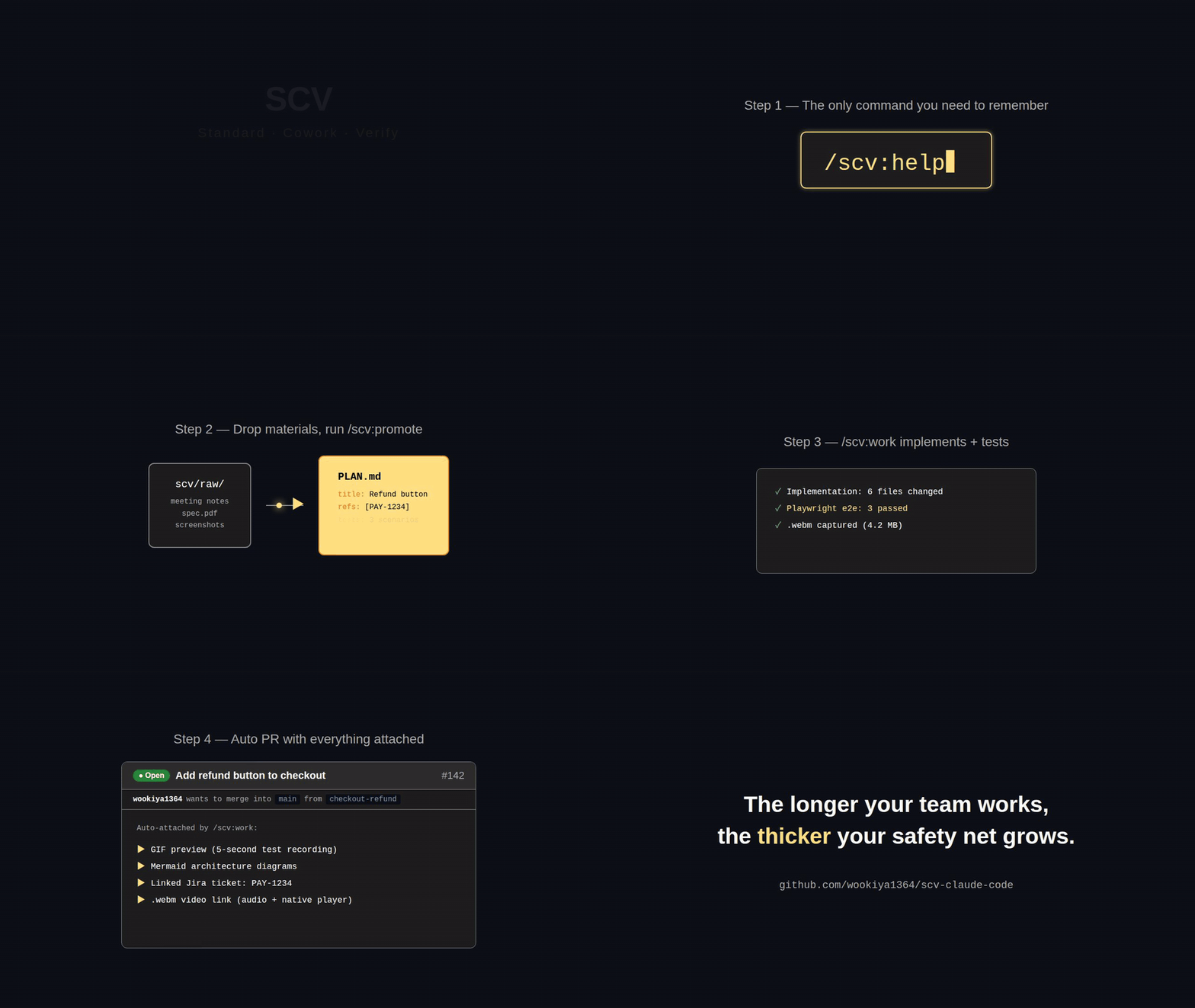
The only command you need to remember is
/scv:help.
It diagnoses your project's state and tells you what to do next. No flags to memorize, no docs to read first — the plugin walks you through every step.
# In any Claude Code session:

# 1. Install
/plugin marketplace add https://github.com/wookiya1364/scv-claude-code
/plugin install scv@scv-claude-code

# 2. Hydrate this project (one-time, per directory)
bash $CLAUDE_PLUGIN_ROOT/scripts/hydrate.sh init .

# 3. /scv:help takes over from here.
/scv:help
That's it. You only need to remember /scv:help — it diagnoses your project and routes to the right command. Pick a starting line:
| Situation | Command |
|---|---|
| Don't know what to do next | /scv:help |
| Have an idea but no materials yet | /scv:help "I want to add a refund button" (v0.9.0+) |
| Want to find past work in the archive | /scv:help "how did we handle refunds last quarter?" (v0.10.0+) |
5-Minute Walkthrough
Scenario: "Add a refund button to the checkout page"
| Min | Step | What happens |
|---|---|---|
| 1 | Drop materials into scv/raw/ |
meeting notes + spec PDF (Jira URL inside) |
| 2 | /scv:promote |
URL detected · slug + title asked · PLAN.md + TESTS.md + FEATURE_ARCHITECTURE.md written |
| 3 | /scv:work <slug> |
Implements · runs Playwright e2e · captures .webm |
| 4 | Auto PR | PR opens with GIF preview · Mermaid diagrams · Jira link — all attached |
| 5 | Review → merge → archive | Reviewer confirms via GIF in 5 sec · merge moves plan to archive · joins /scv:regression |
Stuck at any step? Run /scv:help — it picks up your project's current state and tells you what's next.
The Loop
Drop material → refine into a plan + tests → implement → archive. Every archived plan's tests join the accumulating regression suite that runs against every future change.

%%{init: {'theme':'base', 'themeVariables': {'primaryColor':'#1e1e1e','primaryTextColor':'#fff','primaryBorderColor':'#888','lineColor':'#fff','secondaryColor':'#2d2d2d','tertiaryColor':'#1e1e1e','background':'#0d1117','edgeLabelBackground':'#1e1e1e'}}}%%
flowchart LR
Raw["scv/raw/<br>(meeting notes,<br>specs, screenshots)"]
Promote["scv/promote/<slug>/<br>PLAN.md + TESTS.md<br>+ FEATURE_ARCHITECTURE.md"]
Work["implement<br>+ run TESTS"]
Archive["scv/archive/<br>(N plans accumulated)"]
Regression["/scv:regression<br>(runs every archived TESTS)"]
Raw -->|"/scv:promote<br>(dialog)"| Promote
Promote -->|"/scv:work <slug>"| Work
Work -->|"tests pass<br>+ user approval"| Archive
Archive -->|"each archive<br>joins the suite"| Regression
Regression -.->|"safety net for<br>the next change"| Promote
classDef key fill:#FFE082,stroke:#F57C00,stroke-width:2px,color:#000
class Promote,Regression key
Why the loop matters. Six months later, someone breaks an old feature they never knew about — and the test from that feature's archived plan catches it automatically. The longer your team works with SCV, the thicker your safety net grows.
Slash Commands
You don't have to memorize this — /scv:help picks the right command for you at each step. Reference table below:
| Command | What it does |
|---|---|
/scv:help |
Tells you what to do next. With an argument: conversation (idea) or archive search (retrospective query) — see Quick Start. |
/scv:status |
Inspect raw materials · active promotes · epic progress |
/scv:promote |
scv/raw/ → plan folder (scv/promote/<slug>/) with PLAN + TESTS + Mermaid diagrams |
/scv:work <slug> |
Implement · run tests · archive on pass · open PR with e2e video |
/scv:regression |
Run every archived TESTS as a regression suite |
/scv:report |
Post a phase result to Slack or Discord |
/scv:sync |
Apply plugin updates to standard docs |
/scv:install-deps |
Detect & install missing CLIs (gh / glab / jq / ffmpeg) |
Why SCV?
When AI starts writing your team's code, three things break down.
| Problem | SCV's answer |
|---|---|
| AI diffs — you end up running them yourself before reviewing logic. | /scv:work attaches an e2e GIF preview to the PR. |
| The same change drifts across ticket · PR · comment. | PLAN.md is the single source. Tickets via refs: (link only). |
| Old archives become a graveyard no one searches. | supersedes: + /scv:regression keep the archive alive. |
Architecture & Integrations
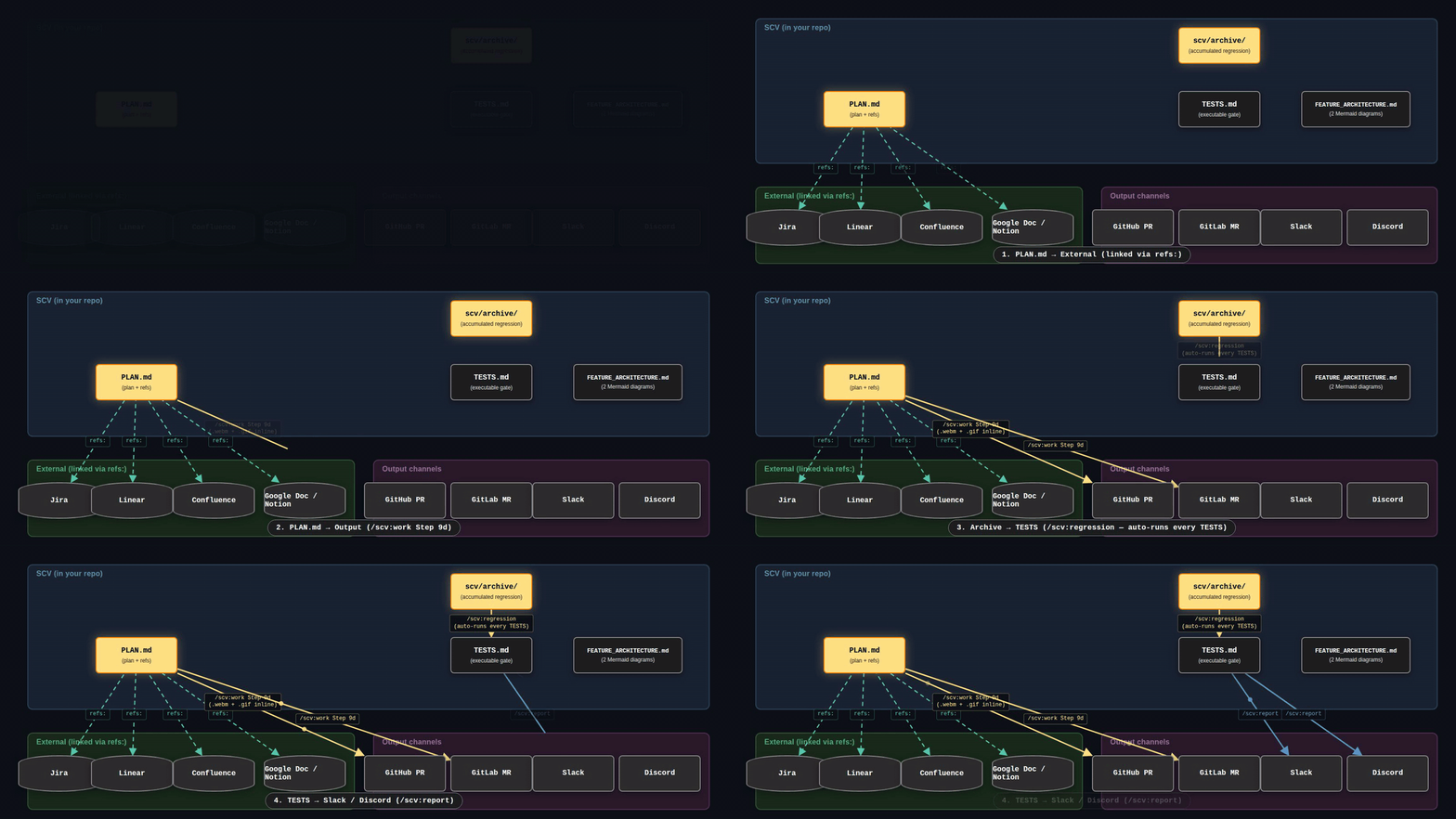
PLAN.md is the single source of truth. External tools (Jira / Linear / Confluence / Google Doc) are linked via refs: — never copied. Outputs (PR / MR / Slack / Discord) are auto-generated from the same source.
%%{init: {'theme':'base', 'themeVariables': {'primaryColor':'#1e1e1e','primaryTextColor':'#fff','primaryBorderColor':'#888','lineColor':'#fff','secondaryColor':'#2d2d2d','tertiaryColor':'#1e1e1e','background':'#0d1117','edgeLabelBackground':'#1e1e1e'}}}%%
flowchart TB
  subgraph SCV["SCV (in your repo)"]
    PLAN["PLAN.md<br>(plan + refs)"]
    TESTS["TESTS.md<br>(executable gate)"]
    FA["FEATURE_ARCHITECTURE.md<br>(2 Mermaid diagrams)"]
    Archive["scv/archive/<br>(accumulated regression)"]
  end

  subgraph External["External (linked via refs:)"]
    Jira[(Jira)]
    Linear[(Linear)]
    Confluence[(Confluence)]
    Doc[(Google Doc / Notion)]
  end

  subgraph Output["Output channels"]
    GH[GitHub PR]
    GL[GitLab MR]
    Slack[Slack]
    Discord[Discord]
  end

  PLAN -.->|refs:| Jira
  PLAN -.->|refs:| Linear
  PLAN -.->|refs:| Confluence
  PLAN -.->|refs:| Doc

  PLAN -->|"/scv:work Step 9d<br>(.webm + .gif inline)"| GH
  PLAN -->|"/scv:work Step 9d"| GL
  Archive -->|"/scv:regression<br>(auto-runs every TESTS)"| TESTS
  TESTS -->|"/scv:report"| Slack
  TESTS -->|"/scv:report"| Discord

  classDef key fill:#FFE082,stroke:#F57C00,stroke-width:2px,color:#000
  class PLAN,Archive key
Key properties
- Single source of truth — PLAN.md written once · PR / regression / Slack all read from it.
- External tools stay external —
refs:link to tickets · no body copy · link resolves when ticket changes. - Vendor-agnostic backends —
gh/glabfirst-class vialib/pr-platform.sh· adding Bitbucket / Gitea = a new adapter. - Multi-language by default — PR / Mermaid / commits follow your
SCV_LANG(English · 한국어 · 日本語).
Philosophy: Standard · Cowork · Verify
Three failure modes of AI-assisted team development — and what SCV refuses to do about each.
S — Standard. Standard docs (DOMAIN, ARCHITECTURE, DESIGN, TESTING, …) seed at status: N/A and stay that way until you lift one. N/A is a steady state, not a backlog.
C — Cowork. /scv:promote is a dialog, not a generation. Claude reads scv/raw/ and proposes a structure; you approve per-candidate. PLAN.md ends up with what you said, not what the LLM guessed.
V — Verify. TESTS.md is executable, not aspirational. Every archived plan's tests run as regression on the next change. Failures triage into regression / obsolete / flaky — never silently skipped.
Reference — project layout, external refs, notifier setupThe plugin's name is the plugin's contract.
Your Project Layout (after hydrate)
my-project/
├── CLAUDE.md           # (optional, user-owned — SCV never touches it)
├── scv/                # SCV owns everything under here
│   ├── CLAUDE.md       # SCV workflow index
│   ├── INTAKE.md PROMOTE.md DOMAIN.md ARCHITECTURE.md DESIGN.md
│   ├── AGENTS.md TESTING.md REPORTING.md RALPH_PROMPT.md
│   ├── readpath.json   # raw change snapshot (auto-managed)
│   ├── promote/        # Active plans (YYYYMMDD-author-slug folders)
│   ├── archive/        # Completed plans (moved by /scv:work)
│   └── raw/            # Free-input space
├── .env.example.scv    # SCV's notifier env template (your existing .env.example is untouched)
└── .gitignore          # SCV rules appended; existing .gitignore preserved
Non-destructive: existing root CLAUDE.md / .env.example stay intact. SCV creates scv/ + separate .env.example.scv + appends to existing .gitignore.
Standard docs are optional. Adoption mode (default) seeds 7 of 9 docs as status: N/A and stays that way until you lift one. N/A is a steady state, not a backlog.
External Refs (Jira / Linear / PR / Docs) — Auto-Detection
PLAN.md frontmatter has a vendor-agnostic refs: array. /scv:promote auto-detects URLs from:
scv/raw/files (drop a meeting note with the ticket URL inside)/scv:promote "...URL..."invocation argument- Dialog answers (paste URLs while answering — auto-parsed)
In .env, set JIRA_BASE_URL / LINEAR_BASE_URL / CONFLUENCE_BASE_URL so PLAN.md stores just id: PAY-1234 (URL inferred at display). Without these, full URLs stored. See template/.env.example.scv.
Notifier Setup (.env) — Optional
cp .env.example.scv .env
$EDITOR .env
Slack:
NOTIFIER_PROVIDER=slack
SLACK_BOT_TOKEN=xoxb-...
SLACK_CHANNEL_ID=C0XXXXX0
SLACK_CHANNEL_ID_PHASE_COMPLETE=C0XXXXX1
SLACK_CHANNEL_ID_E2E_FAILURE=C0XXXXX2
Discord: NOTIFIER_PROVIDER=discord + DISCORD_BOT_TOKEN + DISCORD_CHANNEL_ID_*.
If you already have .env: cat .env.example.scv >> .env. Never commit .env.
demo/ (Repo-only — not part of the plugin)
The demo/ directory holds Remotion compositions that produce the README's GIFs (scv-demo.gif, the-loop.gif, architecture.gif). It carries its own pnpm workspace and is unrelated to plugin behavior — plugin users do not need it.
Learn More
- Each command's detail:
/scv:<command> --help - Project-specific guide:
/scv:help - Changelog: CHANGELOG.md
Contributing
- Run
tests/run-dry.shbefore PRs - Log user-facing changes in
CHANGELOG.md - Follow SemVer for
VERSIONbumps
SCV 는 프로세스 플러그인입니다 — 코드 자동 생성기가 아닙니다. 팀이 같은 plan 과 같은 테스트로 일하게 만드는 도구입니다. 속도는 부수 효과로 따라옵니다.
빠른 시작
외울 명령어는
/scv:help하나뿐입니다.
프로젝트 상태를 진단하고 다음에 뭘 해야 할지 알려줍니다. 플래그 외울 필요 없고, 먼저 읽을 문서도 없습니다 — 플러그인이 단계마다 알려줍니다.
# Claude Code 세션에서:

# 1. 설치
/plugin marketplace add https://github.com/wookiya1364/scv-claude-code
/plugin install scv@scv-claude-code

# 2. 이 프로젝트에 hydrate (디렉토리당 한 번)
bash $CLAUDE_PLUGIN_ROOT/scripts/hydrate.sh init .

# 3. /scv:help 가 여기서부터 안내합니다.
/scv:help
이게 다입니다. 외울 명령은 /scv:help 하나 — 프로젝트를 진단하고 다음에 쓸 명령으로 안내합니다. 시작 줄을 고르세요:
| 상황 | 명령 |
|---|---|
| 다음에 뭐 해야 할지 모르겠다 | /scv:help |
| 아이디어만 있고 자료는 아직 없다 | /scv:help "환불 버튼 추가하고 싶어" (v0.9.0+) |
| 과거 archive 를 찾고 싶다 | /scv:help "지난 분기 결제 archive 보여줘" (v0.10.0+) |
5 분 워크스루
시나리오: "결제 페이지에 환불 버튼 추가"
| 분 | 단계 | 결과 |
|---|---|---|
| 1 | scv/raw/ 에 자료 투입 |
회의록 + 스펙 PDF (Jira URL 포함) |
| 2 | /scv:promote |
URL 인식 · slug + title 질문 · PLAN.md + TESTS.md + FEATURE_ARCHITECTURE.md 생성 |
| 3 | /scv:work <slug> |
구현 · Playwright e2e · .webm 캡처 |
| 4 | 자동 PR | PR 열림 · GIF 미리보기 · Mermaid 도식 · Jira 링크 모두 자동 첨부 |
| 5 | 리뷰 → 머지 → archive | 리뷰어가 GIF 로 5 초 확인 · 머지 시 archive · /scv:regression suite 합류 |
어느 단계든 막히면 /scv:help — 프로젝트의 현재 상태를 보고 다음에 뭐 할지 알려줍니다.
흐름 한눈에
자료 투입 → 계획 + 테스트로 정제 → 구현 → archive. 모든 archive 의 테스트는 누적되는 회귀 테스트 로 합류해 미래의 모든 변경에 대해 자동으로 돕니다.
%%{init: {'theme':'base', 'themeVariables': {'primaryColor':'#1e1e1e','primaryTextColor':'#fff','primaryBorderColor':'#888','lineColor':'#fff','secondaryColor':'#2d2d2d','tertiaryColor':'#1e1e1e','background':'#0d1117','edgeLabelBackground':'#1e1e1e'}}}%%
flowchart LR
Raw["scv/raw/<br>(회의록, 스펙,<br>스크린샷)"]
Promote["scv/promote/<slug>/<br>PLAN.md + TESTS.md<br>+ FEATURE_ARCHITECTURE.md"]
Work["구현<br>+ TESTS 실행"]
Archive["scv/archive/<br>(누적된 N 개 plan)"]
Regression["/scv:regression<br>(archived TESTS 모두 실행)"]
Raw -->|"/scv:promote<br>(대화)"| Promote
Promote -->|"/scv:work <slug>"| Work
Work -->|"테스트 통과<br>+ 사용자 승인"| Archive
Archive -->|"각 archive 가<br>회귀 묶음에 합류"| Regression
Regression -.->|"다음 변경의<br>안전망"| Promote
classDef key fill:#FFE082,stroke:#F57C00,stroke-width:2px,color:#000
class Promote,Regression key
왜 이 흐름이 중요한가. 6 개월 뒤 누군가 모르고 옛 기능을 깨뜨려도, 그 기능의 archive 된 테스트가 자동으로 발견합니다. 팀이 SCV 와 오래 일할수록 안전망이 두터워집니다.
슬래시 커맨드
외울 필요 없습니다 — /scv:help 가 매 단계마다 알맞은 명령을 안내합니다. 아래는 참고용 표:
| 커맨드 | 하는 일 |
|---|---|
/scv:help |
다음에 뭘 해야 할지 안내. 인자 있으면 분기 — 아이디어는 대화 모드, 회고 질문은 archive 검색. 예시는 빠른 시작 표. |
/scv:status |
raw 자료 · 진행 중인 promote · epic 진척도 |
/scv:promote |
scv/raw/ → plan 폴더 (scv/promote/<slug>/) — PLAN + TESTS + Mermaid 도식 |
/scv:work <slug> |
구현 · 테스트 실행 · 통과 시 archive · e2e 비디오 첨부한 PR 생성 |
/scv:regression |
archive 된 모든 TESTS 를 회귀로 실행 |
/scv:report |
단계 결과를 Slack / Discord 에 보고 |
/scv:sync |
플러그인 업데이트를 표준 문서에 반영 |
/scv:install-deps |
누락 CLI 자동 감지 + 설치 안내 (gh / glab / jq / ffmpeg) |
왜 SCV?
AI 가 팀 코드를 짜기 시작하면 세 가지가 어긋납니다.
| 문제 | SCV 의 답 |
|---|---|
| AI diff, 결국 직접 돌려보게 됩니다. | /scv:work 가 e2e + GIF 미리보기를 PR 에 자동 첨부. |
| 같은 변경이 티켓 · PR · 주석 3 군데에서 어긋납니다. | PLAN.md 가 단일 source. 티켓은 refs: 링크. |
| 옛 archive 가 검색 안 되는 묘지가 됩니다. | supersedes: 와 /scv:regression 으로 살아있는 기록. |
아키텍처 & 외부 통합
PLAN.md 가 단일 source of truth. 외부 도구 (Jira / Linear / Confluence / Google Doc) 는 refs: 로 링크 만 — 복사 안 함. 출력 (PR / MR / Slack / Discord) 은 같은 source 에서 자동 생성.
%%{init: {'theme':'base', 'themeVariables': {'primaryColor':'#1e1e1e','primaryTextColor':'#fff','primaryBorderColor':'#888','lineColor':'#fff','secondaryColor':'#2d2d2d','tertiaryColor':'#1e1e1e','background':'#0d1117','edgeLabelBackground':'#1e1e1e'}}}%%
flowchart TB
  subgraph SCV["SCV (내 repo 안)"]
    PLAN["PLAN.md<br>(계획 + refs)"]
    TESTS["TESTS.md<br>(실행 가능한 게이트)"]
    FA["FEATURE_ARCHITECTURE.md<br>(Mermaid 도식 2 개)"]
    Archive["scv/archive/<br>(누적 회귀 묶음)"]
  end

  subgraph External["외부 (refs: 로 연결)"]
    Jira[(Jira)]
    Linear[(Linear)]
    Confluence[(Confluence)]
    Doc[(Google Doc / Notion)]
  end

  subgraph Output["출력 채널"]
    GH[GitHub PR]
    GL[GitLab MR]
    Slack[Slack]
    Discord[Discord]
  end

  PLAN -.->|refs:| Jira
  PLAN -.->|refs:| Linear
  PLAN -.->|refs:| Confluence
  PLAN -.->|refs:| Doc

  PLAN -->|"/scv:work Step 9d<br>(.webm + .gif inline)"| GH
  PLAN -->|"/scv:work Step 9d"| GL
  Archive -->|"/scv:regression<br>(모든 TESTS 자동 실행)"| TESTS
  TESTS -->|"/scv:report"| Slack
  TESTS -->|"/scv:report"| Discord

  classDef key fill:#FFE082,stroke:#F57C00,stroke-width:2px,color:#000
  class PLAN,Archive key
핵심 속성
- 단일 source of truth — PLAN.md 한 번만 작성 · PR / regression / Slack 모두 여기서 읽음.
- 외부 도구는 외부에 둠 —
refs:로 티켓 링크 · 본문 복사 안 함 · 티켓 갱신돼도 링크는 유효. - vendor-agnostic 백엔드 —
lib/pr-platform.sh통해gh/glabfirst-class · Bitbucket / Gitea 추가 = 새 어댑터. - 다국어 default — PR / Mermaid / commit 모두
SCV_LANG따라감 (English · 한국어 · 日本語).
철학: Standard · Cowork · Verify
AI 협업 팀 개발의 세 가지 실패 모드 — SCV 가 거부하는 것.
S — Standard (표준). 표준 문서 (DOMAIN, ARCHITECTURE, DESIGN, TESTING, …) 는 status: N/A 로 시드되고 사용자가 lift 할 때까지 그대로. N/A 는 backlog 가 아니라 정상 상태.
C — Cowork (협업). /scv:promote 는 대화이지 생성이 아닙니다. Claude 가 scv/raw/ 를 읽고 구조를 제안, 사용자가 건건이 승인. PLAN.md 에 들어가는 건 사용자가 말한 것 — LLM 이 추측한 게 아닙니다.
V — Verify (검증). TESTS.md 는 실행 가능한 것이지 희망 사항이 아닙니다. 모든 archived plan 의 테스트가 다음 변경의 회귀로 돕니다. 실패는 regression / obsolete / flaky 로 triage — 조용히 skip 안 됨.
레퍼런스 — 프로젝트 디렉토리 / 외부 Refs / 협업툴 설정플러그인 이름은 플러그인의 계약.
프로젝트 디렉토리 (초기화 후)
my-project/
├── CLAUDE.md           # (선택, 사용자 소유 — SCV 가 건드리지 않음)
├── scv/                # SCV 가 소유하는 영역
│   ├── CLAUDE.md       # SCV 워크플로 인덱스
│   ├── INTAKE.md PROMOTE.md DOMAIN.md ARCHITECTURE.md DESIGN.md
│   ├── AGENTS.md TESTING.md REPORTING.md RALPH_PROMPT.md
│   ├── readpath.json   # raw 변경 스냅샷 (자동 관리)
│   ├── promote/        # 활성 계획 (YYYYMMDD-author-slug 폴더)
│   ├── archive/        # 완료 계획 (/scv:work 가 이동)
│   └── raw/            # 자유 투입 공간
├── .env.example.scv    # SCV 전용 Notifier 변수 템플릿
└── .gitignore          # SCV 규칙 append; 기존 보존
Non-destructive: 루트 CLAUDE.md / .env.example 그대로 보존. SCV 는 scv/ 만 만들고, .env.example.scv 별도 추가 + 기존 .gitignore 에 append.
표준 문서는 옵션. adoption 모드 (default) 가 9 문서 중 7 개를 status: N/A 로 시드하고 lift 결정할 때까지 그대로. N/A 는 backlog 가 아니라 정상 상태.
외부 Refs (Jira / Linear / PR / 문서) — 자동 인식
PLAN.md frontmatter 의 vendor-agnostic refs: 배열. /scv:promote 가 다음 source 의 URL 자동 인식:
scv/raw/안 파일 (회의록에 티켓 URL 적어두기)/scv:promote "...URL..."호출 인자- dialog 답변 안의 URL (자동 파싱)
.env 에 JIRA_BASE_URL / LINEAR_BASE_URL / CONFLUENCE_BASE_URL 박으면 PLAN.md 가 id: PAY-1234 만 저장 (URL 표시 시점에 추론). 미설정 시 full URL 저장. template/.env.example.scv 참조.
협업툴 설정 (.env) — 선택 사항
cp .env.example.scv .env
$EDITOR .env
Slack:
NOTIFIER_PROVIDER=slack
SLACK_BOT_TOKEN=xoxb-...
SLACK_CHANNEL_ID=C0XXXXX0
SLACK_CHANNEL_ID_PHASE_COMPLETE=C0XXXXX1
SLACK_CHANNEL_ID_E2E_FAILURE=C0XXXXX2
Discord: NOTIFIER_PROVIDER=discord + DISCORD_BOT_TOKEN + DISCORD_CHANNEL_ID_*.
기존 .env 있다면: cat .env.example.scv >> .env. .env 는 절대 git commit 금지.
demo/ (저장소 전용 — 플러그인 본체와 별개)
demo/ 디렉토리는 README 의 GIF (scv-demo.gif, the-loop.gif, architecture.gif) 를 만드는 Remotion 컴포지션을 담고 있습니다. 자체 pnpm workspace 로 동작하며 플러그인 동작과 무관합니다 — 사용자는 신경 쓸 필요 없습니다.
더 알아보기
- 각 커맨드 상세:
/scv:<command> --help - 현재 프로젝트 맞춤 안내:
/scv:help - 변경 이력: CHANGELOG.md
기여
- PR 전에
tests/run-dry.sh통과 확인 - 사용자 영향 변경은
CHANGELOG.md에 기록 VERSIONbump 은 SemVer 따름
SCV は プロセス プラグインです — コード自動生成器ではありません。 チームが同じ plan と同じテストで仕事をするための道具です。スピードは副次効果として付いてきます。
クイックスタート
覚えるべきコマンドは
/scv:helpひとつだけ。
プロジェクトの状態を診断し、次に何をすべきか教えてくれます。覚えるフラグなし、先に読むドキュメントなし — プラグインがステップごとに案内します。
# Claude Code セッション内で:

# 1. インストール
/plugin marketplace add https://github.com/wookiya1364/scv-claude-code
/plugin install scv@scv-claude-code

# 2. このプロジェクトに hydrate (ディレクトリごとに 1 回)
bash $CLAUDE_PLUGIN_ROOT/scripts/hydrate.sh init .

# 3. ここから先は /scv:help が引き継ぎます。
/scv:help
これだけです。覚えるコマンドは /scv:help 一つ — プロジェクトを診断し、次に使うコマンドへ案内します。開始行を選んでください:
| 状況 | コマンド |
|---|---|
| 次に何をすべきか分からない | /scv:help |
| アイデアだけあって資料はまだない | /scv:help "払い戻しボタンを追加したい" (v0.9.0+) |
| 過去の archive を探したい | /scv:help "先四半期の決済関連 archive を見せて" (v0.10.0+) |
5 分ウォークスルー
シナリオ: "決済ページに払い戻しボタンを追加"
| 分 | ステップ | 結果 |
|---|---|---|
| 1 | scv/raw/ に資料投入 |
議事録 + 仕様書 PDF (Jira URL 含む) |
| 2 | /scv:promote |
URL 検出 · slug + title 質問 · PLAN.md + TESTS.md + FEATURE_ARCHITECTURE.md を生成 |
| 3 | /scv:work <slug> |
実装 · Playwright e2e · .webm キャプチャ |
| 4 | 自動 PR | PR が開く · GIF プレビュー · Mermaid 図 · Jira リンクがすべて自動添付 |
| 5 | レビュー → マージ → archive | レビュアーが GIF で 5 秒確認 · マージで archive · /scv:regression スイートに合流 |
どのステップで詰まっても /scv:help — プロジェクトの現在の状態を見て、次に何をすべきか教えてくれます。
ループ
資料投入 → プラン + テストへ精製 → 実装 → archive。すべての archive のテストは累積する回帰テストへ合流し、未来のあらゆる変更に対して自動で回ります。
%%{init: {'theme':'base', 'themeVariables': {'primaryColor':'#1e1e1e','primaryTextColor':'#fff','primaryBorderColor':'#888','lineColor':'#fff','secondaryColor':'#2d2d2d','tertiaryColor':'#1e1e1e','background':'#0d1117','edgeLabelBackground':'#1e1e1e'}}}%%
flowchart LR
Raw["scv/raw/<br>(議事録、仕様書、<br>スクリーンショット)"]
Promote["scv/promote/<slug>/<br>PLAN.md + TESTS.md<br>+ FEATURE_ARCHITECTURE.md"]
Work["実装<br>+ TESTS 実行"]
Archive["scv/archive/<br>(累積された N 個のプラン)"]
Regression["/scv:regression<br>(archived TESTS すべて実行)"]
Raw -->|"/scv:promote<br>(対話)"| Promote
Promote -->|"/scv:work <slug>"| Work
Work -->|"テスト合格<br>+ ユーザー承認"| Archive
Archive -->|"各 archive が<br>回帰スイートに合流"| Regression
Regression -.->|"次の変更の<br>セーフティネット"| Promote
classDef key fill:#FFE082,stroke:#F57C00,stroke-width:2px,color:#000
class Promote,Regression key
なぜこのループが重要か. 6 か月後、誰かが知らない古い機能を壊しても、その機能の archive されたテストが自動で検出します。チームが SCV と長く使うほど、セーフティネットが厚くなります。
スラッシュコマンド
覚える必要はありません — /scv:help が各ステップで適切なコマンドを案内します。参考用の表:
| コマンド | やること |
|---|---|
/scv:help |
次に何をすべきか教えてくれます。引数あり時は分岐 — アイデアは対話モード、回顧的な質問は archive 検索。例はクイックスタートの表参照。 |
/scv:status |
raw 資料 · アクティブな promote · epic 進捗 |
/scv:promote |
scv/raw/ → plan フォルダ (scv/promote/<slug>/) — PLAN + TESTS + Mermaid 図 |
/scv:work <slug> |
実装 · テスト実行 · 通過時に archive · e2e 動画添付の PR を自動作成 |
/scv:regression |
archive された全 TESTS を回帰として実行 |
/scv:report |
フェーズ結果を Slack / Discord に通知 |
/scv:sync |
プラグイン更新を標準ドキュメントに反映 |
/scv:install-deps |
不足 CLI 自動検出 + インストール案内 (gh / glab / jq / ffmpeg) |
なぜ SCV?
AI がチームのコードを書き始めると、3 つのことが噛み合わなくなります。
| 問題 | SCV の答え |
|---|---|
| AI の diff、結局自分で動かして確かめる羽目に。 | /scv:work が e2e + GIF プレビューを PR に自動添付。 |
| 同じ変更が チケット · PR · コメント の 3 か所でずれる。 | PLAN.md が単一 source。チケットは refs: でリンクのみ。 |
| 古い archive が誰も検索しない墓場になる。 | supersedes: と /scv:regression で archive を生かす。 |
アーキテクチャと外部統合
PLAN.md が単一の source of truth。外部ツール (Jira / Linear / Confluence / Google Doc) は refs: でリンクのみ — 複製しない。出力 (PR / MR / Slack / Discord) は同じ source から自動生成。
%%{init: {'theme':'base', 'themeVariables': {'primaryColor':'#1e1e1e','primaryTextColor':'#fff','primaryBorderColor':'#888','lineColor':'#fff','secondaryColor':'#2d2d2d','tertiaryColor':'#1e1e1e','background':'#0d1117','edgeLabelBackground':'#1e1e1e'}}}%%
flowchart TB
  subgraph SCV["SCV (リポジトリ内)"]
    PLAN["PLAN.md<br>(プラン + refs)"]
    TESTS["TESTS.md<br>(実行可能なゲート)"]
    FA["FEATURE_ARCHITECTURE.md<br>(Mermaid 図 2 つ)"]
    Archive["scv/archive/<br>(累積回帰スイート)"]
  end

  subgraph External["外部 (refs: でリンク)"]
    Jira[(Jira)]
    Linear[(Linear)]
    Confluence[(Confluence)]
    Doc[(Google Doc / Notion)]
  end

  subgraph Output["出力チャネル"]
    GH[GitHub PR]
    GL[GitLab MR]
    Slack[Slack]
    Discord[Discord]
  end

  PLAN -.->|refs:| Jira
  PLAN -.->|refs:| Linear
  PLAN -.->|refs:| Confluence
  PLAN -.->|refs:| Doc

  PLAN -->|"/scv:work Step 9d<br>(.webm + .gif inline)"| GH
  PLAN -->|"/scv:work Step 9d"| GL
  Archive -->|"/scv:regression<br>(全 TESTS 自動実行)"| TESTS
  TESTS -->|"/scv:report"| Slack
  TESTS -->|"/scv:report"| Discord

  classDef key fill:#FFE082,stroke:#F57C00,stroke-width:2px,color:#000
  class PLAN,Archive key
重要な性質
- 単一の source of truth — PLAN.md は一度だけ書く · PR / regression / Slack すべてここから読む。
- 外部ツールは外部に —
refs:でチケットへリンク · 本文の複製なし · チケット更新時もリンクは有効。 - vendor-agnostic バックエンド —
lib/pr-platform.sh経由でgh/glabfirst-class · Bitbucket / Gitea 追加 = 新アダプター。 - 多言語デフォルト — PR / Mermaid / commit すべて
SCV_LANGに従う (English · 한국어 · 日本語)。
哲学: Standard · Cowork · Verify
AI 協業チーム開発の 3 つの失敗モード — SCV が拒否するもの。
S — Standard (標準). 標準ドキュメント (DOMAIN, ARCHITECTURE, DESIGN, TESTING, …) は status: N/A でシードされ、ユーザーが lift するまでそのまま。N/A は backlog ではなく定常状態。
C — Cowork (協業). /scv:promote は対話であって生成ではありません。Claude が scv/raw/ を読み構造を提案、ユーザーが個別に承認。PLAN.md に入るのはユーザーが言ったこと — LLM が推測したものではありません。
V — Verify (検証). TESTS.md は実行可能なものであって願望ではありません。archived plan のテストは次の変更の回帰として回ります。失敗は regression / obsolete / flaky にトリアージ — 黙ってスキップされません。
リファレンス — プロジェクトディレクトリ / 外部 Refs / 通知設定プラグインの名前はプラグインの契約。
プロジェクトディレクトリ (hydrate 後)
my-project/
├── CLAUDE.md           # (任意 · ユーザー所有 — SCV は触らない)
├── scv/                # SCV が所有する領域
│   ├── CLAUDE.md       # SCV ワークフローのインデックス
│   ├── INTAKE.md PROMOTE.md DOMAIN.md ARCHITECTURE.md DESIGN.md
│   ├── AGENTS.md TESTING.md REPORTING.md RALPH_PROMPT.md
│   ├── readpath.json   # raw 変更スナップショット (自動管理)
│   ├── promote/        # アクティブな計画 (YYYYMMDD-author-slug フォルダ)
│   ├── archive/        # 完了した計画 (/scv:work が移動)
│   └── raw/            # 自由投入スペース
├── .env.example.scv    # SCV 専用 Notifier 変数テンプレート
└── .gitignore          # SCV ルール append; 既存保持
Non-destructive: ルート CLAUDE.md / .env.example はそのまま保持。SCV は scv/ のみ作成、.env.example.scv を別途追加 + 既存 .gitignore に append。
標準ドキュメントは任意。adoption モード (default) は 9 ドキュメントのうち 7 つを status: N/A で seed し lift を決めるまでそのまま。N/A は backlog ではなく定常状態。
外部 Refs (Jira / Linear / PR / ドキュメント) — 自動検出
PLAN.md frontmatter の vendor-agnostic な refs: 配列。/scv:promote が以下の source の URL を自動検出:
scv/raw/内ファイル (議事録にチケット URL を含める)/scv:promote "...URL..."呼び出し引数- dialog 回答中の URL (自動 parse)
.env に JIRA_BASE_URL / LINEAR_BASE_URL / CONFLUENCE_BASE_URL を設定すると PLAN.md は id: PAY-1234 のみ保存 (URL 表示時に推論)。未設定なら full URL 保存。template/.env.example.scv 参照。
通知ツール設定 (.env) — 任意
cp .env.example.scv .env
$EDITOR .env
Slack:
NOTIFIER_PROVIDER=slack
SLACK_BOT_TOKEN=xoxb-...
SLACK_CHANNEL_ID=C0XXXXX0
SLACK_CHANNEL_ID_PHASE_COMPLETE=C0XXXXX1
SLACK_CHANNEL_ID_E2E_FAILURE=C0XXXXX2
Discord: NOTIFIER_PROVIDER=discord + DISCORD_BOT_TOKEN + DISCORD_CHANNEL_ID_*。
既存 .env がある場合: cat .env.example.scv >> .env。.env は絶対に git にコミット禁止。
demo/ (リポジトリ専用 — プラグイン本体とは別)
demo/ ディレクトリは README の GIF (scv-demo.gif、the-loop.gif、architecture.gif) を生成する Remotion コンポジションを含みます。独自の pnpm workspace として動き、プラグインの動作とは無関係です — 利用者が触る必要はありません。
さらに詳しく
- 各コマンドの詳細:
/scv:<command> --help - プロジェクト固有の案内:
/scv:help - 変更履歴: CHANGELOG.md
コントリビューション
- PR の前に
tests/run-dry.shを通す - ユーザー影響のある変更は
CHANGELOG.mdに記録 VERSIONは SemVer に従う
License: MIT © 2026 wookiya1364
Yorumlar (0)
Yorum birakmak icin giris yap.
Yorum birakSonuc bulunamadi