worktabs
Health Uyari
- License — License: MIT
- Description — Repository has a description
- Active repo — Last push 0 days ago
- Low visibility — Only 5 GitHub stars
Code Gecti
- Code scan — Scanned 12 files during light audit, no dangerous patterns found
Permissions Gecti
- Permissions — No dangerous permissions requested
Bu listing icin henuz AI raporu yok.
One window for your Claude Code and Codex conversations, one tab per git worktree.
Worktabs

English | 日本語
One window for your Claude Code and Codex conversations, one tab per git worktree.
Early preview (v0.x): settings and behavior may change from one version to the next.
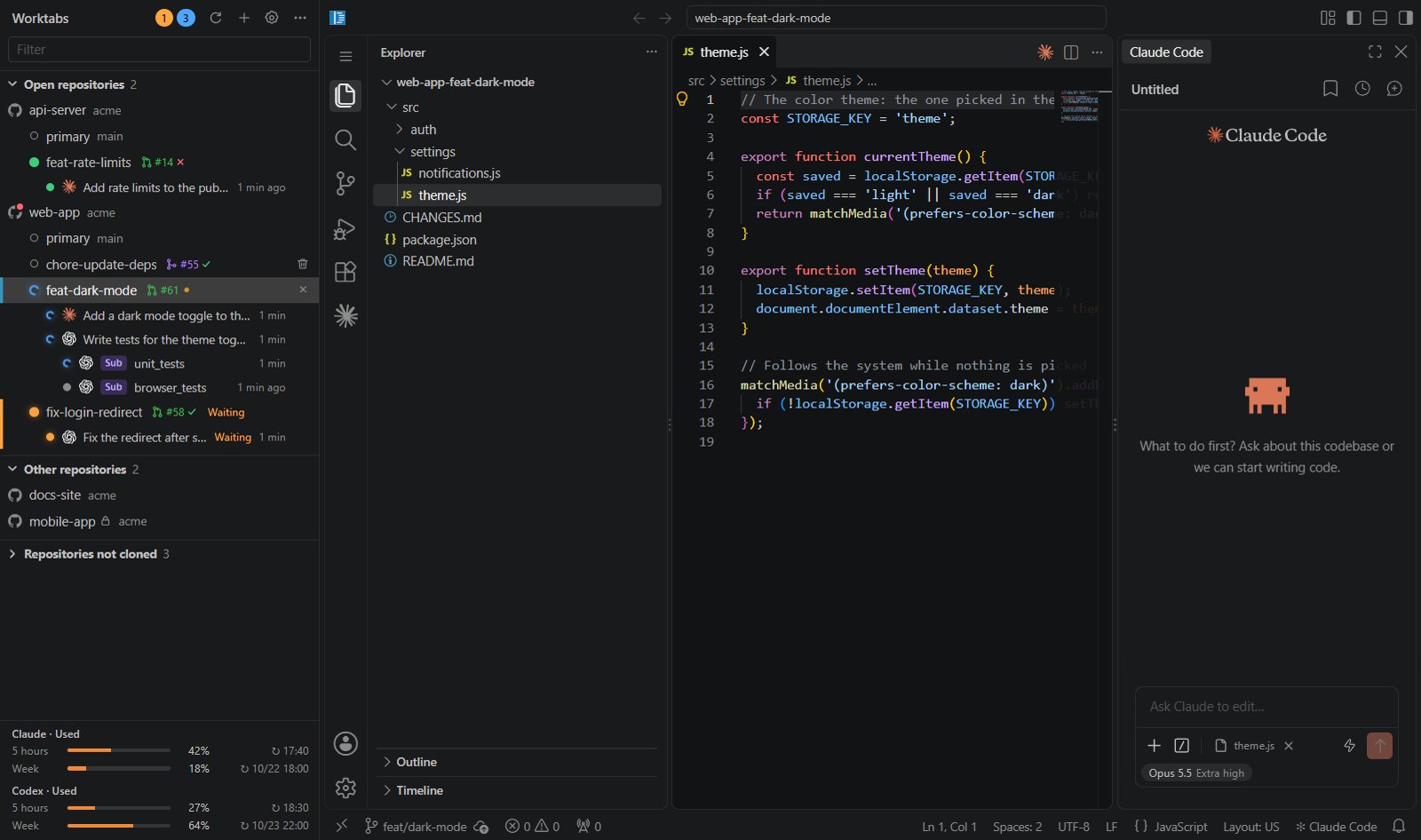
Worktabs starts a browser-based VS Code (code-server) for each git worktree and lets you switch between them from a sidebar. Each tab runs the selected agent's own extension and chat panel. Claude Code is installed by default; Codex can be enabled after importing a compatible extension. Badges in the sidebar and OS notifications tell you which conversations are working and which are waiting for you. It runs on Windows and macOS.
Who it is for
People who want to keep using VS Code as they always have. Agentic development environments (ADEs) keep multiplying, and most of them ask you to move to a new editor and chat panel that some company or developer designed. Worktabs does not replace VS Code. Each tab is VS Code (code-server), and the chat is the Claude Code extension itself. Worktabs only adds the frame around them: a tab per worktree and a sidebar that shows every conversation.
The ADE for when you are at your PC, used alongside cloud sessions. Claude Code on the web runs in the cloud, so you can use it without turning on your PC. Worktabs is for the time you sit at your PC, and the two are meant to be used together. The author uses Worktabs every day and still uses cloud sessions when away from the PC.
Why
With AI agents, running many conversations across many repositories at once has become normal. Worktabs started from wanting to see all of them in one place.
Parallel conversations in one repository collide. Several conversations in one folder fight over the branch and step on each other's changes. Separate git worktrees keep them apart.
The Claude Code extension for VS Code cannot give each conversation its own worktree (anthropics/claude-code#69554). Opening one VS Code per worktree works around that, but on Windows VS Code windows cannot be grouped into tabs (window.nativeTabs is macOS only), and on either OS you have to look at each window to see which Claude is waiting for you.
So Worktabs puts the VS Code of each worktree into tabs of one window and gathers the state of every conversation in a sidebar. You get nearly full VS Code, and the Claude Code chat panel is the real extension, not a rebuild, so new extension features work right away.
Other tools did not fit this workflow:
- herdr is a terminal multiplexer for agents. It does not fit using Claude Code inside VS Code.
- Orca runs agents side by side per worktree, but runs Claude Code as a CLI. Its experimental chat panel has fewer features than the VS Code extension.
- The Code tab of the Claude desktop app separates conversations by worktree, but you cannot use the VS Code editor and extensions there.
- Claude Code on the web separates the environment per conversation, but runs in a cloud Linux environment. It cannot fix or check things that need a real machine, which is a bottleneck when building client apps such as this one. It still works well alongside Worktabs (Who it is for).
- The VS Code Agents window can use Claude, but through VS Code's own harness, not the Claude Code extension (it runs on a Copilot subscription by default).
- Many tools of this kind are macOS only (Conductor, Superset, and others).
Detailed comparisons and the design decisions are in docs/research.md.
Trade-offs
- No custom chat panel or editor. Worktabs uses code-server and the Claude Code extension as they are.
- Each tab is code-server, not your desktop VS Code. Settings and extensions are kept apart. Claude uses Open VSX by default; compatible, licensed extensions can also be imported from desktop VS Code or VSIX (extension management).
- Worktrees made by other means (
git worktree, Orca, and so on) open as they are. - Each tab uses about 0.8 GB of memory, in exchange for full VS Code.
- Worktabs runs on Windows and macOS. Claude Code is installed by default; Codex can be enabled with a compatible, permitted extension import. WSL tabs are Windows only.
Features
- The sidebar shows a tree of repositories → worktrees → conversations. Clicking a worktree opens its VS Code as a tab.
- Each conversation has a badge for working, waiting for approval, or done, and how long it has been in that state. When a conversation in a background tab waits for approval or finishes, an OS notification appears.
- Add and remove worktrees from the sidebar. Files listed in
.worktreeinclude(such as.env) are copied. - Create a worktree from a GitHub issue or a short task: your selected agent suggests the branch name, and the instruction becomes an editable draft in a new conversation. From a PR number, it checks out the PR branch into a worktree for review. Worktabs does not send the task automatically.
- Each worktree row shows the state of the branch's PR (draft, open, merged, closed) and its CI result, plus the CI on main after the merge and the CI of the release tag. A red dot on a repository's icon marks your own PRs there that are approved but not merged yet, even those without a worktree.
- Repository rows mark private and internal GitHub repositories with an icon.
- The repositories of your GitHub account and your organizations that are not cloned yet are listed by owner, and clone with one click (with ghq if it is installed, else with git into a folder you pick; on Windows, into Windows or WSL).
- Idle tabs are suspended to free memory. The tabs open at exit are restored on the next start.
- Claude and Codex subscription usage is shown at the bottom of the sidebar when available.
- Repositories inside WSL open as tabs the same way (Windows only).
The UI is in English or Japanese, following the system's language (locale in the settings).
To use Codex, import its extension in Settings > Extensions, enable it in Settings > General, and sign in through its chat panel. Both agents can be enabled together; the default agent selects new tabs, while existing conversations keep their provider. See agent settings and the Codex verification matrix for setup and the environments still awaiting real-extension checks.
A map of the window, with what you can do in each part, is in docs/features.md.
Requirements
- Windows 11, or macOS (tested on macOS 26.5, Apple Silicon)
- git
- (Optional) ghq. The repository list in the sidebar comes from
ghq list - (Optional) WSL2, to open repositories inside WSL
- (Only to build from source) Node.js and npm
Install
Download the file for your OS from Releases.
Worktabs-<version>-setup.exe: Windows installer. It installs per user, so no administrator rights are needed.Worktabs-<version>-win.zip: Windows, no installation. Extract it anywhere and runWorktabs.exe.Worktabs-<version>-arm64-mac.zip: macOS (Apple Silicon). Move the extractedWorktabs.appto Applications and start it.
The Windows app is not signed. The macOS app uses an ad-hoc signature and is not notarized.
- Windows: SmartScreen warns on the first start. Click "More info" → "Run anyway".
- macOS: before the first start, run
xattr -dr com.apple.quarantine /Applications/Worktabs.app.
On the first start, Worktabs downloads code-server and the extensions (about 300 MB). Verifying downloads (SHA256SUMS.txt), updating, and building from source are covered in docs/install.md.
Usage
- Start Worktabs. The sidebar lists your repositories from
ghq list. Add others with "+" → "Add repository…" at the top of the sidebar. - Click a worktree to open its VS Code as a tab. Use the Claude Code chat panel in it as usual.
- Watch the badges in the sidebar. Click a conversation, or its notification, to jump to that tab and conversation.
- Add a worktree from the "+" on a repository row. Remove one from its right-click menu or the trash button on its row.
See docs/usage.md and docs/worktrees.md for details.
Configuration
The settings file is %APPDATA%\Worktabs\config.json on Windows and ~/Library/Application Support/Worktabs/config.json on macOS. Open it from "…" → "Open settings file" in the sidebar. Keys you leave out use the defaults. See config.example.json for an example.
| Key | Meaning |
|---|---|
repoSources |
Where the repository list comes from: "ghq", "wsl" (ghq list inside each WSL distro), or "wsl:<distro>". Default ["ghq", "wsl"] |
repos |
Repositories added by hand |
codeServerDir |
Use an existing code-server instead of downloading one |
codeServerVersion |
The code-server version to download (default: the tested version) |
updateCheck |
Check for new versions of code-server and extensions at start (default true) |
extensions |
Extensions to install from Open VSX (default: Claude Code). The language pack of the display language is added |
locale |
Display language of the app and of VS Code. Empty (the default) follows the system |
permissionMode |
Initial permission mode of new conversations (auto, manual, acceptEdits, plan). Default auto |
idleSuspendMinutes |
Suspend idle tabs after this many minutes (0 disables) |
All keys, the data folder, and the logs are in docs/config.md.
How it works
- code-server: one process per worktree, listening only on
127.0.0.1. Each worktree has its ownuser-data-dir; extensions are shared, and VS Code settings are shared among the worktrees of a repository. - Claude Code hooks: the extension starts
claudethrough a small wrapper (claudeCode.claudeProcessWrapper), which adds--settingswith HTTP hooks. Only conversations started by Worktabs get these hooks;~/.claude/settings.jsonand the repository's.claude/are not changed. The wrapper also passes the usage events from Claude's output to the app. - Helper extension: a small extension installed into each code-server. It brings a conversation to the front when you click it in the sidebar, passes the theme colors to the sidebar, and adds desktop commands that VS Code Web lacks (such as revealing a file in File Explorer or Finder).
Security assumptions
- Everything listens on
127.0.0.1only: code-server, the hook receiver, and the helper extension. Each uses a random port. - code-server uses
--auth passwordwith a random value per start. The app writes the matching cookie into its tab directly; no plain-text password exists, so nobody can log in through the login page. - The hook receiver checks a token generated per start.
- Other programs running as the same user on the same machine are trusted. Worktabs does not protect against them.
Details are in docs/architecture.md. To report a vulnerability, see SECURITY.md.
Third-party software
On the first start, Worktabs downloads and runs:
- code-server from its GitHub releases
- The Claude Code extension, and the language pack when VS Code is not in English, from Open VSX
Using Claude Code requires your own Claude account and is subject to Anthropic's terms. Worktabs does not download the Codex extension: you import it yourself (extension management), and using Codex is subject to OpenAI's terms.
Worktabs is an independent project. It is not affiliated with, endorsed by, or sponsored by Anthropic or OpenAI. Claude and Claude Code are trademarks of Anthropic. OpenAI and Codex are trademarks of OpenAI.
Documentation
Each page also has a Japanese version under docs/ja/, except docs/research.md.
| Page | Contents |
|---|---|
| docs/features.md | A map of the window, and what you can do in each part |
| docs/install.md | Install, update, build from source |
| docs/usage.md | Usage (sidebar, badges and notifications, tabs, usage limits, updating code-server) |
| docs/worktrees.md | Adding and removing worktrees |
| docs/wsl.md | Repositories in WSL |
| docs/config.md | Settings file and data folder |
| docs/limitations.md | Known limitations |
| docs/architecture.md | How it works |
| docs/development.md | Development (run from source, tests, dev checks) |
| docs/translations.md | Updating the Japanese documents and UI strings |
| docs/releasing.md | Releasing (versioning, CHANGELOG, GitHub Releases) |
| docs/research.md | Summary of the research and verification behind the design (English) |
Contributing
See CONTRIBUTING.md for branches, commits, and pull requests, and the Code of Conduct for how we treat each other. Planned work is tracked in issues. Issues and pull requests are welcome in English or Japanese.
License
MIT. Third-party software in the installer and zips, and what Worktabs downloads at run time, is listed in THIRD_PARTY_NOTICES.md.
Worktabs does not ship the Claude Code extension. It downloads the extension from Open VSX, under Anthropic's license. Using it needs your own Claude account and is subject to Anthropic's terms of service.
Yorumlar (0)
Yorum birakmak icin giris yap.
Yorum birakSonuc bulunamadi