apple-ii-terminal-for-claude-code
Health Warn
- License — License: NOASSERTION
- Description — Repository has a description
- Active repo — Last push 0 days ago
- Low visibility — Only 5 GitHub stars
Code Pass
- Code scan — Scanned 12 files during light audit, no dangerous patterns found
Permissions Pass
- Permissions — No dangerous permissions requested
No AI report is available for this listing yet.
A terminal app for Claude Code that runs natively on Apple IIe, IIe+, IIc, and IIgs.
Apple II Terminal for Claude Code
A real Apple II, as a terminal for Claude Code.
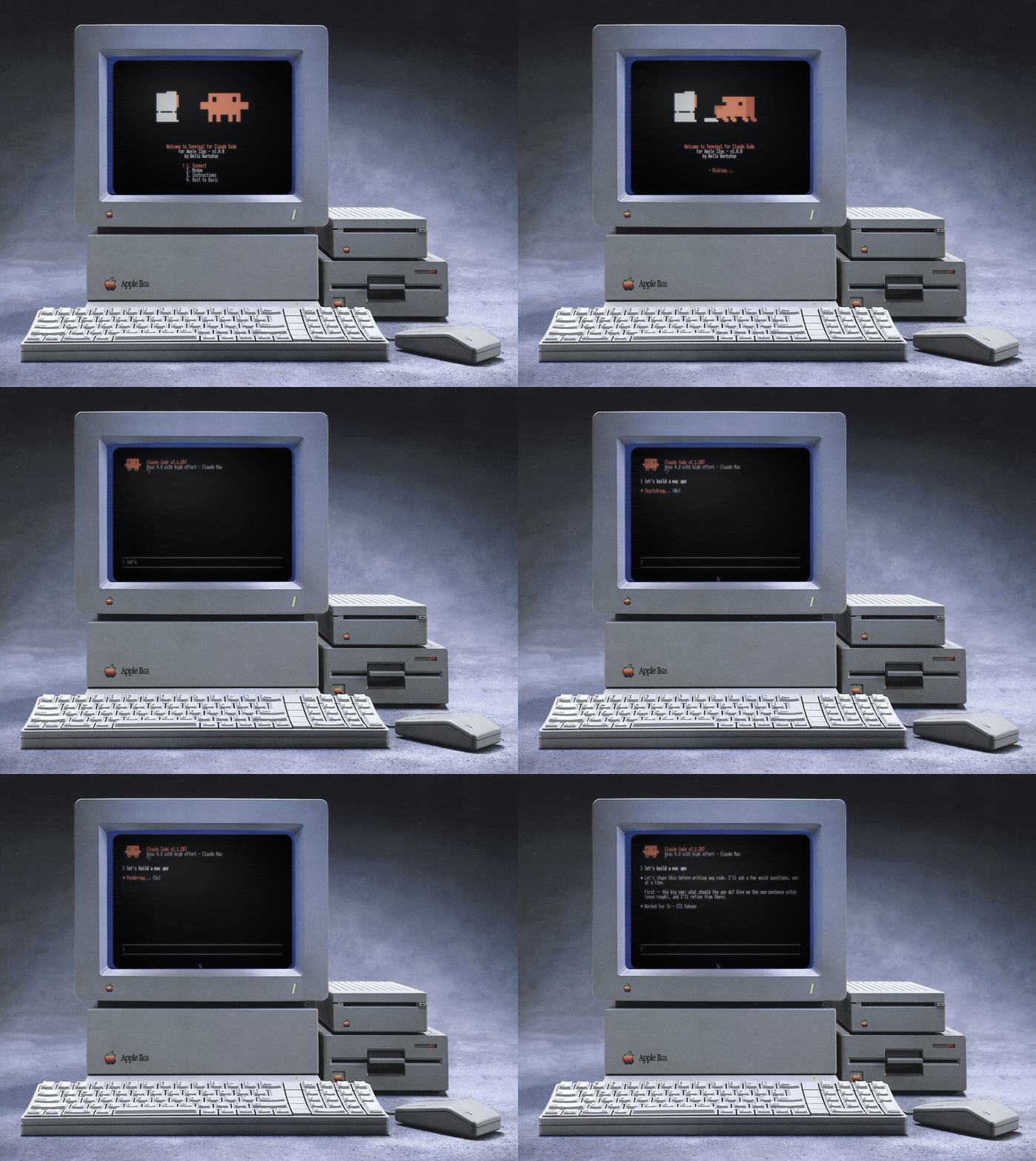
Boot a 140K floppy, dial a WiFi modem, and your Apple II becomes a terminal for the real claude CLI, bridged from a modern machine. The disk image is bootable on every model from the IIgs down to the II+ (or in an emulator).
It's not a chat toy. The backend is the actual agentic Claude Code, and the clients are bare-metal 65816 and 6502 that draw the whole UI themselves from a tiny 7-bit ASCII protocol. A IIgs gets a Super Hi-Res client with an animated splash, scrolling transcript, and thinking spinner; a IIe, IIc, IIc Plus, or II+ gets a text-mode client.
Press Connect and it plays the 1986 dial-up soundscape: dial tone, touch-tones that spell C-L-A-U-D-E on the keypad, ring, and answer tone.
[!TIP]
Did you find my work useful? Your donation helps fund future projects. Thank you!
Apple II instructions
Prerequisites:
- An Apple II (IIgs down to the II+ — see docs/COMPATIBILITY.md for the tested-model matrix)
- A Hayes-compatible modem (or modem emulator like the WiModem 232 Pro) OR a serial connection to your modern Mac.
- FloppyEmu or some way of writing a
.dskimage to a floppy disk - Claude Code installed and logged in on your modern Mac
- The CLAUDE.dsk disk image, from Releases (or built from source, below)
Setup:
Bridge, on the machine with the
claudeCLI:git clone https://github.com/wr/apple-ii-terminal-for-claude-code cd apple-ii-terminal-for-claude-code python3 ./bridge/bridge.py --telnet --app --backend code --workdir ~/your-projectSetup Python install TCP/emulator + --backend codeNone; install and log in to the external claudeCLISerial + --backend codepython3 -m pip install -r bridge/requirements-serial.txtAny transport + --backend chatpython3 -m pip install -r bridge/requirements-chat.txtand setANTHROPIC_API_KEYEvery optional bridge feature python3 -m pip install -r bridge/requirements.txtIt listens on TCP 6400. When an unpaired source IP first needs access, the bridge creates a 6-character code and prints it only on its own console. A native client exchanges the code for a private token and presents it on later connects. The 8-bit client persists that token on its boot disk across reboots; the IIgs client keeps it only in RAM for the current boot. A valid-token reconnect does not print a code. The generated code is discarded after a successful pairing, but an intercepted unused code can still be replayed from the same source IP.
--workdiris the project Claude Code works in — in code mode it reads and writes files and runs commands in that directory, so point it at the repo you actually want on the wire.Trusted LAN only.
--telnetexposes a Claude session (in code mode, a shell on the host) to your network. Telnet is plaintext: anyone who captures LAN traffic may be able to replay a pairing code or token. Run it only on a home LAN you trust, and never port-forward it or bind it to a public interface. See pairing flags to set a shared code or revoke access.What the bridge records. Every prompt you type from the Apple II prints to the bridge's own console; replies are logged as metadata, not text. The pairing store records each token's SHA-256, first-seen IP, and pairing time at
$XDG_CONFIG_HOME/claude-ii-terminal/paired.json, or~/.config/claude-ii-terminal/paired.jsonwhen XDG is unset. It never stores the plaintext token. The 8-bit client keeps that token on disk; the IIgs client retains it only in RAM until reboot. Full picture in SECURITY.md.Modem: store the bridge's address as phone book entry 0, then save:
AT&Z0=192.168.1.50:6400      (your host's LAN IP)
AT&W
Your specific modem may require different commands. Feel free to open a GitHub issue if you want to contribute instructions for your specific hardware.
Connect on the boot menu dials entry 0. The menu also has a live Hayes AT console for whatever your modem needs. Cables, per-device commands (a fresh WiModem ships at 300 baud and wants
AT*B9600once), and a "modem plays dead" checklist are in docs/MODEM-SETUP.md.Disk: copy
CLAUDE.dskto a FloppyEmu SD card (5.25" mode, boots from slot 6). On a Mac,tools/install-sd.shdoes it safely; FloppyEmu is very sensitive to FAT32 fragmentation, and macOS fragments more than you'd expect. If a card is already fragmented,tools/install-sd.sh repairfixes it. Create backups before using!Power on and pick Connect from the menu. With any luck, it should connect to the bridge automatically!
To update later, download the new release image and re-run install-sd.sh; it overwrites the existing image in place.
Emulator instructions
I used KEGS, but any Apple II emulator with serial emulation should work. (KEGS needs an Apple IIgs ROM file you supply — see the KEGS docs.)
Download CLAUDE.dsk from Releases.
In KEGS, press F4: set s6d1 to
CLAUDE.dsk, and set Serial Port Slot 2 to Incoming (KEGS then listens on TCP 6502).Start the bridge, then reboot the emulator with Ctrl-⌘-Reset:
git clone https://github.com/wr/apple-ii-terminal-for-claude-code
cd apple-ii-terminal-for-claude-code/bridge
python3 bridge.py --connect 127.0.0.1:6502 --app --backend code --workdir ~/your-project
On the boot menu pick 1. Connect, then type.
--workdiris the project Claude works in.
Advanced bridge options
The bridge is one Python script. Pick a transport, a backend, and (for the native clients) --app. Two commands cover almost everything:
# Emulator (KEGS in Incoming mode):
python3 bridge.py --connect 127.0.0.1:6502 --app --backend code --workdir ~/project

# Real hardware (WiFi modem listening):
python3 bridge.py --telnet --app --backend code --workdir ~/project
Transport (choose one):
| Flag | Use |
|---|---|
--connect HOST:PORT |
Dial out to a listening emulator (KEGS Incoming, port 6502) |
--telnet |
Listen for a WiFi modem or TCP client (port 6400) |
--serial PORT |
A serial cable, e.g. /dev/tty.usbserial-1420 (pair with --baud, default 9600) |
Backend:
| Flag | Use |
|---|---|
--backend code |
The real agentic Claude Code. Edits files and runs commands on the host, in --workdir. That's the point, but know it |
--backend chat |
Plain Q&A via the Messages API. Needs ANTHROPIC_API_KEY and bridge/requirements-chat.txt (default backend) |
--workdir DIR |
Code mode: the project Claude works in |
--model ID |
Override the Claude model |
--effort LEVEL |
Chat thinking effort: low/medium/high/xhigh/max (default low) |
Native client:
| Flag | Use |
|---|---|
--app |
Native-client protocol. Required for the clients on the boot disk |
--cols 40|80 |
Screen width (default 80; use 40 for a II+ or a 40-column IIe) |
Pairing (telnet only):
| Flag | Use |
|---|---|
--pair-code CODE |
Fix one shared code for every caller; letters are case-insensitive (default: an on-demand code per source IP) |
--clear-paired |
Revoke every stored token credential at startup |
--no-pair |
Drop the pairing gate entirely (isolated networks only) |
--host ADDR |
Bind address (default 0.0.0.0; set 127.0.0.1 to keep it local) |
Run python3 bridge.py --help for the rest (flow control, pacing, telnet negotiation, permission mode).
Generic terminal app instructions
Run the bridge without --app and it speaks ordinary 40/80-column text, so any Apple II with a terminal program, or a stock IIc using the firmware's built-in terminal over a serial cable, can talk to Claude with nothing installed on the II. Wiring, pinouts, and per-machine settings are in apple2/TERMINAL-SETUP.md.
Claude slash commands
Slash commands from the II: the bridge handles /help, /new or /clear, /mode chat|code, /model NAME, and /quit or /exit. In code mode everything else passes through to the CLI, so /cost, /context, /compact, and your installed skills run for real. Ctrl-C interrupts a reply mid-think (the bridge kills the turn and sends what it has); pressed at an idle prompt it quits to the menu.
Building from source
You don't need this to run it; the release disk is prebuilt. To hack on it you need cc65 (brew install cc65), dos33fsprogs (built anywhere, point DOS33FSPROGS at it), and Python 3 with requirements-build.txt installed.
python3 -m pip install -r requirements-build.txt
cd apple2gs && ./build.sh                                    # both clients into one CLAUDE.dsk
python3 preview.py assets.inc out.png                         # render the SHR screen, no emulator
build.sh starts from a pristine Apple DOS 3.3 System Master and injects both clients plus a machine-detecting HELLO; that master-based image is the one proven to boot KEGS, FloppyEmu, and real drives alike. The master is vendored at apple2gs/dos33-master-jan83.dsk (the January 1983 System Master, 143,360 bytes), so a clean checkout builds with nothing to fetch. It's Apple's OS, not ours; see THIRD-PARTY-NOTICES.md. Verify it:
shasum -a 256 apple2gs/dos33-master-jan83.dsk
# 70986935d95c4a918852700364ac107607eb861a7d93a69c2b5caf44a696b17a
Everything else is generated at build time: the font from unscii, the splash animation machine-ported from a gif, the sounds from tone tables in gen_assets.py. Provenance for the bundled material is in THIRD-PARTY-NOTICES.md.
The 8-bit client has its own harness: MAME with an emulated Super Serial Card mapped to a TCP socket, driven by Lua-scripted keystrokes, so the whole boot → dial → session → reply loop runs unattended.
Credits
This project is not affiliated with or endorsed by Anthropic. This is a fan project that gives their excellent CLI a 1986 terminal for fun. "Claude" and the Clawd mascot are Anthropic's.
- Font: unscii (CC0)
- Disk tooling: dos33fsprogs by Vince Weaver.
- Emulator: KEGS.
- The Apple II community... Apple II forever!
MIT license, covering this project's own code only. The build and the release disk also include third-party material (Apple's DOS 3.3, the Clawd art, the unscii font); provenance and status for each is in THIRD-PARTY-NOTICES.md.
Reviews (0)
Sign in to leave a review.
Leave a reviewNo results found