learn-claude-code-rs
Health Gecti
- License — License: MIT
- Description — Repository has a description
- Active repo — Last push 0 days ago
- Community trust — 82 GitHub stars
Code Gecti
- Code scan — Scanned 12 files during light audit, no dangerous patterns found
Permissions Gecti
- Permissions — No dangerous permissions requested
Bu listing icin henuz AI raporu yok.
Build an AI agent harness in Rust, from a minimal loop to tools, subagents, memory, teams, worktrees, MCP, and typed tool routing.

learn-claude-code-rs
English | 中文
A progressive AI Agent Harness tutorial written in Rust.
This repository is a Rust-oriented learning path for building an agent harness. It starts with the smallest agent loop and gradually adds tools, planning, subagents, skills, context compaction, permissions, hooks, memory, multi-agent collaboration, worktree isolation, MCP/plugins, and tool routing.
This project was inspired by shareAI-lab/learn-claude-code. Its chapter design, content organization, and some code ideas reference that project to a certain extent, then reimplement and adapt them for the Rust ecosystem. It is not a line-by-line copy or a simple port; it reorganizes the agent harness topic itself into a runnable Rust tutorial.
Each chapter is an independent runnable Rust crate. You can read them in order or jump directly into a topic to see how a harness capability is expressed through data structures, runtime loops, tool interfaces, and durable state.
Why This Repo
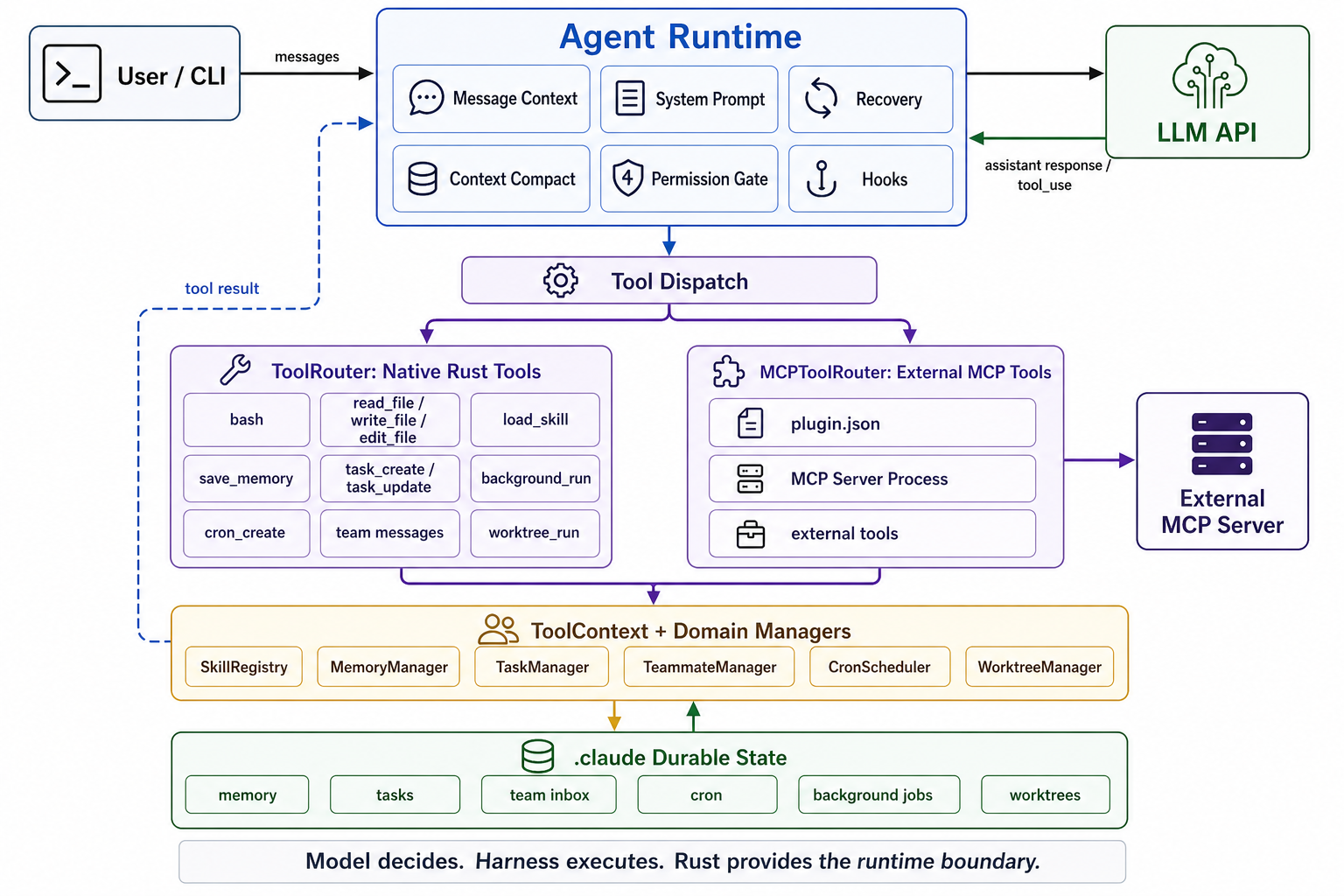
Most LLM examples stop at tool calling. This repo focuses on the runtime around the model:
- tool dispatch
- permissions
- skills
- memory
- context compaction
- subagents
- background work
- team protocols
- worktree isolation
- MCP plugins
- typed tool routing
Architecture
Audience
- People who want to understand the internals of coding agents instead of only using existing products.
- People who want to write AI agents, CLI tools, or automation tools in Rust.
- Readers who already know LLM APIs and want to learn tool use, subagents, permissions, hooks, memory, and related engineering structures.
- People interested in the infrastructure behind Claude Code, Codex, Devin, Cursor Agent, and similar coding agents.
Quick Start
Prepare Rust:
rustup update
cargo --version
Configure the model API. The examples use an Anthropic-compatible SDK interface and read configuration from environment variables:
cp .env.example .env
Edit .env:
ANTHROPIC_API_KEY=your_api_key
ANTHROPIC_BASE_URL=your_anthropic_compatible_base_url
ANTHROPIC_MODEL=your_model_name
Run the first chapter:
cargo run -p s01_agent_loop
Run the integrated version:
cargo run -p sfull
Check the whole workspace:
cargo check --workspace
Learning Path
Each chapter is an independent crate that can be run, read, and modified on its own. Reading in order is recommended because later chapters build on earlier structures.
| Chapter | Directory | Topic | Description |
|---|---|---|---|
| 01 | s01_agent_loop |
Agent Loop | Minimal runnable agent with user input, model response, tool calling, and a basic bash tool. Docs: s01.en.md. |
| 02 | s02_tool_use |
Tool Use | Extract tools into a trait and add read_file, write_file, and edit_file. Docs: s02.en.md. |
| 03 | s03_todo_write |
Todo Planning | Add a todo tool so the agent can maintain a plan and execution state. Docs: s3.en.md. |
| 04 | s04_subagent |
Subagent | Start fresh-context subagents for delegated exploration or subtasks. Docs: s4.en.md. |
| 05 | s05_skill_loading |
Skill Loading | Load skills from skills/ and inject skill content into context on demand. Docs: s05.en.md. |
| 06 | s06_context_compact |
Context Compact | Compact long context while preserving key state. Docs: s06.en.md. |
| 07 | s07_permission_system |
Permission | Add permission modes and interactive confirmation for tool calls. Docs: s07.en.md. |
| 08 | s08_hook_system |
Hook System | Add lifecycle hooks around tool execution and agent events. Docs: s08.en.md. |
| 09 | s09_memory_system |
Memory | Add durable memory for preferences, facts, feedback, and references. Docs: s09.en.md. |
| 10 | s10_system_prompt |
System Prompt | Manage system prompts through structured sections and templates. Docs: s10.en.md. |
| 11 | s11_error_recovery |
Error Recovery | Recover from tool failures, model errors, transport errors, and truncation. Docs: s11.en.md. |
| 12 | s12_task_system |
Task System | Add structured task records with status, owner, and dependencies. Docs: s12.en.md. |
| 13 | s13_background_tasks |
Background Tasks | Start, query, and manage long-running background commands. Docs: s13.en.md. |
| 14 | s14_cron_scheduler |
Cron Scheduler | Schedule future tasks and reinject them into the loop when due. Docs: s14.en.md. |
| 15 | s15_agent_teams |
Agent Teams | Organize multiple agents into teams with roles, inboxes, and messages. Docs: s15.en.md. |
| 16 | s16_team_protocols |
Team Protocols | Add durable request-response protocols for multi-agent collaboration. Docs: s16.en.md. |
| 17 | s17_autonomous_agents |
Autonomous Agents | Implement long-running workers with idle polling and task claiming. Docs: s17.en.md. |
| 18 | s18_worktree_task_isolation |
Worktree Isolation | Use git worktrees to isolate task execution environments. Docs: s18.en.md. |
| 19 | s19_mcp_plugin |
MCP Plugin | Connect MCP/plugin tools to the same permission and tool-result loop. Docs: s19.en.md. |
| 20 | s20_tool_refactor |
Tool Refactor | Refactor tool registration, routing, dispatch, and macro support. Docs: s20.en.md. |
| Full | sfull |
Complete Version | Integrate previous chapters into one complete agent harness. Docs: sfull.en.md. |
Recommended Reading Order
- Run
s01_agent_loopand understand the minimal loop: user input, model response, tool call, and tool result. - Read
s02_tool_usethroughs04_subagentto understand tools, planning, and delegation. - Read
s05_skill_loadingthroughs08_hook_systemto see how a demo becomes an extensible system. - Read
s09_memory_systemthroughs14_cron_schedulerto understand state, long-running work, and scheduling. - Read
s15_agent_teamsthroughs20_tool_refactorto understand multi-agent collaboration, isolated execution, plugins, and tool routing. - Read
sfulllast to see how the pieces fit together.
Project Structure
.
├── Cargo.toml
├── CONTRIBUTING.md
├── s01_agent_loop/
├── s02_tool_use/
├── s03_todo_write/
├── s04_subagent/
├── s05_skill_loading/
├── s06_context_compact/
├── s07_permission_system/
├── s08_hook_system/
├── s09_memory_system/
├── s10_system_prompt/
├── s11_error_recovery/
├── s12_task_system/
├── s13_background_tasks/
├── s14_cron_scheduler/
├── s15_agent_teams/
├── s16_team_protocols/
├── s17_autonomous_agents/
├── s18_worktree_task_isolation/
├── s19_mcp_plugin/
├── s20_tool_refactor/
├── s20_tool_refactor_macros/
├── sfull/
└── skills/
Common Commands
Run a chapter:
cargo run -p s03_todo_write
Run the full version:
cargo run -p sfull
Check:
cargo check --workspace
Test:
cargo test --workspace
Format:
cargo fmt --all
Acknowledgements
Some Rust engineering ideas in this project were inspired by bosun-ai/swiftide, especially around hooks and system prompts.
Contributing
Contributions are welcome from people interested in Rust, AI agents, tool use, MCP, and coding agents.
Please read CONTRIBUTING.md before opening an issue or pull request.
Useful contribution areas:
- Fix unclear or outdated docs.
- Add explanations, diagrams, or examples.
- Improve code structure and error handling.
- Add tests.
- Connect more models, tools, or MCP servers.
- Translate docs.
License
This project is licensed under the MIT License.
Please preserve the license information when using, modifying, or distributing this project.
Yorumlar (0)
Yorum birakmak icin giris yap.
Yorum birakSonuc bulunamadi