serial-studio
Health Warn
- License — License: MIT
- Description — Repository has a description
- Active repo — Last push 0 days ago
- Low visibility — Only 5 GitHub stars
Code Fail
- execSync — Synchronous shell command execution in build-signed.mjs
- process.env — Environment variable access in build-signed.mjs
- crypto private key — Private key handling in build-signed.mjs
- execSync — Synchronous shell command execution in bump-version.mjs
Permissions Pass
- Permissions — No dangerous permissions requested
No AI report is available for this listing yet.
A multi-form serial-port terminal — desktop, web, and remote. Tauri + Rust + React.
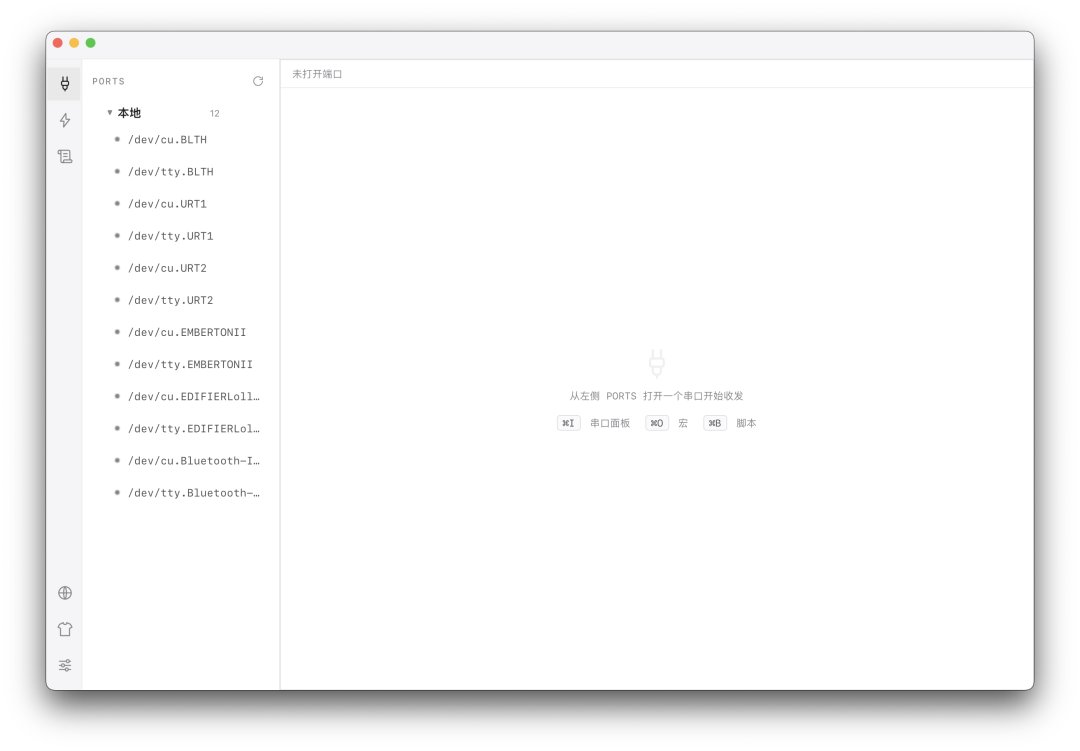
Serial Studio
English · 简体中文




A multi-form serial-port terminal — desktop, web, and remote. Built with Tauri + Rust + React.
Serial Studio lets you talk to serial devices from a polished desktop app, from any
browser on your network, or driven by an LLM over MCP — all backed by the same Rust core.
Multiple clients can share a single port, you can script repetitive exchanges as macros,
and label ports with device aliases.
✨ Features
- Multi-port terminal — concurrent ports in tabs or split side-by-side (VS Code-style editor groups), powered by xterm.js.
- Port sharing — multiple windows / clients attach to the same port. The first opener's
config wins; later clients join read/write. Force-close kicks every holder off. - Macros — step sequences (
send/delay/expect/clear), importable / exportable
as JSON so they travel between machines. - Scripting — full JS control flow (retry / branching / loops / parsing) for what macros can't express. Runs on the open port; pass a port arg to drive several ports from one script. Declare runtime parameters and they're collected in a popup, so reruns need no code edits.
- Port aliases — label a port with the device it connects, e.g.
GPS (COM7). - Three ways in:
- Local desktop app (IPC, bypasses the network entirely).
- Web — open
http://host:port/in a browser; the UI is embedded in the binary. - Remote — connect a desktop window to another machine's Serial Studio.
- MCP — expose the serial port to LLMs (
serial_list/send/read/grep/status/clear), addressable by port name or alias. - Telnet — works with classic terminal clients.
- Instrumented UI — dark/light themes, in-terminal search (Ctrl+F), font zoom, RX/TX LEDs.
🧱 Architecture
Control plane and data plane are deliberately separated:
- Control plane (Tauri IPC) — settings, service lifecycle, alias & macro persistence.
- Data plane (axum) — WebSocket, MCP, Telnet; all adapters over the same
SerialManager+EventBus.
Crates
| Crate | Role |
|---|---|
ss-core |
Serial manager: port ownership (acquire / release / force-close), RX buffer, macro runner. Pure runtime — no persistence, no UI. |
ss-server |
axum WS / MCP / Telnet + embedded SPA (rust-embed). Shared by the Tauri shell and the standalone binary. |
serial-studio (tauri-app) |
The Tauri shell — service supervisor + control-plane commands. |
🛠 Tech stack
Tauri 2 · Rust (edition 2021, axum, serialport, tokio) · React 18 · TypeScript · Vite · xterm.js
📋 Requirements
- Rust (stable)
- Node.js (for the frontend)
- Windows: WebView2 (preinstalled on Win 10/11)
- A serial port (real or virtual)
🚀 Getting started
# build frontend + release binary
npm install --prefix ui
cargo tauri build

# or run in dev (hot-reload frontend)
cargo tauri dev
The release artifact is serial-studio.exe.
📖 Usage
- Desktop — run
serial-studio.exe. - Web / in-browser — the app runs a server (WS
18700, Telnet18701). From any machine
on the LAN, openhttp://<host>:18700/; the UI is served from the binary itself. - Remote window — from the desktop app, open a remote window to another Serial Studio host.
- Headless —
serial-studio.exe --no-guiruns only the backend (no window).
First run (unsigned build): releases aren't code-signed yet.
- macOS — Gatekeeper blocks it. After dragging to
/Applications, strip the quarantine flag:xattr -dr com.apple.quarantine "/Applications/Serial Studio.app"- Windows — SmartScreen warns; click More info → Run anyway.
Updates: Windows and Linux builds self-update in-app (Help → About → Check for updates).
macOS does not auto-update — without Apple notarization, a self-replaced.appgets
re-blocked by Gatekeeper, so grab the new.dmgfrom the
Releases page manually.
⚙️ Configuration
Runtime config lives next to the binary:
| File | Holds |
|---|---|
settings.json |
server listen address / WS port / Telnet port |
ports.json |
per-port metadata (aliases) |
macros.json |
macros |
🤖 MCP
POST /mcp speaks JSON-RPC. Twelve tools: 6 basic (serial_list, serial_send,serial_read, serial_status, serial_grep, serial_clear), 2 script execution
(serial_debug_script for ad-hoc JS, serial_run_script to run a saved script by name —
both gated by enable_scripting), and 4 script library management (serial_save_script,serial_get_script, serial_list_scripts, serial_delete_script — data-only, not gated).
The port argument accepts a real port name or an alias.
A serial_script_guide prompt documents the scripting API and constraints.
Connect from Claude Code
claude mcp add --scope user --transport http SerialStudio http://<host>:18700/mcp
Replace <host> with the machine running Serial Studio (127.0.0.1 for the local app).
Other MCP clients (Claude Desktop, etc.): add an HTTP MCP server pointing at the same URL.
Raw JSON-RPC
{
  "jsonrpc": "2.0", "id": 1, "method": "tools/call",
  "params": { "name": "serial_send", "arguments": { "port": "GPS", "data": "AT", "timeout_ms": 1000 } }
}
🔌 Board integration (custom device side)
You don't need the full serial-studio on the board: implement the device-side subset of the
remote-device protocol with a tiny program, register the board's address in the hub UI, and its
UARTs show up as nickname::port everywhere — Web UI, scripts and MCP tools (agents reach the
board straight through MCP).
- Protocol contract: docs/device-protocol.md (handshake / messages / binary data frames)
- Reference implementation: examples/ss-board-bridge.c — single-file C,
libc only,musl-gcc -O2 -staticproduces a small static binary for any architecture. - Prebuilt: static binaries for x86_64 / aarch64 / armv7 / riscv64 (plus a sha256 manifest)
are attached to every Release — scp one to the board and run. For mips/mipsel, compile
from source with a single musl-gcc command (see the protocol doc).
🔒 Security note
The server binds 0.0.0.0 by default and carries no authentication. Anyone who can reach
the port can open / send to your serial ports and read their output. Bind to 127.0.0.1 insettings.json, or sit behind a firewall / VPN, for anything beyond a trusted LAN.
Remote JS scripting (WS run_script / MCP serial_debug_script + serial_run_script) is gated by enable_scripting
in settings.json, off by default. When enabled, any reachable client can execute JS
against your serial ports. The script sandbox only exposes the serial primitives
(send/expect/clear/sleep) — there is no file, network, or process access — but it can
still drive your devices arbitrarily and read their output. Keep it disabled on untrusted
networks.
The script library tools (serial_save_script / serial_get_script / serial_list_scripts /serial_delete_script) are data management and always accessible regardless ofenable_scripting: any reachable client can read saved script code (which may embed host
paths, LAN addresses, or credentials in comments), overwrite, or delete it. Same trusted-LAN
rule applies.
📁 Project layout
serial-studio/
├─ crates/
│  ├─ core/        # ss-core: serial manager + port ownership + macros
│  ├─ server/      # ss-server: axum WS/MCP/Telnet + embedded SPA
│  └─ tauri-app/   # serial-studio: Tauri shell (control plane)
├─ ui/             # React + TS + Vite frontend
└─ Cargo.toml      # workspace
🤝 Contributing
Issues and pull requests welcome. This is a small project — keep changes scoped and match the
existing style.
📄 License
MIT — see LICENSE.
Reviews (0)
Sign in to leave a review.
Leave a reviewNo results found